2023 FORD EXPLORER belt
[x] Cancel search: beltPage 111 of 573

Cruise Control (If Equipped)
Illuminates when you switch thisfeature on.
Direction Indicator
Illuminates when you switch onthe left or right directionindicator or the hazard flasher. Ifthe indicators stay on or flash faster, checkfor a burned out bulb. See Changing aBulb (page 337).
Door Ajar
Illuminates when the ignition ison and any door is notcompletely closed.
Electric Park Brake
Note:Indicators vary depending on region.
Illuminates or flashes when theelectric parking brake has asystem error. See ElectricParking Brake (page 211).
Engine or Motor CoolantTemperature
Illuminates when your vehiclecoolant temperature is high.Stop your vehicle as soon aspossible, switch off your vehicle and let itcool. See Engine Coolant Check (page324).
Engine Oil
If it illuminates with the enginerunning or when you are driving,this indicates a system error.Stop your vehicle as soon as it is safe todo so and switch the engine off. Check theengine oil level. See Engine Oil Check(page 319).
Note:Do not resume your journey if itilluminates despite the level being correct.Immediately have the system checked.
Fasten Seatbelt
Illuminates and a tone soundsto remind you to fasten yourseatbelt. See SeatbeltReminder (page 42).
Fasten Rear Seatbelt
Illuminates and a tone soundsto signal the rear seatbelts arenot fastened.
Front Airbag
If it does not illuminate when youswitch the ignition on, continuesto flash or remains on when theengine is running, this indicates amalfunction. Have your vehicle checkedas soon as possible.
Front Fog Lamps (If Equipped)
Illuminates when you switch thefront fog lamps on.
High Beam
Illuminates when you switch thehigh beam headlamps on. Itflashes when you use theheadlamp flasher.
107
2023 Explorer (CTW) Canada/United States of America, enUSA, Edition date: 202209, First-PrintingInstrument ClusterE71340 E67018 E146190 E67024 E103308 E67022 E71880 E206718 E67017 E67019
Page 122 of 573

Note:Some options may appear slightlydifferent or not at all if the items areoptional.
Select Screens
Calm Screen
Fuel Economy
Trip 1
Trip 2
This Trip1
EV Coach1
Tire Pressure
Intelligent AWD
Off Road
Trailer Light Check
Seatbelts
Auto StartStop2
Now Playing
1 Hybrid only2 Non-hybrid only
After making your selection:
1.Select a setting and press the OKbutton. This can offer moreinformation on some features.
Note:Hold OK to reset fuel history andaverage fuel economy.
Fuel Economy
An Instant Fuel Economy gauge is providedalong with average fuel economy. Averagefuel economy is continuously averagedsince the last reset.
Hybrid features:
•When the gasoline engine is off theinstant fuel economy gauge is replacedwith an electric driving message.
Note:Hold OK to reset fuel history andaverage fuel economy.
Trip 1 and 2
Provides trip timer, trip average fueleconomy and total trip distance traveled.For hybrid vehicles, the trip also shows thedistance traveled on electric power only.
118
2023 Explorer (CTW) Canada/United States of America, enUSA, Edition date: 202209, First-PrintingInformation Displays
Page 132 of 573
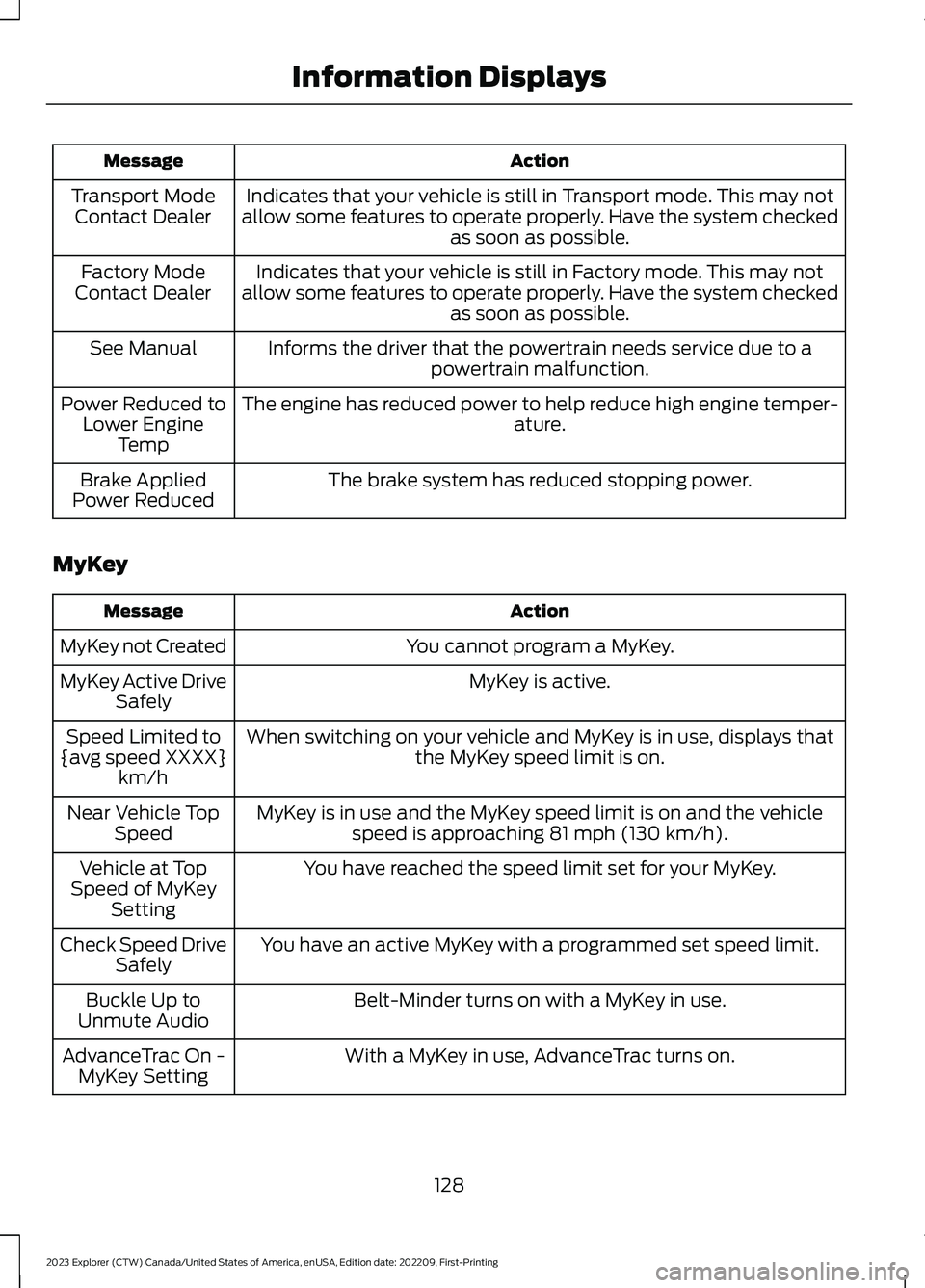
ActionMessage
Indicates that your vehicle is still in Transport mode. This may notallow some features to operate properly. Have the system checkedas soon as possible.
Transport ModeContact Dealer
Indicates that your vehicle is still in Factory mode. This may notallow some features to operate properly. Have the system checkedas soon as possible.
Factory ModeContact Dealer
Informs the driver that the powertrain needs service due to apowertrain malfunction.See Manual
The engine has reduced power to help reduce high engine temper-ature.Power Reduced toLower EngineTemp
The brake system has reduced stopping power.Brake AppliedPower Reduced
MyKey
ActionMessage
You cannot program a MyKey.MyKey not Created
MyKey is active.MyKey Active DriveSafely
When switching on your vehicle and MyKey is in use, displays thatthe MyKey speed limit is on.Speed Limited to{avg speed XXXX}km/h
MyKey is in use and the MyKey speed limit is on and the vehiclespeed is approaching 81 mph (130 km/h).Near Vehicle TopSpeed
You have reached the speed limit set for your MyKey.Vehicle at TopSpeed of MyKeySetting
You have an active MyKey with a programmed set speed limit.Check Speed DriveSafely
Belt-Minder turns on with a MyKey in use.Buckle Up toUnmute Audio
With a MyKey in use, AdvanceTrac turns on.AdvanceTrac On -MyKey Setting
128
2023 Explorer (CTW) Canada/United States of America, enUSA, Edition date: 202209, First-PrintingInformation Displays
Page 148 of 573

SITTING IN THE CORRECT
POSITION
WARNING: Sitting improperly, outof position or with the seatback reclinedtoo far can take weight off the seatcushion and affect the decision of thepassenger sensing system, resulting inserious injury or death in the event of acrash. Always sit upright against yourseat back, with your feet on the floor.
WARNING: Do not recline the seatbackrest too far as this can cause theoccupant to slide under the seatbelt,resulting in personal injury in the eventof a crash.
WARNING: Do not place objectshigher than the top of the seat backrest.Failure to follow this instruction couldresult in personal injury or death in theevent of a sudden stop or crash.
When you use them properly, the seat,head restraint, seatbelt and airbags willprovide optimum protection in the eventof a crash.
We recommend that you follow theseguidelines:
•Sit in an upright position with the baseof your spine as far back as possible.
•Do not recline the seat backrest so thatyour torso is more than 30 degreesfrom the upright position.
•Adjust the head restraint so that thetop of it is level with the top of yourhead and as far forward as possible.Make sure that you remaincomfortable.
•Keep sufficient distance betweenyourself and the steering wheel. Werecommend a minimum of 10 in(25 cm) between your breastbone andthe airbag cover.
•Hold the steering wheel with your armsslightly bent.
•Bend your legs slightly so that you canpress the pedals fully.
•Position the shoulder strap of theseatbelt over the center of yourshoulder and position the lap straptightly across your hips.
Make sure that your driving position iscomfortable and that you can maintain fullcontrol of your vehicle.
HEAD RESTRAINTS
WARNING: Fully adjust the headrestraint before you sit in or operate yourvehicle. This will help minimize the riskof neck injury in the event of a crash. Donot adjust the head restraint when yourvehicle is moving.
144
2023 Explorer (CTW) Canada/United States of America, enUSA, Edition date: 202209, First-PrintingSeatsE68595
Page 151 of 573
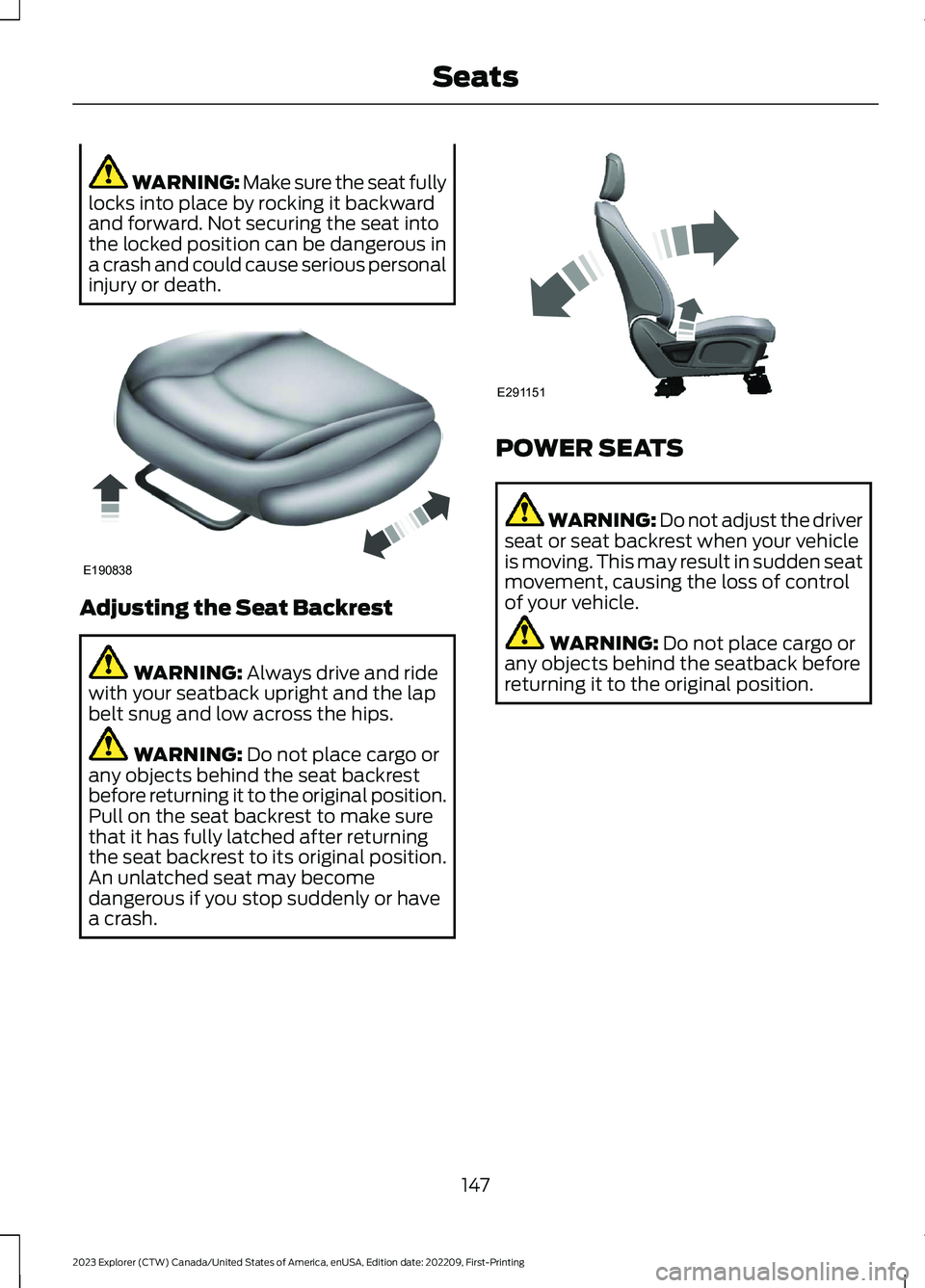
WARNING: Make sure the seat fullylocks into place by rocking it backwardand forward. Not securing the seat intothe locked position can be dangerous ina crash and could cause serious personalinjury or death.
Adjusting the Seat Backrest
WARNING: Always drive and ridewith your seatback upright and the lapbelt snug and low across the hips.
WARNING: Do not place cargo orany objects behind the seat backrestbefore returning it to the original position.Pull on the seat backrest to make surethat it has fully latched after returningthe seat backrest to its original position.An unlatched seat may becomedangerous if you stop suddenly or havea crash.
POWER SEATS
WARNING: Do not adjust the driverseat or seat backrest when your vehicleis moving. This may result in sudden seatmovement, causing the loss of controlof your vehicle.
WARNING: Do not place cargo orany objects behind the seatback beforereturning it to the original position.
147
2023 Explorer (CTW) Canada/United States of America, enUSA, Edition date: 202209, First-PrintingSeatsE190838 E291151
Page 155 of 573

Recalling a PreSet Position
Press and release the preset buttonassociated with your preferred drivingposition. The memory features move tothe position stored for that preset.
Note:You can only recall a preset memoryposition when the ignition is off, or when thetransmission is in park (P) or neutral (N)and the vehicle is not moving if the ignitionis on.
You can also recall a preset memoryposition by:
•Pressing the unlock button on yourremote control if it is linked to a presetposition.
•Unlocking the driver door handle if alinked remote control is present.
Note:Using a linked remote control torecall your memory position when theignition is off moves the seat to the EasyEntry position.
Note:Pressing any active memory featureadjustment control, or any memory buttonduring a memory recall, cancels theoperation.
Linking a PreSet Position to yourRemote Control
Your vehicle can save the preset memorypositions for up to three remote controls.
1.With the ignition on, move the memoryfeatures to the preferred positions.
2.Press and hold the preferred presetbutton for about five seconds. A tonesounds after about two seconds.Continue holding until you hear asecond tone.
3.Within three seconds, press the lockbutton on the remote control you arelinking.
To unlink a remote control, follow thesame procedure – except in step 3, pressthe unlock button on the remote control.
Note:If more than one linked remotecontrol or intelligent access key is in range,the memory function moves to the settingsof the first key to recall a memory position.
Easy Entry and Exit Feature
If you enable the easy entry and exitfeature, it moves the driver seat positionrearward up to 2 in (5 cm) when you switchthe ignition off.
The driver seat returns to the previousposition when you switch the ignition on.
You can enable or disable this featurethrough the touchscreen. See Settings(page 458).
REAR SEATS
Adjusting the Second Row RearSeats
WARNING: Always drive and ridewith your seatback upright and the lapbelt snug and low across the hips.
WARNING: Do not recline the seatbackrest too far as this can cause theoccupant to slide under the seatbelt,resulting in personal injury in the eventof a crash.
151
2023 Explorer (CTW) Canada/United States of America, enUSA, Edition date: 202209, First-PrintingSeats
Page 156 of 573

Adjusting the Seat Backrest
Lift the handle and adjust the seatbackrest rearward or forward.
Folding the Seat Backrest Flat
Lift the handle and fold the seat backrestforward until it is flat.
Note:For bench seats, make sure youunbuckle the center seatbelt before foldingthe seat backrest.
Moving the Seat Backward andForward (If Equipped)
Adjusting the Second Row Seats forEasy Entry
WARNING: Do not drive yourvehicle with a seat that is unlatched orin the folded position. Failure to followthis instruction could result in personalinjury or death in the event of a suddenstop or crash.
WARNING: Do not place cargo orany objects behind the seat backrestbefore returning it to the original position.Pull on the seat backrest to make surethat it has fully latched after returningthe seat backrest to its original position.An unlatched seat may becomedangerous if you stop suddenly or havea crash.
WARNING: Do not adjust a seat orrelease a seat floor latch when thevehicle is moving. Failure to follow thisinstruction could result in personal injuryor death in a sudden stop or crash.
Note:You may have to move the front rowseat forward to allow the second row seatto be fully folded.
152
2023 Explorer (CTW) Canada/United States of America, enUSA, Edition date: 202209, First-PrintingSeatsE281809 E281813 E190838
Page 173 of 573

KEYLESS STARTING (IF EQUIPPED)
Note:The system may not function if theremote control is close to metal objects orelectronic devices, for example keys or a cellphone.
Note:A valid remote control must belocated inside your vehicle to switch theignition on and start your vehicle.
Ignition Modes
The keyless starting system has threemodes:
Off: Turns the ignition off.
•Without applying the brake pedal,press and release the button oncewhen the ignition is in the on mode, orwhen your vehicle is running but is notmoving.
On: All electrical circuits are operationaland the warning lamps and indicatorsilluminate.
•Without applying the brake pedal,press and release the button once.
Start: Starts your vehicle. The engine maynot start when your vehicle starts.
•Press the brake pedal, and then pressthe button for any length of time.
STARTING A GASOLINE
ENGINE
When you start the engine, the idle speedincreases. This helps to warm up theengine. If the engine idle speed does notslow down, have your vehicle checked assoon as possible.
Note: You can crank the engine for a totalof 60 seconds without the engine startingbefore the starting system temporarilydisables. The 60 seconds does not have tobe all at once. For example, if you crank theengine three times for 20 seconds eachtime, without the engine starting, youreached the 60-second time limit. Amessage appears in the information displayalerting you that you exceeded the crankingtime. You cannot attempt to start theengine for at least 15 minutes. After 15minutes, you are limited to a 15-secondengine cranking time. You need to wait 60minutes before you can crank the engine for60 seconds again.
Before starting your vehicle, check thefollowing:
•Make sure all occupants fasten theirseatbelt.
•Make sure the headlamps andelectrical accessories are off.
•Make sure the parking brake is on.
•Make sure the transmission is in park(P).
•Switch the ignition on. For vehicles witha keyless ignition, see the followinginstructions.
Vehicles with an Ignition Key
Note:Do not touch the accelerator pedal.
1.Fully press the brake pedal.
2.Turn the key to the start position tostart your vehicle.
169
2023 Explorer (CTW) Canada/United States of America, enUSA, Edition date: 202209, First-PrintingStarting and Stopping the EngineE357532