2023 FORD EXPLORER fuel
[x] Cancel search: fuelPage 112 of 573

High Voltage Electric SystemFailure (If Equipped)
It illuminates if your hybridelectric vehicle has an electricalcomponent fault or failure thatcauses your vehicle to shutdown or entera limited operating mode. A message mayappear in the instrument cluster display.
Hill Descent (If Equipped)
Illuminates when you switch hilldescent on.
Hood Ajar
Illuminates when the ignition ison and the hood is notcompletely closed.
Lamps On
Illuminates when you switch thelow beam headlamps or theparking lamps on.
Liftgate Ajar
Illuminates when the liftgate isnot completely closed.
Low Beam Warning
Illuminates when the low beamheadlamp bulb is not properlyfunctioning.
Low Fuel Level
Illuminates when the fuel levelis low or the fuel tank is nearlyempty. Refuel as soon aspossible.
Low Tire Pressure Warning
Illuminates when the tirepressure is low. If the lampremains on with the enginerunning or when driving, check the tirepressure as soon as possible.
It also momentarily illuminates when youswitch the ignition on to confirm the lampis functional. If it does not illuminate whenyou switch the ignition on, or begins toflash at any time, have the systemchecked.
Low Washer Fluid
Illuminates when the windshieldwasher fluid is low.
Powertrain Fault
Illuminates when the systemdetects a powertrain or a4WD/AWD fault. Contact anauthorized dealer as soon as possible.
Ready to Drive (If Equipped)
Illuminates when you haveswitched on your hybrid electricvehicle and it is ready to drive. Acorresponding message may appearstating ready to drive.
Service Engine Soon
It illuminates when you switchthe ignition on prior to enginestart to check the bulb and toindicate whether your vehicle is ready forInspection and Maintenance testing.
108
2023 Explorer (CTW) Canada/United States of America, enUSA, Edition date: 202209, First-PrintingInstrument ClusterE144693 E246598 E71341 E162453 E181350 E139232 E132353 E224090 E67028
Page 120 of 573
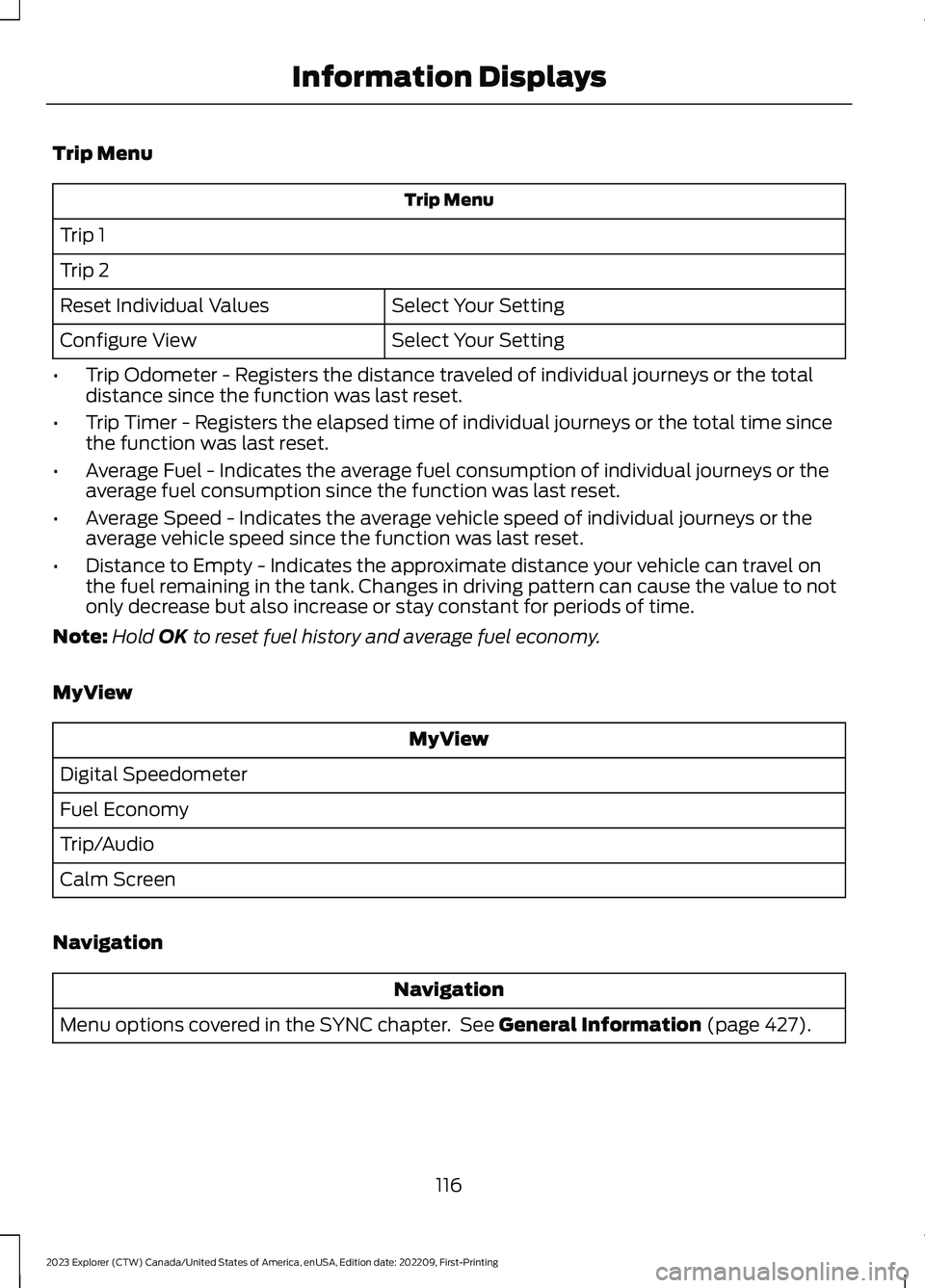
Trip Menu
Trip Menu
Trip 1
Trip 2
Select Your SettingReset Individual Values
Select Your SettingConfigure View
•Trip Odometer - Registers the distance traveled of individual journeys or the totaldistance since the function was last reset.
•Trip Timer - Registers the elapsed time of individual journeys or the total time sincethe function was last reset.
•Average Fuel - Indicates the average fuel consumption of individual journeys or theaverage fuel consumption since the function was last reset.
•Average Speed - Indicates the average vehicle speed of individual journeys or theaverage vehicle speed since the function was last reset.
•Distance to Empty - Indicates the approximate distance your vehicle can travel onthe fuel remaining in the tank. Changes in driving pattern can cause the value to notonly decrease but also increase or stay constant for periods of time.
Note:Hold OK to reset fuel history and average fuel economy.
MyView
MyView
Digital Speedometer
Fuel Economy
Trip/Audio
Calm Screen
Navigation
Navigation
Menu options covered in the SYNC chapter. See General Information (page 427).
116
2023 Explorer (CTW) Canada/United States of America, enUSA, Edition date: 202209, First-PrintingInformation Displays
Page 122 of 573

Note:Some options may appear slightlydifferent or not at all if the items areoptional.
Select Screens
Calm Screen
Fuel Economy
Trip 1
Trip 2
This Trip1
EV Coach1
Tire Pressure
Intelligent AWD
Off Road
Trailer Light Check
Seatbelts
Auto StartStop2
Now Playing
1 Hybrid only2 Non-hybrid only
After making your selection:
1.Select a setting and press the OKbutton. This can offer moreinformation on some features.
Note:Hold OK to reset fuel history andaverage fuel economy.
Fuel Economy
An Instant Fuel Economy gauge is providedalong with average fuel economy. Averagefuel economy is continuously averagedsince the last reset.
Hybrid features:
•When the gasoline engine is off theinstant fuel economy gauge is replacedwith an electric driving message.
Note:Hold OK to reset fuel history andaverage fuel economy.
Trip 1 and 2
Provides trip timer, trip average fueleconomy and total trip distance traveled.For hybrid vehicles, the trip also shows thedistance traveled on electric power only.
118
2023 Explorer (CTW) Canada/United States of America, enUSA, Edition date: 202209, First-PrintingInformation Displays
Page 123 of 573
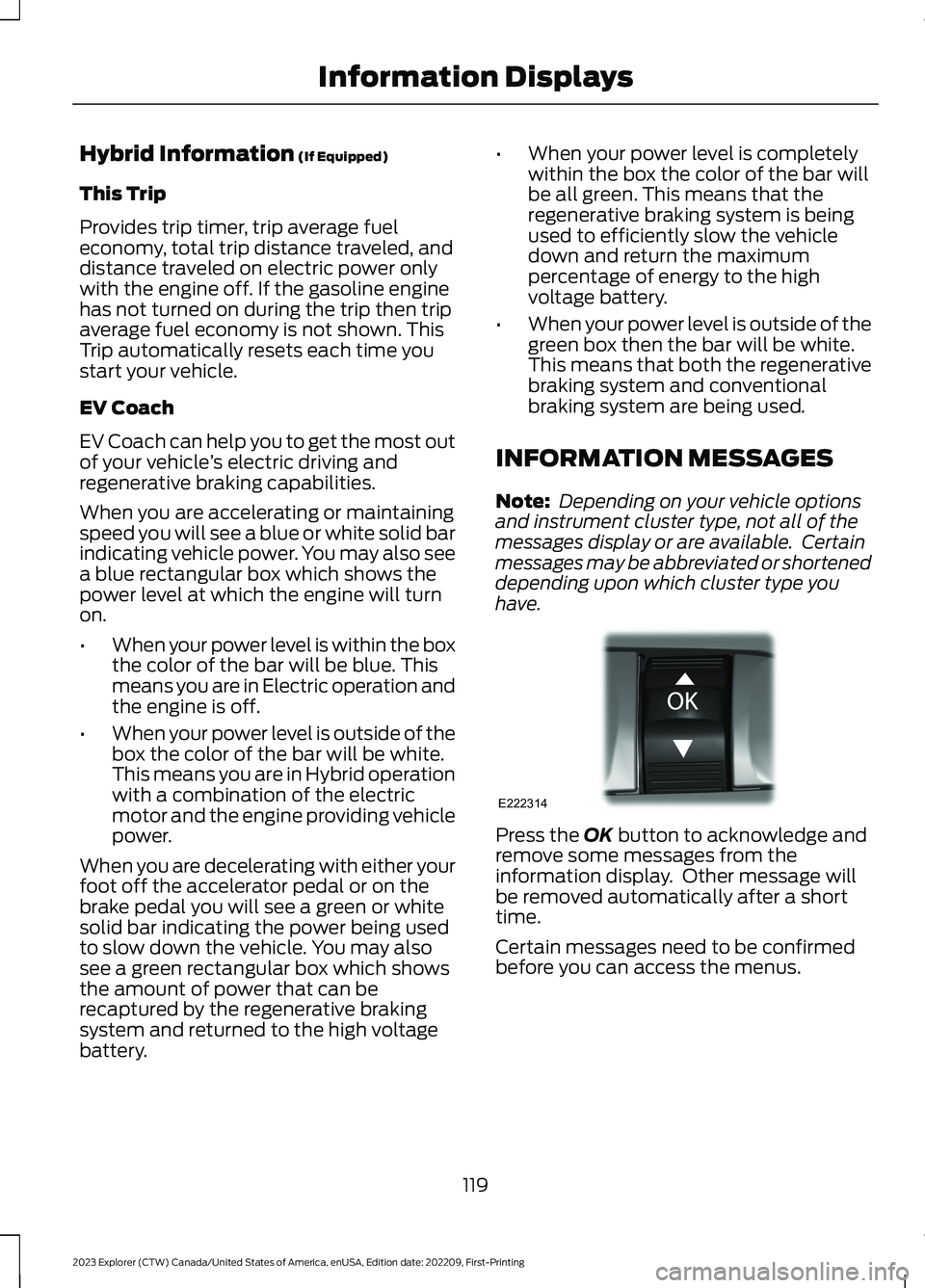
Hybrid Information (If Equipped)
This Trip
Provides trip timer, trip average fueleconomy, total trip distance traveled, anddistance traveled on electric power onlywith the engine off. If the gasoline enginehas not turned on during the trip then tripaverage fuel economy is not shown. ThisTrip automatically resets each time youstart your vehicle.
EV Coach
EV Coach can help you to get the most outof your vehicle’s electric driving andregenerative braking capabilities.
When you are accelerating or maintainingspeed you will see a blue or white solid barindicating vehicle power. You may also seea blue rectangular box which shows thepower level at which the engine will turnon.
•When your power level is within the boxthe color of the bar will be blue. Thismeans you are in Electric operation andthe engine is off.
•When your power level is outside of thebox the color of the bar will be white.This means you are in Hybrid operationwith a combination of the electricmotor and the engine providing vehiclepower.
When you are decelerating with either yourfoot off the accelerator pedal or on thebrake pedal you will see a green or whitesolid bar indicating the power being usedto slow down the vehicle. You may alsosee a green rectangular box which showsthe amount of power that can berecaptured by the regenerative brakingsystem and returned to the high voltagebattery.
•When your power level is completelywithin the box the color of the bar willbe all green. This means that theregenerative braking system is beingused to efficiently slow the vehicledown and return the maximumpercentage of energy to the highvoltage battery.
•When your power level is outside of thegreen box then the bar will be white.This means that both the regenerativebraking system and conventionalbraking system are being used.
INFORMATION MESSAGES
Note: Depending on your vehicle optionsand instrument cluster type, not all of themessages display or are available. Certainmessages may be abbreviated or shorteneddepending upon which cluster type youhave.
Press the OK button to acknowledge andremove some messages from theinformation display. Other message willbe removed automatically after a shorttime.
Certain messages need to be confirmedbefore you can access the menus.
119
2023 Explorer (CTW) Canada/United States of America, enUSA, Edition date: 202209, First-PrintingInformation DisplaysE222314
Page 128 of 573

ActionMessage
Indicates a driver door fault that requires manually opening thedoor by the override lever. Have the system checked as soon aspossible.
Driver Door FaultUse Inside Over-ride Lever In MapPocket
Indicates a fault with the electronic door system. Have the systemchecked as soon as possible.Door Fault ServiceRequired
There is a system malfunction with the child locks. Have the systemchecked as soon as possible.Child LockMalfunctionService Required
Indicates that the rear seat interior door release switches and powerwindows are switched off, preventing rear seat occupants fromopening the doors or windows.
Child Lock ON
Indicates that the rear seat interior door release switches and powerwindows are switched on, allowing the rear seat occupants to openthe doors and windows.
Child Lock OFF
The factory keypad code displays in the information display afterthe system resets the keypad. See Passive Anti-Theft System(page 77).
Factory KeypadCode {X X X X X}
Driver Alert
ActionMessage
Stop and rest as soon as it is safe to do so.Driver AlertWarning Rest Now
Take a rest soon.Driver AlertWarning RestSuggested
Fuel
ActionMessage
An early reminder of a low fuel condition.Fuel Level Low
The fuel fill inlet may not be properly closed.Check Fuel FillInlet
Wait for up to 15 seconds while the fuel system depressurizes.Fuel Door Opening
124
2023 Explorer (CTW) Canada/United States of America, enUSA, Edition date: 202209, First-PrintingInformation Displays
Page 129 of 573
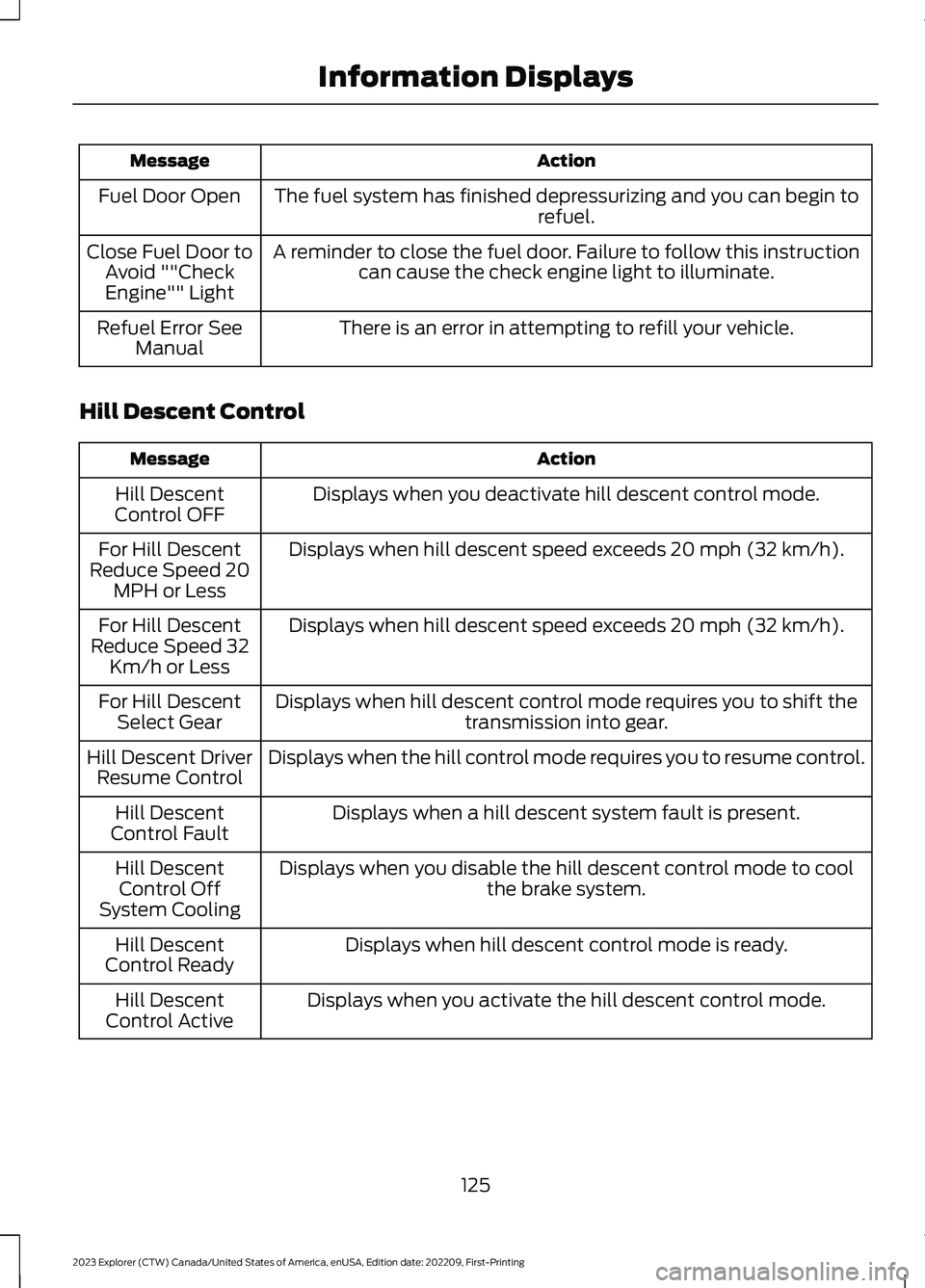
ActionMessage
The fuel system has finished depressurizing and you can begin torefuel.Fuel Door Open
A reminder to close the fuel door. Failure to follow this instructioncan cause the check engine light to illuminate.Close Fuel Door toAvoid ""CheckEngine"" Light
There is an error in attempting to refill your vehicle.Refuel Error SeeManual
Hill Descent Control
ActionMessage
Displays when you deactivate hill descent control mode.Hill DescentControl OFF
Displays when hill descent speed exceeds 20 mph (32 km/h).For Hill DescentReduce Speed 20MPH or Less
Displays when hill descent speed exceeds 20 mph (32 km/h).For Hill DescentReduce Speed 32Km/h or Less
Displays when hill descent control mode requires you to shift thetransmission into gear.For Hill DescentSelect Gear
Displays when the hill control mode requires you to resume control.Hill Descent DriverResume Control
Displays when a hill descent system fault is present.Hill DescentControl Fault
Displays when you disable the hill descent control mode to coolthe brake system.Hill DescentControl OffSystem Cooling
Displays when hill descent control mode is ready.Hill DescentControl Ready
Displays when you activate the hill descent control mode.Hill DescentControl Active
125
2023 Explorer (CTW) Canada/United States of America, enUSA, Edition date: 202209, First-PrintingInformation Displays
Page 141 of 573
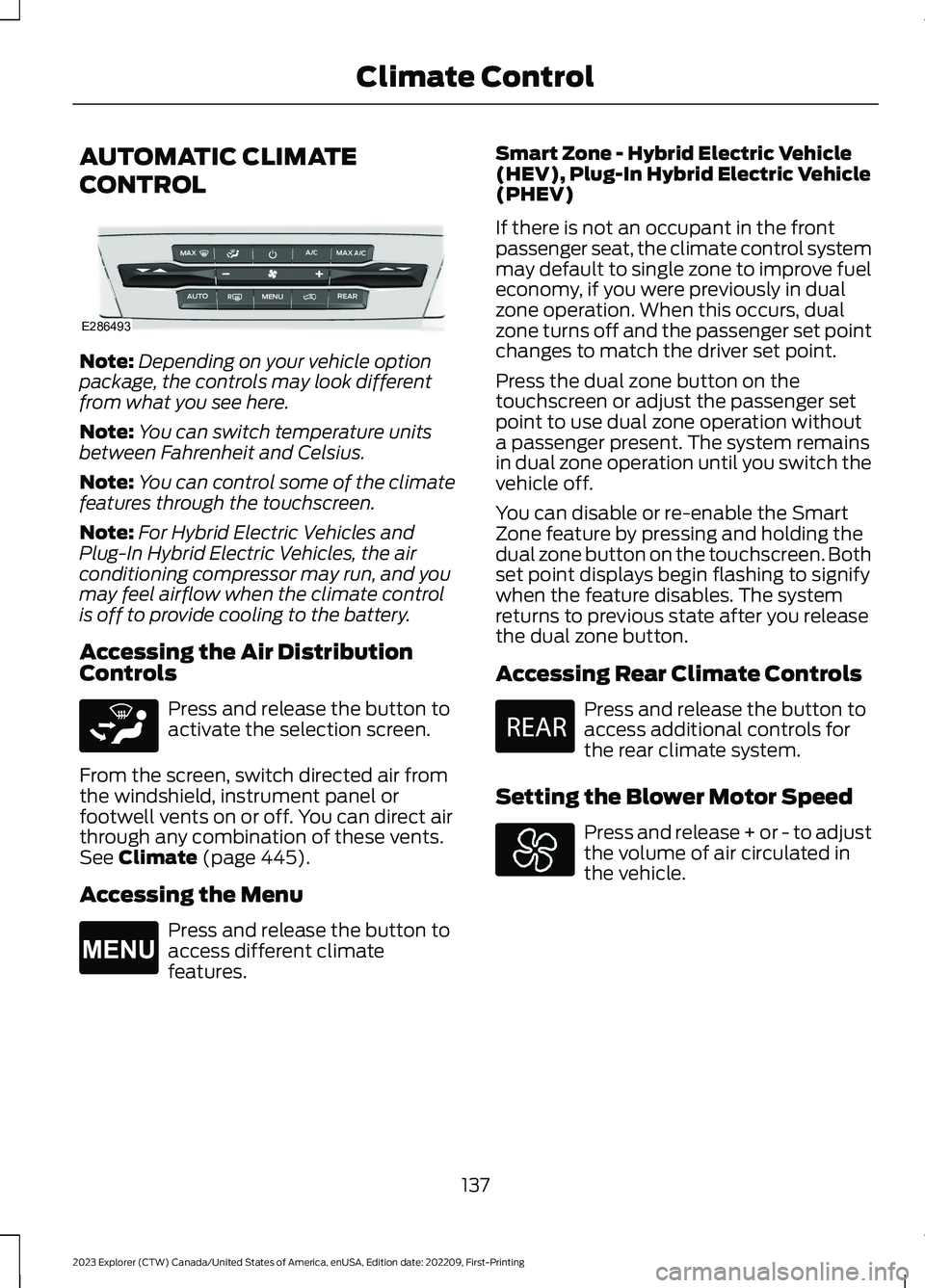
AUTOMATIC CLIMATE
CONTROL
Note:Depending on your vehicle optionpackage, the controls may look differentfrom what you see here.
Note:You can switch temperature unitsbetween Fahrenheit and Celsius.
Note:You can control some of the climatefeatures through the touchscreen.
Note:For Hybrid Electric Vehicles andPlug-In Hybrid Electric Vehicles, the airconditioning compressor may run, and youmay feel airflow when the climate controlis off to provide cooling to the battery.
Accessing the Air DistributionControls
Press and release the button toactivate the selection screen.
From the screen, switch directed air fromthe windshield, instrument panel orfootwell vents on or off. You can direct airthrough any combination of these vents.See Climate (page 445).
Accessing the Menu
Press and release the button toaccess different climatefeatures.
Smart Zone - Hybrid Electric Vehicle(HEV), Plug-In Hybrid Electric Vehicle(PHEV)
If there is not an occupant in the frontpassenger seat, the climate control systemmay default to single zone to improve fueleconomy, if you were previously in dualzone operation. When this occurs, dualzone turns off and the passenger set pointchanges to match the driver set point.
Press the dual zone button on thetouchscreen or adjust the passenger setpoint to use dual zone operation withouta passenger present. The system remainsin dual zone operation until you switch thevehicle off.
You can disable or re-enable the SmartZone feature by pressing and holding thedual zone button on the touchscreen. Bothset point displays begin flashing to signifywhen the feature disables. The systemreturns to previous state after you releasethe dual zone button.
Accessing Rear Climate Controls
Press and release the button toaccess additional controls forthe rear climate system.
Setting the Blower Motor Speed
Press and release + or - to adjustthe volume of air circulated inthe vehicle.
137
2023 Explorer (CTW) Canada/United States of America, enUSA, Edition date: 202209, First-PrintingClimate ControlE286493 E265283 E265038 E270447
Page 146 of 573

HEATED REAR WINDOW
Press the button to clear the rearwindow of thin ice and fog. Theheated rear window turns offafter a short period of time.
Note:Do not use harsh chemicals, razorblades or other sharp objects to clean orremove decals from the inside of the heatedrear window. The vehicle warranty may notcover damage to the heated rear windowgrid lines.
HEATED EXTERIOR MIRRORS
(IF EQUIPPED)
When you switch the heated rear windowon, the heated exterior mirrors turn on.
Note:Do not remove ice from the mirrorswith a scraper or adjust the mirror glasswhen it is frozen in place.
Note:Do not clean the mirror housing orglass with harsh abrasives, fuel or otherpetroleum-based cleaning products. Thevehicle warranty may not cover damagecaused to the mirror housing or glass.
REMOTE START (IF EQUIPPED)
The climate control system adjusts theinterior temperature during remote start.
You can switch this feature on or off andadjust the settings using the touchscreen.See Settings (page 458).
You cannot adjust the climate controlsetting during remote start operation.Switch the ignition on to makeadjustments.
Based on your remote start settings, thefollowing vehicle-dependent features mayor may not remain on after remote startingyour vehicle:
•Climate controlled seats.
•Heated steering wheel.
•Heated mirrors.
•Heated rear window.
•Windshield wiper de-icer.
Note:For dual zone climate controlledseats, the passenger seat setting defaultsto match the driver seat during remote start.
Automatic Settings
If Auto is on, the system sets the interiortemperature to 72°F (22°C) and heats orcools the vehicle interior as required toachieve comfort.
Note:In cold weather, the heated rearwindow and heated mirrors turn on.
Last Settings
If Last Settings is on, the system uses thesettings last selected before you turnedoff the vehicle.
Heated and Cooled Features
In Auto mode, certain heated features mayswitch on during cold weather, and cooledfeatures during hot weather.
142
2023 Explorer (CTW) Canada/United States of America, enUSA, Edition date: 202209, First-PrintingClimate ControlE184884