2023 FORD EXPLORER remove seats
[x] Cancel search: remove seatsPage 146 of 573

HEATED REAR WINDOW
Press the button to clear the rearwindow of thin ice and fog. Theheated rear window turns offafter a short period of time.
Note:Do not use harsh chemicals, razorblades or other sharp objects to clean orremove decals from the inside of the heatedrear window. The vehicle warranty may notcover damage to the heated rear windowgrid lines.
HEATED EXTERIOR MIRRORS
(IF EQUIPPED)
When you switch the heated rear windowon, the heated exterior mirrors turn on.
Note:Do not remove ice from the mirrorswith a scraper or adjust the mirror glasswhen it is frozen in place.
Note:Do not clean the mirror housing orglass with harsh abrasives, fuel or otherpetroleum-based cleaning products. Thevehicle warranty may not cover damagecaused to the mirror housing or glass.
REMOTE START (IF EQUIPPED)
The climate control system adjusts theinterior temperature during remote start.
You can switch this feature on or off andadjust the settings using the touchscreen.See Settings (page 458).
You cannot adjust the climate controlsetting during remote start operation.Switch the ignition on to makeadjustments.
Based on your remote start settings, thefollowing vehicle-dependent features mayor may not remain on after remote startingyour vehicle:
•Climate controlled seats.
•Heated steering wheel.
•Heated mirrors.
•Heated rear window.
•Windshield wiper de-icer.
Note:For dual zone climate controlledseats, the passenger seat setting defaultsto match the driver seat during remote start.
Automatic Settings
If Auto is on, the system sets the interiortemperature to 72°F (22°C) and heats orcools the vehicle interior as required toachieve comfort.
Note:In cold weather, the heated rearwindow and heated mirrors turn on.
Last Settings
If Last Settings is on, the system uses thesettings last selected before you turnedoff the vehicle.
Heated and Cooled Features
In Auto mode, certain heated features mayswitch on during cold weather, and cooledfeatures during hot weather.
142
2023 Explorer (CTW) Canada/United States of America, enUSA, Edition date: 202209, First-PrintingClimate ControlE184884
Page 150 of 573

Second Row Outermost Seat HeadRestraints
The head restraints consist of:
An energy absorbing headrestraint.A
Two steel stems.B
Guide sleeve unlock and removebuttons.C
Removing the Head Restraint
1.Press and hold the C buttons.
2.Pull the head restraint up.
Installing the Head Restraint
Align the steel stems into the guide sleevesand push the head restraint down until itlocks.
Third Row Seat Head Restraints
The head restraints consist of:
An energy absorbing headrestraint.A
Two steel stems.B
Fold strap.C
Folding the Head Restraint
Pull the fold strap (C). Pull the headrestraint back up to reset.
Note:Press the stow or fold button on thepower folding seats to fold the headrestraint.
MANUAL SEATS (IF EQUIPPED)
Moving the Seat Backward andForward
WARNING: Do not adjust the driverseat or seat backrest when your vehicleis moving. This may result in sudden seatmovement, causing the loss of controlof your vehicle.
146
2023 Explorer (CTW) Canada/United States of America, enUSA, Edition date: 202209, First-PrintingSeatsE333253 E286397
Page 158 of 573
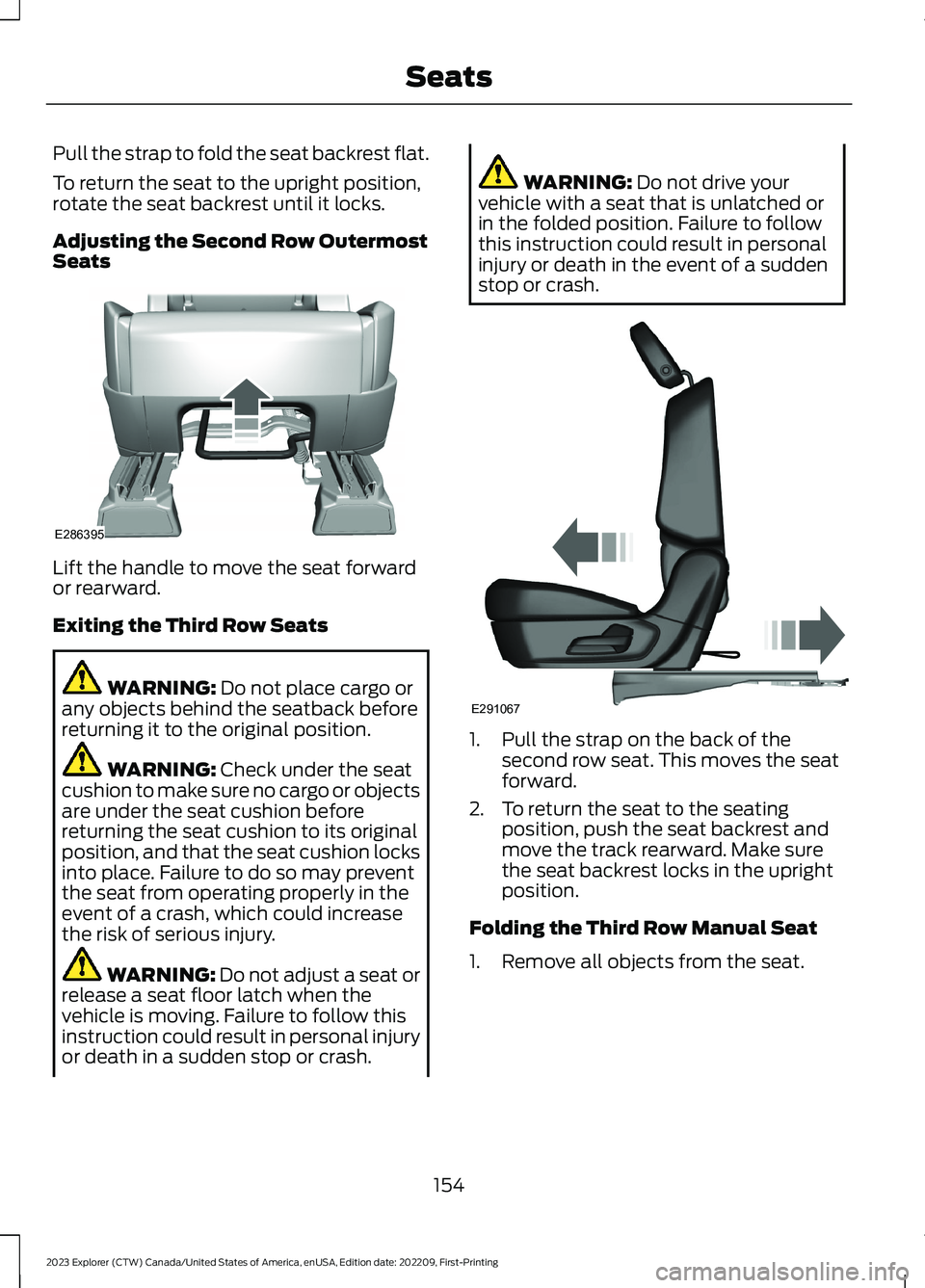
Pull the strap to fold the seat backrest flat.
To return the seat to the upright position,rotate the seat backrest until it locks.
Adjusting the Second Row OutermostSeats
Lift the handle to move the seat forwardor rearward.
Exiting the Third Row Seats
WARNING: Do not place cargo orany objects behind the seatback beforereturning it to the original position.
WARNING: Check under the seatcushion to make sure no cargo or objectsare under the seat cushion beforereturning the seat cushion to its originalposition, and that the seat cushion locksinto place. Failure to do so may preventthe seat from operating properly in theevent of a crash, which could increasethe risk of serious injury.
WARNING: Do not adjust a seat orrelease a seat floor latch when thevehicle is moving. Failure to follow thisinstruction could result in personal injuryor death in a sudden stop or crash.
WARNING: Do not drive yourvehicle with a seat that is unlatched orin the folded position. Failure to followthis instruction could result in personalinjury or death in the event of a suddenstop or crash.
1.Pull the strap on the back of thesecond row seat. This moves the seatforward.
2.To return the seat to the seatingposition, push the seat backrest andmove the track rearward. Make surethe seat backrest locks in the uprightposition.
Folding the Third Row Manual Seat
1.Remove all objects from the seat.
154
2023 Explorer (CTW) Canada/United States of America, enUSA, Edition date: 202209, First-PrintingSeatsE286395 E291067
Page 159 of 573

2.Fold the head restraints by pulling thehead restraint release strap.
3.From the rear of the vehicle, fold theseat backrest by pulling and holdingthe strap while pushing the seatbackrest forward. Release the straponce the seat backrest starts rotatingforward.
Note:Do not use the seat anchors as cargotie downs.
Note:Make sure that the area under theseat is free of objects before stowing it.
Unfolding the Third Row Manual Seat
WARNING: Do not place cargo orany objects behind the seat backrestbefore returning it to the original position.Pull on the seat backrest to make surethat it has fully latched after returningthe seat backrest to its original position.An unlatched seat may becomedangerous if you stop suddenly or havea crash.
Note:Make sure that there are no objectssuch as books, purses or briefcases on theload floor before unstowing the seat. Failureto remove all objects from the top of theload floor prior to unstowing it may causedamage to the seat.
Note:Make sure the area under the loadfloor is free of objects before unstowing it.
1.To return the seat backrest to theupright position, pull the long strapuntil the seat backrest locks.
2.Pull the head restraints up to theirnormal positions.
Adjusting the Third Row PowerSeats
Note:The power rear seat functions disable10 minutes after you switch the ignition off.The transmission must be in park (P) andthe liftgate must be open to operate theseats.
The buttons are inside the liftgate area.
155
2023 Explorer (CTW) Canada/United States of America, enUSA, Edition date: 202209, First-PrintingSeatsE286398 E286399
Page 163 of 573
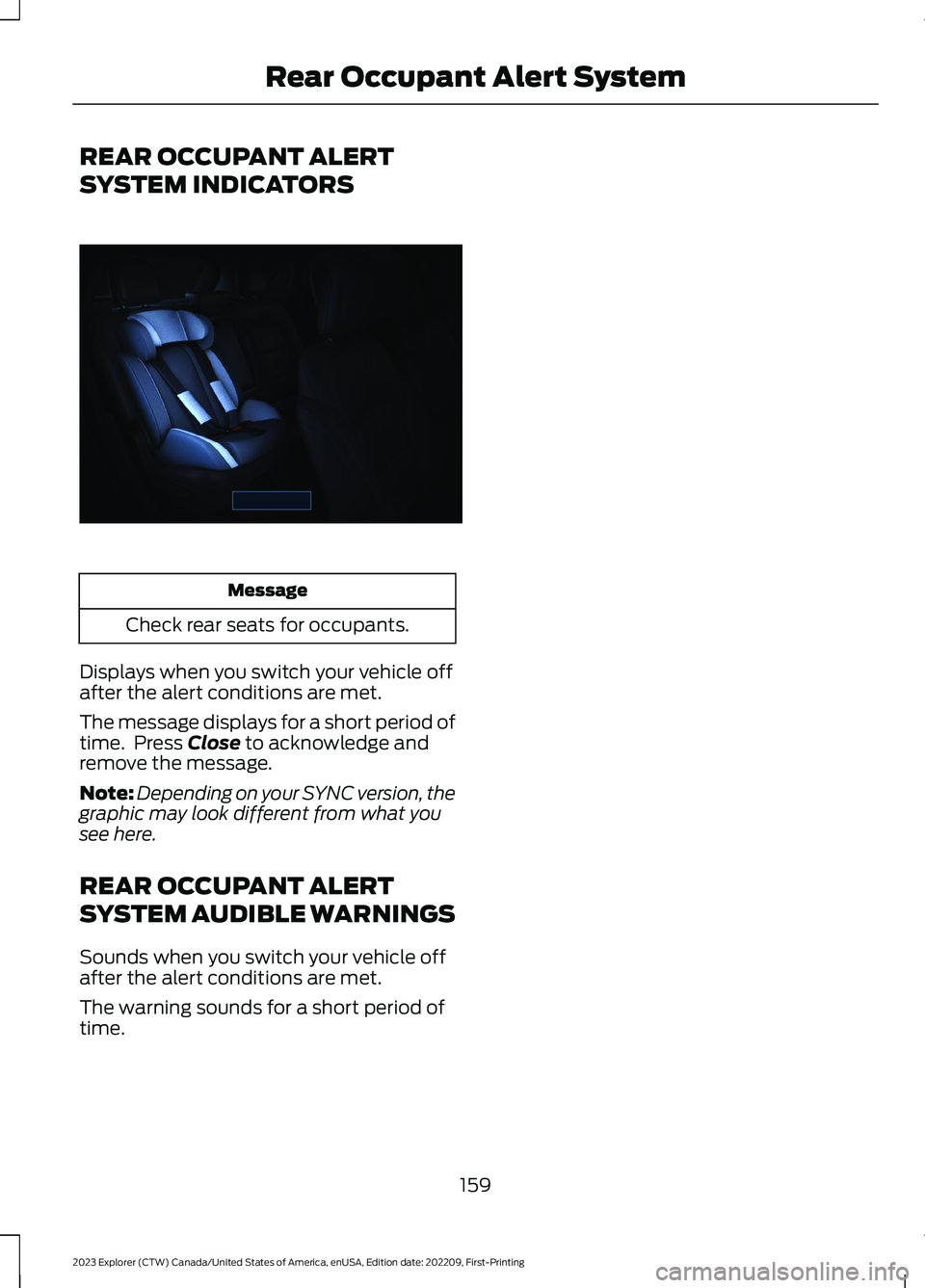
REAR OCCUPANT ALERT
SYSTEM INDICATORS
Message
Check rear seats for occupants.
Displays when you switch your vehicle offafter the alert conditions are met.
The message displays for a short period oftime. Press Close to acknowledge andremove the message.
Note:Depending on your SYNC version, thegraphic may look different from what yousee here.
REAR OCCUPANT ALERT
SYSTEM AUDIBLE WARNINGS
Sounds when you switch your vehicle offafter the alert conditions are met.
The warning sounds for a short period oftime.
159
2023 Explorer (CTW) Canada/United States of America, enUSA, Edition date: 202209, First-PrintingRear Occupant Alert SystemE350472
Page 334 of 573

WARNING: Battery posts,terminals and related accessoriescontain lead and lead compounds,chemicals known to the State ofCalifornia to cause cancer andreproductive harm.Wash your handsafter handling.
WARNING: This vehicle may havemore than one battery. Removing thebattery cables from only one batterydoes not disconnect your vehicleelectrical system. Make sure youdisconnect the battery cables from allbatteries when disconnecting power.Failure to do so may cause seriouspersonal injury or property damage.
WARNING: For vehicles withAuto-Start-Stop the battery requirementis different. You must replace the batterywith one of exactly the samespecification.
The battery is in the engine compartment.See Under Hood Overview (page 317).
Your vehicle has a maintenance-freebattery. It does not require additionalwater during service.
If the vehicle battery has a cover and venthose, make sure you correctly install it aftercleaning or replacing the battery.
For longer, trouble-free operation, keep thetop of the battery clean and dry and thebattery cables tightly fastened to thebattery terminals. If any corrosion ispresent on the battery or terminals, removethe cables from the terminals and cleanwith a wire brush. You can neutralize theacid with a solution of baking soda andwater.
We recommend that you disconnect thenegative battery cable terminal from thebattery if you plan to store your vehicle foran extended period.
Note:If you only disconnect the negativebattery cable terminal, make sure it isisolated or placed away from the batteryterminal to avoid unintended connection orarcing.
If you replace the battery make sure itmatches the electrical requirements ofyour vehicle.
If you disconnect or replace the batteryand your vehicle has an automatictransmission, it must relearn its adaptivestrategy. Because of this, the transmissionmay shift firmly when first driven. This isnormal operation while the transmissionfully updates its operation to optimumshift feel.
Battery Sensor Reset
When you install a new battery, reset thebattery sensor by doing the following:
1.Switch the ignition on, and leave theengine off.
Note:Complete Steps 2 and 3 within 10seconds.
2.Flash the high beam headlamps fivetimes, ending with the high beams off.
3.Press and release the brake pedal threetimes.
The battery warning lamp flashes threetimes to confirm that the reset issuccessful.
Battery Management System (If
Equipped)
The system monitors battery conditionsand takes actions to extend battery life. Ifexcessive battery drain is detected, thesystem temporarily disables someelectrical systems to protect the battery.
Systems included are:
•Heated rear window.
•Heated seats.
330
2023 Explorer (CTW) Canada/United States of America, enUSA, Edition date: 202209, First-PrintingMaintenance
Page 337 of 573

Your vehicle has a maintenance-freebattery. It does not require additionalwater during service.
If the vehicle battery has a cover and venthose, make sure you correctly install it aftercleaning or replacing the battery.
For longer, trouble-free operation, keep thetop of the battery clean and dry and thebattery cables tightly fastened to thebattery terminals. If any corrosion ispresent on the battery or terminals, removethe cables from the terminals and cleanwith a wire brush. You can neutralize theacid with a solution of baking soda andwater.
We recommend that you disconnect thenegative battery cable terminal from thebattery if you plan to store your vehicle foran extended period.
Note:If you only disconnect the negativebattery cable terminal, make sure it isisolated or placed away from the batteryterminal to avoid unintended connection orarcing.
If you replace the battery make sure itmatches the electrical requirements ofyour vehicle.
If you disconnect or replace the batteryand your vehicle has an automatictransmission, it must relearn its adaptivestrategy. Because of this, the transmissionmay shift firmly when first driven. This isnormal operation while the transmissionfully updates its operation to optimumshift feel.
Battery Sensor Reset
When you install a new battery, reset thebattery sensor by doing the following:
1.Switch the ignition on, and leave theengine off.
Note:Complete Steps 2 and 3 within 10seconds.
2.Flash the high beam headlamps fivetimes, ending with the high beams off.
3.Press and release the brake pedal threetimes.
The battery warning lamp flashes threetimes to confirm that the reset issuccessful.
Battery Management System (If
Equipped)
The system monitors battery conditionsand takes actions to extend battery life. Ifexcessive battery drain is detected, thesystem temporarily disables someelectrical systems to protect the battery.
Systems included are:
•Heated rear window.
•Heated seats.
333
2023 Explorer (CTW) Canada/United States of America, enUSA, Edition date: 202209, First-PrintingMaintenance E371794
Page 346 of 573
•Never wash or rinse the engine while itis hot or running; water in the runningengine may cause internal damage.
•Never wash or rinse any ignition coil,spark plug wire or spark plug well, orthe area in and around these locations.
•Cover the battery, power distributionbox, and air filter assembly to preventwater damage when cleaning theengine.
CLEANING THE WINDOWS AND
WIPER BLADES
Car wash chemicals and environmentalfallout can result in windshield and wiperblade contamination. Dirty windshield andwipers will result in poor windshield wiperoperation. Keep the windshield and wiperblades clean to maintain windshield wiperperformance.
To clean the windshield and wiper blades:
•Clean the windshield with anon-abrasive glass cleaner. Whencleaning the interior of the windshield,avoid getting any glass cleaner on theinstrument panel or door panels. Wipeany glass cleaner off these surfacesimmediately.
•For windshields contaminated withtree sap, chemicals, wax or bugs, cleanthe entire windshield using steel wool(no greater than 0000 grade) in acircular motion and rinse with water.
•Clean the wiper blades with isopropylrubbing alcohol or windshield washerconcentrate.
Note: Do not use razor blades or othersharp objects to clean or remove decalsfrom the inside of the heated rear window.The vehicle warranty does not coverdamage caused to the heated rear windowgrid lines.
CLEANING THE INTERIOR
WARNING: Do not use cleaningsolvents, bleach or dye on the vehicle'sseatbelts, as these actions may weakenthe belt webbing.
WARNING: On vehicles equippedwith seat-mounted airbags, do not usechemical solvents or strong detergents.Such products could contaminate theside airbag system and affectperformance of the side airbag in a crash.
For fabric, carpets, cloth seats and seatsequipped with side airbags:
•Remove dust and loose dirt with avacuum cleaner.
•Remove light stains and soil withMotorcraft Professional StrengthCarpet & Upholstery Cleaner.
•If grease or tar is present on thematerial, spot-clean the area first withMotorcraft Spot and Stain Remover. InCanada, use Motorcraft Multi-PurposeCleaner.
•If a ring forms on the fabric after spotcleaning, clean the entire areaimmediately (but do not oversaturate)or the ring will set.
•Do not use household cleaningproducts or glass cleaners, which canstain and discolor the fabric and affectthe flame retardant abilities of the seatmaterials.
Mirrors
Do not clean the housing or glass of anymirror with harsh abrasives, fuel or otherpetroleum or ammonia-based cleaningproducts.
342
2023 Explorer (CTW) Canada/United States of America, enUSA, Edition date: 202209, First-PrintingVehicle Care