2023 FORD EXPLORER lane assist
[x] Cancel search: lane assistPage 261 of 573
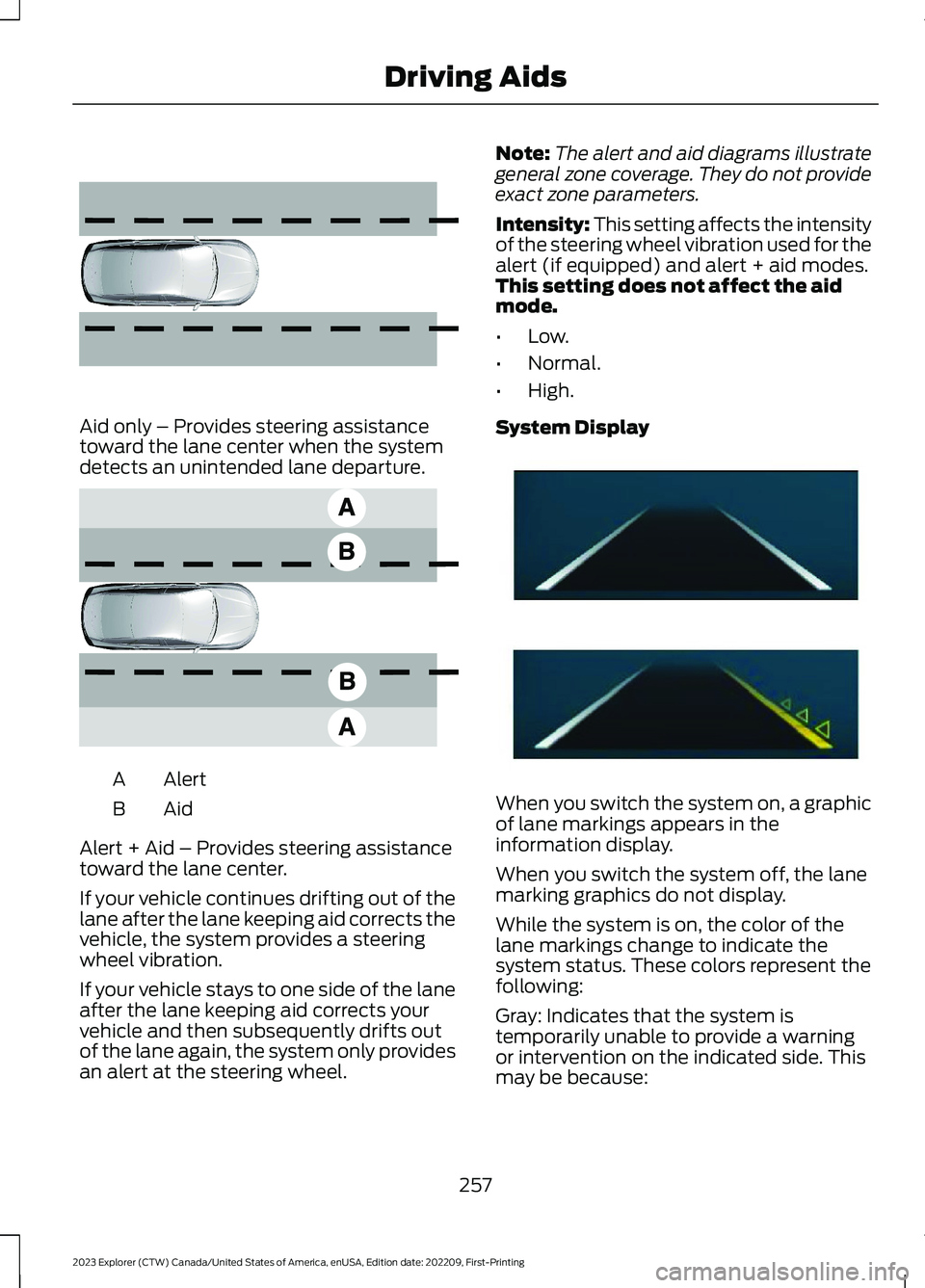
Aid only – Provides steering assistancetoward the lane center when the systemdetects an unintended lane departure.
AlertA
AidB
Alert + Aid – Provides steering assistancetoward the lane center.
If your vehicle continues drifting out of thelane after the lane keeping aid corrects thevehicle, the system provides a steeringwheel vibration.
If your vehicle stays to one side of the laneafter the lane keeping aid corrects yourvehicle and then subsequently drifts outof the lane again, the system only providesan alert at the steering wheel.
Note:The alert and aid diagrams illustrategeneral zone coverage. They do not provideexact zone parameters.
Intensity: This setting affects the intensityof the steering wheel vibration used for thealert (if equipped) and alert + aid modes.This setting does not affect the aidmode.
•Low.
•Normal.
•High.
System Display
When you switch the system on, a graphicof lane markings appears in theinformation display.
When you switch the system off, the lanemarking graphics do not display.
While the system is on, the color of thelane markings change to indicate thesystem status. These colors represent thefollowing:
Gray: Indicates that the system istemporarily unable to provide a warningor intervention on the indicated side. Thismay be because:
257
2023 Explorer (CTW) Canada/United States of America, enUSA, Edition date: 202209, First-PrintingDriving Aids E165516 E165517 E294544
Page 262 of 573
•Your vehicle is under the activationspeed.
•The direction indicator is active.
•Your vehicle is in a dynamic maneuver.
•The road has no or poor lane markingsin the camera field-of-view.
•The camera is obscured or unable todetect the lane markings due toenvironmental, traffic or vehicleconditions. For example, significant sunangles, shadows, snow, heavy rain orfog, following a large vehicle that isblocking or shadowing the lane or poorheadlamp illumination.
See Troubleshooting for additionalinformation.
White: Indicates that the system isavailable or ready to provide a warning orintervention on the indicated side.
Note:If your vehicle has lane centeringassist and the system is active, the wallsappear green instead of white.
Yellow: Indicates that the system isproviding or has just provided a lanekeeping aid intervention.
Red: Indicates that the system is providingor has just provided a lane keeping alertwarning.
The system can be temporarily suppressedat any time by the following:
•Quick braking.
•Fast acceleration.
•Using the direction indicator.
•Evasive steering maneuver.
•Driving too close to the lane markings.
Troubleshooting
Why is the feature not available (line markings are gray) when I can see the lane markingson the road?
Your vehicle speed is outside the operational range of the feature.
The sun is shining directly into the camera lens.
A quick intentional lane change has occurred.
Your vehicle stays too close to the lane markings.
Driving at high speeds in curves.
The last alert warning or aid intervention occurred a short time ago.
Ambiguous lane markings, for example in construction zones.
Rapid transition from light to dark, or from dark to light.
Sudden offset in lane markings.
ABS or AdvanceTrac™ is active.
There is a camera blockage due to dirt, grime, fog, frost or water on the windshield.
You are driving too close to the vehicle in front of you.
258
2023 Explorer (CTW) Canada/United States of America, enUSA, Edition date: 202209, First-PrintingDriving Aids
Page 275 of 573

After you turn the steering wheel, thesystem applies additional steering torqueto help you steer around the vehicle. Afteryou pass the vehicle, the system appliessteering torque in the opposite direction toencourage you to steer back into the lane.The system deactivates after you fully passthe vehicle.
Note:The system does not automaticallysteer around a vehicle. If you do not turn thesteering wheel, the system does notactivate.
Note:The system does not activate if thedistance to the vehicle ahead is too smalland the system cannot avoid a crash.
Adjusting the Pre-Collision AssistSettings
You can adjust the following settings byusing the touchscreen.
•You can change Alert and DistanceAlert sensitivity to one of three possiblesettings.
•You can switch distance indication andalert on or off.
•If required, you can switch activebraking on or off.
•If required, you can switch evasivesteering assist on or off.
Note:Active braking and evasive steeringassist automatically turn on every time youswitch the ignition on.
Note:If you switch active braking off,evasive steering assist turns off.
Blocked Sensors
Camera.1.
Radar sensor (if equipped).2.
If a message regarding a blocked sensoror camera appears in the informationdisplay, you have obstructed radar signalsor camera images. If your vehicle has aradar sensor, it is behind the fascia coverin the center of the lower grille. With ablocked sensor or camera, the system maynot function, or performance may reduce.The following table lists possible causesand actions for when this messagedisplays.
Camera Troubleshooting
ActionCause
Clean the outside of the windshield in frontof the camera.The windshield in front of the camera isdirty or obstructed in some way.
Wait a short time. It may take severalminutes for the camera to detect that thereis no obstruction.
The windshield in front of the camera isclean but the message remains in thedisplay screen.
271
2023 Explorer (CTW) Canada/United States of America, enUSA, Edition date: 202209, First-PrintingDriving AidsE273245
Page 462 of 573

Action and DescriptionMenu Item
Select to choose from a listing ofweather locations.Area
Touch this button to view scores and schedules from a varietyof sports. You can also save up to 10 favorite teams for easieraccess. The score automatically refreshes when a game is inprogress.
Sports Info
Touch this button to view ski conditions for a specific area.Ski Conditions
SETTINGS
Press the button to enter thesettings menu.
Once you select a tile, press thebutton next to a menu item toview an explanation of thefeature or setting.
Sound
Select this tile to adjust the sound settings.
Clock
Select this tile to adjust the clock settings.
Bluetooth®
Select this tile to switch Bluetooth® onand off and adjust the settings.
Phone
Select this tile to connect, disconnect, andmanage the connected device settings.
Audio
Select this tile to adjust the audio settings.
Driver Assist (If Equipped)
Select this tile to adjust Driver Assistfeatures like Parking Aids, Lane KeepingSystem, Pedestrian Detection, andAuto-Start-Stop.
Vehicle
Select this tile to adjust vehicle settingslike windows, alarm, lighting, and MyKeysettings.
FordPass (If Equipped)
Select this tile to adjust the FordPasssettings
General
Select this tile to adjust settings likelanguage, measurement units, or to resetthe system.
911 Assist (If Equipped)
Select this tile to switch 911 Assist on andoff.
Automatic Updates
Select this tile to adjust the automaticupdate settings.
Mobile Apps
Select this tile to adjust permissions,enable, disable, and update mobile apps.
458
2023 Explorer (CTW) Canada/United States of America, enUSA, Edition date: 202209, First-PrintingSYNC™ 3E280315 E268570
Page 565 of 573
3
360 Degree Camera....................................237
4
4WDSee: Four-Wheel Drive.....................................203
9
911 Assist...........................................................55
A
A/CSee: Climate Control..........................................137About This Manual...........................................9ABSSee: Brakes...........................................................210ABS driving hintsSee: Hints on Driving With Anti-LockBrakes..................................................................211Accessories....................................................473AccessoriesSee: Replacement PartsRecommendation............................................12Active Park Assist........................................230Adaptive Cruise Control.............................241Adaptive Cruise Control –Troubleshooting............................................250Adaptive Cruise Control Indicators -Vehicles With: Intelligent AdaptiveCruise Control............................................248Adaptive Cruise Control Indicators -Vehicles With: Lane Centering............248Adaptive Cruise Control Indicators -Vehicles With: Stop and Go..................248Adaptive Cruise Control Limitations -Vehicles With: Lane Centering.............242Adaptive Cruise Control Limitations -Vehicles With: Stop and Go..................243Adaptive Cruise Control Precautions -Vehicles With: Lane Centering..............241Adaptive Cruise Control Precautions -Vehicles With: Stop and Go...................241
Adaptive Cruise Control –Troubleshooting........................................250Adaptive Cruise Control – InformationMessages.........................................................250Adaptive Headlamps...................................89Adjusting the Headlamps.........................335Adjusting the Set SpeedTolerance.....................................................250Adjusting the Steering Wheel - VehiclesWith: Manual Adjustable SteeringColumn............................................................79Adjusting the Steering Wheel - VehiclesWith: Power Adjustable SteeringColumn............................................................79AFSSee: Adaptive Headlamps...............................89Airbag Disposal...............................................53Air ConditioningSee: Climate Control..........................................137Air FilterSee: Changing the Engine Air Filter - 2.3LEcoBoost™......................................................321See: Changing the Engine Air Filter -3.0L.....................................................................322See: Changing the Engine Air Filter -3.3L.....................................................................323AlarmSee: Anti-Theft Alarm.........................................77Ambient Lighting - Vehicles With: 10.1Inch Center Display Screen......................91Ambient Lighting - Vehicles With: 8 InchCenter Display Screen..............................90Anti-Theft Alarm.............................................77Appendices.....................................................531Apps.................................................................455At a Glance.......................................................20At a Glance - ST.............................................20Audible Warnings and Indicators...........109Audio Control...................................................81Audio System.................................................419General Information..........................................419Audio Unit.......................................................419Auto Hold.........................................................214Autolamps........................................................87Automatic Climate Control.......................137Automatic High Beam Control..................92Automatic High Beam ControlIndicators........................................................93
561
2023 Explorer (CTW) Canada/United States of America, enUSA, Edition date: 202209, First-PrintingIndex
Page 571 of 573
Reverse Braking AssistPrecautions..................................................216Reverse Braking Assist................................216Reverse Braking Assist –Troubleshooting.............................................218Reverse Braking Assist –Troubleshooting.........................................218Reverse Braking Assist – Frequently AskedQuestions.........................................................219Reverse Braking Assist – InformationMessages..........................................................218Roadside Assistance...................................291Roadside Emergencies...............................291Rollover Warning.........................................485Roof Racks and Load Carriers.................276Running-InSee: Breaking-In.................................................288Running Out of Fuel....................................183
S
Safety Canopy™..............................................51Safety Precautions.......................................181Satellite Radio..............................................422Scheduled Maintenance...........................476Seatbelt Extensions......................................44Seatbelt Height Adjustment.......................41Seatbelt Reminder.........................................42Seatbelts...........................................................38Principle of Operation........................................38Seatbelt Warning Lamp and IndicatorChime...............................................................41Seats.................................................................144Security...............................................................77Selecting a Drive Mode..............................273Service Data......................................................16Settings Data.....................................................17Settings...........................................................458Setting the Adaptive Cruise ControlGap................................................................246Setting the Adaptive Cruise ControlSpeed............................................................245Setting the Cruise Control Speed..........239Setting the Hill Descent Speed..............224Side Airbags.....................................................50Side Sensing System..................................229Sitting in the Correct Position..................144
Snow ChainsSee: Using Snow Chains.................................363Spare WheelSee: Changing a Road Wheel........................370Special Notices................................................13Special Operating Conditions ScheduledMaintenance..............................................482Speed ControlSee: Cruise Control...........................................239Speed Sign Recognition...........................266Stability Control............................................221Principle of Operation.......................................221Starter SwitchSee: Ignition Switch...........................................168Starting a Gasoline Engine.......................169Starting a Hybrid Electric VehicleSystem............................................................172Starting and Stopping the Engine.........168General Information..........................................168Steering...........................................................268Steering Wheel................................................79Storage Compartments.............................167SunroofSee: Moonroof......................................................99Sun Shades......................................................99Sun Visors.........................................................98Supplementary Restraints System.........46Principle of Operation........................................46Switching Adaptive Cruise Control Onand Off..........................................................245Switching Automatic High Beam ControlOn and Off.....................................................92Switching Cruise Control On andOff..................................................................239Switching From Adaptive Cruise Controlto Cruise Control.......................................248Switching Hill Descent Control On andOff...................................................................224Switching Intelligent Mode On andOff..................................................................250Switching Lane Centering On andOff..................................................................249Switching Rear Occupant Alert SystemOn and Off...................................................158Switching Reverse Braking Assist On andOff....................................................................217Symbols Glossary.............................................9
567
2023 Explorer (CTW) Canada/United States of America, enUSA, Edition date: 202209, First-PrintingIndex
Page 572 of 573

SYNC™ 3.........................................................427General Information..........................................427SYNC™ 3 Troubleshooting.....................460
T
Technical SpecificationsSee: Capacities and Specifications............378The Better Business Bureau (BBB) AutoLine Program (U.S. Only)......................300Tire Care..........................................................349Tire Pressure Monitoring System..........364TiresSee: Wheels and Tires......................................347Towing a Trailer............................................283Towing the Vehicle on FourWheels..........................................................287Towing.............................................................283Traction Control...........................................220Principle of Operation......................................220Trailer Sway Control...................................284Transmission..................................................197Transporting the Vehicle..........................296
U
Under Hood Overview - 2.3LEcoBoost™..................................................316Under Hood Overview - 3.0L....................317Under Hood Overview - 3.3L....................318Unique Driving Characteristics................176USB Port.........................................................425Using Four-Wheel Drive............................203Using MyKey With Remote StartSystems...........................................................67Using Snow Chains.....................................363Using Stability Control...............................222Using Summer Tires...................................362Using Traction Control...............................220Using Voice Recognition...........................429Using Winter Tires.......................................362Utilizing the Mediation/ArbitrationProgram (Canada Only).........................301
V
Vehicle Care...................................................339General Information.........................................339
Vehicle Identification Number................383Vehicle Storage............................................344Vehicle Wi-Fi Hotspot................................418Ventilated Seats............................................157VentilationSee: Climate Control..........................................137VINSee: Vehicle Identification Number............383Voice Control....................................................81
W
Warning Lamps and Indicators...............105Warranty Information................................529Washer Fluid Check....................................336WashersSee: Cleaning the Exterior..............................340See: Wipers and Washers.................................83Waxing..............................................................341What Is 911 Assist...........................................55What Is a Connected Vehicle...................414What Is Adaptive Cruise Control WithLane Centering............................................241What Is Automatic High BeamControl.............................................................92What Is Cruise Control...............................239What Is Drive Mode Control.....................273What Is Hill Descent Control...................224What Is Intelligent Adaptive CruiseControl...........................................................241What Is Reverse Braking Assist...............216What Is the Cabin Air Filter.......................143What Is the Garage Door Opener..........160What is the Rear Occupant AlertSystem...........................................................158What Is the Wireless AccessoryCharger..........................................................166Wheel NutsSee: Changing a Road Wheel........................370Wheels and Tires.........................................347General Information..........................................347Technical Specifications.................................376
568
2023 Explorer (CTW) Canada/United States of America, enUSA, Edition date: 202209, First-PrintingIndex