2023 FORD EXPLORER child lock
[x] Cancel search: child lockPage 41 of 573

A child safety lock is on the rear edge ofeach rear door. You must set the childsafety lock separately on each door.
Left-Hand Side
Turn the key clockwise to switch the childlock on and counter clockwise to switch itoff.
Right-Hand Side
Turn the key counter clockwise to switchthe child lock on and clockwise to switchit off.
Note:To make sure the child safety lock ison, pull the inside door handle twice to verifythe door does not open.
Note:To open the rear doors from insidethe vehicle when the child lock is engaged,roll down the rear window and use theoutside door handle. Or have someoneoutside the vehicle open the door.
37
2023 Explorer (CTW) Canada/United States of America, enUSA, Edition date: 202209, First-PrintingChild Safety E287259
Page 42 of 573

PRINCIPLE OF OPERATION
WARNING: Always drive and ridewith your seatback upright and the lapbelt snug and low across the hips.
WARNING: Children must alwaysbe properly restrained.
WARNING: Do not allow apassenger to hold a child on their lapwhen your vehicle is moving. Failure tofollow this instruction could result inpersonal injury or death in the event of asudden stop or crash.
WARNING: All occupants of yourvehicle, including the driver, shouldalways properly wear their seatbelts,even when an airbag supplementalrestraint system is provided. Failure toproperly wear your seatbelt couldseriously increase the risk of injury ordeath.
WARNING: It is extremelydangerous to ride in a cargo area, insideor outside of a vehicle. In a crash, peopleriding in these areas are more likely to beseriously injured or killed. Do not allowpeople to ride in any area of your vehiclethat is not equipped with seats andseatbelts. Make sure everyone in yourvehicle is in a seat and properly using aseatbelt. Failure to follow this warningcould result in serious personal injury ordeath.
WARNING: In a rollover crash, anunbelted person is significantly morelikely to die than a person wearing aseatbelt.
WARNING: Each seating positionin your vehicle has a specific seatbeltassembly made up of one buckle andone tongue designed to be used as a pair.Use the shoulder belt on the outsideshoulder only. Never wear the shoulderbelt under the arm. Never use a singleseatbelt for more than one person.
WARNING: Even with advancedrestraints systems, properly restrainchildren 12 and under in a rear seatingposition. Failure to follow this couldseriously increase the risk of injury ordeath.
WARNING: Seatbelts and seatsmay be hot in a vehicle that is in thesunshine. The hot seatbelts or seats mayburn a small child. Check seat covers andbuckles before you place a childanywhere near them.
All seating positions in your vehicle havelap and shoulder seatbelts. All occupantsof the vehicle should always properly weartheir seatbelts, even when an airbagsupplemental restraint system is provided.
The seatbelt system consists of:
•Lap and shoulder seatbelts.
•Shoulder seatbelt with automaticlocking mode, (except driver seatbelt).
•Height adjuster at the front outermostseating positions.
•Seatbelt pretensioners at the frontoutermost and second row outermostseating positions.
•Belt tension sensor at the frontoutermost passenger seating position.
•Seatbelt warning light and chime.
38
2023 Explorer (CTW) Canada/United States of America, enUSA, Edition date: 202209, First-PrintingSeatbeltsE71880
Page 44 of 573
Pregnant women should always wear theirseatbelt. Position the lap belt portion of acombination lap and shoulder belt lowacross the hips below the belly and wornas tight as comfort allows. Position theshoulder belt to cross the middle of theshoulder and the center of the chest.
Seatbelt Locking Modes
WARNING: If your vehicle isinvolved in a crash, have the seatbeltsand associated components inspectedas soon as possible. Failure to follow thisinstruction could result in personal injuryor death.
All safety restraints in the vehicle arecombination lap and shoulder belts. Thedriver seatbelt has the first type of lockingmode, and the front outboard passengerand rear seat seatbelts have both types oflocking modes described as follows:
Vehicle Sensitive Mode
This is the normal retractor mode, whichallows free shoulder belt lengthadjustment to your movements andlocking in response to vehicle movement.For example, if the driver brakes suddenlyor turns a corner sharply, or the vehiclereceives an impact of about 5 mph(8 km/h) or more, the combinationseatbelts lock to help reduce forwardmovement of the driver and passengers.
In addition, the design of the retractor is tolock if you pull the webbing out too quickly.If the seatbelt retractor locks, slowly lowerthe height adjuster to allow the seatbeltto retract. If the retractor does not unlock,pull the seatbelt out slowly then feed a
small length of webbing back toward thestowed position. For rear seatbelts, reclinethe rear seat backrest or push the seatbackrest cushion away from the seatbelt.Feed a small length of webbing backtoward the stowed position.
Automatic Locking Mode
In this mode, the shoulder beltautomatically pre-locks. The belt retractsto remove any slack in the shoulder belt.The automatic locking mode is notavailable on the driver seatbelt.
When to Use the Automatic LockingMode
Use this mode any time you install a childsafety seat, except a booster, in passengerfront or rear seating positions. Properlyrestrain children 12 years old and under ina rear seating position whenever possible.See Child Safety (page 23).
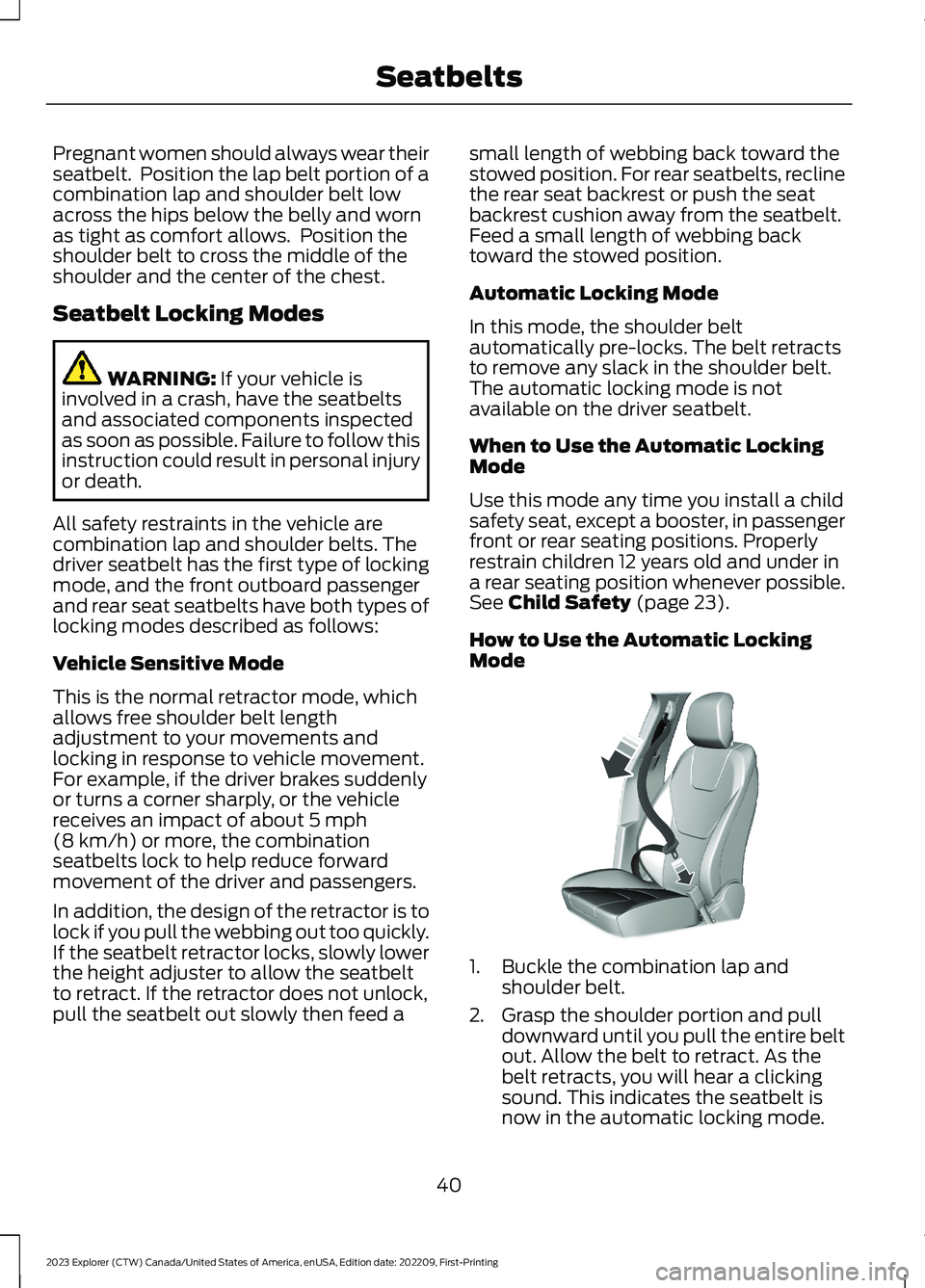
How to Use the Automatic LockingMode
1.Buckle the combination lap andshoulder belt.
2.Grasp the shoulder portion and pulldownward until you pull the entire beltout. Allow the belt to retract. As thebelt retracts, you will hear a clickingsound. This indicates the seatbelt isnow in the automatic locking mode.
40
2023 Explorer (CTW) Canada/United States of America, enUSA, Edition date: 202209, First-PrintingSeatbeltsE142591
Page 73 of 573

Note:The rear doors do not open using theinterior door handles if your vehicle has therear door lock disable feature, or with thechild locks enabled.
Locking and Unlocking the Doorswith the Key Blade
Locking with the Key
Turn the top of the key toward the front ofyour vehicle.
Unlocking with the Key
Turn the top of the key toward the rear ofyour vehicle.
Note: If the child safety locks are on andyou pull the interior handle, you only turn offthe emergency locking, not the child safetylock. You can only open the doors using theexternal door handle.
Activating Intelligent Access (If
Equipped)
You can unlock and lock the vehiclewithout taking the keys out of your pocketor purse when your intelligent access keyis within 3 ft (1 m) of your vehicle.Intelligent access uses a sensor on theback of the door handle for unlocking anda separate sensor on the face of each doorhandle for locking.
The system does not function if:
•Your vehicle battery has no charge.
•The key battery has no charge.
•The key frequencies jam.
Note:The system may not function if thekey is close to metal objects or electronicdevices, for example keys or a cell phone.
Note:If the system does not function, usethe key blade to lock and unlock yourvehicle. See Remote Control (page 57).
Unlocking Using Intelligent Access
With your intelligent access key within 3 ft(1 m) of your vehicle, touch the unlocksensor on the back of the door handle fora brief period and then pull on the doorhandle to unlock, being careful to nottouch the lock sensor at the same time orpulling the door handle too quickly. Theintelligent access system requires a briefdelay to authenticate your intelligentaccess key fob.
Locking Using Intelligent Access
With your intelligent access key within 3 ft(1 m) of your vehicle, touch the outer doorhandle lock sensor for approximately onesecond to lock, being careful to not touchthe unlock sensor on the back of the doorhandle at the same time. After locking, youcan immediately pull on the door handleto confirm locking occurred withoutinadvertently unlocking.
Opening the Liftgate
Press the exterior liftgate release buttonon the top of the liftgate pull-cup handle.See Power Liftgate (page 73).
Smart Unlocks for IntegratedKeyhead Remote Control (If Equipped)
This prevents you from locking yourself outof your vehicle if the key is still in theignition.
69
2023 Explorer (CTW) Canada/United States of America, enUSA, Edition date: 202209, First-PrintingDoors and LocksE297236 E297235
Page 98 of 573

POWER WINDOWS
WARNING: Do not leave childrenunattended in your vehicle and do notlet them play with the power windows.Failure to follow this instruction couldresult in personal injury.
WARNING: When closing thepower windows, verify they are free ofobstruction and make sure that childrenand pets are not in the proximity of thewindow openings.
Press the control to open thewindow. Lift the control to closethe window.
Note:If you hear a pulsing noise when justone of the windows is open. Lower theopposite window slightly to reduce thisnoise.
One-Touch Down
Note:One-touch down applies to the frontwindows only.
Fully press the switch and release it. Pressagain or lift it to stop the window.
One-Touch Up
Note:One-touch up applies to the frontwindows only.
Fully lift the switch and release it. Press orlift it again to stop the window.
Resetting One-Touch Up
Start the engine.
1.Lift and hold the window switch untilyou fully close the door window.Continue to hold the switch for a fewseconds after you close the window.
2.Release the window switch.
3.Press and hold the window switch untilyou fully open the door window.
4.Release the window switch.
5.Lift and hold the window switch untilyou fully close the window.
6.Test for correct window operation bycarrying out the one-touch down andone-touch up features.
Bounce-Back
The window stops when closing. It reversessome distance if there is an obstacle in theway.
Overriding the Bounce-Back Feature
WARNING: If you overridebounce-back, the window does notreverse if it detects an obstacle. Takecare when closing the windows to avoidpersonal injury or damage to yourvehicle.
The window stops if you release the switchbefore the window fully closes. Pull up thewindow switch and hold within a fewseconds of the window reaching thebounce-back position. The window travelsup with no bounce-back protection.
Window Lock
94
2023 Explorer (CTW) Canada/United States of America, enUSA, Edition date: 202209, First-PrintingWindows and Mirrors E295318
Page 128 of 573

ActionMessage
Indicates a driver door fault that requires manually opening thedoor by the override lever. Have the system checked as soon aspossible.
Driver Door FaultUse Inside Over-ride Lever In MapPocket
Indicates a fault with the electronic door system. Have the systemchecked as soon as possible.Door Fault ServiceRequired
There is a system malfunction with the child locks. Have the systemchecked as soon as possible.Child LockMalfunctionService Required
Indicates that the rear seat interior door release switches and powerwindows are switched off, preventing rear seat occupants fromopening the doors or windows.
Child Lock ON
Indicates that the rear seat interior door release switches and powerwindows are switched on, allowing the rear seat occupants to openthe doors and windows.
Child Lock OFF
The factory keypad code displays in the information display afterthe system resets the keypad. See Passive Anti-Theft System(page 77).
Factory KeypadCode {X X X X X}
Driver Alert
ActionMessage
Stop and rest as soon as it is safe to do so.Driver AlertWarning Rest Now
Take a rest soon.Driver AlertWarning RestSuggested
Fuel
ActionMessage
An early reminder of a low fuel condition.Fuel Level Low
The fuel fill inlet may not be properly closed.Check Fuel FillInlet
Wait for up to 15 seconds while the fuel system depressurizes.Fuel Door Opening
124
2023 Explorer (CTW) Canada/United States of America, enUSA, Edition date: 202209, First-PrintingInformation Displays
Page 566 of 573

Automatic Transmission............................197Automatic Transmission FluidCheck............................................................328Auto-Start-Stop............................................176Autowipers.......................................................83Auxiliary Power Points................................164
B
BatterySee: Changing the 12V Battery - Excluding:Hybrid Electric Vehicle (HEV)..................329See: Changing the 12V Battery - Hybrid ElectricVehicle (HEV).................................................332Blind Spot Information System.............259BLISSee: Blind Spot Information System..........259Body Styling Kits.........................................346Bonnet LockSee: Opening and Closing the Hood...........315Booster Seats..................................................33Brake Fluid Check........................................328Brakes...............................................................210General Information..........................................210Breaking-In....................................................288Bulb Specification Chart............................412
C
Canceling the Set Speed..........................240Capacities and Specifications - 2.3LEcoBoost™.................................................384Capacities and Specifications -3.0L.................................................................391Capacities and Specifications - 3.3L,Gasoline.......................................................398Capacities and Specifications - 3.3L,Hybrid Electric Vehicle (HEV).............405Capacities and Specifications................378Cargo Nets......................................................276Car WashSee: Cleaning the Exterior..............................340Catalytic Converter......................................193Changing a Bulb...........................................337Changing a Fuse............................................313Changing a Road Wheel...........................370Changing the 12V Battery - Excluding:Hybrid Electric Vehicle (HEV)..............329
Changing the 12V Battery - HybridElectric Vehicle (HEV).............................332Changing the Engine Air Filter - 2.3LEcoBoost™..................................................321Changing the Engine Air Filter -3.0L.................................................................322Changing the Engine Air Filter -3.3L.................................................................323Changing the Front Wiper Blades.........336Changing the Rear Wiper Blades...........337Changing the Vehicle Wi-Fi HotspotName or Password...................................418Charging a Wireless Device......................166Checking MyKey System Status..............66Checking the Wiper Blades.....................336Child Restraint and SeatbeltMaintenance.................................................43Child Restraint Positioning.........................35Child Safety......................................................23General Information............................................23Child Safety Locks.........................................36Cleaning Leather Seats.............................343Cleaning Products.......................................339Cleaning the Engine.....................................341Cleaning the Exterior.................................340Cleaning the Instrument Panel andInstrument Cluster Lens.........................343Cleaning the Interior...................................342Cleaning the Wheels..................................344Cleaning the Windows and WiperBlades...........................................................342Clearing All MyKeys.......................................66Clearing the Garage Door Opener..........162Climate............................................................445Climate Control..............................................137Cold Weather Precautions.......................288Collision, Damage or Fire Event.............295Connected Vehicle.......................................414Connecting the Vehicle to a MobileNetwork.............................................................414Connected Vehicle Data...............................17Connected Vehicle Limitations...............414Connected Vehicle Requirements.........414Connected Vehicle – Troubleshooting -Vehicles With: Modem.............................415Connected Vehicle – Troubleshooting -Vehicles With: SYNC 3.............................416
562
2023 Explorer (CTW) Canada/United States of America, enUSA, Edition date: 202209, First-PrintingIndex
Page 569 of 573

Hybrid Vehicle Frequently AskedQuestions - Hybrid Electric Vehicle(HEV).............................................................180Hybrid Vehicle Operation - HybridElectric Vehicle (HEV)..............................178
I
Ignition Switch...............................................168In California (U.S. Only)............................299Information Display Control.......................82Information Displays....................................110General Information - Vehicles With: 12.3Inch Instrument Cluster DisplayScreen.................................................................112General Information - Vehicles With: 4.2Inch Instrument Cluster DisplayScreen.................................................................115General Information - Vehicles With: 6.5Inch Instrument Cluster DisplayScreen.................................................................110Information Messages.................................119Installing Child Restraints...........................25Instrument Cluster........................................101Instrument Lighting Dimmer......................87Instrument Panel.............................................21Interior Air Quality.........................................143Interior Lamps.................................................90Interior Mirror...................................................98Introduction........................................................9
J
Jump Starting the Vehicle........................293
K
Keyless Entry.....................................................71Keyless Starting............................................169Keys and Remote Controls.........................57
L
Lane Keeping System................................255Liftgate...............................................................73Lighting Control..............................................86Lighting..............................................................86General Information...........................................86
Limited Slip Differential............................209Load CarriersSee: Roof Racks and Load Carriers.............276Load Carrying.................................................275General Information..........................................275Load Limit........................................................277Locating the Wireless AccessoryCharger..........................................................166Locking and Unlocking................................68Lug NutsSee: Changing a Road Wheel........................370
M
Maintenance...................................................315General Information..........................................315Manual Seats.................................................146Memory Function.........................................150Message CenterSee: Information Displays................................110MirrorsSee: Windows and Mirrors................................94Mobile Communications Equipment......14Mobile Device Data........................................18Moonroof..........................................................99Motorcraft Parts - 2.3LEcoBoost™.................................................382Motorcraft Parts - 3.0L..............................382Motorcraft Parts - 3.3L..............................383MyKey – Troubleshooting...........................67MyKey™.............................................................64Principle of Operation........................................64
N
Navigation......................................................449Normal Scheduled Maintenance..........479
O
Oil Change Indicator Reset......................320Oil CheckSee: Engine Oil Check.......................................319Opening and Closing the Hood...............315Ordering Additional Owner'sLiterature.....................................................303Overhead Console........................................167
565
2023 Explorer (CTW) Canada/United States of America, enUSA, Edition date: 202209, First-PrintingIndex