2023 FORD EXPEDITION belt
[x] Cancel search: beltPage 545 of 658
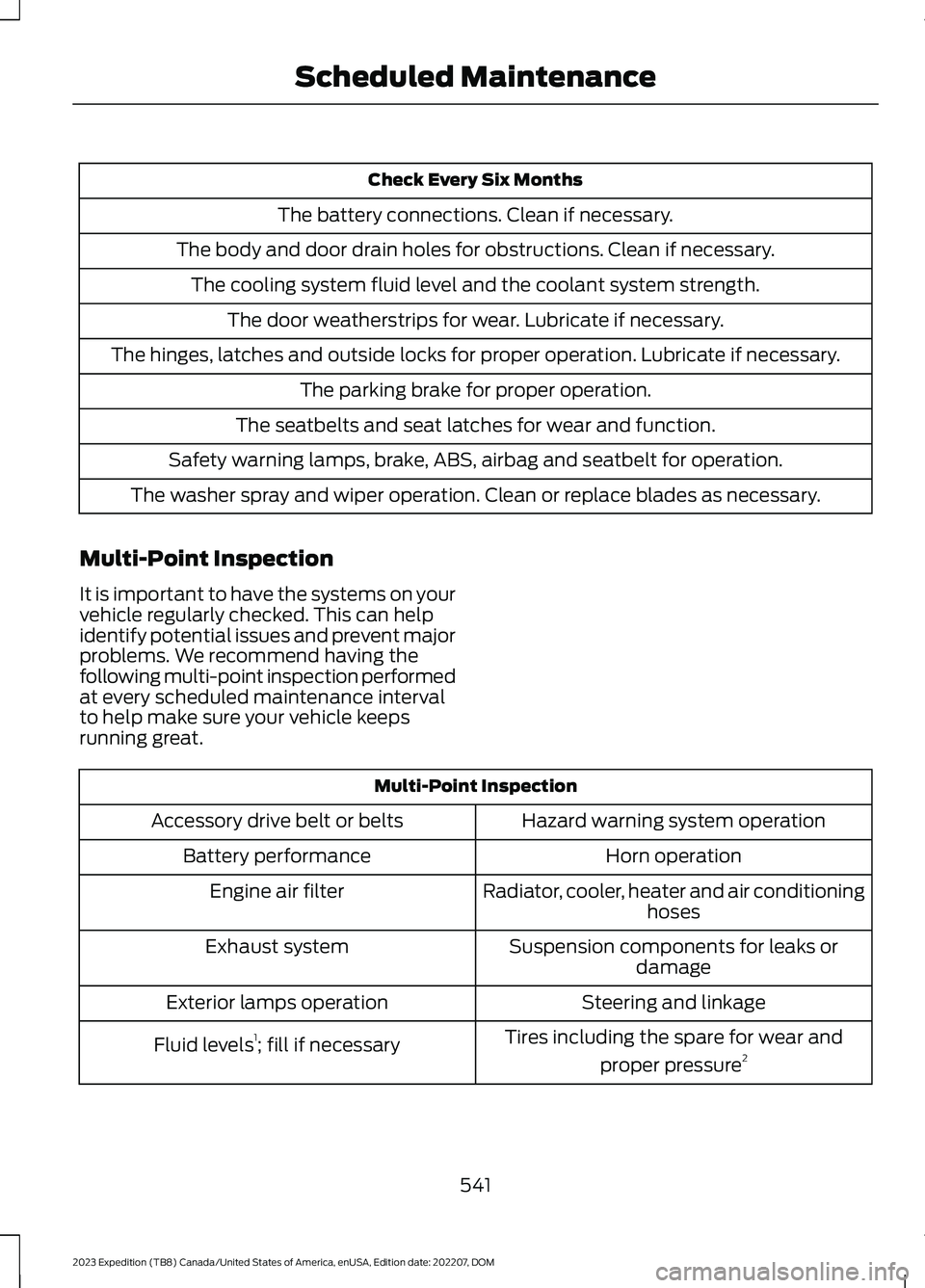
Check Every Six Months
The battery connections. Clean if necessary.
The body and door drain holes for obstructions. Clean if necessary.
The cooling system fluid level and the coolant system strength.
The door weatherstrips for wear. Lubricate if necessary.
The hinges, latches and outside locks for proper operation. Lubricate if necessary.
The parking brake for proper operation.
The seatbelts and seat latches for wear and function.
Safety warning lamps, brake, ABS, airbag and seatbelt for operation.
The washer spray and wiper operation. Clean or replace blades as necessary.
Multi-Point Inspection
It is important to have the systems on yourvehicle regularly checked. This can helpidentify potential issues and prevent majorproblems. We recommend having thefollowing multi-point inspection performedat every scheduled maintenance intervalto help make sure your vehicle keepsrunning great.
Multi-Point Inspection
Hazard warning system operationAccessory drive belt or belts
Horn operationBattery performance
Radiator, cooler, heater and air conditioninghosesEngine air filter
Suspension components for leaks ordamageExhaust system
Steering and linkageExterior lamps operation
Tires including the spare for wear and
proper pressure2Fluid levels1; fill if necessary
541
2023 Expedition (TB8) Canada/United States of America, enUSA, Edition date: 202207, DOMScheduled Maintenance
Page 548 of 658

Brake Fluid Maintenance1
Change the brake fluid.2Every Three Years
1 Perform this maintenance item every three years. Do not exceed the designated timefor the interval.2 Brake fluid servicing requires special equipment available at your authorized dealer.
Other Maintenance Items 1
Replace the cabin air filter.Every 20,000 mi (32,000 km)
Replace the engine air filter.Every 30,000 mi (48,000 km)
Replace the spark plugs.Every 100,000 mi (160,000 km)Inspect the accessory drive belt(s).2
Change the automatic transmission fluid.
Every 150,000 mi (240,000 km)
Change the front axle fluid - Four-wheel drivevehicles.
Change the rear axle fluid.
Change the transfer case fluid - Four-wheeldrive vehicles.
Replace the accessory drive belt(s).
Change the engine coolant.3Every 200,000 mi (320,000 km)
1 Perform these maintenance items within 5,000 mi (4,800 km) of the last engine oil andfilter change. Do not exceed the designated distance for the interval.2 After initial inspection, inspect every other oil change until replaced.3 Initial replacement at 10 years or 200,000 mi (320,000 km), then every 5 years or100,000 mi (160,000 km).
544
2023 Expedition (TB8) Canada/United States of America, enUSA, Edition date: 202207, DOMScheduled Maintenance
Page 552 of 658
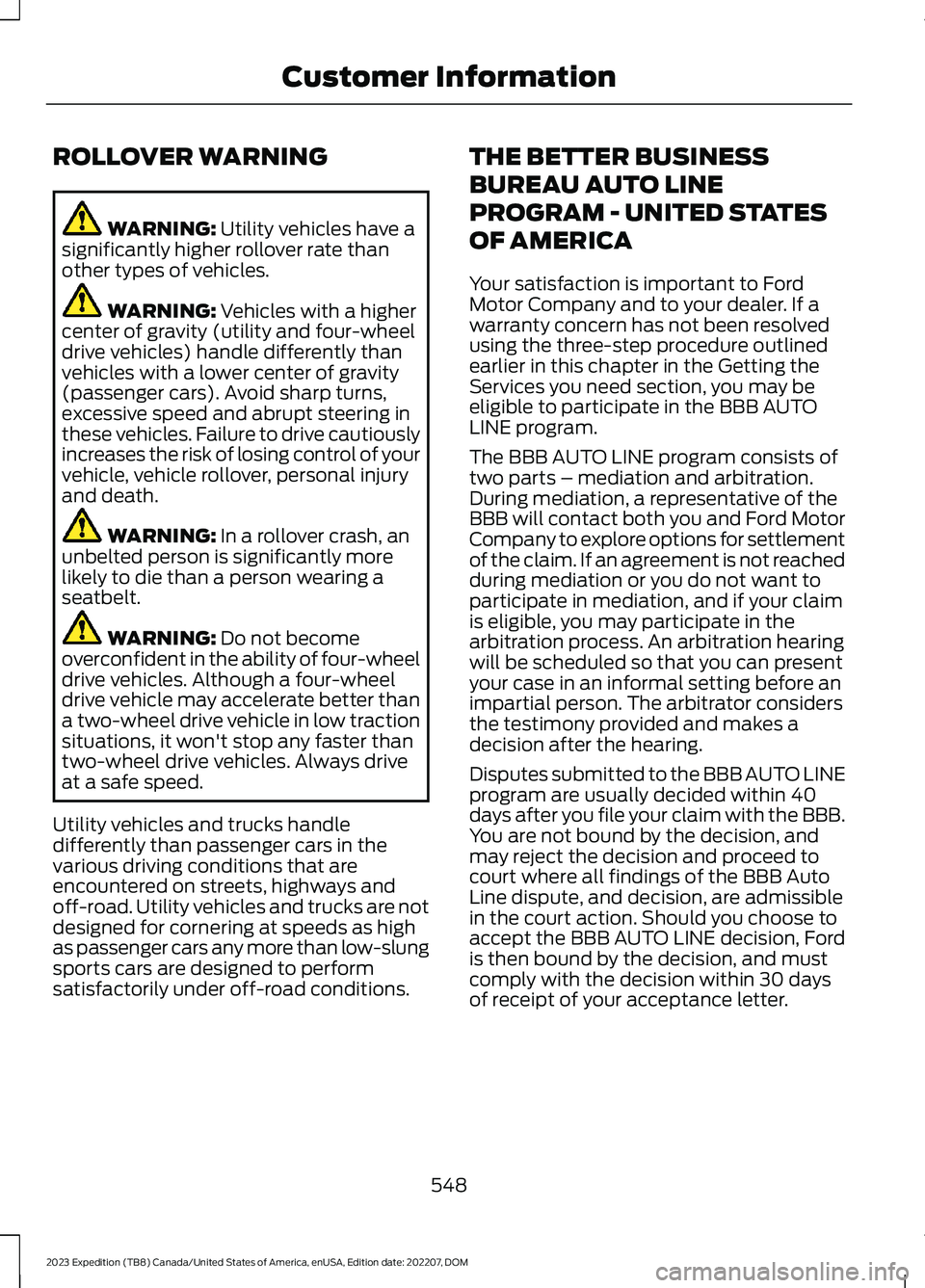
ROLLOVER WARNING
WARNING: Utility vehicles have asignificantly higher rollover rate thanother types of vehicles.
WARNING: Vehicles with a highercenter of gravity (utility and four-wheeldrive vehicles) handle differently thanvehicles with a lower center of gravity(passenger cars). Avoid sharp turns,excessive speed and abrupt steering inthese vehicles. Failure to drive cautiouslyincreases the risk of losing control of yourvehicle, vehicle rollover, personal injuryand death.
WARNING: In a rollover crash, anunbelted person is significantly morelikely to die than a person wearing aseatbelt.
WARNING: Do not becomeoverconfident in the ability of four-wheeldrive vehicles. Although a four-wheeldrive vehicle may accelerate better thana two-wheel drive vehicle in low tractionsituations, it won't stop any faster thantwo-wheel drive vehicles. Always driveat a safe speed.
Utility vehicles and trucks handledifferently than passenger cars in thevarious driving conditions that areencountered on streets, highways andoff-road. Utility vehicles and trucks are notdesigned for cornering at speeds as highas passenger cars any more than low-slungsports cars are designed to performsatisfactorily under off-road conditions.
THE BETTER BUSINESS
BUREAU AUTO LINE
PROGRAM - UNITED STATES
OF AMERICA
Your satisfaction is important to FordMotor Company and to your dealer. If awarranty concern has not been resolvedusing the three-step procedure outlinedearlier in this chapter in the Getting theServices you need section, you may beeligible to participate in the BBB AUTOLINE program.
The BBB AUTO LINE program consists oftwo parts – mediation and arbitration.During mediation, a representative of theBBB will contact both you and Ford MotorCompany to explore options for settlementof the claim. If an agreement is not reachedduring mediation or you do not want toparticipate in mediation, and if your claimis eligible, you may participate in thearbitration process. An arbitration hearingwill be scheduled so that you can presentyour case in an informal setting before animpartial person. The arbitrator considersthe testimony provided and makes adecision after the hearing.
Disputes submitted to the BBB AUTO LINEprogram are usually decided within 40days after you file your claim with the BBB.You are not bound by the decision, andmay reject the decision and proceed tocourt where all findings of the BBB AutoLine dispute, and decision, are admissiblein the court action. Should you choose toaccept the BBB AUTO LINE decision, Fordis then bound by the decision, and mustcomply with the decision within 30 daysof receipt of your acceptance letter.
548
2023 Expedition (TB8) Canada/United States of America, enUSA, Edition date: 202207, DOMCustomer Information
Page 599 of 658
Zambia
PERCHLORATE
Certain components in your vehicle suchas airbag modules, seatbelt pretensionersand remote control batteries may containperchlorate material. Special handlingmay apply for service or vehicle end of lifedisposal.
For more information visit:www.dtsc.ca.gov/hazardouswaste/perchlorate.
REPLACEMENT PARTS
RECOMMENDATION
We have built your vehicle to the higheststandards using quality parts. Werecommend that you demand the use ofgenuine Ford and Motorcraft partswhenever your vehicle requires scheduledmaintenance or repair. You can clearlyidentify genuine Ford and Motorcraft partsby looking for the Ford, FoMoCo orMotorcraft branding on the parts or theirpackaging.
Scheduled Maintenance andMechanical Repairs
One of the best ways for you to make surethat your vehicle provides years of serviceis to have it maintained in line with ourrecommendations using parts thatconform to the specifications detailed inthis Owner’s Manual.
Genuine Ford and Motorcraft parts meetor exceed these specifications.
Collision Repairs
We hope that you never experience acollision, but accidents happen sometimes.
Genuine Ford replacement collision partsmeet our stringent requirements for fit,finish, structural integrity, corrosionprotection and dent resistance. Duringvehicle development we validate thatthese parts deliver the intended level ofprotection as a whole system. A great wayto know for sure you are getting this levelof protection is to use genuine Fordreplacement collision parts.
Warranty on Replacement Parts
Genuine Ford and Motorcraft replacementparts are the only replacement parts thatbenefit from a Ford Warranty.
The Ford Warranty may not cover damagecaused to your vehicle as a result of failednon-Ford parts.
For additional information, refer to theterms and conditions of the Ford Warranty.
595
2023 Expedition (TB8) Canada/United States of America, enUSA, Edition date: 202207, DOMCustomer InformationE364773
Page 627 of 658
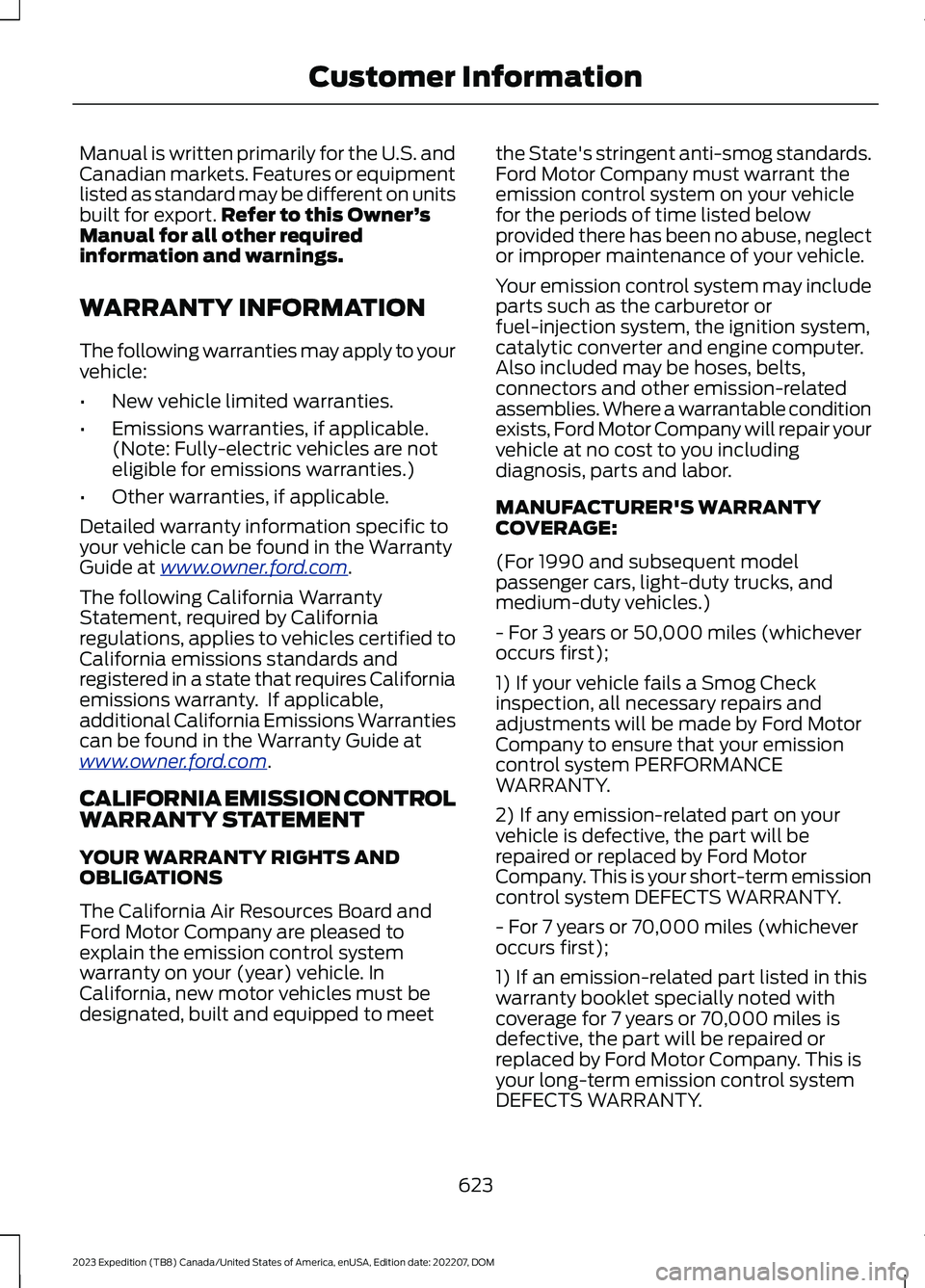
Manual is written primarily for the U.S. andCanadian markets. Features or equipmentlisted as standard may be different on unitsbuilt for export.Refer to this Owner’sManual for all other requiredinformation and warnings.
WARRANTY INFORMATION
The following warranties may apply to yourvehicle:
•New vehicle limited warranties.
•Emissions warranties, if applicable.(Note: Fully-electric vehicles are noteligible for emissions warranties.)
•Other warranties, if applicable.
Detailed warranty information specific toyour vehicle can be found in the WarrantyGuide at www.owner.ford.com.
The following California WarrantyStatement, required by Californiaregulations, applies to vehicles certified toCalifornia emissions standards andregistered in a state that requires Californiaemissions warranty. If applicable,additional California Emissions Warrantiescan be found in the Warranty Guide atwww.owner.ford.com.
CALIFORNIA EMISSION CONTROLWARRANTY STATEMENT
YOUR WARRANTY RIGHTS ANDOBLIGATIONS
The California Air Resources Board andFord Motor Company are pleased toexplain the emission control systemwarranty on your (year) vehicle. InCalifornia, new motor vehicles must bedesignated, built and equipped to meet
the State's stringent anti-smog standards.Ford Motor Company must warrant theemission control system on your vehiclefor the periods of time listed belowprovided there has been no abuse, neglector improper maintenance of your vehicle.
Your emission control system may includeparts such as the carburetor orfuel-injection system, the ignition system,catalytic converter and engine computer.Also included may be hoses, belts,connectors and other emission-relatedassemblies. Where a warrantable conditionexists, Ford Motor Company will repair yourvehicle at no cost to you includingdiagnosis, parts and labor.
MANUFACTURER'S WARRANTYCOVERAGE:
(For 1990 and subsequent modelpassenger cars, light-duty trucks, andmedium-duty vehicles.)
- For 3 years or 50,000 miles (whicheveroccurs first);
1) If your vehicle fails a Smog Checkinspection, all necessary repairs andadjustments will be made by Ford MotorCompany to ensure that your emissioncontrol system PERFORMANCEWARRANTY.
2) If any emission-related part on yourvehicle is defective, the part will berepaired or replaced by Ford MotorCompany. This is your short-term emissioncontrol system DEFECTS WARRANTY.
- For 7 years or 70,000 miles (whicheveroccurs first);
1) If an emission-related part listed in thiswarranty booklet specially noted withcoverage for 7 years or 70,000 miles isdefective, the part will be repaired orreplaced by Ford Motor Company. This isyour long-term emission control systemDEFECTS WARRANTY.
623
2023 Expedition (TB8) Canada/United States of America, enUSA, Edition date: 202207, DOMCustomer Information
Page 633 of 658
3
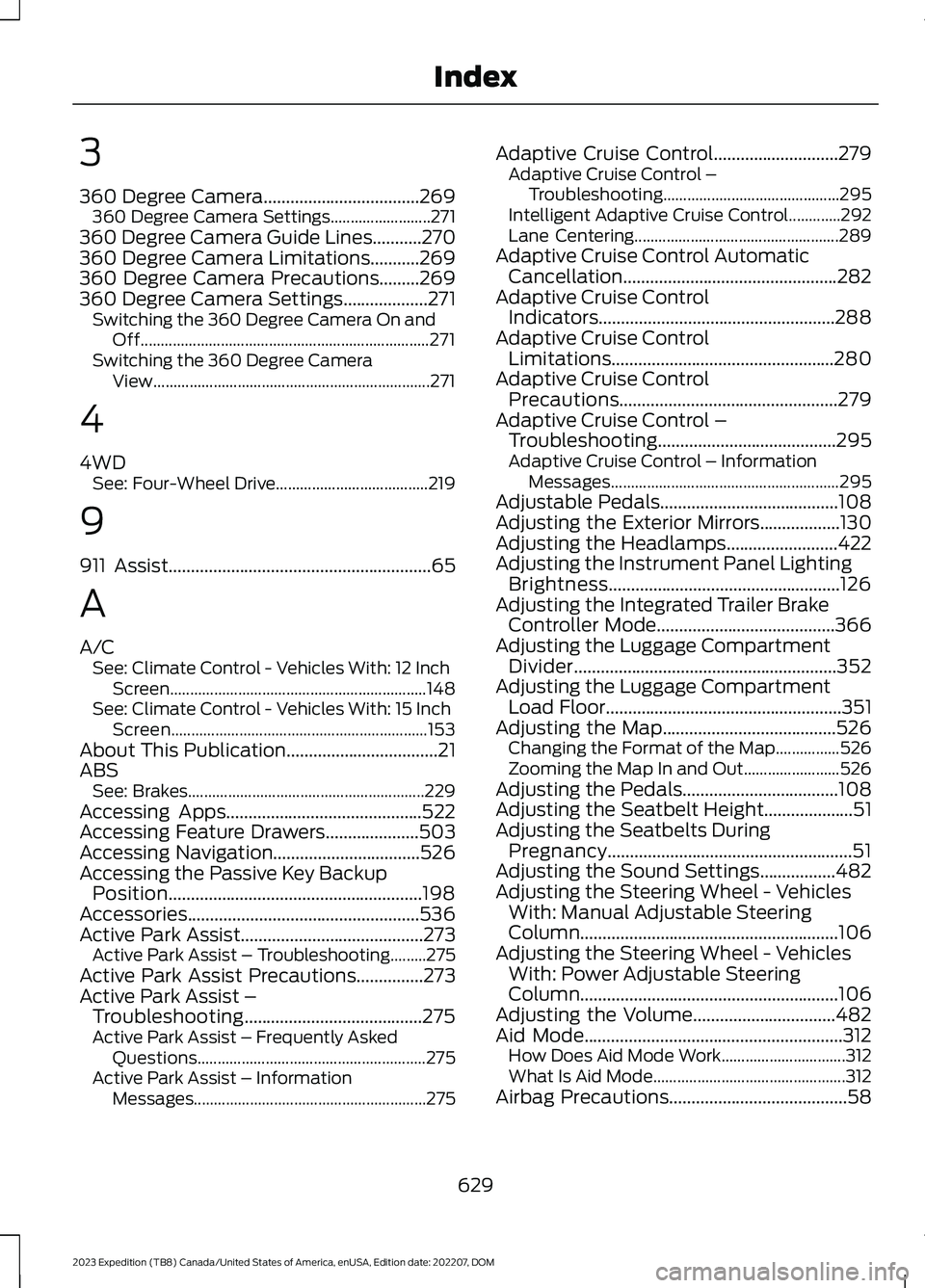
360 Degree Camera...................................269360 Degree Camera Settings.........................271360 Degree Camera Guide Lines...........270360 Degree Camera Limitations...........269360 Degree Camera Precautions.........269360 Degree Camera Settings...................271Switching the 360 Degree Camera On andOff........................................................................271Switching the 360 Degree CameraView.....................................................................271
4
4WDSee: Four-Wheel Drive......................................219
9
911 Assist...........................................................65
A
A/CSee: Climate Control - Vehicles With: 12 InchScreen................................................................148See: Climate Control - Vehicles With: 15 InchScreen................................................................153About This Publication..................................21ABSSee: Brakes...........................................................229Accessing Apps............................................522Accessing Feature Drawers.....................503Accessing Navigation.................................526Accessing the Passive Key BackupPosition.........................................................198Accessories....................................................536Active Park Assist.........................................273Active Park Assist – Troubleshooting.........275Active Park Assist Precautions...............273Active Park Assist –Troubleshooting........................................275Active Park Assist – Frequently AskedQuestions.........................................................275Active Park Assist – InformationMessages..........................................................275
Adaptive Cruise Control............................279Adaptive Cruise Control –Troubleshooting............................................295Intelligent Adaptive Cruise Control.............292Lane Centering...................................................289Adaptive Cruise Control AutomaticCancellation................................................282Adaptive Cruise ControlIndicators.....................................................288Adaptive Cruise ControlLimitations..................................................280Adaptive Cruise ControlPrecautions.................................................279Adaptive Cruise Control –Troubleshooting........................................295Adaptive Cruise Control – InformationMessages.........................................................295Adjustable Pedals........................................108Adjusting the Exterior Mirrors..................130Adjusting the Headlamps.........................422Adjusting the Instrument Panel LightingBrightness....................................................126Adjusting the Integrated Trailer BrakeController Mode........................................366Adjusting the Luggage CompartmentDivider...........................................................352Adjusting the Luggage CompartmentLoad Floor.....................................................351Adjusting the Map.......................................526Changing the Format of the Map................526Zooming the Map In and Out........................526Adjusting the Pedals...................................108Adjusting the Seatbelt Height....................51Adjusting the Seatbelts DuringPregnancy.......................................................51Adjusting the Sound Settings.................482Adjusting the Steering Wheel - VehiclesWith: Manual Adjustable SteeringColumn..........................................................106Adjusting the Steering Wheel - VehiclesWith: Power Adjustable SteeringColumn..........................................................106Adjusting the Volume................................482Aid Mode..........................................................312How Does Aid Mode Work...............................312What Is Aid Mode................................................312Airbag Precautions........................................58
629
2023 Expedition (TB8) Canada/United States of America, enUSA, Edition date: 202207, DOMIndex
Page 637 of 658

Changing the Vehicle Wi-Fi HotspotName or Password - Vehicles With: 15Inch Screen................................................480Charging a Device.........................................185Charging a Wireless Device......................190Checking MyKey System Status................77Checking the Brake Fluid..........................229Checking the Coolant.................................415Checking the Seatbelts...............................54Checking the Tire Pressures....................448Checking the Wiper Blades.........................111Children and Airbags....................................60Child Restraint Anchor Points...................38Locating the Child Restraint Lower AnchorPoints...................................................................38Locating the Child Restraint Top TetherAnchor Points...................................................39What Are the Child Restraint AnchorPoints...................................................................38Child Restraints...............................................39Child Restraint Position Information............39Child Restraints Recommendation................41Child Safety.......................................................37Child Restraint Anchor Points.........................38Child Restraints.....................................................39Installing Child Restraints..................................41Child Safety Locks..........................................47Child Safety Precautions.............................37Cleaning Products.......................................429Cleaning the Exterior..................................430Cleaning Camera Lenses andSensors..............................................................431Cleaning Chrome, Aluminium or StainlessSteel..................................................................430Cleaning Headlamps and RearLamps...............................................................430Cleaning Stripes or Graphics..........................431Cleaning the Engine Compartment.............431Cleaning the Exterior Precautions..............430Cleaning the Underbody..................................431Cleaning Wheels................................................430Cleaning Windows and WiperBlades...............................................................430Cleaning the Interior....................................431Cleaning Carpets and Floor Mats................433Cleaning Displays and Screens....................432Cleaning Moonroof Tracks.............................433Cleaning Plastic..................................................432
Cleaning Seatbelts............................................433Cleaning Seats and the Headliner...............432Cleaning the Instrument Panel.....................431Clearing All MyKeys........................................77Climate Control.............................................148Auto Mode............................................................150Climate Control Hints..................................151Closing the Liftgate.......................................93Closing the Hands-Free Liftgate....................94Closing the Liftgate From Inside YourVehicle.................................................................93Closing the Liftgate From Outside YourVehicle.................................................................93Closing the Liftgate Using the RemoteControl................................................................94Cold Weather Precautions.......................389Connected Navigation...............................526Connected Vehicle......................................475Connected Vehicle –Troubleshooting............................................476Connecting the Vehicle to a MobileNetwork............................................................475Connected Vehicle Data..............................28Connected Vehicle Limitations...............475Connected Vehicle Requirements.........475Connected Vehicle –Troubleshooting........................................476Connected Vehicle – Frequently AskedQuestions.........................................................476Connecting a Bluetooth® Device..........520Connecting a Trailer....................................355Connecting a Trailer –Troubleshooting.............................................357Hitches...................................................................354Connecting a Trailer Precautions..........354Connecting a Trailer –Troubleshooting........................................357Connecting a Trailer – InformationMessages..........................................................357Connecting the Vehicle to a MobileNetwork........................................................475Connecting FordPass to the Modem..........475Enabling and Disabling the Modem...........475What Is the Modem..........................................475Connecting the Vehicle to a Wi-FiNetwork - Vehicles With: 12 InchScreen...........................................................476
633
2023 Expedition (TB8) Canada/United States of America, enUSA, Edition date: 202207, DOMIndex
Page 638 of 658

Connecting the Vehicle to a Wi-FiNetwork - Vehicles With: 15 InchScreen...........................................................476Connecting Your Phone..............................511Contacting Us...................................................19Cooling System Capacity andSpecification..............................................466Crash and BreakdownInformation.................................................393Automatic Crash Shutoff................................397Jump Starting the Vehicle..............................394Post-Crash Alert System................................396Post Impact Braking.........................................396Recovery Towing - Vehicles With: FrontTow Hook.........................................................397Crash Sensors and Airbag Indicator........63Creating a MyKey - Vehicles With: PushButton Start...................................................76Creating a MyKey - Vehicles Without:Push Button Start.......................................76Creating a Vehicle Wi-Fi Hotspot -Vehicles With: 12 Inch Screen...............478Creating a Vehicle Wi-Fi Hotspot -Vehicles With: 15 Inch Screen..............478Cross Traffic Alert........................................325Cross Traffic Alert –Troubleshooting.............................................327Cross Traffic Alert Indicators....................327Cross Traffic Alert Limitations................325Cross Traffic Alert Precautions...............325Cross Traffic Alert –Troubleshooting.........................................327Cross Traffic Alert – InformationMessages..........................................................327Cross Traffic Braking...................................239Cross Traffic Braking –Troubleshooting............................................240Cross Traffic Braking Indicators.............240Cross Traffic Braking Precautions.........239Cross Traffic Braking –Troubleshooting........................................240Cross Traffic Braking – Frequently AskedQuestions..........................................................241Cross Traffic Braking – InformationMessages.........................................................240Cruise Control................................................277Cruise Control Indicators...........................278
Customer Information...............................548Radio Frequency Certification Labels.........551Customizing the Instrument ClusterDisplay............................................................141
D
Data Privacy.....................................................26Department of Transportation UniformTire Quality Grades...................................437Deploying and Stowing the PowerRunning Boards.........................................105Digital Radio..................................................484Digital Radio Indicators...................................485Digital Radio Limitations................................484How Does Digital Radio Work......................484Switching Digital Radio Reception On andOff......................................................................485What Is Digital Radio.......................................484Directing the Flow of Air............................150Disposing of Airbags.....................................64Distance Alert................................................335Adjusting the Sensitivity of DistanceAlert....................................................................335What Is Distance Alert.....................................335Distance Indication.....................................332Distance Indication Indicator........................334Switching Distance Indication On andOff.......................................................................334What Is Distance Indication...........................332Doors and Locks Audible Warnings........83Doors and Locks..............................................81Autolock...................................................................82Autounlock.............................................................82Doors and Locks – Troubleshooting.............83Mislock.....................................................................82Operating the Doors From Inside YourVehicle..................................................................81Operating the Doors From Outside YourVehicle..................................................................81Doors and Locks –Troubleshooting..........................................83Doors and Locks – Frequently AskedQuestions...........................................................84Doors and Locks – InformationMessages...........................................................83Doors and Locks – Warning Lamps..............83Drive Belt Routing........................................428
634
2023 Expedition (TB8) Canada/United States of America, enUSA, Edition date: 202207, DOMIndex