2023 FORD EXPEDITION cruise control
[x] Cancel search: cruise controlPage 334 of 658

Intersection Assist (If Equipped)
If your vehicle comes with a radar sensorincluded in adaptive cruise control, thepre-collision assist system may operate ina scenario where you are turning across anoncoming vehicle's path. Detection ofvehicles driving in an oncoming directionis active if your vehicle is driving at speedsup to 19 mph (30 km/h).
SWITCHING PRE-COLLISION
ASSIST ON AND OFF -
VEHICLES WITH: 12 INCH
SCREEN
To switch the system on or off, use thetouchscreen:
1.Press Features on the touchscreen.
2.Press Driver Assistance.
3.Press Pre-Collision Assist.
4.Switch the feature on or off.
Adjusting the Pre-Collision AssistSettings
You can adjust the following settings byusing the touchscreen controls in thepre-collision assist menu:
•Change alert and distance alertsensitivity to one of three possiblesettings.
•Switch distance indication and alert onor off.
•If required, switch automaticemergency braking on or off.
•If required, switch the entirepre-collision assist feature on or off.
•If required, switch evasive steeringassist on or off.
Note:Automatic emergency braking andevasive steering turn on every time youswitch the ignition on.
Note:If your vehicle has a radar sensor, werecommend that you switch the system offif you install a snow plow or similar objectin such a way that it may block the radarsensor. Your vehicle remembers the selectedsetting across key cycles.
Note:If you switch automatic emergencybraking off, evasive steering assist switchesoff.
SWITCHING PRE-COLLISION
ASSIST ON AND OFF -
VEHICLES WITH: 15 INCH
SCREEN
To switch the system on or off:
1.Access the vehicle drawer.
2.Press SETTINGS.
3.Press Driver Assistance.
4.Press Pre-Collision Assist.
5.Switch the feature on or off.
330
2023 Expedition (TB8) Canada/United States of America, enUSA, Edition date: 202207, DOMPre-Collision AssistE309750
Page 336 of 658

Note:If your vehicle detects excessive heatat the camera or a potential misalignmentcondition, a message could display in theinformation display indicating temporarysensor unavailability. When operationalconditions are correct, the messagedeactivates. For example, when the ambienttemperature around the sensor decreasesor the sensor recalibrates successfully.
DISTANCE INDICATION (IF
EQUIPPED)
WHAT IS DISTANCE INDICATION- VEHICLES WITH: 8 INCH SCREEN
Distance indication displays the gapbetween your vehicle and the vehicleahead of you.
Note:The graphic does not display if youswitch on cruise control or adaptive cruisecontrol.
Time GapDistance GapDistance Indic-ator ColorSystem Sensit-ivityVehicle Speed
Greater than 0.9seconds.Greater than82 ft (25 m).Gray.Normal.62 mph(100 km/h).
0.6-0.9seconds.56–82 ft(17–25 m).Yellow.
Less than 0.6seconds.Less than 56 ft(17 m).Red.
332
2023 Expedition (TB8) Canada/United States of America, enUSA, Edition date: 202207, DOMPre-Collision Assist
Page 337 of 658
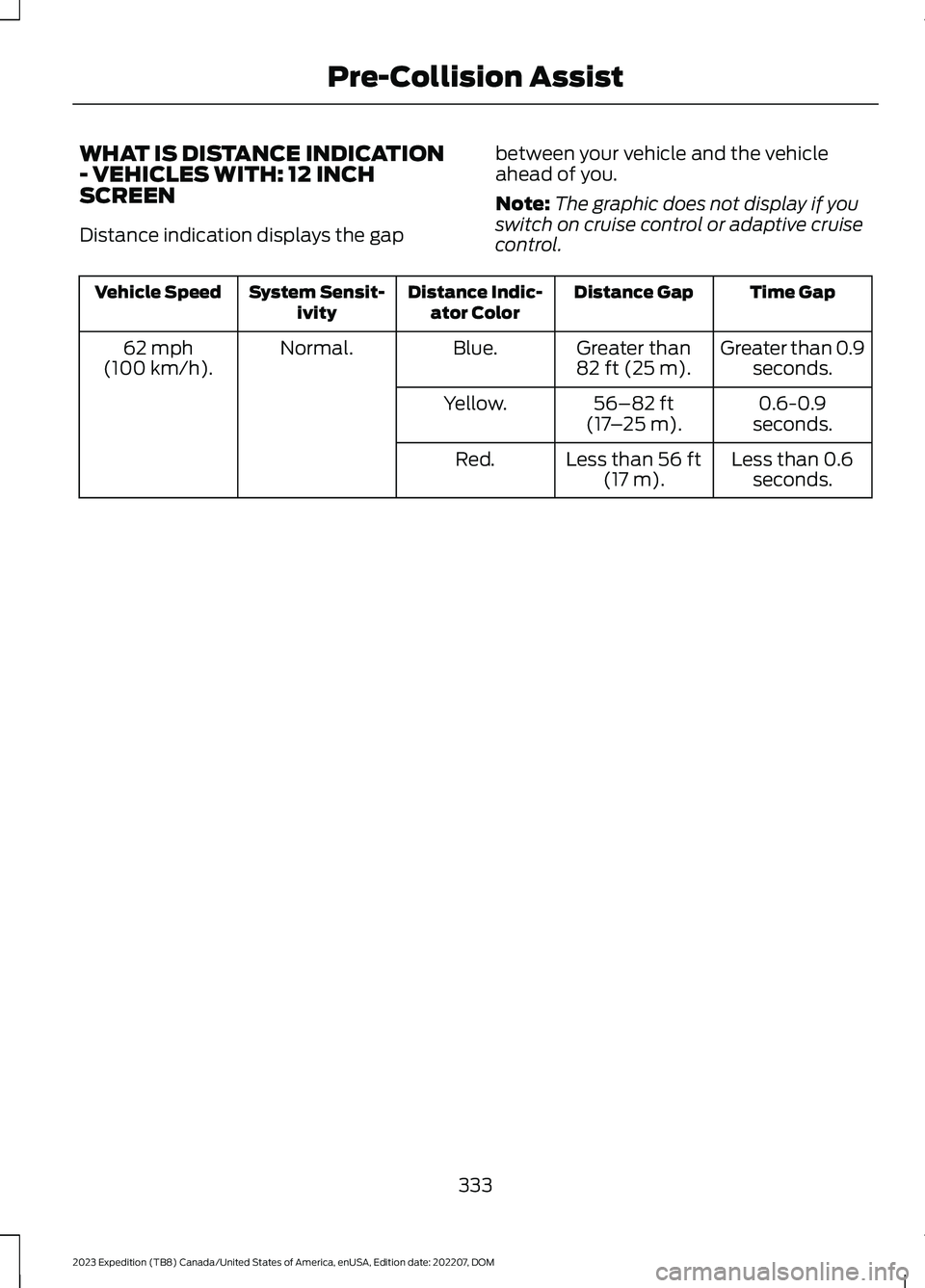
WHAT IS DISTANCE INDICATION- VEHICLES WITH: 12 INCHSCREEN
Distance indication displays the gap
between your vehicle and the vehicleahead of you.
Note:The graphic does not display if youswitch on cruise control or adaptive cruisecontrol.
Time GapDistance GapDistance Indic-ator ColorSystem Sensit-ivityVehicle Speed
Greater than 0.9seconds.Greater than82 ft (25 m).Blue.Normal.62 mph(100 km/h).
0.6-0.9seconds.56–82 ft(17–25 m).Yellow.
Less than 0.6seconds.Less than 56 ft(17 m).Red.
333
2023 Expedition (TB8) Canada/United States of America, enUSA, Edition date: 202207, DOMPre-Collision Assist
Page 339 of 658
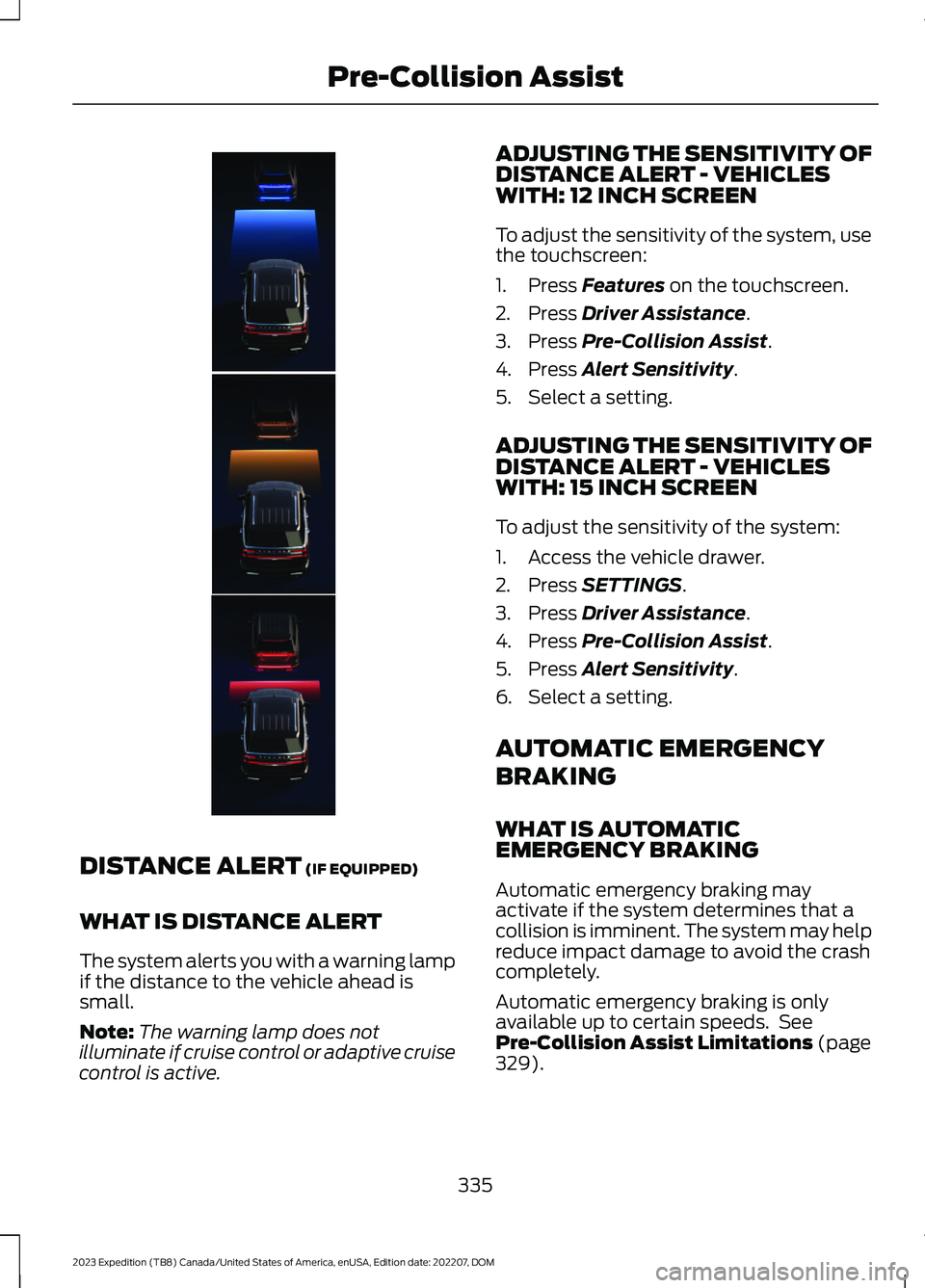
DISTANCE ALERT (IF EQUIPPED)
WHAT IS DISTANCE ALERT
The system alerts you with a warning lampif the distance to the vehicle ahead issmall.
Note:The warning lamp does notilluminate if cruise control or adaptive cruisecontrol is active.
ADJUSTING THE SENSITIVITY OFDISTANCE ALERT - VEHICLESWITH: 12 INCH SCREEN
To adjust the sensitivity of the system, usethe touchscreen:
1.Press Features on the touchscreen.
2.Press Driver Assistance.
3.Press Pre-Collision Assist.
4.Press Alert Sensitivity.
5.Select a setting.
ADJUSTING THE SENSITIVITY OFDISTANCE ALERT - VEHICLESWITH: 15 INCH SCREEN
To adjust the sensitivity of the system:
1.Access the vehicle drawer.
2.Press SETTINGS.
3.Press Driver Assistance.
4.Press Pre-Collision Assist.
5.Press Alert Sensitivity.
6.Select a setting.
AUTOMATIC EMERGENCY
BRAKING
WHAT IS AUTOMATICEMERGENCY BRAKING
Automatic emergency braking mayactivate if the system determines that acollision is imminent. The system may helpreduce impact damage to avoid the crashcompletely.
Automatic emergency braking is onlyavailable up to certain speeds. SeePre-Collision Assist Limitations (page329).
335
2023 Expedition (TB8) Canada/United States of America, enUSA, Edition date: 202207, DOMPre-Collision AssistE354245
Page 564 of 658
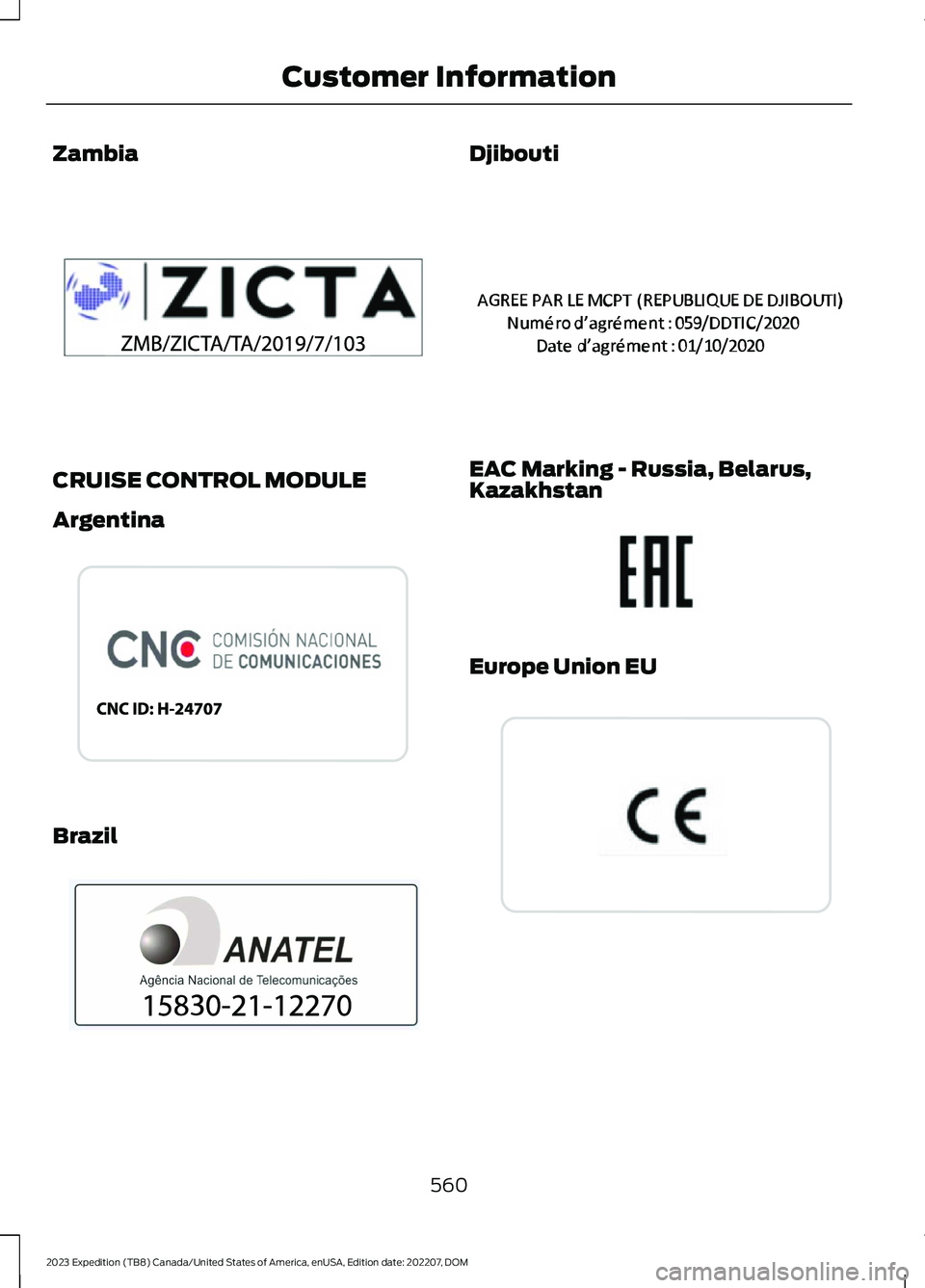
Zambia
CRUISE CONTROL MODULE
Argentina
Brazil
Djibouti
EAC Marking - Russia, Belarus,Kazakhstan
Europe Union EU
560
2023 Expedition (TB8) Canada/United States of America, enUSA, Edition date: 202207, DOMCustomer InformationE340511 E338549 E388865 E356903 E253816 E310043
Page 633 of 658
3
360 Degree Camera...................................269360 Degree Camera Settings.........................271360 Degree Camera Guide Lines...........270360 Degree Camera Limitations...........269360 Degree Camera Precautions.........269360 Degree Camera Settings...................271Switching the 360 Degree Camera On andOff........................................................................271Switching the 360 Degree CameraView.....................................................................271
4
4WDSee: Four-Wheel Drive......................................219
9
911 Assist...........................................................65
A
A/CSee: Climate Control - Vehicles With: 12 InchScreen................................................................148See: Climate Control - Vehicles With: 15 InchScreen................................................................153About This Publication..................................21ABSSee: Brakes...........................................................229Accessing Apps............................................522Accessing Feature Drawers.....................503Accessing Navigation.................................526Accessing the Passive Key BackupPosition.........................................................198Accessories....................................................536Active Park Assist.........................................273Active Park Assist – Troubleshooting.........275Active Park Assist Precautions...............273Active Park Assist –Troubleshooting........................................275Active Park Assist – Frequently AskedQuestions.........................................................275Active Park Assist – InformationMessages..........................................................275
Adaptive Cruise Control............................279Adaptive Cruise Control –Troubleshooting............................................295Intelligent Adaptive Cruise Control.............292Lane Centering...................................................289Adaptive Cruise Control AutomaticCancellation................................................282Adaptive Cruise ControlIndicators.....................................................288Adaptive Cruise ControlLimitations..................................................280Adaptive Cruise ControlPrecautions.................................................279Adaptive Cruise Control –Troubleshooting........................................295Adaptive Cruise Control – InformationMessages.........................................................295Adjustable Pedals........................................108Adjusting the Exterior Mirrors..................130Adjusting the Headlamps.........................422Adjusting the Instrument Panel LightingBrightness....................................................126Adjusting the Integrated Trailer BrakeController Mode........................................366Adjusting the Luggage CompartmentDivider...........................................................352Adjusting the Luggage CompartmentLoad Floor.....................................................351Adjusting the Map.......................................526Changing the Format of the Map................526Zooming the Map In and Out........................526Adjusting the Pedals...................................108Adjusting the Seatbelt Height....................51Adjusting the Seatbelts DuringPregnancy.......................................................51Adjusting the Sound Settings.................482Adjusting the Steering Wheel - VehiclesWith: Manual Adjustable SteeringColumn..........................................................106Adjusting the Steering Wheel - VehiclesWith: Power Adjustable SteeringColumn..........................................................106Adjusting the Volume................................482Aid Mode..........................................................312How Does Aid Mode Work...............................312What Is Aid Mode................................................312Airbag Precautions........................................58
629
2023 Expedition (TB8) Canada/United States of America, enUSA, Edition date: 202207, DOMIndex
Page 636 of 658

Blind Spot Information System.............320Blind Spot Information System –Troubleshooting............................................324Blind Spot Information System With TrailerCoverage...........................................................322Blind Spot Information SystemIndicators.....................................................323Blind Spot Information SystemLimitations..................................................320Blind Spot Information SystemPrecautions.................................................320Blind Spot Information SystemRequirements............................................320Blind Spot Information System –Troubleshooting........................................324Blind Spot Information System –Information Messages................................324Blind Spot Information System WithTrailer Coverage.........................................322Blind Spot Information System With TrailerCoverage Limitations...................................322Selecting a Trailer..............................................323Setting a Trailer Length....................................322What Is Blind Spot Information System withTrailer Coverage.............................................322BlueCruise Alerts.........................................300BlueCruise AutomaticCancellation...............................................300BlueCruise.......................................................297BlueCruise – Troubleshooting.......................301BlueCruise Indicators................................300BlueCruise Limitations..............................298BlueCruise Precautions.............................297BlueCruise Requirements........................298BlueCruise Settings....................................299BlueCruise – Troubleshooting.................301BlueCruise – Information Messages...........301Bluetooth®....................................................520Body Control Module Fuse Box.............408Accessing the Body Control Module FuseBox.....................................................................408Identifying the Fuses in the Body ControlModule Fuse Box..........................................408Locating the Body Control Module FuseBox.....................................................................408Bonnet LockSee: Opening and Closing the Hood...........412Booster Seats..................................................45
Brake Fluid Specification..........................230Brake Over Accelerator..............................229Brake Precautions.......................................229Brakes..............................................................229Anti-Lock Braking System..............................229Brakes – Troubleshooting..............................230Brakes – Troubleshooting........................230Brakes – Frequently Asked Questions........231Brakes – Warning Lamps...............................230Breaking-In....................................................389
C
Calculating Payload....................................347Calculating the Load Limit.......................347Canceling the Set Speed..........................250Capacities and Specifications................463Catalytic Converter.......................................212Catalytic Converter –Troubleshooting.............................................212Catalytic Converter Precautions.............212Catalytic Converter –Troubleshooting.........................................212Catalytic Converter – WarningLamps.................................................................212Center Console...............................................191Locking the Center Console.............................191Opening the Center Console...........................191Center Display Limitations......................499Center Display Overview..........................499Center Display Precautions.....................499Changing a Flat Tire...................................456Changing a Road Wheel...........................456Changing the 12V Battery.........................420Changing the Fuel Filter.............................419Changing the Language.............................142Changing the Measurement Unit...........142Changing the Remote Control Battery -Vehicles With: Flip Key..............................69Changing the Remote Control Battery -Vehicles With: Push Button Start..........70Changing the Temperature Unit.............142Changing the Tire Pressure Unit.............142Changing the Vehicle Wi-Fi HotspotName or Password - Vehicles With: 12Inch Screen.................................................479
632
2023 Expedition (TB8) Canada/United States of America, enUSA, Edition date: 202207, DOMIndex
Page 638 of 658

Connecting the Vehicle to a Wi-FiNetwork - Vehicles With: 15 InchScreen...........................................................476Connecting Your Phone..............................511Contacting Us...................................................19Cooling System Capacity andSpecification..............................................466Crash and BreakdownInformation.................................................393Automatic Crash Shutoff................................397Jump Starting the Vehicle..............................394Post-Crash Alert System................................396Post Impact Braking.........................................396Recovery Towing - Vehicles With: FrontTow Hook.........................................................397Crash Sensors and Airbag Indicator........63Creating a MyKey - Vehicles With: PushButton Start...................................................76Creating a MyKey - Vehicles Without:Push Button Start.......................................76Creating a Vehicle Wi-Fi Hotspot -Vehicles With: 12 Inch Screen...............478Creating a Vehicle Wi-Fi Hotspot -Vehicles With: 15 Inch Screen..............478Cross Traffic Alert........................................325Cross Traffic Alert –Troubleshooting.............................................327Cross Traffic Alert Indicators....................327Cross Traffic Alert Limitations................325Cross Traffic Alert Precautions...............325Cross Traffic Alert –Troubleshooting.........................................327Cross Traffic Alert – InformationMessages..........................................................327Cross Traffic Braking...................................239Cross Traffic Braking –Troubleshooting............................................240Cross Traffic Braking Indicators.............240Cross Traffic Braking Precautions.........239Cross Traffic Braking –Troubleshooting........................................240Cross Traffic Braking – Frequently AskedQuestions..........................................................241Cross Traffic Braking – InformationMessages.........................................................240Cruise Control................................................277Cruise Control Indicators...........................278
Customer Information...............................548Radio Frequency Certification Labels.........551Customizing the Instrument ClusterDisplay............................................................141
D
Data Privacy.....................................................26Department of Transportation UniformTire Quality Grades...................................437Deploying and Stowing the PowerRunning Boards.........................................105Digital Radio..................................................484Digital Radio Indicators...................................485Digital Radio Limitations................................484How Does Digital Radio Work......................484Switching Digital Radio Reception On andOff......................................................................485What Is Digital Radio.......................................484Directing the Flow of Air............................150Disposing of Airbags.....................................64Distance Alert................................................335Adjusting the Sensitivity of DistanceAlert....................................................................335What Is Distance Alert.....................................335Distance Indication.....................................332Distance Indication Indicator........................334Switching Distance Indication On andOff.......................................................................334What Is Distance Indication...........................332Doors and Locks Audible Warnings........83Doors and Locks..............................................81Autolock...................................................................82Autounlock.............................................................82Doors and Locks – Troubleshooting.............83Mislock.....................................................................82Operating the Doors From Inside YourVehicle..................................................................81Operating the Doors From Outside YourVehicle..................................................................81Doors and Locks –Troubleshooting..........................................83Doors and Locks – Frequently AskedQuestions...........................................................84Doors and Locks – InformationMessages...........................................................83Doors and Locks – Warning Lamps..............83Drive Belt Routing........................................428
634
2023 Expedition (TB8) Canada/United States of America, enUSA, Edition date: 202207, DOMIndex