2023 FORD EXPEDITION brake
[x] Cancel search: brakePage 208 of 658
AUTO-START-STOP –FREQUENTLY ASKED QUESTIONS
Why does the engine not alwaysstop when I expect it to?
The system is designed to work in a waythat complements other vehicle systems,allowing them to operate at optimumperformance.
The system does not stop the engine if:
•The driver door is open.
•Your vehicle is at high altitude.
•The heated windshield is on.
•The engine is warming up.
•The outside temperature is too low ortoo high.
•The battery charge is low.
•The battery temperature is outside theoptimal operating range.
•The engine is required to run tomaintain interior climate and reducefogging.
Why does the engine sometimesrestart when I do not expect it to?
The system is designed to work in a waythat complements other vehicle systems,allowing them to operate at optimumperformance.
The system restarts the engine if:
•You switch the heated windshield on.
•You switch maximum defrost on.
•Your vehicle starts to roll downhill inneutral.
•The engine is required to run tomaintain adequate brake systemassistance.
•The engine is required to run tomaintain interior climate and reducefogging.
Can I permanently switch thesystem off?
No. The system plays an important role inreducing the fuel consumption and the CO2emissions.
Will the frequent engine startscause parts to wear out?
Your vehicle has an enhanced battery andstarter motor that are designed for theincreased number of engine starts.
204
2023 Expedition (TB8) Canada/United States of America, enUSA, Edition date: 202207, DOMAuto-Start-Stop (If Equipped)
Page 214 of 658
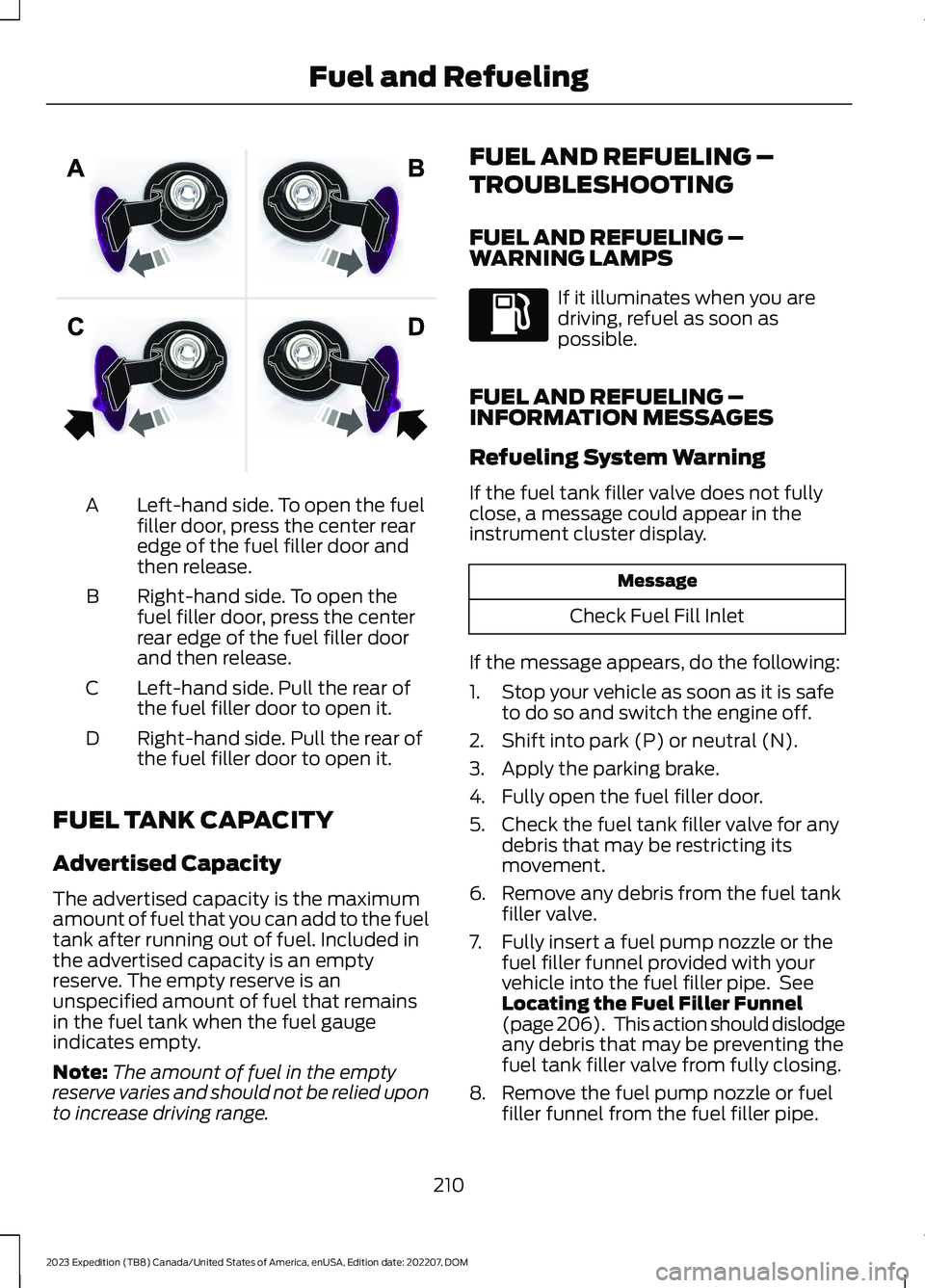
Left-hand side. To open the fuelfiller door, press the center rearedge of the fuel filler door andthen release.
A
Right-hand side. To open thefuel filler door, press the centerrear edge of the fuel filler doorand then release.
B
Left-hand side. Pull the rear ofthe fuel filler door to open it.C
Right-hand side. Pull the rear ofthe fuel filler door to open it.D
FUEL TANK CAPACITY
Advertised Capacity
The advertised capacity is the maximumamount of fuel that you can add to the fueltank after running out of fuel. Included inthe advertised capacity is an emptyreserve. The empty reserve is anunspecified amount of fuel that remainsin the fuel tank when the fuel gaugeindicates empty.
Note:The amount of fuel in the emptyreserve varies and should not be relied uponto increase driving range.
FUEL AND REFUELING –
TROUBLESHOOTING
FUEL AND REFUELING –WARNING LAMPS
If it illuminates when you aredriving, refuel as soon aspossible.
FUEL AND REFUELING –INFORMATION MESSAGES
Refueling System Warning
If the fuel tank filler valve does not fullyclose, a message could appear in theinstrument cluster display.
Message
Check Fuel Fill Inlet
If the message appears, do the following:
1.Stop your vehicle as soon as it is safeto do so and switch the engine off.
2.Shift into park (P) or neutral (N).
3.Apply the parking brake.
4.Fully open the fuel filler door.
5.Check the fuel tank filler valve for anydebris that may be restricting itsmovement.
6.Remove any debris from the fuel tankfiller valve.
7.Fully insert a fuel pump nozzle or thefuel filler funnel provided with yourvehicle into the fuel filler pipe. SeeLocating the Fuel Filler Funnel(page 206). This action should dislodgeany debris that may be preventing thefuel tank filler valve from fully closing.
8.Remove the fuel pump nozzle or fuelfiller funnel from the fuel filler pipe.
210
2023 Expedition (TB8) Canada/United States of America, enUSA, Edition date: 202207, DOMFuel and RefuelingE206911
Page 217 of 658
AUTOMATIC TRANSMISSION
PRECAUTIONS
WARNING: Apply the parkingbrake, shift into park (P), switch theignition off and remove the key beforeyou leave your vehicle. Failure to followthis instruction could result in personalinjury or death.
WARNING: When your vehicle isstationary, keep the brake pedal fullypressed when shifting gears. Failure tofollow this instruction could result inpersonal injury, death or propertydamage.
WARNING: Do not apply the brakepedal and accelerator pedalsimultaneously. Applying both pedalssimultaneously for more than a fewseconds will limit engine performance,which may result in difficulty maintainingspeed in traffic and could lead to seriousinjury.
AUTOMATIC TRANSMISSION
POSITIONS
PARK (P)
WARNING: Shift into park (P) onlywhen your vehicle is stationary.
In park (P) power is not transmitted to thedriven wheels.
Note:A tone sounds if you attempt to exityour vehicle without the vehicle in park (P).
Note:Your vehicle may not shift out of park(P) if the vehicle battery has run out ofcharge.
Note:Your vehicle may not shift out of park(P) if a fuse is blown.
Note:Your vehicle may not shift out of park(P) unless the key or remote control is insideyour vehicle.
Note:The electronic parking brake couldapply when the selector is in park (P). SeeAutomatically Releasing the ElectricParking Brake (page 233).
Note:Your vehicle could shift into park (P)if you attempt to exit your vehicle withoutthe vehicle in park (P). See How DoesAutomatic Return to Park (P) Work (page217).
Note:A tone could sound when you selectpark (P).
REVERSE (R)
WARNING: Shift into reverse (R)only when your vehicle is stationary.
In reverse (R) power is transmitted to thedriven wheels.
NEUTRAL (N)
WARNING: In neutral (N) yourvehicle is free to roll.
In neutral (N) power is not transmitted tothe driven wheels.
DRIVE (D)
In drive (D) power is transmitted to thedriven wheels.
213
2023 Expedition (TB8) Canada/United States of America, enUSA, Edition date: 202207, DOMAutomatic Transmission
Page 218 of 658
MANUAL (M)
In manual (M) you can select a specificgear. See Manually Shifting Gears (page215).
Note:We recommend using this mode fordriving on hilly or mountainous roads orwhen towing a trailer. See Towing a Trailer(page 358).
SHIFTING YOUR VEHICLE INTO
GEAR
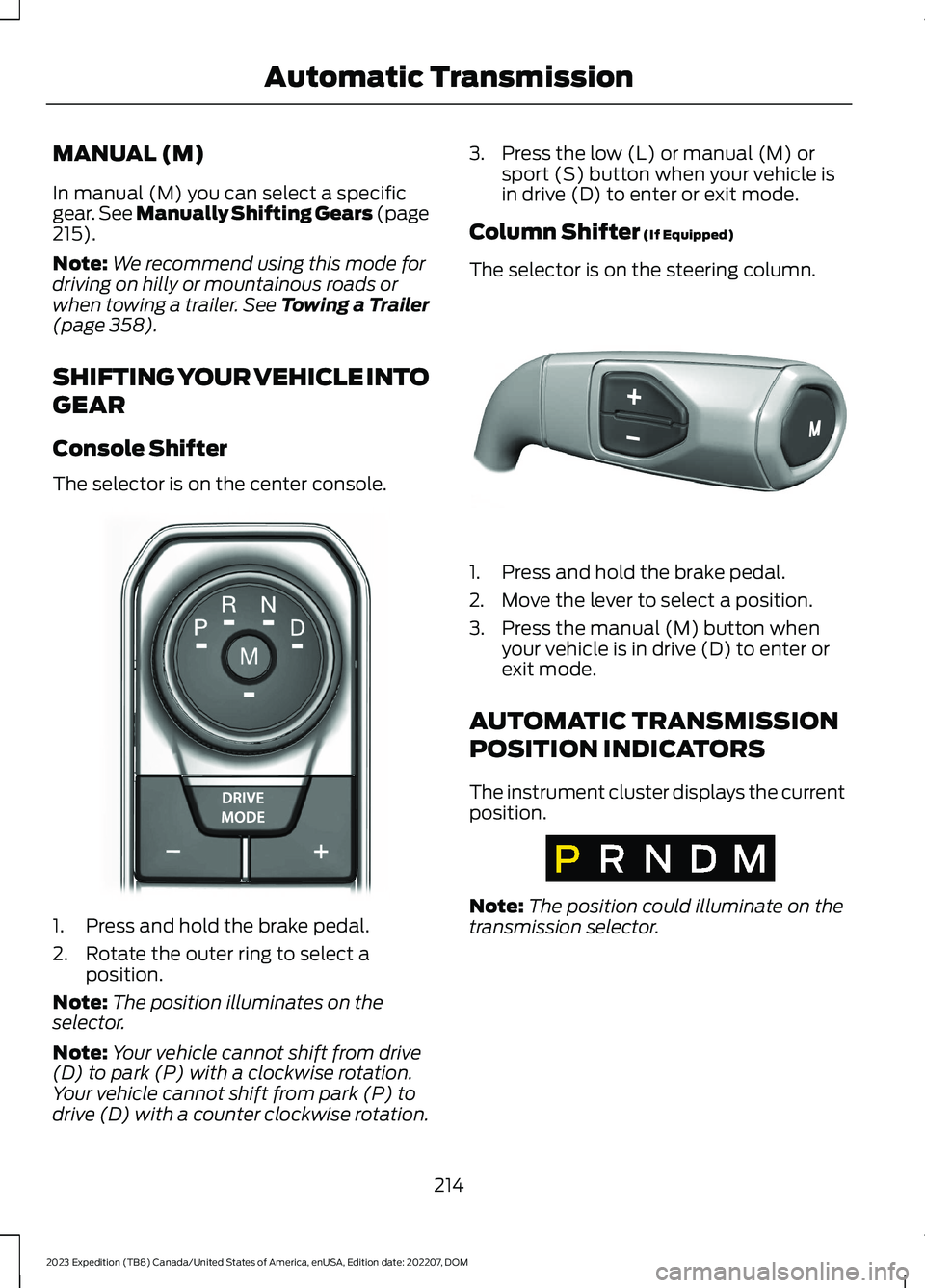
Console Shifter
The selector is on the center console.
1.Press and hold the brake pedal.
2.Rotate the outer ring to select aposition.
Note:The position illuminates on theselector.
Note:Your vehicle cannot shift from drive(D) to park (P) with a clockwise rotation.Your vehicle cannot shift from park (P) todrive (D) with a counter clockwise rotation.
3.Press the low (L) or manual (M) orsport (S) button when your vehicle isin drive (D) to enter or exit mode.
Column Shifter (If Equipped)
The selector is on the steering column.
1.Press and hold the brake pedal.
2.Move the lever to select a position.
3.Press the manual (M) button whenyour vehicle is in drive (D) to enter orexit mode.
AUTOMATIC TRANSMISSION
POSITION INDICATORS
The instrument cluster displays the currentposition.
Note:The position could illuminate on thetransmission selector.
214
2023 Expedition (TB8) Canada/United States of America, enUSA, Edition date: 202207, DOMAutomatic TransmissionE252861 E327267 E317778
Page 219 of 658
MANUALLY SHIFTING GEARS
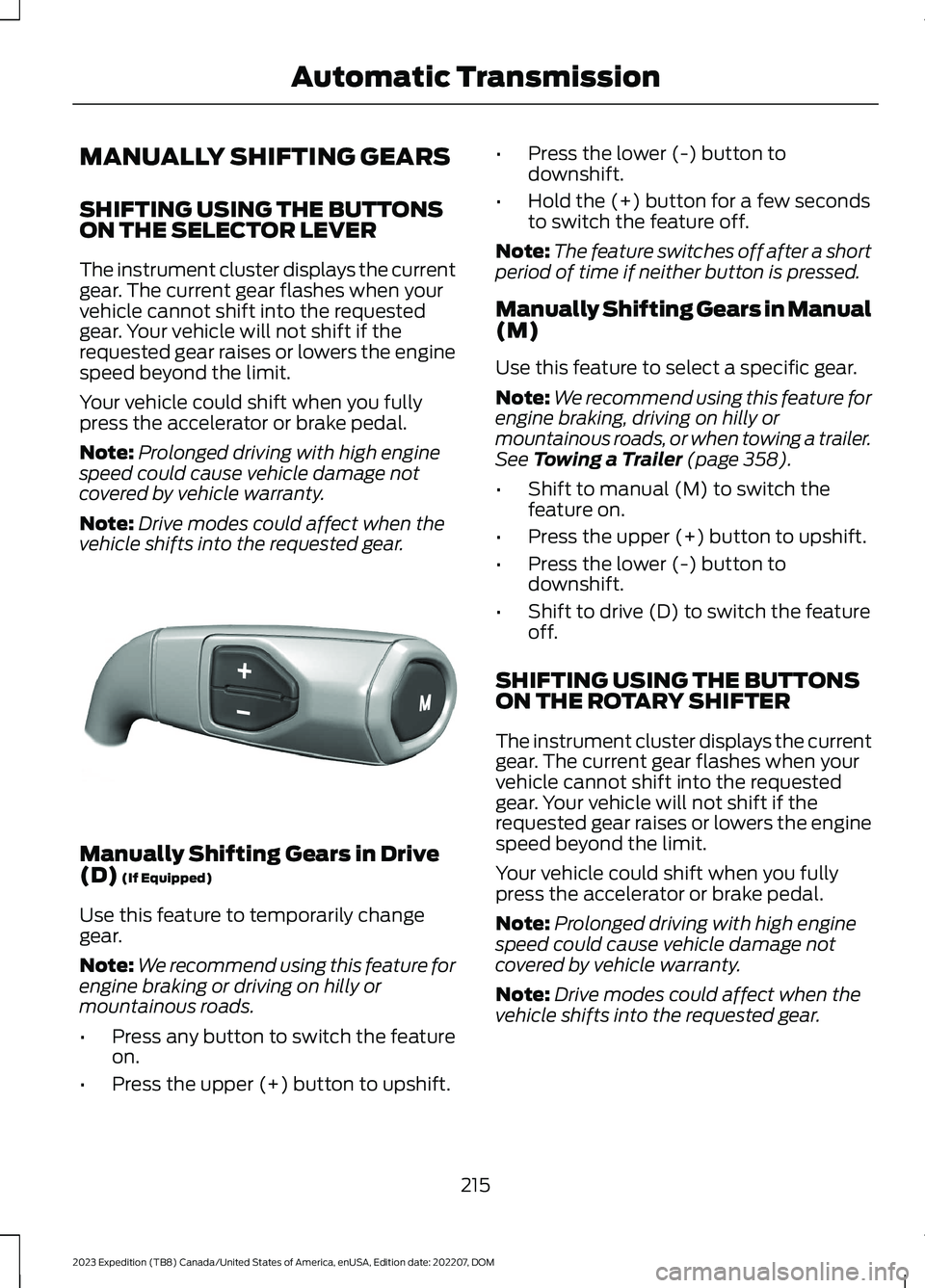
SHIFTING USING THE BUTTONSON THE SELECTOR LEVER
The instrument cluster displays the currentgear. The current gear flashes when yourvehicle cannot shift into the requestedgear. Your vehicle will not shift if therequested gear raises or lowers the enginespeed beyond the limit.
Your vehicle could shift when you fullypress the accelerator or brake pedal.
Note:Prolonged driving with high enginespeed could cause vehicle damage notcovered by vehicle warranty.
Note:Drive modes could affect when thevehicle shifts into the requested gear.
Manually Shifting Gears in Drive(D) (If Equipped)
Use this feature to temporarily changegear.
Note:We recommend using this feature forengine braking or driving on hilly ormountainous roads.
•Press any button to switch the featureon.
•Press the upper (+) button to upshift.
•Press the lower (-) button todownshift.
•Hold the (+) button for a few secondsto switch the feature off.
Note:The feature switches off after a shortperiod of time if neither button is pressed.
Manually Shifting Gears in Manual(M)
Use this feature to select a specific gear.
Note:We recommend using this feature forengine braking, driving on hilly ormountainous roads, or when towing a trailer.See Towing a Trailer (page 358).
•Shift to manual (M) to switch thefeature on.
•Press the upper (+) button to upshift.
•Press the lower (-) button todownshift.
•Shift to drive (D) to switch the featureoff.
SHIFTING USING THE BUTTONSON THE ROTARY SHIFTER
The instrument cluster displays the currentgear. The current gear flashes when yourvehicle cannot shift into the requestedgear. Your vehicle will not shift if therequested gear raises or lowers the enginespeed beyond the limit.
Your vehicle could shift when you fullypress the accelerator or brake pedal.
Note:Prolonged driving with high enginespeed could cause vehicle damage notcovered by vehicle warranty.
Note:Drive modes could affect when thevehicle shifts into the requested gear.
215
2023 Expedition (TB8) Canada/United States of America, enUSA, Edition date: 202207, DOMAutomatic TransmissionE327267
Page 221 of 658
Do not tow your vehicle in this mode.Failure to follow these instructions couldresult in vehicle damage not covered bythe vehicle warranty.
ENTERING TEMPORARYNEUTRAL MODE
1.Bring your vehicle to a complete stop.
2.Press and hold the brake pedal.
3.Power your vehicle on.
4.Shift into neutral (N).
Note:An instructional message appears.
5.Press the manual (M) button.
Note:A confirmation message appearswhen your vehicle enters the mode.
6.Release the brake pedal.
Note:Your vehicle is free to roll.
7.Switch your vehicle off.
Note:Do not tow your vehicle in this mode.
Note:The neutral (N) indicator on thetransmission selector may flash in thismode.
EXITING TEMPORARY NEUTRALMODE
1.Press the brake pedal.
2.Shift into park (P), or power yourvehicle on and shift into drive (D) orreverse (R).
USING PROGRESSIVE RANGE
SELECTION (IF EQUIPPED)
Progressive range selection gives you theability to lock out gears from the automaticshifting range. This could provide you withan improved driving experience by reducingtransmission shifts, for example, in slipperyconditions or steep slopes.
With the transmission in drive (D), pressthe - button to begin to switch the featureon.
Press the - button again to continue lockingout higher gears. Beginning with the highestgear, the instrument cluster will indicatethe current gear and highest gear available.For example, press the - button twice tolock out 10th and 9th gears.
Note:The instrument cluster will indicatethe current gear and highest gear available.
Press the + button to unlock gears to allowthe transmission to shift to higher gears.
Note: The transmission automaticallyshifts within the gear range you select.
AUTOMATIC RETURN TO
PARK (P)
WHAT IS AUTOMATIC RETURN TOPARK (P)
Your vehicle shifts into park (P) if youattempt to exit your vehicle without thetransmission in park (P).
HOW DOES AUTOMATIC RETURNTO PARK (P) WORK
Your vehicle shifts into park (P) when yourvehicle is stationary and any of thefollowing occur:
•You switch the vehicle off.
•You open the driver door with yourseatbelt unlatched.
•You unlatch the driver seatbelt whenthe driver door is open.
Note:Do not use automatic return to park(P) when your vehicle is moving, except inan emergency. See Starting and Stoppingthe Engine (page 193).
217
2023 Expedition (TB8) Canada/United States of America, enUSA, Edition date: 202207, DOMAutomatic Transmission
Page 227 of 658
Avoid driving at excessive speed. Thiscauses vehicle momentum to work againstyou and your vehicle could become stuckto the point that assistance may berequired from another vehicle. Remember,you may be able to back out the way youcame if you proceed with caution.
DRIVING THROUGH MUD ANDWATER
WARNING: Do not spin the wheelsat over 34 mph (55 km/h). The tires mayfail and injure a passenger or bystander.
Mud
Be cautious of sudden changes in vehiclespeed or direction when you are driving inmud. Even four-wheel drive vehicles canlose traction in slick mud. If your vehicledoes slide, steer in the direction of the slideuntil you regain control of your vehicle.After driving through mud, clean off residuestuck to rotating driveshafts and tires.Excess mud stuck on tires and rotatingdriveshafts can cause an imbalance thatcould damage drive components.
Water
If you must drive through high water, driveslowly. Traction or brake capability maybe limited. When driving through water,determine the depth and avoid waterhigher than the bottom of the hubs. If theignition system gets wet, your vehicle maystall. Once through water, test the brakes.Wet brakes do not stop your vehicle aseffectively as dry brakes. Drying improvesby applying light pressure to the brakepedal while moving slowly.
Note:Driving through deep water maydamage the transmission. If the front or rearaxle is submerged in water, the axlelubricant and transfer case lubricant shouldbe checked and changed if necessary.
DRIVING ON HILLY OR SLOPINGTERRAIN
Although natural obstacles may make itnecessary to travel diagonally up or downa hill or steep incline, you should try to drivestraight up or straight down.
Note:Avoid turning on steep slopes or hills.A danger lies in losing traction, slippingsideways and possible vehicle roll over.Whenever driving on a hill, determinebeforehand the route you can use. Do notdrive over the crest of a hill without seeingwhat conditions are on the other side. Donot drive in reverse over a hill without theaid of an observer.
When climbing a steep slope or hill, startin a lower gear rather than downshifting toa lower gear from a higher gear once theascent has started. This reduces strain onthe engine and the possibility of stalling.
If your vehicle stalls, do not try toturnaround because this could causevehicle roll over. It is better to reverse backto a safe location.
Apply just enough power to the wheels toclimb the hill. Too much power can causethe tires to slip, spin or lose traction,resulting in loss of vehicle control.
Descend a hill in the same gear you woulduse to climb up the hill to avoid excessivebrake application and brake overheating.Do not descend in neutral. Disengageoverdrive or move the transmissionselector lever to a lower gear. Whendescending a steep hill, avoid sudden hardbraking as you could lose control. The frontwheels have to be turning in order to steeryour vehicle.
223
2023 Expedition (TB8) Canada/United States of America, enUSA, Edition date: 202207, DOMFour-Wheel Drive (If Equipped)
Page 228 of 658
Note:If your vehicle has anti-lock brakes,apply the brakes steadily. Do not pump thebrakes.
DRIVING ON SNOW AND ICE
Four-wheel drive vehicles have advantagesover two-wheel drive vehicles in snow andice but can skid like any other vehicle.Should you start to slide while driving onsnowy or icy roads, turn the steering wheelin the direction of the slide until you regaincontrol.
Avoid sudden applications of power andquick changes of direction on snow andice. Apply the accelerator slowly andsteadily when starting from a full stop.Avoid sudden braking. Although afour-wheel drive vehicle can acceleratebetter than a two-wheel drive vehicle insnow and ice, it cannot stop any faster asbraking occurs at all four wheels. Do notbecome overconfident as to roadconditions.
Make sure you allow sufficient distancebetween you and other vehicles forstopping. Drive slower than usual andconsider using one of the lower gears. Inemergency stopping situations, apply thebrake steadily. Do not pump the brakepedal. See Anti-Lock Braking SystemLimitations (page 229).
Note:Excessive tire slippage can causetransmission damage.
FOUR-WHEEL DRIVE –
TROUBLESHOOTING
FOUR-WHEEL DRIVE – WARNINGLAMPS
Illuminates when a four-wheeldrive or power train fault ispresent.
Note:When a system fault is present, thesystem can typically remain in whichevermode was selected prior to the faultcondition occurring. It does not default totwo-wheel drive in all circumstances. Whenthis warning is displayed, have your vehicleserviced by an authorized dealer.
FOUR-WHEEL DRIVE – INFORMATION MESSAGES
ActionMessage
A four-wheel drive system fault is present.Have your vehicle checked as soon aspossible.
Check 4x4
The four-wheel drive system is making ashift.4x4 Shift in Progress
Displays when you attempt to switch tofour-wheel drive low mode and you do notshift the transmission to neutral (N) first.
For 4x4 LOW Shift to N
224
2023 Expedition (TB8) Canada/United States of America, enUSA, Edition date: 202207, DOMFour-Wheel Drive (If Equipped)