2023 FORD EXPEDITION mirror
[x] Cancel search: mirrorPage 324 of 658

WHAT IS BLIND SPOT
INFORMATION SYSTEM
Blind spot information system detectsvehicles that may have entered the blindspot zone.
HOW DOES BLIND SPOT
INFORMATION SYSTEM WORK
Blind spot information system usessensors on both sides of your vehicle,detecting rearward from the exteriormirrors to approximately 13 ft (4 m)beyond the rear bumper. The detectionarea extends to approximately 59 ft (18 m)beyond the rear bumper when the vehiclespeed is greater than 30 mph (48 km/h)to alert you of faster approaching vehicles.
BLIND SPOT INFORMATION
SYSTEM PRECAUTIONS
WARNING: Do not use the blindspot information system as areplacement for using the interior andexterior mirrors or looking over yourshoulder before changing lanes. Theblind spot information system is not areplacement for careful driving.
WARNING: The system may notoperate properly during severe weatherconditions, for example snow, ice, heavyrain and spray. Always drive with duecare and attention. Failure to take caremay result in a crash.
Note: Blind spot information system doesnot prevent contact with other vehicles. Itdoes not detect parked vehicles,pedestrians, animals or other infrastructure.
BLIND SPOT INFORMATION
SYSTEM LIMITATIONS
Blind spot information system does notoperate in park (P) or reverse (R).
The system may not alert you if a vehiclequickly passes through the detection zone.
Note:For vehicles without blind spotinformation system with trailer coverage,aftermarket trailer tow modules or tow barsmay interfere with the system. In thissituation it is recommended that you switchthe system off when you attach a trailer. Forvehicles with a trailer tow module and towbar approved by the manufacturer, thesystem automatically turns off when youattach a trailer.
BLIND SPOT INFORMATION
SYSTEM REQUIREMENTS
Blind spot information system turns onwhen all the following occur:
•You start your vehicle.
•You shift into drive (D).
•The vehicle speed is greater than6 mph (10 km/h).
320
2023 Expedition (TB8) Canada/United States of America, enUSA, Edition date: 202207, DOMBlind Spot Information SystemE255695
Page 326 of 658
BLIND SPOT INFORMATION
SYSTEM WITH TRAILER
COVERAGE
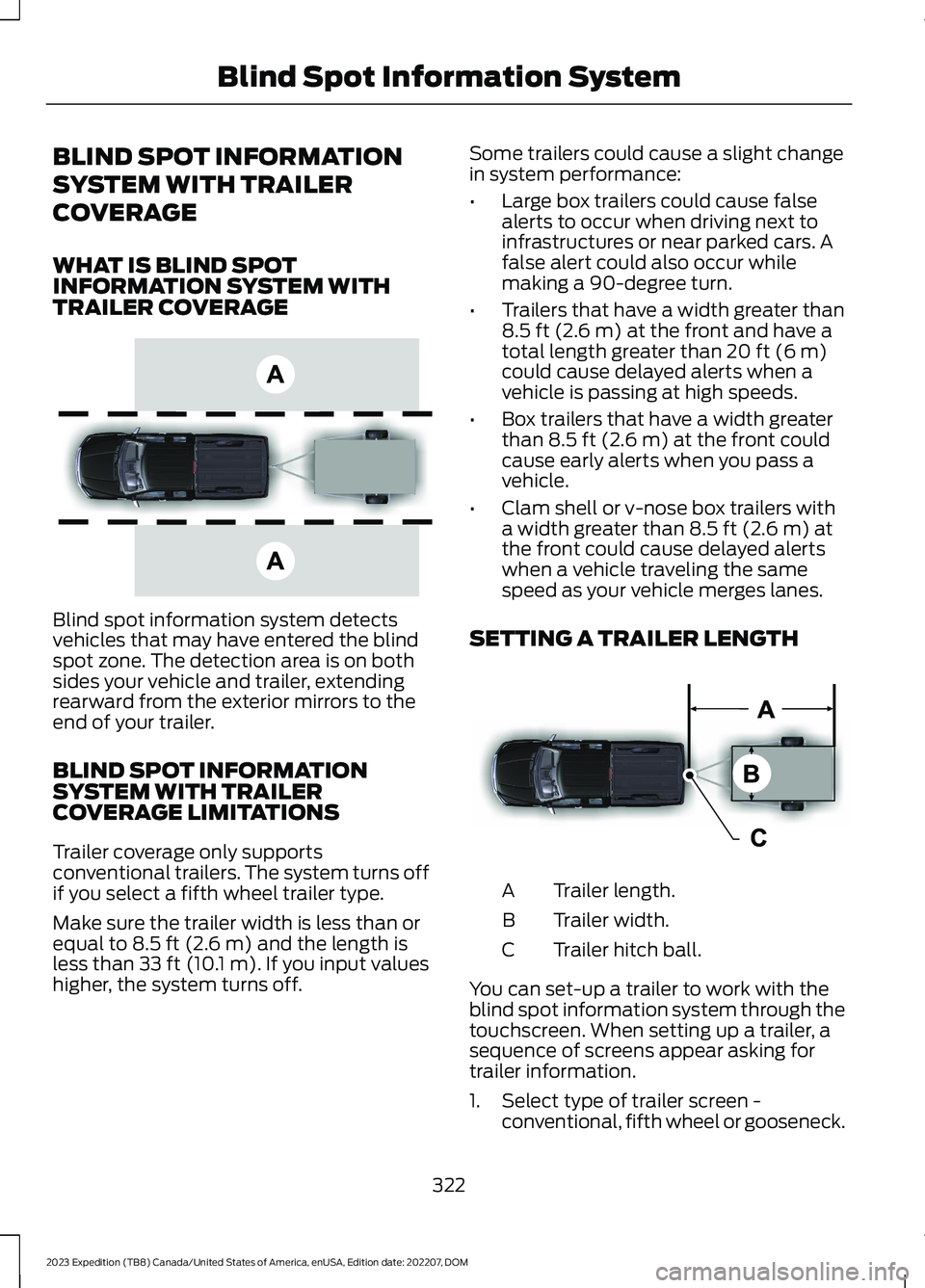
WHAT IS BLIND SPOTINFORMATION SYSTEM WITHTRAILER COVERAGE
Blind spot information system detectsvehicles that may have entered the blindspot zone. The detection area is on bothsides your vehicle and trailer, extendingrearward from the exterior mirrors to theend of your trailer.
BLIND SPOT INFORMATIONSYSTEM WITH TRAILERCOVERAGE LIMITATIONS
Trailer coverage only supportsconventional trailers. The system turns offif you select a fifth wheel trailer type.
Make sure the trailer width is less than orequal to 8.5 ft (2.6 m) and the length isless than 33 ft (10.1 m). If you input valueshigher, the system turns off.
Some trailers could cause a slight changein system performance:
•Large box trailers could cause falsealerts to occur when driving next toinfrastructures or near parked cars. Afalse alert could also occur whilemaking a 90-degree turn.
•Trailers that have a width greater than8.5 ft (2.6 m) at the front and have atotal length greater than 20 ft (6 m)could cause delayed alerts when avehicle is passing at high speeds.
•Box trailers that have a width greaterthan 8.5 ft (2.6 m) at the front couldcause early alerts when you pass avehicle.
•Clam shell or v-nose box trailers witha width greater than 8.5 ft (2.6 m) atthe front could cause delayed alertswhen a vehicle traveling the samespeed as your vehicle merges lanes.
SETTING A TRAILER LENGTH
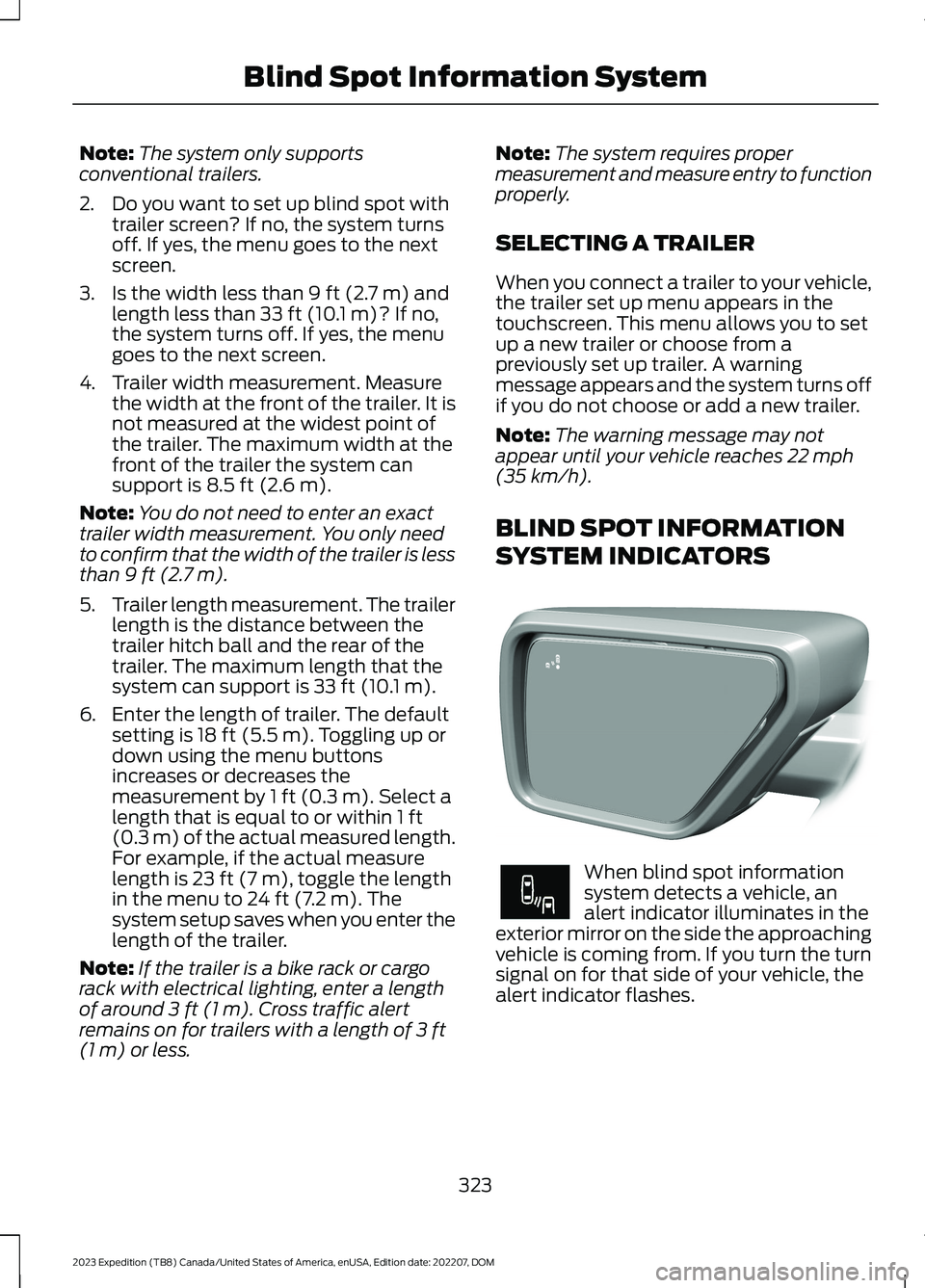
Trailer length.A
Trailer width.B
Trailer hitch ball.C
You can set-up a trailer to work with theblind spot information system through thetouchscreen. When setting up a trailer, asequence of screens appear asking fortrailer information.
1.Select type of trailer screen -conventional, fifth wheel or gooseneck.
322
2023 Expedition (TB8) Canada/United States of America, enUSA, Edition date: 202207, DOMBlind Spot Information SystemE225007 E225008
Page 327 of 658
Note:The system only supportsconventional trailers.
2.Do you want to set up blind spot withtrailer screen? If no, the system turnsoff. If yes, the menu goes to the nextscreen.
3.Is the width less than 9 ft (2.7 m) andlength less than 33 ft (10.1 m)? If no,the system turns off. If yes, the menugoes to the next screen.
4.Trailer width measurement. Measurethe width at the front of the trailer. It isnot measured at the widest point ofthe trailer. The maximum width at thefront of the trailer the system cansupport is 8.5 ft (2.6 m).
Note:You do not need to enter an exacttrailer width measurement. You only needto confirm that the width of the trailer is lessthan 9 ft (2.7 m).
5.Trailer length measurement. The trailerlength is the distance between thetrailer hitch ball and the rear of thetrailer. The maximum length that thesystem can support is 33 ft (10.1 m).
6.Enter the length of trailer. The defaultsetting is 18 ft (5.5 m). Toggling up ordown using the menu buttonsincreases or decreases themeasurement by 1 ft (0.3 m). Select alength that is equal to or within 1 ft(0.3 m) of the actual measured length.For example, if the actual measurelength is 23 ft (7 m), toggle the lengthin the menu to 24 ft (7.2 m). Thesystem setup saves when you enter thelength of the trailer.
Note:If the trailer is a bike rack or cargorack with electrical lighting, enter a lengthof around 3 ft (1 m). Cross traffic alertremains on for trailers with a length of 3 ft(1 m) or less.
Note:The system requires propermeasurement and measure entry to functionproperly.
SELECTING A TRAILER
When you connect a trailer to your vehicle,the trailer set up menu appears in thetouchscreen. This menu allows you to setup a new trailer or choose from apreviously set up trailer. A warningmessage appears and the system turns offif you do not choose or add a new trailer.
Note:The warning message may notappear until your vehicle reaches 22 mph(35 km/h).
BLIND SPOT INFORMATION
SYSTEM INDICATORS
When blind spot informationsystem detects a vehicle, analert indicator illuminates in theexterior mirror on the side the approachingvehicle is coming from. If you turn the turnsignal on for that side of your vehicle, thealert indicator flashes.
323
2023 Expedition (TB8) Canada/United States of America, enUSA, Edition date: 202207, DOMBlind Spot Information SystemE309137 E249861E249861
Page 329 of 658

WHAT IS CROSS TRAFFIC
ALERT
The system alerts you of vehiclesapproaching from the sides behind yourvehicle when you shift into reverse (R).
HOW DOES CROSS TRAFFIC
ALERT WORK
Cross traffic alert detects vehicles thatapproach at a speed between 4–37 mph(6–60 km/h). Coverage decreases whenthe sensors are partially, mostly or fullyobstructed.
The sensor on the left-hand side is onlypartially obstructed and zone coverage onthe right-hand side is maximized.
Zone coverage also decreases whenparking at narrow angles. The sensor onthe left-hand side is mostly obstructed andzone coverage on that side is severelyreduced.
Note: Slowly reversing helps increase thecoverage area and effectiveness.
CROSS TRAFFIC ALERT
PRECAUTIONS
WARNING: Do not use the crosstraffic alert system as a replacement forusing the interior and exterior mirrors orlooking over your shoulder beforereversing out of a parking space. Thecross traffic alert system is not areplacement for careful driving.
WARNING: The system may notoperate properly during severe weatherconditions, for example snow, ice, heavyrain and spray. Always drive with duecare and attention. Failure to take caremay result in a crash.
CROSS TRAFFIC ALERT
LIMITATIONS
The system may not correctly operatewhen any of the following occur:
•Something is blocking the sensors.
•Adjacently parked vehicles or objectsare obstructing the sensors.
•Vehicles approach at speeds less than4 mph (6 km/h) or greater than 37 mph(60 km/h).
•Your vehicle speed is greater than7 mph (12 km/h).
•You reverse out of an angled parkingspace.
325
2023 Expedition (TB8) Canada/United States of America, enUSA, Edition date: 202207, DOMCross Traffic AlertE142440 E142441
Page 331 of 658

If something is blocking the sensors, amessage may appear in the informationdisplay when you shift into reverse (R).
Note:Bike and cargo racks could causefalse alerts due to obstruction of the sensor.We recommend switching the feature offwhen using a bike or cargo rack.
CROSS TRAFFIC ALERT
INDICATORS
When the cross traffic alertdetects an approaching vehicle,a tone sounds, a warning lampilluminates in the relevant exterior mirrorand arrows appear in the informationdisplay to show which side the vehicle isapproaching from.
If the system malfunctions, a warning lampilluminates in the instrument cluster anda message appears in the instrumentcluster display. Have your vehicle checkedas soon as possible.
Note:If arrows do not display, a messageappears in the instrument cluster display.
Note:In some conditions, the system couldalert you, even when there is nothing in thedetection zone, for example a vehiclepassing further away from your vehicle.
CROSS TRAFFIC ALERT – TROUBLESHOOTING
CROSS TRAFFIC ALERT – INFORMATION MESSAGES
ActionMessage
Displays instead of indication arrows whenthe system detects a vehicle. Check forapproaching traffic.
Cross Traffic Alert
Indicates blocked cross traffic alert systemsensors. Clean the sensors. If the messagecontinues to appear, have your vehiclechecked as soon as possible.
Cross Traffic Not Available Sensor BlockedSee Manual
The system has malfunctioned. Have yourvehicle checked as soon as possible.Cross Traffic System Fault
Displays if you attach a trailer to yourvehicle.Cross Traffic Alert Deactivated TrailerAttached
Note:When connecting a trailer, the systemmay detect the trailer and turn the systemOFF. If the system does not turn OFFautomatically, switch the cross traffic alertsystem OFF manually.
327
2023 Expedition (TB8) Canada/United States of America, enUSA, Edition date: 202207, DOMCross Traffic AlertE268294
Page 343 of 658

WHAT IS DRIVER ALERT
Driver alert alerts you if it determines thatyou are becoming drowsy or if your drivingdeteriorates.
HOW DOES DRIVER ALERT
WORK
Driver Alert calculates your alertness levelbased on your driving behavior in relationto the lane markings and other factorsthrough use of the front camera sensorbehind the interior mirror.
DRIVER ALERT PRECAUTIONS
WARNING: You are responsible forcontrolling your vehicle at all times. Thesystem is designed to be an aid and doesnot relieve you of your responsibility todrive with due care and attention. Failureto follow this instruction could result inthe loss of control of your vehicle,personal injury or death.
WARNING: Take regular restbreaks if you feel tired. Do not wait forthe system to warn you.
WARNING: Certain driving stylesmay result in the system warning youeven if you are not feeling tired.
WARNING: In cold and severeweather conditions the system may notfunction. Rain, snow and spray can alllimit sensor performance.
WARNING: The system will notoperate if the sensor cannot track theroad lane markings.
WARNING: If damage occurs in theimmediate area surrounding the sensor,have your vehicle checked as soon aspossible.
WARNING: The system may notcorrectly operate if your vehicle is fittedwith a suspension kit not approved byus.
WARNING: The system may notoperate properly if the sensor is blocked.Keep the windshield free fromobstruction.
Note:If something is blocking the cameraor damaged the windshield, Driver Alert maynot function.
DRIVER ALERT LIMITATIONS
Driver alert may not function correctly if:
•The sensor cannot track the road lanemarkings.
•Your vehicle's speed is less thanapproximately 40 mph (65 km/h).
339
2023 Expedition (TB8) Canada/United States of America, enUSA, Edition date: 202207, DOMDriver AlertE309385
Page 345 of 658

WHAT IS SPEED SIGN
RECOGNITION
Speed sign recognition detects speed limitsigns to inform you of the current speedlimit. Detected speed signs appear in theinstrument cluster display.
HOW DOES SPEED SIGN
RECOGNITION WORK
Speed sign recognition uses a sensorbehind the interior mirror to detect speedsigns.
If your vehicle has speed sign recognitionwith navigation, stored speed sign datamay influence the indicated speed limitvalue.
SPEED SIGN RECOGNITION
PRECAUTIONS
WARNING: You are responsible forcontrolling your vehicle at all times. Thesystem is designed to be an aid and doesnot relieve you of your responsibility todrive with due care and attention. Failureto follow this instruction could result inthe loss of control of your vehicle,personal injury or death.
WARNING: In cold and severeweather conditions the system may notfunction. Rain, snow and spray can alllimit sensor performance.
WARNING: The system may notoperate properly if the sensor is blocked.Keep the windshield free fromobstruction.
Note:Do not carry out windshield repairsin the immediate area surrounding thesensor.
Note:If your vehicle has a suspension kitnot approved by Ford, the system may notcorrectly function.
Note:The system may not detect all speedsigns and may incorrectly read signs.
Note:Always fit our original parts whenreplacing headlamp bulbs. Other bulbs mayreduce system performance.
SPEED SIGN RECOGNITION
LIMITATIONS
Speed sign recognition may not operatecorrectly due to:
•Outdated map data.
•Incorrect recognition of speed limits bythe sensor of signs on parallel roads orexit ramps.
•Missed recognition of faded, dirty, ordistorted signs.
SPEED SIGN RECOGNITION
INDICATORS
When the system detects a speed limitsign, it appears in the instrument clusterdisplay.
341
2023 Expedition (TB8) Canada/United States of America, enUSA, Edition date: 202207, DOMSpeed Sign Recognition (If Equipped)E317824
Page 414 of 658

Protected ComponentRatingItem
In-vehicle temperature andhumidity sensor.5 A21
Electrochromic mirror.5 A22Second row heated seatmodule.
Power window switch.30 A23Power mirror switch.Left-hand front door zonemodule.
Moonroof logic.30 A24
Speaker amplifier 2.20 A25
Right-hand front door zonemodule.30 A26
Left-hand rear door zonemodule.30 A27
Right-hand rear door zonemodule.30 A28
Adjustable pedals.15 A29
Trailer tow control module.5 A30
Rear climate controlmodule.10 A31
Drive mode switch module.Terrain management switch.Radio frequency transceivermodule.4x4 switch.
Audio control module.20 A32
Not used.—33
Run/start relay.30 A34
Not used (spare).5 A35
Image processing module A.15 A36Automated park assistmodule.
410
2023 Expedition (TB8) Canada/United States of America, enUSA, Edition date: 202207, DOMFuses