2023 FORD EXPEDITION cooling
[x] Cancel search: coolingPage 422 of 658
WARNING: Do not remove thecoolant reservoir cap when the engine ison or the cooling system is hot. Wait 10minutes for the cooling system to cooldown. Cover the coolant reservoir capwith a thick cloth to prevent thepossibility of scalding and slowly removethe cap. Failure to follow this instructioncould result in personal injury.
Your vehicle has limited engine powerwhen in the fail-safe mode, drive yourvehicle with caution. Your vehicle does notmaintain high-speed operation and theengine could operate poorly.
Remember that the engine is capable ofautomatically shutting down to preventengine damage. In this situation:
1.Pull off the road as soon as safelypossible and switch the engine off.
2.If you are a member of a roadsideassistance program, we recommendthat you contact your roadsideassistance service provider.
3.If this is not possible, wait for a shortperiod of time for the engine to cool.
4.Check the coolant level. If the coolantlevel is at or below the minimum mark,add prediluted coolant immediately.
5.When the engine temperature cools,you can re-start the engine. Have yourvehicle checked as soon as possible tominimize engine damage.
Note:If you continue to drive your vehiclein fail-safe mode without repairing it, youwill damage your engine.
Engine Coolant TemperatureManagement (If Equipped)
WARNING: To reduce the risk ofcrash and injury, be prepared that thevehicle speed may reduce and thevehicle may not be able to acceleratewith full power until the coolanttemperature reduces.
If you tow a trailer with your vehicle, theengine may temporarily reach a highertemperature during severe operatingconditions, for example ascending a longor steep grade in high ambienttemperatures.
At this time, you may notice the coolanttemperature gauge moves toward the redzone and a message may appear in theinformation display.
You may notice a reduction in vehiclespeed caused by reduced engine power inorder to manage the engine coolanttemperature. Your vehicle may enter thismode if certain high-temperature andhigh-load conditions take place. Theamount of speed reduction depends onvehicle loading, grade and ambienttemperature. If this occurs, there is noneed to stop your vehicle. You cancontinue to drive.
The air conditioning may automaticallyturn on and off during severe operatingconditions to protect the engine fromoverheating. When the coolanttemperature decreases to the normaloperating temperature, the air conditioningturns on.
If the coolant temperature gauge movesfully into the red zone, or if the coolanttemperature warning or service enginesoon messages appear in your informationdisplay, do the following:
418
2023 Expedition (TB8) Canada/United States of America, enUSA, Edition date: 202207, DOMMaintenance
Page 470 of 658
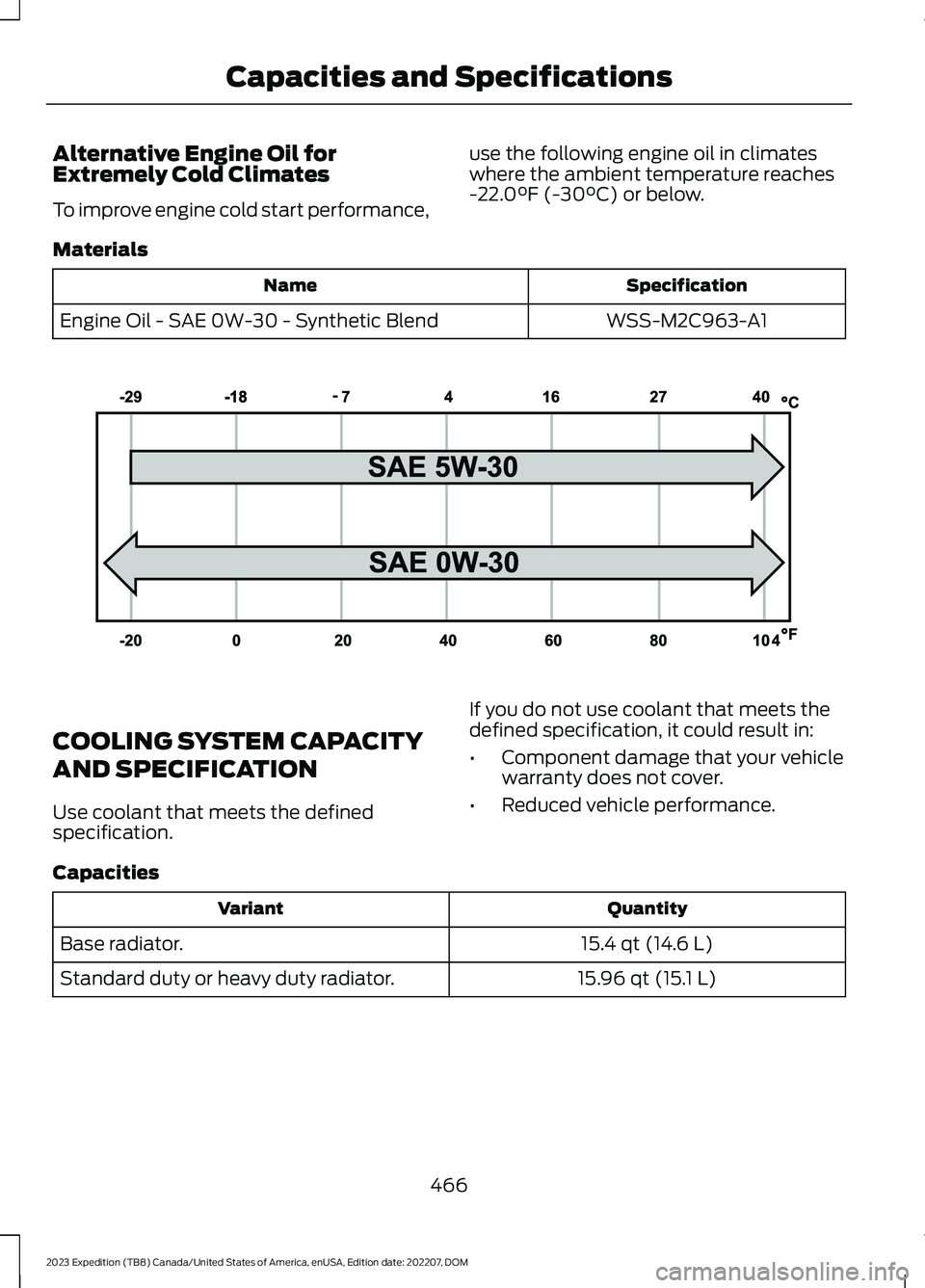
Alternative Engine Oil forExtremely Cold Climates
To improve engine cold start performance,
use the following engine oil in climateswhere the ambient temperature reaches-22.0°F (-30°C) or below.
Materials
SpecificationName
WSS-M2C963-A1Engine Oil - SAE 0W-30 - Synthetic Blend
COOLING SYSTEM CAPACITY
AND SPECIFICATION
Use coolant that meets the definedspecification.
If you do not use coolant that meets thedefined specification, it could result in:
•Component damage that your vehiclewarranty does not cover.
•Reduced vehicle performance.
Capacities
QuantityVariant
15.4 qt (14.6 L)Base radiator.
15.96 qt (15.1 L)Standard duty or heavy duty radiator.
466
2023 Expedition (TB8) Canada/United States of America, enUSA, Edition date: 202207, DOMCapacities and SpecificationsE240523
Page 545 of 658
Check Every Six Months
The battery connections. Clean if necessary.
The body and door drain holes for obstructions. Clean if necessary.
The cooling system fluid level and the coolant system strength.
The door weatherstrips for wear. Lubricate if necessary.
The hinges, latches and outside locks for proper operation. Lubricate if necessary.
The parking brake for proper operation.
The seatbelts and seat latches for wear and function.
Safety warning lamps, brake, ABS, airbag and seatbelt for operation.
The washer spray and wiper operation. Clean or replace blades as necessary.
Multi-Point Inspection
It is important to have the systems on yourvehicle regularly checked. This can helpidentify potential issues and prevent majorproblems. We recommend having thefollowing multi-point inspection performedat every scheduled maintenance intervalto help make sure your vehicle keepsrunning great.
Multi-Point Inspection
Hazard warning system operationAccessory drive belt or belts
Horn operationBattery performance
Radiator, cooler, heater and air conditioninghosesEngine air filter
Suspension components for leaks ordamageExhaust system
Steering and linkageExterior lamps operation
Tires including the spare for wear and
proper pressure2Fluid levels1; fill if necessary
541
2023 Expedition (TB8) Canada/United States of America, enUSA, Edition date: 202207, DOMScheduled Maintenance
Page 547 of 658
When to expect the OIL CHANGE REQUIRED Message
Vehicle Use and ExampleInterval
Extended hot or cold operation
Extreme3,000–5,000 mi(5,000–8,000 km)Maximum load or towingExtreme hot or cold operation
Normal Maintenance Intervals
At Every Oil Change Interval as Indicated by the Information Display 1
Change the engine oil and filter.2
Rotate the tires, inspect tire wear and measure tread depth.
Perform a multi-point inspection - recommended.
Inspect the automatic transmission fluid level - vehicles with dipstick. Consult yourdealer for requirements.
Inspect the brake pads, rotors, hoses and parking brake.
Inspect the engine cooling system strength and hoses.
Inspect the exhaust system and heat shields.
Inspect the front axle and U-joints.
Inspect the half-shaft boots.
Inspect the steering linkage, ball joints, suspension, tire-rod ends, driveshaft and U-joints.
Inspect the wheels and related components for abnormal noise, wear, looseness ordrag.
1 Do not exceed one year or 10,000 mi (16,000 km) between service intervals.2 Reset the oil change reminder after engine oil and filter changes.
543
2023 Expedition (TB8) Canada/United States of America, enUSA, Edition date: 202207, DOMScheduled Maintenance
Page 638 of 658

Connecting the Vehicle to a Wi-FiNetwork - Vehicles With: 15 InchScreen...........................................................476Connecting Your Phone..............................511Contacting Us...................................................19Cooling System Capacity andSpecification..............................................466Crash and BreakdownInformation.................................................393Automatic Crash Shutoff................................397Jump Starting the Vehicle..............................394Post-Crash Alert System................................396Post Impact Braking.........................................396Recovery Towing - Vehicles With: FrontTow Hook.........................................................397Crash Sensors and Airbag Indicator........63Creating a MyKey - Vehicles With: PushButton Start...................................................76Creating a MyKey - Vehicles Without:Push Button Start.......................................76Creating a Vehicle Wi-Fi Hotspot -Vehicles With: 12 Inch Screen...............478Creating a Vehicle Wi-Fi Hotspot -Vehicles With: 15 Inch Screen..............478Cross Traffic Alert........................................325Cross Traffic Alert –Troubleshooting.............................................327Cross Traffic Alert Indicators....................327Cross Traffic Alert Limitations................325Cross Traffic Alert Precautions...............325Cross Traffic Alert –Troubleshooting.........................................327Cross Traffic Alert – InformationMessages..........................................................327Cross Traffic Braking...................................239Cross Traffic Braking –Troubleshooting............................................240Cross Traffic Braking Indicators.............240Cross Traffic Braking Precautions.........239Cross Traffic Braking –Troubleshooting........................................240Cross Traffic Braking – Frequently AskedQuestions..........................................................241Cross Traffic Braking – InformationMessages.........................................................240Cruise Control................................................277Cruise Control Indicators...........................278
Customer Information...............................548Radio Frequency Certification Labels.........551Customizing the Instrument ClusterDisplay............................................................141
D
Data Privacy.....................................................26Department of Transportation UniformTire Quality Grades...................................437Deploying and Stowing the PowerRunning Boards.........................................105Digital Radio..................................................484Digital Radio Indicators...................................485Digital Radio Limitations................................484How Does Digital Radio Work......................484Switching Digital Radio Reception On andOff......................................................................485What Is Digital Radio.......................................484Directing the Flow of Air............................150Disposing of Airbags.....................................64Distance Alert................................................335Adjusting the Sensitivity of DistanceAlert....................................................................335What Is Distance Alert.....................................335Distance Indication.....................................332Distance Indication Indicator........................334Switching Distance Indication On andOff.......................................................................334What Is Distance Indication...........................332Doors and Locks Audible Warnings........83Doors and Locks..............................................81Autolock...................................................................82Autounlock.............................................................82Doors and Locks – Troubleshooting.............83Mislock.....................................................................82Operating the Doors From Inside YourVehicle..................................................................81Operating the Doors From Outside YourVehicle..................................................................81Doors and Locks –Troubleshooting..........................................83Doors and Locks – Frequently AskedQuestions...........................................................84Doors and Locks – InformationMessages...........................................................83Doors and Locks – Warning Lamps..............83Drive Belt Routing........................................428
634
2023 Expedition (TB8) Canada/United States of America, enUSA, Edition date: 202207, DOMIndex
Page 651 of 658
Overhead Storage...............................................191Under Floor Storage..........................................192Storing Your Vehicle...................................435SunroofSee: Moonroof......................................................132Switching Active Park Assist On andOff...................................................................273Switching Adaptive Cruise Control Onand Off...........................................................281Switching Air Conditioning On andOff...................................................................148Switching All of the Interior Lamps Onand Off...........................................................125Switching Android Auto On andOff...................................................................523Switching Apple CarPlay On andOff...................................................................523Switching Auto Hold On and Off...........243Switching Auto-Start-Stop On andOff..................................................................202Switching Blind Spot InformationSystem On and Off - Vehicles With: 12Inch Screen...................................................321Switching Blind Spot InformationSystem On and Off - Vehicles With: 15Inch Screen...................................................321Switching BlueCruise On and Off.........299Switching Climate Control On andOff...................................................................148Switching Cross Traffic Alert On and Off- Vehicles With: 12 Inch Screen............326Switching Cross Traffic Alert On and Off- Vehicles With: 15 Inch Screen............326Switching Cross Traffic Braking On andOff..................................................................240Switching Cruise Control On andOff...................................................................277Switching Defrost On and Off.................148Switching Driver Alert On and Off -Vehicles With: 12 Inch Screen..............340Switching Driver Alert On and Off -Vehicles With: 15.5 Inch Center DisplayScreen/15 Inch Screen...........................340Switching Easy Entry and Exit On andOff....................................................................90Switching From Adaptive Cruise Controlto Cruise Control - Vehicles With: 12Inch Screen.................................................289
Switching From Adaptive Cruise Controlto Cruise Control - Vehicles With: 15Inch Screen.................................................289Switching Hill Descent Control On andOff..................................................................256Switching Maximum Cooling On andOff...................................................................149Switching Maximum Defrost On andOff...................................................................148Switching Parking Aid On and Off.........261Switching Pre-Collision Assist On andOff - Vehicles With: 12 InchScreen...........................................................330Switching Pre-Collision Assist On andOff - Vehicles With: 15 InchScreen...........................................................330Switching Rear Occupant Alert SystemOn and Off - Vehicles With: 12 InchScreen.............................................................177Switching Rear Occupant Alert SystemOn and Off - Vehicles With: 15 InchScreen............................................................178Switching Recirculated Air On andOff...................................................................148Switching Repeat Mode On andOff..................................................................482Switching Reverse Braking Assist On andOff - Vehicles With: 12 InchScreen...........................................................236Switching Reverse Braking Assist On andOff - Vehicles With: 15 InchScreen...........................................................236Switching Shuffle Mode On andOff..................................................................482Switching Stability Control On andOff..................................................................248Switching Text Message Notification Onand Off...........................................................515Switching the Audio Unit On andOff...................................................................481Switching the Display On and Off........484Switching the Front Interior Lamps Onand Off...........................................................125Switching the Hazard Flashers On andOff..................................................................394Switching the Heated Mirrors On andOff...................................................................149
647
2023 Expedition (TB8) Canada/United States of America, enUSA, Edition date: 202207, DOMIndex