2023 FORD EXPEDITION brakes
[x] Cancel search: brakesPage 244 of 658
Note:You may experience reduced systemperformance on road surfaces that limitdeceleration. For example, roads with ice,loose gravel, mud or sand.
SWITCHING CROSS TRAFFIC
BRAKING ON AND OFF
1.Press Features on the touchscreen.
2.Press Driver Assistance.
3.Switch Cross Traffic Braking on oroff.
OVERRIDING CROSS TRAFFIC
BRAKING
There could be instances whenunexpected or unwanted braking occurs.Firmly pressing the accelerator pedal orswitching the feature off overrides thesystem.
CROSS TRAFFIC BRAKING
INDICATORS
If the system determines that a collisionwith an obstacle may occur, full brakingmay apply. Bring your vehicle to a stop asafe distance away from the obstacle.
A message and warningindicator appear when thesystem applies the brakes.
CROSS TRAFFIC BRAKING – TROUBLESHOOTING
CROSS TRAFFIC BRAKING – INFORMATION MESSAGES
ActionMessage
Drive the vehicle on a straight road for ashort period. Make sure the parking aids andcross traffic alert systems are on. If themessage remains on, have the systemchecked as soon as possible.
Reverse Brake Assist Not Available SeeManual
Displays when a system error has occurred.Have your vehicle checked as soon aspossible.
Reverse Brake Assist Fault
Displays when cross traffic braking is off.Reverse Brake Assist Off
240
2023 Expedition (TB8) Canada/United States of America, enUSA, Edition date: 202207, DOMCross Traffic BrakingE293490
Page 246 of 658
WHAT IS HILL START ASSIST
Hill Start Assist makes it easier for you topull away when your vehicle is on a slopewithout using the parking brake.
HOW DOES HILL START
ASSIST WORK
When the system activates, your vehicleremains stationary for a few seconds afteryou release the brake pedal. This gives youtime to move your foot from the brakepedal to the accelerator pedal. The brakesrelease when you apply the acceleratorpedal and the vehicle begins to moveforward, or the vehicle is stationary beyondhill start assist hold time.
The system activates when your vehicle isin any forward gear and facing uphill, orwhen your vehicle is in reverse (R) andfacing downhill.
HILL START ASSIST
PRECAUTIONS
WARNING: The system does notreplace the parking brake. When youleave your vehicle, always apply theparking brake.
WARNING: You must remain inyour vehicle when the system turns on.At all times you are responsible forcontrolling your vehicle, supervising thesystem, and intervening if required.Failure to follow this instruction couldresult in the loss of control of yourvehicle, personal injury or death.
HILL START ASSIST –
TROUBLESHOOTING
HILL START ASSIST –INFORMATION MESSAGES
ActionMessage
Displays whensystem is not avail-able. Have yourvehicle checked assoon as possible.
Hill Start Assist NotAvailable
242
2023 Expedition (TB8) Canada/United States of America, enUSA, Edition date: 202207, DOMHill Start Assist
Page 247 of 658
HOW DOES AUTO HOLD WORK
Auto hold applies the brakes to hold yourvehicle after you bring the vehicle to a stop.This can help when waiting on a hill or intraffic.
SWITCHING AUTO HOLD ON
AND OFF
WARNING: The system does notreplace the parking brake. When youleave your vehicle, always apply theparking brake.
WARNING: You must remain inyour vehicle when the system turns on.At all times you are responsible forcontrolling your vehicle, supervising thesystem, and intervening if required.Failure to follow this instruction couldresult in the loss of control of yourvehicle, personal injury or death.
You can switch the system on or off byaccessing the menu in the SYNC displayscreen.
1.Press Features on the touchscreen.
2.Press Driver Assistance.
Note:You can only switch the system onafter you close the driver door.
Note:The system remembers the lastsetting when you start your vehicle.
Note:When using an automatic car wash,make sure to switch auto hold off or shift toneutral (N) with the brake pedal applied toensure auto hold is not active.
USING AUTO HOLD
1.Bring your vehicle to a complete stop.The auto hold active indicatorilluminates in the information display.
2.Release the brake pedal. The systemholds your vehicle at a standstill. Theauto hold active indicator remainsilluminated in the information display.
3.Apply the accelerator and drive off ina normal manner. The system releasesthe brakes and the auto hold activeindicator switches off.
Note:The system only activates if youapply enough brake pressure on the brakepedal to bring the vehicle to a standstill.
Note:Under certain conditions, the systemcould apply the electric parking brake. Thebrake system warning lamp illuminates. Theelectric parking brake releases when youpress the accelerator pedal. SeeAutomatically Releasing the ElectricParking Brake (page 233).
Note:Auto hold cancels if you shift intoreverse (R), or neutral (N), and press thebrake pedal.
There could be actions that can cause theauto hold system not to work when thefollowing occur:
•When you use active park assist.
•The driver door is open.
•You shift into reverse (R), or neutral(N) before the system is active.
•Your vehicle is in temporary neutralmode.
AUTO HOLD INDICATORS
Illuminates when the system isactive.
243
2023 Expedition (TB8) Canada/United States of America, enUSA, Edition date: 202207, DOMAuto HoldE323448
Page 249 of 658
WHAT IS TRACTION CONTROL
The traction control system helps to avoiddrive wheel spin and loss of traction.
HOW DOES TRACTION
CONTROL WORK
If your wheels begin to spin, the loss oftraction can compromise steering controland stability of the vehicle. The tractioncontrol system applies the brakes toindividual wheels and when needed,reduces engine power at the same time toincrease traction.
SWITCHING TRACTION
CONTROL ON AND OFF
WARNING: Operating your vehiclewith the traction control disabled couldlead to an increased risk of loss of vehiclecontrol, vehicle rollover, personal injuryand death.
The traction control system turns on eachtime you switch the ignition on.
The button for the stability and tractioncontrol system is on the instrument panel.
Press and release the button to switchtraction control off. The stability controlsystem remains fully active, to switch it off,press and hold the button for a fewseconds, then release.
When you switch traction control off, amessage and an illuminated icon appearon the instrument cluster.
Press the switch again to turn the tractioncontrol system back on to normaloperation.
If your vehicle is stuck in mud or snow,switching traction control off may bebeneficial as this allows the wheels to spin.
TRACTION CONTROL
INDICATOR
Stability and Traction ControlIndicator
If the indicator does notilluminate when you switch theignition on, or remains on whenthe engine is running, this indicates amalfunction. Have your vehicle checkedby an authorized dealer as soon aspossible.
The traction control off indicatorilluminates when you switch thetraction control system off, orwhen an alternative stability control modeis selected that requires the tractioncontrol off depending on the drive modeselected.
245
2023 Expedition (TB8) Canada/United States of America, enUSA, Edition date: 202207, DOMTraction ControlE327252 E138639 E130458
Page 251 of 658
HOW DOES STABILITY
CONTROL WORK
WARNING: Vehicle modificationsinvolving braking system, aftermarketroof racks, suspension, steering system,tire construction and wheel and tire sizemay change the handling characteristicsof your vehicle and may adversely affectthe performance of the electronicstability control system. In addition,installing any stereo speakers mayinterfere with and adversely affect theelectronic stability control system.Reducing the effectiveness of theelectronic stability control system couldlead to an increased risk of loss of vehiclecontrol, vehicle rollover, personal injuryand death.
WARNING: Remember that evenadvanced technology cannot defy thelaws of physics. It's always possible tolose control of a vehicle due toinappropriate driver input for theconditions. Aggressive driving on anyroad condition can cause you to losecontrol of your vehicle increasing the riskof personal injury or property damage.Activation of the electronic stabilitycontrol system is an indication that atleast some of the tires have exceededtheir ability to grip the road; this couldreduce the operator's ability to controlthe vehicle potentially resulting in a lossof vehicle control, vehicle rollover,personal injury and death.
WARNING: You are responsible forcontrolling your vehicle at all times. Thesystem is designed to be an aid and doesnot relieve you of your responsibility todrive with due care and attention. Failureto follow this instruction could result inthe loss of control of your vehicle,personal injury or death.
If a driving condition activates either thestability control or traction control you mayexperience the following conditions:
•The stability and traction control lightflashes.
•Your vehicle slows down.
•Reduced engine power.
The stability control system has severalfeatures built into it to help you maintaincontrol of your vehicle:
Electronic Stability Control
Electronic stability control enhances yourvehicle’s ability to prevent skids or lateralslides by applying brakes to one or moreof the wheels individually and, if necessary,reducing engine power.
Roll Stability Control
Roll stability control enhances yourvehicle’s ability to prevent rollovers bydetecting your vehicle’s roll motion andthe rate at which it changes by applyingthe brakes to one or more wheelsindividually.
Curve Control
Curve control enhances your vehicle’sability to follow the road when corneringseverely or avoiding objects in the roadway.Curve control operates by reducing enginepower and, if necessary, applying brakesto one or more of the wheels individually.
247
2023 Expedition (TB8) Canada/United States of America, enUSA, Edition date: 202207, DOMStability Control
Page 252 of 658
Side Wind Stabilization
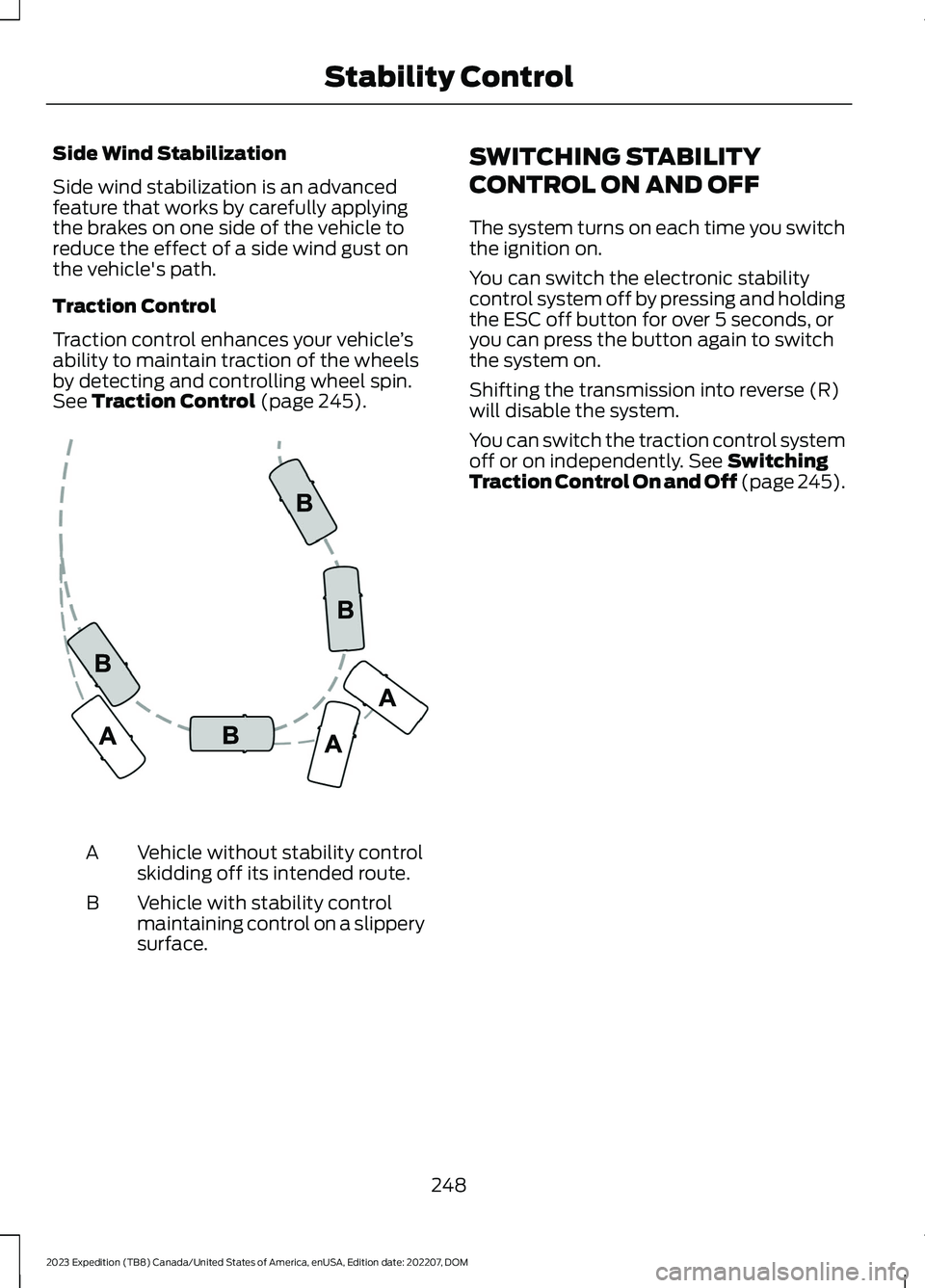
Side wind stabilization is an advancedfeature that works by carefully applyingthe brakes on one side of the vehicle toreduce the effect of a side wind gust onthe vehicle's path.
Traction Control
Traction control enhances your vehicle’sability to maintain traction of the wheelsby detecting and controlling wheel spin.See Traction Control (page 245).
Vehicle without stability controlskidding off its intended route.A
Vehicle with stability controlmaintaining control on a slipperysurface.
B
SWITCHING STABILITY
CONTROL ON AND OFF
The system turns on each time you switchthe ignition on.
You can switch the electronic stabilitycontrol system off by pressing and holdingthe ESC off button for over 5 seconds, oryou can press the button again to switchthe system on.
Shifting the transmission into reverse (R)will disable the system.
You can switch the traction control systemoff or on independently. See SwitchingTraction Control On and Off (page 245).
248
2023 Expedition (TB8) Canada/United States of America, enUSA, Edition date: 202207, DOMStability ControlE72903
Page 255 of 658
TRAIL ONE PEDAL DRIVEPRECAUTIONS
WARNING: This system is an extradriving aid. It does not replace yourattention and judgment, or the need toapply the brakes. This system does NOTautomatically brake your vehicle. If youfail to press the brake pedal whennecessary, you may collide with anothervehicle.
Shifting into drive (D) or reverse (R) doesnot cause the vehicle to move.
You can press the brake pedal to increasebraking. This does not turn the system off.
Trail one pedal drive could apply theparking brake when your vehicle is notmoving and not in park (P).
Note:Always check the transmissionselection before accelerating.
Note:Only use trail one pedal drive onslippery or loose surfaces. Using trail onepedal drive on dry, hard surfaces couldproduce some vibration, driveline bind upand potential excessive tire and vehiclewear.
TRAIL ONE PEDAL DRIVELIMITATIONS
Trail one pedal drive is unavailable whenany of the following occur:
•Your vehicle is not in four-wheel drivehigh (4H) or four-wheel drive low (4L)modes.
•Using cruise control.
•Using trail control.
•You exceed 30 mph (48 km/h).
Releasing the accelerator pedal may allowyour vehicle to come to a complete stop,some situations may require you to pressthe brake pedal to come to a completestop.
SWITCHING TRAIL ONE PEDALDRIVE ON AND OFF
Switching Trail One Pedal Drive On
Press the trail features buttonwhen in four-wheel drive high orfour-wheel drive low to activatetrail one pedal drive.
Switching Trail One Pedal DriveOff
Press the trail features button again toswitch trail one pedal drive off.
Selecting a driveline mode other thanfour-wheel drive high or four-wheel drivelow switches trail one pedal drive off.
If you exceed 40 mph (65 km/h) trail onepedal drive switches off.
Pressing either button when trailone pedal drive is active turnstrail control on and places trailone pedal drive into standbymode.
Switching from Trail Control toTrail One Pedal Drive
When using trail control infour-wheel drive high orfour-wheel drive low modes, youcan switch to trail one pedal drive bypressing the button on the steering wheel.
251
2023 Expedition (TB8) Canada/United States of America, enUSA, Edition date: 202207, DOMTrail Control (If Equipped)E371768 E246884 E246885 E308130
Page 257 of 658
TRAIL CONTROL – TROUBLESHOOTING
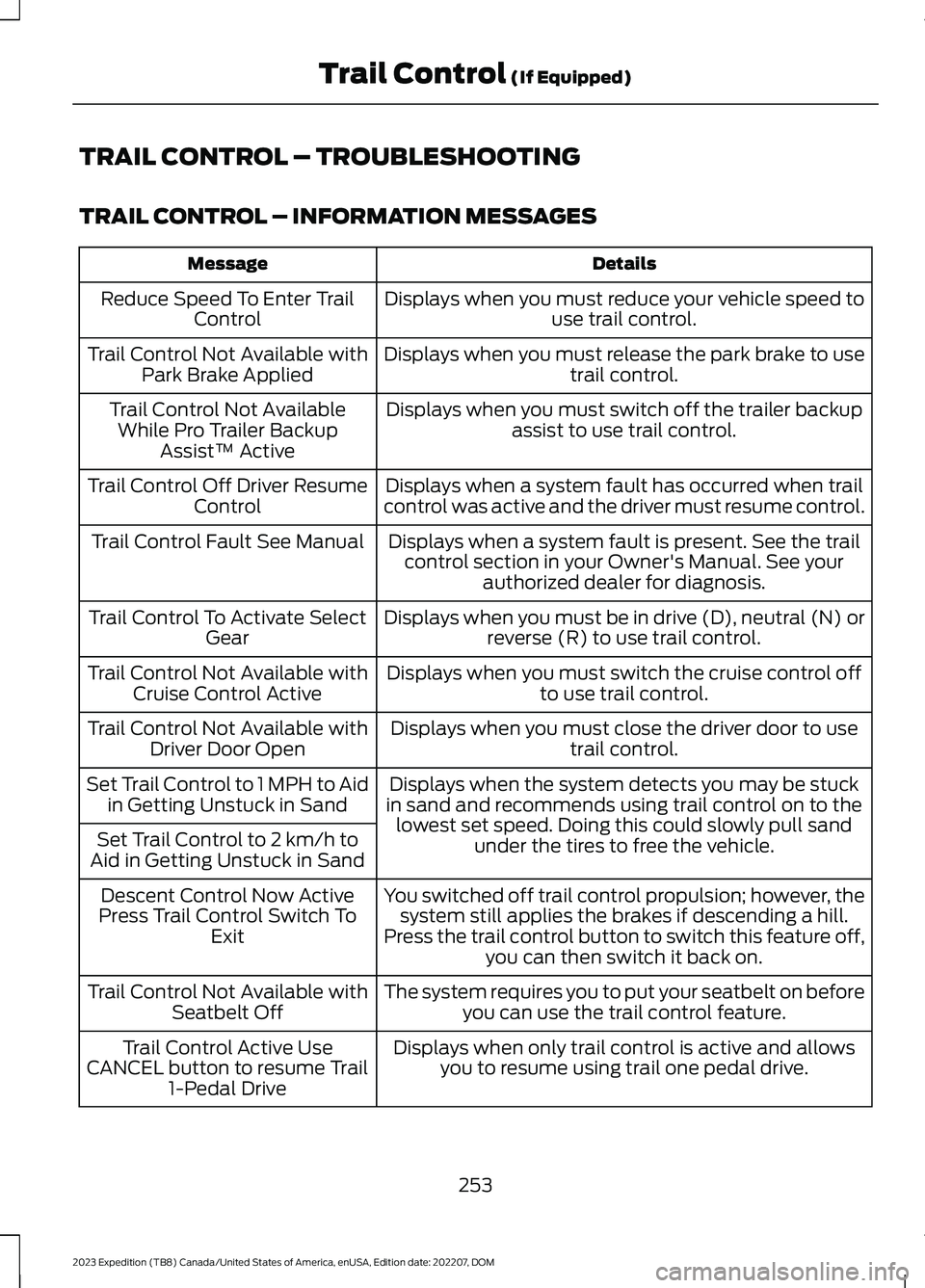
TRAIL CONTROL – INFORMATION MESSAGES
DetailsMessage
Displays when you must reduce your vehicle speed touse trail control.Reduce Speed To Enter TrailControl
Displays when you must release the park brake to usetrail control.Trail Control Not Available withPark Brake Applied
Displays when you must switch off the trailer backupassist to use trail control.Trail Control Not AvailableWhile Pro Trailer BackupAssist™ Active
Displays when a system fault has occurred when trailcontrol was active and the driver must resume control.Trail Control Off Driver ResumeControl
Displays when a system fault is present. See the trailcontrol section in your Owner's Manual. See yourauthorized dealer for diagnosis.
Trail Control Fault See Manual
Displays when you must be in drive (D), neutral (N) orreverse (R) to use trail control.Trail Control To Activate SelectGear
Displays when you must switch the cruise control offto use trail control.Trail Control Not Available withCruise Control Active
Displays when you must close the driver door to usetrail control.Trail Control Not Available withDriver Door Open
Displays when the system detects you may be stuckin sand and recommends using trail control on to thelowest set speed. Doing this could slowly pull sandunder the tires to free the vehicle.
Set Trail Control to 1 MPH to Aidin Getting Unstuck in Sand
Set Trail Control to 2 km/h toAid in Getting Unstuck in Sand
You switched off trail control propulsion; however, thesystem still applies the brakes if descending a hill.Press the trail control button to switch this feature off,you can then switch it back on.
Descent Control Now ActivePress Trail Control Switch ToExit
The system requires you to put your seatbelt on beforeyou can use the trail control feature.Trail Control Not Available withSeatbelt Off
Displays when only trail control is active and allowsyou to resume using trail one pedal drive.Trail Control Active UseCANCEL button to resume Trail1-Pedal Drive
253
2023 Expedition (TB8) Canada/United States of America, enUSA, Edition date: 202207, DOMTrail Control (If Equipped)