2023 FORD EXPEDITION warning
[x] Cancel search: warningPage 358 of 658
CONNECTING A TRAILER
PRECAUTIONS
Do not tow a trailer until you drive yourvehicle at least 1,000 mi (1,600 km).
Consult your local motor vehicle laws fortowing a trailer.
See the instructions included with towingaccessories for the proper installation andadjustment specifications.
Service your vehicle more frequently if youtow a trailer. See Normal ScheduledMaintenance (page 542).
If you use a rental trailer, follow theinstructions the rental agency gives you.
When attaching the trailer wiring connectorto your vehicle, only use a proper fittingconnector that works with the vehicle andtrailer functions.
Account for the trailer coupler weight aspart of your vehicle load when calculatingthe total vehicle weight.
Do not exceed the load limits. SeeCalculating the Load Limit (page 347).
HITCHES
INSTALLING A HITCH
WARNING: Do not cut, drill, weldor modify the trailer hitch. Modifying thetrailer hitch could reduce the hitch rating.
Do not use a hitch that either clamps ontothe bumper or attaches to the axle. Youmust distribute the load in your trailer sothat 10-15% of the total weight of thetrailer is on the tongue. Do not exceed thetongue load rating indicated on the hitchreceiver.
Trailer Hitch Cover
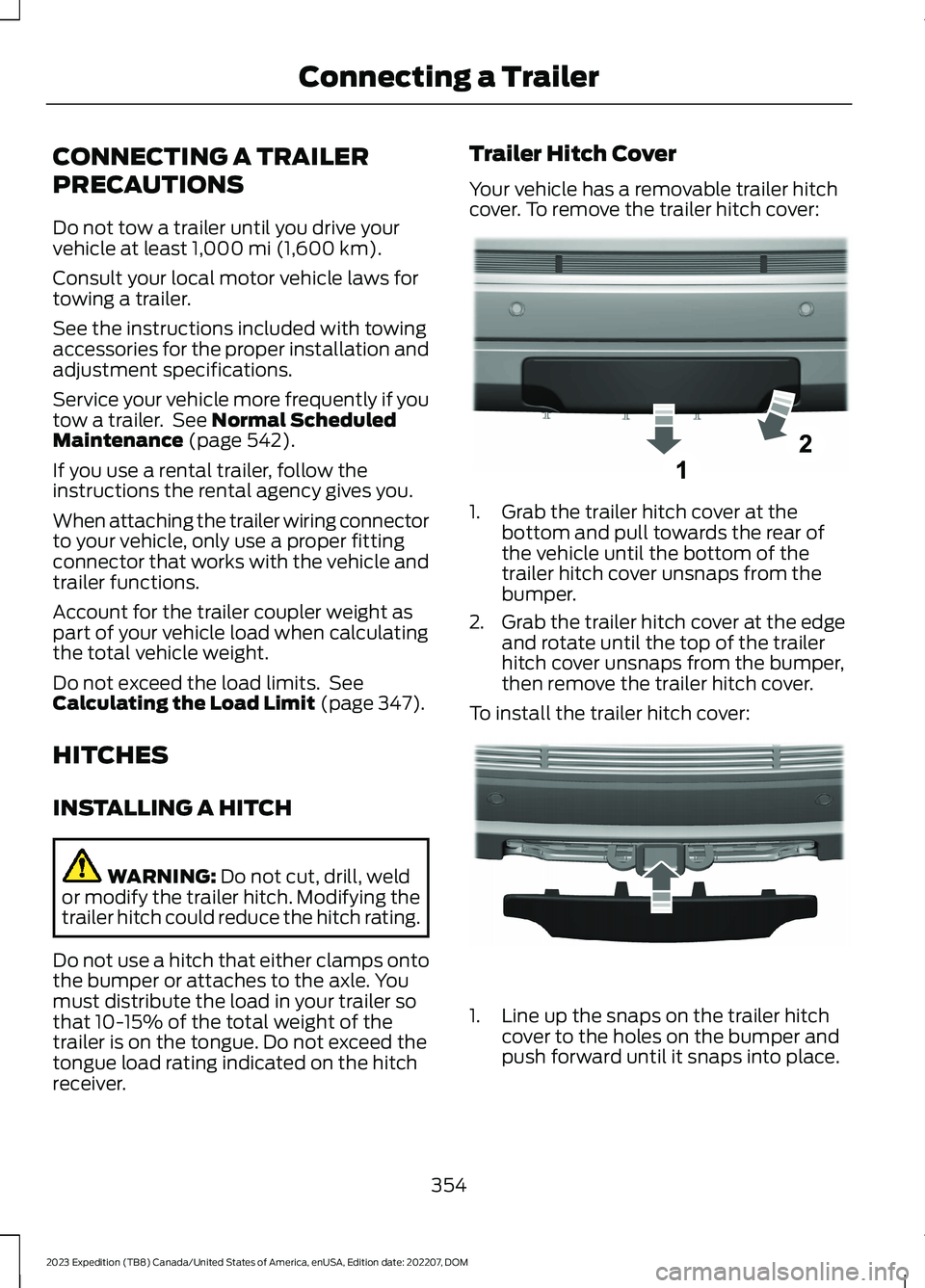
Your vehicle has a removable trailer hitchcover. To remove the trailer hitch cover:
1.Grab the trailer hitch cover at thebottom and pull towards the rear ofthe vehicle until the bottom of thetrailer hitch cover unsnaps from thebumper.
2.Grab the trailer hitch cover at the edgeand rotate until the top of the trailerhitch cover unsnaps from the bumper,then remove the trailer hitch cover.
To install the trailer hitch cover:
1.Line up the snaps on the trailer hitchcover to the holes on the bumper andpush forward until it snaps into place.
354
2023 Expedition (TB8) Canada/United States of America, enUSA, Edition date: 202207, DOMConnecting a TrailerE268259 E268260
Page 359 of 658
HOOKING UP A TRAILER USING AWEIGHT-DISTRIBUTING HITCH
WARNING: Do not adjust the springbars so that your vehicle's rear bumperis higher than before attaching the trailer.Doing so will defeat the function of theweight-distributing hitch, which maycause unpredictable handling, and couldresult in serious personal injury.
A weight-distributing hitch helps distributetongue load to all towing vehicle and trailerwheels. For more information, visit the linksin the following table.
WebsiteMarket
https://www.fleet.ford.com/towing-guides/
United States ofAmerica
https://www.fleet.ford.ca/towing-guides/
Canada
CONNECTING A TRAILER
Recognizing a Trailer
1.Attach the trailer and wiring connectorto your vehicle.
2.Switch on your vehicle.
3.Set up a profile for the trailer using thetouchscreen.
Note:If your vehicle does not recognize thetrailer, press and hold the brake pedal for afew seconds.
Note:Trailer profiles store trailer types,dimensions, preferences, trailer specificmileage and fuel economy.
Note:Disabling the trailer detectionnotification makes the default trailer profileactive when a connection is detected.
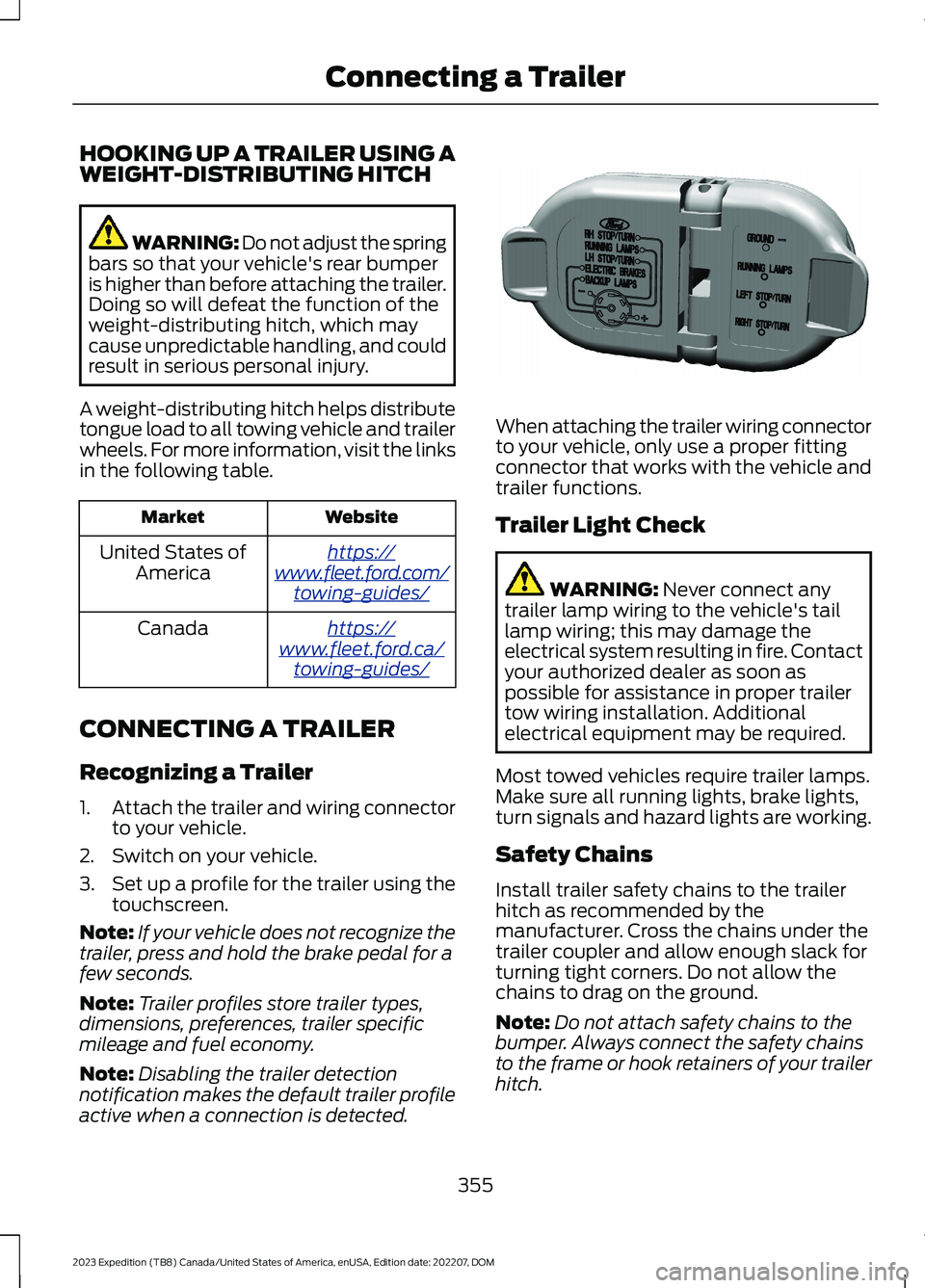
When attaching the trailer wiring connectorto your vehicle, only use a proper fittingconnector that works with the vehicle andtrailer functions.
Trailer Light Check
WARNING: Never connect anytrailer lamp wiring to the vehicle's taillamp wiring; this may damage theelectrical system resulting in fire. Contactyour authorized dealer as soon aspossible for assistance in proper trailertow wiring installation. Additionalelectrical equipment may be required.
Most towed vehicles require trailer lamps.Make sure all running lights, brake lights,turn signals and hazard lights are working.
Safety Chains
Install trailer safety chains to the trailerhitch as recommended by themanufacturer. Cross the chains under thetrailer coupler and allow enough slack forturning tight corners. Do not allow thechains to drag on the ground.
Note:Do not attach safety chains to thebumper. Always connect the safety chainsto the frame or hook retainers of your trailerhitch.
355
2023 Expedition (TB8) Canada/United States of America, enUSA, Edition date: 202207, DOMConnecting a TrailerE163167
Page 361 of 658

CONNECTING A TRAILER – TROUBLESHOOTING
CONNECTING A TRAILER – INFORMATION MESSAGES
DescriptionMessage
The system senses a trailer connectionbecomes disconnected, either intentionallyor unintentionally, during a given ignitioncycle.
Trailer Disconnected
There are certain faults in your vehiclewiring and trailer wiring or brake system.Trailer Wiring Fault
There is a fault with your trailer battery, oryour trailer battery voltage is very low.Trailer Battery Not Charging See Manual
One or more tires on your trailer is belowthe specified tire pressure.Trailer Tire Low Specified:
Displays when one or more tires on thetrailer is above the recommended temper-ature.
Trailer Tire Over Temperature
A trailer tire pressure sensor is malfunc-tioning. If the warning stays on or continuesto come on, have the system checked assoon as possible.
Trailer Tire Pressure Sensor Fault
The trailer tire pressure monitoring systemis malfunctioning. If the warning stays onor continues to come on, have the systemchecked.
Trailer Tire Pressure Monitor Fault
The system cannot detect the trailer tirepressure monitoring system.Trailer Tire Pressure Monitor Capability NotDetected
The trailer tire pressure monitoring systemis not setup.Trailer Tire Pressure Indication Not SetupSee Manual
357
2023 Expedition (TB8) Canada/United States of America, enUSA, Edition date: 202207, DOMConnecting a Trailer
Page 362 of 658
TOWING A TRAILER
PRECAUTIONS
WARNING: Do not exceedthe GVWR or the GAWRspecified on the certificationlabel.
WARNING: Towing trailersbeyond the maximumrecommended gross trailerweight exceeds the limit of yourvehicle and could result in enginedamage, transmission damage,structural damage, loss ofvehicle control, vehicle rolloverand personal injury.
WARNING: Do not exceedthe lowest rating capacity foryour vehicle or trailer hitch.Overloading your vehicle ortrailer hitch can impair yourvehicle stability and handling.Failure to follow this instructioncould result in the loss of controlof your vehicle, personal injury ordeath.
WARNING: Make sure thatthe vertical load on the tow ballis between the minimum andmaximum recommended weightat all times. Failure to follow thisinstruction could result in theloss of control of your vehicle,personal injury or death.
WARNING: Do not cut,drill, weld or modify the trailerhitch. Modifying the trailer hitchcould reduce the hitch rating.
WARNING: The anti-lockbrake system does not controlthe trailer brakes.
TRAILER BRAKE
PRECAUTIONS
WARNING: Do not connect atrailer's hydraulic brake system directlyto your vehicle's brake system. Yourvehicle may not have enough brakingpower and your chances of having acollision greatly increase.
WARNING: Do not tow a trailerfitted with electric trailer brakes unlessyour vehicle is fitted with a compatibleaftermarket electronic trailer brakecontroller. Failure to follow thisinstruction could result in the loss ofcontrol of your vehicle, personal injury ordeath. For additional information andassistance, we recommend that youcontact an authorized dealer.
Electric brakes and manual, automatic orsurge-type trailer brakes are safe if youinstall them properly and adjust them tothe manufacturer's specifications. Thetrailer brakes must meet local and federalregulations.
The rating for the tow vehicle's brakingsystem operation is at the gross vehicleweight rating, not the gross combinedweight rating.
358
2023 Expedition (TB8) Canada/United States of America, enUSA, Edition date: 202207, DOMTowing a Trailer
Page 368 of 658

DetailsMessage
A trailer tire pressure sensor requiresservice. If the warning stays on or continuesto come on, have the system checked assoon as possible.
Trailer Tire Pressure Sensor Fault
The trailer tire pressure monitoring systemrequires service. If the warning stays on orcontinues to come on, have the systemchecked as soon as possible.
Trailer Tire Pressure Monitor Fault
The system cannot detect the trailer tirepressure monitoring system.Trailer Tire Pressure Monitor Capability NotDetected
The trailer tire pressure monitoring systemis not setup.Trailer Tire Pressure Indication Not SetupSee Manual
364
2023 Expedition (TB8) Canada/United States of America, enUSA, Edition date: 202207, DOMTowing a Trailer
Page 369 of 658
WHAT IS THE INTEGRATED
TRAILER BRAKE CONTROLLER
The trailer brake controller assists insmooth and effective trailer braking basedon the towing vehicle’s brake pressure.
INTEGRATED TRAILER BRAKE
CONTROLLER PRECAUTIONS
WARNING: Use the integratedtrailer brake controller to properly adjustthe trailer brakes and check allconnections before towing a trailer.Failure to follow this instruction couldresult in the loss of control of yourvehicle, personal injury or death.
•Only use the manual control lever forproper adjustment of the gain duringtrailer setup. Misuse, such asapplication during trailer sway, couldcause instability of trailer or towvehicle.
•Avoid towing in adverse weatherconditions. The trailer brake controllerdoes not provide anti-lock control ofthe trailer wheels. Trailer wheels canlock up on slippery surfaces, resultingin reduced stability of trailer and towvehicle.
•The trailer brake controller is only afactory-installed or dealer-installeditem. Ford is not responsible forwarranty or performance of thecontroller due to misuse or customerinstallation.
Note:Do not attempt removal of the trailerbrake controller without consulting theWorkshop Manual. Damage to the unit mayresult.
Note:Make sure to set the integrated trailerbrake controller gain to 0 if you are using anaftermarket trailer brake controller.
USING THE INTEGRATED
TRAILER BRAKE CONTROLLER
1.Make sure the trailer brakes are in goodworking condition, functioning normallyand properly adjusted. See your trailerdealer if necessary.
Note:An authorized dealer can diagnosethe trailer brake controller to determineexactly which trailer fault has occurred. Yourvehicle warranty does not cover issues withyour trailer.
2.Hook up the trailer and make theelectrical connections according to thetrailer manufacturer's instructions.
Note:Select default mode if the trailer hassurge brakes, or no brakes at all. The systemhas no effect on the braking performanceof the trailer in either of these cases.
Note:If a trailer is connected by a four-pinconnector, the trailer braking function willnot be supported.
3.When you plug in a trailer with electricor electric-over-hydraulic brakes, amessage confirming connectionappears in the information display.
4.Use the gain adjustment to find thedesired starting point. A gain setting of6.0 is a good starting point for heavierloads.
Note:Use the following steps to adjust thegain setting whenever road, weather andtrailer, or vehicle loading conditions, changefrom when you initially set the gain.
5.In a traffic-free environment, tow thetrailer on a dry, level surface andsqueeze the manual control levercompletely.
365
2023 Expedition (TB8) Canada/United States of America, enUSA, Edition date: 202207, DOMIntegrated Trailer Brake Controller (If Equipped)
Page 373 of 658
HOW DOES TRAILER SWAY
CONTROL WORK
The system applies the brakes to theindividual wheels and reduces enginetorque to aid vehicle stability.
If the trailer begins to sway, the stabilitycontrol lamp flashes and the messageTrailer Sway Reduce Speed appears inthe information display.
Stop your vehicle as soon as it is safe todo so. Check the vertical weight on thetow ball and trailer load distribution.
TRAILER SWAY CONTROL
PRECAUTIONS
WARNING: Turning off trailer swaycontrol increases the risk of loss ofvehicle control, serious injury or death.Ford does not recommend disabling thisfeature except in situations where speedreduction may be detrimental (such ashill climbing), the driver has significanttrailer towing experience, and can controltrailer sway and maintain safe operation.
Note:This feature only activates whensignificant trailer sway occurs.
Note:This feature does not prevent trailersway, but reduces it once it begins.
Note:This feature cannot stop all trailersfrom swaying.
Note:In some cases, if vehicle speed is toohigh, the system may activate multipletimes, gradually reducing vehicle speed.
SWITCHING TRAILER SWAY
CONTROL ON AND OFF
1.Press Features on the touchscreen.
2.Press Towing.
3.Switch Trailer Sway Control on or off.
The system turns on each time you startyour vehicle.
369
2023 Expedition (TB8) Canada/United States of America, enUSA, Edition date: 202207, DOMTrailer Sway Control
Page 374 of 658
WHAT IS TRAILER BACKUP
ASSISTANCE
Trailer backup assistance utilizes thecontrol knob on the instrument panel tohelp you steer a trailer. Turn the controlknob in the direction you want the trailerto go and the system steers the vehicle.
HOW DOES TRAILER BACKUP
ASSISTANCE WORK
Trailer backup assistance uses a sticker todetect the trailer angle relative to thetowing vehicle and provides instructions,graphics and camera views on thetouchscreen.
TRAILER BACKUP
ASSISTANCE PRECAUTIONS
WARNING: Driving while distractedcan result in loss of vehicle control, crashand injury. We strongly recommend thatyou use extreme caution when using anydevice that may take your focus off theroad. Your primary responsibility is thesafe operation of your vehicle. Werecommend against the use of anyhand-held device while driving andencourage the use of voice-operatedsystems when possible. Make sure youare aware of all applicable local lawsthat may affect the use of electronicdevices while driving.
WARNING: This system is an extradriving aid. It does not replace yourattention and judgment, or the need toapply the brakes. This system does NOTautomatically brake your vehicle. If youfail to press the brake pedal whennecessary, you may collide with anothervehicle.
Note:The system is not a substitute forsafe driving practices. Always be aware ofyour vehicle and trailer combination, andthe surrounding environment.
Note:The system does not detect orprevent your vehicle or trailer from makingcontact with obstacles in the surroundingenvironment.
Note:The front end of your vehicle swingsout when changing the direction of thetrailer.
Note:In certain conditions, the trailer couldturn faster or the trailer angle could increasemore than anticipated. Always monitor theclearance between the trailer and vehicleand the surroundings.
SETTING UP THE TRAILER
BACKUP ASSISTANCE FOR A
CONVENTIONAL TRAILER
CONFIGURING THE TRAILER
You must configure a trailer in the systemto use the trailer reversing aids. This is aone-time setup process per trailer and thetrailer information is saved in the systemfor the next time you use that trailer.
The system only works with conventionaltrailers. It does not work with other typesincluding fifth-wheel and goosenecktrailers. The following illustration showsexamples of conventional trailers on theleft-hand side.
370
2023 Expedition (TB8) Canada/United States of America, enUSA, Edition date: 202207, DOMTrailer Backup Assistance (If Equipped)