Page 3 of 516
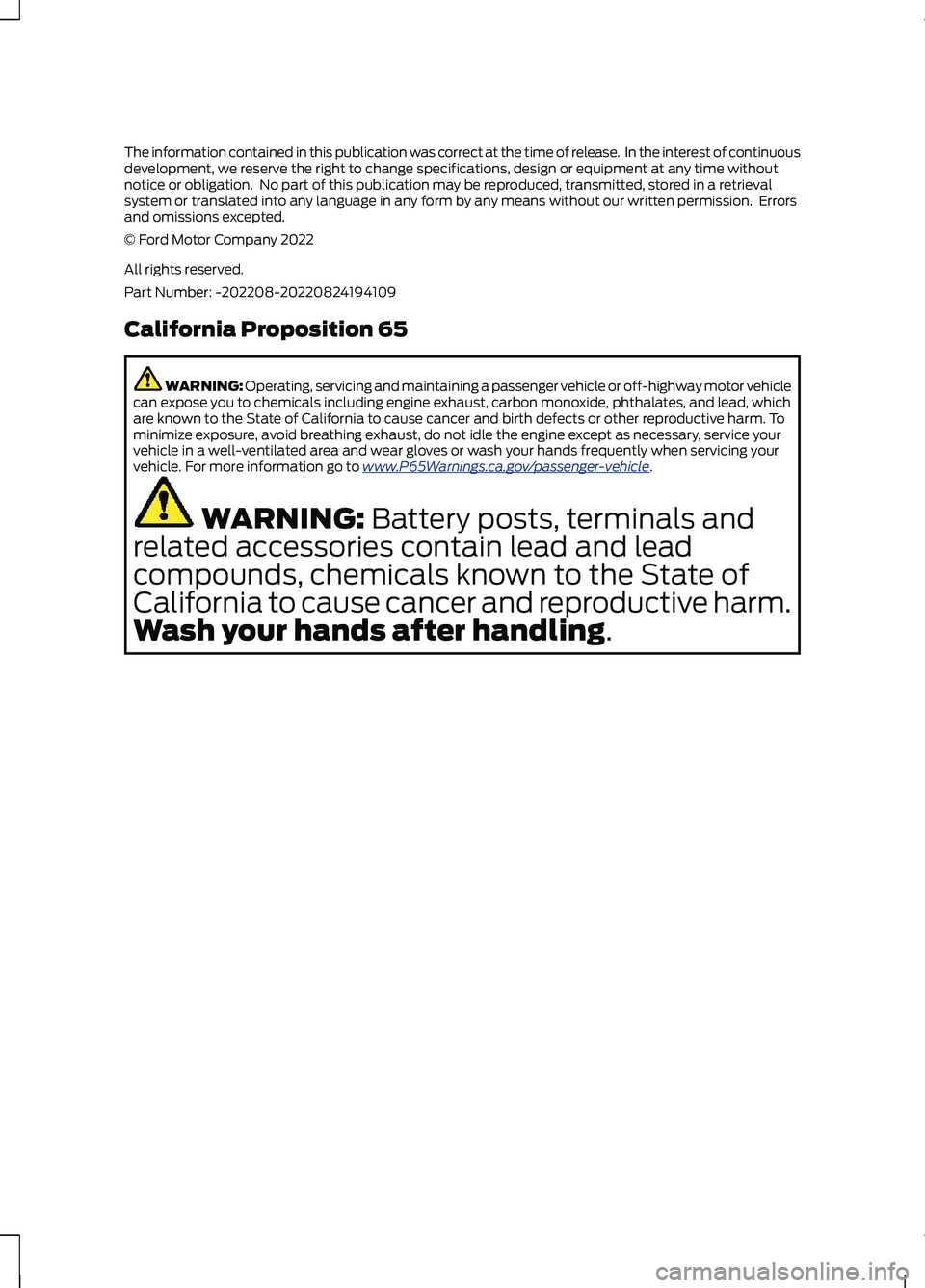
The information contained in this publication was correct at the time of release. In the interest of continuousdevelopment, we reserve the right to change specifications, design or equipment at any time withoutnotice or obligation. No part of this publication may be reproduced, transmitted, stored in a retrievalsystem or translated into any language in any form by any means without our written permission. Errorsand omissions excepted.© Ford Motor Company 2022
All rights reserved.Part Number: -202208-20220824194109
California Proposition 65
WARNING: Operating, servicing and maintaining a passenger vehicle or off-highway motor vehiclecan expose you to chemicals including engine exhaust, carbon monoxide, phthalates, and lead, whichare known to the State of California to cause cancer and birth defects or other reproductive harm. Tominimize exposure, avoid breathing exhaust, do not idle the engine except as necessary, service yourvehicle in a well-ventilated area and wear gloves or wash your hands frequently when servicing yourvehicle. For more information go to www.P65Warnings.ca.gov/passenger-vehicle.
WARNING: Battery posts, terminals and
related accessories contain lead and lead
compounds, chemicals known to the State of
California to cause cancer and reproductive harm.
Wash your hands after handling.
Page 110 of 516
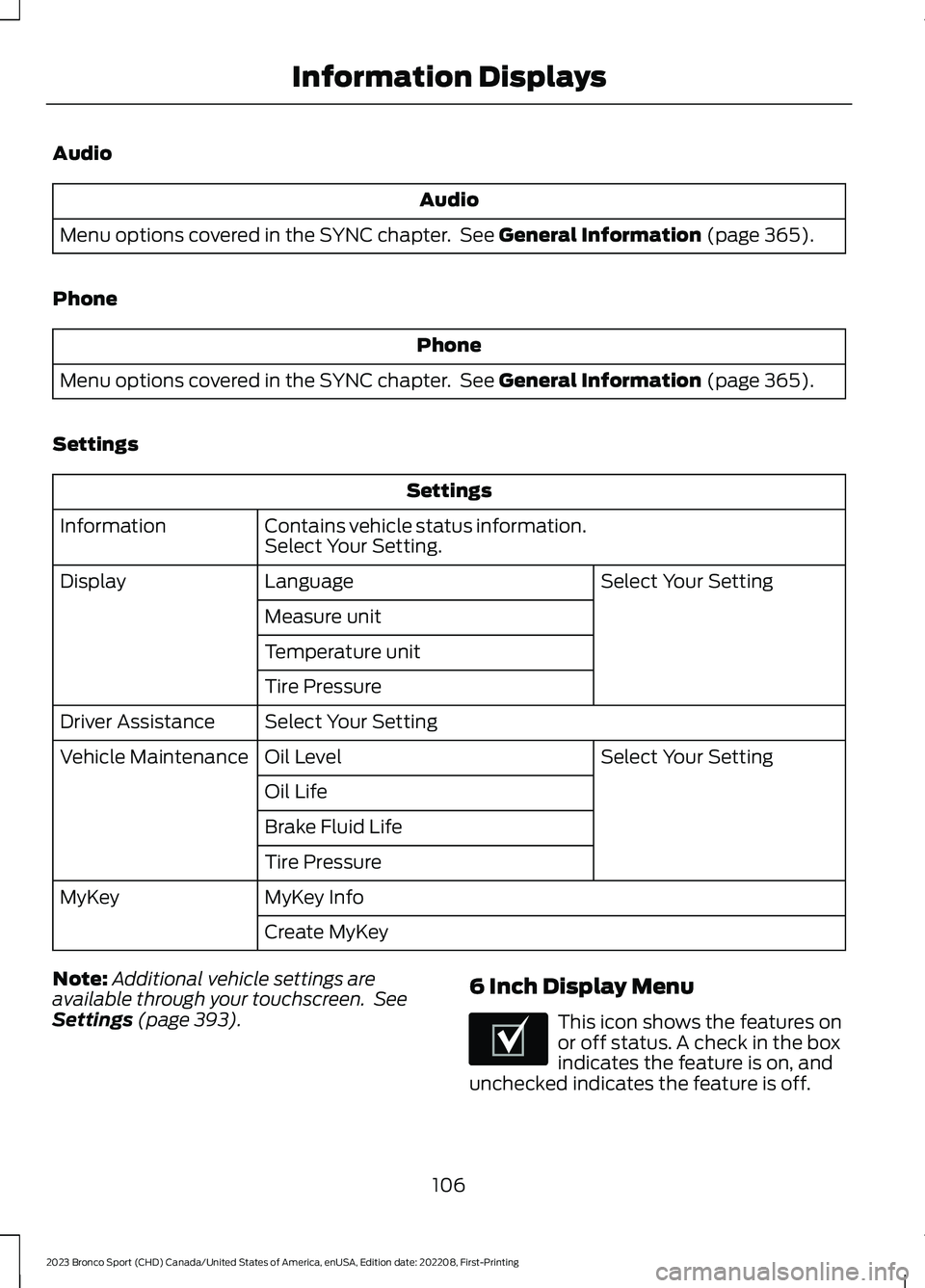
Audio
Audio
Menu options covered in the SYNC chapter. See General Information (page 365).
Phone
Phone
Menu options covered in the SYNC chapter. See General Information (page 365).
Settings
Settings
Contains vehicle status information.Select Your Setting.Information
Select Your SettingLanguageDisplay
Measure unit
Temperature unit
Tire Pressure
Select Your SettingDriver Assistance
Select Your SettingOil LevelVehicle Maintenance
Oil Life
Brake Fluid Life
Tire Pressure
MyKey InfoMyKey
Create MyKey
Note:Additional vehicle settings areavailable through your touchscreen. SeeSettings (page 393).
6 Inch Display Menu
This icon shows the features onor off status. A check in the boxindicates the feature is on, andunchecked indicates the feature is off.
106
2023 Bronco Sport (CHD) Canada/United States of America, enUSA, Edition date: 202208, First-PrintingInformation DisplaysE204495
Page 398 of 516
Driver Assist (If Equipped)
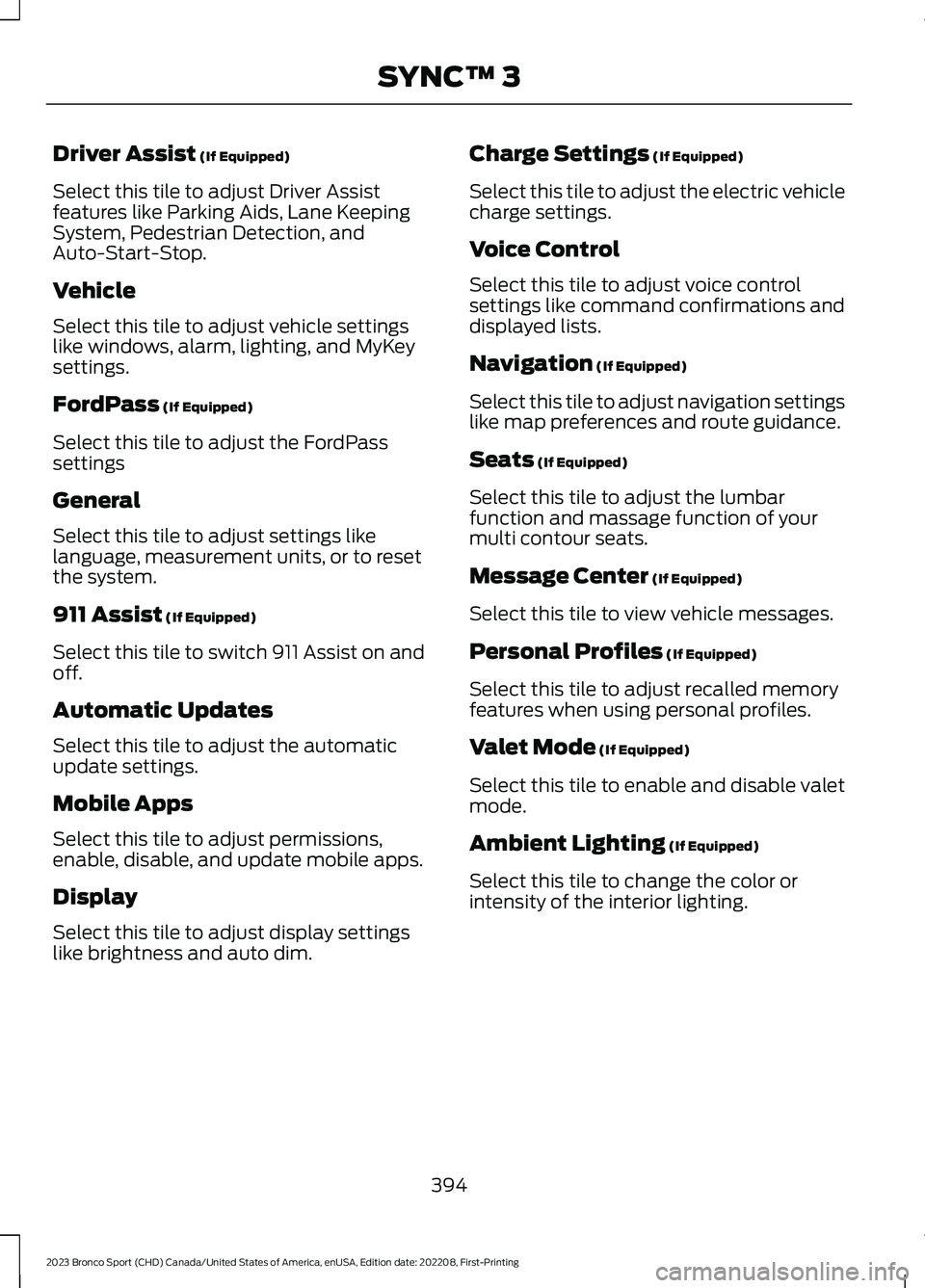
Select this tile to adjust Driver Assistfeatures like Parking Aids, Lane KeepingSystem, Pedestrian Detection, andAuto-Start-Stop.
Vehicle
Select this tile to adjust vehicle settingslike windows, alarm, lighting, and MyKeysettings.
FordPass (If Equipped)
Select this tile to adjust the FordPasssettings
General
Select this tile to adjust settings likelanguage, measurement units, or to resetthe system.
911 Assist (If Equipped)
Select this tile to switch 911 Assist on andoff.
Automatic Updates
Select this tile to adjust the automaticupdate settings.
Mobile Apps
Select this tile to adjust permissions,enable, disable, and update mobile apps.
Display
Select this tile to adjust display settingslike brightness and auto dim.
Charge Settings (If Equipped)
Select this tile to adjust the electric vehiclecharge settings.
Voice Control
Select this tile to adjust voice controlsettings like command confirmations anddisplayed lists.
Navigation (If Equipped)
Select this tile to adjust navigation settingslike map preferences and route guidance.
Seats (If Equipped)
Select this tile to adjust the lumbarfunction and massage function of yourmulti contour seats.
Message Center (If Equipped)
Select this tile to view vehicle messages.
Personal Profiles (If Equipped)
Select this tile to adjust recalled memoryfeatures when using personal profiles.
Valet Mode (If Equipped)
Select this tile to enable and disable valetmode.
Ambient Lighting (If Equipped)
Select this tile to change the color orintensity of the interior lighting.
394
2023 Bronco Sport (CHD) Canada/United States of America, enUSA, Edition date: 202208, First-PrintingSYNC™ 3
Page 400 of 516
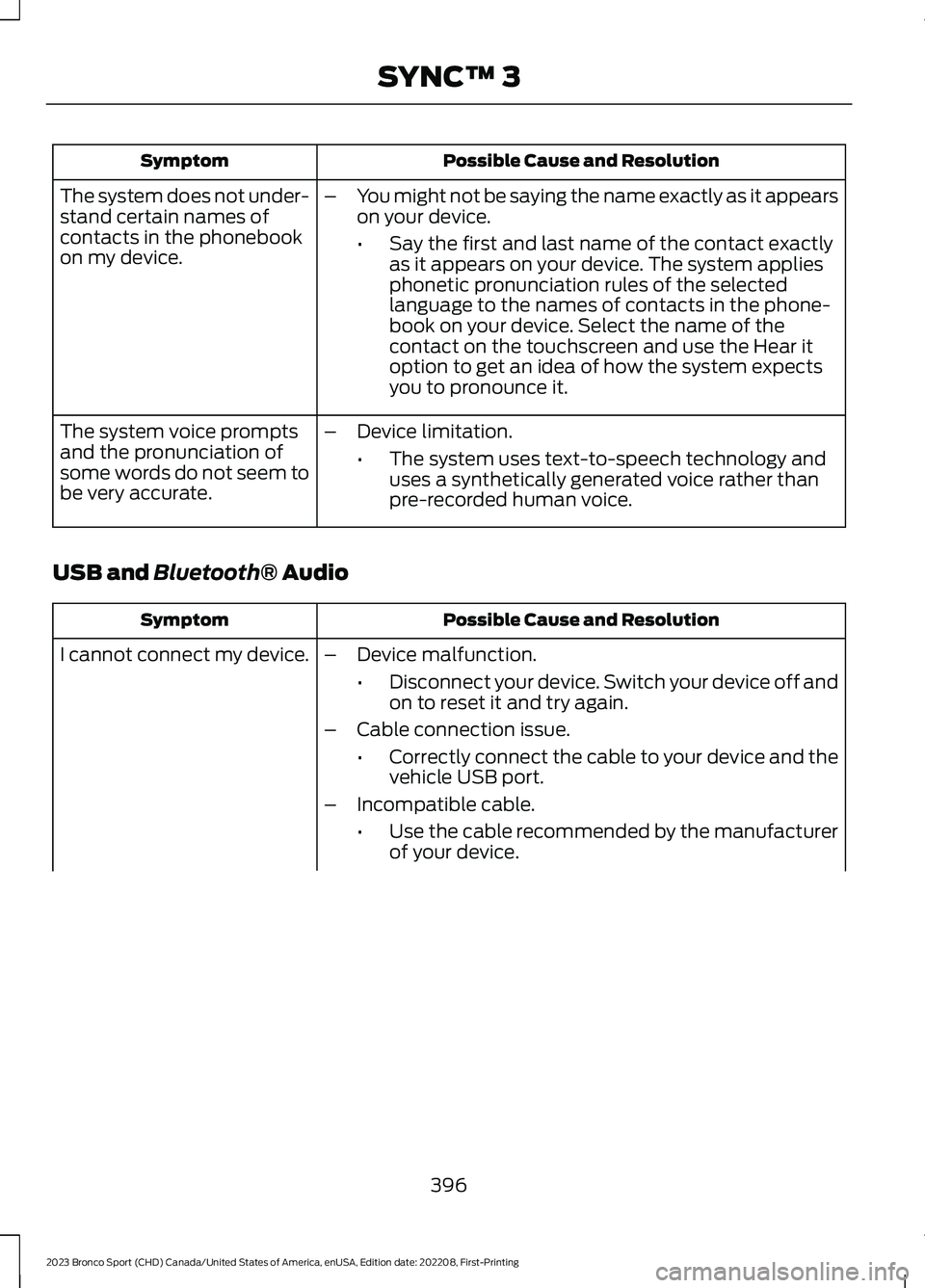
Possible Cause and ResolutionSymptom
–You might not be saying the name exactly as it appearson your device.
•Say the first and last name of the contact exactlyas it appears on your device. The system appliesphonetic pronunciation rules of the selectedlanguage to the names of contacts in the phone-book on your device. Select the name of thecontact on the touchscreen and use the Hear itoption to get an idea of how the system expectsyou to pronounce it.
The system does not under-stand certain names ofcontacts in the phonebookon my device.
–Device limitation.
•The system uses text-to-speech technology anduses a synthetically generated voice rather thanpre-recorded human voice.
The system voice promptsand the pronunciation ofsome words do not seem tobe very accurate.
USB and Bluetooth® Audio
Possible Cause and ResolutionSymptom
I cannot connect my device.–Device malfunction.
•Disconnect your device. Switch your device off andon to reset it and try again.
–Cable connection issue.
•Correctly connect the cable to your device and thevehicle USB port.
–Incompatible cable.
•Use the cable recommended by the manufacturerof your device.
396
2023 Bronco Sport (CHD) Canada/United States of America, enUSA, Edition date: 202208, First-PrintingSYNC™ 3