2023 FORD BRONCO SPORT phone
[x] Cancel search: phonePage 264 of 516
OFF-ROAD DRIVING
WHAT IS OFF-ROAD DRIVING
Off-road driving is driving your vehicle onunsurfaced roads or trails, made from dirt,rocks, sand and mud.
Your vehicle has been designed andequipped to explore those places wherethe road cannot take you, whether youchoose a forest trail or the open desert.
OFF-ROAD DRIVINGPRECAUTIONS
WARNING: If you continue to driveyour vehicle when the engine isoverheating, the engine could stopwithout warning. Failure to follow thisinstruction could result in the loss ofcontrol of your vehicle.
Before going off-road, consult with yourlocal governmental agencies to determinedesignated off-road trails and recreationareas. Also, be sure to understand anyoff-road vehicle registration requirementsfor the area in which you plan on driving.
Tread Lightly is an educational programdesigned to increase public awareness ofland-use regulations and responsibilitiesin our nation’s wilderness areas. The U.S.Forest Service and Bureau of LandManagement is encouraging you to helppreserve our national forest and otherpublic and private lands by treading lightly.
Before taking your vehicle off-road,perform a basic vehicle inspection to makesure the vehicle is in top working condition.
Before you venture off road, have a clearmental picture of the underside of yourvehicle. Learn the location of any lowhanging items and any skid plates that maybe on the vehicle. You can avoid snaggingthem on rocks and other obstacles if youknow where they are.
Memorizing some basic dimensions helpsyou confidently deal with off-roadobstacles. Get to know your vehicle’sheight and width, its lowest point, itswading depth and angles. Familiarizeyourself with your vehicle’s on-boardtechnology features.
We recommend driving at least twovehicles when driving off-road. The buddysystem helps make sure that help is closeat hand should a vehicle become stuck ordamaged.
We recommend taking supplies such as afirst aid kit, supply of water, tow strap andcell or satellite phone with you any timeyou plan an off-road excursion.
Note:Remove the front license plate beforeoff-road driving to achieve optimalperformance.
BASIC OFF-ROAD DRIVINGTECHNIQUES
Grip the steering wheel with your thumbson the outside of the rim. This reduces therisk of injury due to abrupt steering wheelmotions that occur when negotiating roughterrain.
Control your throttle, brake and steeringinputs in a smooth manner. Sudden inputsto the controls can cause a loss of tractionfor the vehicle, especially when on slopedterrain or crossing obstacles such as rocksor logs.
260
2023 Bronco Sport (CHD) Canada/United States of America, enUSA, Edition date: 202208, First-PrintingDriving Hints
Page 360 of 516
VEHICLE WI-FI HOTSPOT –
TROUBLESHOOTING
VEHICLE WI-FI HOTSPOT –FREQUENTLY ASKED QUESTIONS
Why can I not see the Wi-Fi hotspotname when I search for Wi-Finetworks on my cell phone or otherdevice?
•Make sure Wi-Fi hotspot visibility is on.
•The system does not provide a Wi-Fihotspot at this time.
356
2023 Bronco Sport (CHD) Canada/United States of America, enUSA, Edition date: 202208, First-PrintingVehicle Wi-Fi Hotspot (If Equipped)
Page 369 of 516
GENERAL INFORMATION
WARNING: Driving while distractedcan result in loss of vehicle control, crashand injury. We strongly recommend thatyou use extreme caution when using anydevice that may take your focus off theroad. Your primary responsibility is thesafe operation of your vehicle. Werecommend against the use of anyhand-held device while driving andencourage the use of voice-operatedsystems when possible. Make sure youare aware of all applicable local lawsthat may affect the use of electronicdevices while driving.
About SYNC
The system allows you to interact with theentertainment, information andcommunication systems on your vehicleusing voice commands and a touchscreen.The system provides easy interaction withaudio, phone, navigation, mobile apps andsettings.
Note:You can switch the system on anduse it for up to an hour without switchingthe ignition on.
Note:You can use the system after youswitch the ignition off for up to 10 minutesor until you open a door.
Note:For your safety, some features arespeed-dependent. Their use is limited towhen your vehicle speed is less than 3 mph(5 km/h).
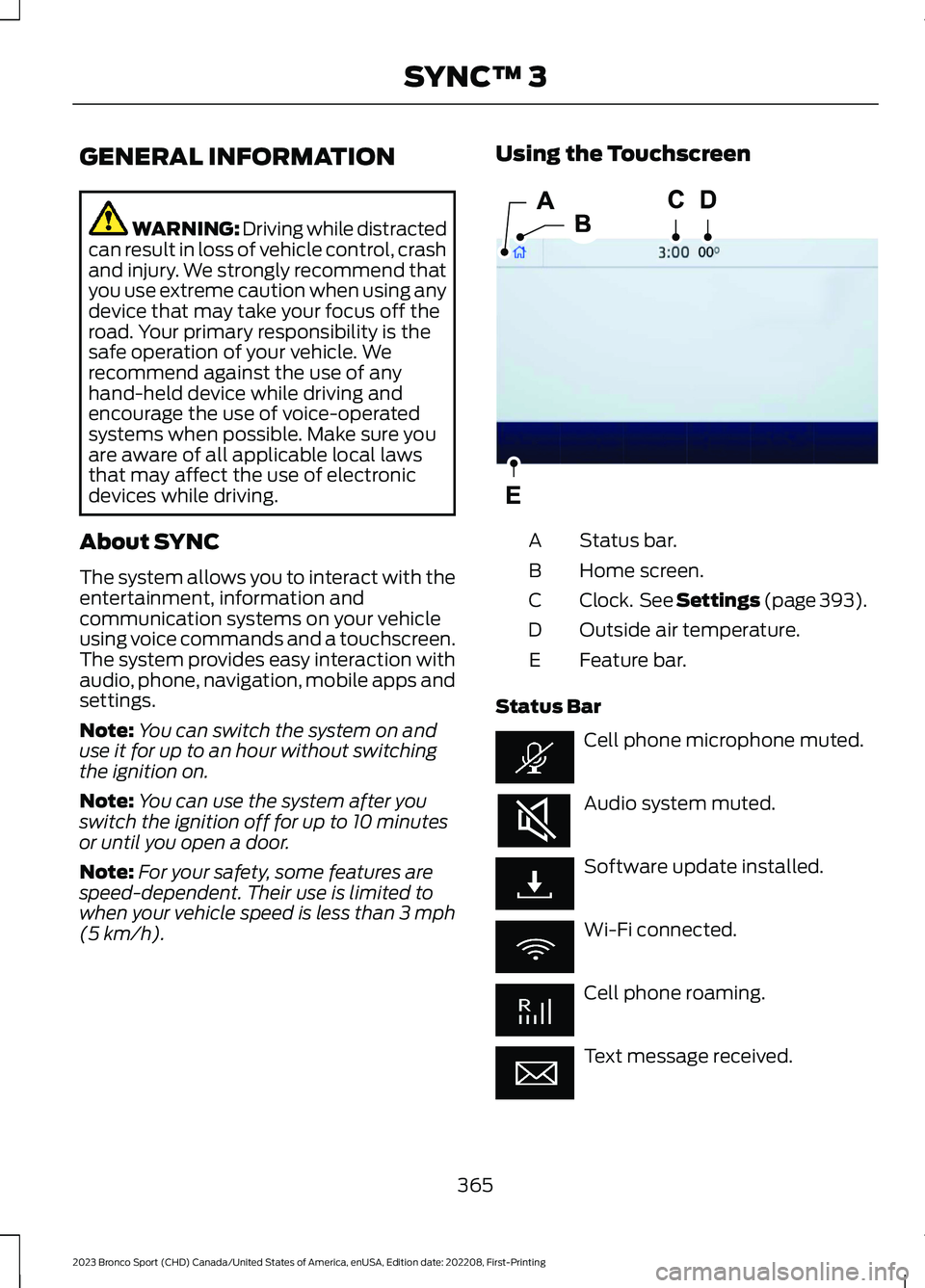
Using the Touchscreen
Status bar.A
Home screen.B
Clock. See Settings (page 393).C
Outside air temperature.D
Feature bar.E
Status Bar
Cell phone microphone muted.
Audio system muted.
Software update installed.
Wi-Fi connected.
Cell phone roaming.
Text message received.
365
2023 Bronco Sport (CHD) Canada/United States of America, enUSA, Edition date: 202208, First-PrintingSYNC™ 3E293823
Page 370 of 516
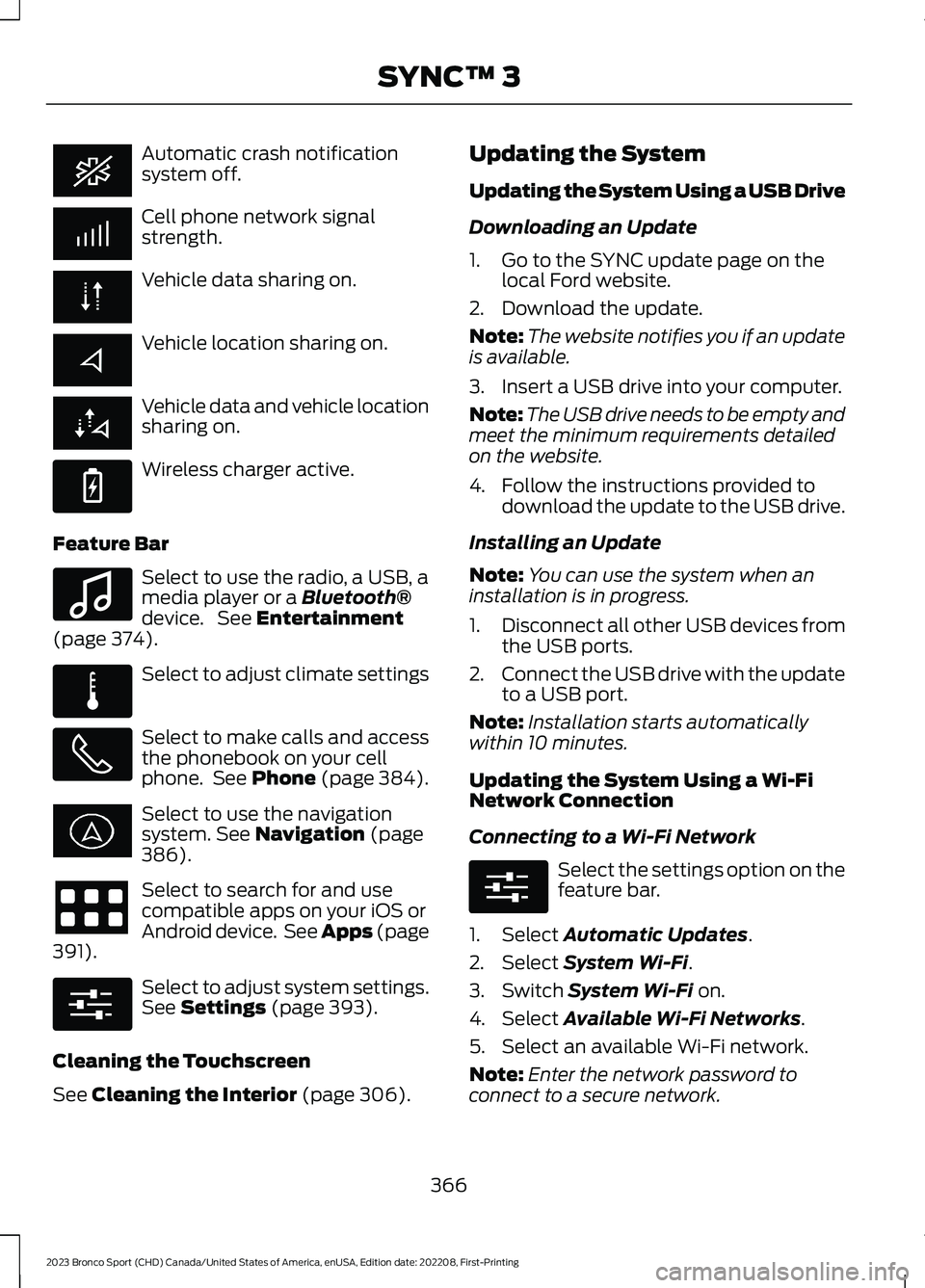
Automatic crash notificationsystem off.
Cell phone network signalstrength.
Vehicle data sharing on.
Vehicle location sharing on.
Vehicle data and vehicle locationsharing on.
Wireless charger active.
Feature Bar
Select to use the radio, a USB, amedia player or a Bluetooth®device. See Entertainment(page 374).
Select to adjust climate settings
Select to make calls and accessthe phonebook on your cellphone. See Phone (page 384).
Select to use the navigationsystem. See Navigation (page386).
Select to search for and usecompatible apps on your iOS orAndroid device. See Apps (page391).
Select to adjust system settings.See Settings (page 393).
Cleaning the Touchscreen
See Cleaning the Interior (page 306).
Updating the System
Updating the System Using a USB Drive
Downloading an Update
1.Go to the SYNC update page on thelocal Ford website.
2.Download the update.
Note:The website notifies you if an updateis available.
3.Insert a USB drive into your computer.
Note:The USB drive needs to be empty andmeet the minimum requirements detailedon the website.
4.Follow the instructions provided todownload the update to the USB drive.
Installing an Update
Note:You can use the system when aninstallation is in progress.
1.Disconnect all other USB devices fromthe USB ports.
2.Connect the USB drive with the updateto a USB port.
Note:Installation starts automaticallywithin 10 minutes.
Updating the System Using a Wi-FiNetwork Connection
Connecting to a Wi-Fi Network
Select the settings option on thefeature bar.
1.Select Automatic Updates.
2.Select System Wi-Fi.
3.Switch System Wi-Fi on.
4.Select Available Wi-Fi Networks.
5.Select an available Wi-Fi network.
Note:Enter the network password toconnect to a secure network.
366
2023 Bronco Sport (CHD) Canada/United States of America, enUSA, Edition date: 202208, First-PrintingSYNC™ 3 E263583 E100027 E283811 E280315 E280315
Page 371 of 516
Switching Automatic System UpdatesOn
Select the settings option on thefeature bar.
1.Select Automatic Updates.
2.Switch Automatic System Updateson.
The system is now set to check for andreceive system updates when it isconnected to a Wi-Fi network.
Note:You can use the system when adownload is in progress.
Note:If the system is disconnected fromthe Wi-Fi network when a download is inprogress, the download continues the nexttime the system is connected to a Wi-Finetwork.
Additional Information andAssistance
For additional information and assistance,we recommend that you contact anauthorized dealer or refer to the local Fordwebsite.
USING VOICE RECOGNITION
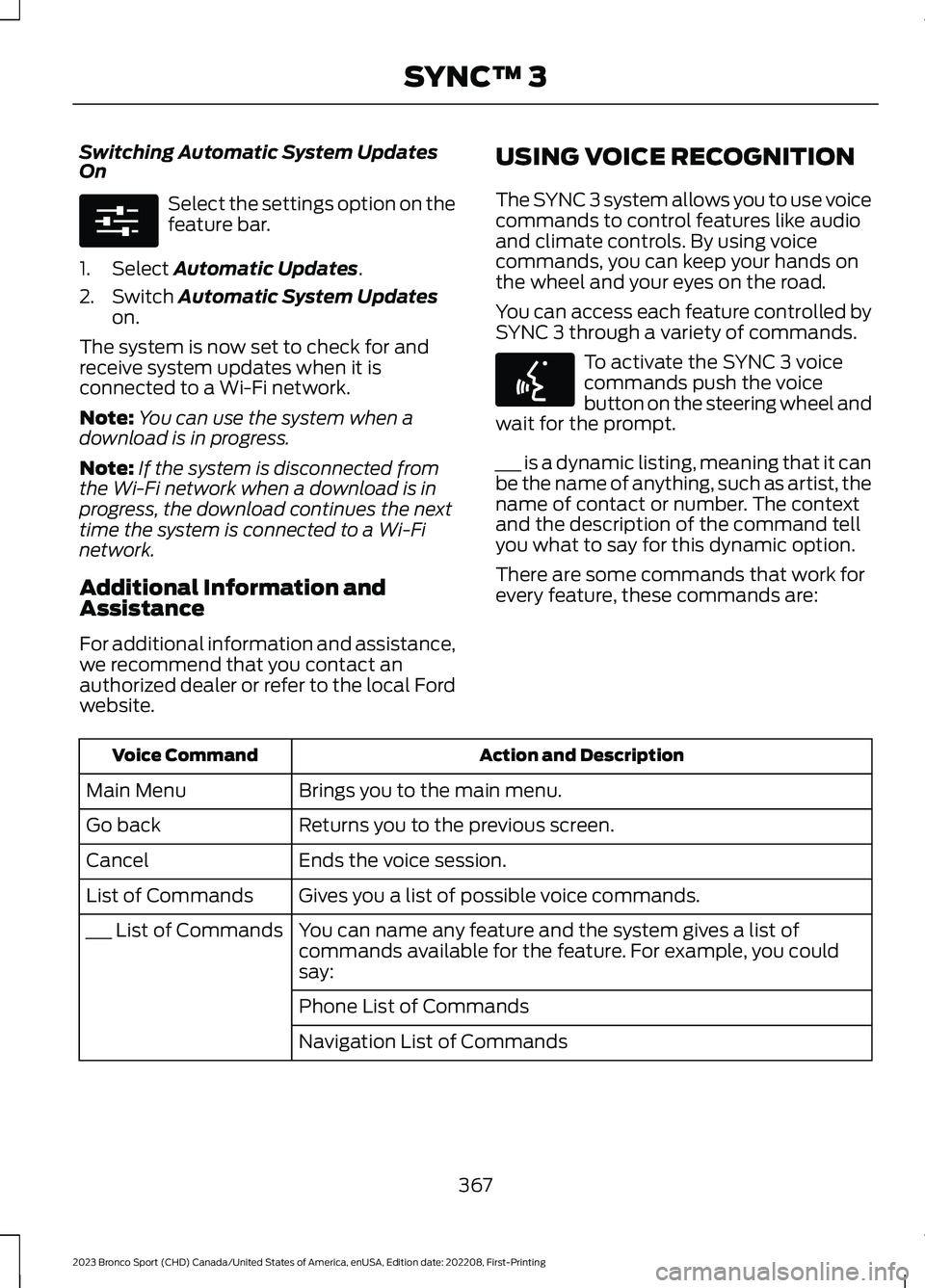
The SYNC 3 system allows you to use voicecommands to control features like audioand climate controls. By using voicecommands, you can keep your hands onthe wheel and your eyes on the road.
You can access each feature controlled bySYNC 3 through a variety of commands.
To activate the SYNC 3 voicecommands push the voicebutton on the steering wheel andwait for the prompt.
___ is a dynamic listing, meaning that it canbe the name of anything, such as artist, thename of contact or number. The contextand the description of the command tellyou what to say for this dynamic option.
There are some commands that work forevery feature, these commands are:
Action and DescriptionVoice Command
Brings you to the main menu.Main Menu
Returns you to the previous screen.Go back
Ends the voice session.Cancel
Gives you a list of possible voice commands.List of Commands
You can name any feature and the system gives a list ofcommands available for the feature. For example, you couldsay:
___ List of Commands
Phone List of Commands
Navigation List of Commands
367
2023 Bronco Sport (CHD) Canada/United States of America, enUSA, Edition date: 202208, First-PrintingSYNC™ 3E280315 E142599
Page 373 of 516
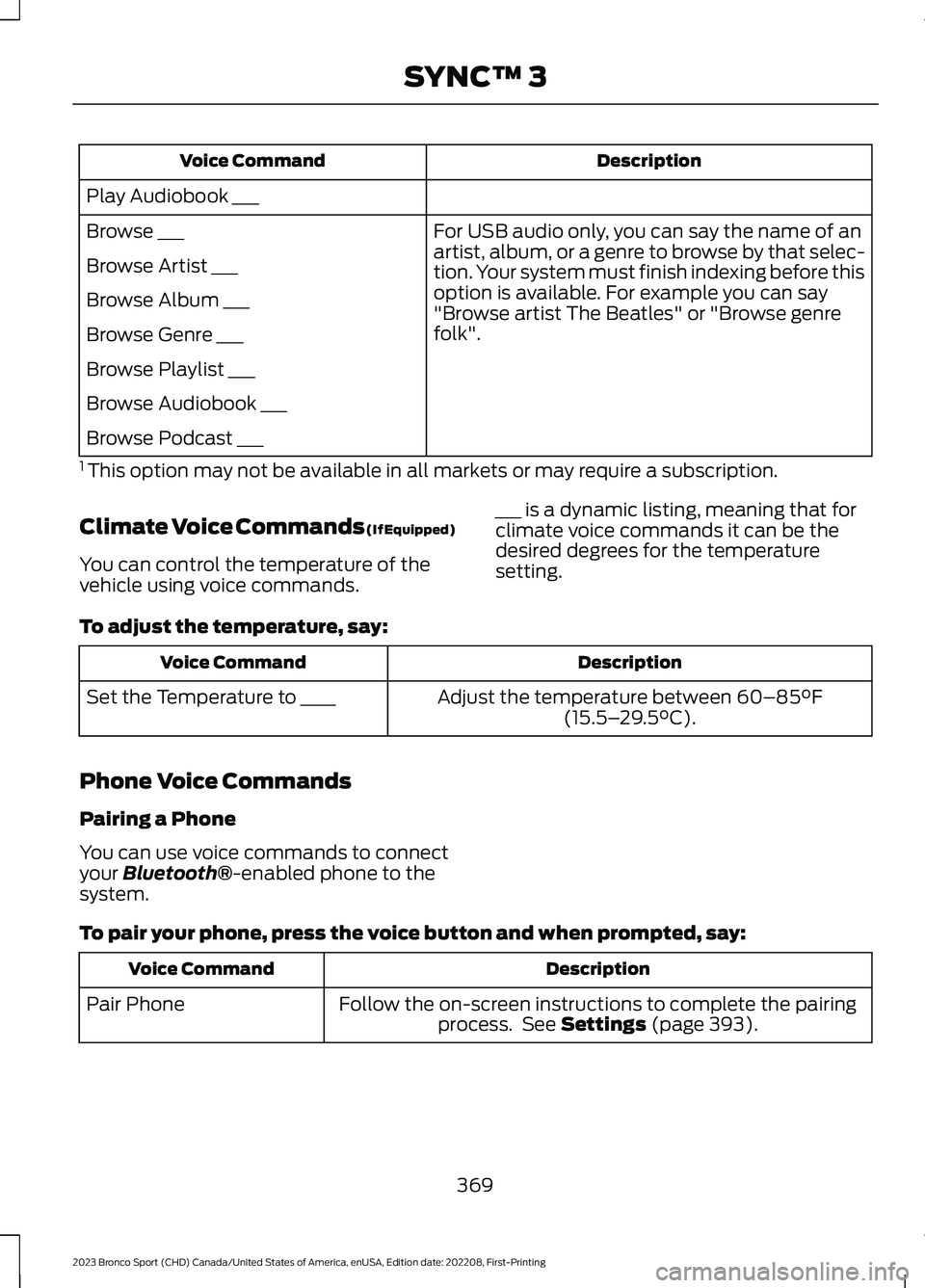
DescriptionVoice Command
Play Audiobook ___
For USB audio only, you can say the name of anartist, album, or a genre to browse by that selec-tion. Your system must finish indexing before thisoption is available. For example you can say"Browse artist The Beatles" or "Browse genrefolk".
Browse ___
Browse Artist ___
Browse Album ___
Browse Genre ___
Browse Playlist ___
Browse Audiobook ___
Browse Podcast ___
1 This option may not be available in all markets or may require a subscription.
Climate Voice Commands (If Equipped)
You can control the temperature of thevehicle using voice commands.
___ is a dynamic listing, meaning that forclimate voice commands it can be thedesired degrees for the temperaturesetting.
To adjust the temperature, say:
DescriptionVoice Command
Adjust the temperature between 60–85°F(15.5–29.5°C).Set the Temperature to ____
Phone Voice Commands
Pairing a Phone
You can use voice commands to connectyour Bluetooth®-enabled phone to thesystem.
To pair your phone, press the voice button and when prompted, say:
DescriptionVoice Command
Follow the on-screen instructions to complete the pairingprocess. See Settings (page 393).Pair Phone
369
2023 Bronco Sport (CHD) Canada/United States of America, enUSA, Edition date: 202208, First-PrintingSYNC™ 3
Page 374 of 516
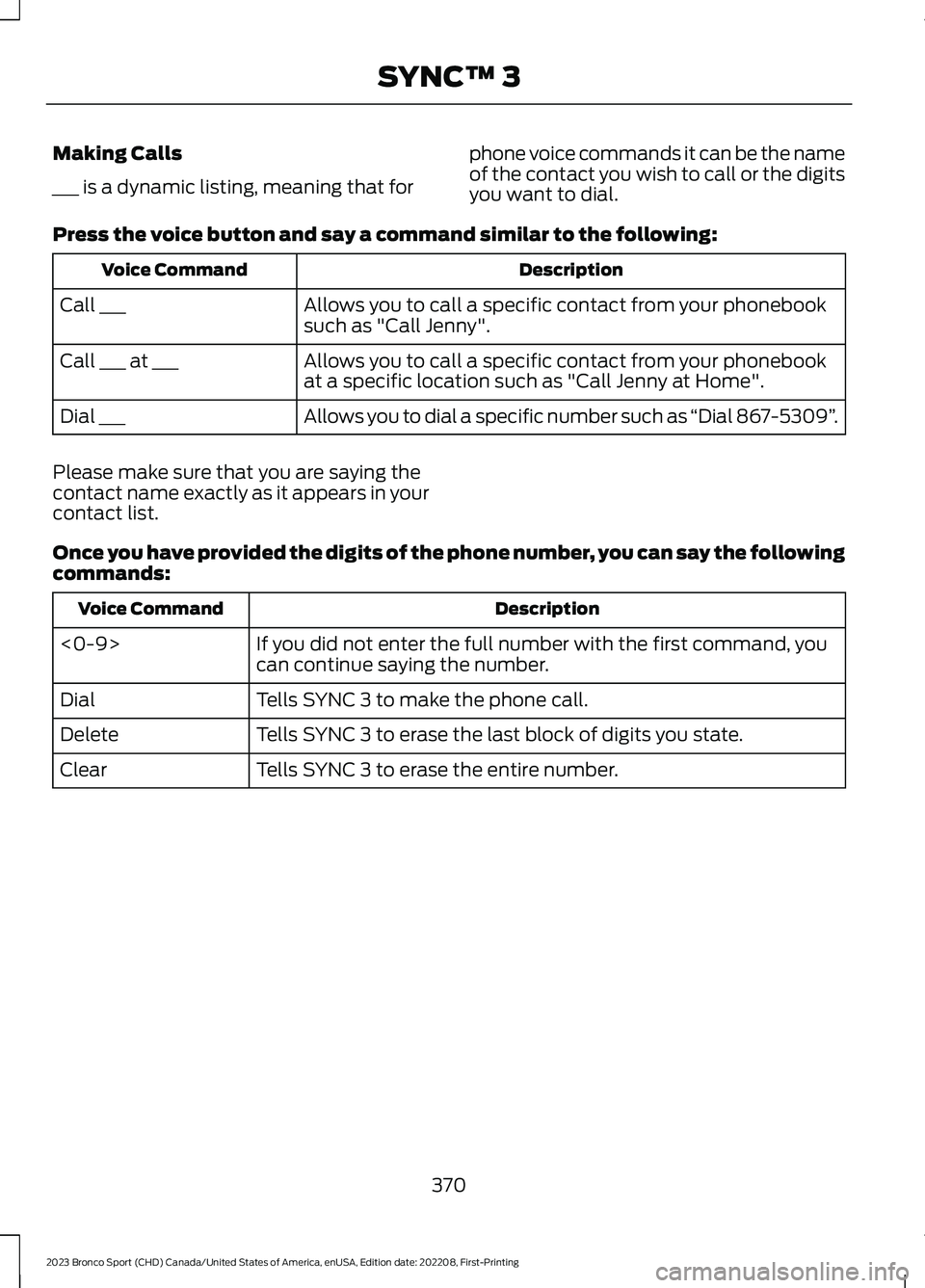
Making Calls
___ is a dynamic listing, meaning that for
phone voice commands it can be the nameof the contact you wish to call or the digitsyou want to dial.
Press the voice button and say a command similar to the following:
DescriptionVoice Command
Allows you to call a specific contact from your phonebooksuch as "Call Jenny".Call ___
Allows you to call a specific contact from your phonebookat a specific location such as "Call Jenny at Home".Call ___ at ___
Allows you to dial a specific number such as “Dial 867-5309”.Dial ___
Please make sure that you are saying thecontact name exactly as it appears in yourcontact list.
Once you have provided the digits of the phone number, you can say the followingcommands:
DescriptionVoice Command
If you did not enter the full number with the first command, youcan continue saying the number.<0-9>
Tells SYNC 3 to make the phone call.Dial
Tells SYNC 3 to erase the last block of digits you state.Delete
Tells SYNC 3 to erase the entire number.Clear
370
2023 Bronco Sport (CHD) Canada/United States of America, enUSA, Edition date: 202208, First-PrintingSYNC™ 3
Page 377 of 516
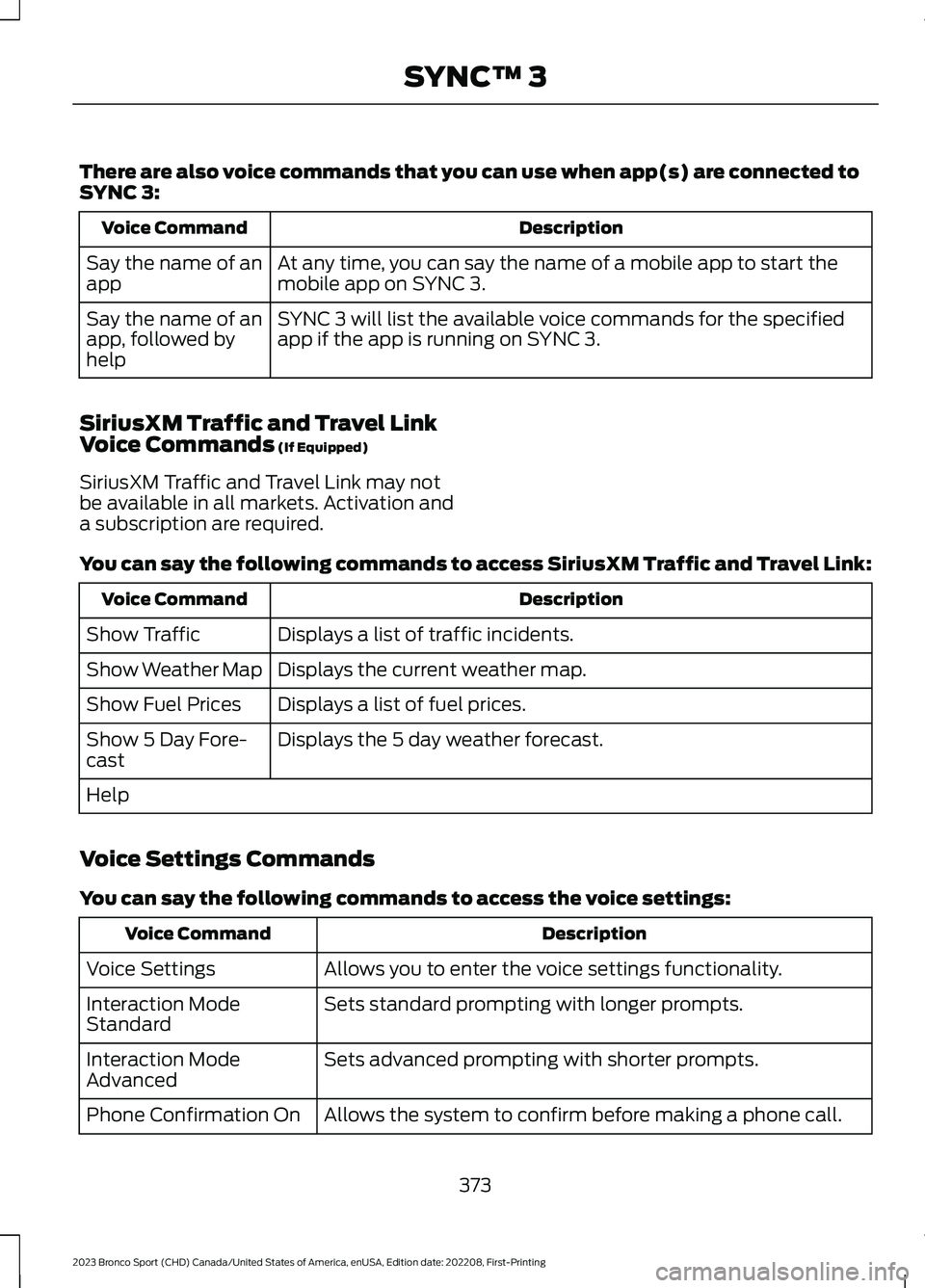
There are also voice commands that you can use when app(s) are connected toSYNC 3:
DescriptionVoice Command
At any time, you can say the name of a mobile app to start themobile app on SYNC 3.Say the name of anapp
SYNC 3 will list the available voice commands for the specifiedapp if the app is running on SYNC 3.Say the name of anapp, followed byhelp
SiriusXM Traffic and Travel LinkVoice Commands (If Equipped)
SiriusXM Traffic and Travel Link may notbe available in all markets. Activation anda subscription are required.
You can say the following commands to access SiriusXM Traffic and Travel Link:
DescriptionVoice Command
Displays a list of traffic incidents.Show Traffic
Displays the current weather map.Show Weather Map
Displays a list of fuel prices.Show Fuel Prices
Displays the 5 day weather forecast.Show 5 Day Fore-cast
Help
Voice Settings Commands
You can say the following commands to access the voice settings:
DescriptionVoice Command
Allows you to enter the voice settings functionality.Voice Settings
Sets standard prompting with longer prompts.Interaction ModeStandard
Sets advanced prompting with shorter prompts.Interaction ModeAdvanced
Allows the system to confirm before making a phone call.Phone Confirmation On
373
2023 Bronco Sport (CHD) Canada/United States of America, enUSA, Edition date: 202208, First-PrintingSYNC™ 3