2023 FORD BRONCO door lock
[x] Cancel search: door lockPage 393 of 642

REMOVING AND INSTALLING THEREAR ROOF PANEL - RAPTOR, 4-DOOR
WARNING: Do not remove ormodify the B-Pillar brace or trim. Doingso could affect safety systemperformance, including safety canopyand front seat mounted side airbags,during a crash or rollover.
Do not remove or modify the C-pillar brace.
Remove the front panels and center panelbefore removing the rear roof panel.
1.Open the rear doors.
2.Open the tailgate window. SeeOpening and Closing the Windows(page 113).
3.Locate the wire harness and washerhose on the driver side rear insidecorner of the vehicle.
4.Release the locking tab by pushing itdown.
5.Push the tab inward when pulling downto disconnect and remove the wiringharness.
6.Push the release button on the hoseconnector and pull down to removethe washer hose.
7.Secure the wiring harness to the bodyside by plugging it into the receptacleand pushing up on the locking tab.
8.Secure the washer hose by snapping itinto the top of the body sidereceptacle.
389
2023 Bronco (TG1) Canada/United States of America, enUSA, Edition date: 202208, DOMRemovable Vehicle ComponentsE335339 E335340 E345383
Page 394 of 642
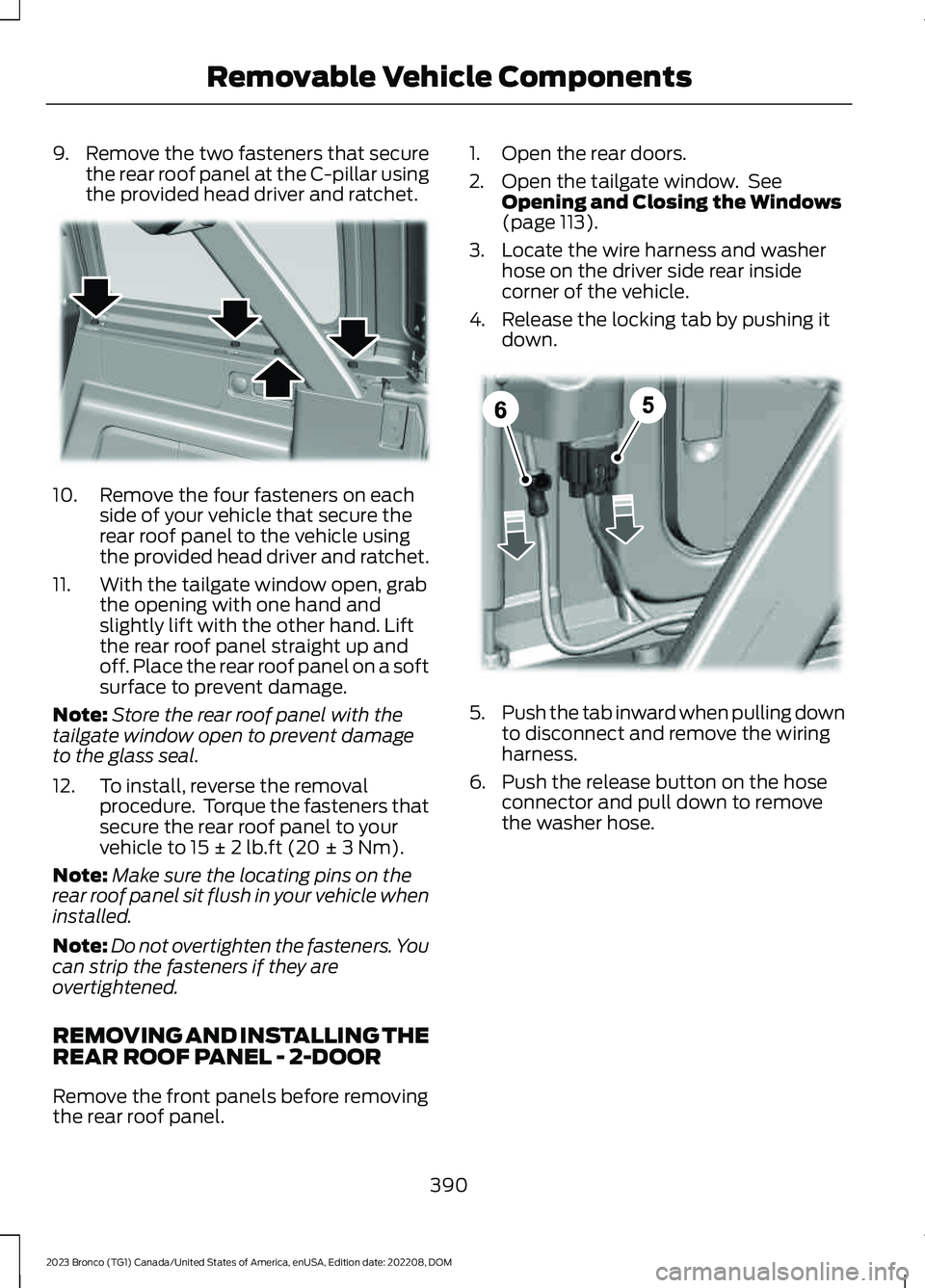
9.Remove the two fasteners that securethe rear roof panel at the C-pillar usingthe provided head driver and ratchet.
10.Remove the four fasteners on eachside of your vehicle that secure therear roof panel to the vehicle usingthe provided head driver and ratchet.
11.With the tailgate window open, grabthe opening with one hand andslightly lift with the other hand. Liftthe rear roof panel straight up andoff. Place the rear roof panel on a softsurface to prevent damage.
Note:Store the rear roof panel with thetailgate window open to prevent damageto the glass seal.
12.To install, reverse the removalprocedure. Torque the fasteners thatsecure the rear roof panel to yourvehicle to 15 ± 2 lb.ft (20 ± 3 Nm).
Note:Make sure the locating pins on therear roof panel sit flush in your vehicle wheninstalled.
Note:Do not overtighten the fasteners. Youcan strip the fasteners if they areovertightened.
REMOVING AND INSTALLING THEREAR ROOF PANEL - 2-DOOR
Remove the front panels before removingthe rear roof panel.
1.Open the rear doors.
2.Open the tailgate window. SeeOpening and Closing the Windows(page 113).
3.Locate the wire harness and washerhose on the driver side rear insidecorner of the vehicle.
4.Release the locking tab by pushing itdown.
5.Push the tab inward when pulling downto disconnect and remove the wiringharness.
6.Push the release button on the hoseconnector and pull down to removethe washer hose.
390
2023 Bronco (TG1) Canada/United States of America, enUSA, Edition date: 202208, DOMRemovable Vehicle ComponentsE333997 E335339
Page 411 of 642

17.From behind the bumper, hand startthe lamp bolt at the top center of thelamp housing.
Note:Do not tighten or torque the bolt.
18.Using the hex tool, tighten the fourbolts installed in Step 15. Thentighten the bolt loosened in Step 12.Lastly, tighten the bolt installed inStep 17.
Note:We recommend that you use a torquewrench to make sure that you tighten all thebolts to 16 lb.ft (22 Nm).
19.Insert the vehicle-side lamp wiringconnector onto the lamp plugattached to the lamp housing andpush together until you feel it clicktogether.
Note:Make sure you do not press therelease tab on the lamp connector whenpushing the connectors together, this wayyou can feel them click together.
Note:The lamp-side wiring connector isattached to the lamp housing and does notneed to be removed to perform this step.
20.To install the additional front bumpercap, repeat Steps 8-19 on theopposite side.
21.Reinstall the center front bumpercover in the original location.
22.Install the 17 pushpins removed inSteps 2-6. Do not press the pushpinheads in until all pushpins are inplace.
23.Lock the pushpins in place by pushingthe head in until it stops.
Note:There should be a gap of about0.10 in(2.5 mm) between the head and body ofthe pushpin.
24.Return the hex tool to the tool pouchwith the docking plug protective capsand lamp bolts, and then secure thetool pouch in the vehicle.
STORING THE DOORS AND
THE ROOF PANELS - 4-DOOR,
EXCLUDING: RAPTOR
WARNING: Do not store removeddoors or roof panels in vehicle withoutusing the Ford onboard storage kit, andverifying they have been secured perinstructions. Failure to follow thisinstruction could result in personal injuryor death.
Note:Cargo can shift under severe vehicleuse, to reduce the risk of damage, avoid highspeed or extreme rock crawl off-roadsituations when storing the doors in thecargo area.
Note:Inspect the bags and harnessperiodically to make sure they are notdamaged. Inspect the door retentionharness straps to make sure there are nonicks, tears or cuts. Replace if necessary.
407
2023 Bronco (TG1) Canada/United States of America, enUSA, Edition date: 202208, DOMRemovable Vehicle Components E366958
Page 430 of 642

CLEANING VINYL
WARNING: On vehicles equippedwith seat-mounted airbags, do not usechemical solvents or strong detergents.Such products could contaminate theside airbag system and affectperformance of the side airbag in a crash.
We recommend that you only clean vinylsurfaces in the following way:
1.Remove dust and loose dirt with avacuum cleaner.
2.Wipe the surface with a soft, dampcloth and a mild soap and watersolution. Dry the area with a clean, softcloth.
3.For additional information andassistance, we recommend that youcontact an authorized dealer.
CLEANING CARPETS AND FLOORMATS
We recommend that you only clean yourcarpets in the following way:
1.Remove dust and loose dirt with avacuum cleaner.
2.Wipe the surface with a soft, dampcloth and a mild soap and watersolution. Dry the area with a clean, softcloth.
3.For additional information andassistance, we recommend that youcontact an authorized dealer.
For heavy stains, spot clean the area. If aring forms on the fabric, clean the entirearea immediately, but do not over-saturateor the ring could set.
We recommend that you only clean yourfloor mats in the following way:
1.Remove dust and loose dirt with avacuum cleaner.
2.Wash rubber floor mats using mildsoap and lukewarm or cold water.
3.Completely dry the floor mat beforeplacing them back in your vehicle.
Cleaning Rubber Floors
1.Remove the floor mats prior to washingout. See Floor Mats (page 327).
Note:Prior to washing out, remove largedebris to prevent clogging the drain.
2.Turn active drain plugs in eachpassenger compartmentcounterclockwise to open.
3.Wash out debris using a standardgarden style hose.
Note:Use caution to not spray seats,console, door interior, electrical connections,instrument cluster display and underside ofthe instrument panel on both driver andpassenger sides.
4.Wipe out remaining water or debrisfrom the floor.
5.Install active drain plugs and turnclockwise to close.
6.Reinstall floor mats.
CLEANING SEATBELTS
WARNING: Do not use cleaningsolvents, bleach or dye on the vehicle'sseatbelts, as these actions may weakenthe belt webbing.
1.Wipe the surface with a soft, dampcloth and a mild soap and watersolution. Dry the area with a clean, softcloth.
426
2023 Bronco (TG1) Canada/United States of America, enUSA, Edition date: 202208, DOMVehicle Care
Page 488 of 642

CONNECTED VEHICLE –
TROUBLESHOOTING
CONNECTED VEHICLE –FREQUENTLY ASKED QUESTIONS
Why can I not confirm theconnection of my FordPassaccount to the modem?
•The modem is not enabled. Switchvehicle connectivity on.
•The network signal is weak. Move yourvehicle closer to a place where thenetwork signal is not obstructed.
Why can I not connect to a Wi-Finetwork?
•You entered the wrong networkpassword. Enter the correct password.
•The network signal is weak. Move yourvehicle closer to the Wi-Fi router or toa place where the network signal is notobstructed.
•There are multiple access points inrange with the same network name.Choose a unique name for yournetwork. Do not use the default nameunless it contains a unique identifier,for example as part of the MACaddress.
Why does the Wi-Fi connectiondisconnect after successfulconnection?
•The network signal is weak. Move yourvehicle closer to the Wi-Fi router or toa place where the network signal is notobstructed.
What can I do if I am close to a Wi-Fi router but the network signalstrength is weak?
•If your vehicle has a heated windshield,position your vehicle so that thewindshield is not facing the Wi-Firouter.
•If your vehicle has metallic tinting onthe windows but not on the windshield,position your vehicle so that thewindshield is facing the Wi-Fi router oropen the windows that are facing therouter.
•If your vehicle has metallic tinting onthe windows and the windshield, openthe windows that are facing the router.
•If your vehicle is in a garage and youhave the garage door closed, open thegarage door as it could block the signal.
Why can I not see a network Iexpect to see in the list of availablenetworks?
•The network is hidden. Make thenetwork visible and try again, ormanually add a network in the Wi-Fisettings menu.
Why do software downloads taketoo long?
•The network signal is weak. Move yourvehicle closer to the Wi-Fi router or toa place where the network signal is notobstructed.
•Wi-Fi network is in high demand or hasa slow Internet connection. Use a morereliable Wi-Fi network.
484
2023 Bronco (TG1) Canada/United States of America, enUSA, Edition date: 202208, DOMConnected Vehicle
Page 521 of 642

This introduces new features and providesupdates to the vehicle's software systems.Make sure to switch Automatic Updateson, set a recurring update schedule andconnect your vehicle to Wi-Fi. Updatescould take longer when not connected toWi-Fi or could not download at all. SeeConnecting the Vehicle to a Wi-FiNetwork (page 483). See Connecting theVehicle to a Wi-Fi Network (page 483).
Your vehicle may be able to receivedrivable software updates, non-drivablesoftware updates or both. Drivablesoftware updates happen during normalvehicle usage and require limited inputfrom you. You are notified on yourtouchscreen and connected device priorto a non-drivable update.
Most updates complete in less than 30minutes, although some updates couldtake up to a few hours. Check yourtouchscreen or connected device for themost accurate estimated update time.
You are notified of the status of the vehiclesoftware update in the touchscreen andon your connected device. See SoftwareUpdate Indicators (page 518).
Vehicle Software UpdateRequirements
Non-drivable software updates do notinstall if any of the following occur:
•Your vehicle is running.
•Your vehicle is switched on.
•Your vehicle is not parked.
•The 12 V battery charge is too low.
•The hazard indicators are switched on.
•The alarm is sounding.
•The doors are open.
•The parking lamps are switched on.
•You are pressing the brake pedal.
•An emergency call is in process.
•Your vehicle is in limp home mode.
Vehicle Software UpdateLimitations
Once you begin a non-drivable softwareupdate, you cannot:
•Cancel the update.
•Lock, unlock or enter your vehicleunless you have a key blade.
•You can open the doors using themechanical latch if child locks arenot on.
•Drive your vehicle.
•Start your vehicle.
•Use the remote control to lock, unlockor start your vehicle.
•Use the alarm, central locks or doortones.
•Use the electronic door locks.
•Charge your vehicle.
•Charging resumes once the updatecompletes.
SOFTWARE UPDATE
SETTINGS
To access the Software Updates menu:
1.Press Settings on the touchscreen.
2.Press Software Updates.
You can do the following in the SoftwareUpdates menu:
•Switch Automatic Updates on and off.
•Schedule and install software updates.
•View software update details.
Press the button next to a menuoption for more information.
517
2023 Bronco (TG1) Canada/United States of America, enUSA, Edition date: 202208, DOMVehicle Software UpdatesE366956
Page 534 of 642

Check Every Six Months
The battery connections. Clean if necessary.
The body and door drain holes for obstructions. Clean if necessary.
The cooling system fluid level and the coolant system strength.
The door weatherstrips for wear. Lubricate if necessary.
The hinges, latches and outside locks for proper operation. Lubricate if necessary.
The parking brake for proper operation.
The seatbelts and seat latches for wear and function.
Safety warning lamps, brake, ABS, airbag and seatbelt for operation.
The washer spray and wiper operation. Clean or replace blades as necessary.
Multi-Point Inspection
It is important to have the systems on yourvehicle regularly checked. This can helpidentify potential issues and prevent majorproblems. We recommend having thefollowing multi-point inspection performedat every scheduled maintenance intervalto help make sure your vehicle keepsrunning great.
Multi-Point Inspection
Hazard warning system operationAccessory drive belt or belts
Horn operationBattery performance
Radiator, cooler, heater and air conditioninghosesEngine air filter
Suspension components for leaks ordamageExhaust system
Steering and linkageExterior lamps operation
Tires including the spare for wear and
proper pressure2Fluid levels1; fill if necessary
530
2023 Bronco (TG1) Canada/United States of America, enUSA, Edition date: 202208, DOMScheduled Maintenance
Page 623 of 642

Closing the Tailgate.......................................93Closing the Tailgate From Outside YourVehicle.................................................................93Clutch Fluid Capacity andSpecification...............................................188Cold Weather Precautions.......................326Connected Navigation................................514Connected Vehicle......................................483Connected Vehicle –Troubleshooting...........................................484Connecting the Vehicle to a MobileNetwork............................................................483Connected Vehicle Data..............................25Connected Vehicle Limitations..............483Connected Vehicle Requirements........483Connected Vehicle –Troubleshooting.......................................484Connected Vehicle – Frequently AskedQuestions........................................................484Connecting a Bluetooth® Device...........510Connecting a Trailer...................................305Connecting a Trailer –Troubleshooting...........................................306Connecting a Trailer Precautions..........305Connecting a Trailer –Troubleshooting.......................................306Connecting a Trailer – InformationMessages........................................................306Connecting the Vehicle to a MobileNetwork.......................................................483Connecting FordPass to the Modem.........483Enabling and Disabling the Modem...........483What Is the Modem..........................................483Connecting the Vehicle to a Wi-FiNetwork.......................................................483Connecting Your Phone............................505Contacting Us...................................................16Cooling System Capacity andSpecification - 2.3L EcoBoost™.........472Cooling System Capacity andSpecification - 2.7L EcoBoost™/3.0LEcoBoost™.................................................473Crash and BreakdownInformation.................................................328Automatic Crash Shutoff................................332Jump Starting the Vehicle..............................329Post-Crash Alert System.................................331Post Impact Braking..........................................331
Recovery Towing................................................332Crash Sensors and Airbag Indicator........75Crawler Gear..................................................186Using Crawler Gear............................................186What Is Crawler Gear........................................186Creating a MyKey...........................................85Creating a Vehicle Wi-Fi Hotspot.........486Cross Traffic Alert........................................283Cross Traffic Alert –Troubleshooting............................................285Cross Traffic Alert Indicators...................284Cross Traffic Alert Limitations................283Cross Traffic Alert Precautions...............283Cross Traffic Alert –Troubleshooting........................................285Cross Traffic Alert – InformationMessages.........................................................285Cruise Control...............................................250Cruise Control Indicators...........................251Customer Information...............................538Radio Frequency CertificationLabels................................................................542Customizing the Instrument ClusterDisplay............................................................127
D
Data Privacy.....................................................23Department of Transportation UniformTire Quality Grades..................................430Digital Radio...................................................491Digital Radio Indicators...................................492Digital Radio Limitations.................................491How Does Digital Radio Work.......................491Switching Digital Radio Reception On andOff......................................................................492What Is Digital Radio........................................491Directing the Flow of Air.............................132Disposing of Airbags.....................................76Distance Indication.....................................289Distance Indication Indicator........................290Switching Distance Indication On andOff......................................................................290What Is Distance Indication..........................289Doors and Locks.............................................88Autolock..................................................................89Autounlock.............................................................88Doors and Locks – Troubleshooting.............89
619
2023 Bronco (TG1) Canada/United States of America, enUSA, Edition date: 202208, DOMIndex