2023 DODGE CHALLENGER battery location
[x] Cancel search: battery locationPage 151 of 300

MULTIMEDIA149
3. After selecting a widget location, select the gauge to
display:
Gauge: Oil Temp
Gauge: Oil Pressure
Gauge: Coolant Temp
Gauge: Battery Voltage
Gauge: Trans Temp — If Equipped with an Auto -
matic Transmission
Gauge: Boost Pressure — If Equipped
Gauge: Air/Fuel Ratio — If Equipped
Gauge: I/C Coolant Temp — If Equipped
Gauge: Intake Air Temp
Gauge: Engine Torque
Gauge: Engine Power
Gauge: G-Force
Gauge: Steering Angle
Gauge: Current Gear
Gauge: Current Speed
Timer: 0–60 mph (0–100 km/h)
Timer: 0–100 mph (0–160 km/h)
Timer: 60 ft (20 m)
Timer: 330 ft (100 m)
Timer: 1/8 Mile (200 m)
Timer: 1000 ft (300 m)
Timer: 1/4 Mile (400 m)
Timer: Braking Distance
Timer: Reaction Time
Historical Data
The Historical Data feature allows you to view information
about your vehicle such as the VIN, miles on the odometer,
longitude and latitude coordinates, and more.
To activate the Historical Data feature on your
touchscreen, follow these steps:
1. Select the Home page tab within Performance Pages. Then, press the settings icon (gear icon) in
the upper right hand corner of the touchscreen.
Home Page Settings
2. Towards the bottom of the screen, a checkbox will appear next to “Include historical data in
screenshot.” Click the box to signify that this feature
will be on.
Historical Data
NOTE:Once the checkbox is selected, the bottom bar of the
screen will be replaced with the historical data from your
vehicle present at the time the screenshot icon was
pressed.
5
23_LA_OM_EN_USC_t.book Page 149
Page 202 of 300
200IN CASE OF EMERGENCY
(Continued)
ASSIST Call
The ASSIST Button is used to automatically connect you to
any one of the following support centers:
Roadside Assistance – If you get a flat tire, or need a
tow, just push the ASSIST button and you will be
connected to a representative for assistance.
Roadside Assistance will know what vehicle you’re
driving and its location. Additional fees may apply for
roadside Assistance.
SiriusXM Guardian™ Customer Care – In-vehicle
support for SiriusXM Guardian™.
Vehicle Customer Care – Total support for all other
vehicle issues.
Uconnect Customer Care - Total support for Radio,
Phone and NAV issues.
SOS Call
1. Push the SOS Call button on the Rearview Mirror.
NOTE:In case the SOS Call button is pushed in error, there will be
a 10 second delay before the SOS Call system initiates a
call to a SOS operator. To cancel the SOS Call connection,
push the SOS call button on the Rearview Mirror or press
the cancellation button on the Device Screen. Termination
of the SOS Call will turn off the green LED light on the
Rearview Mirror.
2. The LED light located between the ASSIST and SOS buttons on the Rearview Mirror will turn green once a
connection to a SOS operator has been made.
3. Once a connection between the vehicle and a SOS operator is made, the SOS Call system may transmit
the following important vehicle information to a SOS
operator:
Indication that the occupant placed a SOS Call.
The vehicle brand.
The last known GPS coordinates of the vehicle.
4. You should be able to speak with the SOS operator through the vehicle audio system to determine if
additional help is needed.NOTE:
Your vehicle may be transmitting data as autho -
rized by the subscriber.
Once a connection is made between the vehicle’s
SOS Call system and the SOS operator, the SOS
operator may be able to open a voice connection
with the vehicle to determine if additional help is
needed. Once the SOS operator opens a voice
connection with the vehicle’s SOS Call system, the
operator should be able to speak with you or other
vehicle occupants and hear sounds occurring in
the vehicle. The vehicle’s SOS Call system will
attempt to remain connected with the SOS oper -
ator until the SOS operator terminates the connec -
tion. 5. The SOS operator may attempt to contact appropriate
emergency responders and provide them with
important vehicle information and GPS coordinates.
WARNING!
ALWAYS obey traffic laws and pay attention to the road.
ALWAYS drive safely with your hands on the steering
wheel. You have full responsibility and assume all risks
related to the use of the Uconnect and SiriusXM
Guardian™ features and applications in this vehicle.
Only use Uconnect features and SiriusXM Guardian™
services when it is safe to do so. Failure to do so may
result in an accident involving serious injury or death.
WARNING!
If anyone in the vehicle could be in danger (e.g., fire
or smoke is visible, dangerous road conditions or
location), do not wait for voice contact from an Emer -
gency Services Agent. All occupants should exit the
vehicle immediately and move to a safe location.
Never place anything on or near the vehicle’s oper -
able network and GPS antennas. You could prevent
operable network and GPS signal reception, which
can prevent your vehicle from placing an emergency
call. An operable network and GPS signal reception is
required for the SOS Call system to function properly.
The SOS Call system is embedded into the vehicle’s
electrical system. Do not add aftermarket electrical
equipment to the vehicle’s electrical system. This
may prevent your vehicle from sending a signal to
initiate an emergency call. To avoid interference that
can cause the SOS Call system to fail, never add
aftermarket equipment (e.g., two-way mobile radio,
CB radio, data recorder, etc.) to your vehicle’s elec -
trical system or modify the antennas on your vehicle.
IF YOUR VEHICLE LOSES BATTERY POWER FOR ANY
REASON (INCLUDING DURING OR AFTER AN ACCI -
DENT), THE UCONNECT FEATURES, APPS AND
SERVICES, AMONG OTHERS, WILL NOT OPERATE.
23_LA_OM_EN_USC_t.book Page 200
Page 218 of 300
216IN CASE OF EMERGENCY
(F) SEALANT BOTTLE AND HOSE REPLACE -
MENT:
1. Uncoil the Sealant Hose (4) (clear in color).
2. Locate the round Sealant Bottle release button in the recessed area under the sealant bottle.
3. Push the Sealant Bottle release button. The Sealant Bottle (1) will pop up. Remove the bottle and dispose
of it accordingly.
4. Clean any remaining sealant from the Tire Service Kit housing.
5. Position the new Sealant Bottle (1) in the housing so that the Sealant Hose (4) aligns with the hose slot in
the front of the housing. Push the bottle into the
housing. An audible click will be heard indicating the
bottle is locked into place.
6. Verify that the cap is installed on the fitting at the end of the Sealant Hose (4) and return the hose to its
storage area (located on the bottom of the air pump).
7. Return the Tire Service Kit to its storage location in the vehicle.
JUMP STARTING
If your vehicle has a discharged battery, it can be jump
started using a set of jumper cables and a battery in
another vehicle, or by using a portable battery booster
pack. Jump starting can be dangerous if done improperly,
so please follow the procedures in this section carefully.
NOTE:When using a portable battery booster pack, follow the
manufacturer's operating instructions and precautions.
PREPARATIONS FOR JUMP START
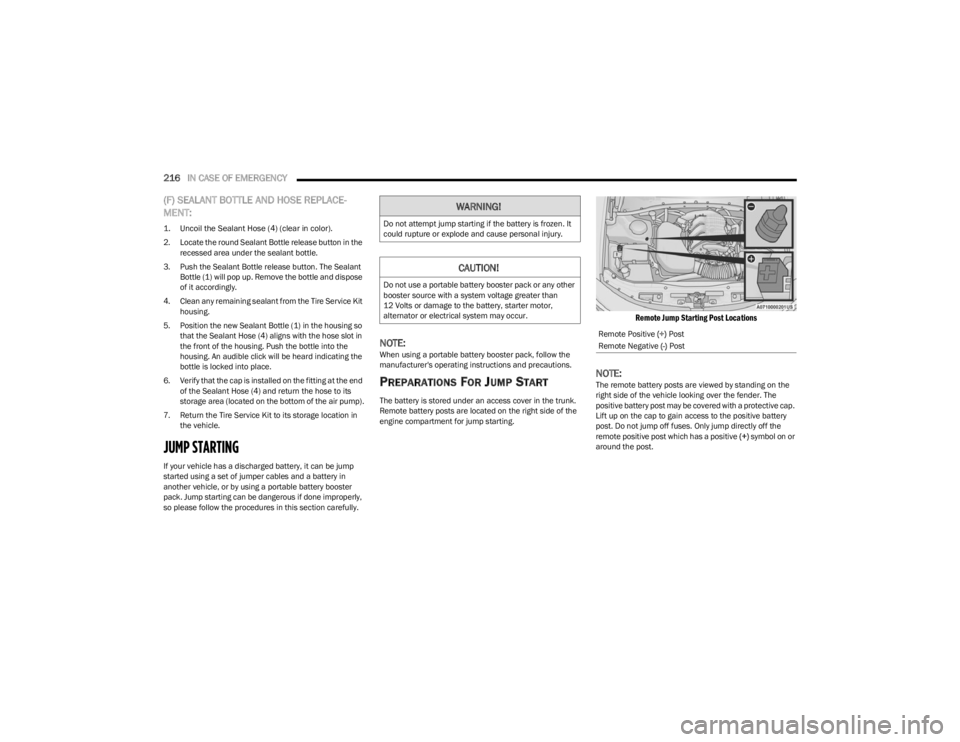
The battery is stored under an access cover in the trunk.
Remote battery posts are located on the right side of the
engine compartment for jump starting.
Remote Jump Starting Post Locations
NOTE:The remote battery posts are viewed by standing on the
right side of the vehicle looking over the fender. The
positive battery post may be covered with a protective cap.
Lift up on the cap to gain access to the positive battery
post. Do not jump off fuses. Only jump directly off the
remote positive post which has a positive (+) symbol on or
around the post.
WARNING!
Do not attempt jump starting if the battery is frozen. It
could rupture or explode and cause personal injury.
CAUTION!
Do not use a portable battery booster pack or any other
booster source with a system voltage greater than
12 Volts or damage to the battery, starter motor,
alternator or electrical system may occur.
Remote Positive (+) Post
Remote Negative (-) Post
23_LA_OM_EN_USC_t.book Page 216
Page 244 of 300
242SERVICING AND MAINTENANCE
FUSES
General Information
The fuses protect electrical systems against excessive
current.
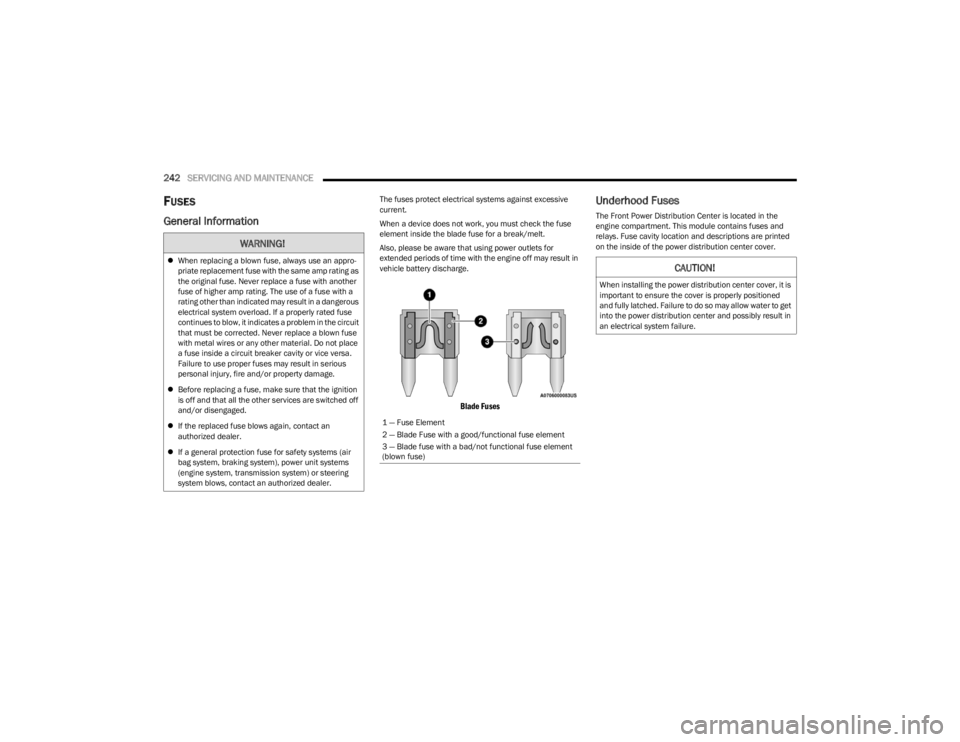
When a device does not work, you must check the fuse
element inside the blade fuse for a break/melt.
Also, please be aware that using power outlets for
extended periods of time with the engine off may result in
vehicle battery discharge.
Blade Fuses
Underhood Fuses
The Front Power Distribution Center is located in the
engine compartment. This module contains fuses and
relays. Fuse cavity location and descriptions are printed
on the inside of the power distribution center cover.
WARNING!
When replacing a blown fuse, always use an appro -
priate replacement fuse with the same amp rating as
the original fuse. Never replace a fuse with another
fuse of higher amp rating. The use of a fuse with a
rating other than indicated may result in a dangerous
electrical system overload. If a properly rated fuse
continues to blow, it indicates a problem in the circuit
that must be corrected. Never replace a blown fuse
with metal wires or any other material. Do not place
a fuse inside a circuit breaker cavity or vice versa.
Failure to use proper fuses may result in serious
personal injury, fire and/or property damage.
Before replacing a fuse, make sure that the ignition
is off and that all the other services are switched off
and/or disengaged.
If the replaced fuse blows again, contact an
authorized dealer.
If a general protection fuse for safety systems (air
bag system, braking system), power unit systems
(engine system, transmission system) or steering
system blows, contact an authorized dealer.
1 — Fuse Element
2 — Blade Fuse with a good/functional fuse element
3 — Blade fuse with a bad/not functional fuse element
(blown fuse)
CAUTION!
When installing the power distribution center cover, it is
important to ensure the cover is properly positioned
and fully latched. Failure to do so may allow water to get
into the power distribution center and possibly result in
an electrical system failure.
23_LA_OM_EN_USC_t.book Page 242
Page 287 of 300

285
INDEX
AAbout Your Brakes ................................................ 74, 273
Adaptive Cruise Control (ACC) .................................84, 85
Adding Engine Coolant (Antifreeze) ............................ 238
Adding Washing Fluid .................................................. 230
Additives, Fuel .............................................................. 275
Advance Phone Connectivity ....................................... 142
Air Bag........................................................................... 180 Advance Front Air Bag ............................................ 180
Air Bag Operation.................................................... 181
Air Bag Warning Light ............................................. 179
Enhanced Accident Response ...................... 184
, 222
Event Data Recorder (EDR).................................... 222 Front Air Bag ........................................................... 180
If Deployment Occurs ............................................. 183
Knee Impact Bolsters ............................................. 181
Maintaining Your Air Bag System .......................... 184
Maintenance ........................................................... 184
Redundant Air Bag Warning Light ......................... 179
Side Air Bags ........................................................... 181
Transporting Pets.................................................... 196
Air Bag Light ................................................. 63
, 179, 196
Air Cleaner, Engine (Engine Air Cleaner Filter) ........... 233
Air Conditioner Maintenance ...................................... 234
Air Conditioner Refrigerant .......................................... 234
Air Conditioner System ................................................ 234
Air Conditioning ............................................................... 45
Air Conditioning Filter ........................................... 49
, 234
Air Conditioning System..................................................45 Air Conditioning, Operating Tips ..................................... 48Air Filter......................................................................... 233 Air Pressure
Tires.......................................................................... 261
Alarm Arm The System.................................................. 19
, 20
Panic........................................................................... 13
Rearm The System .................................................... 20
Security Alarm..................................................... 19
, 66
Alarm System Security Alarm............................................................ 19
All Wheel Drive Towing ...................................................................... 222
All Wheel Drive (AWD)...................................................241
Alterations/Modifications Vehicle.......................................................................... 8
Alternate Tire Service Kit — If Equipped
b
.............. 211
Android Auto........................................................ 144, 145
Android auto™
b
....................................................... 144
Antifreeze (Engine Coolant) ............................... 238, 277
Disposal ...................................................................239
Anti-Lock Brake System (ABS) ..................................... 159
Anti-Lock Warning Light.................................................. 66
Apple CarPlay ...................................................... 144
, 147
Apple carplay® ¹ ...........................................................146
Arming System Security Alarm............................................................ 19
Assist, Hill Start ............................................................. 162
Audio Settings ............................................................... 131
Audio Systems (Radio) ................................................. 106
Auto Down Power Windows............................................ 52
Automatic Door Locks .................................................... 24 Automatic Headlights ..................................................... 41 Automatic High Beams .................................................. 40
Automatic Temperature Control (ATC) .......................... 48
Automatic Transmission ................................................ 79 Adding Fluid .................................................... 241
, 279
Fluid And Filter Change........................................... 241
Fluid Change ........................................................... 241
Fluid Level Check .................................................... 241
Fluid Type .......................................................241
, 279
Special Additives ..................................................... 241
Automatic Transmission Limp Home Mode ................. 81
AutoPark ......................................................................... 72
Autostick Operation ................................................................... 82
AWD Towing...................................................................... 222
Axle Fluid....................................................................... 279
Axle Lubrication ............................................................ 279
BBack Up Camera............................................................. 96
Battery.................................................................... 64, 231
Charging System Light .............................................. 64
Keyless Key Fob Replacement................................. 13
Location ................................................................... 231
Belts, Seat..................................................................... 196
Blind Spot Monitoring .................................................. 164
Bluetooth Connecting To A Particular Mobile PhoneOr Audio Device After Pairing ............................ 139
Body Mechanism Lubrication ...................................... 235
B-Pillar Location ........................................................... 258
11
23_LA_OM_EN_USC_t.book Page 285
Page 290 of 300

288 H
Hazard Driving Through Flowing, Rising, Or Shallow Standing Water .................................... 105
Hazard Warning Flashers ............................................ 199
Head Restraints .............................................................. 34
Head Rests ...................................................................... 34
Headlights Automatic ...................................................................41
Cleaning................................................................... 270
High Beam/Low Beam Select Switch .......................40
Lights On Reminder ...................................................41
On With Wipers ..........................................................41
Passing ....................................................................... 41
Switch .........................................................................39
Time Delay..................................................................41
Washers................................................................... 230
Heated Mirrors ................................................................36 Heated Seats...................................................................31
Heated Steering Wheel...................................................25Heater .............................................................................. 45
Hill Start Assist ............................................................. 162
Hitches Trailer Towing .......................................................... 100
HomeLink (Garage Door Opener) ..................................36
Hood Release ..................................................................54
IIgnition .............................................................................15 Switch .........................................................................15
Illuminated Entry ............................................................. 43
Information Center, Vehicle............................................58 Inside Rearview Mirror.......................................... 35
, 199 Instrument Cluster
Descriptions ........................................................ 56
, 69
Display................................................................. 57, 60
Instrument Cluster
b
.................................................. 57
Instrument Cluster Display Audio .......................................................................... 62
Driver Assist ............................................................... 61
Fuel Economy ............................................................ 61
Speedometer ............................................................. 60
Vehicle Info ................................................................ 60
Instrument Panel Lens Cleaning ................................. 272
Interior Appearance Care ............................................. 271
Interior Lights .................................................................. 42
Intermittent Wipers (Delay Wipers) ............................... 44 iPod/USB/MP3 Control .................................................. 50 Bluetooth Streaming Audio....................................... 50
JJack Location ................................................................ 202
Jack Operation .............................................................. 203
Jacking And Tire Changing
b
....................................202
Jacking Instructions ...................................................... 203
Jump Starting ...................................................... 216
, 217
KKey Fob Arm The System......................................................... 19
Panic Alarm ................................................................ 13
Programming Additional Key Fobs ........................... 15
Unlatch The Trunk ..................................................... 13
Key Fob Battery Service (Remote Keyless Entry) ......... 13
Key Fob Programming (Remote Keyless Entry) ............ 15 Keyless Enter 'n Go™ ..................................................... 22
Enter The Trunk......................................................... 13
Keys ................................................................................. 12 Replacement ............................................................. 15
LLane Change And Turn Signals ..................................... 42
Lane Change Assist ........................................................ 42Lap/Shoulder Belts ...................................................... 174
Latches ......................................................................... 198 Hood........................................................................... 54
Lead Free Gasoline ...................................................... 274
Leaks, Fluid................................................................... 198
Life Of Tires ................................................................... 263
Light Bulbs ...........................................................198
, 250
Lights ............................................................................. 198 Air Bag...................................................... 63
, 179, 196
Automatic Headlights ............................................... 41
Brake Assist Warning.............................................. 162
Brake Warning.................................................. 64
, 273
Bulb Replacement .................................................. 250
Courtesy/Reading ..................................................... 42
Cruise ......................................................................... 69
Daytime Running....................................................... 40
Dimmer Switch, Headlight ........................................ 43
Electronic Stability Program(ESP) Indicator ............ 65
Exterior.............................................................. 39
, 198
Fog ............................................................................. 42
Headlight Switch ....................................................... 39
Headlights.................................................................. 39
Headlights On With Wipers....................................... 41
High Beam ................................................................. 40
High Beam/Low Beam Select .................................. 40
Illuminated Entry ....................................................... 43
23_LA_OM_EN_USC_t.book Page 288
Page 299 of 300

The driver’s primary responsibility is the safe operation of the vehicle. Driving w\
hile distracted can result in loss of vehicle control, resulting in an accident and personal
injury. FCA US LLC strongly recommends that the driver use extreme caution whe\
n using any device or feature that may take their attention off the road. Use of any electrical
devices, such as cellular telephones, computers, portable radios, vehicl\
e navigation or other devices, by the driver while the vehicle is moving is dangerous and could lead
to a serious accident. Texting while driving is also dangerous and should never be done while th\
e vehicle is moving. If you find yourself unable to devote your full attention
to vehicle operation, pull off the road to a safe location and stop your\
vehicle. Some states or provinces prohibit the use of cellular telephones or texting while driving. It is
always the driver’s responsibility to comply with all local laws.
This Owner’s Manual has been prepared to help you get acquainted with your new Dodge brand vehicle and to provide a convenient reference source for common questions.
Not all features shown in this manual may apply to your vehicle. For add\
itional information, visit mopar.com/om (U.S.), owners.mopar.ca (Canada) or your local Dodge brand
dealer.
DRIVING AND ALCOHOL
Drunk driving is one of the most frequent causes of accidents. Your driving ability can be seriously impaired with blood alcohol levels far
below the legal minimum. If you are drinking, don’t drive. Ride with \
a designated non-drinking driver, call a cab, a rideshare, a friend, or use public
transportation.
WARNING
Driving after drinking can lead to an accident. Your perceptions are less sharp, your reflexes are slower and your judg\
ment is impaired when you have
been drinking. Never drink and then drive.
WARNING: Operating, servicing and maintaining a passenger vehicle or off-highway \
motor vehicle can expose you to
chemicals including engine exhaust, carbon monoxide, phthalates, and lea\
d, which are known to the State of California to
cause cancer and birth defects or other reproductive harm. To minimize exposure, avoid breathing exhaust, do not idle the
engine except as necessary, service your vehicle in a well-ventilated area and wear gloves or wash\
your hands frequently
when servicing your vehicle. For more information go to www.P65Warnings.ca.gov/passenger-vehicle.
This Owner’s Manual illustrates and describes the operation of features and equipme\
nt that are either standard or optional on this vehicle. This manual may\
also include a description of features and equipment that are no longer available or were not ordered \
on this vehicle. Please disregard any features and equipment described i\
n this manual that are not on this vehicle. FCA US LLC reserves the right to make changes in design and specifications\
, and/or make additions to or improvements to its products without impos\
ing any obligation upon itself to install them on products previously manufactured.
With respect to any vehicles sold in Canada, the name FCA US LLC shall b\
e deemed to be deleted and the name FCA Canada Inc. used in substitution\
therefore.
This Owner’s Manual is intended to familiarize you with the important features of y\
our vehicle. Your most up-to-date Owner’s Manual, Navigation/Uconnect manuals and Warranty Booklet can be found by visiting the website on the back cover.
U.S. Residents: If you are the first registered retail owner of your v\
ehicle, you may obtain a complimentary printed copy of the Warranty Booklet by calling 1-800-423-6343 or by contacting your dealer. Replacement kits can be purchased by visiting www.techauthority.com.
Canadian Residents: If you are the first registered retail owner of yo\
ur vehicle, you may obtain a complimentary printed copy of the W arranty Booklet or purchase a replacement kit by calling 1-800-387-1143 or by contacting your dealer.
FCA US LLC reserves the right to modify the terms or discontinue the Roa\
dside Assistance Program at any time. The Roadside Assistance Program i\
s subject to restrictions and conditions of use, that are determined solely by FCA US LLC.
ROADSIDE ASSISTANCE 24 HOURS, 7 DAYS A WEEK AT YOUR SERVICE. CALL 1-800-521-2779 OR VISIT CHRYSLER.RSAHELP.COM (USA) CALL 1-800-363-4869 OR VISIT FCA.ROADSIDEAID.COM (CANADA) SERVICES: Flat Tire Service, Out Of Gas/Fuel Delivery, Battery Jump Assistance, Lockout Service and Towing Service
Please see the Customer Assistance chapter in this Owner’s Manual for further information.