2023 DODGE CHALLENGER reset
[x] Cancel search: resetPage 5 of 300

3
Headlight Time Delay ................................................. 41
Lights-On Reminder ................................................... 41
Fog Lights — If Equipped ............................................ 42
Turn Signals .............................................................. 42
Lane Change Assist — If Equipped............................. 42
INTERIOR LIGHTS ...............................................................42 Front Map/Reading Lights ........................................ 42
Ambient Light — If Equipped ...................................... 42
Dimmer Controls ........................................................ 43
Illuminated Entry ........................................................ 43
WINDSHIELD WIPERS AND WASHERS ........................... 44 Windshield Wiper Operation....................................... 44
Rain Sensing Wipers — If Equipped ........................... 45
CLIMATE CONTROLS ..........................................................45 Automatic Climate Control Descriptions
And Functions ............................................................. 45
Automatic Temperature Control (ATC) ...................... 48
Climate Voice Commands .......................................... 48
Operating Tips ............................................................ 48
INTERIOR STORAGE AND EQUIPMENT ............................49 Storage ........................................................................ 49
Illuminated Cupholders — If Equipped....................... 50
USB/AUX Control ......................................................... 50
Electrical Power Outlets.............................................. 50
WINDOWS ............................................................................52 Power Window Controls .............................................. 52
Wind Buffeting............................................................. 52
POWER SUNROOF — IF EQUIPPED ...................................52 Opening And Closing The Sunroof ............................. 53
Pinch Protect Feature — If Equipped ......................... 53
Sunshade Operation ................................................... 53
Sunroof Maintenance ................................................. 53
Ignition Off Operation.................................................. 53 HOOD.................................................................................... 54
Opening The Hood .......................................................54
Closing The Hood ......................................................... 54
TRUNK .................................................................................. 54 Opening The Trunk ......................................................54
Closing The Trunk ........................................................ 55
Trunk Safety ................................................................ 55
Cargo Area Features.................................................... 55
GETTING TO KNOW YOUR
INSTRUMENT PANEL
INSTRUMENT CLUSTER ..................................................... 56 Instrument Cluster Descriptions ................................. 57
INSTRUMENT CLUSTER DISPLAY ..................................... 57 Location And Controls ................................................. 58
Engine Oil Life Reset ................................................... 59
Performance Shift Indicator (PSI) — If Equipped ....... 59
Instrument Cluster Display Selectable
Menu Items .................................................................. 60
Battery Saver On/Battery Saver
Mode Message — Electrical Load Reduction
Actions — If Equipped .................................................. 62
WARNING LIGHTS AND MESSAGES ................................ 63 Red Warning Lights ..................................................... 63
Yellow Warning Lights ................................................. 66
Yellow Indicator Lights ................................................ 68
Green Indicator Lights ................................................. 68
White Indicator Lights.................................................. 69
Blue Indicator Lights.................................................... 69
ONBOARD DIAGNOSTIC SYSTEM — OBD II ..................... 69 Onboard Diagnostic System (OBD II)
Cybersecurity ...............................................................70
EMISSIONS INSPECTION AND MAINTENANCE
PROGRAMS ........................................................................ 70
STARTING AND OPERATING
STARTING THE ENGINE...................................................... 71 Manual Transmission — If Equipped .......................... 71
Automatic Transmission — If Equipped...................... 71
Normal Starting ........................................................... 71
AutoPark ...................................................................... 72
Extended Park Starting ............................................... 73
If Engine Fails To Start ............................................... 74
Cold Weather Operation
(Below –22°F Or −30°C) .......................................... 74
After Starting................................................................ 74
ENGINE BREAK-IN RECOMMENDATIONS —
3.6L & 5.7L ......................................................................... 74
PARKING BRAKE ................................................................ 74
MANUAL TRANSMISSION — IF EQUIPPED ...................... 76 6-Speed Manual Transmission................................... 76
Shifting ......................................................................... 76
Recommended Shift Speeds ...................................... 77
1–4 Skip Shift ............................................................. 77
Downshifting ................................................................ 77
AUTOMATIC TRANSMISSION —
IF EQUIPPED ...................................................................... 78 Ignition Park Interlock ................................................. 78
Brake Transmission Shift Interlock
(BTSI) System ............................................................. 79
8-Speed Automatic Transmission ............................. 79
SPORT MODE — WITHOUT PERFORMANCE
CONTROL ............................................................................. 83
FUEL SAVER TECHNOLOGY 5.7L — IF EQUIPPED .......... 83
ELECTRIC POWER STEERING ........................................... 83
CRUISE CONTROL SYSTEMS — IF EQUIPPED ................. 84 Cruise Control ............................................................. 84
Adaptive Cruise Control (ACC) .................................... 85
23_LA_OM_EN_USC_t.book Page 3
Page 21 of 300

GETTING TO KNOW YOUR VEHICLE19
For more information on ATC, MTC, and climate control
settings, see Úpage 45.
NOTE:These features will stay on through the duration of Remote
Start until the ignition is placed in the ON/RUN position.
The climate control settings will change if manually
adjusted by the driver while the vehicle is in Remote Start
mode, and exit automatic override. This includes the OFF
button on the climate controls, which will turn the system
off.
REMOTE START WINDSHIELD WIPER
D
E-ICER ACTIVATION — IF EQUIPPED
When Remote Start is active and the outside ambient
temperature is less than 33°F (0.6°C), the Windshield
Wiper De-Icer will activate. Exiting Remote Start will
resume its previous operation. If the Windshield Wiper
De-Icer was active, the timer and operation will continue.
REMOTE START CANCEL MESSAGE —
I
F EQUIPPED
One of the following messages will display in the
instrument cluster display if the vehicle fails to remote
start or exits Remote Start prematurely:
Remote Start Canceled — Door Open
Remote Start Canceled — Hood Open
Remote Start Canceled — Fuel Low
Remote Start Canceled — Trunk Open
Remote Start Disabled — Start Vehicle To Reset The message will stay active until the ignition is placed in
the ON/RUN position.
VEHICLE SECURITY SYSTEM — IF EQUIPPED
The Vehicle Security system monitors the vehicle doors for
unauthorized entry and the Keyless Enter ‘n Go™ Ignition
for unauthorized operation. While the Vehicle Security
system is armed, interior switches for door locks and trunk
release are disabled. If something triggers the alarm, the
Vehicle Security system will provide the following audible
and visible signals:
The horn will pulse
The turn signals will flash
The Vehicle Security Light in the instrument cluster will
flash
TO ARM THE SYSTEM
Follow these steps to arm the Vehicle Security system:
1. Make sure the vehicle’s ignition is placed in the OFF
position.
2. Perform one of the following methods to lock the vehicle:
Push lock on the interior power door lock switch
with the driver and/or passenger door open.
Push the lock button on the exterior Passive Entry
door handle with a valid key fob available in the
same exterior zone
Úpage 22.
Push the lock button on the key fob.
3. If any doors are open, close them.
TO DISARM THE SYSTEM
The Vehicle Security system can be disarmed using any of
the following methods:
Push the unlock button on the key fob.
Grab the Passive Entry door handle to unlock the door
Úpage 22.
Push the START/STOP ignition button (requires at least
one valid key fob in the vehicle).
NOTE:
The driver's door key cylinder and the trunk button on
the key fob cannot arm or disarm the Vehicle Security
system.
When the Vehicle Security system is armed, the interior
power door lock switches will not unlock the doors.
The Vehicle Security system is designed to protect your
vehicle. However, you can create conditions where the
system will give you a false alarm. If one of the previously
described arming sequences has occurred, the Vehicle
Security system will arm, regardless of whether you are in
the vehicle or not. If you remain in the vehicle and open a
door, the alarm will sound. If this occurs, disarm the
Vehicle Security system.
If the Vehicle Security system is armed and the battery
becomes disconnected, the Vehicle Security system will
remain armed when the battery is reconnected; the
exterior lights will flash, and the horn will sound. If this
occurs, disarm the Vehicle Security system.
2
23_LA_OM_EN_USC_t.book Page 19
Page 29 of 300

GETTING TO KNOW YOUR VEHICLE27
Each time you give a Voice Command, you must first
push the Voice Recognition (VR) button, wait until after
the beep, then say your Voice Command.
You can interrupt the help message or system prompts
by pushing the VR button and saying a Voice Command
from the current category.
Uconnect Voice Command Buttons
ADDITIONAL INFORMATION
© 2022 FCA US LLC. All rights reserved. Mopar and
Uconnect are registered trademarks and Mopar Owner
Connect is a trademark of FCA US LLC. SiriusXM® and all
related marks and logos are trademarks of SiriusXM®
Radio Inc.
Úpage 284. Uconnect System Support:
US residents visit www.DriveUconnect.com or call:
1-877-855-8400 (24 hours a day 7 days a week)
Canadian residents visit www.DriveUconnect.ca or call:
1-800-465-2001 (English) or 1-800-387-9983
(French)
SiriusXM Guardian™ services support:
US residents visit www.driveuconnect.com/
sirius-xm-guardian or call: 1-844-796-4827
Canadian residents visit https://www.driveucon -
nect.ca/en/sirius-xm-guardian or call:
1-877-324-9091
DRIVER MEMORY SETTINGS — IF EQUIPPED
This feature allows the driver to save up to two different
memory profiles for easy recall through a memory switch.
Each memory profile saves desired position settings for
the following features:
Driver seat cushion
Easy Entry/Exit seat operation (if equipped)
Side mirrors
Power tilt/telescoping steering column (if equipped)
A set of desired radio station presets
NOTE:
Your vehicle is equipped with two key fobs, each can be
linked to either memory position 1 or 2.
Be sure to program the radio presets prior to program -
ming the memory settings.
The memory settings switch is located on the driver’s door
trim panel. The switch consists of three buttons:
The set (S) button, which is used to activate the
memory save function.
The (1) and (2) buttons which are used to recall either
of two saved memory profiles.
Memory Settings Switch
1 — Push To Start Or Answer A Phone Call And Send Or
Receive A Text
2 — Push The Voice Recognition Button To Begin Radio,
Media, Navigation, And Climate Functions
2
23_LA_OM_EN_USC_t.book Page 27
Page 30 of 300

28GETTING TO KNOW YOUR VEHICLE
PROGRAMMING THE MEMORY FEATURE
To create a new memory profile, perform the following:
NOTE:Saving a new memory profile will erase the selected profile
from memory.
1. Place the vehicle’s ignition in the ON/RUN position
(do not start the engine).
2. Adjust all memory profile settings to desired preferences (i.e., seat, side mirror, power tilt and
telescopic steering column [if equipped], and radio
station presets).
3. Push and release the set (S) button on the memory switch, and then push the desired memory button
(1 or 2) within five seconds. The instrument cluster
display will display which memory position has been
set.
NOTE:Memory profiles can be set without the vehicle in PARK,
but the vehicle must be in PARK to recall a memory profile.
LINKING AND UNLINKING THE KEY FOB
T
O MEMORY
Your key fobs can be programmed to recall one of two
saved memory profiles.
NOTE:Before programming your key fobs you must select the
“Personal Settings Linked To Key Fob” feature through the
Uconnect system
Úpage 107. To program your key fobs, perform the following:
1. Place the vehicle’s ignition in the OFF position.
2. Select a desired memory profile, 1 or 2.
3. Once the profile has been recalled, push and release
the set (S) button on the memory switch.
4. Within five seconds, push and release button (1) or (2) accordingly. “Memory Profile Set” (1 or 2) will
display in the instrument cluster.
5. Push and release the lock button on the key fob within 10 seconds.
NOTE:Your key fob can be unlinked from your memory settings
by pushing the set (S) button, followed by pushing the
unlock button on the key fob within 10 seconds.
MEMORY POSITION RECALL
NOTE:If a recall is attempted when the vehicle is not in PARK, a
message will be displayed in the instrument cluster
display.
To recall the memory settings for driver one or two, push
the desired memory button number (1 or 2) or the unlock
button on the key fob linked to the desired memory
position.
A recall can be canceled by pushing any of the memory
buttons (S, 1, or 2) during a recall. When a recall is
canceled, the driver seat will stop moving. A delay of one
second will occur before another recall can be selected.
NOTE:If the vehicle is equipped with Passive Entry, the memory
settings are recalled when using Passive Entry to unlock
the driver's door with a linked key fob.
SEATS
Seats are a part of the Occupant Restraint system of the
vehicle.
WARNING!
It is dangerous to ride in a cargo area, inside or
outside of a vehicle. In a collision, people riding in
these areas are more likely to be seriously injured or
killed.
Do not allow people to ride in any area of your vehicle
that is not equipped with seats and seat belts. In a
collision, people riding in these areas are more likely
to be seriously injured or killed.
Be sure everyone in your vehicle is in a seat and
using a seat belt properly.
23_LA_OM_EN_USC_t.book Page 28
Page 35 of 300
GETTING TO KNOW YOUR VEHICLE33
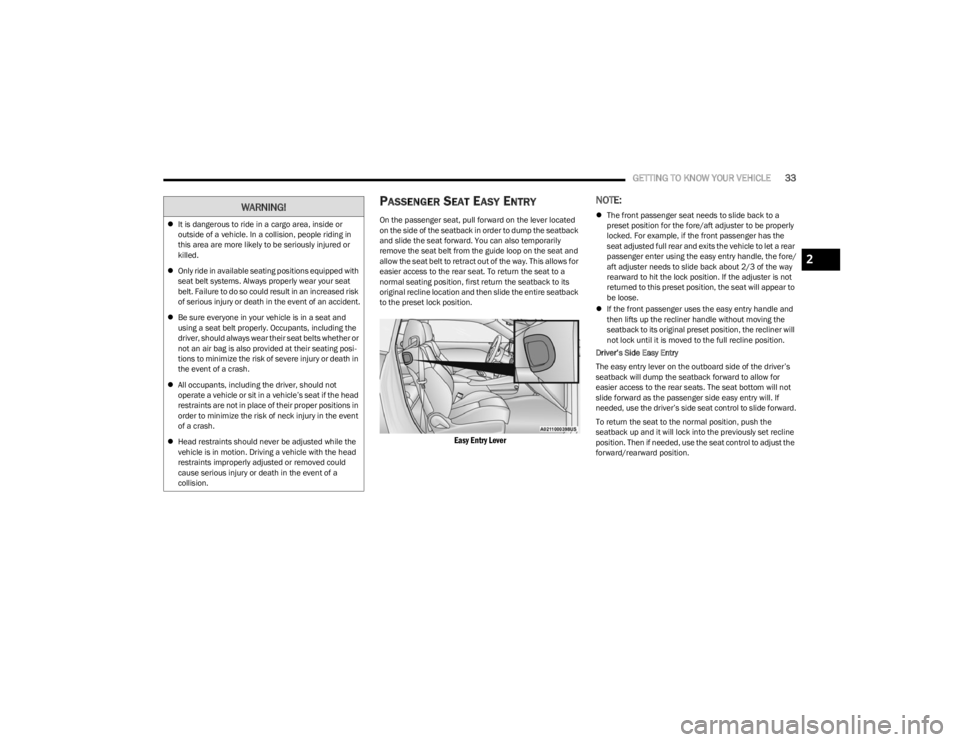
PASSENGER SEAT EASY ENTRY
On the passenger seat, pull forward on the lever located
on the side of the seatback in order to dump the seatback
and slide the seat forward. You can also temporarily
remove the seat belt from the guide loop on the seat and
allow the seat belt to retract out of the way. This allows for
easier access to the rear seat. To return the seat to a
normal seating position, first return the seatback to its
original recline location and then slide the entire seatback
to the preset lock position.
Easy Entry Lever
NOTE:
The front passenger seat needs to slide back to a
preset position for the fore/aft adjuster to be properly
locked. For example, if the front passenger has the
seat adjusted full rear and exits the vehicle to let a rear
passenger enter using the easy entry handle, the fore/
aft adjuster needs to slide back about 2/3 of the way
rearward to hit the lock position. If the adjuster is not
returned to this preset position, the seat will appear to
be loose.
If the front passenger uses the easy entry handle and
then lifts up the recliner handle without moving the
seatback to its original preset position, the recliner will
not lock until it is moved to the full recline position.
Driver’s Side Easy Entry
The easy entry lever on the outboard side of the driver’s
seatback will dump the seatback forward to allow for
easier access to the rear seats. The seat bottom will not
slide forward as the passenger side easy entry will. If
needed, use the driver’s side seat control to slide forward.
To return the seat to the normal position, push the
seatback up and it will lock into the previously set recline
position. Then if needed, use the seat control to adjust the
forward/rearward position.
It is dangerous to ride in a cargo area, inside or
outside of a vehicle. In a collision, people riding in
this area are more likely to be seriously injured or
killed.
Only ride in available seating positions equipped with
seat belt systems. Always properly wear your seat
belt. Failure to do so could result in an increased risk
of serious injury or death in the event of an accident.
Be sure everyone in your vehicle is in a seat and
using a seat belt properly. Occupants, including the
driver, should always wear their seat belts whether or
not an air bag is also provided at their seating posi -
tions to minimize the risk of severe injury or death in
the event of a crash.
All occupants, including the driver, should not
operate a vehicle or sit in a vehicle’s seat if the head
restraints are not in place of their proper positions in
order to minimize the risk of neck injury in the event
of a crash.
Head restraints should never be adjusted while the
vehicle is in motion. Driving a vehicle with the head
restraints improperly adjusted or removed could
cause serious injury or death in the event of a
collision.WARNING!
2
23_LA_OM_EN_USC_t.book Page 33
Page 61 of 300

GETTING TO KNOW YOUR INSTRUMENT PANEL59
For the Trip and Fuel Economy menus (and Performance
Timers) — If Equipped:
Information is reset by pushing and holding the OK
button.
ENGINE OIL LIFE RESET
Use this QR code to access your digital
experience .
Oil Change Required
Your vehicle is equipped with an
engine oil change indicator system.
The “Oil Change Required” message
will display in the instrument cluster
display for five seconds after a single
chime has sounded, to indicate the next scheduled oil
change interval. The engine oil change indicator system is
duty cycle based, which means the engine oil change
interval may fluctuate, dependent upon your personal
driving style.
Unless reset, this message will continue to display each
time you place the ignition in the ON/RUN position. To turn
off the message temporarily, push and release the OK or
arrow buttons. To reset the oil change indicator system
(after performing the scheduled maintenance), refer to
the following procedure. Vehicles Equipped With Keyless Enter ‘n Go™ — Ignition
Use the steering wheel instrument cluster display controls
for the following procedure(s):
1. Without pressing the brake pedal, push the ENGINE
START/STOP button and place the ignition in the
ON/RUN position (do not start the engine).
2. Push and release the down arrow button to scroll
downward through the main menu to “Vehicle Info.”
3. Push and release the right arrow button to access
the ”Oil Life” screen.
4. Push and hold the OK button to reset oil life. If
conditions are met, the gauge and numeric display
will update to show 100%. If conditions are not met a
pop-up message of "To reset oil life engine must be
off with ignition in run” will be displayed (for five
seconds), and the user will remain at the Oil Life
screen.
5. Push and release the up or down arrow button
to return to previous main menu.
NOTE:If the indicator message illuminates when you start the
vehicle, the oil change indicator system did not reset. If
necessary, repeat this procedure. Secondary Method Of Resetting Engine Oil Life
1. Without pressing the brake pedal, push the ENGINE
START/STOP button and place the ignition to the
ON/RUN position (do not start the engine).
2. Fully press the accelerator pedal, slowly, three times within ten seconds.
3. Without pushing the brake pedal, push the ENGINE START/STOP button once to return the ignition to the
OFF position.
NOTE:If the indicator message illuminates when you start the
vehicle, the oil change indicator system did not reset.
If necessary, repeat this procedure.
PERFORMANCE SHIFT INDICATOR
(PSI) — I
F EQUIPPED
The PSI is enabled on vehicles with manual transmission,
or when a vehicle with automatic transmission is in
manual shift mode. The PSI provides the driver with a
visual indication within the instrument cluster display
when the driver configured gear shift point has been
reached and the driver is still accelerating. This indication
notifies the driver to change gear corresponding to the
configured RPMs in the head unit.
3
23_LA_OM_EN_USC_t.book Page 59
Page 62 of 300

60GETTING TO KNOW YOUR INSTRUMENT PANEL
INSTRUMENT CLUSTER DISPLAY
S
ELECTABLE MENU ITEMS
Push and release the up or down arrow button until
the desired Selectable Menu item is displayed in the
instrument cluster display.
Follow the Menu or submenu prompts as desired.
Speedometer
Push and release the up or down arrow button until
the speedometer menu is displayed in the instrument
cluster display. Push and release the OK button to toggle
units (km/h or mph) of the speedometer.
Vehicle Info
Push and release the up or down arrow button until
the “Vehicle Info” menu is displayed in the instrument
cluster display. Push and release the right or left
arrow button to scroll through the submenus items of
“Vehicle Info.” Follow the directional prompts to access or
reset any of the following “Vehicle Info” submenu items:
Tire Pressure Monitor
If tire pressure is OK for all tires, a vehicle ICON is
displayed with tire pressure values in each corner of the
ICON.
If one or more tires have low pressure, “Inflate Tire To XX”
is displayed with the vehicle ICON and the tire pressure
values in each corner of the ICON with the pressure value
of the low tire are displayed in a different color than the
other tire pressure value. If the Tire Pressure system requires service, “Service Tire
Pressure System” is displayed.
Tire PSI is an information only function and cannot be
reset
Úpage 168.
Coolant Temp
Displays the actual coolant temperature.
Trans Temp
Displays the actual transmission temperature.
Oil Temp
Displays the actual oil temperature.
Oil Pressure
Displays the actual oil pressure.
Oil Life
To reset the Oil Life, you must hold the OK button. The
“Hold OK to Reset” instruction will be displayed at all
times, but the following conditions will need to be met in
order to reset Oil Life:
The vehicle must be off
The ignition must be in the ON/RUN position
If the conditions are met, holding the OK button will reset
the gauge and the numeric display will return to 100%.
If the conditions are not met, a pop-up message will
display for 5 seconds, describing the required conditions,
and then the Oil Life screen will reappear.
Battery Voltage
Displays the actual battery voltage.
All Wheel Drive (AWD) Status — If Equipped
Displays the status of the All - Wheel Drive system.
Performance Features
Push and release the up or down arrow button until
the Performance menu is displayed in the instrument
cluster display. Push the right or left arrow button to
enter the submenus.
The Performance Features include the following:
0-60 mph (0-100 km/h) Timer
Best
Last
Recent
Reaction Timer
0-100 mph (0-160 km/h) Timer
Best
Last
Recent
Reaction Timer
WARNING!
Measurement of vehicle statistics with the
Performance Features is intended for off-highway or
track use only and should not be done on any public
roadways. It is recommended that these features be
used in a controlled environment and within the limits
of the law. The capabilities of the vehicle as measured
by the performance pages must never be exploited in a
reckless or dangerous manner, which can jeopardize
the user’s safety or the safety of others. Only a safe,
attentive, and skillful driver can prevent accidents.
23_LA_OM_EN_USC_t.book Page 60
Page 63 of 300

GETTING TO KNOW YOUR INSTRUMENT PANEL61
1/8 Mile (200 meters) Timer
Best
Last
Recent
Reaction Timer
1/4 Mile (400 meters) Timer
Best
Last
Recent
Reaction Timer
Braking Distance
Distance
From Speed
Current G-Forces
Peak G-Forces
Lap Timer
Lap History
Will list the last five laps with the best lap high -
lighted in green.
Top Speed
The following describes each feature and its operation:
Driver Assist — If Equipped
Adaptive Cruise Control (ACC) Menu
The instrument cluster display displays the current ACC
system settings. The information displayed depends on
ACC system status. Push the ACC ON/OFF button (located on the steering
wheel) until one of the following displays in the instrument
cluster display:
Adaptive Cruise Control Off
When ACC is deactivated, the display will read “Adaptive
Cruise Control Off.”
Adaptive Cruise Control Ready
When ACC is activated but the vehicle speed setting has
not been selected, the display will read “Adaptive Cruise
Control Ready.”
Push the SET + or the SET- button (located on the steering
wheel) and the following will display in the instrument
cluster display:
ACC SET
When ACC is set, the set speed will display in the
instrument cluster.
If the Driver Assist main menu is not selected, an ACC
pop-up message may display if any ACC activity occurs,
which may include any of the following:
Distance Setting Change
System Cancel
Driver Override
System Off
ACC Proximity Warning
ACC Unavailable Warning
The instrument cluster display will return to the last
display selected after five seconds of no ACC display
activity
Úpage 85.
Fuel Economy
Two submenu pages; one with Current Value
(instantaneous calculation of the fuel economy) displayed
and one without the Current Value displayed (toggle the
left or right arrow button to select one):
Current Fuel Economy (MPG, L/100 km, or km/L).
Range To Empty (miles or km).
Average Fuel Economy (MPG, L/100 km, or km/L).
The Max and Min values will correspond to the
particular engine requirements.
Lower end of gauge will be displayed in an amber color
and turn green as Fuel Economy improves.
Hold the OK button to reset average fuel economy
information.
Trip Info
Push and release the up or down arrow button until
the Trip Menu item is displayed in the instrument cluster
display. Toggle the left or right arrow button to
select Trip A or Trip B. The Trip information will display the
following:
Distance – Shows the total distance (mi or km) traveled
for Trip A or Trip B since the last reset.
Average Fuel Economy – Shows the average fuel
economy (MPG, L/100km or km/L) of Trip A or Trip B
since the last reset.
Elapsed Time – Shows the total elapsed time of travel
since the last reset.
Hold the OK button to reset feature information.
3
23_LA_OM_EN_USC_t.book Page 61