2023 CHRYSLER PACIFICA Heat
[x] Cancel search: HeatPage 4 of 328

2
INTRODUCTION
SYMBOLS KEY ....................................................................... 8
VEHICLE MODIFICATIONS/ALTERATIONS ......................... 8
SYMBOL GLOSSARY ............................................................. 8
GETTING TO KNOW YOUR VEHICLE
KEYS ....................................................................................12
Key Fob ........................................................................ 12
SENTRY KEY ........................................................................15
IGNITION SWITCH ...............................................................15 Keyless Enter ‘n Go™ Ignition .................................... 15
REMOTE START — IF EQUIPPED ......................................16 How To Use Remote Start .......................................... 17
To Exit Remote Start Mode ........................................ 17
Remote Start Front Defrost Activation —
If Equipped .................................................................. 18
Remote Start Comfort Systems — If Equipped.......... 18
Remote Start Windshield Wiper De-Icer Activation —
If Equipped .................................................................. 18
Remote Start Cancel Message .................................. 18
VEHICLE SECURITY SYSTEM — IF EQUIPPED ..................19 To Arm The System .................................................... 19
To Disarm The System ................................................ 19
Rearming Of The System ............................................ 19
Security System Manual Override.............................. 19 DOORS ................................................................................. 20
Manual Door Locks......................................................20
Power Door Locks — If Equipped ................................ 21
Keyless Enter ‘n Go™ — Passive Entry ...................... 21
Automatic Unlock Doors On Exit — If Equipped ......... 23
Manual Sliding Side Door............................................ 23
Power Sliding Side Door — If Equipped ...................... 24
Hands-Free Sliding Doors — If Equipped.................... 25
Child Protection Door Lock System — Rear Doors.....25
STEERING WHEEL .............................................................. 26 Tilt/Telescoping Steering Column ..............................26
Heated Steering Wheel —If Equipped......................... 26
DRIVER MEMORY SETTINGS — IF EQUIPPED ................ 27 Programming The Memory Feature............................ 27
Linking And Unlinking The Key Fob To Memory......... 27
Memory Position Recall............................................... 28
SEATS ................................................................................... 28 Manual Adjustment (Front Seats) — If Equipped....... 28
Manual Adjustment (Rear Seats) ............................... 29
Power Adjustment (Front Seats) — If Equipped ......... 40
Power Adjustment (Rear Seats) — If Equipped .......... 42
Heated Seats ...............................................................43
Ventilated Seats — If Equipped................................... 44
Plastic Grocery Bag Retainer Hooks........................... 45
Head Restraints .......................................................... 45
UCONNECT VOICE RECOGNITION —
IF EQUIPPED ....................................................................... 47 Introducing Voice Recognition .................................... 47
Basic Voice Commands............................................... 47
Get Started ................................................................... 47
Additional Information................................................. 48 MIRRORS............................................................................. 48
Inside Rearview Mirror ................................................ 48
Illuminated Vanity Mirrors —If Equipped ................... 48
Outside Mirrors ........................................................... 49
Outside Mirrors With Turn Signal — If Equipped ....... 49
Driver's Outside Automatic Dimming Mirror —
If Equipped................................................................... 49
Conversation Mirror .................................................... 49
Power Mirrors — If Equipped....................................... 49
Power Folding Outside Mirrors — If Equipped ........... 50
Automatic Power Folding Mirrors — If Equipped ....... 50
Outside Mirrors Folding Feature................................. 50
Heated Mirrors — If Equipped ..................................... 50
Tilt Side Mirrors In Reverse —If Equipped.................. 51
UNIVERSAL GARAGE DOOR OPENER (HOMELINK®) —
IF EQUIPPED ...................................................................... 51 Before You Begin Programming HomeLink® ............ 51
Erasing All The HomeLink® Channels ....................... 51
Identifying Whether You Have A Rolling Code Or
Non-Rolling Code Device............................................. 52
Programming HomeLink® To A Garage
Door Opener ................................................................ 52
Programming HomeLink® To A
Miscellaneous Device ................................................. 53
Reprogramming A Single HomeLink® Button ........... 53
Canadian/Gate Operator Programming .................... 53
Security ........................................................................ 54
Troubleshooting Tips ................................................... 54
23_RUP_OM_EN_USC_t.book Page 2
Page 6 of 328

4
STARTING AND OPERATING
STARTING THE ENGINE ................................................... 111
Normal Starting ........................................................ 111
AutoPark .................................................................... 111Cold Weather Operation
(Below –22°F Or −30°C) ........................................ 113After Starting — Warming Up The Engine ................ 113
If Engine Fails To Start ............................................. 114
To Turn Off The Engine Using The ENGINE
START/STOP Button.................................................. 114
ENGINE BLOCK HEATER — IF EQUIPPED ..................... 114
ENGINE BREAK-IN RECOMMENDATIONS .................... 114
PARKING BRAKE ............................................................. 115 Electric Park Brake (EPB) ........................................ 115
AUTOMATIC TRANSMISSION .......................................... 117 Ignition Park Interlock............................................... 118
Brake/Transmission Shift Interlock (BTSI) System....118
9-Speed Automatic Transmission ............................ 118
Gear Ranges.............................................................. 119
ALL-WHEEL DRIVE (AWD) — IF EQUIPPED .................. 120
ACTIVE NOISE CANCELLATION....................................... 121
POWER STEERING ........................................................... 121
STOP/START SYSTEM — IF EQUIPPED.......................... 121 Autostop Mode .......................................................... 121
Possible Reasons The Engine Does Not Autostop.. 122
To Start The Engine While In Autostop .................... 122
To Manually Turn Off The Stop/Start System ......... 122
To Manually Turn On The Stop/Start System.......... 123
System Malfunction .................................................. 123 CRUISE CONTROL SYSTEMS — IF EQUIPPED ............. 123
Cruise Control ........................................................... 123
Adaptive Cruise Control (ACC).................................. 124
PARKSENSE FRONT/REAR PARK ASSIST SYSTEM —
IF EQUIPPED .................................................................... 132 ParkSense Sensors .................................................. 132ParkSense Display.................................................... 132
ParkSense Warning Display ..................................... 135
Enabling And Disabling ParkSense ......................... 135
Service The ParkSense Park Assist System............ 135
Cleaning The ParkSense System ............................. 136ParkSense System Usage Precautions ................... 136
PARKSENSE ACTIVE PARK ASSIST SYSTEM —
IF EQUIPPED ..................................................................... 137 Enabling And Disabling The ParkSense Active Park
Assist System ............................................................ 137
Parallel/Perpendicular Parking Space Assistance
Operation................................................................... 138
LANESENSE — IF EQUIPPED ......................................... 140 LaneSense Operation............................................... 140
Turning LaneSense On Or Off .................................. 140
LaneSense Warning Message ................................. 140
Changing LaneSense Status.................................... 142 PARKVIEW REAR BACK UP CAMERA ........................... 142
SURROUND VIEW CAMERA SYSTEM —
IF EQUIPPED......................................................................143
FAMCAM SYSTEM — IF EQUIPPED .................................145
REFUELING THE VEHICLE ................................................146
VEHICLE LOADING ...........................................................146 Certification Label ..................................................... 146
TRAILER TOWING .............................................................147 Common Towing Definitions..................................... 147
Trailer Hitch Classification ........................................ 149Trailer Towing Weights (Maximum Trailer
Weight Ratings) ........................................................ 149
Vehicle Loading Chart ............................................... 150Trailer And Tongue Weight ....................................... 151Towing Requirements .............................................. 151Towing Tips ............................................................... 153
RECREATIONAL TOWING (BEHIND MOTORHOME) ..... 154 Towing This Vehicle Behind Another Vehicle ........... 154
DRIVING TIPS ....................................................................155 Driving On Slippery Surfaces .................................... 155
Driving Through Water ............................................. 156
23_RUP_OM_EN_USC_t.book Page 4
Page 7 of 328

5
MULTIMEDIA
UCONNECT SYSTEMS ..................................................... 157
CYBERSECURITY ............................................................. 157
UCONNECT SETTINGS...................................................... 157Customer Programmable Features ........................ 158
REAR SEAT ENTERTAINMENT (RSE) WITH AMAZON
FIRE TV BUILT-IN — IF EQUIPPED .................................. 177 Overview .................................................................... 177Getting Started .......................................................... 177
Accessing Rear Seat Entertainment with Fire TV
built-in from the Front Radio Screen ....................... 178
Accessing Rear Seat Entertainment with Fire TV
built-in from the Rear Screens ................................. 178First Time Starting Up (Using the Rear Screens) .... 178Alexa Voice Control ................................................... 179
Listen Via Vehicle Speakers ..................................... 179
Quick Menu ............................................................... 179
Parental Controls (Using the Rear Screens)............ 179Voice Remote with Alexa Pairing (Using the Rear
Screens)..................................................................... 179Media Sources Input (Using the Front Radio and
Rear Screens)............................................................ 180
Voice Remote with Alexa .......................................... 180
Rear Seat Entertainment with Fire TV built-in streaming
(Using the Front Radio and Rear Screens) .................181
Play A Blu-ray™ or DVD —If Equipped ...................... 182
Fire TV Apps/Games (Using the Rear Screens) ...... 183 Using The Video USB Port ........................................ 183
Play Video Games ..................................................... 183
Headphones Operation ............................................ 183
Rear Climate Controls .............................................. 184
Legal & Compliance.................................................. 186
RADIO OPERATION AND MOBILE PHONES.................. 186 Regulatory And Safety Information.......................... 186
SAFETY
SAFETY FEATURES .......................................................... 187Anti-Lock Brake System (ABS) ................................ 187
Electronic Brake Control (EBC) System .................. 188
AUXILIARY DRIVING SYSTEMS ...................................... 192 Blind Spot Monitoring (BSM) — If Equipped............ 192
Forward Collision Warning (FCW) With Mitigation —
If Equipped ................................................................ 195Tire Pressure Monitoring System (TPMS) ............... 197
OCCUPANT RESTRAINT SYSTEMS ............................... 200 Occupant Restraint Systems Features ................... 200
Important Safety Precautions .................................. 200
Seat Belt Systems .................................................... 201
Supplemental Restraint Systems (SRS).................. 209
Child Restraints ........................................................ 219
SAFETY TIPS .................................................................... 233 Transporting Passengers ......................................... 233
Transporting Pets .................................................... 233
Connected Vehicles .................................................. 233Safety Checks You Should Make Inside
The Vehicle ............................................................... 233 Periodic Safety Checks You Should Make Outside
The Vehicle ................................................................ 234
Exhaust Gas ............................................................... 235
Carbon Monoxide Warnings ..................................... 235
IN CASE OF EMERGENCY
HAZARD WARNING FLASHERS ......................................236
SOS AND ASSIST MIRROR — IF EQUIPPED ..................236
JACKING AND TIRE CHANGING —IF EQUIPPED ...........239
Preparations For Jacking ......................................... 239
Jack And Spare Tire Location ................................... 240
Equipment Removal ................................................. 240
Jacking Instructions .................................................. 240
Road Tire Installation ................................................ 244
Portable Air Compressor —If Equipped .................... 244
Return Inflatable Spare Tire ..................................... 245
TIRE SERVICE KIT — IF EQUIPPED.................................. 245
JUMP STARTING ...............................................................251 Preparations For Jump Start..................................... 251
Jump Starting Procedure .......................................... 252
REFUELING IN EMERGENCY – IF EQUIPPED ................252
IF YOUR ENGINE OVERHEATS......................................... 253
MANUAL PARK RELEASE ...............................................254
FREEING A STUCK VEHICLE ........................................... 255
TOWING A DISABLED VEHICLE.......................................256 All Wheel Drive (AWD) Models .................................. 258
ENHANCED ACCIDENT RESPONSE SYSTEM (EARS) ..258
EVENT DATA RECORDER (EDR)......................................258
23_RUP_OM_EN_USC_t.book Page 5
Page 18 of 328

16GETTING TO KNOW YOUR VEHICLE
The push button ignition can be placed in the following
modes:
OFF
The engine is stopped
Some electrical devices (e.g. power locks, alarm, etc.)
are still available
ACC
The engine is stopped
Some electrical devices are available (e.g. power
windows)
ON/RUN
Driving position
All electrical devices are available (e.g. climate
controls, etc.)
START
The engine will start (when foot is on the brake pedal)
The engine only runs with the ignition in the ON/RUN
ignition position, or from a Remote Start request.
In case the ignition switch does not change with the push
of a button, the key fob may have a low or depleted
battery. In this situation, a backup method can be used to
operate the ignition switch. Put the nose side (side
opposite of the emergency key) of the key fob against the
START/STOP ignition button and push to operate the
ignition switch.
Backup Starting Method
NOTE:
The key fob may not be detected by the vehicle Keyless
Enter ‘n Go™ system if it is located next to a mobile
phone, laptop or other electronic device; these devices
may block the key fob’s wireless signal and prevent the
Keyless Enter ‘n Go™ system from starting the vehicle.
For the proper engine starting procedure, see
Úpage 111.
REMOTE START — IF EQUIPPED
If applicable, refer to the “Hybrid Supplement” for
additional information.
This system uses the key fob to start the engine
conveniently from outside the vehicle while still
maintaining security. The system has a range
of 328 ft (100 m).
Remote Start is used to defrost windows in cold weather
and to reach a comfortable climate in all ambient
conditions before the customer enters the vehicle.
NOTE:Obstructions between the vehicle and key fob may reduce
this range Úpage 312.
WARNING!
When leaving the vehicle, always remove the key fob
from the vehicle and lock your vehicle.
Never leave children alone in a vehicle, or with
access to an unlocked vehicle.
Allowing children to be in a vehicle unattended is
dangerous for a number of reasons. A child or others
could be seriously or fatally injured. Children should
be warned not to touch the parking brake, brake
pedal or the gear selector.
Do not leave the key fob in or near the vehicle, or in
a location accessible to children, and do not leave
the Keyless Enter ‘n Go™ Ignition in the ON/RUN
position. A child could operate power windows, other
controls, or move the vehicle.
Do not leave children or animals inside parked vehi -
cles in hot weather. Interior heat buildup may cause
serious injury or death.
CAUTION!
An unlocked car is an invitation for thieves. Always
remove the key fobs from the vehicle and lock all doors
when leaving the vehicle unattended.
23_RUP_OM_EN_USC_t.book Page 16
Page 20 of 328

18GETTING TO KNOW YOUR VEHICLE
NOTE:
For vehicles equipped with the Keyless Enter ‘n Go™ —
Passive Entry feature, the message “Remote Start
Active — Push Start Button” will show in the instrument
cluster display until you push the START/STOP ignition
button.
To avoid unintentional shutdowns, the system will
disable for two seconds after receiving a valid Remote
Start request.
REMOTE START FRONT DEFROST
A
CTIVATION — IF EQUIPPED
When Remote Start is active, and the outside ambient
temperature is 40°F (4.5°C) or below, the system will
automatically activate front defrost for 15 minutes or less.
The time is dependent on the ambient temperature. Once
the timer expires, the system will automatically adjust the
settings depending on ambient conditions. See “Remote
Start Comfort Systems — If Equipped” in the next section
for detailed operation.
REMOTE START COMFORT SYSTEMS —
I
F EQUIPPED
When Remote Start is activated, the front and rear defrost
will automatically turn on in cold weather. The heated
steering wheel and driver heated seat feature will turn on
if selected in the Comfort menu screen within Uconnect
Settings
Úpage 157. In warm weather, the driver vented
seat feature will automatically turn on when Remote Start
is activated, if programmed in the Comfort menu screen.
The vehicle will adjust the climate control settings
depending on the outside ambient temperature. Automatic Temperature Control (ATC) — If Equipped
The climate controls will be automatically adjusted to the
optimal temperature and mode settings depending on the
outside ambient temperature. This will occur until the
ignition is placed in the ON/RUN position where the
climate controls will resume their previous settings.
Manual Temperature Control (MTC) — If Equipped
In ambient temperatures at 40°F (4.5°C) or below, the
climate settings will default to maximum heat, with
fresh air entering the cabin. If the front defrost timer
expires, the vehicle will enter Mix Mode.
In ambient temperatures from 40°F (4.5°C) to 78°F
(26°C), the climate settings will be based on the last
settings selected by the driver.
In ambient temperatures at 78°F (26°C) or above, the
climate settings will default to MAX A/C, Bi-Level mode,
with Recirculation on.
For more information on ATC, MTC, and climate control
settings, see
Úpage 60.
NOTE:
These features will stay on through the duration of
Remote Start until the ignition is placed in the ON/RUN
position. The climate control settings will change, and
exit automatic operation, if manually adjusted by the
driver while the vehicle is in Remote Start mode. This
includes the OFF button on the climate controls, which
will turn the system off.
REMOTE START WINDSHIELD WIPER
D
E-ICER ACTIVATION — IF EQUIPPED
When the Remote Start system is active and the outside
ambient temperature is less than 33°F (0.6°C), the
Windshield Wiper De-Icer will activate. Exiting Remote
Start will resume its previous operation. If the Windshield
Wiper De-Icer was active, the timer and operation will
continue.
REMOTE START CANCEL MESSAGE
One of the following messages will display in the
instrument cluster if the vehicle fails to remote start or
exits Remote Start prematurely:
Remote Start Canceled — Door Open
Remote Start Canceled — Hood Open
Remote Start Canceled — Fuel Low
Remote Start Canceled — Liftgate Open
Remote Start Canceled — Too Cold
Remote Start Canceled — Time Expired
Remote Start Disabled — Start Vehicle To Reset
The message will stay active until the ignition is placed in
the ON/RUN position.
23_RUP_OM_EN_USC_t.book Page 18
Page 28 of 328

26GETTING TO KNOW YOUR VEHICLE
To avoid unintentional operation of the power sliding
door from the rear seats, push the Sliding Door Power
Off button, located in the overhead console. When the
overhead console power OFF LED is illuminated, the
sliding door may not be power opened or closed by
pushing the buttons just inside the sliding doors or
pulling on the handles.
To Disengage The Child Protection Door Lock
1. Open the sliding side door.
2. Slide the Child Protection Door Lock control outward (away from the vehicle) to disengage the Child
Protection Door Lock.
3. Repeat Steps 1 and 2 on the opposite sliding door.
NOTE:After disengaging (or engaging) the Child Protection Door
Lock, always test the inside door handle with the sliding
door closed to make certain the Child Protection Door
Lock is in the desired position. The inside door handle will
open the sliding door when the Child Protection Door Lock
is disengaged.
STEERING WHEEL
TILT/TELESCOPING STEERING COLUMN
This feature allows you to tilt the steering column upward
or downward. It also allows you to lengthen or shorten the
steering column. The tilt/telescoping lever is located left
of the steering wheel at the end of the steering column.
Tilt/Telescoping Lever
To unlock the steering column, push the lever downward
(toward the floor). To tilt the steering column, move the
steering wheel upward or downward as desired. To
lengthen or shorten the steering column, pull the steering
wheel outward or push it inward as desired. To lock the
steering column in position, push the lever upward until
fully engaged.
HEATED STEERING WHEEL —
I
F EQUIPPED
The steering wheel contains a heating element
that helps warm your hands in cold weather.
The heated steering wheel has only one
temperature setting. Once the heated steering
wheel has been turned on, it will stay on for an average of
80 minutes before automatically shutting off. This time
will vary based on environmental temperatures. The
heated steering wheel can shut off early or may not turn
on when the steering wheel is already warm.
The heated steering wheel button is located within the
Uconnect system. You can access the button through the
Comfort screen.
Press the heated steering wheel button once to turn
the heating element on.
Press the heated steering wheel button a second time
to turn the heating element off.
WARNING!
Avoid trapping anyone in the vehicle in a collision.
Remember that the sliding doors cannot be opened
from the inside door handle when the Child Protection
Door Locks are engaged.
WARNING!
Do not adjust the steering column while driving.
Adjusting the steering column while driving or driving
with the steering column unlocked, could cause the
driver to lose control of the vehicle. Failure to follow this
warning may result in serious injury or death.
23_RUP_OM_EN_USC_t.book Page 26
Page 29 of 328

GETTING TO KNOW YOUR VEHICLE27
NOTE:The engine must be running for the heated steering wheel
to operate.
For information on use with the Remote Start system, see
Úpage 18.
DRIVER MEMORY SETTINGS — IF EQUIPPED
This feature allows the driver to save up to two different
memory profiles for easy recall through a memory switch.
Each memory profile saves desired position settings for
the following features:
Driver’s seat
Easy Entry/Exit seat operation (if equipped)
Power steering wheel position (if equipped)
Side mirrors (if equipped)
A set of desired radio station presets
NOTE:
Your vehicle is equipped with two key fobs, each can be
linked to either memory position 1 or 2.
Memory settings will be linked to the driver profiles in
the Uconnect system, in addition to several other
features (radio presets, home screens, settings, navi -
gation, phone, etc.)
Úpage 157.
The Driver Memory Settings switch is located on the driver
door, next to the door handle, and consists of three
buttons:
The set (S) button, which is used to activate the
memory save function.
The (1) and (2) buttons which are used to recall either
of two saved memory profiles.
Driver Memory Switch
PROGRAMMING THE MEMORY FEATURE
To create a new memory profile, perform the following:
NOTE:Saving a new memory profile will erase the selected profile
from memory.
1. Place the vehicle’s ignition in the ON/RUN position
(do not start the engine).
2. Adjust all memory profile settings to desired preferences (i.e., driver’s seat, outside mirrors and
radio station presets).
3. Push the set (S) button on the memory switch, and then push the desired memory button (1 or 2) within
five seconds. The instrument cluster display will show
which memory position has been set.
NOTE:Memory profiles can be set without the vehicle in PARK.
LINKING AND UNLINKING THE KEY FOB
T
O MEMORY
Your key fob can be programmed to recall one of two
saved memory profiles.
NOTE:Before programming your key fob you must select the
“Personal Settings Linked to Key Fob” feature through the
Uconnect Settings
Úpage 157.
To program your key fob, perform the following:
1. Place the vehicle’s ignition in the OFF position.
2. Select a desired memory profile 1 or 2.
WARNING!
Persons who are unable to feel pain to the skin
because of advanced age, chronic illness, diabetes,
spinal cord injury, medication, alcohol use, exhaus -
tion, or other physical conditions must exercise care
when using the steering wheel heater. It may cause
burns even at low temperatures, especially if used
for long periods.
Do not place anything on the steering wheel that
insulates against heat, such as a blanket or steering
wheel covers of any type and material. This may
cause the steering wheel heater to overheat.
1 — Memory Profile Button 1
2 — Memory Profile Button 2
3 — Set Button
2
23_RUP_OM_EN_USC_t.book Page 27
Page 45 of 328
GETTING TO KNOW YOUR VEHICLE43
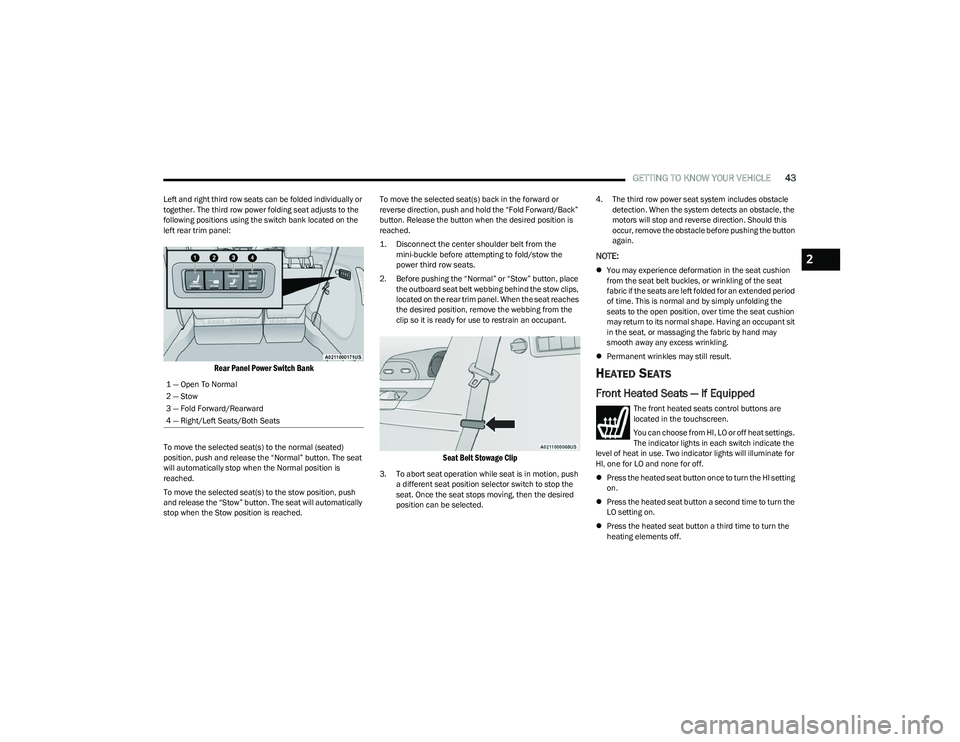
Left and right third row seats can be folded individually or
together. The third row power folding seat adjusts to the
following positions using the switch bank located on the
left rear trim panel:
Rear Panel Power Switch Bank
To move the selected seat(s) to the normal (seated)
position, push and release the “Normal” button. The seat
will automatically stop when the Normal position is
reached.
To move the selected seat(s) to the stow position, push
and release the “Stow” button. The seat will automatically
stop when the Stow position is reached. To move the selected seat(s) back in the forward or
reverse direction, push and hold the “Fold Forward/Back”
button. Release the button when the desired position is
reached.
1. Disconnect the center shoulder belt from the
mini-buckle before attempting to fold/stow the
power third row seats.
2. Before pushing the “Normal” or “Stow” button, place the outboard seat belt webbing behind the stow clips,
located on the rear trim panel. When the seat reaches
the desired position, remove the webbing from the
clip so it is ready for use to restrain an occupant.
Seat Belt Stowage Clip
3. To abort seat operation while seat is in motion, push a different seat position selector switch to stop the
seat. Once the seat stops moving, then the desired
position can be selected. 4. The third row power seat system includes obstacle
detection. When the system detects an obstacle, the
motors will stop and reverse direction. Should this
occur, remove the obstacle before pushing the button
again.
NOTE:
You may experience deformation in the seat cushion
from the seat belt buckles, or wrinkling of the seat
fabric if the seats are left folded for an extended period
of time. This is normal and by simply unfolding the
seats to the open position, over time the seat cushion
may return to its normal shape. Having an occupant sit
in the seat, or massaging the fabric by hand may
smooth away any excess wrinkling.
Permanent wrinkles may still result.
HEATED SEATS
Front Heated Seats — If Equipped
The front heated seats control buttons are
located in the touchscreen.
You can choose from HI, LO or off heat settings.
The indicator lights in each switch indicate the
level of heat in use. Two indicator lights will illuminate for
HI, one for LO and none for off.
Press the heated seat button once to turn the HI setting
on.
Press the heated seat button a second time to turn the
LO setting on.
Press the heated seat button a third time to turn the
heating elements off.
1 — Open To Normal
2 — Stow
3 — Fold Forward/Rearward
4 — Right/Left Seats/Both Seats
2
23_RUP_OM_EN_USC_t.book Page 43