2023 CHRYSLER PACIFICA Slide
[x] Cancel search: SlidePage 43 of 328
GETTING TO KNOW YOUR VEHICLE41
Adjusting The Seat Up Or Down
The height of the seats can be adjusted up or down. Pull
upward or push downward on the rear of seat switch, the
seat will move in the direction of the switch. Release the
switch when the desired position has been reached.
Tilting The Seat Up Or Down
The angle of the seat cushion can be adjusted in two
directions. Pull upward or push downward on the front of
the seat switch, the front of the seat cushion will move in
the direction of the switch. Release the switch when the
desired position has been reached.
Reclining The Seatback
The angle of the seatback can be adjusted forward or
rearward. Push the seatback switch forward or rearward,
the seat will move in the direction of the switch. Release
the switch when the desired position is reached.
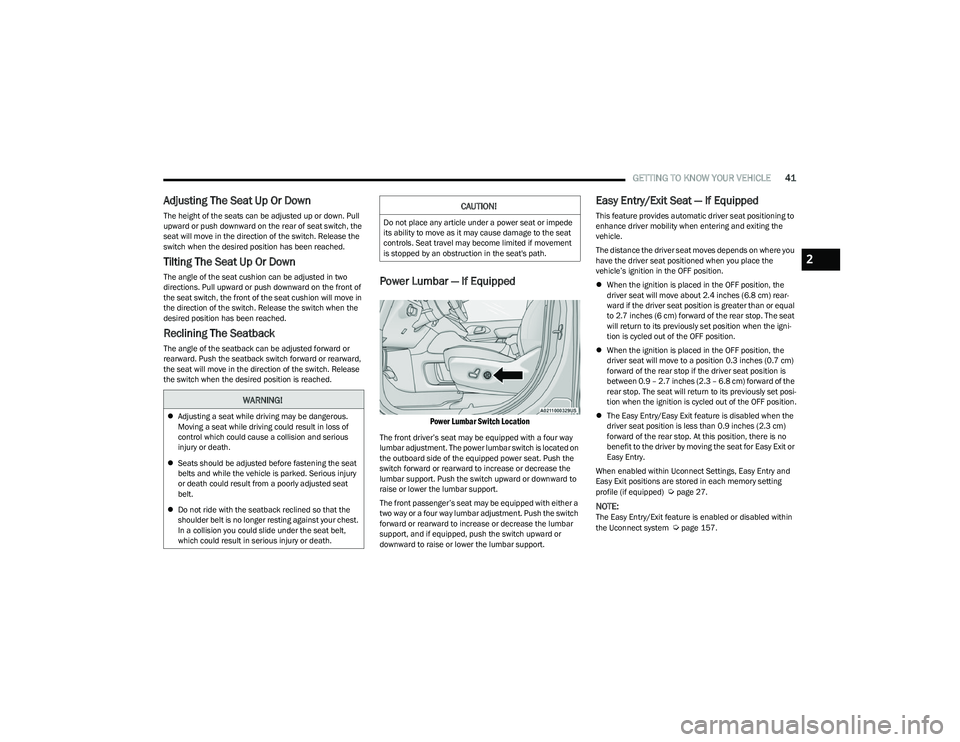
Power Lumbar — If Equipped
Power Lumbar Switch Location
The front driver’s seat may be equipped with a four way
lumbar adjustment. The power lumbar switch is located on
the outboard side of the equipped power seat. Push the
switch forward or rearward to increase or decrease the
lumbar support. Push the switch upward or downward to
raise or lower the lumbar support.
The front passenger’s seat may be equipped with either a
two way or a four way lumbar adjustment. Push the switch
forward or rearward to increase or decrease the lumbar
support, and if equipped, push the switch upward or
downward to raise or lower the lumbar support.
Easy Entry/Exit Seat — If Equipped
This feature provides automatic driver seat positioning to
enhance driver mobility when entering and exiting the
vehicle.
The distance the driver seat moves depends on where you
have the driver seat positioned when you place the
vehicle’s ignition in the OFF position.
When the ignition is placed in the OFF position, the
driver seat will move about 2.4 inches (6.8 cm) rear -
ward if the driver seat position is greater than or equal
to 2.7 inches (6 cm) forward of the rear stop. The seat
will return to its previously set position when the igni -
tion is cycled out of the OFF position.
When the ignition is placed in the OFF position, the
driver seat will move to a position 0.3 inches (0.7 cm)
forward of the rear stop if the driver seat position is
between 0.9 – 2.7 inches (2.3 – 6.8 cm) forward of the
rear stop. The seat will return to its previously set posi -
tion when the ignition is cycled out of the OFF position.
The Easy Entry/Easy Exit feature is disabled when the
driver seat position is less than 0.9 inches (2.3 cm)
forward of the rear stop. At this position, there is no
benefit to the driver by moving the seat for Easy Exit or
Easy Entry.
When enabled within Uconnect Settings, Easy Entry and
Easy Exit positions are stored in each memory setting
profile (if equipped)
Úpage 27.
NOTE:The Easy Entry/Exit feature is enabled or disabled within
the Uconnect system Úpage 157.
WARNING!
Adjusting a seat while driving may be dangerous.
Moving a seat while driving could result in loss of
control which could cause a collision and serious
injury or death.
Seats should be adjusted before fastening the seat
belts and while the vehicle is parked. Serious injury
or death could result from a poorly adjusted seat
belt.
Do not ride with the seatback reclined so that the
shoulder belt is no longer resting against your chest.
In a collision you could slide under the seat belt,
which could result in serious injury or death.
CAUTION!
Do not place any article under a power seat or impede
its ability to move as it may cause damage to the seat
controls. Seat travel may become limited if movement
is stopped by an obstruction in the seat's path.
2
23_RUP_OM_EN_USC_t.book Page 41
Page 44 of 328
42GETTING TO KNOW YOUR VEHICLE
POWER ADJUSTMENT (REAR SEATS) —
I
F EQUIPPED
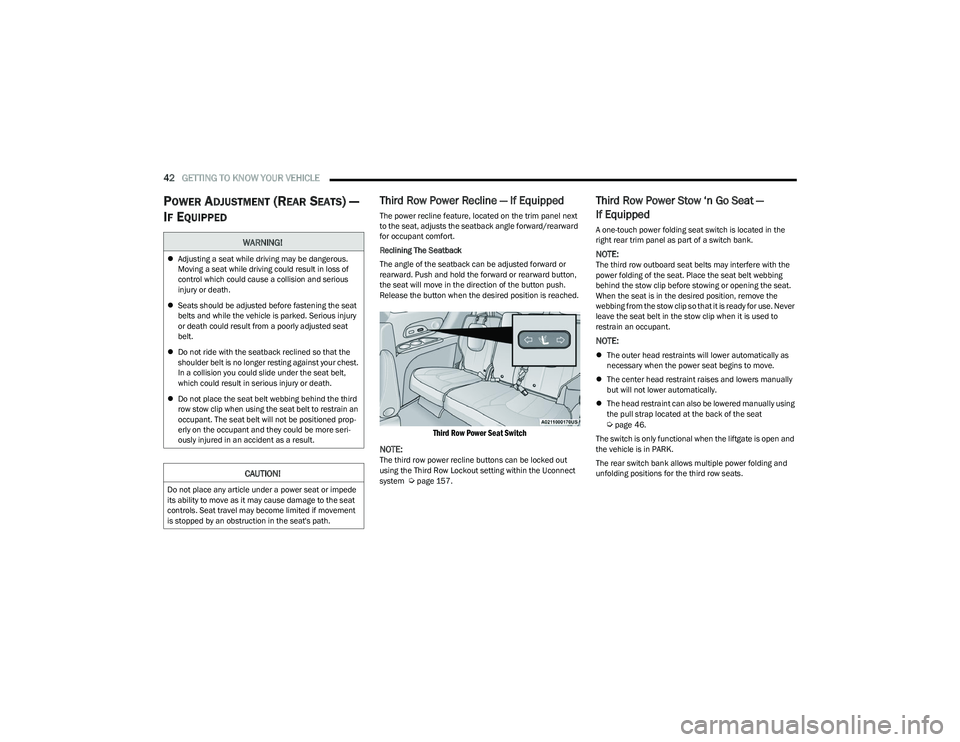
Third Row Power Recline — If Equipped
The power recline feature, located on the trim panel next
to the seat, adjusts the seatback angle forward/rearward
for occupant comfort.
Reclining The Seatback
The angle of the seatback can be adjusted forward or
rearward. Push and hold the forward or rearward button,
the seat will move in the direction of the button push.
Release the button when the desired position is reached.
Third Row Power Seat Switch
NOTE:
The third row power recline buttons can be locked out
using the Third Row Lockout setting within the Uconnect
system
Úpage 157.
Third Row Power Stow ‘n Go Seat —
If Equipped
A one-touch power folding seat switch is located in the
right rear trim panel as part of a switch bank.
NOTE:The third row outboard seat belts may interfere with the
power folding of the seat. Place the seat belt webbing
behind the stow clip before stowing or opening the seat.
When the seat is in the desired position, remove the
webbing from the stow clip so that it is ready for use. Never
leave the seat belt in the stow clip when it is used to
restrain an occupant.
NOTE:
The outer head restraints will lower automatically as
necessary when the power seat begins to move.
The center head restraint raises and lowers manually
but will not lower automatically.
The head restraint can also be lowered manually using
the pull strap located at the back of the seat
Úpage 46.
The switch is only functional when the liftgate is open and
the vehicle is in PARK.
The rear switch bank allows multiple power folding and
unfolding positions for the third row seats.
WARNING!
Adjusting a seat while driving may be dangerous.
Moving a seat while driving could result in loss of
control which could cause a collision and serious
injury or death.
Seats should be adjusted before fastening the seat
belts and while the vehicle is parked. Serious injury
or death could result from a poorly adjusted seat
belt.
Do not ride with the seatback reclined so that the
shoulder belt is no longer resting against your chest.
In a collision you could slide under the seat belt,
which could result in serious injury or death.
Do not place the seat belt webbing behind the third
row stow clip when using the seat belt to restrain an
occupant. The seat belt will not be positioned prop -
erly on the occupant and they could be more seri -
ously injured in an accident as a result.
CAUTION!
Do not place any article under a power seat or impede
its ability to move as it may cause damage to the seat
controls. Seat travel may become limited if movement
is stopped by an obstruction in the seat's path.
23_RUP_OM_EN_USC_t.book Page 42
Page 64 of 328

62GETTING TO KNOW YOUR VEHICLE
Front Defrost Button
Press and release the Front Defrost button on
the touchscreen, or push the button on the
faceplate to change the current airflow setting
to Defrost mode. The indicator illuminates
when this feature is on. Air comes from the windshield and
side window demist outlets. When the defrost button is
selected, the blower level may increase. Use Defrost mode
with maximum temperature settings for best windshield
and side window defrosting and defogging. Performing
this function will cause the Automatic Temperature
Control (ATC) to switch into manual mode. If the Front
Defrost mode is turned off the climate system will return
to the previous setting.
Rear Defrost Button
Press and release the Rear Defrost Control
button on the touchscreen or push and release
the button on the faceplate to turn on the rear
window defroster and the heated outside
mirrors (if equipped). An indicator will illuminate when the
rear window defroster is on. The rear window defroster
automatically turns off after 15 minutes.Front Temperature Control
These buttons provide the driver and passenger with
independent temperature control.
Push the red button on the faceplate or
touchscreen or press and slide the
temperature bar towards the red arrow
button on the touchscreen for warmer
temperature settings.
Push the blue button on the faceplate or
touchscreen or press and slide the
temperature bar towards the blue arrow
button on the touchscreen for cooler
temperature settings.
NOTE:The temperature can also be adjusted by pressing the
Temperature readout on the top left and right corners of
the status bar.
SYNC Button
Press the SYNC button on the touchscreen to
toggle the SYNC feature on/off. The SYNC
indicator is illuminated when this feature is
enabled. SYNC is used to synchronize the front
and rear passenger temperature settings with the driver
temperature setting. Changing the front or rear passenger
temperature setting while in SYNC will automatically exit
this feature.
NOTE:The SYNC setting is only available on the touchscreen.
Blower Control
Blower Control regulates the amount of air
forced through the climate control system.
There are seven blower speeds available.
Adjusting the blower will cause automatic
mode to switch to manual operation. The speeds can be
selected using either the blower control knob on the
faceplate or the buttons on the touchscreen.
Faceplate: The blower speed increases as you turn the
blower control knob clockwise from the lowest blower
setting. The blower speed decreases as you turn the
blower control knob counterclockwise.
Touchscreen: Blower speed can be selected by
pressing the blower bar area between the icons. Press
the desired blower speed from 1-7.
CAUTION!
Failure to follow these cautions can cause damage to
the heating elements:
Use care when washing the inside of the rear
window. Do not use abrasive window cleaners on the
interior surface of the window. Use a soft cloth and a
mild washing solution, wiping parallel to the heating
elements. Labels can be peeled off after soaking
with warm water.
Do not use scrapers, sharp instruments, or abrasive
window cleaners on the interior surface of the
window.
Keep all objects a safe distance from the window.
23_RUP_OM_EN_USC_t.book Page 62
Page 69 of 328

GETTING TO KNOW YOUR VEHICLE67
Front Temperature Control
These buttons provide the driver and passenger with
independent temperature control.
Push the red button on the faceplate or
touchscreen or press and slide the
temperature bar towards the red arrow
button on the touchscreen for warmer
temperature settings.
Push the blue button on the faceplate or
touchscreen or press and slide the
temperature bar towards the blue arrow
button on the touchscreen for cooler
temperature settings.
SYNC Button
Press the SYNC button on the touchscreen to
toggle the Sync feature on/off. The SYNC
indicator is illuminated when this feature is
enabled. SYNC is used to synchronize the front
and rear passenger temperature settings with the driver
temperature setting. Changing the front or rear passenger
temperature setting while in SYNC will automatically exit
this feature. Pressing SYNC on the touchscreen while in
the Front Climate screen synchronizes the driver and
passenger temperatures only. In order to SYNC rear
temperature to driver temperature, the touchscreen must
be on the Rear Climate screen.
NOTE:The SYNC setting is only available on the touchscreen.
Blower Control
Blower Control is used to regulate the amount
of air forced through the Climate Control
system. There are seven blower speeds
available. The speeds can be selected using
either the blower control knob on the faceplate or the
buttons on the touchscreen.
Faceplate: The blower speed increases as you turn the
blower control knob clockwise from the lowest blower
setting. The blower speed decreases as you turn the
blower control knob counterclockwise.
Touchscreen: Use the small blower icon to reduce the
blower setting and the large blower icon to increase the
blower setting. Blower speed can also be selected by
pressing the blower bar area between the icons.
Mode Control
The airflow distribution mode can be adjusted
so air comes from the instrument panel outlets,
floor outlets, defrost outlets and demist
outlets.
Faceplate: Push the button in the center of the knob to
change the airflow distribution mode.
Touchscreen: Select Mode by pressing one of the Mode
Buttons on the touchscreen.
Panel Mode
Air comes from the outlets in the instrument
panel. Each of these outlets can be individually
adjusted to direct the flow of air. The air vanes
of the center outlets and outboard outlets can
be moved up and down or side to side to regulate airflow
direction. There is a shut-off wheel located below the air
vanes to shut off or adjust the amount of airflow from
these outlets.
Bi-Level Mode
Air comes from the instrument panel outlets
and floor outlets. A slight amount of air is
directed through the defrost and side window
demister outlets.
NOTE:Bi-Level mode is designed under comfort conditions to
provide cooler air out of the panel outlets and warmer air
from the floor outlets.
CAUTION!
Failure to follow these cautions can cause damage to
the heating elements:
Use care when washing the inside of the rear
window. Do not use abrasive window cleaners on the
interior surface of the window. Use a soft cloth and a
mild washing solution, wiping parallel to the heating
elements. Labels can be peeled off after soaking
with warm water.
Do not use scrapers, sharp instruments, or abrasive
window cleaners on the interior surface of the
window.
Keep all objects a safe distance from the window.
2
23_RUP_OM_EN_USC_t.book Page 67
Page 93 of 328

GETTING TO KNOW YOUR VEHICLE91
The Stow ‘n Place roof rack does not increase the total
load carrying capacity of the vehicle. Be sure the total load
of cargo inside the vehicle plus that on the external rack
does not exceed the maximum vehicle load capacity.
DEPLOYING THE CROSSBARS
1. To deploy the crossbars, completely loosen the
thumb screws at both ends of the crossbar and lift
the crossbar from its stowed position in the side rail.
Repeat with crossbar on the opposite side.
Thumb Screw
NOTE:
The thumb screws cannot be fully removed.
Removing Crossbars
2. Bend the crossbar supports at each end, taking care to keep hand clear of pivoting joint. Slide the thumb
screw down.
Bending Pivot
3. Position the crossbars across the roof making sure the letters on the crossbars align with the matching
letters on the side rail.
Positioning Crossbars
4. Once the crossbar is in place, tighten both thumb screws completely.
Installing Crossbars
CAUTION!
Use care when removing and handling the crossbars to
prevent damage to the vehicle.
2
23_RUP_OM_EN_USC_t.book Page 91
Page 183 of 328

MULTIMEDIA181
14.Play/Pause Button ‖ — Begin/resume or pause disc
play.
15. Channel +/- — Push the up or down arrow button on
the Channel button to browse channels available in
Fire TV.
16. Recent — Push to access recently viewed content on
Fire TV.
17. Gear/Settings — Push to bring up setting options for
Fire TV.
18. App 2 — Push to launch App 2.
19. Vehicle Button — Push to activate the Vehicle menu.
Replacing the Voice Remote with Alexa
Batteries
Each Voice Remote with Alexa requires two AAA batteries
for operation.
To replace the batteries:
1. Locate the battery compartment on the back of the
Voice Remote with Alexa, then slide the battery
cover downward.
2. Remove the old batteries and follow battery recycling procedures for your area.
3. Install new batteries, making sure to orient them according to the polarity diagram shown inside the
battery compartment.
4. Slide the battery compartment cover back on.
REAR SEAT ENTERTAINMENT WITH FIRE
TV
BUILT-IN STREAMING (USING THE
F
RONT RADIO AND REAR SCREENS)
Access Using Launch Source
To access Rear Seat Entertainment with Fire TV built-in
from the front radio, press the Media tab located on the
bottom menu bar. Then select the Rear Seat option
located on the top menu bar. Select “Launch Source”, and
then under “Inputs” select “Fire TV Home”.
Access Using Browse Media
Selecting “Browse Media” on the front radio screen will
give access to different media within Rear Seat
Entertainment with Fire TV built-in.
These options will be in the top menu of “Browse Media”
and include:
Fire TV — Selecting “Fire TV” will show streaming
options for categories and to select apps. This option
will be selectable on the left slider menu in “Browse
Media”. While in “Browse Media” under Fire TV, it will
display recent activity under “Recent”. This will display
recent videos viewed from Fire TV and recent down -
loads as well.
USB Video — Under “USB Videos”, videos will appear
that are options with a USB device connected to Rear
Seat Entertainment with Fire TV built-in.
USB Music — Under “USB Music”, music will appear
that are options with a USB device connected to Rear
Seat Entertainment with Fire TV built-in. Access Using the Voice Remote with Alexa and Rear
Screens
Rear passengers will be able to access some options for
streaming by pressing the “Prime Video”, “App 1”, or
“App 2” button on the Voice Remote with Alexa. Selecting
one of those buttons on the Voice Remote with Alexa will
take you to the home page for that respective streaming
service. Turning on either of the rear screens will launch
Fire TV. By default, the rear screens will always launch in
Fire TV. More streaming options can be selected on the
Fire TV home page.
Fire TV
Fire TV is your source for online streaming with Rear Seat
Entertainment with Fire TV built-in.
NOTE:A data source needs to be connected to the system for
streaming to be accessible. This can be set up when Fire
TV is turned on for the first time from the rear screens.
Some of these options can be an in-vehicle 4G Wi-Fi hot
spot, capable Wi-Fi hot spot from a mobile device, or Wi-Fi
from an outside source like a home or a garage.
To access Fire TV on the front screen, select “Launch
Source” on the front touchscreen, rear seat screen, and
then “Fire TV Home” under “Inputs”.
Viewing from the front radio screen mirrors or controls the
Fire TV experience from one of the rear Fire TV displays.
The menu bar for Fire TV will have the options for “Home”,
“Find”, “Library”, “Brand”, and “Live”.
Below the menu bar will be streaming options linked to
your Prime account like “Prime Video”.
5
23_RUP_OM_EN_USC_t.book Page 181
Page 202 of 328

200SAFETY
Should this occur, you should stop as soon as possible
and inflate the tires with low pressure (those in a different
color in the instrument cluster graphic) to the vehicle’s
recommended cold placard pressure value as shown in
the "Inflate to XX" message. Once the system receives the
updated tire pressures, the system will automatically
update, the pressure values in the graphic display in the
instrument cluster will return to their original color, and
the TPMS Warning Light will turn off. The vehicle may need
to be driven for up to 20 minutes above 15 mph
(24 km/h) in order for the TPMS to receive this
information.
TPMS DEACTIVATION — IF EQUIPPED
The Tire Pressure Monitoring System (TPMS) can be
deactivated if replacing all four wheel and tire assemblies
(road tires) with wheel and tire assemblies that do not
have TPMS sensors, such as when installing winter wheel
and tire assemblies on your vehicle.
To deactivate the TPMS, first, replace all four wheel and
tire assemblies (road tires) with tires not equipped with
Tire Pressure Monitoring System (TPMS) sensors. Then,
drive the vehicle for 20 minutes above 15 mph (24 km/h).
The TPMS will chime, the TPMS Warning Light will flash on
and off for 75 seconds and then remain on. The
instrument cluster will display the “SERVICE TPM
SYSTEM” message and then display dashes (--) in place of
the pressure values.
Beginning with the next ignition cycle, the TPMS will no
longer chime or display the “SERVICE TPM SYSTEM” message in the instrument cluster but dashes (--) will
remain in place of the pressure values.
To reactivate the TPMS, replace all four wheel and tire
assemblies (road tires) with tires equipped with TPMS
sensors. Then, drive the vehicle for up to 20 minutes
above 15 mph (24 km/h). The TPMS will chime, the TPMS
Warning Light will flash on and off for 75 seconds and then
turn off. The instrument cluster will display the “SERVICE
TPM SYSTEM” message and then display pressure values
in place of the dashes. On the next ignition cycle the
"SERVICE TPM SYSTEM" message will no longer be
displayed as long as no system fault exists.OCCUPANT RESTRAINT SYSTEMS
Some of the most important safety features in your vehicle
are the restraint systems:
OCCUPANT RESTRAINT SYSTEMS
F
EATURES
Seat Belt Systems
Supplemental Restraint Systems (SRS) Air Bags
Child Restraints
Some of the safety features described in this section may
be standard equipment on some models, or may be
optional equipment on others. If you are not sure, ask an
authorized dealer.
IMPORTANT SAFETY PRECAUTIONS
Please pay close attention to the information in this
section. It tells you how to use your restraint system properly, to keep you and your passengers as safe as
possible.
Here are some simple steps you can take to minimize the
risk of harm from a deploying air bag:
1. Children 12 years old and under should always ride
buckled up in the rear seat of a vehicle with a rear
seat.
2. A child who is not big enough to wear the vehicle seat belt properly must be secured in the appropriate child
restraint or belt-positioning booster seat in a rear
seating position
Úpage 219.
3. If a child from 2 to 12 years old (not in a rear-facing child restraint) must ride in the front passenger seat,
move the seat as far back as possible and use the
proper child restraint
Úpage 219.
4. Never allow children to slide the shoulder belt behind them or under their arm.
5. You should read the instructions provided with your child restraint to make sure that you are using it
properly.
6. All occupants should always wear their lap and shoulder belts properly.
7. The driver and front passenger seats should be moved back as far as practical to allow the front air
bags room to inflate.
8. Do not lean against the door or window. If your vehicle has side air bags, and deployment occurs, the side air
bags will inflate forcefully into the space between
occupants and the door and occupants could be injured.
9. If the air bag system in this vehicle needs to be modified to accommodate a disabled person, see
23_RUP_OM_EN_USC_t.book Page 200
Page 204 of 328
202SAFETY
(Continued)
(Continued)
(Continued)
Lap/Shoulder Belts
All seating positions in your vehicle are equipped with lap/
shoulder belts.
The seat belt webbing retractor will lock only during very
sudden stops or collisions. This feature allows the
shoulder part of the seat belt to move freely with you
under normal conditions. However, in a collision the seat
belt will lock and reduce your risk of striking the inside of
the vehicle or being thrown out of the vehicle.
WARNING!
Relying on the air bags alone could lead to more
severe injuries in a collision. The air bags work with
your seat belt to restrain you properly. In some colli -
sions, the air bags won’t deploy at all. Always wear
your seat belt even though you have air bags.
In a collision, you and your passengers can suffer
much greater injuries if you are not properly buckled
up. You can strike the interior of your vehicle or other
passengers, or you can be thrown out of the vehicle.
Always be sure you and others in your vehicle are
buckled up properly.
It is dangerous to ride in a cargo area, inside or
outside of a vehicle. In a collision, people riding in
these areas are more likely to be seriously injured or
killed.
Do not allow people to ride in any area of your vehicle
that is not equipped with seats and seat belts.
Be sure everyone in your vehicle is in a seat and
using a seat belt properly. Occupants, including the
driver, should always wear their seat belts whether or
not an air bag is also provided at their seating posi -
tion to minimize the risk of severe injury or death in
the event of a crash.
Wearing your seat belt incorrectly could make your
injuries in a collision much worse. You might suffer
internal injuries, or you could even slide out of the
seat belt. Follow these instructions to wear your seat
belt safely and to keep your passengers safe, too.
Two people should never be belted into a single seat
belt. People belted together can crash into one
another in a collision, hurting one another badly.
Never use a lap/shoulder belt or a lap belt for more
than one person, no matter what their size.
WARNING!
A lap belt worn too high can increase the risk of injury
in a collision. The seat belt forces won’t be at the
strong hip and pelvic bones, but across your
abdomen. Always wear the lap part of your seat belt
as low as possible and keep it snug.
A twisted seat belt may not protect you properly. In a
collision, it could even cut into you. Be sure the seat
belt is flat against your body, without twists. If you
can’t straighten a seat belt in your vehicle, take it to
an authorized dealer immediately and have it fixed.
WARNING!
A seat belt that is buckled into the wrong buckle will
not protect you properly. The lap portion could ride
too high on your body, possibly causing internal inju -
ries. Always buckle your seat belt into the buckle
nearest you.
A seat belt that is too loose will not protect you prop -
erly. In a sudden stop, you could move too far
forward, increasing the possibility of injury. Wear
your seat belt snugly.
A seat belt that is worn under your arm is dangerous.
Your body could strike the inside surfaces of the
vehicle in a collision, increasing head and neck
injury. A seat belt worn under the arm can cause
internal injuries. Ribs aren’t as strong as shoulder
bones. Wear the seat belt over your shoulder so that
your strongest bones will take the force in a collision.
A shoulder belt placed behind you will not protect you
from injury during a collision. You are more likely to
hit your head in a collision if you do not wear your
shoulder belt. The lap and shoulder belt are meant to
be used together.
WARNING!
23_RUP_OM_EN_USC_t.book Page 202