2023 CADILLAC XT5 remote
[x] Cancel search: remotePage 149 of 482

Cadillac XT5 Owner Manual (GMNA-Localizing-U.S./Canada/Mexico-
16406251) - 2023 - CRC - 3/25/22
148 Instruments and Controls
door opener receiver. Clear all
people and objects near the
garage door.
Make sure the hand-held
transmitter has a new battery
for quicker and more accurate
transmission of the
radio-frequency signal.
Programming the
Universal Remote System
For questions or programming
help, see www.homelink.com/
gm or call 1-800-355-3515.
For calls placed outside the
U.S., Canada, or Puerto Rico,
international rates will apply
and may differ based on
landline or mobile phone.
Programming involves
time-sensitive actions, and
may time out causing the
procedure to be repeated.
To program up to three
devices:1. Hold the end of the hand-held transmitter
about 3 to 8 cm (1 to 3 in) away from the Universal
Remote system buttons
with the indicator light in
view. The hand-held
transmitter was supplied
by the manufacturer of the
garage door opener
receiver.
2. Press and release one of the three Universal
Remote system buttons to
be programmed. Press and
hold the hand-held
transmitter button. Do not
release the hand-held
transmitter button until
the indicator light changes
from a slow to a rapid flash
or continuous light. Then
release the hand-held
transmitter button.
Some garage door
openers may require
substitution of Step 2 with
the procedure under
“Radio Signals for Some
Gate Operators” later in
this section. 3. Press and hold the newly
programmed Universal
Remote system button for
five seconds while
watching the indicator light
and garage door
activation.
.If the indicator light
stays on continuously or
the garage door moves
when the button is
pressed, then
programming is
complete. There is no
need to complete
Steps 4–6.
.If the indicator light does
not come on or the
garage door does not
move, a second button
press may be required.
For a second time, press
and hold the newly
programmed button for
five seconds. If the
indicator light is
continuously lit, or the
garage door moves,
programming is
complete.
Page 150 of 482

Cadillac XT5 Owner Manual (GMNA-Localizing-U.S./Canada/Mexico-
16406251) - 2023 - CRC - 3/25/22
Instruments and Controls 149
.If the indicator light
flashes rapidly and the
garage door does not
move, continue with
programming Steps 4–6.
Learn or Smart Button
4. After completing Steps 1– 3, locate the Learn or
Smart button inside the
garage on the garage door
opener receiver. The name
and color of the button
may vary by manufacturer.
5. Press and release the Learn or Smart button.
Step 6 must be completed
within 30 seconds of
pressing this button. 6. Return to the vehicle and
firmly press and hold the
trained Universal Remote
system button for
two seconds and release.
Repeat the “press/hold/
release” sequence up to
three times to complete
the training process.
The Universal Remote system
should now activate the
garage door.
Repeat the process for
programming the two
remaining buttons.
Radio Signals for Some
Gate Operators
For questions or programming
help, see www.homelink.com/
gm or call 1-800-355-3515.
For calls placed outside the
U.S., Canada, or Puerto Rico,
international rates will apply
and may differ based on
landline or mobile phone.
Some radio-frequency laws
and gate operators require
transmitter signals to time out or quit after several seconds
of transmission. This may not
be long enough for the
Universal Remote system to
pick up the signal during
programming.
If the programming did not
work, replace Step 2 under
“Programming the Universal
Remote System”
with the
following:
Press and hold the Universal
Remote system button while
pressing and releasing the
hand-held transmitter button
every two seconds until the
signal has been successfully
accepted by the Universal
Remote system. The Universal
Remote system indicator light
will flash slowly at first and
then change to a rapid flash or
continuous solid-light. Proceed
with Step 3 under
“Programming the Universal
Remote System” to complete.
Page 151 of 482

Cadillac XT5 Owner Manual (GMNA-Localizing-U.S./Canada/Mexico-
16406251) - 2023 - CRC - 3/25/22
150 Instruments and Controls
Universal Remote
System Operation
Using the Universal
Remote System
Press and hold the
appropriate Universal Remote
system button for at least
one-half second. The indicator
light will come on while the
signal is being transmitted.
Erasing Universal Remote
System Buttons
Erase all programmed buttons
when vehicle ownership is
terminated.
To erase:1. Press and hold the two outside buttons until the
indicator light begins to
flash. This should take
about 10 seconds.
2. Release both buttons.
Reprogramming a Single
Universal Remote System
Button
To reprogram any of the
system buttons: 1. Press and hold any one of the buttons. Do not
release the button.
2. The indicator light will begin to flash after
20 seconds. Without
releasing the button,
proceed with Step 1 under
“Programming the
Universal Remote System.”
Page 157 of 482
Cadillac XT5 Owner Manual (GMNA-Localizing-U.S./Canada/Mexico-
16406251) - 2023 - CRC - 3/25/22
156 Lighting
Interior Lighting
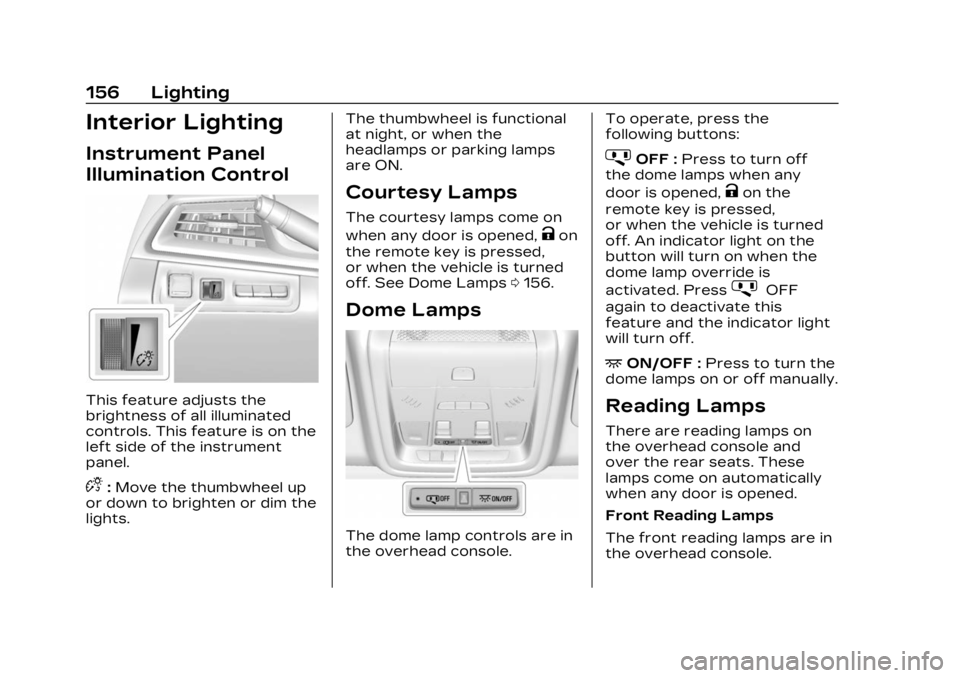
Instrument Panel
Illumination Control
This feature adjusts the
brightness of all illuminated
controls. This feature is on the
left side of the instrument
panel.
D:Move the thumbwheel up
or down to brighten or dim the
lights. The thumbwheel is functional
at night, or when the
headlamps or parking lamps
are ON.
Courtesy Lamps
The courtesy lamps come on
when any door is opened,
Kon
the remote key is pressed,
or when the vehicle is turned
off. See Dome Lamps 0156.
Dome Lamps
The dome lamp controls are in
the overhead console. To operate, press the
following buttons:
jOFF :
Press to turn off
the dome lamps when any
door is opened,
Kon the
remote key is pressed,
or when the vehicle is turned
off. An indicator light on the
button will turn on when the
dome lamp override is
activated. Press
jOFF
again to deactivate this
feature and the indicator light
will turn off.
+ON/OFF : Press to turn the
dome lamps on or off manually.
Reading Lamps
There are reading lamps on
the overhead console and
over the rear seats. These
lamps come on automatically
when any door is opened.
Front Reading Lamps
The front reading lamps are in
the overhead console.
Page 158 of 482

Cadillac XT5 Owner Manual (GMNA-Localizing-U.S./Canada/Mexico-
16406251) - 2023 - CRC - 3/25/22
Lighting 157
Press the lamp lenses to turn
the front reading lamps on
or off.
Rear Reading Lamps
The rear reading lamps are
over the rear seats.
Press the lamp lens to turn
the rear reading lamps on
or off.
Lighting Features
Entry Lighting
The interior lamps turn on
when pressing
Kon the
remote key or opening any
doors, and the dome lamp
control is in the door position.
Some exterior lamps also turn
on when pressing
Kon the
remote key or opening any
doors. Low-Beam lamps will
only turn on briefly at night,
or in areas with limited lighting.
All lamps will gradually fade
out after about 30 seconds.
Entry lighting can be disabled
manually by closing all doors,
pressing
Qon the remote key,
or starting the vehicle. This feature can be changed.
On the infotainment home
page, select the Settings icon
TVehicleTVehicle Locator
Lights.
Exit Lighting
Some exterior lamps and
interior lamps turn on when
the driver door is opened after
the vehicle is turned off.
The exterior and interior lamps
remain on for a set amount of
time, then automatically
turn off.
The interior lights turn on
when the vehicle is turned off.
The exterior lamps turn off
immediately by turning the
exterior lamp control off.
This feature can be changed.
On the infotainment home
screen, select the Settings
icon
TVehicleTExit Lighting.
Page 209 of 482

Cadillac XT5 Owner Manual (GMNA-Localizing-U.S./Canada/Mexico-
16406251) - 2023 - CRC - 3/25/22
208 Infotainment System
Audio
Adjusts different audio
settings.
Climate
Adjusts different climate
settings.
Navigation
Adjusts different navigation
settings.
See Using the Navigation
System0175.
Phone
Adjusts different phone
settings.
SiriusXM
Adjusts different features.
Vehicle
The menu may contain the
following: Rear Seat Reminder
Allows for a chime and a
message when the rear door
has been opened before or
during operation of the
vehicle.
Climate and Air Quality
Adjusts different climate
settings.
Collision/Detection Systems
Adjusts different driver
assistance system settings.
Comfort and Convenience
Adjusts different comfort and
convenience settings.
Lighting
Adjusts different lighting
settings.
Power Door Locks
Adjusts different door lock
settings.
Remote Lock, Unlock, and
Start
Adjusts different remote lock
settings.Seating Position
Adjusts different seat
settings.
Teen Driver
See Teen Driver
0209.
Valet Mode
This will lock the infotainment
system and steering wheel
controls. It may also limit
access to vehicle storage
locations, if equipped.
To enable valet mode: 1. Enter a four-digit code on the keypad.
2. Select Enter to go to the confirmation screen.
3. Re-enter the four-digit code.
Touch Lock or Unlock to lock
or unlock the system. Touch
Back to go back to the
previous menu.
Page 210 of 482

Cadillac XT5 Owner Manual (GMNA-Localizing-U.S./Canada/Mexico-
16406251) - 2023 - CRC - 3/25/22
Infotainment System 209
Personal
If equipped, this menu allows
adjustment of different user
profile settings. See“Users”in
Using the System 0163 for
information on setting up user
profiles.
The menu may contain the
following:
Name
Touch to edit your user name
that will be displayed in the
vehicle.
Vehicle Account Information
Touch to view the vehicle
account information and to
change the account password.
An “unverified user account”
pop-up will display until the
account information
verification process has been
completed on the Internet.
Check your registered e-mail
account for an activation
e-mail to complete the
verification process. Profile Picture
Touch to choose or change
your profile picture.
Profile Identifiers
Touch to have the vehicle
recognize the identifier you
choose.
Touch Vehicle Key 1 and/or
Vehicle Key 2.
If the remote key is lost or
stolen, see your dealer.
Security
Touch to have your profile
secured with a PIN.
Touch No or Yes.
Vehicle Name
Touch to edit your
vehicle name.
Vehicle Account
Touch to view the vehicle
account information and to
change the account password.
Delete Profile
Touch to remove the profile
from the vehicle.
Touch Remove or Cancel.
Teen Driver
If equipped, this allows
multiple keys to be registered
for beginner drivers to
encourage safe driving habits.
When the vehicle is started
with a Teen Driver key, it will
automatically activate certain
safety systems, allow setting
of some features, and limit the
use of others. The Report
Card will record vehicle data
about driving behavior that
can be viewed later. When the
vehicle is started with a
registered key, the Driver
Information Center (DIC)
displays a message that Teen
Driver is active.
Page 211 of 482

Cadillac XT5 Owner Manual (GMNA-Localizing-U.S./Canada/Mexico-
16406251) - 2023 - CRC - 3/25/22
210 Infotainment System
To access:1. Touch Settings on the Home Page, then touch
Vehicle, and then Teen
Driver.
2. Create a Personal Identification Number (PIN)
by choosing a four-digit
PIN. Re-enter the PIN to
confirm. To change the
PIN, touch Change PIN.
The PIN is required to:
.Set up/Add or remove keys.
.Change Teen Driver
settings.
.Change or clear the Teen
Driver PIN.
.Access or delete Report
Card data.
Set up/Add keys to activate
Teen Driver and assign
restrictions to the key:
Any vehicle key can be
registered, up to a maximum
of eight keys. Label the key to
tell it apart from the
other keys. For a pushbutton start
system:
1. Start the vehicle.
2. For automatic transmissions, the vehicle
must be in P (Park). For
manual transmissions, the
vehicle must be stopped
with the parking brake set.
3. From the Settings menu, touch Vehicle and then
Teen Driver.
4. Enter the PIN.
5. Place the remote key you wish to register in the
transmitter pocket. The
key does not need to be
the one that started the
vehicle. See Remote Key
Operation 09 for
transmitter pocket
location. 6. From the Teen Driver
menu, touch Setup Keys or
Add/Remove Teen
Driver Keys.
.If the remote key has
not previously been
registered, the option to
add the key displays.
Touch Add and a
confirmation message
displays. Teen Driver
restrictions will be
applied whenever this
remote key is used to
operate the vehicle.
.If the remote key has
already been registered,
the option to remove
the key displays.
If Remove is touched,
the remote key is no
longer registered.
A confirmation message
displays, and Teen
Driver restrictions will
not be applied if this
remote key is used to
operate the vehicle.