2023 CADILLAC ESCALADE ignition
[x] Cancel search: ignitionPage 38 of 461

Cadillac Escalade Owner Manual (GMNA-Localizing-U.S./Canada/Mexico-
16417396) - 2023 - CRC - 5/9/22
36 Keys, Doors, and Windows
.Press2to engage the rear window
lockout feature. The indicator light is on
when engaged.
.Press2again to disengage.
Window Express Movement
All windows can be opened without holding
the window switch. Press the switch down
fully and quickly release to express open the
window.
If equipped, pull the window switch up fully
and quickly release to express close the
window.
Briefly press or pull the window switch in
the same direction to stop that window’s
express movement.
Window Automatic Reversal System
The express-close feature will reverse
window movement if it comes in contact
with an object. Extreme cold or ice could
cause the window to auto-reverse. The
window will operate normally after the
object or condition is removed.
Automatic Reversal System Override
{Warning
If automatic reversal system override is
active, the window will not reverse
automatically. You or others could be
injured and the window could be
damaged. Before using automatic reversal
system override, make sure that all
people and obstructions are clear of the
window path.
When the engine is on, override the
automatic reversal system by pulling and
holding the window switch if conditions
prevent it from closing.
Programming the Power Windows
Programming may be necessary if the
vehicle battery has been disconnected or
discharged. If the window is unable to
express-up, program each express-close
window: 1. Close all doors.
2. Turn the ignition on or to accessory mode.
3. Partially open the window to be programmed. Then close it and continue
to pull the switch briefly after the
window has fully closed.
4. Open the window and continue to press the switch briefly after the window has
fully opened.
Remote Window Operation
If equipped with remote window open
feature, press and hold
"on the remote
key for about three seconds to open all
windows. If equipped with remote window
close feature, press and hold
Qon the
remote key for three seconds to close all
windows. The vehicle must be off and the
remote window operation must be enabled.
To view available settings for this feature,
touch the Settings icon on the infotainment
Page 39 of 461
Cadillac Escalade Owner Manual (GMNA-Localizing-U.S./Canada/Mexico-
16417396) - 2023 - CRC - 5/9/22
Keys, Doors, and Windows 37
home page. Select“Vehicle”to display the
list of available options and select “Remote
Lock, Unlock, Start”.
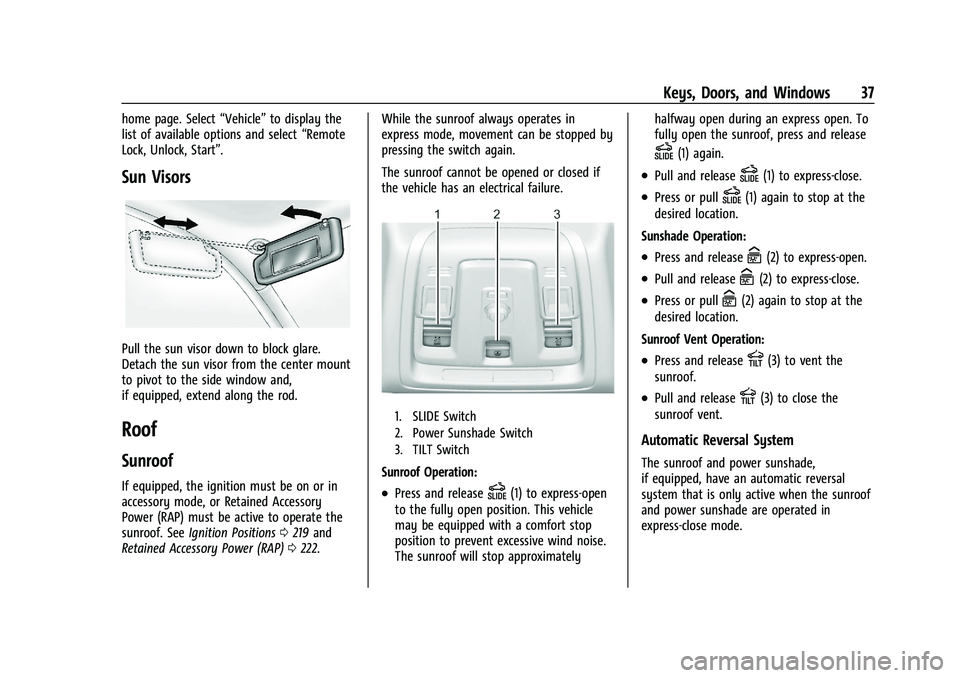
Sun Visors
Pull the sun visor down to block glare.
Detach the sun visor from the center mount
to pivot to the side window and,
if equipped, extend along the rod.
Roof
Sunroof
If equipped, the ignition must be on or in
accessory mode, or Retained Accessory
Power (RAP) must be active to operate the
sunroof. See Ignition Positions 0219 and
Retained Accessory Power (RAP) 0222. While the sunroof always operates in
express mode, movement can be stopped by
pressing the switch again.
The sunroof cannot be opened or closed if
the vehicle has an electrical failure.
1. SLIDE Switch
2. Power Sunshade Switch
3. TILT Switch
Sunroof Operation:
.Press and releaseD(1) to express-open
to the fully open position. This vehicle
may be equipped with a comfort stop
position to prevent excessive wind noise.
The sunroof will stop approximately halfway open during an express open. To
fully open the sunroof, press and release
D(1) again.
.Pull and releaseD(1) to express-close.
.Press or pullD(1) again to stop at the
desired location.
Sunshade Operation:
.Press and releaseC(2) to express-open.
.Pull and releaseC(2) to express-close.
.Press or pullC(2) again to stop at the
desired location.
Sunroof Vent Operation:
.Press and releaseE(3) to vent the
sunroof.
.Pull and releaseE(3) to close the
sunroof vent.
Automatic Reversal System
The sunroof and power sunshade,
if equipped, have an automatic reversal
system that is only active when the sunroof
and power sunshade are operated in
express-close mode.
Page 44 of 461

Cadillac Escalade Owner Manual (GMNA-Localizing-U.S./Canada/Mexico-
16417396) - 2023 - CRC - 5/9/22
42 Seats and Restraints
When an occupant or child restraint is in the
seat, always return the head restraint to the
full upright position. Push the head restraint
up and rearward until it locks into place.
Push and pull on the head restraint to make
sure that it is locked.
Front Seats
Power Seat Adjustment
{Warning
You can lose control of the vehicle if you
try to adjust a driver seat while the
vehicle is moving. Adjust the driver seat
only when the vehicle is not moving.
{Warning
The power seats will work with the
ignition off. Children could operate the
power seats and be injured. Never leave
children alone in the vehicle.
To adjust the seat:
.Move the seat forward or rearward by
sliding the control forward or rearward.
.Raise or lower the front part of the seat
cushion by moving the front of the
control up or down.
.Raise or lower the seat by moving the
rear of the control up or down.
Reclining Seatbacks
To recline the seatback:
.Tilt the top of the control rearward to
recline.
.Tilt the top of the control forward to
raise.
{Warning
Sitting in a reclined position when the
vehicle is in motion can be dangerous.
Even when buckled up, the seat belts
cannot do their job.(Continued)
Page 50 of 461

Cadillac Escalade Owner Manual (GMNA-Localizing-U.S./Canada/Mexico-
16417396) - 2023 - CRC - 5/9/22
48 Seats and Restraints
unoccupied, the auto heated or ventilated
seats feature will not activate that seat. To
enable or disable auto heated or ventilated
seats, select Settings > Vehicle > Climate
and Air Quality > Auto Cooled or Auto
Heated Seats > ON or OFF.
Remote Start Heated and Ventilated Seats
During a remote start, the heated or
ventilated seats, if equipped, can be turned
on automatically. When it is cold outside,
the heated seats turn on, and when it is hot
outside the ventilated seats turn on. If the
auto heated or ventilated seats feature,
if equipped, is not turned on, the heated or
ventilated seats may be canceled when the
ignition is turned on. If necessary, press the
heated or ventilated seat button to use the
heated or ventilated seats after the vehicle
is started.
The heated or ventilated seat indicator lights
may turn on during a remote start.
The temperature performance of an
unoccupied seat may be reduced. This is
normal.
To enable or disable remote start heated or
ventilated seats, select Settings > Vehicle >
Remote Lock, Unlock, and Start > RemoteStart Auto Heat Seats or Remote Start Auto
Cool Seats > ON or OFF. See
Remote Vehicle
Start 014.
Rear Seats
Rear Seat Reminder
If equipped, the message REAR SEAT
REMINDER LOOK IN REAR SEAT displays
under certain conditions indicating there
may be an item or passenger in the rear
seat. Check before exiting the vehicle.
This feature will activate when a second row
door is opened while the vehicle is on or up
to 10 minutes before the vehicle is turned
on. There will be an alert when the vehicle
is turned off. The alert does not directly
detect objects in the rear seat; instead,
under certain conditions, it detects when a
rear door is opened and closed, indicating
that there may be something in the
rear seat.
The feature is active only once each time
the vehicle is turned on and off, and will
require reactivation by opening and closing
the second row doors. There may be an
alert even when there is nothing in the rear seat; for example, if a child entered the
vehicle through the rear door and left the
vehicle without the vehicle being shut off.
The feature can be turned on or off. Select
Settings > Vehicle > Rear Seat Reminder >
ON or OFF.Second Row Seats
Rear Seat Adjustment
To adjust the seat position:
1. Remove objects on the floor in front of or on the second row seat, or in the seat
tracks on the floor.
Page 70 of 461

Cadillac Escalade Owner Manual (GMNA-Localizing-U.S./Canada/Mexico-
16417396) - 2023 - CRC - 5/9/22
68 Seats and Restraints
Rollover capable roof-rail airbags are
designed to help contain the head and chest
of occupants in the outboard seating
positions in the first, second, and third rows.
The rollover capable roof-rail airbags are
designed to help reduce the risk of full or
partial ejection in rollover events, although
no system can prevent all such ejections.
But airbags would not help in many types
of collisions, primarily because the
occupant's motion is not toward those
airbags. SeeWhen Should an Airbag Inflate?
0 66.
Airbags should never be regarded as
anything more than a supplement to seat
belts.
What Will You See after an
Airbag Inflates?
After frontal and seat-mounted side impact
airbags inflate, they quickly deflate, so
quickly that some people may not even
realize the airbags inflated. The front center
airbag and roof-rail airbags may still be at
least partially inflated for some time after
they inflate. Some components of the airbag
module may be hot for several minutes. For
location of the airbags, see Where Are the
Airbags? 065. The parts of the airbag that come into
contact with you may be warm, but not too
hot to touch. There may be some smoke
and dust coming from the vents in the
deflated airbags. Airbag inflation does not
prevent the driver from seeing out of the
windshield or being able to steer the
vehicle, nor does it prevent people from
leaving the vehicle.
{Warning
When an airbag inflates, there may be
dust in the air. This dust could cause
breathing problems for people with a
history of asthma or other breathing
trouble. To avoid this, everyone in the
vehicle should get out as soon as it is
safe to do so. If you have breathing
problems but cannot get out of the
vehicle after an airbag inflates, then get
fresh air by opening a window or a door.
If you experience breathing problems
following an airbag deployment, you
should seek medical attention.
The vehicle has a feature that may
automatically unlock the doors, turn on the
interior lamps and hazard warning flashers,
and shut off the fuel system after the airbags inflate. The feature may also
activate, without airbag inflation, after an
event that exceeds a predetermined
threshold. After turning the ignition off and
then on again, the fuel system will return to
normal operation; the doors can be locked,
the interior lamps can be turned off, and
the hazard warning flashers can be turned
off using the controls for those features.
If any of these systems are damaged in the
crash they may not operate as normal.{Warning
A crash severe enough to inflate the
airbags may have also damaged
important functions in the vehicle, such
as the fuel system, brake and steering
systems, etc. Even if the vehicle appears
to be drivable after a moderate crash,
there may be concealed damage that
could make it difficult to safely operate
the vehicle.
Use caution if you should attempt to
restart the engine after a crash has
occurred.
Page 101 of 461

Cadillac Escalade Owner Manual (GMNA-Localizing-U.S./Canada/Mexico-
16417396) - 2023 - CRC - 5/9/22
Instruments and Controls 99
Windshield Wiper without Rainsense (INTShown)
With the ignition on or in accessory mode,
move the windshield wiper lever to select
the wiper speed.
HI : Use for fast wipes.
LO : Use for slow wipes.
AUTO : If equipped with Rainsense, use this
setting for intermittent wipes when
Rainsense is disabled, or Rainsense wipes when Rainsense is enabled. For intermittent
wipes, move the windshield wiper lever to
AUTO, then turn the band up for more
frequent wipes or down for less frequent
wipes. If Rainsense is turned on, see
“Rainsense”
later in this section.
INT :If equipped with intermittent wipers
only, move the windshield wiper lever to
INT. Turn the band up for more frequent
wipes or down for less frequent wipes.
OFF : Use to turn the wipers off.
1X : For a single wipe, briefly move the
wiper lever down. For several wipes, hold
the wiper lever down.
f: Pull the windshield wiper lever
toward you to spray windshield washer fluid
and activate the wipers. The wipers will
continue until the lever is released or the
maximum wash time is reached. When the windshield wiper lever is released, additional
wipes may occur depending on how long
the windshield washer has been activated.
See
Washer Fluid 0351 for information on
filling the windshield washer fluid reservoir.
{Warning
In freezing weather, do not use the
washer until the windshield is warmed.
Otherwise the washer fluid can form ice
on the windshield, blocking your vision.
{Warning
Before driving the vehicle, always clear
snow and ice from the hood, windshield,
washer nozzles, roof, and rear of the
vehicle, including all lamps and windows.
Reduced visibility from snow and ice
buildup could lead to a crash.
Clear snow and ice from the wiper blades
and windshield before using them. If frozen
to the windshield, carefully loosen or thaw
them. Damaged blades should be replaced.
See Wiper Blade Replacement 0356.
Heavy snow or ice can overload the wiper
motor. See Electrical System Overload 0359.
Page 102 of 461

Cadillac Escalade Owner Manual (GMNA-Localizing-U.S./Canada/Mexico-
16417396) - 2023 - CRC - 5/9/22
100 Instruments and Controls
Night Vision Camera Washer
When it is dark enough for the night vision
system to operate, activate the front
windshield washer five times to clean the
camera sensor.
SeeNight Vision System 0292 for
information on using the night vision
system.
Wiper Parking
If the ignition is turned off while the wipers
are on LO, HI, or AUTO with Rainsense
turned off, they will immediately stop.
If the windshield wiper lever is then moved
to OFF before the driver door is opened or
within 10 minutes, the wipers will restart
and move to the base of the windshield.
If the ignition is turned off while the wipers
are performing wipes due to windshield
washing or Rainsense, the wipers continue
to run until they reach the base of the
windshield.
Rainsense
If equipped with Rainsense and the feature
is turned on, a sensor near the top center of
the windshield detects the amount of water on the windshield and controls the
frequency of the windshield wiper based on
the current sensitivity setting.
Keep this area of the windshield clear of
debris to allow for best system performance.
AUTO :
Move the windshield wiper lever to
AUTO. Turn the band on the wiper lever to
adjust the sensitivity.
.Turn the band up for more sensitivity to
moisture.
.Turn the band down for less sensitivity to
moisture.
.Move the windshield wiper lever out of
the AUTO position to deactivate
Rainsense.
To turn the Rainsense feature on or off, see
“Rain Sense Wipers” under Settings >
Vehicle> Comfort and Convenience > Rain
Sense Wipers. Wiper Arm Assembly Protection
When using an automatic car wash, move
the windshield wiper lever to OFF. This
disables the automatic Rainsense windshield
wipers.
With Rainsense, if the transmission is in
N (Neutral) and the vehicle speed is very
slow, the wipers will automatically stop at
the base of the windshield.
The wiper operations return to normal when
the transmission is no longer in N (Neutral)
or the vehicle speed has increased.
Rear Window Wiper/Washer
The rear window wiper/washer controls are
on the end of the windshield wiper lever.
Turn the controls to adjust the setting.
OFF :
Turns the wiper off.
Page 104 of 461

Cadillac Escalade Owner Manual (GMNA-Localizing-U.S./Canada/Mexico-
16417396) - 2023 - CRC - 5/9/22
102 Instruments and Controls
satellites. When the compass display shows
CAL, drive the vehicle for a short distance in
an open area where it can receive a GPS
signal. The compass system will
automatically determine when a GPS signal
is restored and provide a heading again.
Clock
Set the time and date using the
infotainment system. See "Time/Date" under
Settings0184.
Power Outlets
Power Outlets 12-Volt Direct Current
Accessory power outlets can be used to plug
in electrical equipment, such as a cell phone
or MP3 player.
The vehicle has two accessory power
outlets:
.Below the center console in the map
pocket
.Inside the center console (Standard Floor
Console Only)
Standard Floor Console
Cooling Floor Console
Lift the cover to access and replace when
not in use. The accessory power outlets are powered as
follows:
.The power outlets are powered when the
vehicle is started or the ignition is in
accessory mode, or until the driver door is
opened within 10 minutes of turning off
the vehicle. See
Retained Accessory Power
(RAP) 0222.
Caution
Leaving electrical equipment plugged in
for an extended period of time while the
vehicle is off will drain the battery.
Always unplug electrical equipment when
not in use and do not plug in equipment
that exceeds the maximum 15 amp
rating.
Certain power accessory plugs may not be
compatible with the accessory power outlet
and could overload vehicle or adapter fuses.
If a problem is experienced, see your dealer.
When adding electrical equipment, be sure
to follow the proper installation instructions
included with the equipment. See Add-On
Electrical Equipment 0334.