Page 329 of 548
3295-1. Using the air conditioning system and defogger
5
Interior features
*: If equipped
WARNING
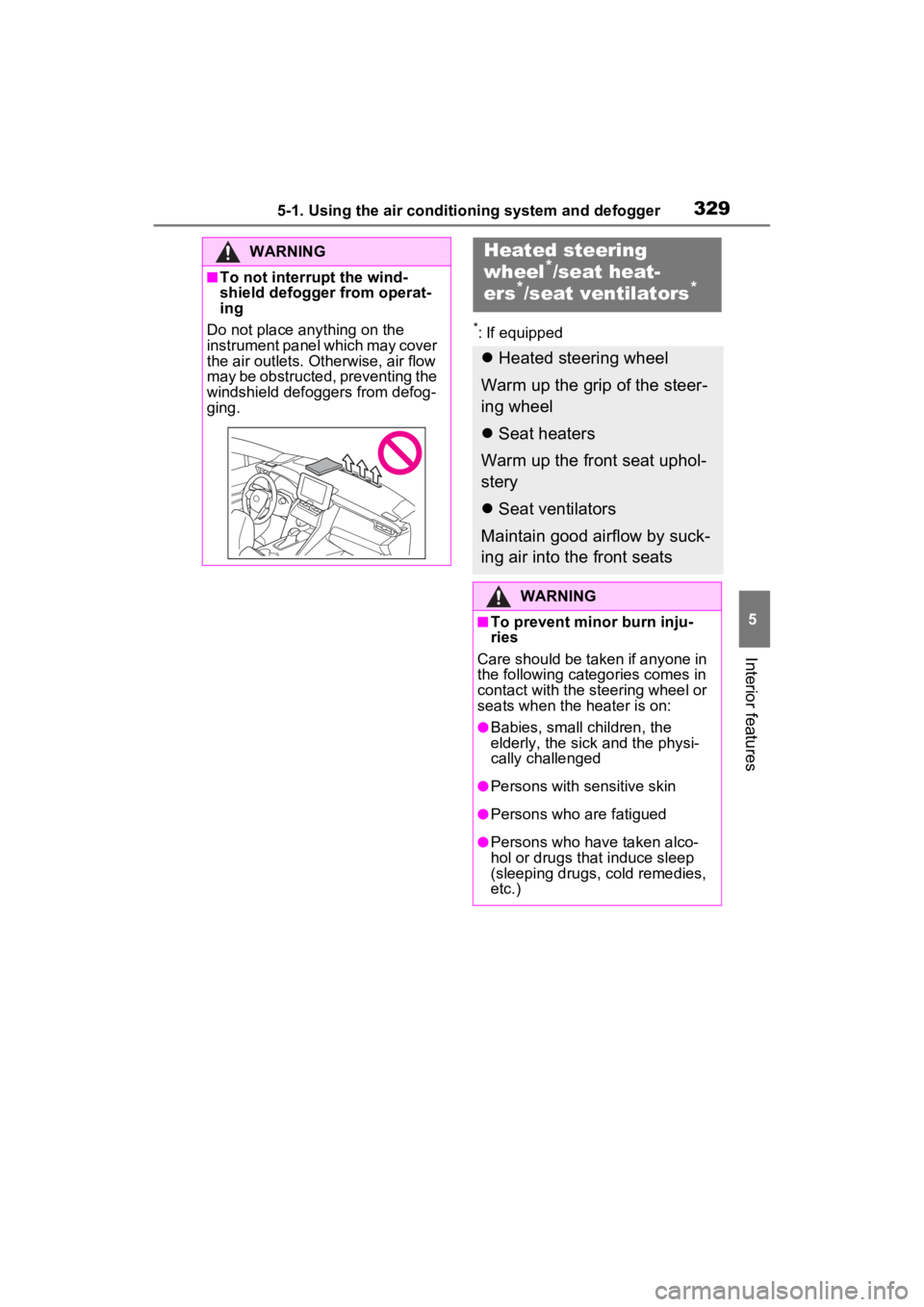
■To not interrupt the wind-
shield defogger from operat-
ing
Do not place anything on the
instrument panel which may cover
the air outlets. Otherwise, air flow
may be obstructed, preventing the
windshield defoggers from defog-
ging.
Heated steering
wheel*/seat heat-
ers*/seat ventilators*
Heated steering wheel
Warm up the grip of the steer-
ing wheel
Seat heaters
Warm up the front seat uphol-
stery
Seat ventilators
Maintain good airflow by suck-
ing air into the front seats
WARNING
■To prevent minor burn inju-
ries
Care should be taken if anyone in
the following categories comes in
contact with the steering wheel or
seats when the heater is on:
●Babies, small children, the
elderly, the sick and the physi-
cally challenged
●Persons with sensitive skin
●Persons who are fatigued
●Persons who have taken alco-
hol or drugs that induce sleep
(sleeping drugs, cold remedies,
etc.)
Page 330 of 548
3305-1. Using the air conditioning system and defogger
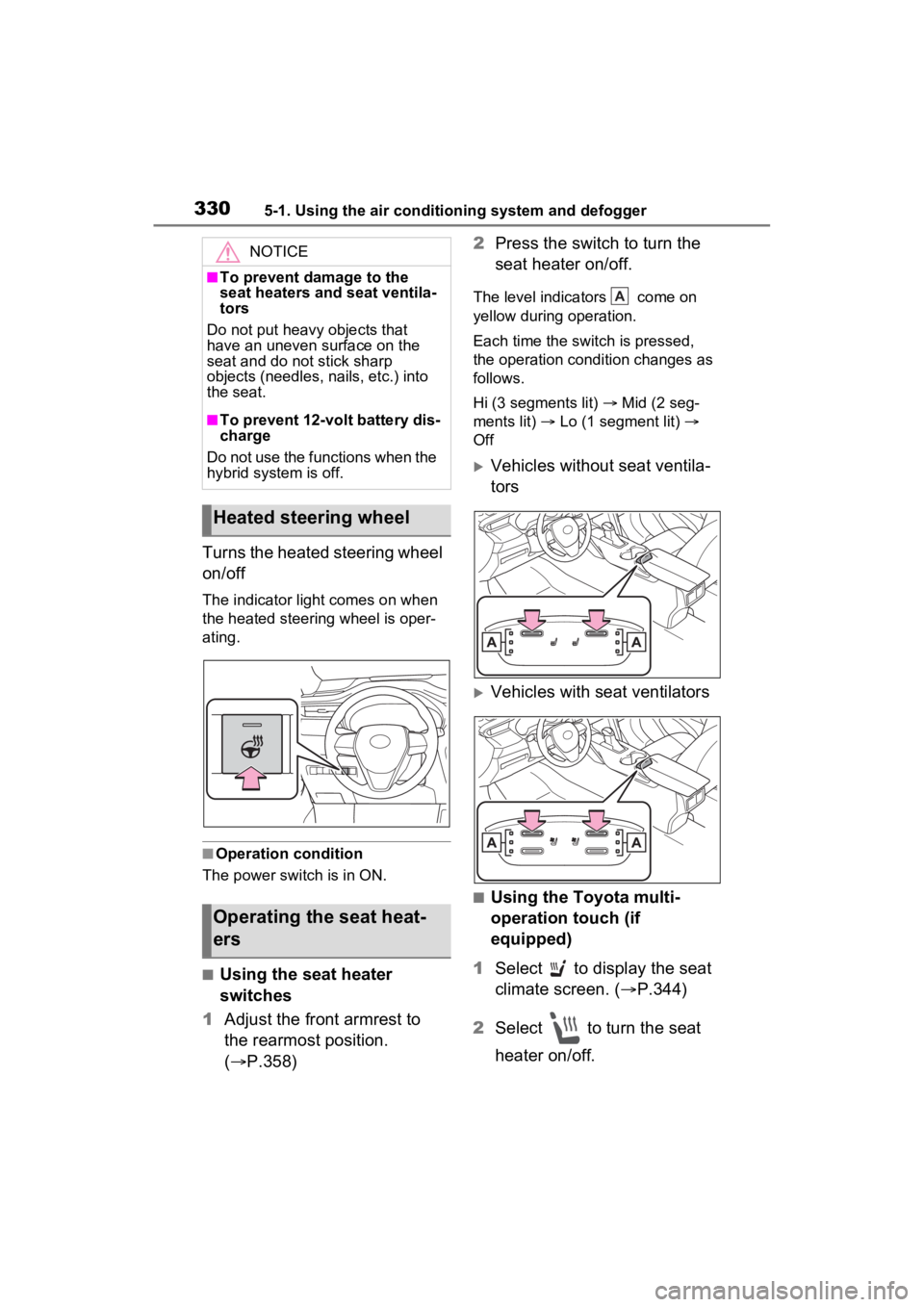
Turns the heated steering wheel
on/off
The indicator light comes on when
the heated steering wheel is oper-
ating.
■Operation condition
The power swit ch is in ON.
■Using the seat heater
switches
1 Adjust the front armrest to
the rearmost position.
( P.358) 2
Press the switch to turn the
seat heater on/off.
The level indica tors come on
yellow during operation.
Each time the switch is pressed,
the operation condition changes as
follows.
Hi (3 segments lit) Mid (2 seg-
ments lit) Lo (1 segment lit)
Off
Vehicles without seat ventila-
tors
Vehicles with seat ventilators
■Using the Toyota multi-
operation touch (if
equipped)
1 Select to display the seat
climate screen. ( P.344)
2 Select to turn the seat
heater on/off.
NOTICE
■To prevent damage to the
seat heaters and seat ventila-
tors
Do not put heavy objects that
have an uneven surface on the
seat and do not stick sharp
objects (needles, nails, etc.) into
the seat.
■To prevent 12-volt battery dis-
charge
Do not use the functions when the
hybrid system is off.
Heated steering wheel
Operating the seat heat-
ers
A
Page 331 of 548
3315-1. Using the air conditioning system and defogger
5
Interior features
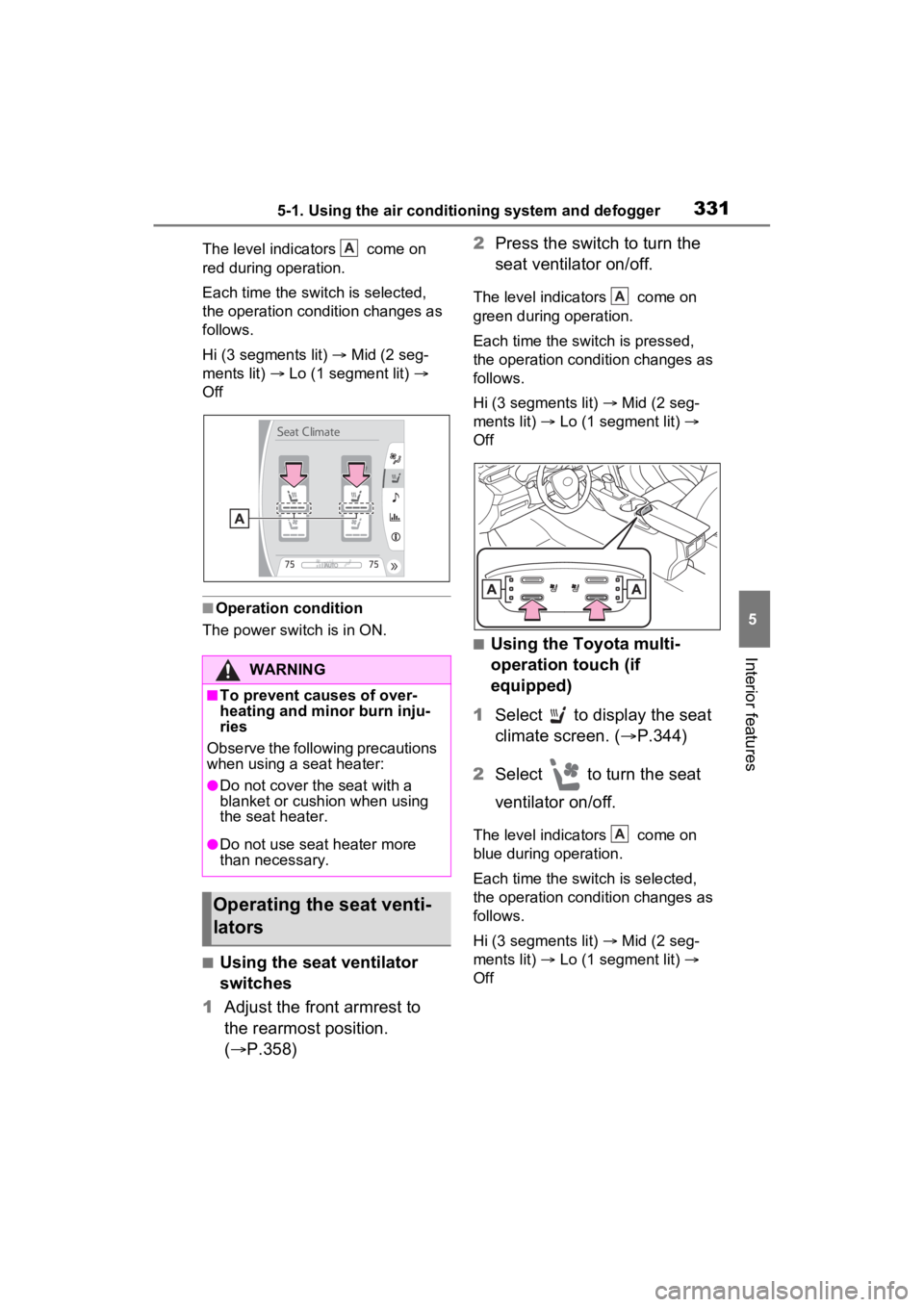
The level indicators come on
red during operation.
Each time the switch is selected,
the operation condition changes as
follows.
Hi (3 segments lit) Mid (2 seg-
ments lit) Lo (1 segment lit)
Off
■Operation condition
The power swit ch is in ON.
■Using the seat ventilator
switches
1 Adjust the front armrest to
the rearmost position.
( P.358) 2
Press the switch to turn the
seat ventilator on/off.
The level indica tors come on
green during operation.
Each time the switch is pressed,
the operation condition changes as
follows.
Hi (3 segments lit) Mid (2 seg-
ments lit) Lo (1 segment lit)
Off
■Using the Toyota multi-
operation touch (if
equipped)
1 Select to display the seat
climate screen. ( P.344)
2 Select to turn the seat
ventilator on/off.
The level indica tors come on
blue during operation.
Each time the switch is selected,
the operation condition changes as
follows.
Hi (3 segments lit) Mid (2 seg-
ments lit) Lo (1 segment lit)
Off
WARNING
■To prevent causes of over-
heating and minor burn inju-
ries
Observe the following precautions
when using a seat heater:
●Do not cover the seat with a
blanket or cushion when using
the seat heater.
●Do not use seat heater more
than necessary.
Operating the seat venti-
lators
A
A
A
Page 332 of 548
3325-1. Using the air conditioning system and defogger
■Operation condition
The power swit ch is in ON.
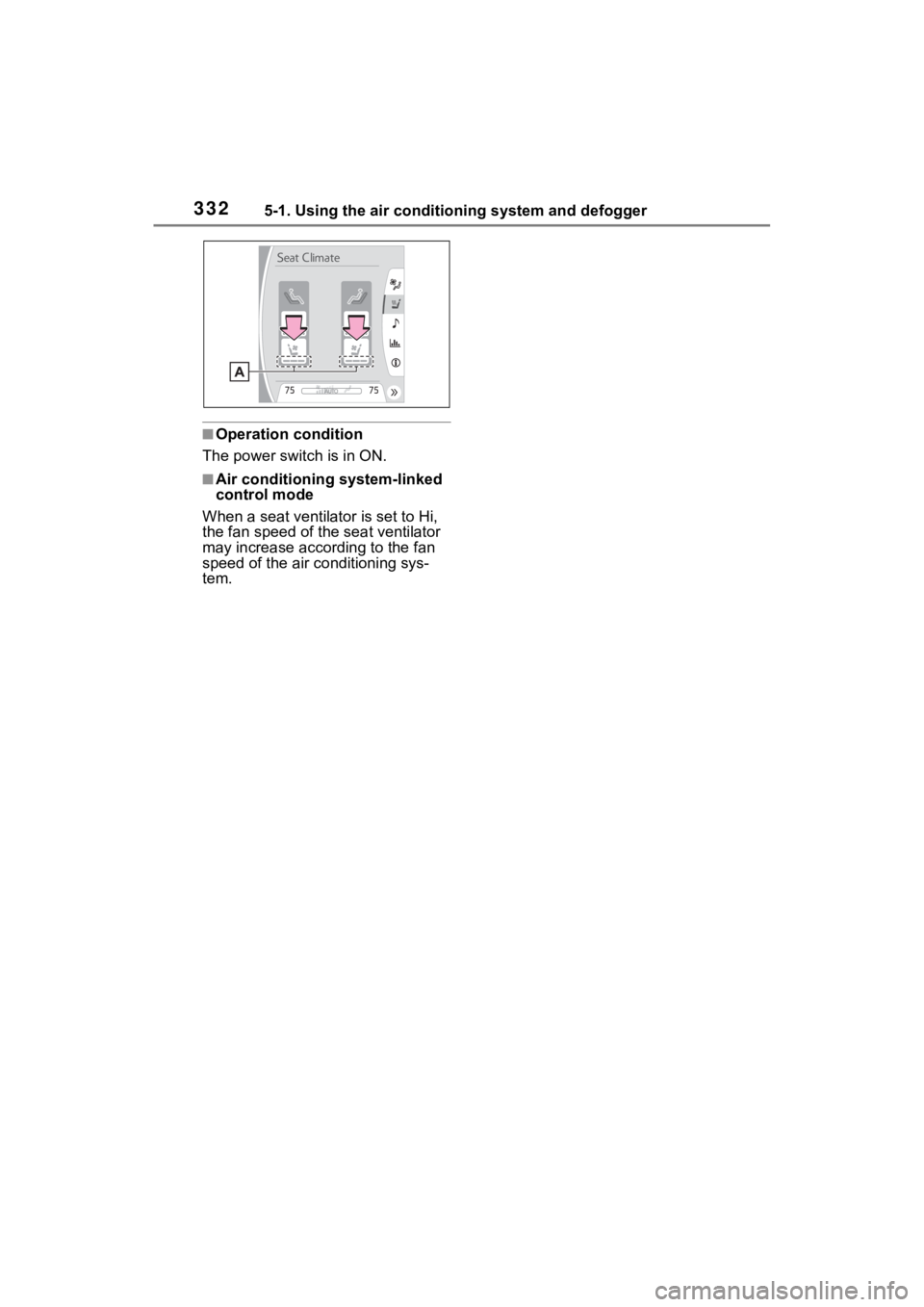
■Air conditioning system-linked
control mode
When a seat ventilator is set to Hi,
the fan speed of the seat ventilator
may increase acco rding to the fan
speed of the air conditioning sys-
tem.
Page 334 of 548
3345-2. Using the interior lights
tronic key, whether the doors are
locked/unlocked, and whether the
doors are opened/closed.
●If the interior lights remain on
when the power switch is turned to
OFF, the lights will go off automat-
ically after 20 minutes.
■Interior lights brightness reduc-
tion
The brightness of the following
lights will be reduc ed when shifting
the shift lever to any position other
than P.
●Instrument panel lower illumina-
tion (if equipped)
●Footwell lights (if equipped)
●Upper console lights (if equipped)
●Front console light
●Inside door handle lights (if
equipped)
■The interior lights may turn on
automatically when
If any of the SRS airbags deploy
(inflate) or in the event of a strong
rear impact, the interior lights will
turn on automatically.
The interior lights will turn off auto-
matically after approximately 20
minutes.
The interior lights can be turned off
manually. However, in order to help
prevent further collisions, it is rec-
ommended that they be left on until
safety can be ensured.
(The interior lights may not turn on
automatically depending on the
force of the impact and conditions of
the collision.)
■Customization
Setting (e.g. the time elapsed before
the lights turn off) can be changed.
(Customizable features: P.510)
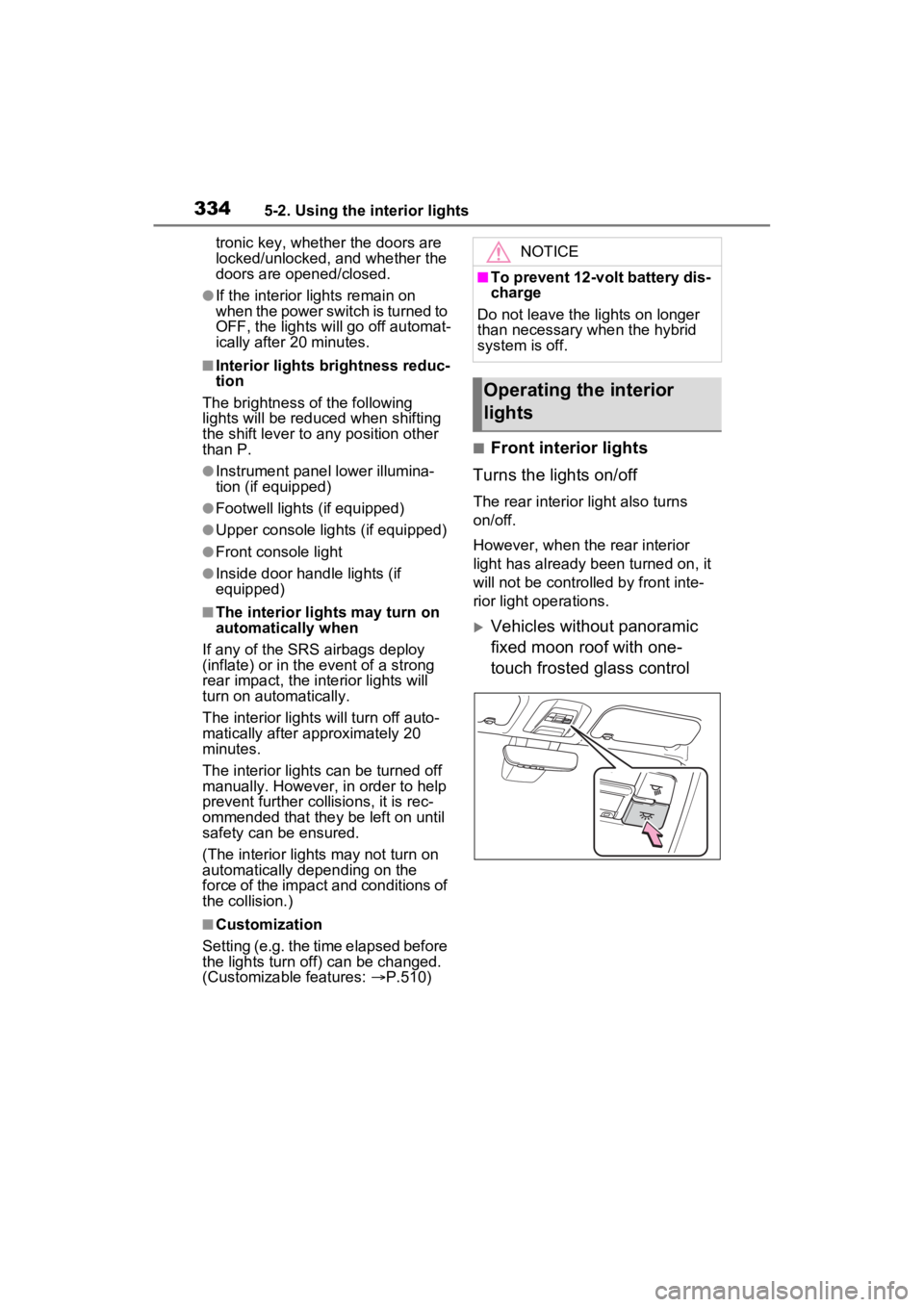
■Front interior lights
Turns the lights on/off
The rear interior light also turns
on/off.
However, when the rear interior
light has already been turned on, it
will not be controlle d by front inte-
rior light operations.
Vehicles without panoramic
fixed moon roof with one-
touch frosted glass control
NOTICE
■To prevent 12-volt battery dis-
charge
Do not leave the lights on longer
than necessary when the hybrid
system is off.
Operating the interior
lights
Page 344 of 548
3445-4. Using the other interior features
5-4.Using the other interior features
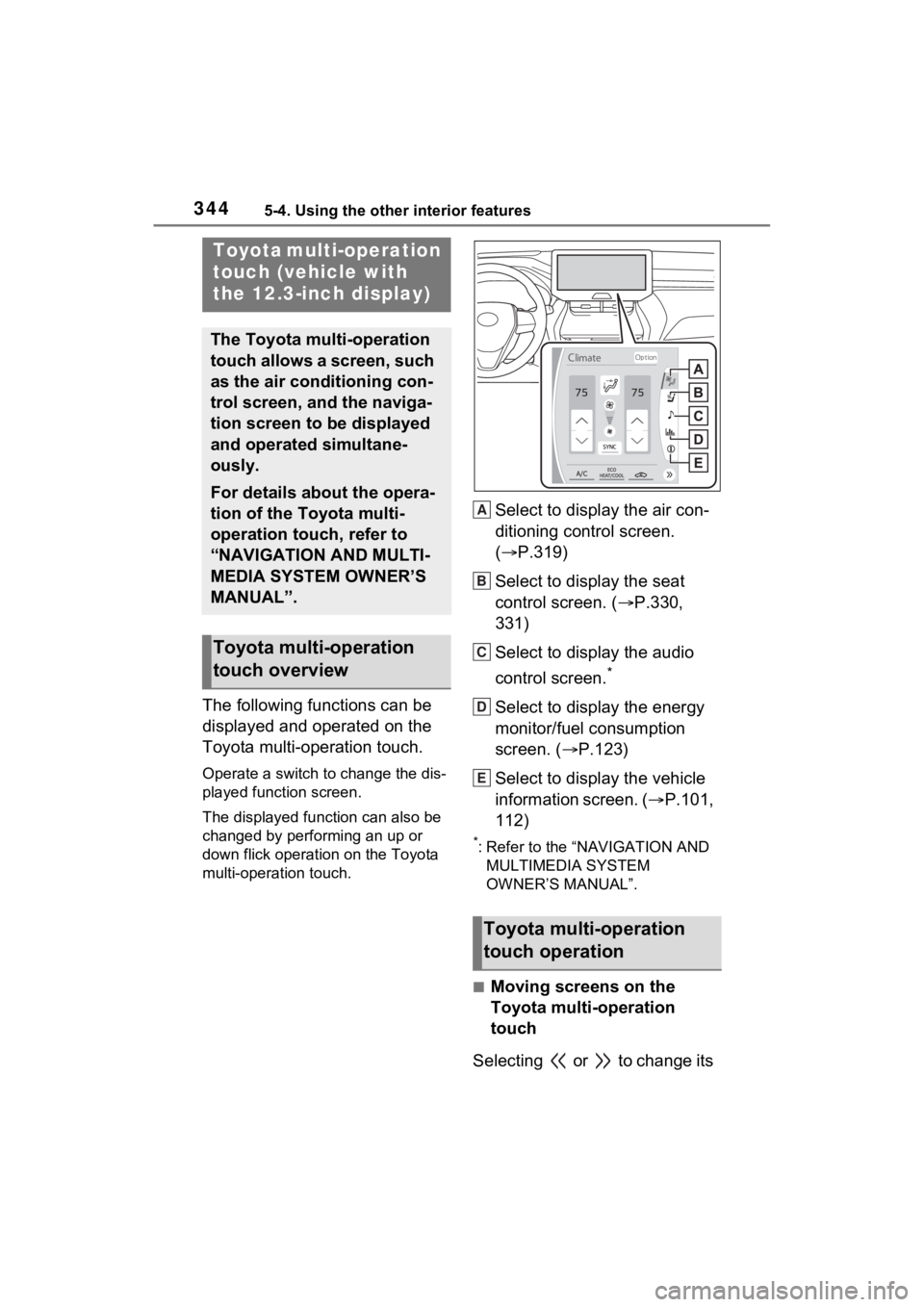
The following functions can be
displayed and operated on the
Toyota multi-operation touch.
Operate a switch to change the dis-
played function screen.
The displayed function can also be
changed by performing an up or
down flick operation on the Toyota
multi-operation touch.
Select to display the air con-
ditioning control screen.
( P.319)
Select to display the seat
control screen. ( P.330,
331)
Select to display the audio
control screen.
*
Select to display the energy
monitor/fuel consumption
screen. ( P.123)
Select to display the vehicle
information screen. ( P.101,
112)
*: Refer to the “NAVIGATION AND MULTIMEDIA SYSTEM
OWNER’S MANUAL”.
■Moving screens on the
Toyota multi-operation
touch
Selecting or to change its
Toyota multi-operation
touch (vehicle with
the 12.3-inch display)
The Toyota multi-operation
touch allows a screen, such
as the air conditioning con-
trol screen, and the naviga-
tion screen to be displayed
and operated simultane-
ously.
For details about the opera-
tion of the Toyota multi-
operation touch, refer to
“NAVIGATION AND MULTI-
MEDIA SYSTEM OWNER’S
MANUAL”.
Toyota multi-operation
touch overview
Toyota multi-operation
touch operation
A
B
C
D
E
Page 357 of 548
3575-4. Using the other interior features
5
Interior features
WARNING
■Caution regarding interfer-
ence with electronic devices
People with implantable cardiac
pacemakers, cardiac resynchroni-
zation therapy-pacemakers or
implantable cardioverter defibrilla-
tors, as well as any other electri-
cal medical device, should consult
their physician about the usage of
the wireless charger. The opera-
tions of the wireless charger may
have an affect on medical
devices.
■To prevent damage or burns
Observe the following precau-
tions.
Failure to do so m ay result in a
possibility of equ ipment failure
and damage, catch fire, burns due
to overheat.
●Do not insert any metallic
objects between the charging
area and the portable device
while charging
●Do not attach stickers, metallic
objects, etc., to the charger area
or portable device
●Do not cover with cloth, etc.,
and charge
●Do not charge portable devices
other than designated
●Do not attempt t o dismantle for
disassembly or modifications
●Do not hit or apply a strong
force
NOTICE
■Conditions in which the func-
tion may not operate cor-
rectly
In the following co nditions, it may
not operate correctly
●The portable device is fully
charged
●There is foreign matter between
the charge area and portable
device
●The temperature of the portable
device gets higher from
charging
●The charging surface of the por-
table device is facing up
●The placement of the portable
device is out of alignment with
the charge area
●Near a TV tower, electric power
plant, gas station, radio station,
large display, airport or other
facility that gen erates strong
radio waves or electrical noise
●When the electronic key is in
contact with, or is covered by
the following metallic objects
• Cards to which aluminum foil is attached
• Cigarette boxes that have alu- minum foil inside
• Metallic wallets or bags
• Coins
• Hand warmers made of metal
• Media such as CDs and DVDs
Page 369 of 548
369
6
6
Maintenance and care
Maintenance and care
6-1. Maintenance and careCleaning and protecting the vehicle exterior .......... 370
Cleaning and protecting the vehicle interior ........... 373
6-2. Maintenance Maintenance requirements.................................. 377
General maintenance.. 379
Emission inspection and maintenance (I/M) pro-
grams ........................ 381
6-3. Do-it-yourself mainte- nance
Do-it-yourself service pre- cautions ..................... 383
Hood ........................... 385
Positioning a floor jack 386
Engine compartment ... 388
12-volt battery ............. 394
Tires ............................ 397
Tire inflation pressure . 409
Wheels ......... ...............411
Air conditioning filter .... 413
Cleaning the hybrid battery (traction battery) air intake
vent and filter............. 415
Wiper insert replacement .................................. 419
Electronic key battery.. 422
Checking and replacing fuses.......................... 424Headlight aim ..............
427
Exterior lights .............. 428