2022 TOYOTA VENZA HYBRID air condition
[x] Cancel search: air conditionPage 297 of 548

2974-5. Using the driving support systems
4
Driving
■VSC (Vehicle Stability Con-
trol)
Helps the driver to control skid-
ding when swerving suddenly or
turning on slippery road sur-
faces.
■Enhanced VSC (Enhanced
Vehicle Stability Control)
Provides cooperative control of
the ABS, TRAC, VSC and EPS.
Helps to maintai n directional
stability when swerving on slip-
pery road surfaces by con-
trolling steering performance.
■TRAC (Traction Control)
Helps to maintain drive power
and prevent the drive wheels
from spinning when starting the
vehicle or accelerating on slip-
pery roads
■Active Cornering Assist
(ACA)
Helps to prevent the vehicle
from drifting to the outer side by
performing inner wheel brake
control when attempting to
accelerate while turning
■Hill-start assist control
Helps to reduce the backward
movement of the vehicle when
starting on an uphill
■EPS (Electric Power Steer-
ing)
Employs an electric motor to
reduce the amount of effort
needed to turn the steering wheel
■E-Four (Electronic On-
Demand AWD system)
Automatically switches from
front wheel drive to all-wheel
drive (AWD) according to the
driving conditions, helping to
ensure reliable handling and
stability. Examples of condi-
tions where the system will
switch to AWD are when corner-
ing, going uphill, starting off or
accelerating, and when the road
surface is slippery due to snow,
rain, etc.
■The Secondary Collision
Brake
When the SRS airbag sensor
detects a collision and the sys-
tem operates, the brakes and
brake lights are automatically
controlled to reduce the vehicle
speed and help reduce the pos-
sibility of further damage due to
a secondary collision.
■When the TRAC/VSC/ABS sys-
tems are operating
The slip indicator light will flash
while the TRAC/VSC/ABS systems
are operating.
■Disabling the TRAC system
If the vehicle gets stuck in mud, dirt
Page 299 of 548

2994-5. Using the driving support systems
4
Driving
■ECB operating sound
ECB operating sound may be heard
in the following cases, but it does
not indicate that a malfunction has
occurred.
●Operating sound heard from the
engine compartment when the
brake pedal is dep ressed repeat-
edly, when the hybrid system is
started or just after the vehicle
begins to move.
●Operating sound heard from the
engine compartment when the
brake pedal is operated.
●Motor sound of the brake system
heard from the front part of the
vehicle when the driver’s door is
opened.
●Operating sound heard from the
engine compartment when one or
two minutes passed after the stop
of the hybrid system.
■Active Cornering Assist opera-
tion sounds and vibrations
When the Active Cornering Assist is
operated, operation sounds and
vibrations may b e generated from
the brake system, but this is not a
malfunction.
■EPS operation sound
When the steering wheel is oper-
ated, a motor sou nd (whirring
sound) may be heard. This does not
indicate a malfunction.
■Automatic reactivation of TRAC
and VSC systems
After turning the TRAC and VSC
systems off, the systems will be
automatically re-enabled in the fol-
lowing situations:
●When the power switch is turned
off.
●If only the TRAC system is turned
off, the TRAC will turn on when
vehicle speed increases.
If both the TRAC and VSC sys-
tems are turned off, automatic re-
enabling will not oc cur when vehi- cle speed increases.
■Operating conditions of Active
Cornering Assist
The system operates when the fol-
lowing occurs.
●TRAC/VSC can operate
●The driver is attempting to accel-
erate while turning
●The system detects that the vehi-
cle is drifting to the outer side
●The brake pedal is released
■Reduced effectiveness of the
EPS system
The effect iveness of the EPS sys-
tem is reduced to prevent the sys-
tem from overheating when there is
frequent steering input over an
extended period of time. The steer-
ing wheel may feel heavy as a
result. Should this occur, refrain
from excessive steering input or
stop the vehicle a nd turn the hybrid
system off. The EPS system should
return to normal within 10 minutes.
■Secondary Collision Brake
operating conditions
The system operates when the SRS
airbag sensor de tects a collision
while the vehicle is in motion. How-
ever, the system does not operate in
any of the following situations.
●The vehicle speed is below 6 mph
(10 km/h)
●Components are damaged
■Secondary Collision Brake
automatic cancellation
The system is automatically can-
celed in any of th e following situa-
tions.
●The vehicle speed drops below
approximately 6 mph (10 km/h)
●A certain amount of time elapses
during operation
●The accelerator pedal is
depressed a large amount
Page 302 of 548
3024-6. Driving tips
4-6.Driving tips
When using Eco drive mode, the
torque corresponding to the
accelerator pedal depression
amount can be generated more
smoothly than it is in normal
conditions. In addition, the oper-
ation of the air conditioning sys-
tem (heating/cooling) will be
minimized, improving the fuel
economy. (P.295)
The Eco-friendly driving is pos-
sible by keeping the indicate of
Hybrid System Indicator within
Eco area. ( P.90, 94)
Shift the shift lever to D when
stopped at a traffic light, or driv-
ing in heavy traffic etc. Shift the
shift lever to P when parking.
When using the N, there is no
positive effect on fuel consump-
tion. In the N, the gasoline
engine operates but electricity
cannot be generated. Also,
when using the air conditioning system, etc., the hybrid battery
(traction battery) power is con-
sumed.
Drive your vehicle smoothly.
Avoid abrupt acceleration and
deceleration. Gradual accel-
eration and deceleration will
make more effective use of
the electric motor (traction
motor) without having to use
gasoline engine power.
Avoid repeated acceleration.
Repeated acceleration con-
sumes hybrid battery (trac-
tion battery) power, resulting
in poor fuel consumption. Bat-
tery power can be restored by
driving with the accelerator
pedal slightly released.
Make sure to operate the brakes
gently and in a timely manner. A
greater amount of electrical
energy can be regenerated
when slowing down.
Repeated acceleration and
deceleration, as well as long
waits at traffic lights, will lead to
bad fuel economy. Check traffic
reports before leaving and avoid
delays as much as possible.
Hybrid Electric Vehi-
cle driving tips
For economical and ecolog-
ical driving, pay attention to
the following points:
Using Eco drive mode
Use of Hybrid System
Indicator
Shift lever operation
Accelerator pedal/brake
pedal operation
When braking
Delays
Page 303 of 548
3034-6. Driving tips
4
Driving
When driving in a traffic jam,
gently release the brake pedal
to allow the vehicle to move for-
ward slightly while avoiding
overuse of the accelerator
pedal. Doing so can help control
excessive gasoline consump-
tion.
Control and maintain the vehicle
at a constant speed. Before
stopping at a toll booth or simi-
lar, allow plenty of time to
release the accelerator and gen-
tly apply the brakes. A greater
amount of electrical energy can
be regenerated when slowing
down.
Use the air conditioning only
when necessary. Doing so can
help reduce excessive gasoline
consumption.
In summer: When the ambient
temperature is high, use the
recirculated air mode. Doing so
will help to reduce the burden on
the air conditioning system and
reduce fuel consumption as
well.
In winter: Because the gasoline
engine will not automatically cut
out until it and the interior of the
vehicle are warm, it will con-
sume fuel. Also, fuel consump-
tion can be improved by avoiding overuse of the heater.
Make sure to check the tire infla-
tion pressure frequently.
Improper tire inflation pressure
can cause poor fuel economy.
Also, as snow tires can cause
large amounts of friction, their
use on dry roads can lead to
poor fuel economy. Use tires
that are appropriate for the sea-
son.
Carrying heavy luggage will lead
to poor fuel economy. Avoid car-
rying unnecessary luggage.
Installing a large roof rack will
also cause poor fuel economy.
Since the gasoline engine starts
up and cuts out automatically
when cold, warming up the
engine is unnecessary. More-
over, frequently driving short
distances will cause the engine
to repeatedly warm up, which
can lead to excess fuel con-
sumption.
Highway driving
Air conditioning
Checking tire inflation
pressure
Luggage
Warming up before driv-
ing
Page 304 of 548
3044-6. Driving tips
Use fluids that are appropriate
to the prevailing outside tem-
peratures.
• Engine oil
• Engine coolant
• Power control unit coolant
• Washer fluid
Have a service technician
inspect the condition of the
12-volt battery.
Have the vehicle fitted with
four snow tires or purchase a
set of tire chains for the front
tires.
*
Ensure that all tires are the same
size and brand, and that chains
match the size of the tires.
*: Tire chains cannot be mounted
on vehicles with 225/55R19 tires.
Winter driving tips
Carry out the necessary
preparations and inspec-
tions before driving the
vehicle in winter. Always
drive the vehicle in a man-
ner appropriate to the pre-
vailing weather conditions.
Preparation for winter
WARNING
■Driving with snow tires
Observe the following precautions
to reduce the risk of accidents.
Failure to do so m ay result in a
loss of vehicle control and cause
death or serious injury.
●Use tires of the specified size.
●Maintain the recommended
level of air pressure.
●Do not drive in excess of 75
mph (120 km/h), regardless of
the type of snow tires being
used.
●Use snow tires on all, not just
some wheels.
■Driving with tire chains
(except 225/55R19 tires)
Observe the following precautions
to reduce the risk of accidents.
Failure to do so may result in the
vehicle being unable to be driven
safely, and may cause death or
serious injury.
●Do not drive in excess of the
speed limit specifi ed for the tire
chains being used, or 30 mph
(50 km/h), whichever is lower.
●Avoid driving on bumpy road
surfaces or over potholes.
●Avoid sudden acceleration,
abrupt steering, sudden brak-
ing and shifting operations that
cause sudden engine braking.
●Slow down sufficiently before
entering a curve to ensure that
vehicle control is maintained.
●Do not use LTA (Lane Tracing
Assist) system.
NOTICE
■Repairing or replacing snow
tires
Request repairs or replacement of
snow tires from your Toyota
dealer or legitimate tire retailers.
This is because the removal and
attachment of snow tires affects
the operation of the tire pressure
warning valves and transmitters.
Page 305 of 548

3054-6. Driving tips
4
Driving
Perform the following according
to the driving conditions:
Do not try to forcibly open a
window or move a wiper that
is frozen. Pour warm water
over the frozen area to melt
the ice. Wipe away the water
immediately to prevent it from
freezing.
To ensure proper operation of
the climate control system
fan, remove any snow that
has accumulated on the air
inlet vents in front of the wind-
shield.
Check for and remove any
excess ice or snow that may
have accumulated on the
exterior lights, vehicle’s roof,
chassis, around the tires or on
the brakes.
Remove any snow or mud
from the bottom of your shoes
before getting in the vehicle.
Accelerate the vehicle slowly,
keep a safe distance between
you and the vehicle ahead, and
drive at a reduced speed suit-
able to road conditions.
Turn automatic mode of the
parking brake off. Otherwise, the parking brake
may freeze and not be able to
be released automatically.
Also, avoid using the following as
the parking brake may operate
automatically, even if automatic
mode is off.
• Brake hold system
Park the vehicle and move
the shift lever to P without set-
ting the parking brake. The
parking brake may freeze up,
preventing it from being
released. If the vehicle is
parked without setting the
parking brake, make sure to
block the wheels. Failure to
do so may be dangerous
because it may cause the
vehicle to move unexpect-
edly, possibly leading to an
accident.
When the parking brake is in auto-
matic mode, release the parking
brake after shifting the shift lever to
P. ( P.210)
If the vehicle is parked without
setting the parking brake,
confirm that the shift lever
cannot be moved out of P.
If the vehicle is left parked
with the brakes damp in cold
temperatures, there is a pos-
sibility of the brakes freezing.
Before driving the vehicle
When driving the vehicle
When parking the vehicle
Page 311 of 548

311
5
5
Interior features
Interior features
5-1. Using the air conditioning system and defogger
Automatic air conditioning system (vehicles with 8-
inch display) .............. 312
Automatic air conditioning system (vehicles with
12.3-inch display) ...... 319
Heated steering wheel/seat heaters/seat ventilators
.................................. 329
5-2. Using the interior lights Interior lights list .......... 333
5-3. Using the storage features List of storage features 337
Luggage compartment fea- tures .......................... 340
5-4. Using the other interior features
Toyota multi-operation touch (vehicle with the
12.3-inch display) ...... 344
Panoramic fixed moon roof with one-touch frosted
glass control .............. 346
Other interior features . 349
Garage door opener.... 360
Page 312 of 548
3125-1. Using the air conditioning system and defogger
5-1.Using the air conditioning system and defogger
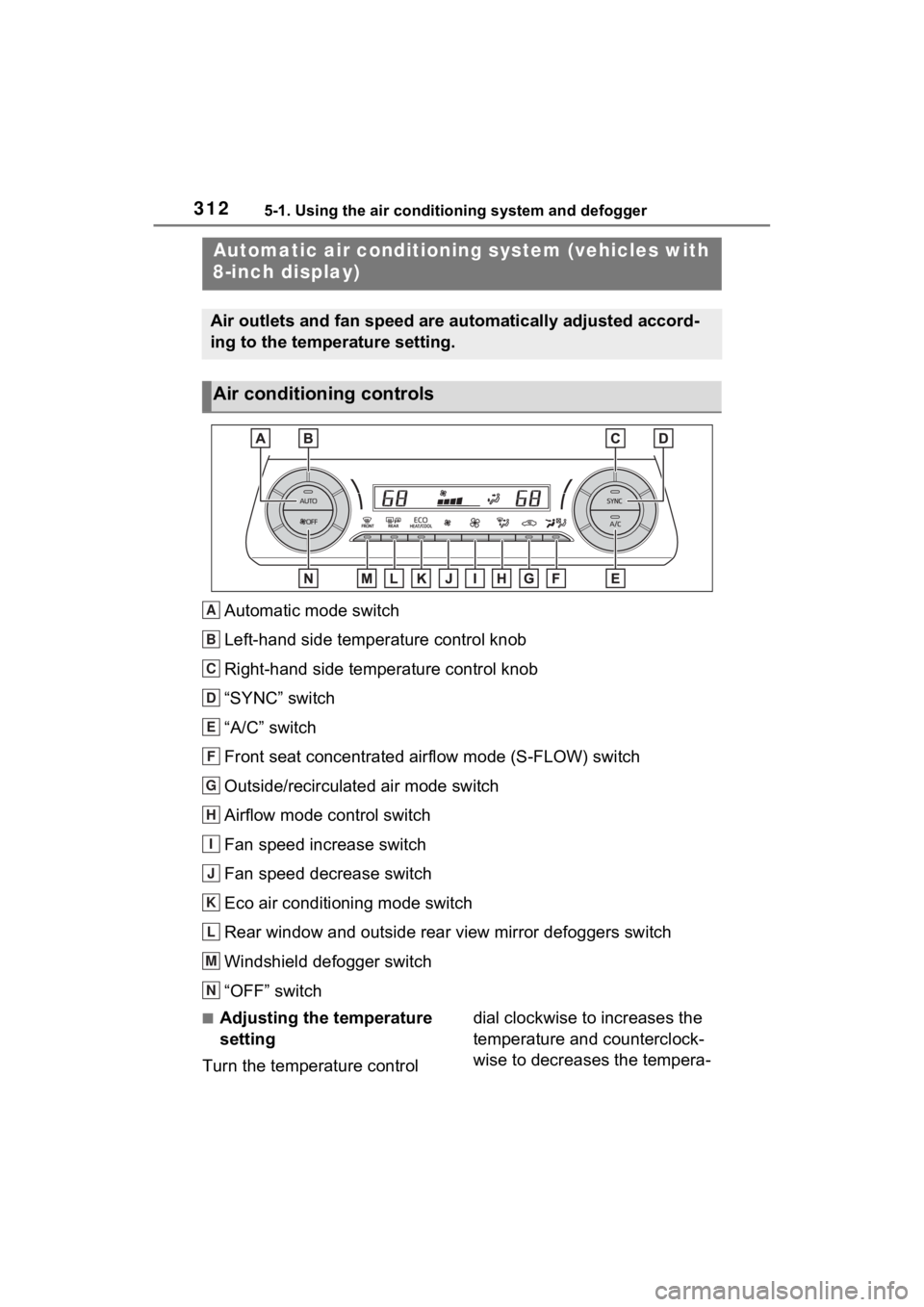
Automatic mode switch
Left-hand side temperature control knob
Right-hand side temperature control knob
“SYNC” switch
“A/C” switch
Front seat concentrated airflow mode (S-FLOW) switch
Outside/recirculated air mode switch
Airflow mode control switch
Fan speed increase switch
Fan speed decrease switch
Eco air conditioning mode switch
Rear window and outside rear view mirror defoggers switch
Windshield defogger switch
“OFF” switch
■Adjusting the temperature
setting
Turn the temperature control dial clockwise to increases the
temperature and counterclock-
wise to decreases the tempera-
Automatic air c
onditioning system (vehicles with
8-inch display)
Air outlets and fan speed are automatically adjusted accord-
ing to the temperature setting.
Air conditioning controls
A
B
C
D
E
F
G
H
I
J
K
L
M
N