2022 TOYOTA TUNDRA HYBRID display
[x] Cancel search: displayPage 122 of 618
1223-2. Opening, closing and locking the doors and tailgate
Owners Manual_USA_M0C031_en
■Changing the setting of tailgate
opening alert
When the tailgate is left open, a
buzzer sounds and a warning mes-
sage is displayed on the multi-infor-
mation display.
Settings can be changed on
screen of the multi-information dis-
play. Select the “ Alert” and
change the settings. ( P.565)
■Customization
Some functions can be customized.
( P.561)
■Before removing the tail-
gate
Turn the tailgate opening alert
off before removing the tailgate.
( P.122)
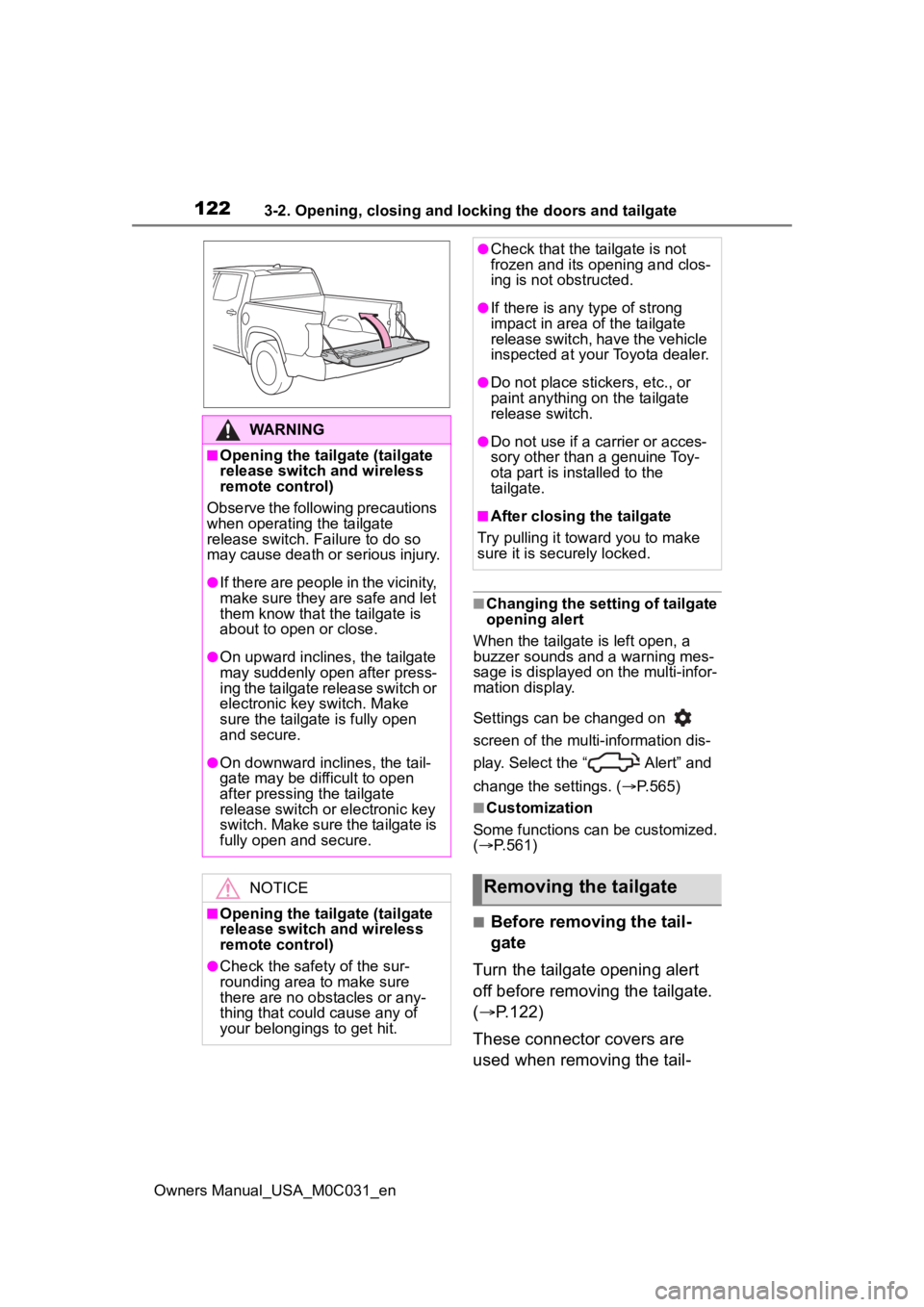
These connector covers are
used when removing the tail-
WARNING
■Opening the tailgate (tailgate
release switch and wireless
remote control)
Observe the following precautions
when operating the tailgate
release switch. Failure to do so
may cause death or serious injury.
●If there are people in the vicinity,
make sure they are safe and let
them know that the tailgate is
about to open or close.
●On upward inclines, the tailgate
may suddenly open after press-
ing the tailgate release switch or
electronic key switch. Make
sure the tailgate is fully open
and secure.
●On downward inclines, the tail-
gate may be difficult to open
after pressing the tailgate
release switch or electronic key
switch. Make sure the tailgate is
fully open and secure.
NOTICE
■Opening the tailgate (tailgate
release switch and wireless
remote control)
●Check the safety of the sur-
rounding area to make sure
there are no obstacles or any-
thing that could cause any of
your belongings to get hit.
●Check that the tailgate is not
frozen and its opening and clos-
ing is not obstructed.
●If there is any type of strong
impact in area of the tailgate
release switch, have the vehicle
inspected at your Toyota dealer.
●Do not place stickers, etc., or
paint anything on the tailgate
release switch.
●Do not use if a carrier or acces-
sory other than a genuine Toy-
ota part is installed to the
tailgate.
■After closing the tailgate
Try pulling it toward you to make
sure it is securely locked.
Removing the tailgate
Page 126 of 618
1263-2. Opening, closing and locking the doors and tailgate
Owners Manual_USA_M0C031_en
*: If equipped
■Automatic stowing function
The step will be automatically
retracted, for safety, under the fol-
lowing condition:
●Vehicle speed is approximately 3
mph (5 km/h) or higher
■If “Power Steps Unable to
Retract” is displayed on the
multi-Information display
The step may not be completely
stowed.
Check that nothing is caught
between the step and the vehicle.
■If “Power Steps System Mal-
function See Owner’s Manual”
is displayed on the multi-infor-
mation display
The system may be malfunctioning.
Have the vehicle inspected by Toy-
ota dealer.
Power bed step*
The power bed step deploys
when opening the tailgate,
operating the wireless
remote control, or by using
the switch inside the vehi-
cle.
The power bed step stows
by closing the tailgate, oper-
ating the switch inside the
vehicle, or by driving above
3 mph (5 km/h).
WARNING
■Cautions regarding the power
bed step
Observe the following precau-
tions. Failure to do so may cause
serious injury.
●Check to make sure that all pas-
sengers and people in the vehi-
cle’s surrounding area do not
have a hand on the step or any
part of their body in a position
where it could be caught
between the step and the vehi-
cle when the pow er bed step is
being operated.
●Confirm that the step has com-
pletely deployed or stowed
before getting in or out of the
vehicle. If someone gets in or
out of the vehicle during power
bed step operation, the step
may stop deploying or stowing.
●Take care when pressing the
power steps switch. The step
will deploy or stow and may hit
other people or objects.
●Always check that the power
steps switch is turned off when
cleaning the step, before jack-
ing up or placing any object
under the vehicle, or if the step
is not operating correctly.
●Do not allow children to operate
the power bed step. Operating
power bed step so that a step
contacts someone can cause
serious injury, and in some
instances, even death.
■Jam protection function
Observe the following precau-
tions. Failure to do so may cause
serious injury.
Do not place any body part
between the power bed step and
vehicle. The jam protection func-
tion may not work depending on
the shape of the object that is
caught.
Page 128 of 618

1283-2. Opening, closing and locking the doors and tailgate
Owners Manual_USA_M0C031_en
■Antenna location
Antennas outside the cabin
Antennas inside the cabin
Antenna inside rear bumper
■Effective range (areas within
which the electronic key is
detected)
When locking or unlocking the
doors
The system can be operated when
the electronic key is within about 2.3
ft. (0.7 m) of an outside door handle.
(Only the doors de tecting the key
can be operated.)
When starting the hybrid system
or changing power switch modes
The system can be operated when
the electronic key i s inside the vehi-
cle.
When opening the tailgate
The system can be operated when
the electronic key is within about 2.3
ft. (0.7 m) of the tailgate release but-
ton.
■Alarms and warning messages
An alarm sounds and warning mes-
sages are displayed on the multi-
information disp lay to protect
against unexpect ed accidents or
theft of the vehicle resulting from
erroneous operation. When a warn-
ing message is displayed, take
appropriate measures based on the
displayed message. ( P.511)
When only an alarm sounds, cir-
cumstances and correction proce-
dures are as follows.
●When an exterior alarm sounds
once for 5 seconds
Smar t key system
The following operations
can be performed simply by
carrying the electronic key
on your person, for example
in your pocket. The driver
should always carry the
electronic key.
Locks and unlocks the
doors ( P.113)
Opens the tailgate
( P.121)
Starts the hybrid system
( P.195)
Page 129 of 618
1293-2. Opening, closing and locking the doors and tailgate
Owners Manual_USA_M0C031_en
3
Before driving
●When an interior alarm sounds
continuously
■If “Smart Key System Malfunc-
tion See Owner’s Manual” is
displayed on the multi-informa-
tion display
The system may be malfunctioning.
Have the vehicle inspected by Toy-
ota dealer immediately.
■If “Key Detected in Vehicle” is
shown on the multi-information
display
An attempt was m ade to lock the
doors using the smart key system
while the electronic key was still
inside the vehicle. Retrieve the elec-
tronic key from the vehicle and lock
the doors again.
■Battery-saving function
The battery-saving function will be
activated in order to prevent the
electronic key battery and the 12-
volt battery from being discharged while the vehicle is not in operation
for a long time.
●In the following situations, the
smart key system
may take some
time to unlock the doors.
• The electronic key has been left in an area of approxi mately 6 ft. (2
m) of the outside of the vehicle for
10 minutes or longer.
• The smart key system has not been used for 5 days or longer.
●If the smart key system has not
been used for 14 days or longer,
the doors cannot be unlocked at
any doors except the driver’s door.
In this case, take hold of the
driver’s door handle, or use the
wireless remote c ontrol or the
mechanical key, to unlock the
doors.
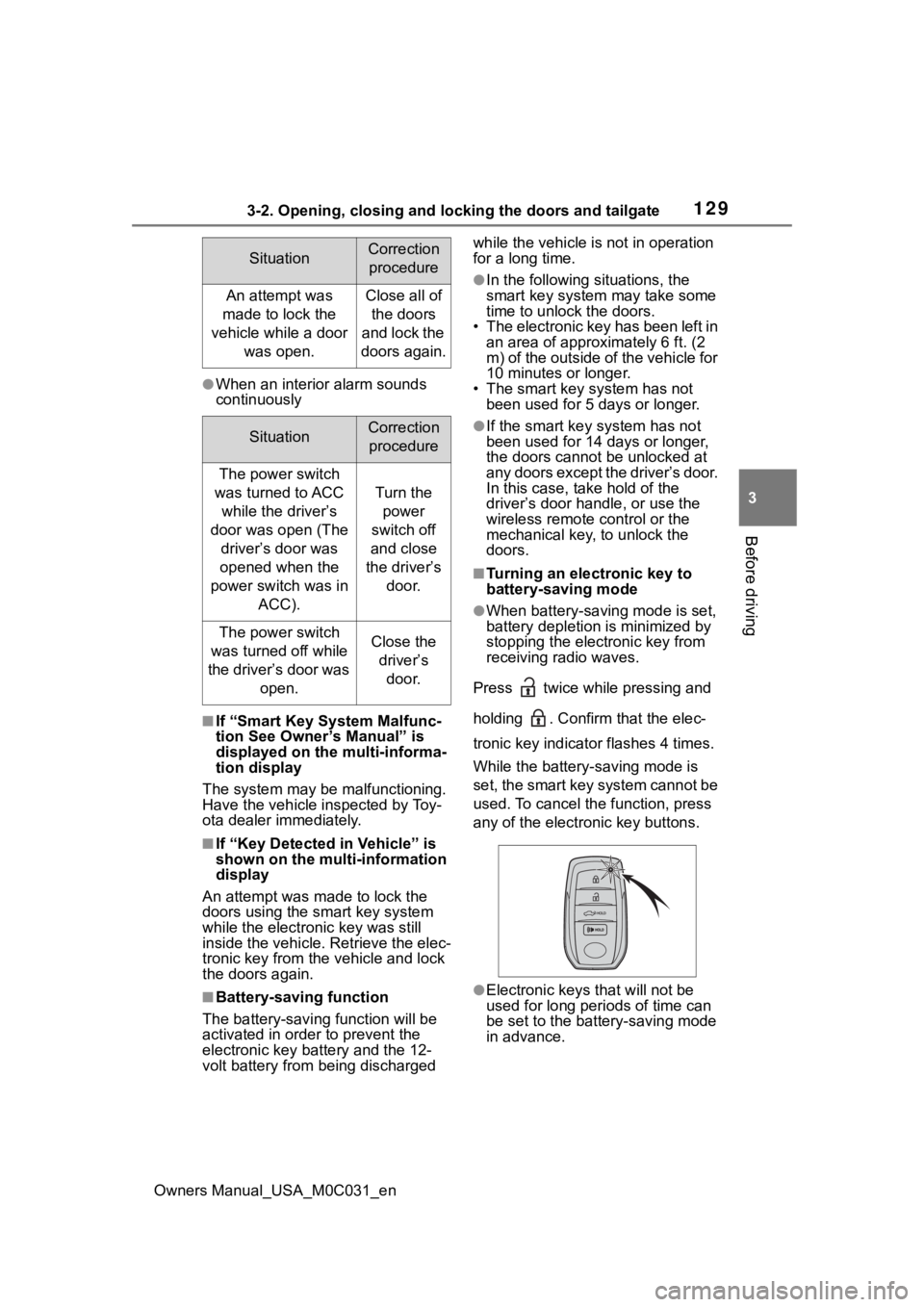
■Turning an electronic key to
battery-saving mode
●When battery-saving mode is set,
battery depletion is minimized by
stopping the electronic key from
receiving radio waves.
Press twice while pressing and
holding . Confirm that the elec-
tronic key indicator flashes 4 times.
While the battery-saving mode is
set, the smart key system cannot be
used. To cancel the function, press
any of the electronic key buttons.
●Electronic keys that will not be
used for long periods of time can
be set to the battery-saving mode
in advance.
SituationCorrection procedure
An attempt was
made to lock the
vehicle while a door was open.Close all of the doors
and lock the
doors again.
SituationCorrection procedure
The power switch
was turned to ACC while the driver’s
door was open (The driver’s door was
opened when the
power switch was in ACC).
Turn the power
switch off
and close
the driver’s door.
The power switch
was turned off while
the driver’s door was open.Close the driver’s door.
Page 130 of 618

1303-2. Opening, closing and locking the doors and tailgate
Owners Manual_USA_M0C031_en
■Conditions affecting operation
The smart key system uses weak
radio waves. In the following situa-
tions, the communication between
the electronic key and the vehicle
may be affected, preventing the
smart key system, wireless remote
control and immobilizer system from
operating properly. (Ways of coping:
P.527)
●When the electronic key battery is
depleted
●Near a TV tower, electric power
plant, gas station , radio station,
large display, airpo rt or other facil-
ity that generates strong radio
waves or electrical noise
●When carrying a portable radio,
cellular phone, cordless phone or
other wireless communication
device
●When the electronic key is in con-
tact with, or is covered by the fol-
lowing metallic objects
• Cards to which al uminum foil is
attached
• Cigarette boxes that have alumi- num foil inside
• Metallic wallets or bags
• Coins
• Hand warmers made of metal
• Media such as CDs and DVDs
●When other wireless keys (that
emit radio waves) are being used
nearby
●When carrying the electronic key
together with the following devices
that emit radio waves
• Another electronic key or a wire- less key that emits radio waves
• Personal computers or personal
digital assistants (PDAs)
• Digital audio players
• Portable game systems
●If window tint with a metallic con-
tent or metallic objects are
attached to the rear window
●When the electronic key is placed
near a battery charger or elec-
tronic devices
●When the vehicle is parked in a
pay parking spot where radio
waves are emitted.
■Note for the entry function
●Even when the electronic key is
within the effective range (detec-
tion areas), the system may not
operate properly in the following
cases:
• The electronic key is too close to the window or outside door han-
dle, near the ground, or in a high
place when the doors are locked
or unlocked.
• The electronic key is near the
ground or in a high place, or too
close to the center of the rear
bumper.
• The electronic key is on the instru- ment panel, or floor, or in the door
pockets or glove box when the
hybrid system is started or power
switch modes are changed.
●Do not leave the electronic key on
top of the instrument panel or near
the door pockets when exiting the
vehicle. Depending on the radio
wave reception conditions, it may
be detected by the antenna out-
side the cabin and the doors will
become lockable from the outside,
possibly trapping the electronic
key inside the vehicle.
●As long as the electronic key is
within the effective range, the
doors may be locked or unlocked
by anyone. However, only the
doors detecting the electronic key
can be used to unlock the vehicle.
●Even if the electro nic key is not
inside the vehicle, it may be possi-
ble to start the hybrid system if the
electronic key is near the window.
●The doors may unlock or lock if a
large amount of water splashes on
the door handle, such as in the
rain or in a car wash, when the
electronic key is within the effec-
tive range. (The doors will auto-
matically be locked after
approximately 60 seconds if the
Page 131 of 618

1313-2. Opening, closing and locking the doors and tailgate
Owners Manual_USA_M0C031_en
3
Before driving
doors are not opened and closed.)
●If the wireless remote control is
used to lock the doors when the
electronic key is near the vehicle,
there is a possib ility that the door
may not be unlocke d by the entry
function. (Use the wireless remote
control to unloc k the doors.)
●Touching the door lock sensor
while wearing gloves may delay or
prevent lock operation.
●When the lock op eration is per-
formed using the lock sensor, rec-
ognition signals will be shown up
to two consecutive times. After
this, no recogniti on signals will be
given.
●If the door handle becomes wet
while the electronic key is within
the effective ran ge, the door may
lock and unlock repeatedly. In this
case, follow the fo llowing correc-
tion procedures to wash the vehi-
cle:
• Place the electronic key in a loca- tion 6 ft. (2 m) or more away from
the vehicle. (Take care to ensure
that the key is not stolen.)
• Set the electronic key to battery-
saving mode to disable the smart
key system. ( P.129)
●If the electronic key is inside the
vehicle and a door handle
becomes wet during a car wash, a
message may be shown on the
multi-informatio n display and a
buzzer will sound outside the vehi-
cle. To turn off the alarm, lock all
the doors.
●The lock sensor may not work
properly if it com es into contact
with ice, snow, mud, etc. Clean
the lock sensor and attempt to
operate it again.
●A sudden approach to the effec-
tive range or door handle may pre-
vent the doors from being
unlocked. In this case, return the
door handle to the original position
and check that the doors unlock
before pulling the door handle again.
●If there is another electronic key in
the detection area, it may take
slightly longer to unlock the doors
after the door handle is gripped.
■When the vehicle is not driven
for extended periods
●To prevent theft of
the vehicle, do
not leave the electronic key within
6 ft. (2 m) of the vehicle.
●The smart key system can be
deactivated in advance.
●Setting the electronic key to bat-
tery-saving mode helps to reduce
key battery depletion. ( P.129)
■To operate the system properly
●Make sure to carry the electronic
key when operating the system.
Do not get the electronic key too
close to the vehicle when operat-
ing the system from the outside of
the vehicle.
Depending on the position and hold-
ing condition of the electronic key,
the key may not be detected cor-
rectly and the system may not oper-
ate properly. (The alarm may go off
accidentally, or the door lock pre-
vention function m ay not operate.)
■If the smart key system does
not operate properly
●Locking and unlocking the doors
and tailgate: P. 5 2 7
●Starting the hybrid system:
P. 5 2 8
■Customization
Some functions can be customized.
( P.561)
■If the smart key system has
been deactivated in a custom-
ized setting
●Locking and unlocking the doors
and opening the tailgate:
Use the wireless remote control or
mechanical key. ( P.113, 121,
527)
Page 146 of 618
1463-4. Adjusting the steering wheel and mirrors
Owners Manual_USA_M0C031_en
*: If equipped
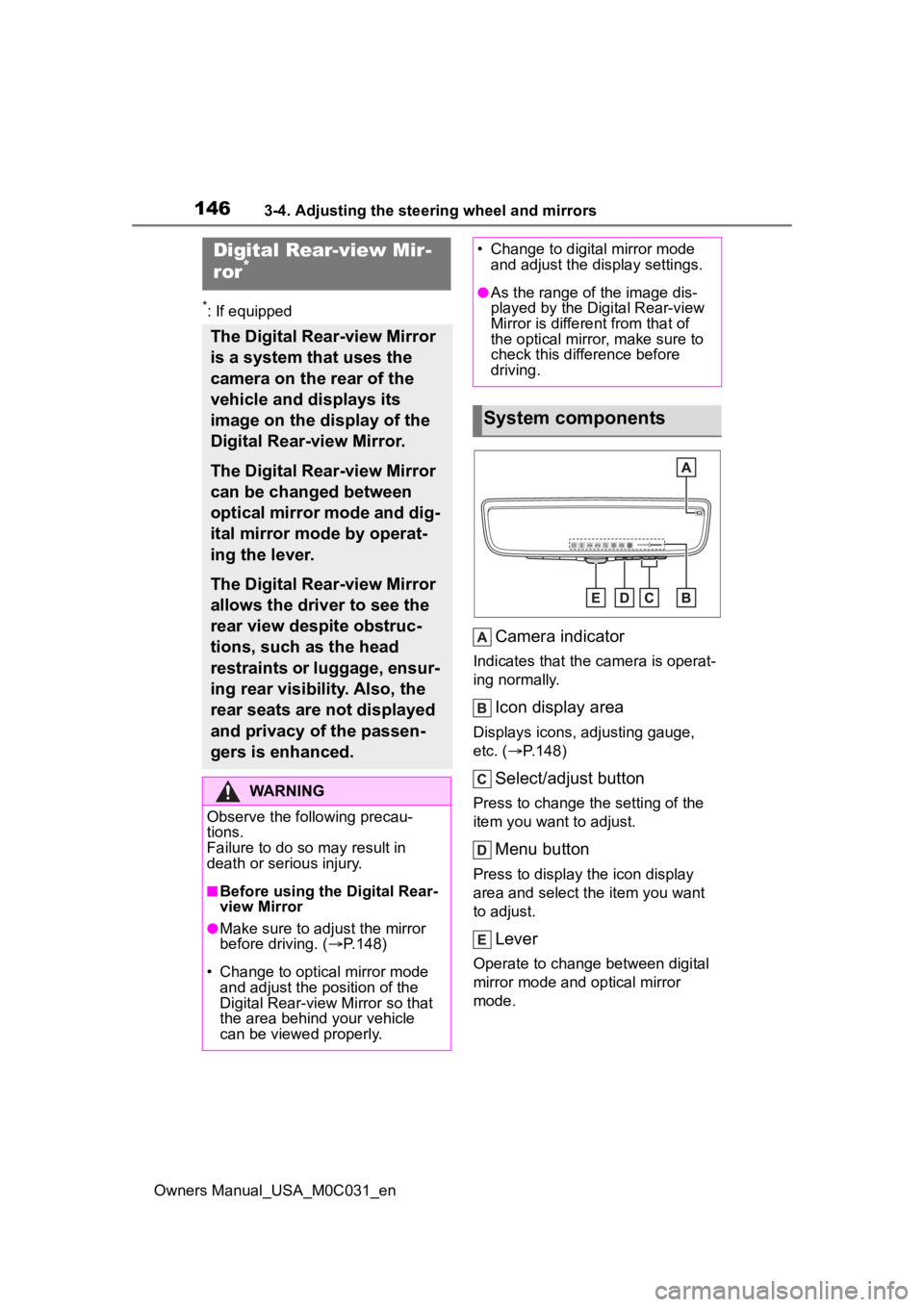
Camera indicator
Indicates that the camera is operat-
ing normally.
Icon display area
Displays icons, adjusting gauge,
etc. (P.148)
Select/adjust button
Press to change the setting of the
item you want to adjust.
Menu button
Press to display the icon display
area and select the item you want
to adjust.
Lever
Operate to change between digital
mirror mode and optical mirror
mode.
Digital Rear-view Mir-
ror*
The Digital Rear-view Mirror
is a system that uses the
camera on the rear of the
vehicle and displays its
image on the display of the
Digital Rear-view Mirror.
The Digital Rear-view Mirror
can be changed between
optical mirror mode and dig-
ital mirror mode by operat-
ing the lever.
The Digital Rear-view Mirror
allows the driver to see the
rear view despite obstruc-
tions, such as the head
restraints or luggage, ensur-
ing rear visibility. Also, the
rear seats are not displayed
and privacy of the passen-
gers is enhanced.
WARNING
Observe the following precau-
tions.
Failure to do so m ay result in
death or serious injury.
■Before using the Digital Rear-
view Mirror
●Make sure to adjust the mirror
before driving. ( P.148)
• Change to optical mirror mode and adjust the position of the
Digital Rear-view Mirror so that
the area behind your vehicle
can be viewed properly.
• Change to digital mirror mode and adjust the display settings.
●As the range of the image dis-
played by the Digital Rear-view
Mirror is different from that of
the optical mirror, make sure to
check this difference before
driving.
System components
Page 147 of 618
1473-4. Adjusting the steering wheel and mirrors
Owners Manual_USA_M0C031_en
3
Before driving
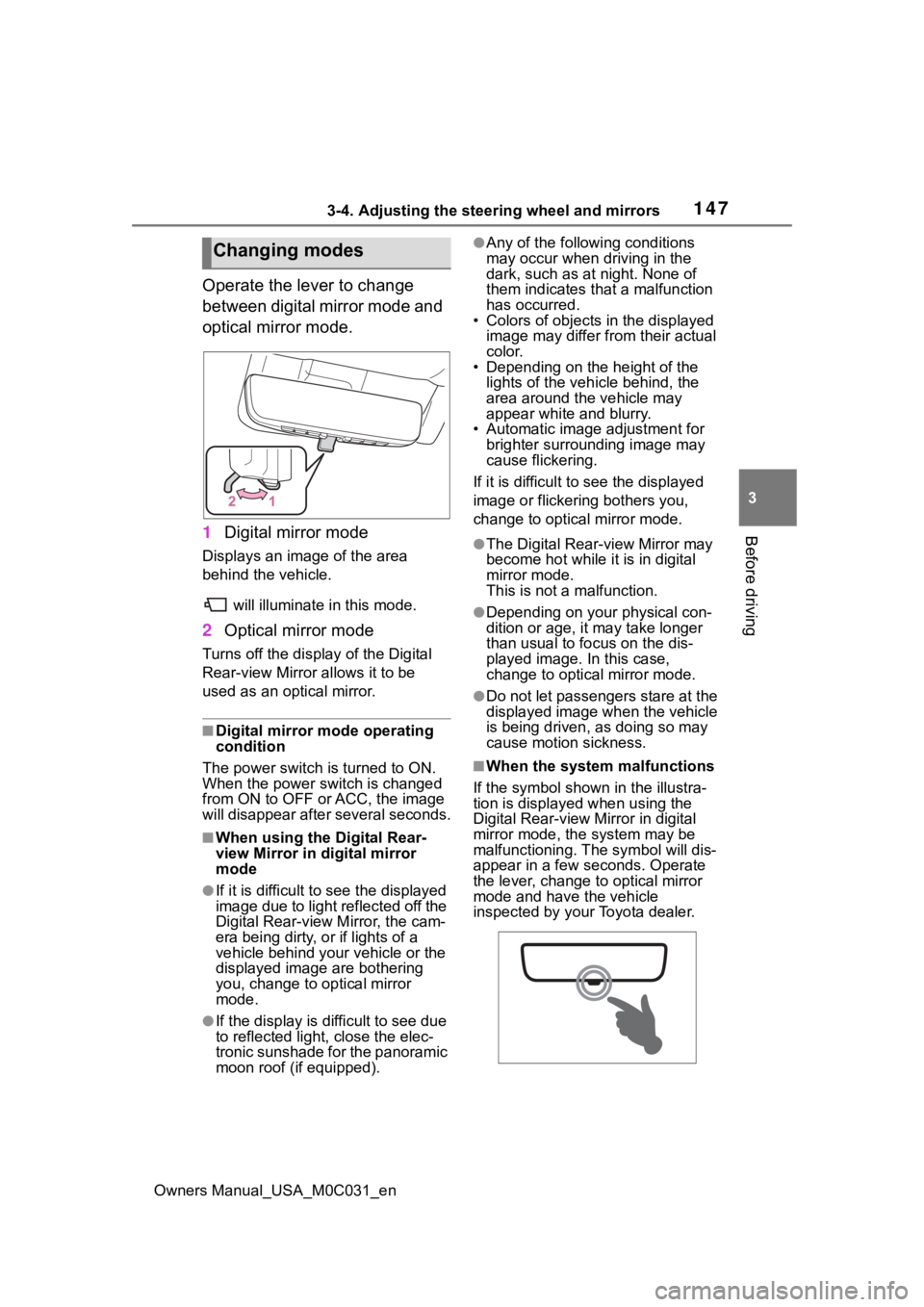
Operate the lever to change
between digital mirror mode and
optical mirror mode.
1 Digital mirror mode
Displays an image of the area
behind the vehicle.
will illuminate in this mode.
2Optical mirror mode
Turns off the display of the Digital
Rear-view Mirror allows it to be
used as an optical mirror.
■Digital mirror mode operating
condition
The power switch is turned to ON.
When the power switch is changed
from ON to OFF or ACC, the image
will disappear afte r several seconds.
■When using the Digital Rear-
view Mirror in digital mirror
mode
●If it is difficult to see the displayed
image due to light reflected off the
Digital Rear-view M irror, the cam-
era being dirty, or if lights of a
vehicle behind your vehicle or the
displayed image are bothering
you, change to optical mirror
mode.
●If the display is difficult to see due
to reflected light, close the elec-
tronic sunshade for the panoramic
moon roof (if equipped).
●Any of the following conditions
may occur when driving in the
dark, such as at night. None of
them indicates that a malfunction
has occurred.
• Colors of objects in the displayed
image may differ from their actual
color.
• Depending on the height of the
lights of the vehicle behind, the
area around the vehicle may
appear white and blurry.
• Automatic image adjustment for brighter surrounding image may
cause flickering.
If it is difficult to see the displayed
image or flickering bothers you,
change to optical mirror mode.
●The Digital Rear-view Mirror may
become hot while it is in digital
mirror mode.
This is not a malfunction.
●Depending on your physical con-
dition or age, it may take longer
than usual to fo cus on the dis-
played image. In this case,
change to optical mirror mode.
●Do not let passengers stare at the
displayed image when the vehicle
is being driven, as doing so may
cause motion sickness.
■When the system malfunctions
If the symbol shown in the illustra-
tion is displayed when using the
Digital Rear-view Mirror in digital
mirror mode, the system may be
malfunctioning. The symbol will dis-
appear in a few seconds. Operate
the lever, change to optical mirror
mode and have the vehicle
inspected by your Toyota dealer.
Changing modes