Page 492 of 592
4927-2. Steps to take in an emergency
SEQUOIA_OM_USA_OM0C047U
■Warning buzzer
P. 477
Once
After the engine switch has
been turned off with the shift
lever in a position other than
P, the shift lever has been
shifted to P.
Turn the engine switch
off.
Once
During a engine starting pro-
cedure in the event that the
electronic key was not func-
tioning properly ( P. 509), the
engine switch was touched
with the electronic key.
Press the engine switch
within 10 seconds of the
buzzer sounding.
Interior
buzzerExterior buzzerWarning messageDetails/Actions
Turn Power OFF
(Flashes)
Engine Start:
Press Brake Pedal,
Touch Engine Switch
with Key
(Flashes)
Page 509 of 592

5097-2. Steps to take in an emergency
SEQUOIA_OM_USA_OM0C047U
7
When trouble arises
If the electronic key does not operate
properly
Use the mechanical key (P. 108)
in order to perform the following
operations:
Locks all the doors
Unlocks all the doors
Turning the key rearward unlocks
the driver’s door. Turning the key
once again unlocks the other
doors.
Ensure that the shift lever is in P and depress the brake pedal.
Touch the Toyota emblem side
of the electronic key to the
engine switch.
If any of the doors is opened or
closed while the key is being
touched to the switch, an alarm will
sound to indicate that the start
function cannot detect the key.
Press the engine switch.
In the event that the engine still cannot be started, contact your Toyota
dealer.
If communication between the electronic key and vehicle is
interrupted ( P. 131) or the electronic key cannot be used
because the battery is depleted, the smart key system and wire-
less remote control cannot be used. In such cases, the doors
can be opened and the engine c an be started by following the
procedure below.
Locking and unlocking the doors
Starting the engine
1
2
3
Page 510 of 592
5107-2. Steps to take in an emergency
SEQUOIA_OM_USA_OM0C047U
■Stopping the engine
Shift the shift lever to P and press the engine switch as you normally do when
stopping the engine.
■ Replacing the key battery
As the above procedure is a temporary measure, it is recommende d that the
electronic key battery be replaced immediately when the battery is depleted.
( P. 448)
■ Changing engine switch modes
Within 10 seconds of the buzzer sounding, release the brake ped al and press
the engine switch.
The engine does not start and modes will be changed each time t he switch is
pressed. ( P. 215)
Page 511 of 592
5117-2. Steps to take in an emergency
SEQUOIA_OM_USA_OM0C047U
7
When trouble arises
If the vehicle batter y is discharged
If you have a set of jumper (or booster) cables and a second ve hicle
with a 12-volt battery, you can jump start your vehicle by foll owing the
steps below.
Confirm that the key is being
carried.
When connecting the jumper (or
booster) cables, depending on the
situation, the alarm may activate
and doors locked. ( P. 86)
Open the hood ( P. 416)
The following procedures may be used to start the engine if the
vehicle’s battery is discharged.
You can also call your Toyota de aler or a qualified repair shop.
1
2
Page 513 of 592

5137-2. Steps to take in an emergency
7
When trouble arises
SEQUOIA_OM_USA_OM0C047U
■Starting the engine when t he battery is discharged
The engine cannot be started by push-starting.
■ To prevent battery discharge
●Turn off the headlights and the audio system while the engine is off.
● Turn off any unnecessary electrical components when the vehicle is running
at a low speed for an extended period, such as in heavy traffic .
■ Charging the battery
The electricity stored in the battery will discharge gradually even when the
vehicle is not in use, due to natural discharge and the draining effects of cer-
tain electrical appliances. If the vehicle is left for a long t ime, the battery may
discharge, and the engine may be unable to start. (The battery recharges
automatically during driving.)
■ When recharging or replacing the battery
●In some cases, it may not be possible to unlock the doors using the smart
key system when the battery is discharged. Use the wireless rem ote control
or the mechanical key to lock or unlock the doors.
● The engine may not start on the first attempt after the battery has recharged
but will start normally after the second attempt. This is not a malfunction.
● The engine switch mode is memorized by the vehicle. When the ba ttery is
reconnected, the system will return to the mode it was in befor e the battery
was discharged. Before disconnecting the battery, turn the engine switch off.
If you are unsure what mode the engine switch was in before the battery dis-
charged, be especially careful when reconnecting the battery.
Page 552 of 592
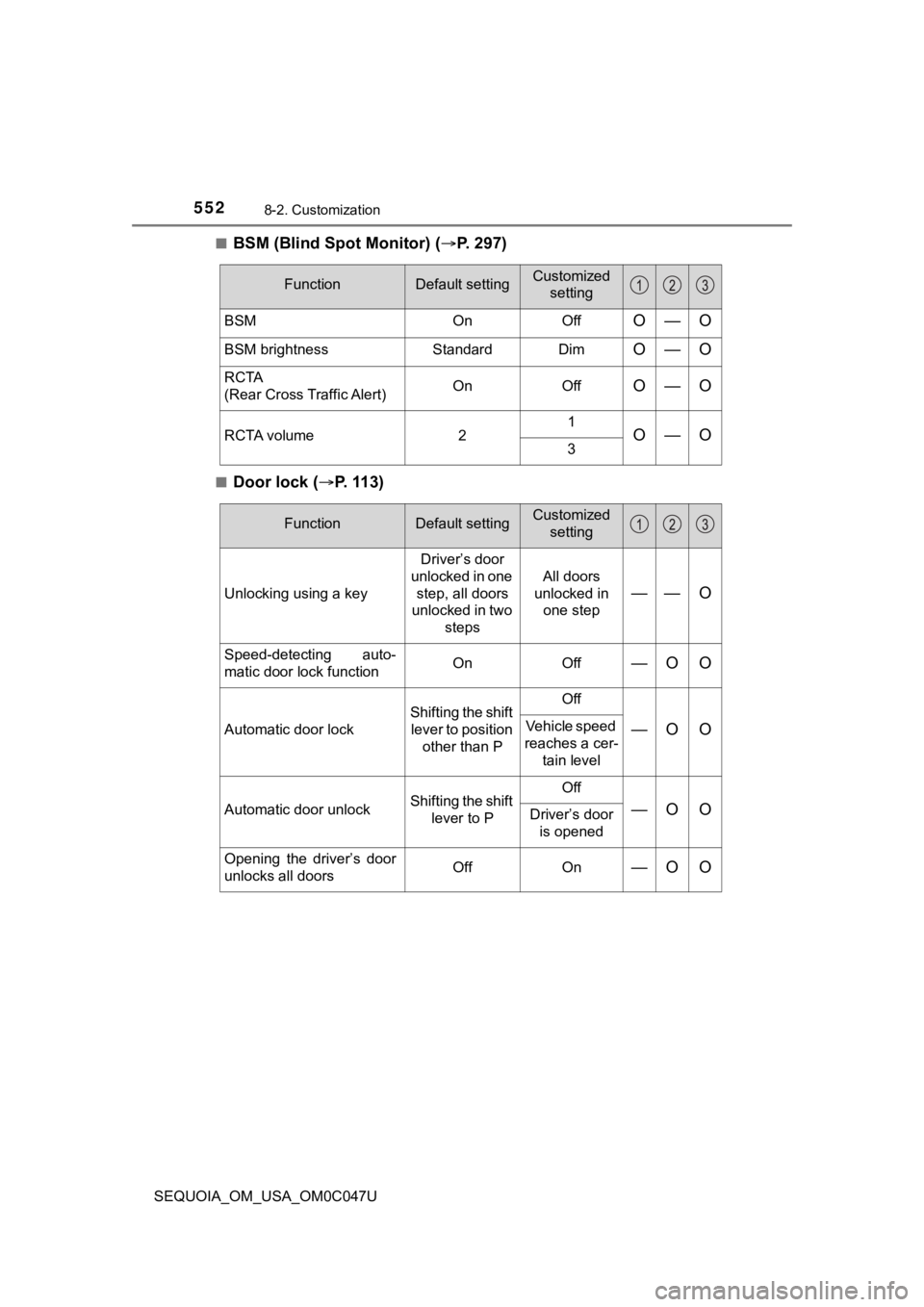
5528-2. Customization
SEQUOIA_OM_USA_OM0C047U■
BSM (Blind Spot Monitor) (
P. 2 9 7 )
■Door lock ( P. 113)
FunctionDefault settingCustomized
setting
BSM OnOffO—O
BSM brightness Standard DimO—O
RCTA
(Rear Cross Traffic Alert) On OffO—O
RCTA volume
21O—O3
FunctionDefault settingCustomized
setting
Unlocking using a key Driver’s door
unlocked in one step, all doors
unlocked in two
steps All doors
unlocked in one step—— O
Speed-detecting auto-
matic door lock function On Off—O O
Automatic door lockShifting the shift
lever to position other than P Off—O OVehicle speed
reaches a cer- tain level
Automatic door unlock Shifting the shift
lever to P Off
—O ODriver’s door
is opened
Opening the driver’s door
unlocks all doors Off On
—O O
Page 553 of 592
5538-2. Customization
8
Vehicle specifications
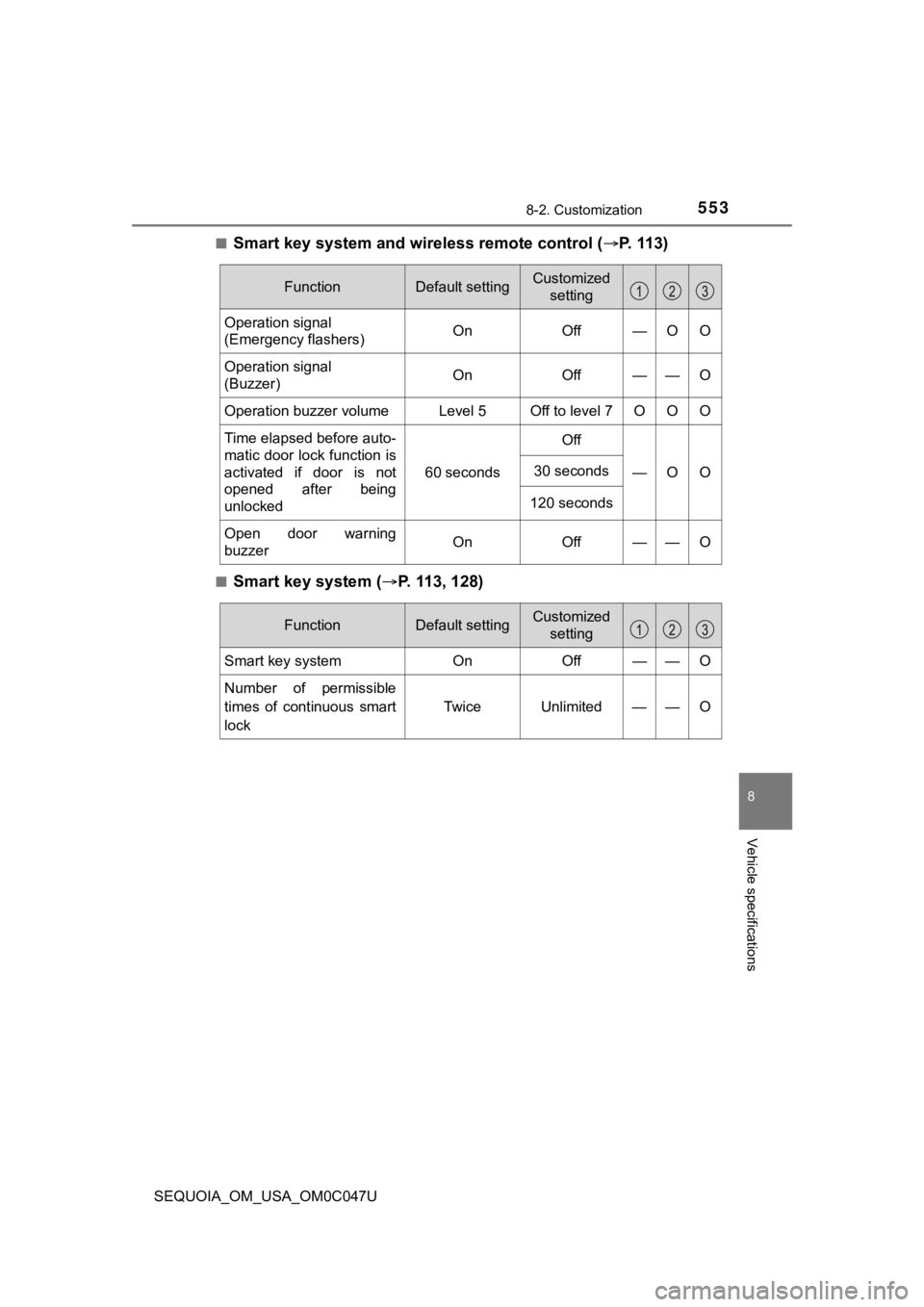
SEQUOIA_OM_USA_OM0C047U■
Smart key system and wireless remote control (
P. 113)
■Smart key system ( P. 113, 128)
FunctionDefault settingCustomized
setting
Operation signal
(Emergency flashers) On Off — O O
Operation signal
(Buzzer) On Off — — O
Operation buzzer volume Level 5 Off to level 7 O O O
Time elapsed before auto-
matic door lock function is
activated if door is not
opened after being
unlocked 60 seconds
Off
—O O
30 seconds
120 seconds
Open door warning
buzzerOnOff — —O
FunctionDefault settingCustomized setting
Smart key systemOnOff——O
Number of permissible
times of continuous smart
lock Twice Unlimited — — O
Page 555 of 592
5558-2. Customization
8
Vehicle specifications
SEQUOIA_OM_USA_OM0C047U■
Power back door (
P. 118)
■Power windows ( P. 165)
■Power back window ( P. 1 6 8 )
■Rear window wiper and washer ( P. 241)
FunctionDefault settingCustomized
setting
Switch operation Push and holdOne short
push—— O
Wireless remote control
linked operation On Off—— O
Operation signal volume Off
On—— O
Operation when door
locksPossible Impossible—— O
Time elapsed before back
door closing function is
activated when pushing
switch in the luggage
compartment1.5 seconds
0 seconds
—— O1 seconds
2 seconds
FunctionDefault settingCustomized
setting
Door key linked operation Open and close Open only—— OClose only
Off
FunctionDefault settingCustomizedsetting
Linked back door key
operation Open and closeOpen only—— OClose only
Sensitivity of jam protec-
tion function Level 1 Level 2 to 4
—— O
FunctionDefault settingCustomized
setting
Washer linkage wiper con-
trol On Off—— O
Drip prevention function On
Off—— O