Page 412 of 748

4125-5. Other settings
2Adjust the clock manually.
Select “+” to set the time for-
ward one hour and “-” to set
the time back one hour.
Select “+” to set the time for-
ward one minute and “-” to
set the time back one minute.
Select to round to the nearest
hour.
e.g.
1:00 to 1:29 1:00
1:30 to 1:59 2:00
*: This function is not made avail-
able in some countries or areas.
1 Display the general settings
screen. ( P.410)
2 Select “Projection Settings”.
3 Select the desired items to
be set. Select to turn Apple CarPlay
connection establishment
on/off.
Select to turn Android Auto
connection establishment
on/off.
●When the settings are changed
with a device connected to the
system via USB, disconnect the
device and connect it again to
enable the settings.
The driver settings feature will
allow the system to link some
preferences (such as audio pre-
sets, screen theme, language,
etc.) to a paired Bluetooth
®
phone.
1 Display the general settings
screen. ( P.410)
2 Select “Driver Setting”.
3 Select “Enable This Feature”.
1 Select “Manually Select
Linked Settings”.
Projection settings
*
A
B
C
'ULYHU�VHWWLQJV
0DQXDOO\�VHOHFW�OLQNHG�VHW�
WLQJV
A
B
Page 416 of 748
4165-6. Using the audio/visual system
5-6.Using the audio/visual system
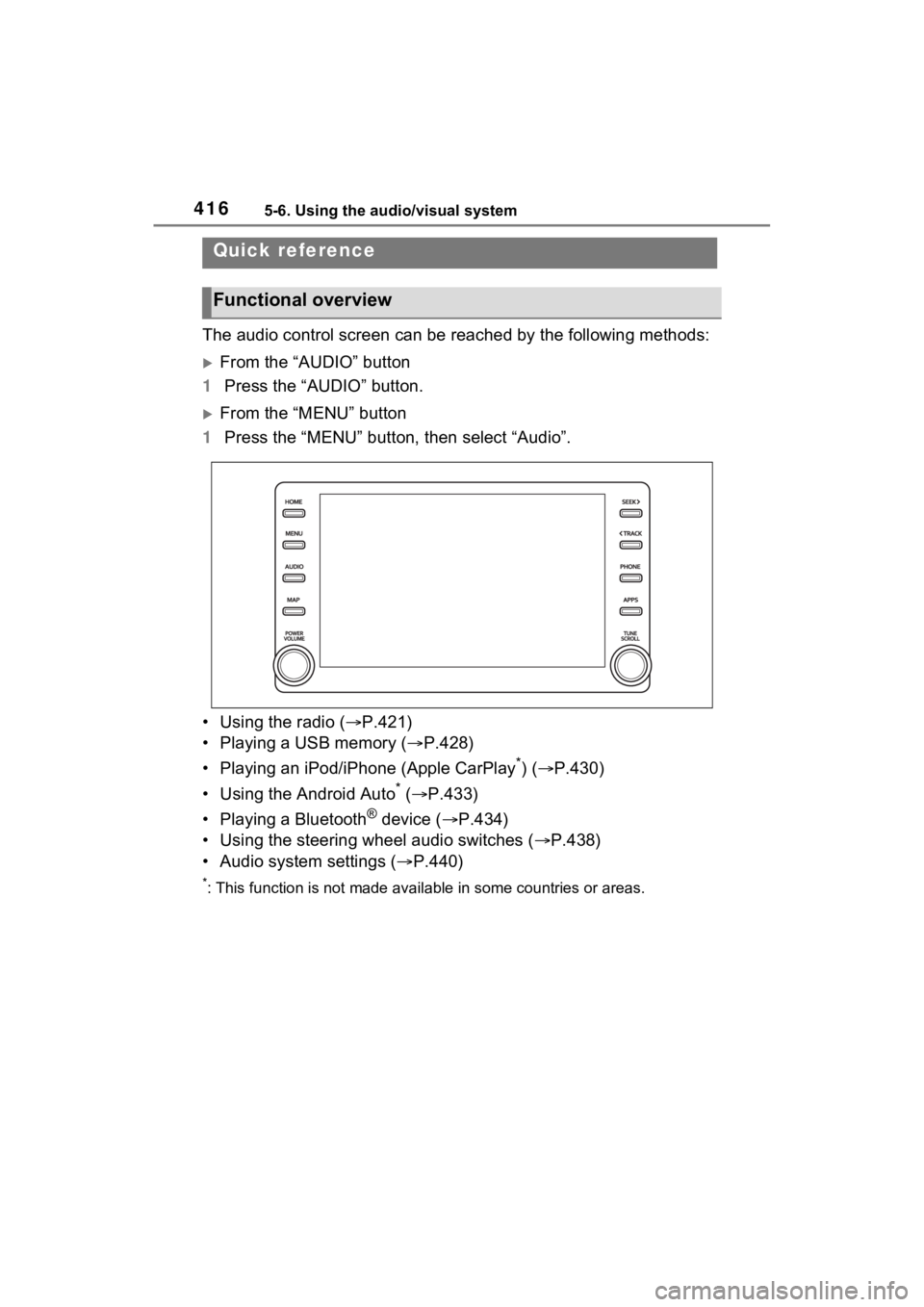
The audio control screen can be reached by the following methods:
From the “AUDIO” button
1 Press the “AUDIO” button.
From the “MENU” button
1 Press the “MENU” button, then select “Audio”.
• Using the radio ( P.421)
• Playing a USB memory ( P.428)
• Playing an iPod/iPhone (Apple CarPlay
*) ( P.430)
• Using the Android Auto
* ( P.433)
• Playing a Bluetooth
® device ( P.434)
• Using the steering wheel audio switches ( P.438)
• Audio system settings ( P.440)
*: This function is not made availa ble in some countries or areas.
Quick reference
Functional overview
Page 417 of 748

4175-6. Using the audio/visual system
5
Audio
“POWER VOLUME” knob:
Press to turn the audio/visual
system on and off. The system
turns on in the last mode used.
Turn this knob to adjust the vol-
ume.1
Press the “AUDIO” button.
2 Select “Source” or press
“AUDIO” button again.
3 Select the desired source.
●Dimmed screen buttons cannot be
operated.
●When there are tw o pages, select
or to change the page.
●When an Apple CarPlay/Android
Auto connection is established,
some system functions, such as
the following, will be replaced by
similar Apple CarPlay/Android
Auto function or will become
unavailable:
• iPod (Audio Playback)
• USB audio/USB video
• Bluetooth
® audio
• Toyota Apps*
*
: This function is not made avail- able in some countries or areas.
Some basics
This section describes
some of the basic features
of the audio/visual system.
Some information may not
pertain to your system.
Your audio/visual system
works when the engine
switch is in ACC or ON.
NOTICE
●To prevent the battery from
being discharged, do not leave
the audio/visual system on lon-
ger than necessary when the
engine is not running.
Turning the system on
and off
Selecting an audio source
Page 418 of 748

4185-6. Using the audio/visual system
1Display the audio source
selection screen. ( P.417)
2 Select “Reorder”.
3 Select the desired audio
source then or to reor-
der.
4 Select “OK”.
1 Connect a device.
Turn on the power of the
device if it is not turned on.
●If a USB hub is plugged-in, two
devices can be connected at a
time.
●Even if a USB hub is used to con-
nect more than two USB devices,
only the first two connected
devices will be recognized.
●If a USB hub that has more than
two ports is connected to the USB
port, devices connected to the
USB hub may not charge or be
inoperable, as the supply of cur-
rent may be insufficient.
●When an Apple CarPlay/Android
Auto connection is established,
the other USB port can be used
only for device battery charger.
1 Display the audio control
screen. ( P.417)
2 Select “Sound”.
3 Select the desired item to be
set.
Select to set the tre-
ble/mid/bass. ( P.418)
Select to set the fader/bal-
ance. ( P.419)
Select to set the automatic
sound leveliser. ( P.419)
■Treble/Mid/Bass
How good an audio program
sounds is largely determined by
the mix of the treble, mid and
bass levels. In fact, different
kinds of music and vocal pro-
grams usually sound better with
different mixes of treble, mid
and bass.
1 Select “Treble/Mid/Bass”.
Reordering the audio
source
USB port
Sound settings
A
B
C
Page 419 of 748
4195-6. Using the audio/visual system
5
Audio
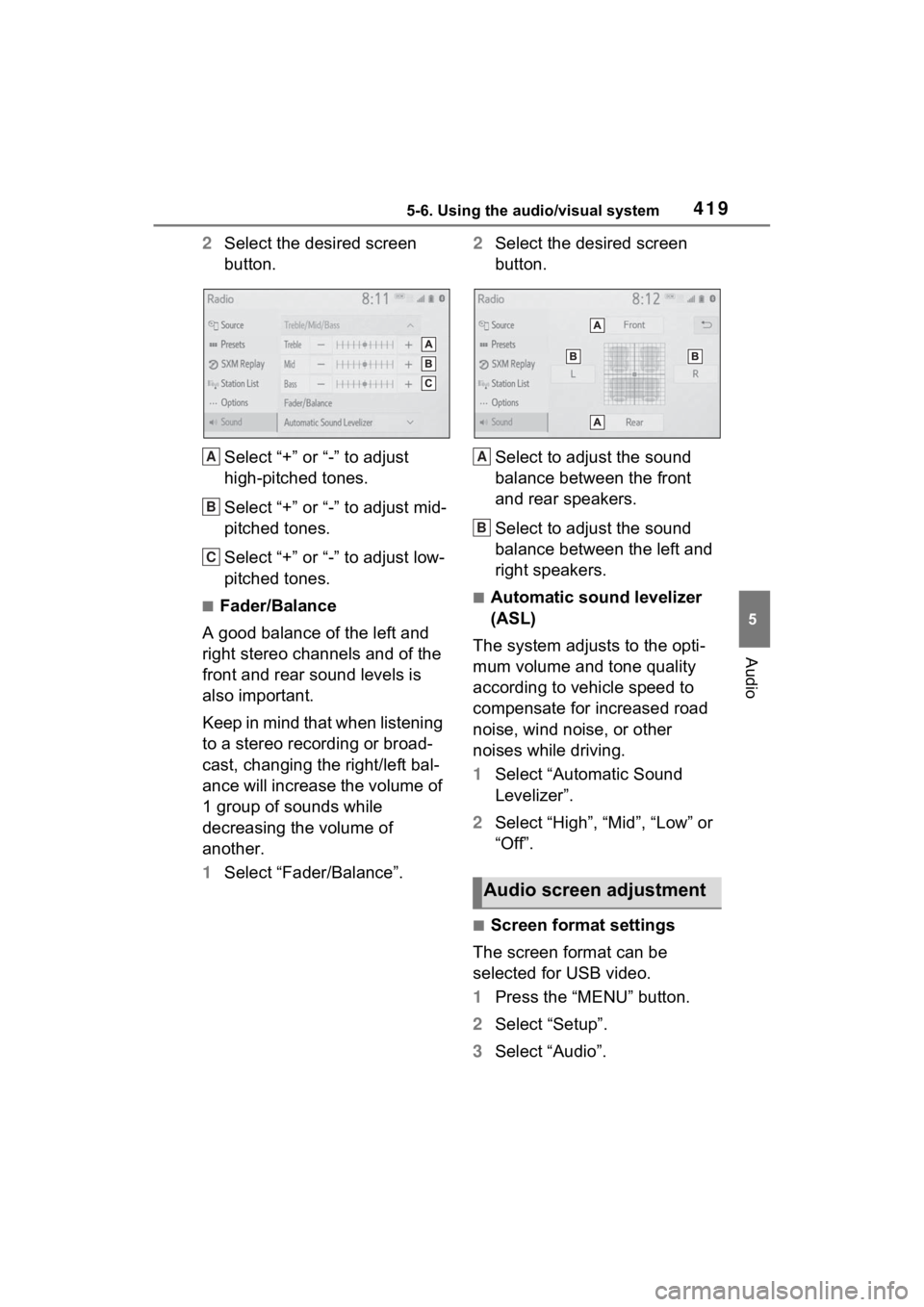
2Select the desired screen
button.
Select “+” or “-” to adjust
high-pitched tones.
Select “+” or “-” to adjust mid-
pitched tones.
Select “+” or “-” to adjust low-
pitched tones.
■Fader/Balance
A good balance of the left and
right stereo channels and of the
front and rear sound levels is
also important.
Keep in mind that when listening
to a stereo recording or broad-
cast, changing the right/left bal-
ance will increase the volume of
1 group of sounds while
decreasing the volume of
another.
1 Select “Fader/Balance”. 2
Select the desired screen
button.
Select to adjust the sound
balance between the front
and rear speakers.
Select to adjust the sound
balance between the left and
right speakers.■Automatic sound levelizer
(ASL)
The system adjusts to the opti-
mum volume and tone quality
according to vehicle speed to
compensate for increased road
noise, wind noise, or other
noises while driving.
1 Select “Automatic Sound
Levelizer”.
2 Select “High”, “Mid”, “Low” or
“Off”.
■Screen format settings
The screen format can be
selected for USB video.
1 Press the “MENU” button.
2 Select “Setup”.
3 Select “Audio”.
A
B
C
Audio screen adjustment
A
B
Page 428 of 748

4285-8. Media operation
5-8.Media operation
The USB memory operation
screen can be reached by the
following methods: P.417
Connecting a USB memory
( P.418)
When an Apple Car-
Play/Android Auto connec-
tion is established, this
function will be unavailable.
USB audio
Select to display the audio
source selection screen.
Select to return to the top
screen.
Select to display a song list
screen.
Select to display the play
mode selection screen.
Select to display the sound
setting screen. ( P.418)
Select to set repeat playback.
( P.429) Select to change the
file/track.
Select and hold to fast
rewind.
Select to play/pause.
Select to change the
file/track.
Select and hold to fast for-
ward.
Select to set random play-
back. (
P.429)
Select to change the
folder/album.
Displays cover art
Select to change the artist.
USB video
1 Select “Browse”.
2 Select “Videos”.
3 Select the desired folder and
file.
Select to display the audio
source selection screen.
Select to return to the top
screen.
Select to display a song list
screen.
Select to display the play
USB memory
Overview
Control screen
A
B
C
D
E
F
G
H
I
J
K
L
M
A
B
C
D
Page 429 of 748

4295-8. Media operation
5
Audio
mode selection screen.
Select to display the sound
setting screen. (P.418)
Select to change the file.
Select and hold to fast
rewind.
Select to play/pause.
Select to change the file.
Select and hold to fast for-
ward.
Select to display a full screen
image.
Select to change the folder.
Press to change the
file/track.
Press and hold to fast for-
ward/rewind.
Turn to change the file/track.
Turn to move up/down the
list. Also, the knob can be
used to enter selections on
the list screens by pressing it.
●While the vehicle is being driven,
this function can only output
sound.
●If tag information exists, the
file/folder names will be changed
to track/album names.
The file/track or folder/album
currently being listened to can
be repeated.
1 Select .
●Each time is selected, the
mode changes as follows:
When random playback is off
• file/track repeat folder/album
repeat off
When random playback is on
• file/track repeat off
Files/tracks or folders/albums
can be automatically and ran-
domly selected.
1 Select .
●Each time is selected, the
mode changes as follows:
• random (1 folder/album random) folder/album random (all
folder/album random) off
Control panel
E
F
G
H
I
J
A
B
5HSHDWLQJ
5DQGRP�RUGHU
:$51,1*
●Do not operate the player’s con-
trols or connect the USB mem-
ory while driving.
NOTICE
●Do not leave your portable
player in the car. In particular,
high temperatures inside the
vehicle may damage the porta-
ble player.
Page 432 of 748

4325-8. Media operation
battery.
●Depending on the iPod/iPhone,
the video sound may not be able
to be heard.
●Depending on the iPod/iPhone
and the songs in the iPod/iPhone,
a cover art may be displayed. This
function can be changed to “On”
or “Off”. (P.440) It may take time
to display the co ver art, and the
iPod/iPhone may not be operated
while the cover ar t display is in
process.
●When an iPod/iPhone is con-
nected and the audio source is
changed to iPod/iPhone mode,
the iPod/iPhone will resume play-
ing from the same point it was last
used.
●Depending on the iPod/iPhone
that is connected to the system,
certain functions may not be avail-
able.
●If an iPhone is connected via
Bluetooth® and USB at the same
time, system operation may
become unstable. For known
phone compatibility information,
refer to http://www.toyota.com/
audio-multimedia.
●Tracks selected by operating a
connected iPod/iPhone may not
be recognized or displayed prop-
erly.
●The system may not function
properly if a conversion adapter is
used to connect a device.
The track currently being lis-
tened to can be repeated.
1 Select .
●Each time is selected, the
mode changes as follows:
When shuffle is off (iPhone 5 or
later)
• track repeat album repeat off
When shuffle is off (iPhone 4s or
earlier)
• track repeat off
When shuffle is on
• track repeat off
Tracks or albums can be auto-
matically and randomly
selected.
1 Select .
●Each time is selected, the
mode changes as follows:
• shuffle (1 album shuffle) album
shuffle (all album shuffle) off
Repeating
Random order
WARNING
●Do not operate the player’s con-
trols or connect the iPod/iPhone
while driving.
NOTICE
●Do not leave your portable
player in the car. In particular,
high temperatures inside the
vehicle may damage the porta-
ble player.
●Do not push down on or apply
unnecessary pressure to the
portable player while it is con-
nected as this may damage the
portable player or its terminal.
●Do not insert foreign objects into
the port as this may damage the
portable player or its terminal.