Page 311 of 748
3114-5. Using the driving support systems
4
Driving
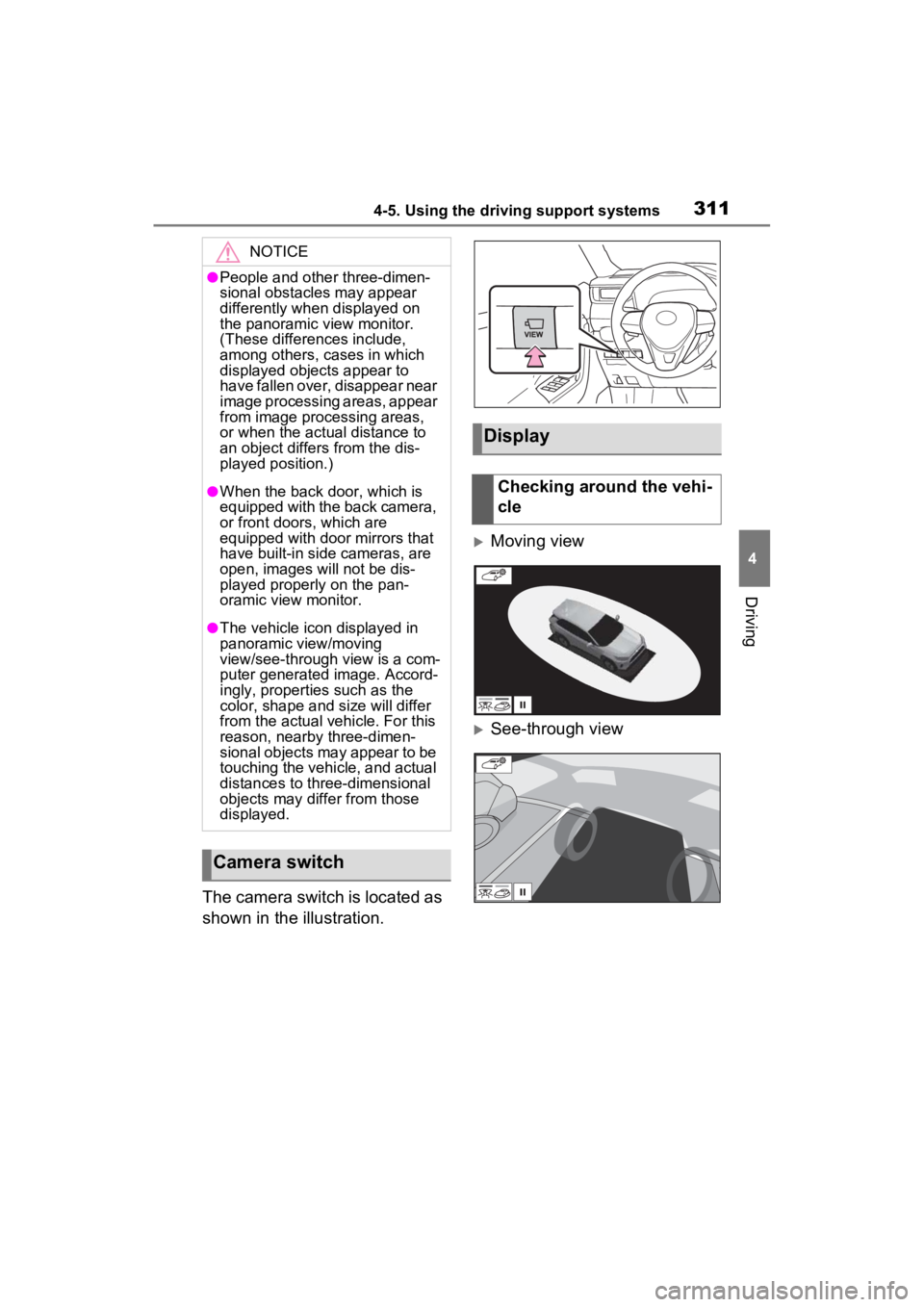
The camera switch is located as
shown in the illustration.
Moving view
See-through view
NOTICE
●People and other three-dimen-
sional obstacles may appear
differently when displayed on
the panoramic view monitor.
(These differences include,
among others, cases in which
displayed objects appear to
have fallen over, disappear near
image processing areas, appear
from image processing areas,
or when the actual distance to
an object differs from the dis-
played position.)
●When the back door, which is
equipped with the back camera,
or front doors, which are
equipped with door mirrors that
have built-in side cameras, are
open, images will not be dis-
played properly on the pan-
oramic view monitor.
●The vehicle icon displayed in
panoramic view/moving
view/see-through view is a com-
puter generated image. Accord-
ingly, properties such as the
color, shape and size will differ
from the actual veh icle. For this
reason, nearby three-dimen-
sional objects may appear to be
touching the vehicle, and actual
distances to three-dimensional
objects may diffe r from those
displayed.
Camera switch
Display
Checking around the vehi-
cle
Page 312 of 748
3124-5. Using the driving support systems
Wide front view & panoramic
view
Rear view & panoramic view
Wide front view & side views
Side views
Rear view & side views
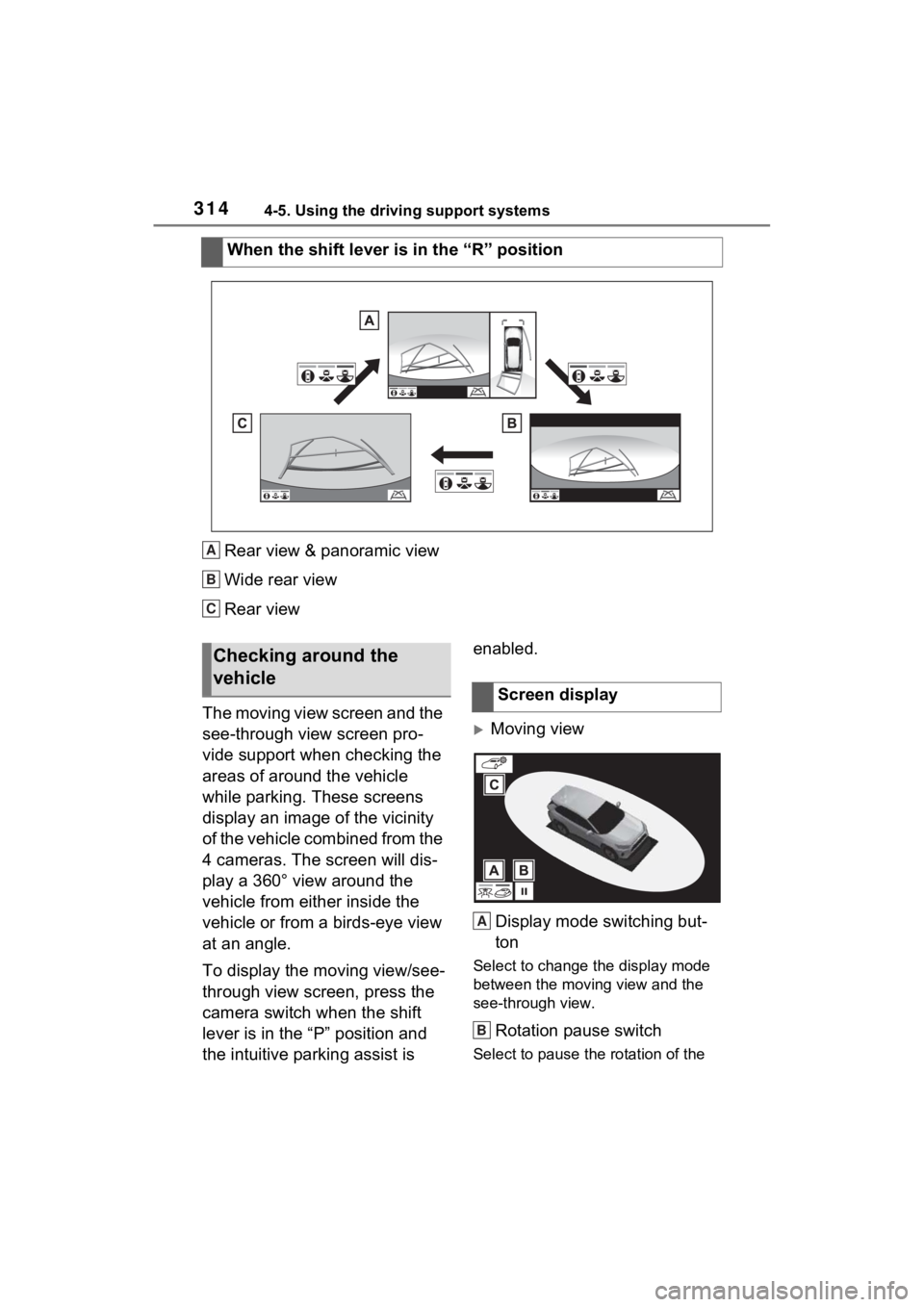
When you press the camera switch or shift the shift lever to th e “R”
position while the engine switch is in ON, the panoramic view m oni-
tor operates.
The monitor displays various views of the position of the vehicle.
(The following is an example) Checking the front and
around the vehicle
Checking the rear and
around the vehicle
When folding the outside
rear view mirrors
How to switch the display
Page 314 of 748
3144-5. Using the driving support systems
Rear view & panoramic view
Wide rear view
Rear view
The moving view screen and the
see-through view screen pro-
vide support when checking the
areas of around the vehicle
while parking. These screens
display an image of the vicinity
of the vehicle combined from the
4 cameras. The screen will dis-
play a 360° view around the
vehicle from either inside the
vehicle or from a birds-eye view
at an angle.
To display the moving view/see-
through view screen, press the
camera switch when the shift
lever is in the “P” position and
the intuitive parking assist is enabled.
Moving view
Display mode switching but-
ton
Select to change the display mode
between the moving view and the
see-through view.
Rotation pause switch
Select to pause th e rotation of the
When the shift lever is in the “R” position
A
B
C
&KHFNLQJ�DURX\
QG�WKH�
YHKLFOH
6FUHHQ�GLVSOD\
A
B
Page 315 of 748
3154-5. Using the driving support systems
4
Driving
screen.
To resume rotation, select .
Body color setting switch
Select to display the body color set-
ting screen and change the color of
the vehicle displa yed on the pan-
oramic view monitor. ( P.328)
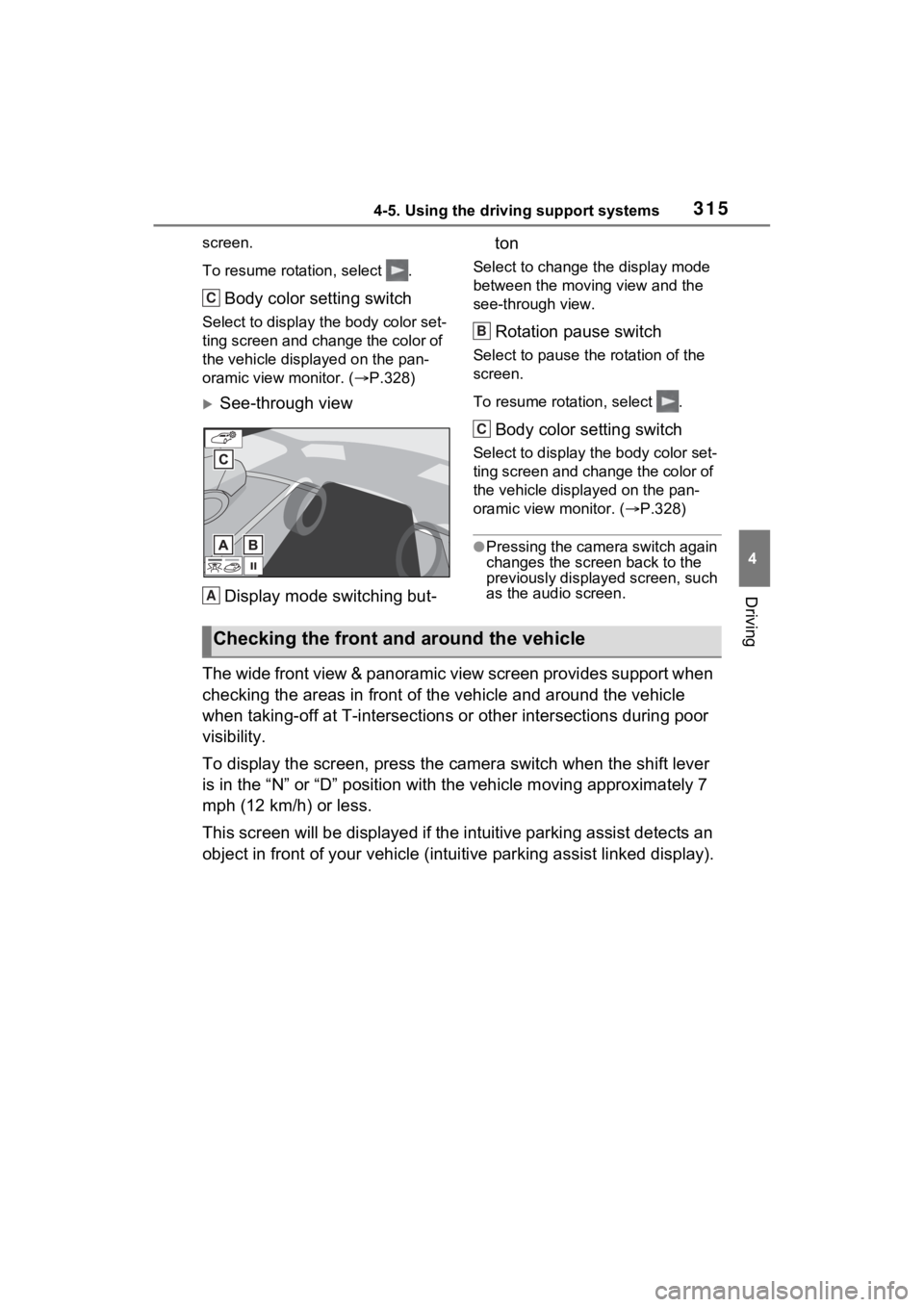
See-through view
Display mode switching but- ton
Select to change the display mode
between the moving view and the
see-through view.
Rotation pause switch
Select to pause th
e rotation of the
screen.
To resume rotation, select .
Body color setting switch
Select to display the body color set-
ting screen and change the color of
the vehicle displayed on the pan-
oramic view monitor. ( P.328)
●Pressing the camera switch again
changes the screen back to the
previously displayed screen, such
as the audio screen.
The wide front view & panoramic view screen provides support wh en
checking the areas in front of the vehicle and around the vehic le
when taking-off at T-intersections or other intersections durin g poor
visibility.
To display the screen, press the camera switch when the shift lever
is in the “N” or “D” position with the vehicle moving approxima tely 7
mph (12 km/h) or less.
This screen will be displayed if the intuitive parking assist d etects an
object in front of your vehicle (i ntuitive parking assist linked display).
C
A
B
C
Checking the front and around the vehicle
Page 316 of 748

3164-5. Using the driving support systems
Wide front view & panoramic viewDistance guide lines
Shows distance in front of the vehicle.
• Display points approximately 3 ft. (1 m) from the edge of the bumper.
Intuitive parking assist
When a sensor detects an obstacle, the direction of and the app roximate
distance to the obsta cle are displayed and the buzzer sounds.
Estimated course lines
Shows an estimated course when the steering wheel is turned.
• This line will be displayed when the steering wh eel is turned by 90° or
more from the cen ter (straight-line) position.
Guide line switching button
Select to change the guide line mode between the distance guide line
mode and the estimated course line mode. ( P.317)
Automatic display button
Select to turn automatic display mode on/off. The indicator on the button
illuminates during autom atic display mode. (P.317)
Parking Support Brake*
When the system determines that the possib ility of a frontal collision with a
detected object is high, a warning message is displayed.
*: If equipped
●Pressing the camera switch chan ges the screen to the side views screen
or previously displayed scre en, such as the audio screen.
●For details about the intuitive parking assist (P.270) and Parking Sup-
port Brake* function. ( P.278)
●The display position of the intuitive parking assist and the po sition of
obstacles displayed in the camera image do not match.
Screen display
A
B
C
D
E
F
Page 317 of 748

3174-5. Using the driving support systems
4
Driving
*: If equipped
Each time the guide line switch-
ing button is selected, the mode
will change as follows:
Distance guide line
Only the distance guide lines
are displayed.
Estimated course line
Estimated course lines will be
added to the distance guide
lines.
In addition to screen switching
by operating the camera switch,
automatic display mode is avail-
able. In this mode, the screen is
switched automatically in
response to vehicle speed.
In automatic display mode, the
monitor will automatically dis-
play images in the following situ-
ations:
When the shift lever is shifted
to “N” or “D” position.
When vehicle speed is
reduced to approximately 6
mph (10 km/h) or less.
The side view screen displays images from the cameras installed on
WARNING
●When a sensor indicator on the intuitive parking assist display illumi-
nates in red or a buzzer sounds continuously, be sure to check the area
around the vehicle immediately a nd do not proceed any further until
safety has been ensured, otherwise an unexpected accident may o ccur.
●As the intuitive parking assist display is displayed over the camera view,
it may be difficult to see the intuitive parking assist display depending on
the color and brightness of the surrounding area.
Switching the guide line
mode
Automatic display mode
Checking the sides of the vehicle
Page 318 of 748

3184-5. Using the driving support systems
each outside rear view mirror. This screen is designed to support the
driver in safe driving in situations such as when driving on a narrow
road, by allowing them to check the areas around the sides of t he
vehicle.
To display the screen, press the camera switch when the shift lever
is in the “D”, or “N” position with the vehicle moving approxim ately 7
mph (12 km/h) or less.
Side view
Distance guide lines
Show distance in front of the vehicle.
• Display points approximately 3 ft. (1 m) from the edge of the bumper.
Vehicle width guide lines
Shows guide lines of the vehicle’ s width including the outside rear view mir-
rors.
Front tire guide lines
Shows guide lines of where the f ront tire touches the ground.
Automatic display button
Select to turn automatic display mode on/off. The indicator on the button
illuminates during autom atic display mode. (P.319)
Intuitive parking assist
When a sensor detects an obstacle, the direction of and the app roximate
distance to the obsta cle are displayed and the buzzer sounds.
●Pressing the camera switch changes the screen to the wide front view &
panoramic view screen or previous ly displayed screen, such as the audio
screen.
●For details about the int uitive parking assist. (P.270)
Screen display
A
B
C
D
E
Page 319 of 748

3194-5. Using the driving support systems
4
Driving
●The side views can be displayed even when the outside rear view mirrors
are retracted.
In addition to screen switching
by operating the camera switch,
automatic display mode is avail-
able. In this mode, the screen is
switched automatically in
response to vehicle speed.
In automatic display mode, the
monitor will automatically dis-
play images in the following situ-
ations:
When the shift lever is shifted
to “N” or “D” position.
When vehicle speed is
reduced to approximately 6
mph (12 km/h) or less.
Side View
Check the positions and dis-
tance between the vehicle
width guide line and a target
object such as the obstacle or
curb of the road.
WARNING
●When a sensor indicator on the in tuitive parking assist display illumi-
nates in red or a buzzer sounds continuously, be sure to check the area
around the vehicle immediately a nd do not proceed any further until
safety has been ensured, otherwise an unexpected accident may o ccur.
●As the intuitive parking assist display is displayed over the camera view,
it may be difficult to see the intuitive parking assist display depending on
the color and brightness of the surrounding area.
Automatic display modeUsing the vehicle width
guide line