2022 TOYOTA MIRAI key battery
[x] Cancel search: key batteryPage 1 of 556

1
2
3
4
5
6
7
8
9
10
Owners Manual_USA_M62084_en
Pictorial indexSearch by illustration
For safety
and securityMake sure to read through them
(Main topics: Child seat, theft deterrent system)
Fuel cell systemFuel cell vehicle characteristics, precautions, etc.
(Main topics: Fuel cell system)
Vehicle status
information and
indicatorsReading driving-related information
(Main topics: Meters, multi-information display)
Before driving
Opening and closing the doors and windows,
adjustment before driving
(Main topics: Keys, doors, seats)
Driving
Operations and advice which are necessary for
driving
(Main topics: Starting f uel cell system, refueling)
Interior featuresUsage of the interior features
(Main topics: Air conditioner, storage features)
Maintenance
and careCaring for your vehicle and maintenance
procedures
(Main topics: Interior and exterior, light bulbs)
When trouble
arisesWhat to do in case of malfunction and emergency
(Main topics: Battery discharge, flat tire)
Vehicle
specificationsVehicle specifications, customizable features
(Main topics: Fuel, oil, tire inflation pressure)
For ownersReporting safety defects for U.S. owners, seat belt
and SRS airbag instructions for Canadian owners
IndexSearch by symptom
Search alphabetically
Page 4 of 556
4TABLE OF CONTENTS
Owners Manual_USA_M62084_en
6-1. Using the air conditioning
system and defogger
ALL AUTO control ......... 324
Automatic air conditioning system (vehicles with 8-inch
display) ........................ 325
Automatic air conditioning system (vehicles with 12.3-
inch display) ................ 332
Rear automatic air condition- ing system ................... 341
Heated steering wheel/seat heaters/seat ventilators 342
6-2. Using the interior lights Interior lights list ............ 346
6-3. Using the storage features List of storage features . 349
Trunk features ............... 352
6-4. Using the other interior fea- tures
Toyota multi-operation touch
(vehicle with the 12.3-inch
display) ........................ 353
Electronic sunshade...... 355
Other interior features ... 356
Garage door opener...... 371
7-1. Maintenance and care Cleaning and protecting the vehicle exterior ............ 380
Cleaning and protecting the vehicle interior ............. 3847-2. Maintenance
Maintenance requirements.................................... 387
General maintenance .... 388
7-3. Do-it-yourself maintenance Do-it-yourself service precau-tions ............................. 391
Hood .............................. 393
Positioning a floor jack .. 393
Fuel cell unit compartment .................................... 395
12-volt battery................ 400
Tires .............................. 403
Replacing the tire .......... 411
Tire inflation pressure .... 415
Wheels .......................... 417
Air conditioning filter ...... 419
Cleaning the traction battery air intake vents and filters
.................................... 420
Electronic key battery .... 423
Checking and replacing fuses .................................... 425
Headlight aim ................ 428
Light bulbs ..................... 429
8-1. Essential information Emergency flashers....... 432
If your vehicle has to be stopped in an emergency.................................... 432
If the vehicle is submerged or water on the road is rising.................................... 433
6Interior features
7Maintenance and care
8When trouble arises
Page 5 of 556

5TABLE OF CONTENTS
Owners Manual_USA_M62084_en
1
2
3
4
5
6
7
8
9
10
8-2. Steps to take in an emer- gency
If your vehicle needs to be towed........................... 435
If you think something is wrong .......................... 439
If a warning light turns on or a warning buzzer sounds 441
If a warning message is dis- played.......................... 451
If you have a flat tire...... 455
If the fuel cell system will not
start ............................. 466
If you lose your keys ..... 467
If the fuel door cannot be opened ........................ 468
If the electronic key does not operate properly .......... 468
If the 12-volt battery is dis- charged ....................... 471
If your vehicle overheats 476
If the vehicle becomes stuck .................................... 480
9-1. Specifications Maintenance data (fuel, fluid level, etc.) .................... 482
Tire information ............. 488
9-2. Customization Customizable features .. 498
9-3. Initialization Items to initialize ........... 51010-1.For owners
Reporting safet y defects for
U.S. owners ................. 512
Reporting safet y defects for
Canadian owners ........ 512
Seat belt instructions for Canadian owners (in
French) ........................ 513
SRS airbag instructions for Canadian owners (in
French) ........................ 514
Headlight aim instructions for Canadian owners (in
French) ........................ 521
What to do if... (Troubleshoot- ing) .............................. 524
Alphabetical Index ......... 527
9Vehicle specifications
10For owners
Index
Page 71 of 556

711-4. Theft deterrent system
Owners Manual_USA_M62084_en
1
For safety and security
trol.
Turn the power switch to ACC
or ON, or start the fuel cell
system. (The alarm will be
deactivated or stopped after a
few seconds.)
■System maintenance
The vehicle has a maintenance-free
type alarm system.
■Triggering of the alarm
The alarm may be triggered in the
following situations:
(Stopping the alarm deactivates the
alarm system.)
●For Canada: The doors are
unlocked using the mechanical
key.
●For Canada: The trunk is opened
using the mechanical key.
●A person inside the vehicle opens
a door, the trunk or hood, or
unlocks the vehicle.
●The 12-volt battery is recharged or
replaced when the vehicle is
locked. ( P.473)
■Alarm-operated door lock
In the following cases, depending
on the situation, the door may auto-
matically lock to prevent improper
entry into the vehicle:
●When a person remaining in the
vehicle unlocks the door and the
alarm is activated.
●While the alarm i s activated, a
person remaining in the vehicle
unlocks the door.
■Customization
Some functions can be customized.
( P.498)
NOTICE
■To ensure the system oper-
ates correctly
Do not modify or remove the sys-
tem. If modified or removed, the
proper operation of the system
cannot be guaranteed.
Page 118 of 556
1184-1. Key information
Owners Manual_USA_M62084_en
4-1.Key information
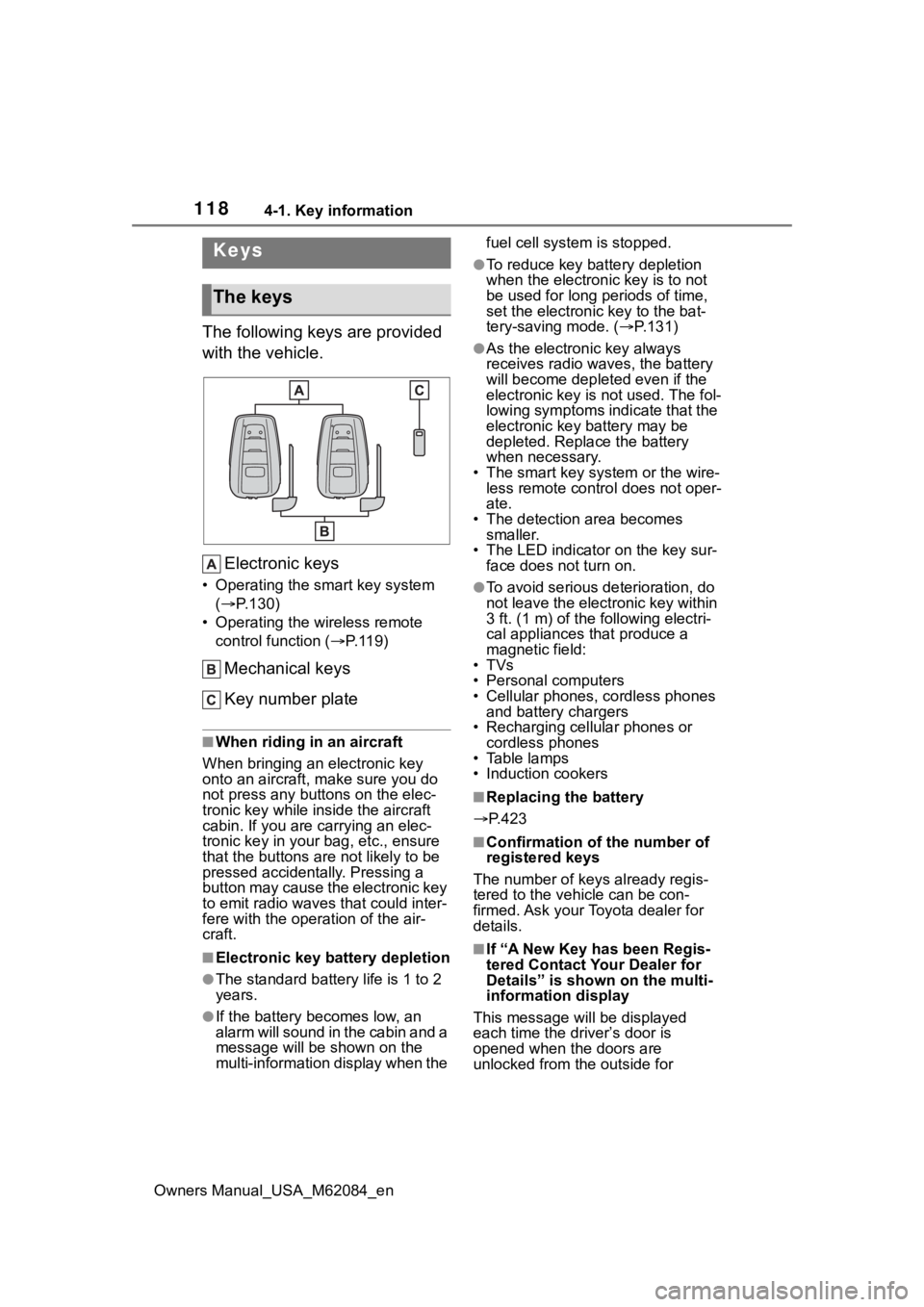
The following keys are provided
with the vehicle.Electronic keys
• Operating the smart key system ( P.130)
• Operating the wireless remote control function ( P. 1 1 9 )
Mechanical keys
Key number plate
■When riding in an aircraft
When bringing an electronic key
onto an aircraft, make sure you do
not press any buttons on the elec-
tronic key while inside the aircraft
cabin. If you are carrying an elec-
tronic key in your bag, etc., ensure
that the buttons are not likely to be
pressed accidentally. Pressing a
button may cause the electronic key
to emit radio waves that could inter-
fere with the oper ation of the air-
craft.
■Electronic key battery depletion
●The standard battery life is 1 to 2
years.
●If the battery becomes low, an
alarm will sound in the cabin and a
message will be s hown on the
multi-information display when the fuel cell system is stopped.
●To reduce key battery depletion
when the electronic key is to not
be used for long periods of time,
set the electronic key to the bat-
tery-saving mode. (
P.131)
●As the electronic key always
receives radio waves, the battery
will become depleted even if the
electronic key is not used. The fol-
lowing symptoms indicate that the
electronic key battery may be
depleted. Replace the battery
when necessary.
• The smart key system or the wire- less remote contro l does not oper-
ate.
• The detection area becomes smaller.
• The LED indicator on the key sur- face does not turn on.
●To avoid serious deterioration, do
not leave the electronic key within
3 ft. (1 m) of the following electri-
cal appliances that produce a
magnetic field:
•TVs
• Personal computers
• Cellular phones, cordless phones and battery chargers
• Recharging cellular phones or cordless phones
• Table lamps
• Induction cookers
■Replacing the battery
P.423
■Confirmation of the number of
registered keys
The number of keys already regis-
tered to the vehi cle can be con-
firmed. Ask your Toyota dealer for
details.
■If “A New Key has been Regis-
tered Contact Your Dealer for
Details” is shown on the multi-
information display
This message will be displayed
each time the driver’s door is
opened when the doors are
unlocked from the outside for
Keys
The keys
Page 120 of 556
1204-1. Key information
Owners Manual_USA_M62084_enon the electronic key.
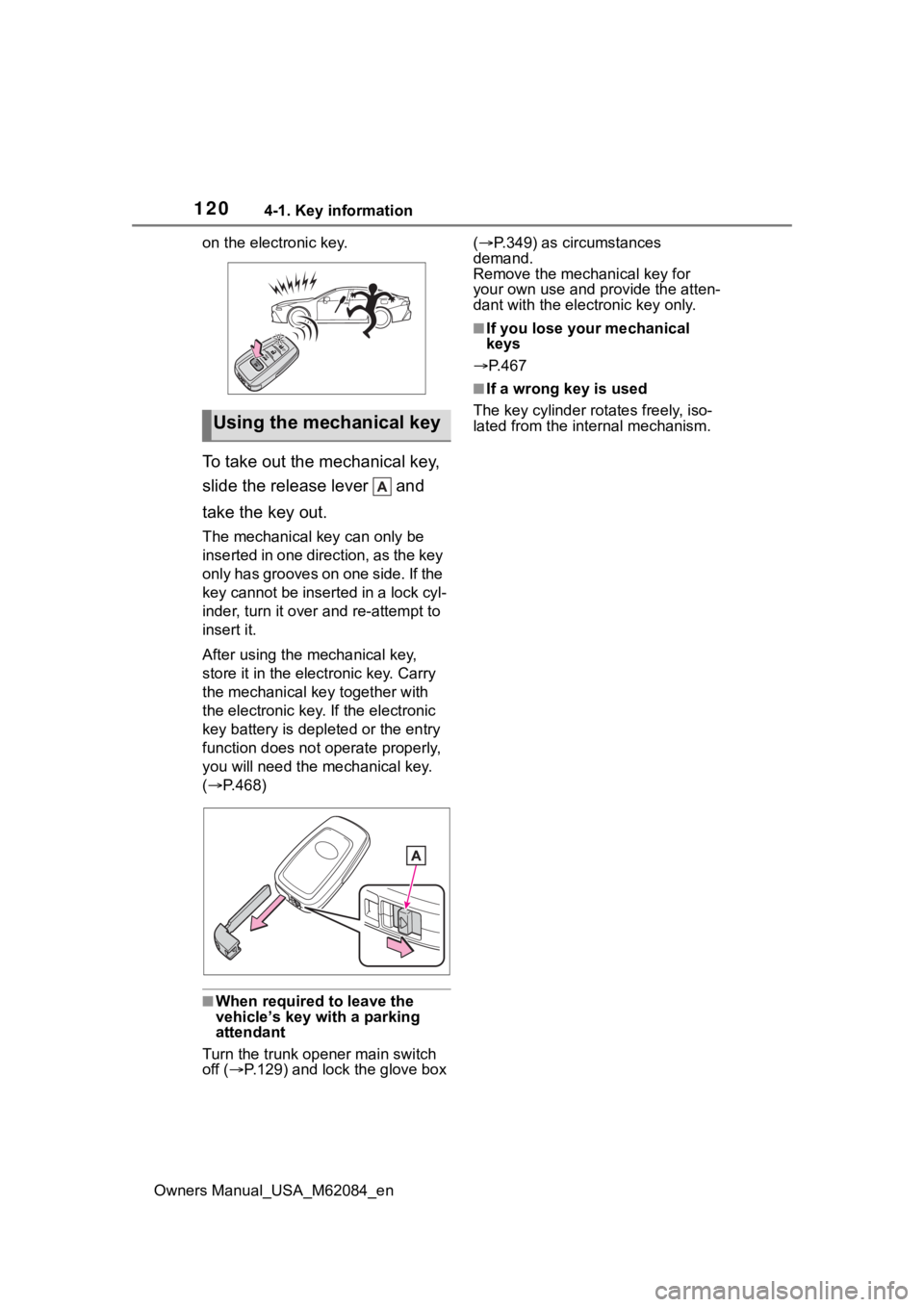
To take out the mechanical key,
slide the release lever and
take the key out.
The mechanical key can only be
inserted in one direction, as the key
only has grooves on one side. If the
key cannot be inserted in a lock cyl-
inder, turn it over and re-attempt to
insert it.
After using the mechanical key,
store it in the electronic key. Carry
the mechanical k
ey together with
the electronic key. If the electronic
key battery is dep leted or the entry
function does not operate properly,
you will need the m echanical key.
( P.468)
■When required to leave the
vehicle’s key with a parking
attendant
Turn the trunk ope ner main switch
off ( P.129) and lock the glove box (
P.349) as circumstances
demand.
Remove the mechanical key for
your own use and p rovide the atten-
dant with the elec tronic key only.
■If you lose your mechanical
keys
P.467
■If a wrong key is used
The key cylinder rotates freely, iso-
lated from the internal mechanism.
Using the mechanical key
Page 123 of 556
1234-2. Opening, closing and locking the doors and trunk
Owners Manual_USA_M62084_en
4
Before driving
Replace the key battery with a new
one if it is depleted. ( P.423)
■If the 12-volt battery is dis-
charged
The doors cannot be locked and
unlocked using the smart key sys-
tem or wireless remote control. Lock
or unlock the doors using the
mechanical key. ( P.469)
■Rear seat reminder function
●In order to remind you not to for-
get luggage, etc., in the rear seat,
when the power switch is turned to
OFF after any of the following con-
ditions are met, a buzzer will
sound and a message will be dis-
played on the multi-information
display for approximately 6 sec-
onds.
• The fuel cell system is started within 10 minutes after opening
and closing a rear door.
• A rear door has been opened and closed after the fuel cell system
was started.
However, if a rear door is opened
and then closed within approxi-
mately 2 seconds , the rear seat
reminder function may not operate.
●The rear seat reminder function
determines that luggage, etc., has
been placed in a rear seat based
on opening and closing of a rear
door. Therefore, depending on the
situation, the rear seat reminder
function may not operate and you
may still forget luggage, etc., in
the rear seat, or it may operate
unnecessarily.
●The rear seat reminder function
can be enabled/disabled.
( P.498)
■Customization
Some functions can be customized.
( P.498)
WARNING
■To prevent an accident
Observe the following precautions
while driving the vehicle.
Failure to do so may result in a
door opening and an occupant
falling out of the vehi cle, resulting
in death or serious injury.
●Ensure that all doors are prop-
erly closed and locked.
●Do not pull the inside handle of
the doors while driving.
Be especially careful for the front
doors, as the doors may be
opened even if the inside lock but-
tons are in locked position.
●Set the rear door child-protector
locks when children are seated
in the rear seats.
■When opening or closing a
door
Check the surroundings of the
vehicle such as wh ether the vehi-
cle is on an incline, whether there
is enough space for a door to
open and whether a strong wind
is blowing. When opening or clos-
ing the door, hold the door handle
tightly to prepare for any unpre-
dictable movement.
Page 129 of 556
1294-2. Opening, closing and locking the doors and trunk
Owners Manual_USA_M62084_en
4
Before driving
■Using the mechanical key
The trunk can be also opened using
the mechanical key. ( P.469)
■If the smart key system or the
wireless remote control does
not operate properly
Use the mechanical key to unlock
the trunk. ( P.469)
Replace the key battery with a new
one if it is depleted.
■Open door warning buzzer
P. 1 2 4
■Customization
Some functions can be customized.
( P.498)
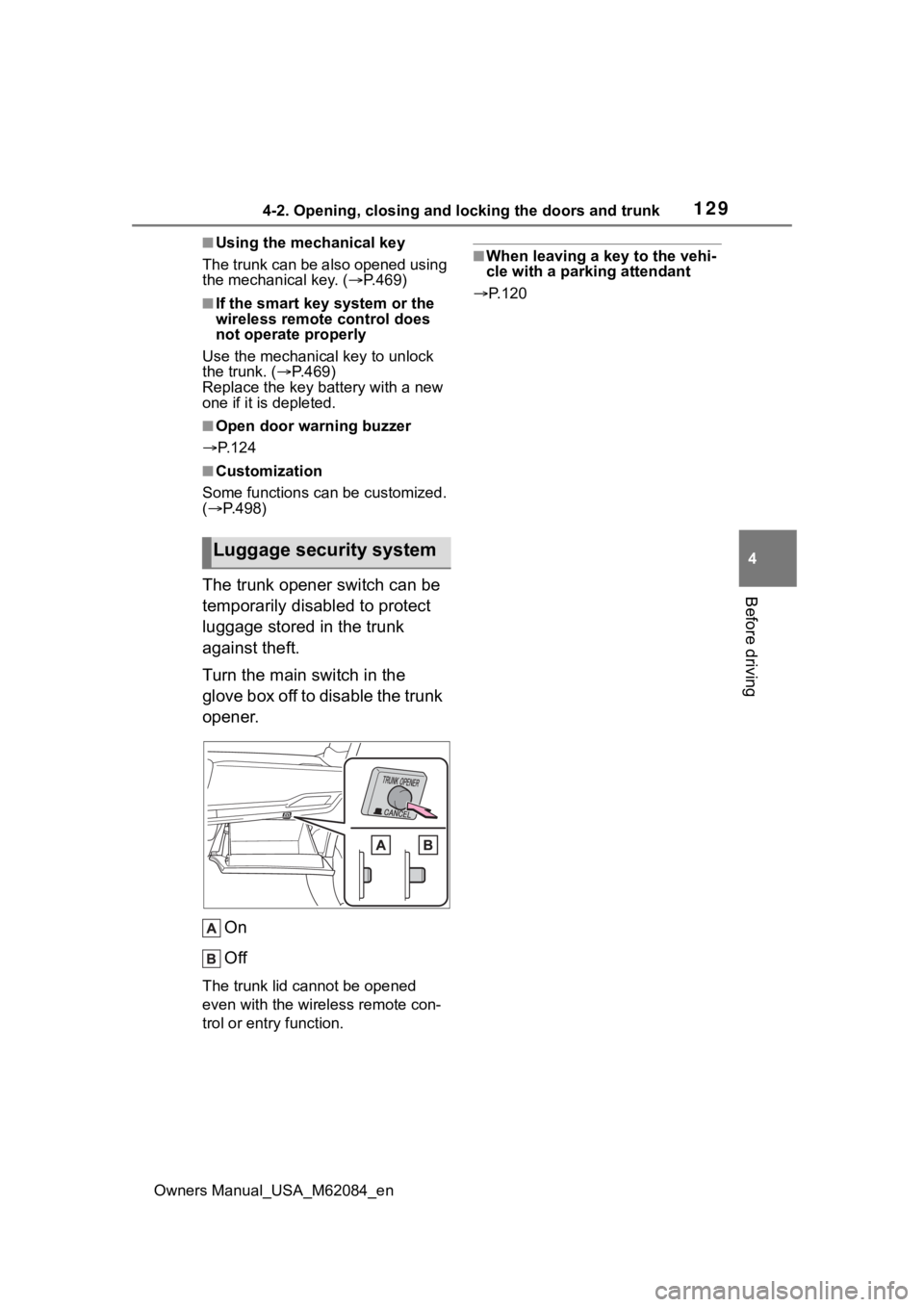
The trunk opener switch can be
temporarily disabled to protect
luggage stored in the trunk
against theft.
Turn the main switch in the
glove box off to disable the trunk
opener.
On
Off
The trunk lid cannot be opened
even with the wireless remote con-
trol or entry function.
■When leaving a key to the vehi-
cle with a parking attendant
P.120
Luggage security system