2022 TOYOTA MIRAI key
[x] Cancel search: keyPage 70 of 556
701-4. Theft deterrent system
Owners Manual_USA_M62084_en
■Items to check before lock-
ing the vehicle
To prevent unexpected trigger-
ing of the alarm and vehicle
theft, make sure of the following:
Nobody is in the vehicle.
The windows are closed
before the alarm is set.
No valuables or other per-
sonal items are left in the
vehicle.
■Setting
Close the doors, trunk and
hood, and lock all the doors
using the entry function or wire-
less remote control. The system
will be set automatically after 30
seconds.
Except for Canada: the alarm
can also be set using the
mechanical key.
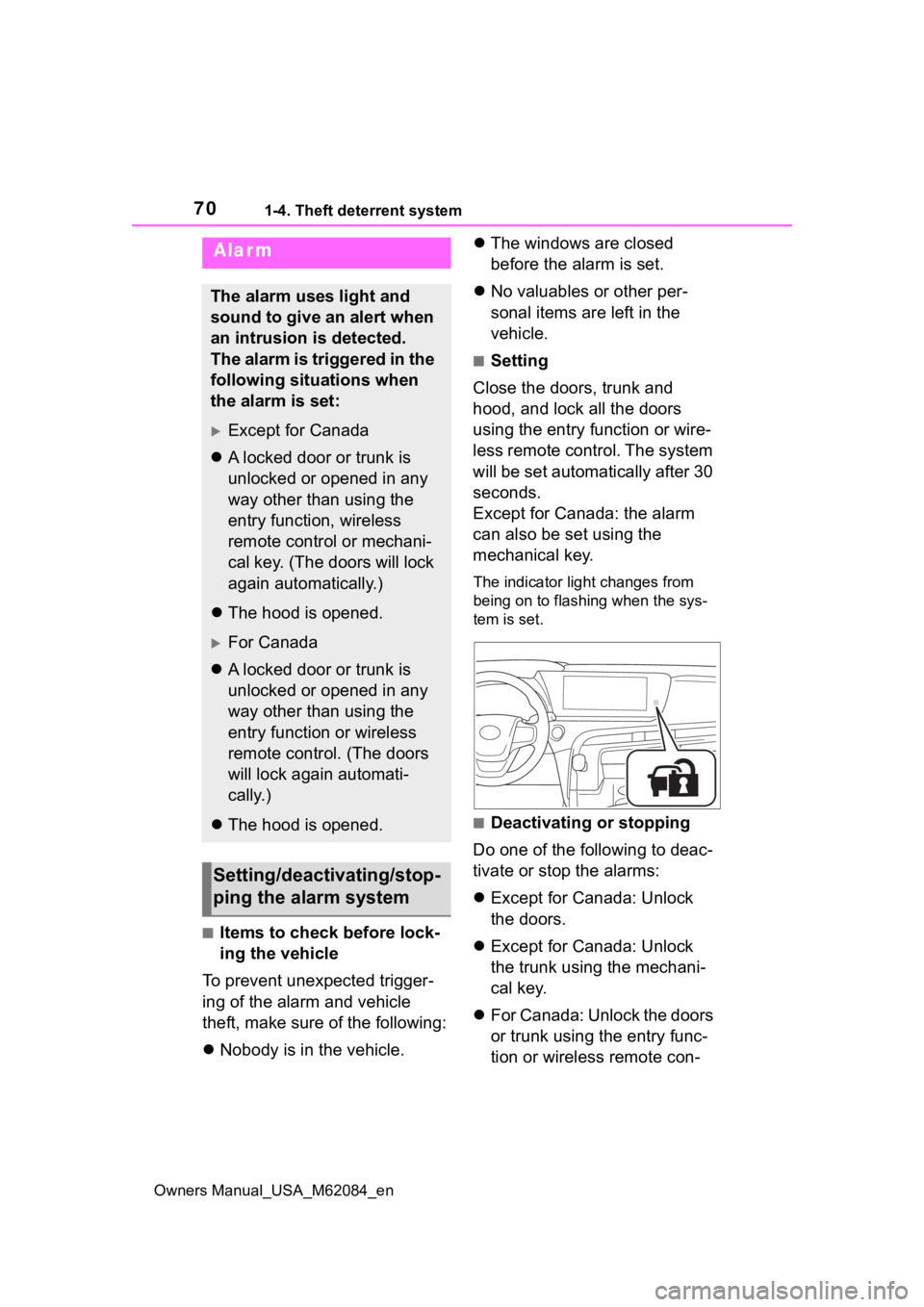
The indicator light changes from
being on to flashing when the sys-
tem is set.
■Deactivating or stopping
Do one of the following to deac-
tivate or stop the alarms:
Except for Canada: Unlock
the doors.
Except for Canada: Unlock
the trunk using the mechani-
cal key.
For Canada: Unlock the doors
or trunk using the entry func-
tion or wireless remote con-
Alarm
The alarm uses light and
sound to give an alert when
an intrusion is detected.
The alarm is triggered in the
following situations when
the alarm is set:
Except for Canada
A locked door or trunk is
unlocked or opened in any
way other than using the
entry function, wireless
remote control or mechani-
cal key. (The doors will lock
again automatically.)
The hood is opened.
For Canada
A locked door or trunk is
unlocked or opened in any
way other than using the
entry function or wireless
remote control. (The doors
will lock again automati-
cally.)
The hood is opened.
Setting/deactivating/stop-
ping the alarm system
Page 71 of 556

711-4. Theft deterrent system
Owners Manual_USA_M62084_en
1
For safety and security
trol.
Turn the power switch to ACC
or ON, or start the fuel cell
system. (The alarm will be
deactivated or stopped after a
few seconds.)
■System maintenance
The vehicle has a maintenance-free
type alarm system.
■Triggering of the alarm
The alarm may be triggered in the
following situations:
(Stopping the alarm deactivates the
alarm system.)
●For Canada: The doors are
unlocked using the mechanical
key.
●For Canada: The trunk is opened
using the mechanical key.
●A person inside the vehicle opens
a door, the trunk or hood, or
unlocks the vehicle.
●The 12-volt battery is recharged or
replaced when the vehicle is
locked. ( P.473)
■Alarm-operated door lock
In the following cases, depending
on the situation, the door may auto-
matically lock to prevent improper
entry into the vehicle:
●When a person remaining in the
vehicle unlocks the door and the
alarm is activated.
●While the alarm i s activated, a
person remaining in the vehicle
unlocks the door.
■Customization
Some functions can be customized.
( P.498)
NOTICE
■To ensure the system oper-
ates correctly
Do not modify or remove the sys-
tem. If modified or removed, the
proper operation of the system
cannot be guaranteed.
Page 94 of 556

943-1. Instrument cluster
Owners Manual_USA_M62084_en
*1: These lights turn on when the power switch is turned to ON to
indicate that a system check is
being performed. They will turn
off after the fuel cell system is
on, or after a few seconds. There
may be a malfunction in a sys-
tem if the light does not come on,
or turn off. Have the vehicle
inspected by your Toyota dealer.
*2: This light illuminates on the multi-information display.
*3: This light illuminates on the multi-informatio n display with a
message.
*4: Intuitive parking assist OFF indi- cator turns on when the power
switch is turned to ON while the
Intuitive parking assist function is
on. It will turn off after a few sec-
onds.
The indicators inform the driver
of the operating state of the
vehicle’s various systems.
Low fuel level warn-
ing light
*2 ( P.447)
Driver’s and front pas-
senger’s seat belt
reminder light
( P.448)
Rear passengers’ seat
belt reminder lights
*2
( P.448)
WARNING
■If a safety system warning
light does not come on
Should a safety system light such
as the ABS and SRS warning light
not come on when you start the
fuel cell system, this could mean
that these systems are not avail-
able to help protect you in an acci-
dent, which could result in death
or serious injury. Have the vehicle
inspected by your Toyota dealer
immediately if this occurs.
Indicators
Turn signal indicator
( P.182)
(U.S.A.)
Headlight indicator
( P.191)
(Canada)
Tail light indicator
( P.191)
Headlight high beam indi-
cator ( P.193)
Automatic High Beam
indicator ( P.193)
(Blue)
Low coolant temperature
indicator
*1, 2
Smart key system indica-
tor
*3 ( P.172)
Cruise control indicator
*2
( P.237)
Dynamic radar cruise
control indicator
*2
( P.237)
Cruise control “SET” indi-
cator
*2 ( P.237)
(*4)
LTA indicator*2 ( P.213,
229)
Intuitive parking assist
OFF indicator
*5, 6 (if
equipped) ( P.255)
PKSB OFF indicator
*5, 7
(if equipped) ( P.274)
Page 117 of 556
117
Owners Manual_USA_M62084_en
4
4
Before driving
Before driving
4-1. Key informationKeys ............................ 118
4-2. Opening, closing and locking the doors and
trunk
Doors .......................... 121
Trunk ........................... 126
Smart key system ....... 130
4-3. Adjusting the seats Front seats .................. 135
Driving position memory .................................. 136
Head restraints............ 139
4-4. Adjusting the steering wheel and mirrors
Steering wheel ............ 141
Inside rear view mirror 143
Digital Rearview Mirror 144
Outside rear view mirrors .................................. 154
4-5. Opening, closing the win- dows
Power windows ........... 156
Page 118 of 556
1184-1. Key information
Owners Manual_USA_M62084_en
4-1.Key information
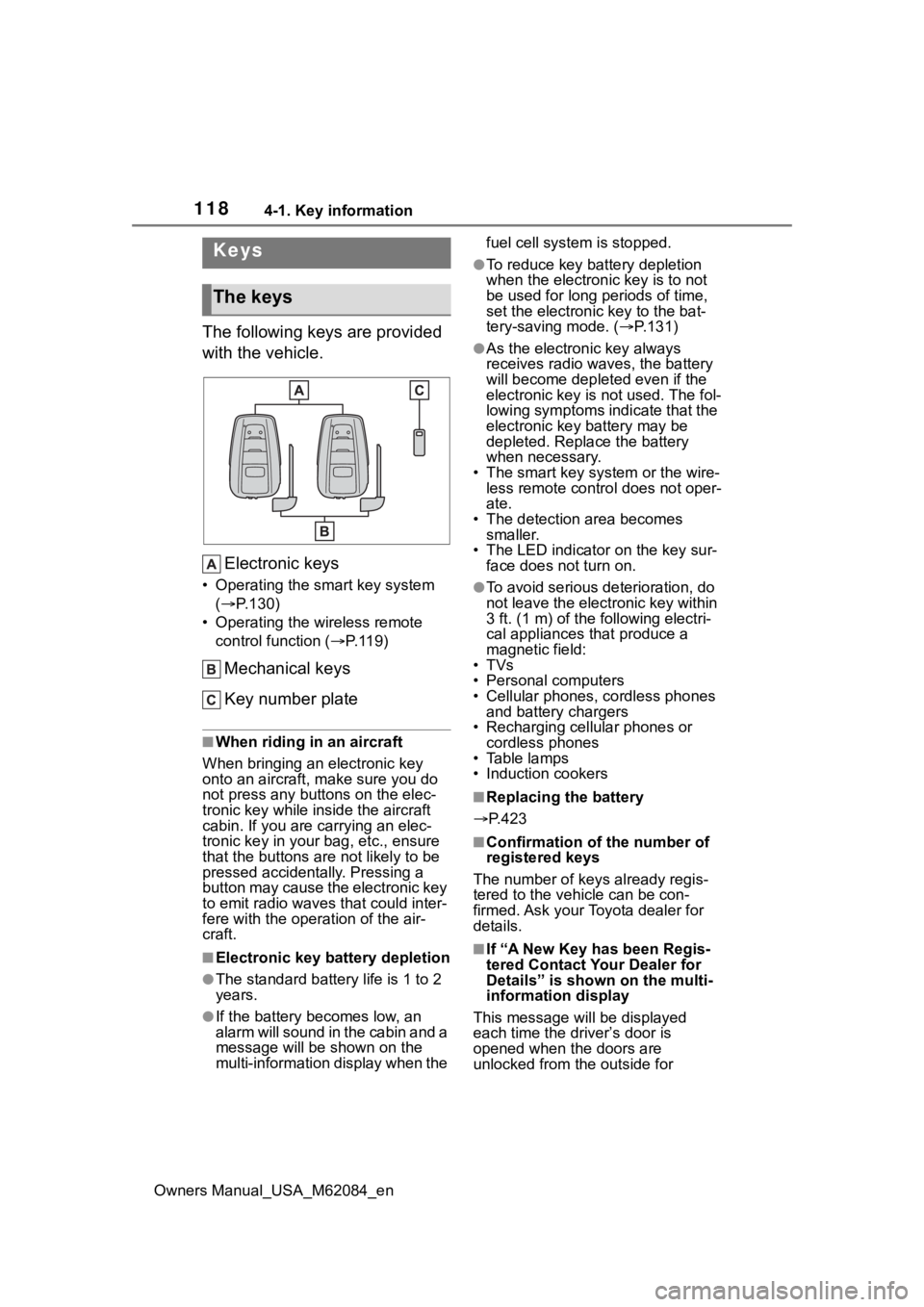
The following keys are provided
with the vehicle.Electronic keys
• Operating the smart key system ( P.130)
• Operating the wireless remote control function ( P. 1 1 9 )
Mechanical keys
Key number plate
■When riding in an aircraft
When bringing an electronic key
onto an aircraft, make sure you do
not press any buttons on the elec-
tronic key while inside the aircraft
cabin. If you are carrying an elec-
tronic key in your bag, etc., ensure
that the buttons are not likely to be
pressed accidentally. Pressing a
button may cause the electronic key
to emit radio waves that could inter-
fere with the oper ation of the air-
craft.
■Electronic key battery depletion
●The standard battery life is 1 to 2
years.
●If the battery becomes low, an
alarm will sound in the cabin and a
message will be s hown on the
multi-information display when the fuel cell system is stopped.
●To reduce key battery depletion
when the electronic key is to not
be used for long periods of time,
set the electronic key to the bat-
tery-saving mode. (
P.131)
●As the electronic key always
receives radio waves, the battery
will become depleted even if the
electronic key is not used. The fol-
lowing symptoms indicate that the
electronic key battery may be
depleted. Replace the battery
when necessary.
• The smart key system or the wire- less remote contro l does not oper-
ate.
• The detection area becomes smaller.
• The LED indicator on the key sur- face does not turn on.
●To avoid serious deterioration, do
not leave the electronic key within
3 ft. (1 m) of the following electri-
cal appliances that produce a
magnetic field:
•TVs
• Personal computers
• Cellular phones, cordless phones and battery chargers
• Recharging cellular phones or cordless phones
• Table lamps
• Induction cookers
■Replacing the battery
P.423
■Confirmation of the number of
registered keys
The number of keys already regis-
tered to the vehi cle can be con-
firmed. Ask your Toyota dealer for
details.
■If “A New Key has been Regis-
tered Contact Your Dealer for
Details” is shown on the multi-
information display
This message will be displayed
each time the driver’s door is
opened when the doors are
unlocked from the outside for
Keys
The keys
Page 119 of 556
1194-1. Key information
Owners Manual_USA_M62084_en
4
Before driving
approximately 10 days after a new
electronic key has been registered.
If this message is displayed but you
have not had a new electronic key
registered, ask your Toyota dealer to
check if an unknow n electronic key
(other than those in your posses-
sion) has been registered.
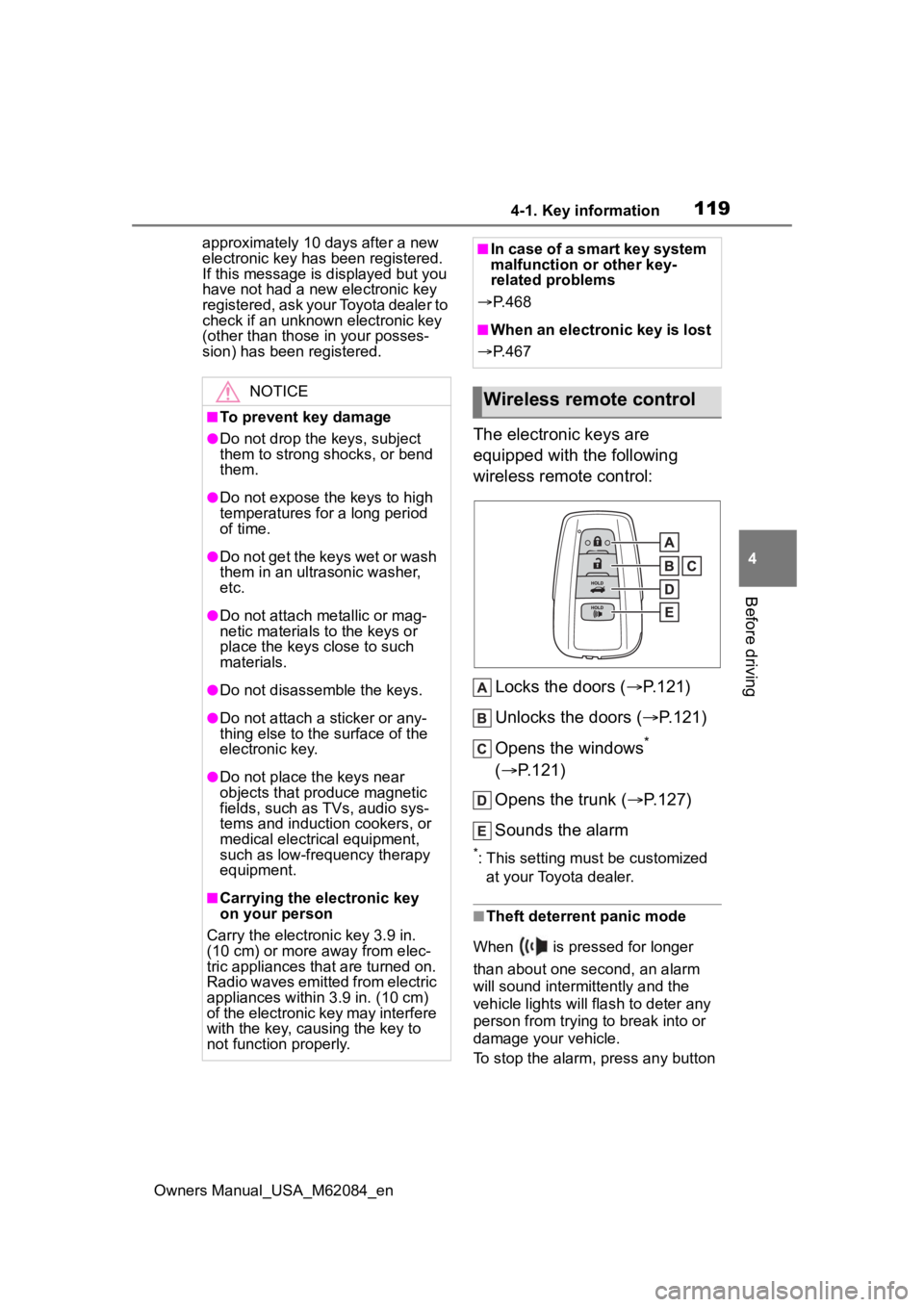
The electronic keys are
equipped with the following
wireless remote control:
Locks the doors ( P.121)
Unlocks the doors ( P.121)
Opens the windows
*
( P.121)
Opens the trunk ( P.127)
Sounds the alarm
*: This setting must be customized at your Toyota dealer.
■Theft deterrent panic mode
When is pressed for longer
than about one second, an alarm
will sound intermittently and the
vehicle lights will flash to deter any
person from trying to break into or
damage your vehicle.
To stop the alarm, press any button
NOTICE
■To prevent key damage
●Do not drop the keys, subject
them to strong shocks, or bend
them.
●Do not expose the keys to high
temperatures for a long period
of time.
●Do not get the keys wet or wash
them in an ultrasonic washer,
etc.
●Do not attach metallic or mag-
netic materials to the keys or
place the keys close to such
materials.
●Do not disassemble the keys.
●Do not attach a sticker or any-
thing else to the surface of the
electronic key.
●Do not place th e keys near
objects that produce magnetic
fields, such as TVs, audio sys-
tems and induction cookers, or
medical electrical equipment,
such as low-frequency therapy
equipment.
■Carrying the electronic key
on your person
Carry the electronic key 3.9 in.
(10 cm) or more away from elec-
tric appliances that are turned on.
Radio waves emitted from electric
appliances within 3.9 in. (10 cm)
of the electronic key may interfere
with the key, causing the key to
not function properly.
■In case of a smart key system
malfunction or other key-
related problems
P. 4 6 8
■When an electronic key is lost
P. 4 6 7
Wireless remote control
Page 120 of 556
1204-1. Key information
Owners Manual_USA_M62084_enon the electronic key.
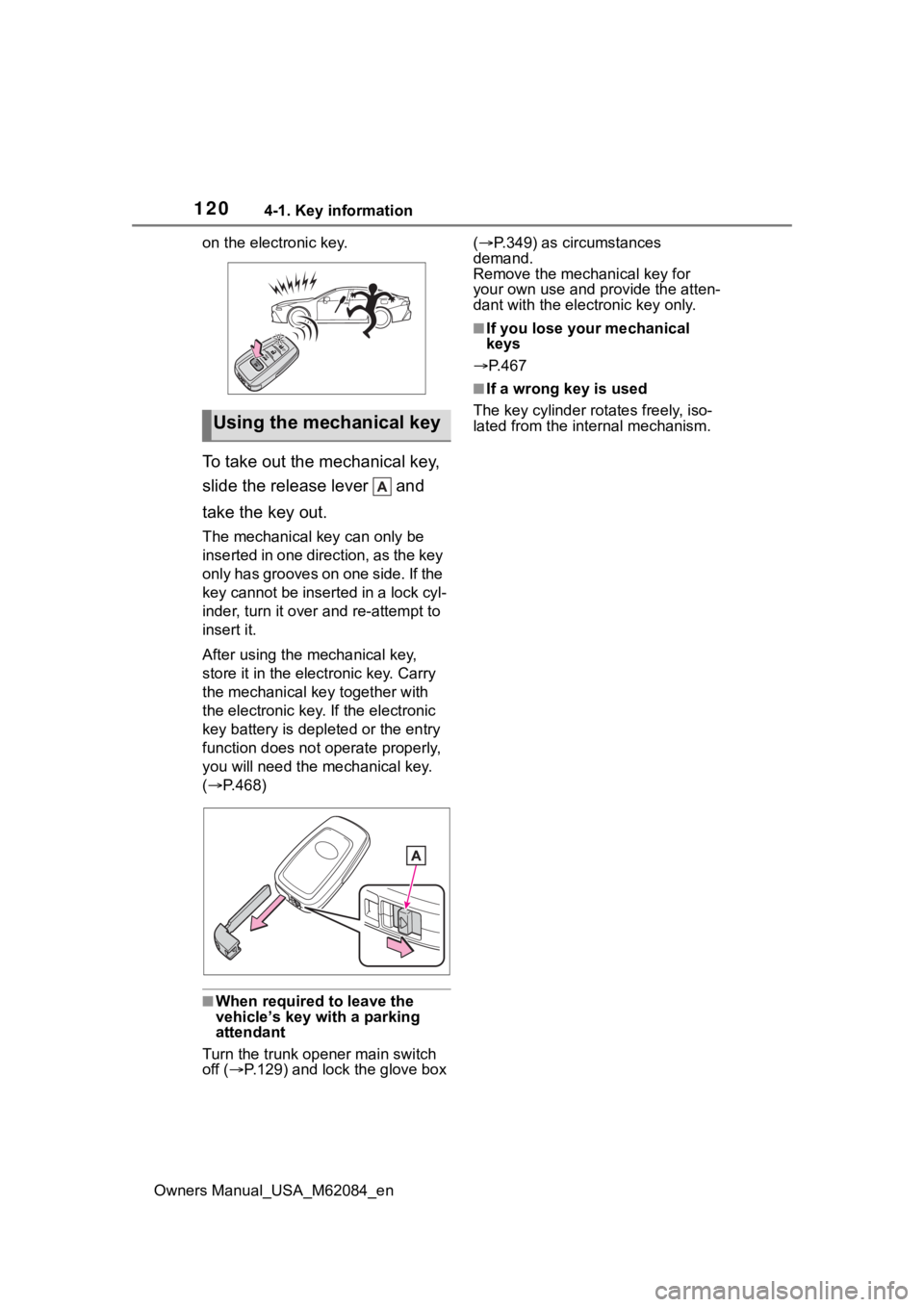
To take out the mechanical key,
slide the release lever and
take the key out.
The mechanical key can only be
inserted in one direction, as the key
only has grooves on one side. If the
key cannot be inserted in a lock cyl-
inder, turn it over and re-attempt to
insert it.
After using the mechanical key,
store it in the electronic key. Carry
the mechanical k
ey together with
the electronic key. If the electronic
key battery is dep leted or the entry
function does not operate properly,
you will need the m echanical key.
( P.468)
■When required to leave the
vehicle’s key with a parking
attendant
Turn the trunk ope ner main switch
off ( P.129) and lock the glove box (
P.349) as circumstances
demand.
Remove the mechanical key for
your own use and p rovide the atten-
dant with the elec tronic key only.
■If you lose your mechanical
keys
P.467
■If a wrong key is used
The key cylinder rotates freely, iso-
lated from the internal mechanism.
Using the mechanical key
Page 121 of 556

1214-2. Opening, closing and locking the doors and trunk
Owners Manual_USA_M62084_en
4
Before driving
4-2.Opening, closing and locking the doors and trunk
■Smart key system (entry
function)
Carry the electronic key to
enable this function.
1 Grip the driver’s door handle
to unlock the door. Holding
the driver’s door handle for
approximately 2 seconds
unlocks all the doors. Grip
any passenger door handle
to unlock all the doors.
*
Make sure to touch the sensor on
the back of the handle.
The doors cannot be unlocked for 3
seconds after the doors are locked.
2Touch the lock sensor (inden-
tation on the surface of the
door handle) to lock all the
doors.
Check that the door is securely
locked.
*: The door unlock settings can be
changed.
■Wireless remote control
1 Locks all the doors
Check that the d oor is securely
locked.
2 Unlocks all the doors
Pressing the button unlocks the
driver’s door. Pressing the button
again within 5 seconds unlocks the
other door.
Press and hold to open the win-
dows.
*
*
: This setting must be customized at your Toyota dealer.
■Switching the door unlock func-
tion
It is possible to set which doors the
entry function unlocks using the
wireless remote control.
1 Turn the power switch off.
2 When the indicator light on the
key surface is not on, press and
hold , or for
approximately 5 seconds while
pressing and holding .
The setting changes each time an
operation is per formed, as shown
below. (When changing the setting
continuously, release the buttons,
wait for at least 5 seconds, and
repeat step 2 .)
Doors
Unlocking and locking the
doors from the outside