Page 311 of 556

3115-5. Using the driving support systems
Owners Manual_USA_M62084_en
5
Driving
are detected, they may cause the
target parking space to be mis-
aligned.
Select on the multimedia
display, and then select
“Advanced Park”.
■Speed Profile
The vehicle speed for when
parking assistance is performed
can be set.
This setting cannot be changed for
when registering a parking space to
the memory function.
WARNING
■To ensure the Advanced Park
can operate properly
P. 2 5 5
In addition, please refer to the
“Panoramic view monitor” of
“Peripheral monito ring system” in
the “NAVIGATION AND MULTI-
MEDIA SYSTEM OWNER’S
MANUAL”.
■When the sensors do not
operate properly
●In situations such as the follow-
ing, the sensors may not oper-
ate correctly, possibly leading to
an accident. Proceed carefully.
• When a sensor is frozen. (Thawing the area will resolve
this problem.) In especially cold
weather, if a sensor is frozen
the screen may show an abnor-
mal display, or parked vehicles
may not be detected.
• When the vehicl e is tilted at a
steep angle
• When it is extremely hot or cold
• When driving on rough, sloped, or gravel roads, or grass
• When ultrasonic waves are being produced near the vehicle
due to vehicle horns, motorcy-
cle engines, air brakes of large
vehicles, or the sensors of
another vehicle
• When it is raining or a sensor is splashed by water
• When the area around the vehi- cle is dark or backlit
• When a fender pole or radio antenna has been installed to
the vehicle
• When a sensor is extremely close to a parked vehicle
• When there is a parked vehicle next to the target parking space,
if the displayed target parking
space is far from the actual tar-
get parking space, a sensor
may be misaligned. Have the
vehicle inspected by your Toy-
ota dealer.
• Do not install any accessories near the detection area of the
sensors.
●The Advanced Park will guide
the vehicle to appropriate posi-
tions for changing the direction
of travel, however, if you feel
that the vehicle is approaching
too close to an adjacent parked
vehicle at any time, depress the
brake pedal and change the
shift position. However, if this is
performed, the number of turns
necessary may increase, and
the vehicle may be parked at an
angle.
Changing the settings
Page 472 of 556

4728-2. Steps to take in an emergency
Owners Manual_USA_M62084_enafter checking the surrounding a
rea. Also, do not make any connections
where parts nearby may interfere.
Exclusive jump starting terminal (your vehicle)
Positive (+) battery terminal (second vehicle)
Negative (-) battery term inal (second vehicle)
Solid, stationary, unpainted metallic point away from the exclu sive
jump starting terminal and any m oving parts as shown in the illus-
tration
5 Start the engine of the sec-
ond vehicle. Increase the
engine speed slightly and
maintain at that level for
approximately 5 minutes to
recharge the 12-volt battery
of your vehicle.
6 Open and close any of the
doors of your vehicle with the
power switch off.
7 Maintain the engine speed of
the second vehicle and start
the fuel cell system of your
vehicle by turning the power
switch to ON.
8 Make sure the “READY” indi-
cator comes on. If the indica- tor does not come on, contact
your Toyota dealer.
9 Once the fuel cell system has
started, remove the jumper
cables in the exact reverse
order from which they were
connected.
10Close the exclusive jump starting terminal cover and
install the fuse box cover.
Once the fuel cell system starts,
have the vehicle inspected at
your Toyota dealer as soon as
possible.
Page 492 of 556
4929-1. Specifications
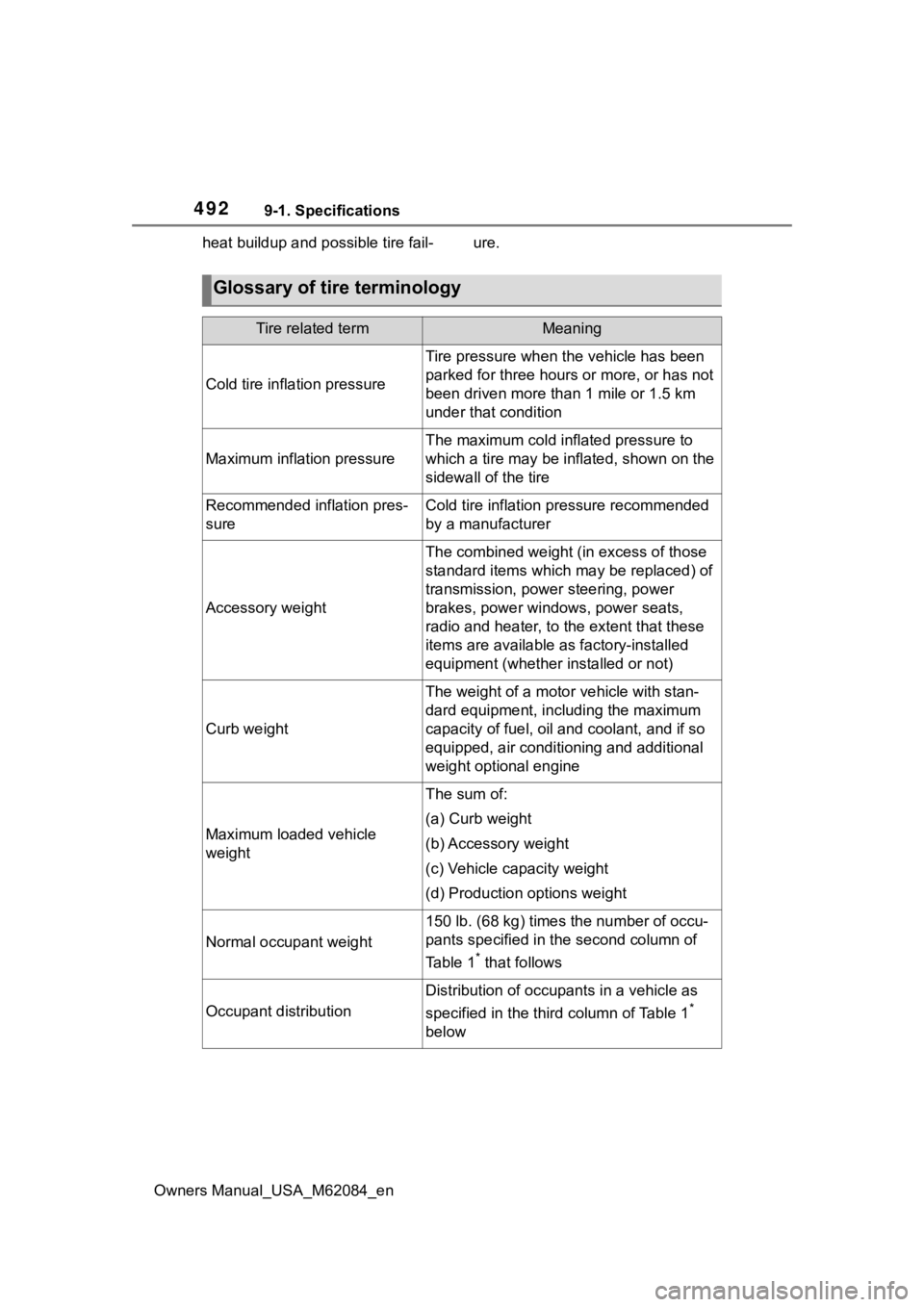
Owners Manual_USA_M62084_enheat buildup and possible tire fail- ure.
Glossary of tire terminology
Tire related termMeaning
Cold tire inflation pressure
Tire pressure when the vehicle has been
parked for three hours or more, or has not
been driven more than
1 mile or 1.5 km
under that condition
Maximum inflation pressure
The maximum cold inf lated pressure to
which a tire may be inflated, shown on the
sidewall of the tire
Recommended inflation pres-
sureCold tire inflation pressure recommended
by a manufacturer
Accessory weight
The combined weight (in excess of those
standard items which may be replaced) of
transmission, power steering, power
brakes, power windows, power seats,
radio and heater, to the extent that these
items are available as factory-installed
equipment (whether installed or not)
Curb weight
The weight of a moto r vehicle with stan-
dard equipment, including the maximum
capacity of fuel, oil and coolant, and if so
equipped, air conditioning and additional
weight optional engine
Maximum loaded vehicle
weight
The sum of:
(a) Curb weight
(b) Accessory weight
(c) Vehicle capacity weight
(d) Production options weight
Normal occupant weight
150 lb. (68 kg) times the number of occu-
pants specified in the second column of
Ta b l e 1
* that follows
Occupant distribution
Distribution of occupants in a vehicle as
specified in the third column of Table 1
*
below