2022 TOYOTA MIRAI door lock
[x] Cancel search: door lockPage 85 of 556
852-1. Fuel cell vehicle
Owners Manual_USA_M62084_en
2
Fuel cell system
WARNING
●The hydrogen tanks, fuel cell
stack, hydrogen pipelines, and
connecting components are
filled with hydrogen gas. Do not
remove or disassemble these
parts. Doing so can cause a
hydrogen gas leak, resulting in
fire or explosion of the vehicle,
which may result in death or
serious injury.
■When hydrogen gas leak or
other malfunctio n is detected
●If a large amount of hydrogen
gas leaking is noticed, turn off
the power switch, exit the vehi-
cle, and stay far away from it.
Display warning signs and keep
sources of fire away from the
vehicle. If possible, get assis-
tance. When the above is done,
immediately contact your Toyota
dealer.
●If you notice gas leaking or any
other malfunction, immediately
stop the vehicle in a safe and
well-ventilated place, exit the
vehicle, and stay far away from
it.
●If a warning message is dis-
played in the multi-information
display, immediately stop the
vehicle in a safe, well-ventilated
outdoor place.
■Tailpipe
●Do not directly touch the water
or steam coming out of the tail-
pipe. Doing so may cause low-
temperature burns.
●The fuel cell vehicle generates
water during power generation.
The generated water dis-
charged from the tailpipe is not
suitable for drinking. Never
drink the water coming out of
the tailpipe.
●You may notice a strange odor
from the tailpipe for a while after
the purchase of a new vehicle
or after an extended period of
non-use, but this is not a mal-
function. Also, the odor is harm-
less but it may be unpleasant,
so do not breathe in the
exhaust.
■High-voltage and high-tem-
perature precautions
This vehicle is equipped with a
high-voltage system. Follow the
instructions below as high-volt-
ages can cause severe burns and
electric shock that may result in
death or serious injury.
●Never touch, disassemble,
remove, or replace the high-
voltage parts, cables (orange),
or connectors.
●The components inside the fuel
cell unit compartment will
become hot during operation.
Be careful of both the high-volt-
age and high-temperature, and
always obey the warning labels
on the vehicle.
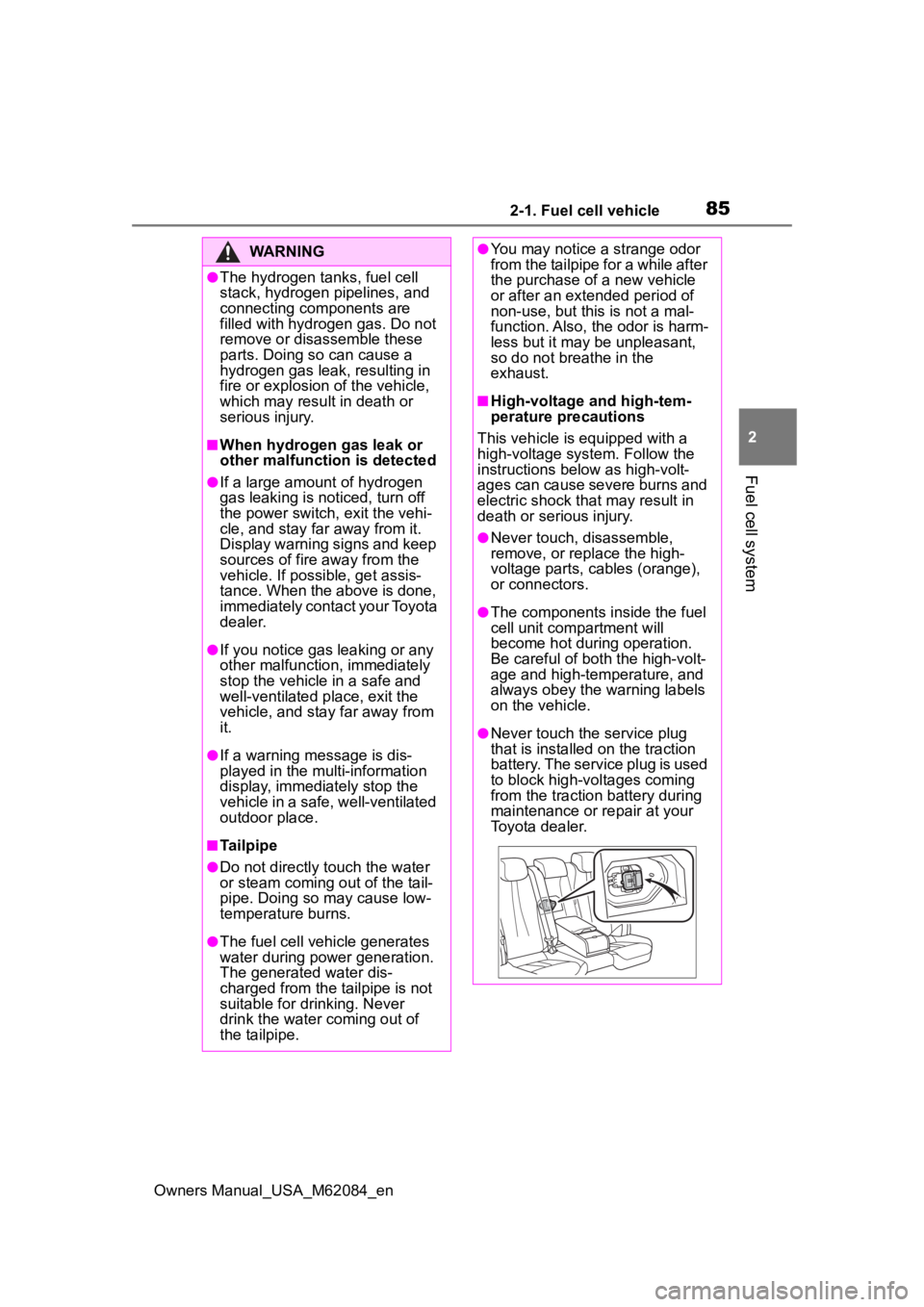
●Never touch the service plug
that is installed on the traction
battery. The service plug is used
to block high-voltages coming
from the traction battery during
maintenance or repair at your
Toyota dealer.
Page 117 of 556
117
Owners Manual_USA_M62084_en
4
4
Before driving
Before driving
4-1. Key informationKeys ............................ 118
4-2. Opening, closing and locking the doors and
trunk
Doors .......................... 121
Trunk ........................... 126
Smart key system ....... 130
4-3. Adjusting the seats Front seats .................. 135
Driving position memory .................................. 136
Head restraints............ 139
4-4. Adjusting the steering wheel and mirrors
Steering wheel ............ 141
Inside rear view mirror 143
Digital Rearview Mirror 144
Outside rear view mirrors .................................. 154
4-5. Opening, closing the win- dows
Power windows ........... 156
Page 118 of 556
1184-1. Key information
Owners Manual_USA_M62084_en
4-1.Key information
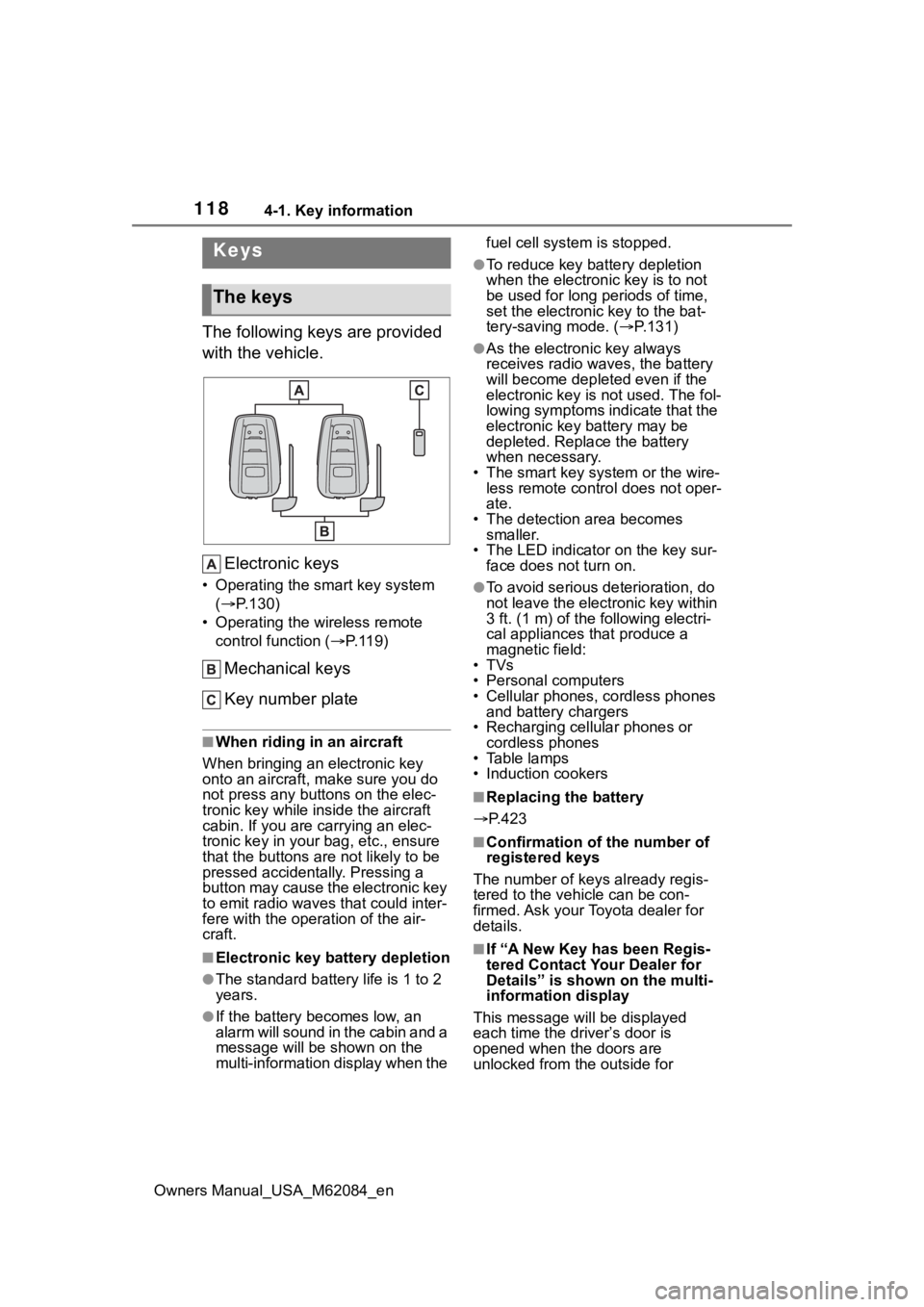
The following keys are provided
with the vehicle.Electronic keys
• Operating the smart key system ( P.130)
• Operating the wireless remote control function ( P. 1 1 9 )
Mechanical keys
Key number plate
■When riding in an aircraft
When bringing an electronic key
onto an aircraft, make sure you do
not press any buttons on the elec-
tronic key while inside the aircraft
cabin. If you are carrying an elec-
tronic key in your bag, etc., ensure
that the buttons are not likely to be
pressed accidentally. Pressing a
button may cause the electronic key
to emit radio waves that could inter-
fere with the oper ation of the air-
craft.
■Electronic key battery depletion
●The standard battery life is 1 to 2
years.
●If the battery becomes low, an
alarm will sound in the cabin and a
message will be s hown on the
multi-information display when the fuel cell system is stopped.
●To reduce key battery depletion
when the electronic key is to not
be used for long periods of time,
set the electronic key to the bat-
tery-saving mode. (
P.131)
●As the electronic key always
receives radio waves, the battery
will become depleted even if the
electronic key is not used. The fol-
lowing symptoms indicate that the
electronic key battery may be
depleted. Replace the battery
when necessary.
• The smart key system or the wire- less remote contro l does not oper-
ate.
• The detection area becomes smaller.
• The LED indicator on the key sur- face does not turn on.
●To avoid serious deterioration, do
not leave the electronic key within
3 ft. (1 m) of the following electri-
cal appliances that produce a
magnetic field:
•TVs
• Personal computers
• Cellular phones, cordless phones and battery chargers
• Recharging cellular phones or cordless phones
• Table lamps
• Induction cookers
■Replacing the battery
P.423
■Confirmation of the number of
registered keys
The number of keys already regis-
tered to the vehi cle can be con-
firmed. Ask your Toyota dealer for
details.
■If “A New Key has been Regis-
tered Contact Your Dealer for
Details” is shown on the multi-
information display
This message will be displayed
each time the driver’s door is
opened when the doors are
unlocked from the outside for
Keys
The keys
Page 119 of 556
1194-1. Key information
Owners Manual_USA_M62084_en
4
Before driving
approximately 10 days after a new
electronic key has been registered.
If this message is displayed but you
have not had a new electronic key
registered, ask your Toyota dealer to
check if an unknow n electronic key
(other than those in your posses-
sion) has been registered.
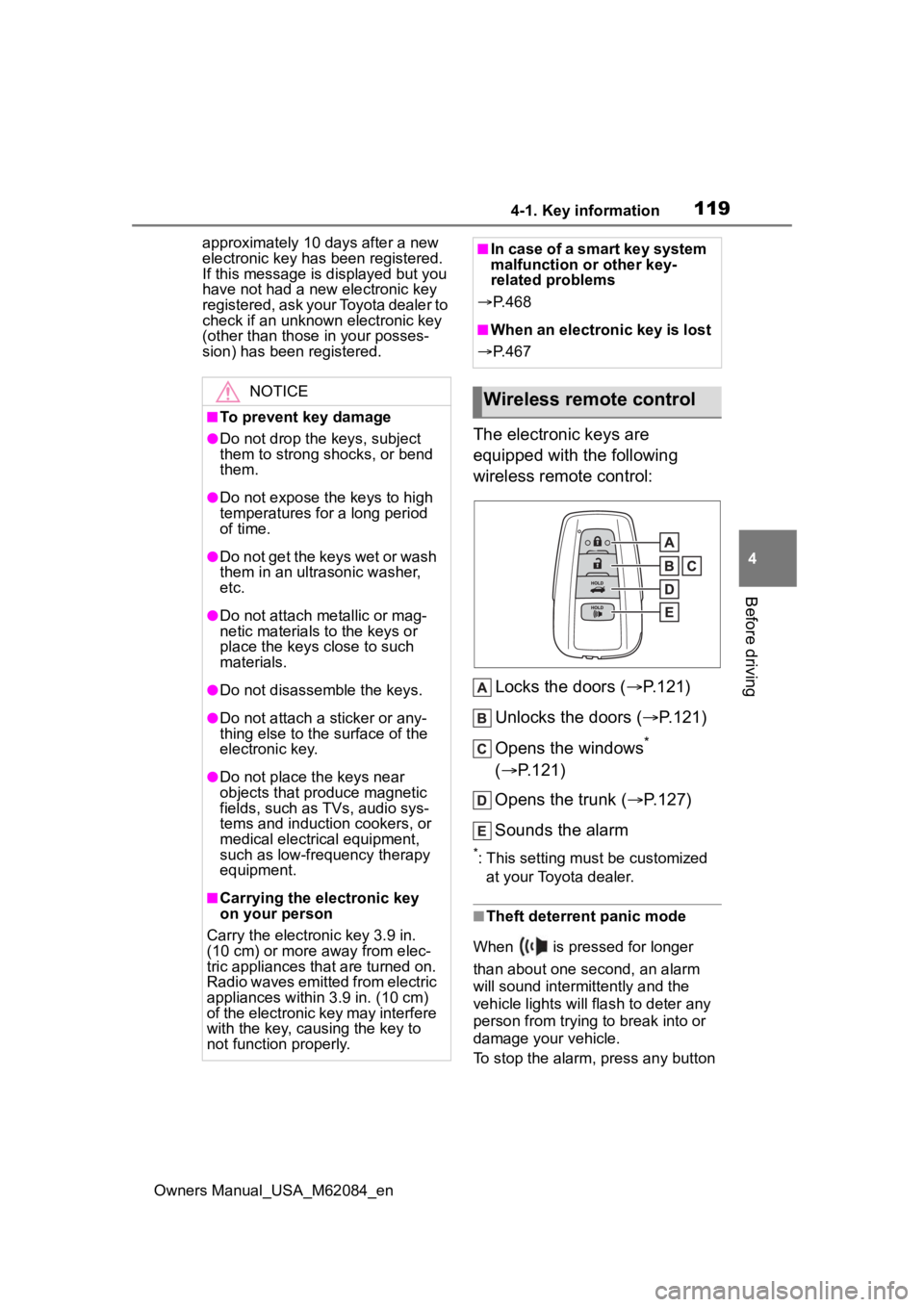
The electronic keys are
equipped with the following
wireless remote control:
Locks the doors ( P.121)
Unlocks the doors ( P.121)
Opens the windows
*
( P.121)
Opens the trunk ( P.127)
Sounds the alarm
*: This setting must be customized at your Toyota dealer.
■Theft deterrent panic mode
When is pressed for longer
than about one second, an alarm
will sound intermittently and the
vehicle lights will flash to deter any
person from trying to break into or
damage your vehicle.
To stop the alarm, press any button
NOTICE
■To prevent key damage
●Do not drop the keys, subject
them to strong shocks, or bend
them.
●Do not expose the keys to high
temperatures for a long period
of time.
●Do not get the keys wet or wash
them in an ultrasonic washer,
etc.
●Do not attach metallic or mag-
netic materials to the keys or
place the keys close to such
materials.
●Do not disassemble the keys.
●Do not attach a sticker or any-
thing else to the surface of the
electronic key.
●Do not place th e keys near
objects that produce magnetic
fields, such as TVs, audio sys-
tems and induction cookers, or
medical electrical equipment,
such as low-frequency therapy
equipment.
■Carrying the electronic key
on your person
Carry the electronic key 3.9 in.
(10 cm) or more away from elec-
tric appliances that are turned on.
Radio waves emitted from electric
appliances within 3.9 in. (10 cm)
of the electronic key may interfere
with the key, causing the key to
not function properly.
■In case of a smart key system
malfunction or other key-
related problems
P. 4 6 8
■When an electronic key is lost
P. 4 6 7
Wireless remote control
Page 121 of 556

1214-2. Opening, closing and locking the doors and trunk
Owners Manual_USA_M62084_en
4
Before driving
4-2.Opening, closing and locking the doors and trunk
■Smart key system (entry
function)
Carry the electronic key to
enable this function.
1 Grip the driver’s door handle
to unlock the door. Holding
the driver’s door handle for
approximately 2 seconds
unlocks all the doors. Grip
any passenger door handle
to unlock all the doors.
*
Make sure to touch the sensor on
the back of the handle.
The doors cannot be unlocked for 3
seconds after the doors are locked.
2Touch the lock sensor (inden-
tation on the surface of the
door handle) to lock all the
doors.
Check that the door is securely
locked.
*: The door unlock settings can be
changed.
■Wireless remote control
1 Locks all the doors
Check that the d oor is securely
locked.
2 Unlocks all the doors
Pressing the button unlocks the
driver’s door. Pressing the button
again within 5 seconds unlocks the
other door.
Press and hold to open the win-
dows.
*
*
: This setting must be customized at your Toyota dealer.
■Switching the door unlock func-
tion
It is possible to set which doors the
entry function unlocks using the
wireless remote control.
1 Turn the power switch off.
2 When the indicator light on the
key surface is not on, press and
hold , or for
approximately 5 seconds while
pressing and holding .
The setting changes each time an
operation is per formed, as shown
below. (When changing the setting
continuously, release the buttons,
wait for at least 5 seconds, and
repeat step 2 .)
Doors
Unlocking and locking the
doors from the outside
Page 122 of 556

1224-2. Opening, closing and locking the doors and trunk
Owners Manual_USA_M62084_enTo prevent unintended triggering of
the alarm, unlock
the doors using
the wireless remote control and
open and close a door once after
the settings have been changed. (If
a door is not opened within 60 sec-
onds after is pressed, the doors
will be locked again and the alarm
will automatically be set.)
In a case that the alarm is triggered,
immediately stop the alarm. ( P. 7 0 )
■Impact detection door lock
release system
In the event that t he vehicle is sub-
ject to a strong impact, all the doors
are unlocked. Depending on the
force of the impact or the type of
accident, however, the system may
not operate.
■Operation signals
A buzzer sounds and the emer-
gency flashers flash to indicate that
the doors have been locked/unlocked. (Locked: once;
Unlocked: twice)
A buzzer sounds to indicate that the
windows are operating.
■Security feature
If a door is not opened within
approximately 60 s econds after the
vehicle is unlocked, the security fea-
ture automatically locks the vehicle
again.
■When the doors cannot be
locked by the lock sensor on
the surface of the door handle
When the doors cannot be locked
even if the lock se nsor on the sur-
face of the door handle is touched
by a finger, touch the lock sensor
with the palm.
If you are wearing gloves, remove
them.
■Open door warning buzzer
If an attempt to lock the doors is
made when a door is not fully
closed, a buzzer sounds continu-
ously for 5 seconds. Fully close the
door to stop the buzzer, and lock the
vehicle once more.
■Setting the alarm
Locking the doors will set the alarm
system. ( P. 7 0 )
■Conditions affecting the opera-
tion of the smart key system or
wireless remote control
P.132
■If the smart key system or the
wireless remote control does
not operate properly
Use the mechanical key to lock and
unlock the doors. ( P.469)
Multi-informa-
tion display/BeepUnlocking func- tion
Exterior: Beeps 3 times
Interior: Pings once
Holding the
driver’s door
handle unlocks
only the driver’s
door.
Holding any of
the passenger
door handles
unlocks all the
doors.
Exterior: Beeps twice
Interior: Pings once
Holding a door
handle unlocks
all the doors.
Page 123 of 556
1234-2. Opening, closing and locking the doors and trunk
Owners Manual_USA_M62084_en
4
Before driving
Replace the key battery with a new
one if it is depleted. ( P.423)
■If the 12-volt battery is dis-
charged
The doors cannot be locked and
unlocked using the smart key sys-
tem or wireless remote control. Lock
or unlock the doors using the
mechanical key. ( P.469)
■Rear seat reminder function
●In order to remind you not to for-
get luggage, etc., in the rear seat,
when the power switch is turned to
OFF after any of the following con-
ditions are met, a buzzer will
sound and a message will be dis-
played on the multi-information
display for approximately 6 sec-
onds.
• The fuel cell system is started within 10 minutes after opening
and closing a rear door.
• A rear door has been opened and closed after the fuel cell system
was started.
However, if a rear door is opened
and then closed within approxi-
mately 2 seconds , the rear seat
reminder function may not operate.
●The rear seat reminder function
determines that luggage, etc., has
been placed in a rear seat based
on opening and closing of a rear
door. Therefore, depending on the
situation, the rear seat reminder
function may not operate and you
may still forget luggage, etc., in
the rear seat, or it may operate
unnecessarily.
●The rear seat reminder function
can be enabled/disabled.
( P.498)
■Customization
Some functions can be customized.
( P.498)
WARNING
■To prevent an accident
Observe the following precautions
while driving the vehicle.
Failure to do so may result in a
door opening and an occupant
falling out of the vehi cle, resulting
in death or serious injury.
●Ensure that all doors are prop-
erly closed and locked.
●Do not pull the inside handle of
the doors while driving.
Be especially careful for the front
doors, as the doors may be
opened even if the inside lock but-
tons are in locked position.
●Set the rear door child-protector
locks when children are seated
in the rear seats.
■When opening or closing a
door
Check the surroundings of the
vehicle such as wh ether the vehi-
cle is on an incline, whether there
is enough space for a door to
open and whether a strong wind
is blowing. When opening or clos-
ing the door, hold the door handle
tightly to prepare for any unpre-
dictable movement.
Page 124 of 556
1244-2. Opening, closing and locking the doors and trunk
Owners Manual_USA_M62084_en
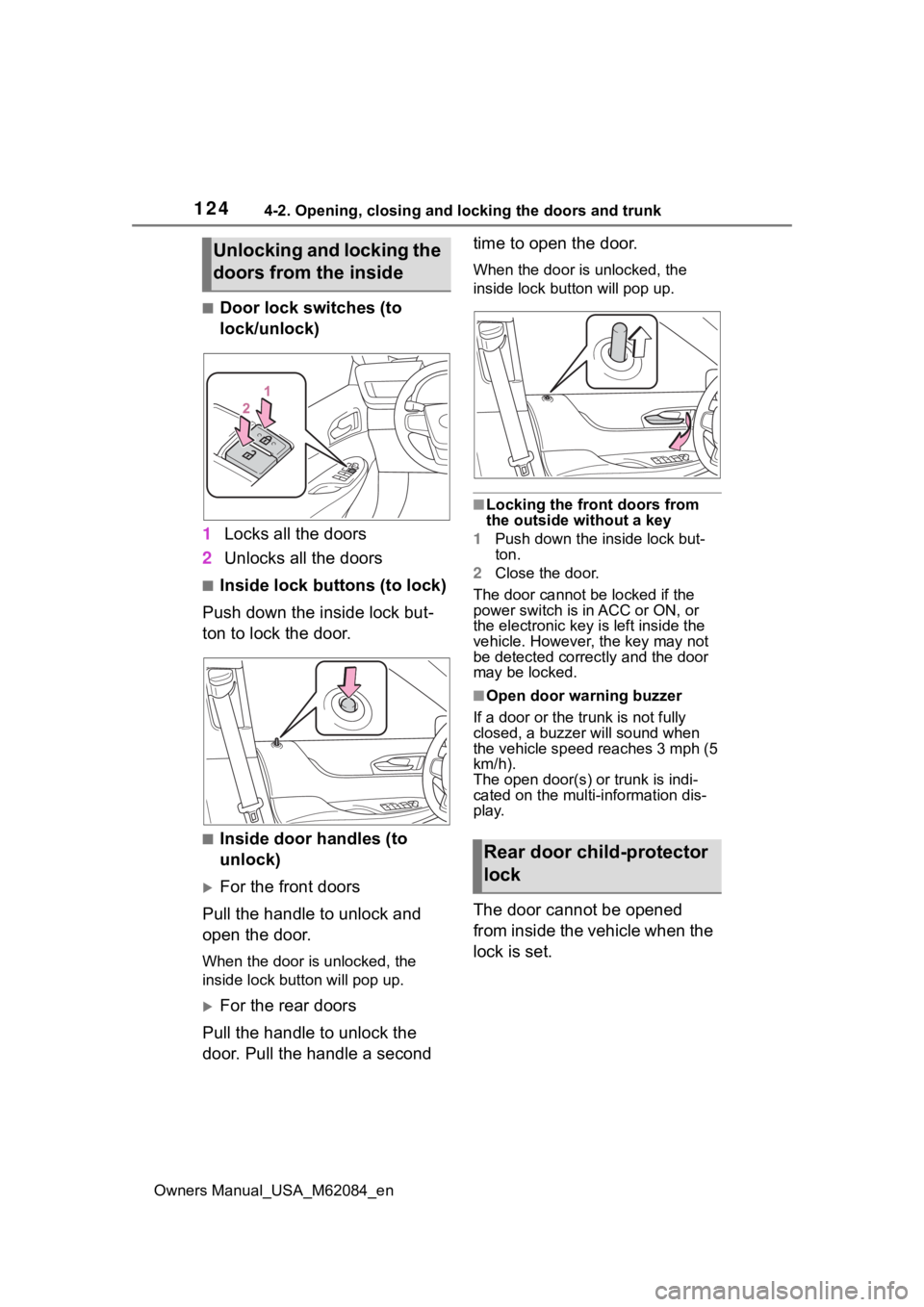
■Door lock switches (to
lock/unlock)
1 Locks all the doors
2 Unlocks all the doors
■Inside lock buttons (to lock)
Push down the inside lock but-
ton to lock the door.
■Inside door handles (to
unlock)
For the front doors
Pull the handle to unlock and
open the door.
When the door is unlocked, the
inside lock button will pop up.
For the rear doors
Pull the handle to unlock the
door. Pull the handle a second time to open the door.
When the door is unlocked, the
inside lock butt
on will pop up.
■Locking the front doors from
the outside without a key
1 Push down the inside lock but-
ton.
2 Close the door.
The door cannot be locked if the
power switch is in ACC or ON, or
the electronic key is left inside the
vehicle. However, the key may not
be detected correctly and the door
may be locked.
■Open door warning buzzer
If a door or the tr unk is not fully
closed, a buzzer will sound when
the vehicle speed reaches 3 mph (5
km/h).
The open door(s) or trunk is indi-
cated on the multi-information dis-
play.
The door cannot be opened
from inside the vehicle when the
lock is set.
Unlocking and locking the
doors from the inside
Rear door child-protector
lock