891-2. Child safety
1
HILUX_OM_OM0K513E_(EE)
For safety and security
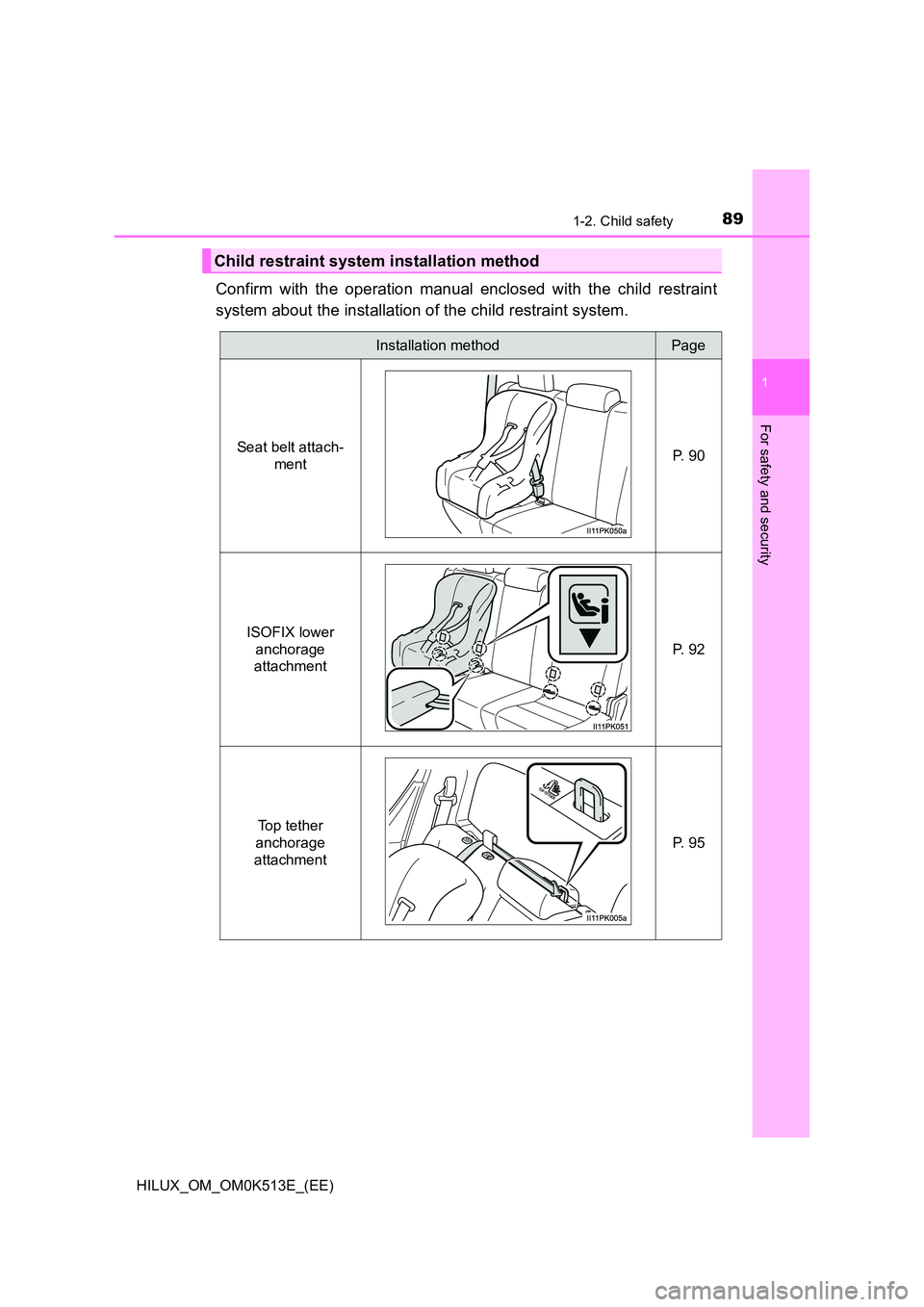
Confirm with the operation manual enclosed with the child restraint
system about the installation of the child restraint system.
Child restraint system installation method
Installation methodPage
Seat belt attach-
ment P. 9 0
ISOFIX lower
anchorage
attachment
P. 9 2
Top tether
anchorage
attachment
P. 9 5
1362. Instrument cluster
HILUX_OM_OM0K513E_(EE)
Warning message display
Select to display warning messages and measures to be taken if a
malfunction is detected. ( P. 575)
Settings display
Select to change the meter display settings. (P. 647)
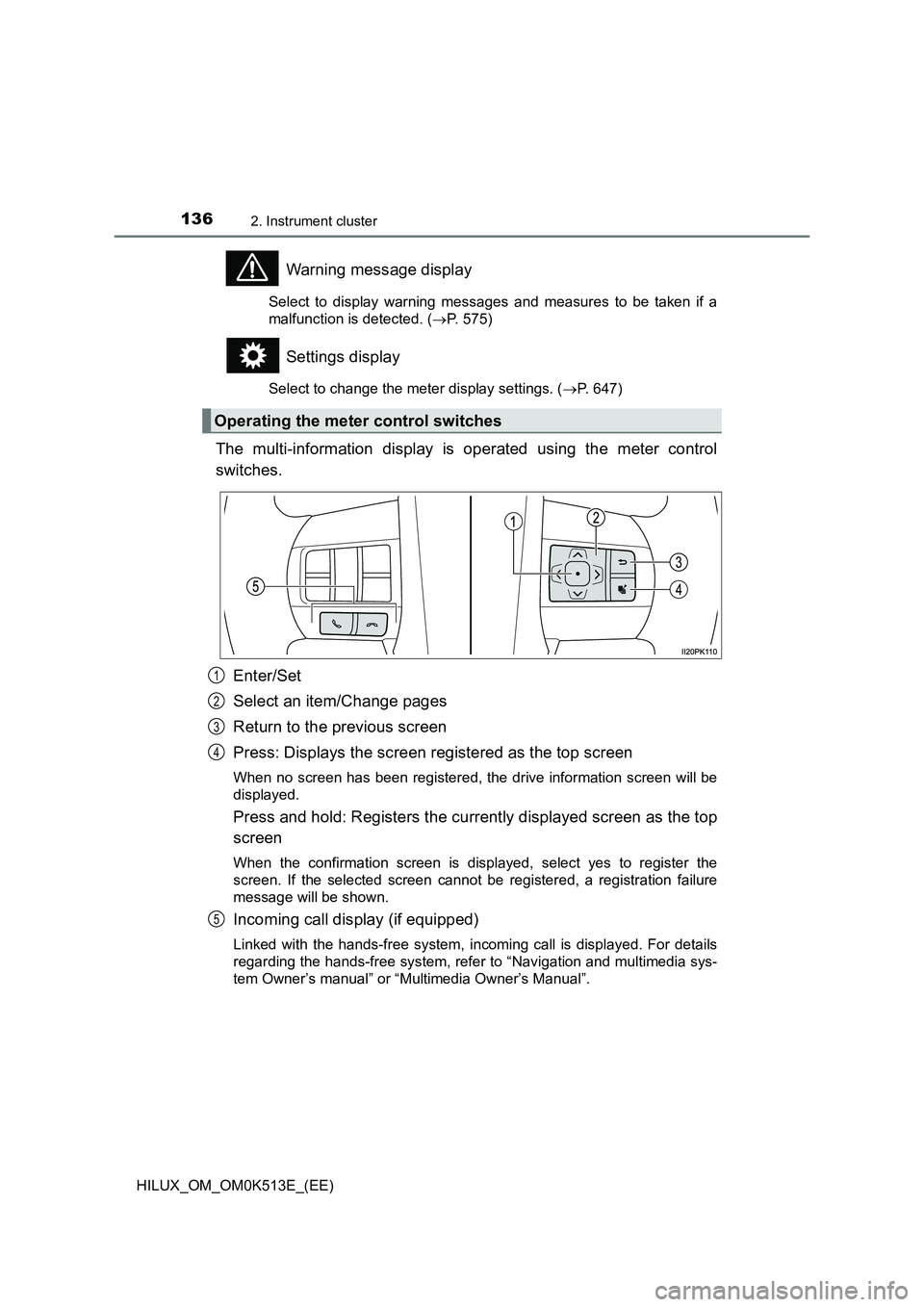
The multi-information display is operated using the meter control
switches.
Enter/Set
Select an item/Change pages
Return to the previous screen
Press: Displays the screen registered as the top screen
When no screen has been registered, the drive information screen will be
displayed.
Press and hold: Registers the currently displayed screen as the top
screen
When the confirmation screen is displayed, select yes to register the
screen. If the selected screen cannot be registered, a registration failure
message will be shown.
Incoming call display (if equipped)
Linked with the hands-free system, incoming call is displayed. For details
regarding the hands-free system, refer to “Navigation and multimedia sys-
tem Owner’s manual” or “Multimedia Owner’s Manual”.
Operating the meter control switches
1
2
3
4
5
1984-1. Before driving
HILUX_OM_OM0K513E_(EE)
WARNING
Observe the following precautions.
Failure to do so may result in death or serious injury.
Q When driving the vehicle
O Use engine braking (downshift) to maintain a safe speed when driving
down a steep hill.
Using the brakes continuously may cause the brakes to overheat and lose
effectiveness. ( P. 2 3 2 )
O Do not adjust the positions of the steering wheel, the seat, or the inside or
outside rear view mirrors while driving.
Doing so may result in a loss of vehicle control.
O Always check that all passengers’ arms, heads or other parts of their body
are not outside the vehicle.
O On vehicles with manual transmission, observe the following to prevent
the clutch from being damaged.
• Do not operate the clutch halfway for a long period of time unless it is
necessary.
• Do not operate the clutch half or partial engaged to control the vehicle
speed, such as to drive the vehicle at a low speed, to hold the vehicle
on a slope, etc.
• Do not depress the brake pedal during operating the clutch half or par-
tial engaged.
Doing so could not only speed up the clutch wear, but also damage the
clutch or even cause a fatal accident such as vehicle fire.
Q When driving on slippery road surfaces
O Sudden braking, acceleration and steering may cause tire slippage and
reduce your ability to control the vehicle.
O Sudden acceleration, engine braking due to shifting, or changes in engine
speed could cause the vehicle to skid.
O After driving through a puddle, lightly depress the brake pedal to make
sure that the brakes are functioning properly. Wet brake pads may prevent
the brakes from functioning properly. If the brakes on only one side are wet
and not functioning properly, steering control may be affected.