2022 TOYOTA HIGHLANDER warning lights
[x] Cancel search: warning lightsPage 249 of 568

2494-5. Using the driving support systems
4
Driving
WARNING
●The vehicle is driven in an area
without white (yellow) lines,
such as in front of a tollgate or
checkpoint, or at an intersec-
tion, etc.
●The white (yellow) lines are
cracked, “Botts’ dots”, “Raised
pavement marker” or stones are
present.
●The white (yellow) lines cannot
be seen or are difficult to see
due to sand, etc.
●The vehicle is driven on a road
surface that is wet due to rain,
puddles, etc.
●The traffic li nes are yellow
(which may be more difficult to
recognize than lines that are
white).
●The white (yellow) lines cross
over a curb, etc.
●The vehicle is driven on a bright
surface, such as concrete.
●If the edge of the road is not
clear or straight.
●The vehicle is driven on a sur-
face that is bright due to
reflected light, etc.
●The vehicle is driven in an area
where the brightness changes
suddenly, such as at the
entrances and exits of tunnels,
etc.
●Light from the h eadlights of an
oncoming vehicle, the sun, etc.
enters the camera.
●The vehicle is driven on a slope.
●The vehicle is driven on a road
which tilts left or right, or a wind-
ing road.
●The vehicle is driven on an
unpaved or rough road.
●The traffic lane is excessively
narrow or wide.
●The vehicle is extremely tilted
due to carrying heavy luggage
or having improper tire pres-
sure.
●The distance to the preceding
vehicle is extremely short.
●The vehicle is moving up and
down a large amount due to
road conditions during driving
(poor roads or road seams).
●When driving in a tunnel or at
night with the headlights off or
when a headlight is dim due to
its lens being dir ty or it being
misaligned.
●The vehicle is struck by a cross-
wind.
●The vehicle is affected by wind
from a vehicle driven in a
nearby lane.
●The vehicle has just changed
lanes or crossed an intersec-
tion.
●Tires which differ by structure,
manufacturer, brand or tread
pattern are used.
●When tires of a size other than
specified are installed.
●Snow tires, etc . are equipped.
●The vehicle is b eing driven at
extremely high speeds.
Page 260 of 568

2604-5. Using the driving support systems
This mode employs a radar to detect the presence of vehicles up to
approximately 328 ft. (100 m) ahead, determines the current vehi-
cle-to-vehicle following distance, and operates to maintain a s uitable
following distance from the vehicle ahead. The desired vehi-
cle-to-vehicle distance can also be set by operating the vehi-
cle-to-vehicle distance switch.
When driving on downhill slopes, t he vehicle-to-vehicle distance may
become shorter.
Example of constant speed cruising
When there are no vehicles ahead
The vehicle travels at the speed set by the driver.
Example of deceleration crui sing and follow-up cruising
When a preceding vehicle driving slower than the set speed
appears
When a vehicle is detected runni ng ahead of you, the system automatically
decelerates your vehicle. When a greater reduction in vehicle s peed is nec-
essary, the system applies the brakes (the stop lights will come on at this
time). The system will respond to changes in the speed of the vehicle
ahead in order to maintain the vehicle-to-vehicle distance set by the driver.
Approach warning warns you when the system cannot decelerate suffi-
ciently to prevent your vehicle from closing in on the vehicle ahead.
When the vehicle ahead of you st ops, your vehicle will also stop (vehicle is
stopped by system control). Afte r the vehicle ahead starts off, pressing the
“+RES” switch or depressing the accelerator pedal (start-off operation) will
resume follow-up cruising. If the start-off operation is not pe rformed, system
control continues to keep your vehicle stopped.
Driving in vehicle-to-vehicle distance control mode
Page 286 of 568

2864-5. Using the driving support systems
■The system can be operated
when
●The engine switch is in ON.
●Intuitive parking assist function is
on.
●The vehicle speed is less than
about 6 mph (10 km/h).
●A shift lever other than P.
■If “Parking Assist Unavailable”
is displayed on the multi-infor-
mation display
●Water may be continuously flow-
ing over the sensor surface, such
as in a heavy rain. When the sys-
tem determines that it is normal,
the system will return to normal.
WARNING
■Cautions regarding the use of
the system
There is a limit to the degree of
recognition accuracy and control
performance that this system can
provide, do not ov erly rely on this
system. The driver is always
responsible for paying attention to
the vehicle’ surroundings and
driving safely.
■To ensure the system can
operate properly
Observe the following precau-
tions.
Failing to do so may result in the
vehicle being unable to be driven
safely and possibly cause an acci-
dent.
●Do not damage the sensors,
and always keep them clean.
●Do not attach a sticker or install
an electronic component, such
as a backlit license plate (espe-
cially fluorescent type), fog
lights, fender pole or wireless
antenna near a radar sensor.
●Do not subject the surrounding
area of the sensor to a strong
impact. If subjected to an
impact, have the vehicle
inspected by your Toyota
dealer. If the fr ont or rear
bumper needs to be
emoved/installed or replaced,
contact your Toyota dealer.
●Do not modify, disassemble or
paint the sensors.
●Do not attach a license plate
cover.
●Keep your tires properly
inflated.
■When to disable the function
In the following situations, disable
the function as it may operate
even though there is no possibility
of a collision.
●Failing to observe the warnings
above.
●A non-genuine Toyota suspen-
sion (lowered suspension, etc.)
is installed.
■Notes when washing the vehi-
cle
Do not apply intensive bursts of
water or steam to the sensor
area.
Doing so may result in the sensor
malfunctioning.
●When using a high pressure
washer to wash the vehicle, do
not spray the sensors directly,
as doing so may cause a sensor
to malfunction.
●When using steam to clean the
vehicle, do not direct steam too
close to the sensors as doing so
may cause a sensor to malfunc-
tion.
Page 316 of 568

3164-5. Using the driving support systems
*: If equipped
Press the downhill assist control
switch.
The downhill assist control system
indicator will comes on and the sys-
tem will operate.
When the system is in operation,
the slip indicator will flash, and the
stop lights/high mounted stop lights
will be lit. A sound may also occur
during the operation. This does not
indicated a malfunction.
Press the downhill assist control
switch while the system is in
operation.
The downhill assist control system
indicator will flash as the system
gradually ceases operation, and will
turn off when the system is fully off.
Press the downhill assist control
switch while the downhill assist
control system indicator is flashing
to start the system again.
■Operating tips
The system will o perate when the
shift lever is in a position other than
P, however to make effective use of
the system it is recommended to
select a lower shift range.
■If the downhill assist control
system indicator flashes
●In the following situ ations, the indi-
cator flashes and the system will
not operate:
• The shift lever is in a position P.
• The vehicle speed exceeds approximately 18 mph (30 km/h).
• The brake system overheats.
●In the following situation, the indi-
cator flashes to alert the driver,
but the system will operate:
• The downhill assist control switch is turned off while the system is
operating.
The system will gradually ceases
Downhill assist con-
trol system*
The downhill assist control
system helps to prevent
excessive speed on steep
downhill slopes.
The system will operate
when the vehicle is traveling
under 18 mph (30 km/h).
WARNING
■When using downhill assist
control system
Do not rely overmuch on the
downhill assist control system.
This function does not extend the
vehicle’s performance limitations.
Always thoroughly check the road
conditions, and drive safely.
System operation
Turning off the system
Page 358 of 568
3585-2. Using the air conditioning system and defogger
*: If equipped
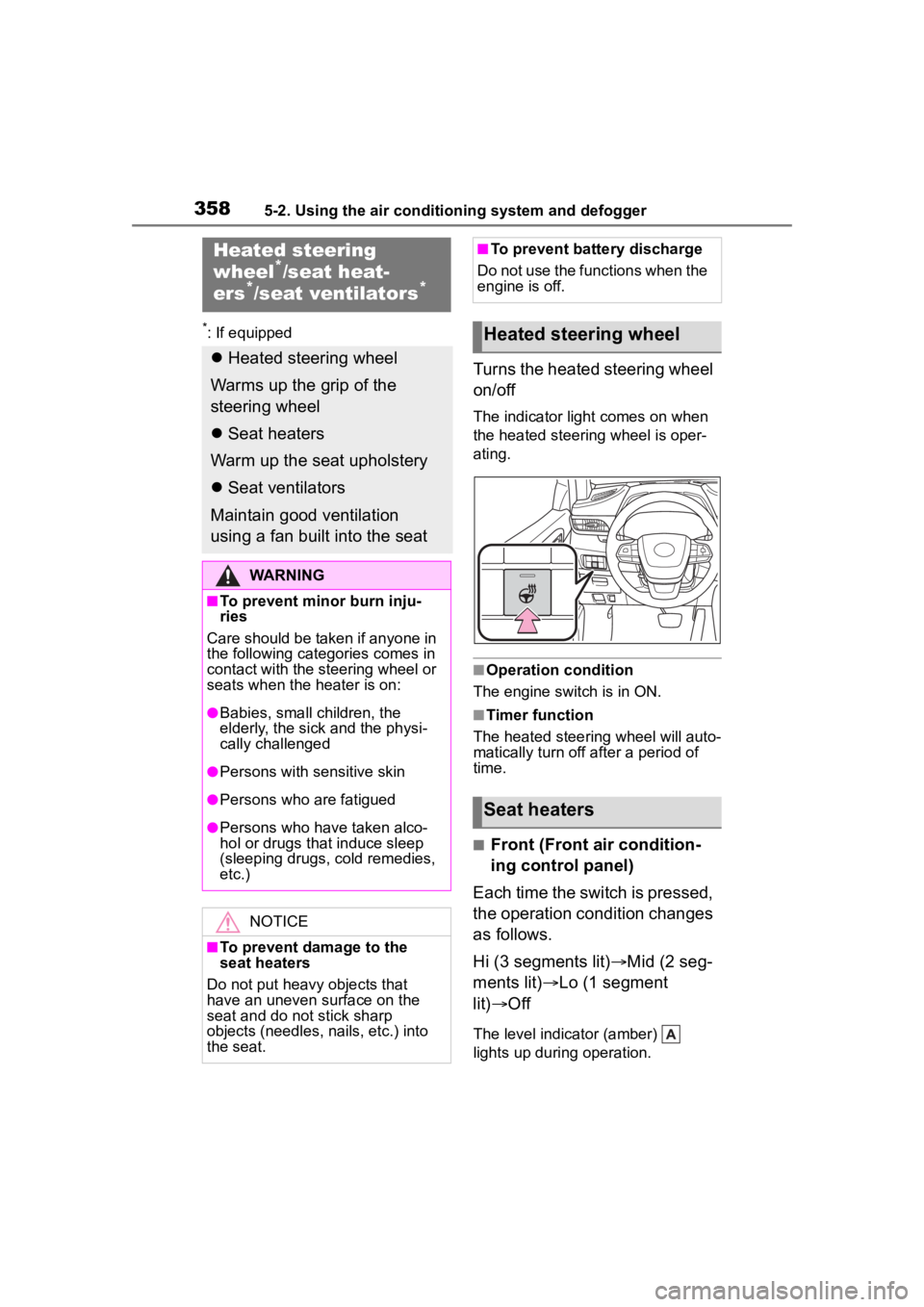
Turns the heated steering wheel
on/off
The indicator light comes on when
the heated steering wheel is oper-
ating.
■Operation condition
The engine switch is in ON.
■Timer function
The heated steering wheel will auto-
matically turn off after a period of
time.
■Front (Front air condition-
ing control panel)
Each time the switch is pressed,
the operation condition changes
as follows.
Hi (3 segments lit) Mid (2 seg-
ments lit) Lo (1 segment
lit) Off
The level indicator (amber)
lights up during operation.
Heated steering
wheel*/seat heat-
ers*/seat ventilators*
Heated steering wheel
Warms up the grip of the
steering wheel
Seat heaters
Warm up the seat upholstery
Seat ventilators
Maintain good ventilation
using a fan built into the seat
WARNING
■To prevent minor burn inju-
ries
Care should be taken if anyone in
the following categories comes in
contact with the steering wheel or
seats when the heater is on:
●Babies, small children, the
elderly, the sick and the physi-
cally challenged
●Persons with sensitive skin
●Persons who are fatigued
●Persons who have taken alco-
hol or drugs that induce sleep
(sleeping drugs, cold remedies,
etc.)
NOTICE
■To prevent damage to the
seat heaters
Do not put heavy objects that
have an uneven surface on the
seat and do not stick sharp
objects (needles, nails, etc.) into
the seat.
■To prevent battery discharge
Do not use the functions when the
engine is off.
Heated steering wheel
Seat heaters
Page 359 of 568
3595-2. Using the air conditioning system and defogger
5
Interior features
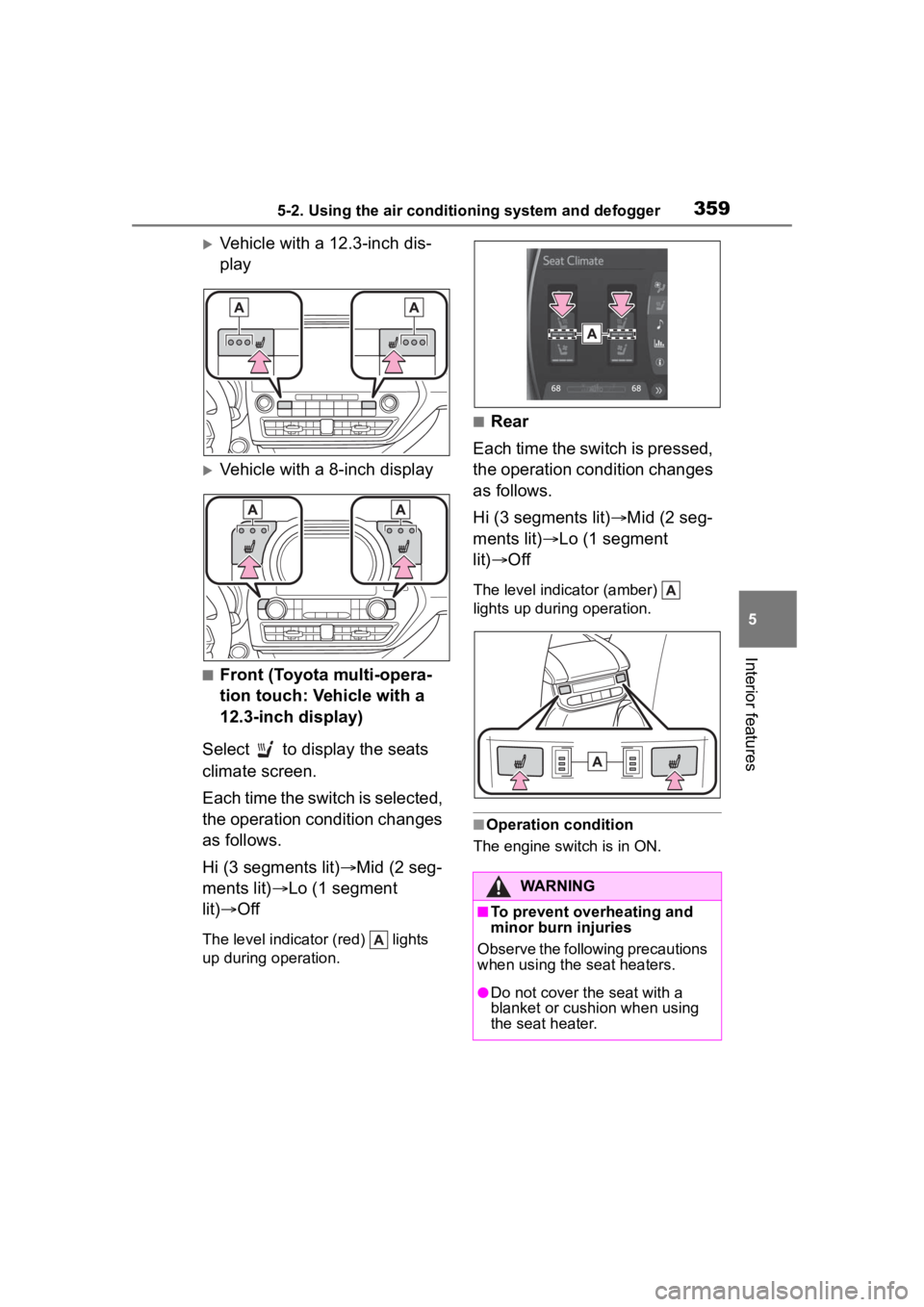
Vehicle with a 12.3-inch dis-
play
Vehicle with a 8-inch display
■Front (Toyota multi-opera-
tion touch: Vehicle with a
12.3-inch display)
Select to display the seats
climate screen.
Each time the switch is selected,
the operation condition changes
as follows.
Hi (3 segments lit) Mid (2 seg-
ments lit) Lo (1 segment
lit) Off
The level indicator (red) lights
up during operation.
■Rear
Each time the switch is pressed,
the operation condition changes
as follows.
Hi (3 segments lit) Mid (2 seg-
ments lit) Lo (1 segment
lit) Off
The level indicator (amber)
lights up during operation.
■Operation condition
The engine switch is in ON.
WARNING
■To prevent overheating and
minor burn injuries
Observe the following precautions
when using the seat heaters.
●Do not cover the seat with a
blanket or cushion when using
the seat heater.
Page 360 of 568
3605-2. Using the air conditioning system and defogger
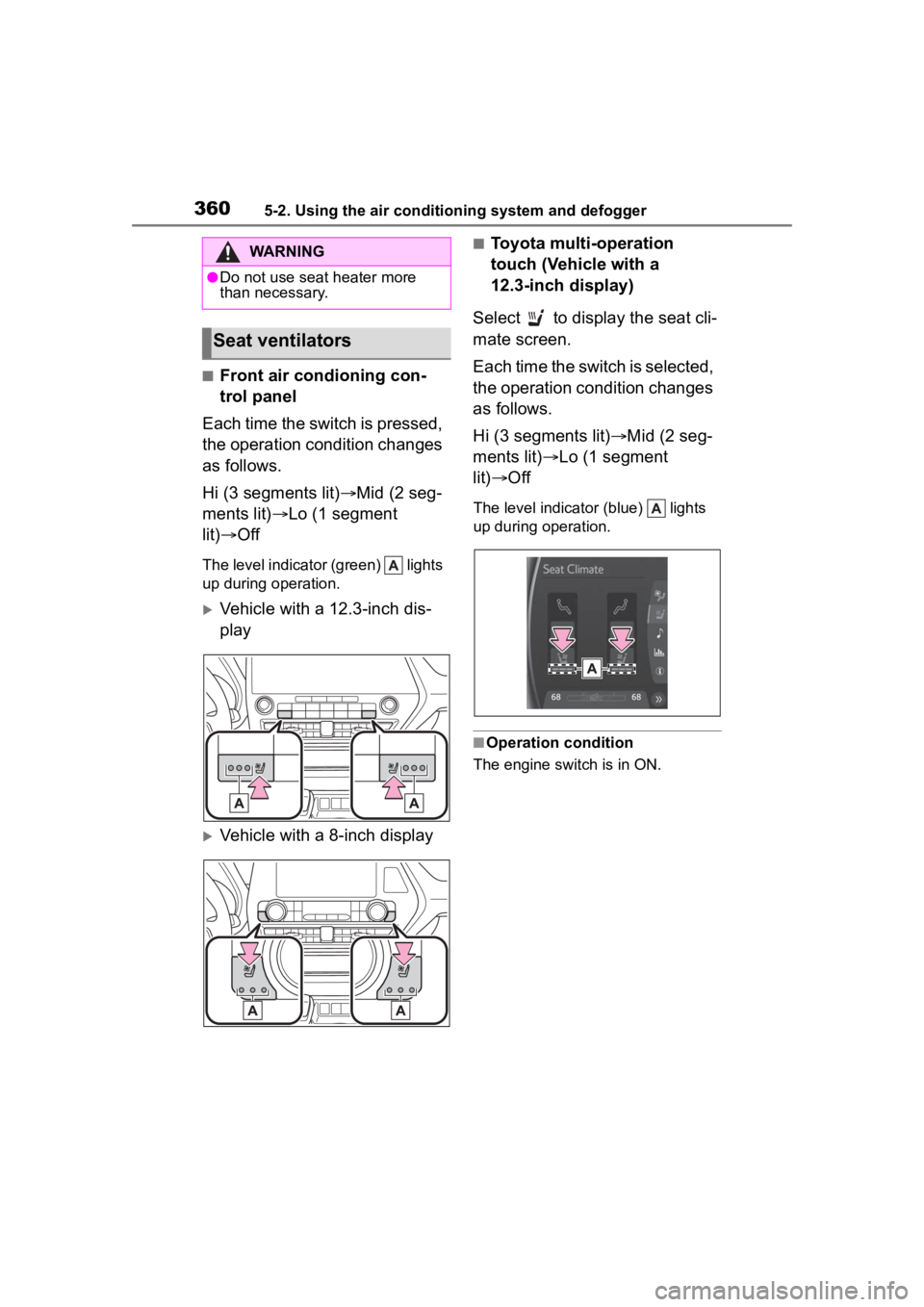
■Front air condioning con-
trol panel
Each time the switch is pressed,
the operation condition changes
as follows.
Hi (3 segments lit) Mid (2 seg-
ments lit) Lo (1 segment
lit) Off
The level indicator (green) lights
up during operation.
Vehicle with a 12.3-inch dis-
play
Vehicle with a 8-inch display
■Toyota multi-operation
touch (Vehicle with a
12.3-inch display)
Select to display the seat cli-
mate screen.
Each time the switch is selected,
the operation condition changes
as follows.
Hi (3 segments lit) Mid (2 seg-
ments lit) Lo (1 segment
lit) Off
The level indicator (blue) lights
up during operation.
■Operation condition
The engine switch is in ON.
WARNING
●Do not use seat heater more
than necessary.
Seat ventilators
Page 365 of 568
3655-4. Using the storage features
5
Interior features
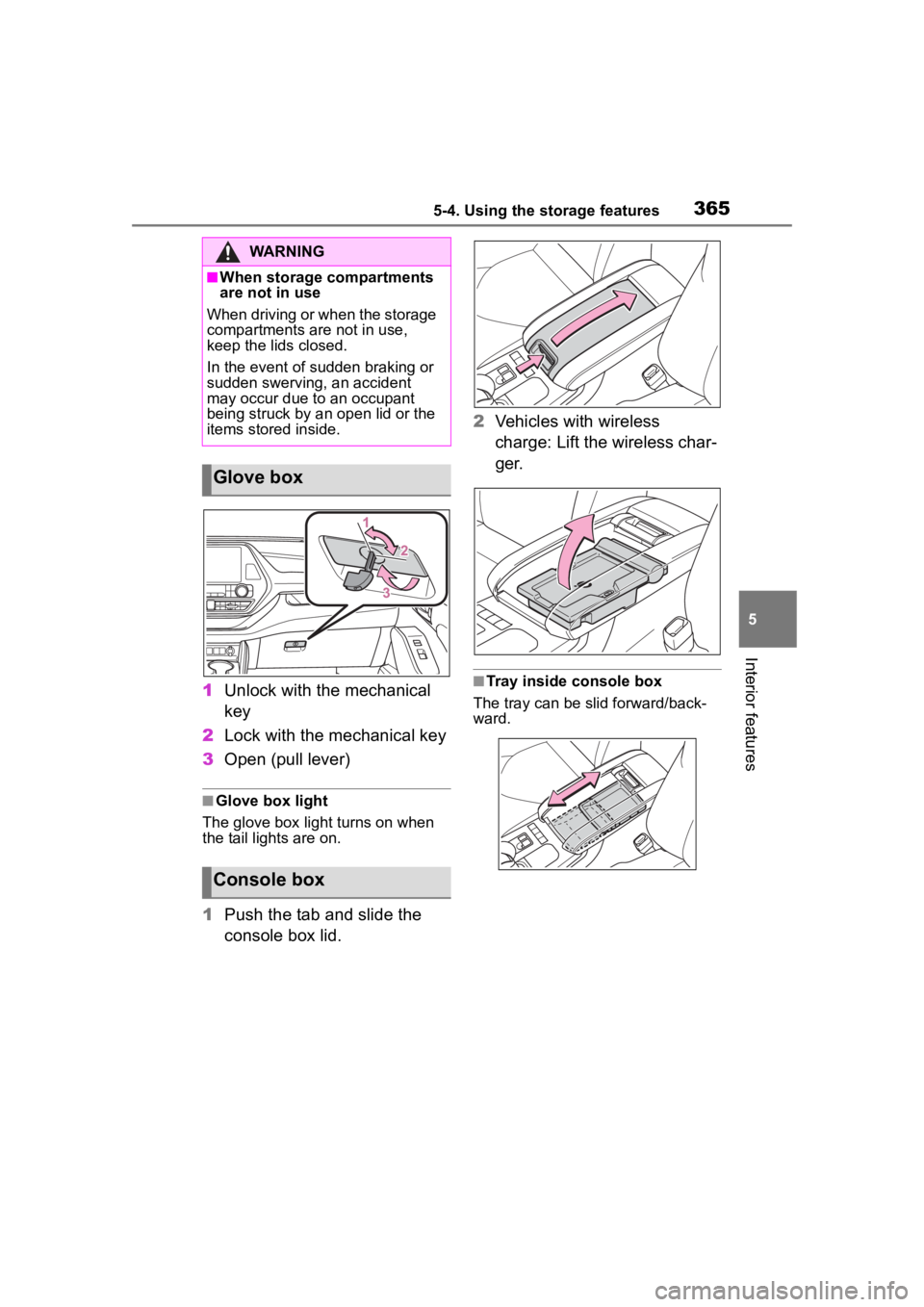
1Unlock with the mechanical
key
2 Lock with the mechanical key
3 Open (pull lever)
■Glove box light
The glove box light turns on when
the tail lights are on.
1 Push the tab and slide the
console box lid. 2
Vehicles with wireless
charge: Lift the wireless char-
ger.
■Tray inside console box
The tray can be slid forward/back-
ward.
WARNING
■When storage compartments
are not in use
When driving or when the storage
compartments are not in use,
keep the lids closed.
In the event of sudden braking or
sudden swerving, an accident
may occur due to an occupant
being struck by an open lid or the
items stored inside.
Glove box
Console box