2022 TOYOTA HIGHLANDER battery
[x] Cancel search: batteryPage 287 of 568

2874-5. Using the driving support systems
4
Driving
●Initialization may not have been
performed after a battery terminal
was disconnected and recon-
nected. Initialize the system.
( P.287) If this message contin-
ues to be displayed even after ini-
tialization, have the vehicle
inspected by you r Toyota dealer.
■If “Parking Assist Unavailable
Clean Parking Assist Sensor” is
displayed on the multi-informa-
tion display
A sensor may be covered with ice,
snow, dirt, etc. Remove the ice,
snow, dirt, etc., from the sensor to
return the syste m to normal.
Also, due to ice forming on a sensor
at low temperatures, a warning
message may be displayed or the
sensor may not be able to detect an
object. Once the ice melts, the sys-
tem will return to normal.
■If a battery terminal has been
disconnected and reconnected
The system needs to be initialized.
To initialize the system, drive the
vehicle straight ahead for 5 seconds
or more at a speed of approximately
22 mph (35 km/h) or more.
■Sensor detection information
●The following situations may occur
during use.
• The sensor's detection areas are limited to the areas around the
vehicle front and rear bumpers.
• Depending on the shape of the object and other factors, the
detection distance may shorten, or
detection may be impossible.
• If an object is extremely close to a sensor, it may not be detected.
• There will be a short delay
between object detection and dis-
play. Even at low speeds, there is
a possibility that the object will
come within the sensor’s detec-
tion areas before the display is
shown and the warning beep
sounds.
• It might be difficult to hear the buzzer due to the volume of the audio system or air flow noise of
the air conditioning system.
• It may be diffi cult to hear the
buzzer if buzzers for other sys-
tems are sounding.
■Objects which the system may
not be properly detected
The shape of the object may pre-
vent the sensor from detecting it.
Pay particular attent ion to the follow-
ing objects:
●Wires, fences, ropes, etc.
●Cotton, snow and other materials
that absorb sound waves
●Sharply-angled objects
●Low objects
●Tall objects with upper sections
projecting outwards in the direc-
tion of your vehicle
People may not be detected if they
are wearing certain types of cloth-
ing.
■Situations in which the system
may not operate properly
Certain vehicle conditions and the
surrounding environment may affect
the ability of a sensor to correctly
detect objects. Part icular instances
where this may occur are listed
below.
●There is dirt, snow, water drops or
ice on a sensor. (Cleaning the
sensors will resolve this problem.)
●A sensor is froz en. (Thawing the
area will resolve this problem.)
In especially cold weather, if a
sensor is frozen the sensor dis-
play may be displayed abnormally,
or objects, such as a wall, may not
be detected.
●When a sensor or the area around
a sensor is extremely hot or cold.
Page 306 of 568

3064-5. Using the driving support systems
■If a battery terminal has been
disconnected and reconnected
The system needs to be initialized.
To initialize the system, drive the
vehicle straight ahead for 5 seconds
or more at a speed of approximately
22 mph (35 km/h) or more.
Page 324 of 568

3244-6. Driving tips
4-6.Driving tips
Use fluids that are appropriate
to the prevailing outside tem-
peratures.
• Engine oil
• Engine coolant
• Washer fluid
Have a service technician
inspect the condition of the
battery.
Have the vehicle fitted with
four snow tires or purchase a
set of tire chains for the front
tires.
Ensure that all tires are the same
size and brand, and that chains
match the size of the tires.
Perform the following according
to the driving conditions:
Winter driving tips
Carry out the necessary
preparations and inspec-
tions before driving the
vehicle in winter. Always
drive the vehicle in a man-
ner appropriate to the pre-
vailing weather conditions.
Pre-winter preparations
WARNING
■Driving with snow tires
Observe the following precautions
to reduce the risk of accidents.
Failure to do so m ay result in a
loss of vehicle control and cause
death or serious injury.
●Use tires of the specified size.
●Maintain the recommended
level of air pressure.
●Do not drive in excess of 75
mph (120 km/h), regardless of
the type of snow tires being
used.
●Use snow tires on all, not just
some wheels.
■Driving with tire chains
Observe the following precautions
to reduce the risk of accidents.
Failure to do so may result in the
vehicle being unable to be driven
safely, and may cause death or
serious injury.
●Do not drive in excess of the
speed limit specifi ed for the tire
chains being used, or 30 mph
(50 km/h), whichever is lower.
●Avoid driving on bumpy road
surfaces or over potholes.
●Avoid sudden acceleration,
abrupt steering, sudden brak-
ing and shifting operations that
cause sudden engine braking.
●Slow down sufficiently before
entering a curve to ensure that
vehicle control is maintained.
●Do not use the LTA (Lane Trac-
ing Assist) system.
NOTICE
■Repairing or replacing snow
tires
Request repairs or replacement of
snow tires from Toyota dealers or
legitimate tire retailers.
This is because the removal and
attachment of snow tires affects
the operation of the tire pressure
warning valves and transmitters.
Before driving the vehicle
Page 337 of 568
3375-2. Using the air conditioning system and defogger
5
Interior features
to outside air mode prior to turning
the vehicle off.
●When parking, the system auto-
matically switches to outside air
mode to encourage better air cir-
culation throughout the vehicle,
helping to reduce odors that occur
when starting the vehicle.
■Air conditioning filter
P. 4 3 2
■Air conditioning system refrig-
erant
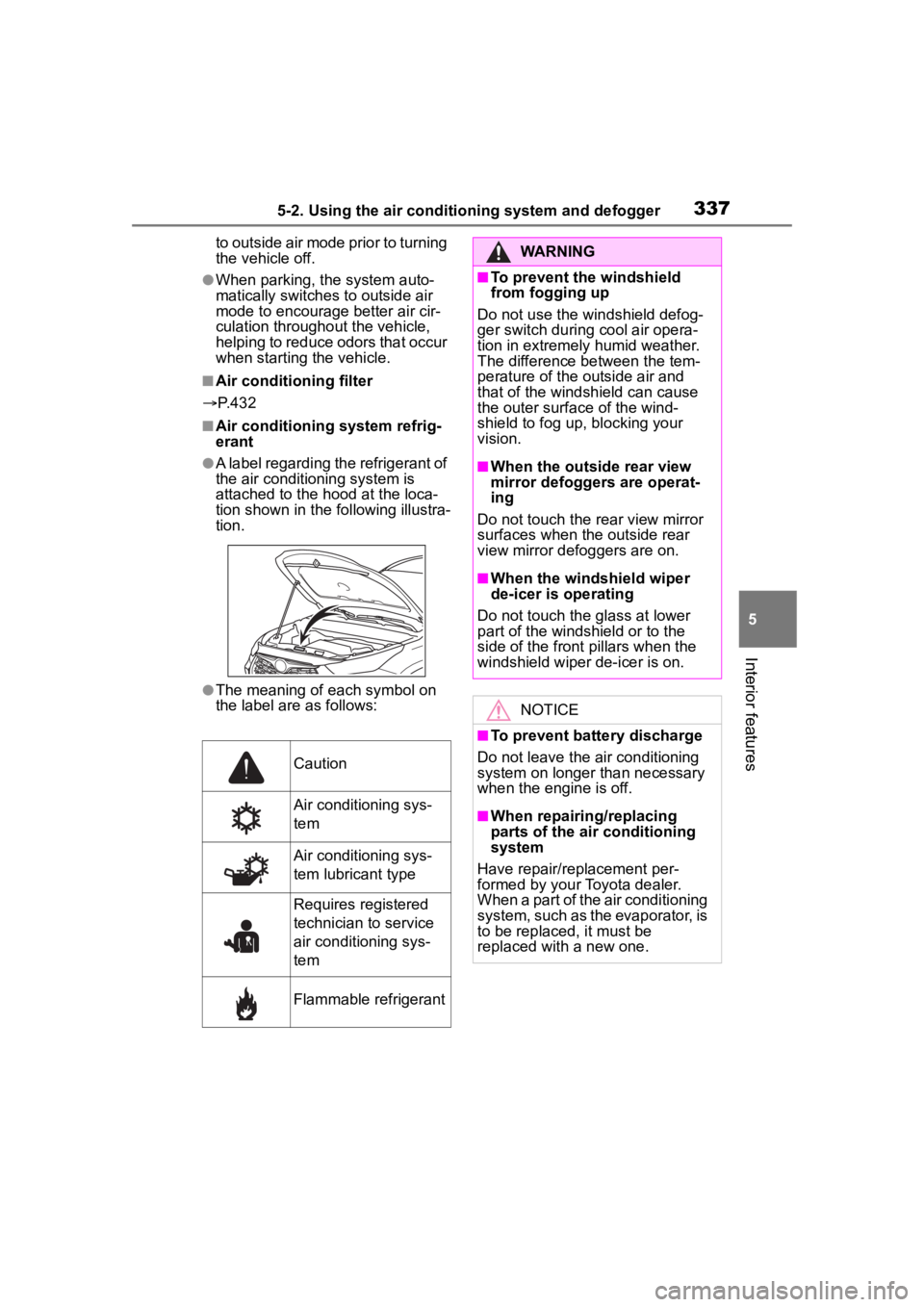
●A label regarding the refrigerant of
the air conditioning system is
attached to the ho od at the loca-
tion shown in the f ollowing illustra-
tion.
●The meaning of each symbol on
the label are as follows:
Caution
Air conditioning sys-
tem
Air conditioning sys-
tem lubricant type
Requires registered
technician to service
air conditioning sys-
tem
Flammable refrigerant
WARNING
■To prevent the windshield
from fogging up
Do not use the windshield defog-
ger switch during cool air opera-
tion in extremely humid weather.
The difference between the tem-
perature of the outside air and
that of the windshield can cause
the outer surface of the wind-
shield to fog up, blocking your
vision.
■When the outside rear view
mirror defoggers are operat-
ing
Do not touch the rear view mirror
surfaces when the outside rear
view mirror def oggers are on.
■When the windshield wiper
de-icer is operating
Do not touch the glass at lower
part of the windshield or to the
side of the front p illars when the
windshield wiper de-icer is on.
NOTICE
■To prevent battery discharge
Do not leave the air conditioning
system on longer than necessary
when the engine is off.
■When repairing/replacing
parts of the air conditioning
system
Have repair/replacement per-
formed by your Toyota dealer.
When a part of the air conditioning
system, such as the evaporator, is
to be replaced, it must be
replaced with a new one.
Page 343 of 568

3435-2. Using the air conditioning system and defogger
5
Interior features
up, press the Stop & Start cancel
switch and refrain from using the
Stop & Start system.
■When an odor comes from the
air conditioning system while
the engine is stopped due to the
Stop & Start system (vehicles
with Stop & Start system)
Press the Stop & Start cancel switch
to restart the engine.
■Air conditioning filter
P. 4 3 2
■Air conditioning system refrig-
erant
●A label regarding the refrigerant of
the air conditioning system is
attached to the ho od at the loca-
tion shown in the f ollowing illustra-
tion.
●The meaning of each symbol on
the label are as follows:
■Customization
Some functions can be customized.
( P.521)
Caution
Air conditioning sys-
tem
Air conditioning sys-
tem lubricant type
Requires registered
technician to service
air conditioning sys-
tem
Flammable refrigerant
WARNING
■To prevent the windshield
from fogging up
Do not use the windshield defog-
ger switch during cool air opera-
tion in extremely humid weather.
The difference between the tem-
perature of the outside air and
that of the windshield can cause
the outer surface of the wind-
shield to fog up, blocking your
vision.
■When the outside rear view
mirror defoggers are operat-
ing
Do not touch the rear view mirror
surfaces when the outside rear
view mirror def oggers are on.
■When the windshield wiper
de-icer is operating
Do not touch the glass at lower
part of the windshield or to the
side of the front p illars when the
windshield wiper de-icer is on.
NOTICE
■To prevent battery discharge
Do not leave the air conditioning
system on longer than necessary
when the engine is off.
■When repairing/replacing
parts of the air conditioning
system
Have repair/replacement per-
formed by your Toyota dealer.
When a part of the air conditioning
system, such as the evaporator, is
to be replaced, it must be
replaced with a new one.
Page 346 of 568
3465-2. Using the air conditioning system and defogger
■Customization
Some functions can be customized.
( P.521)
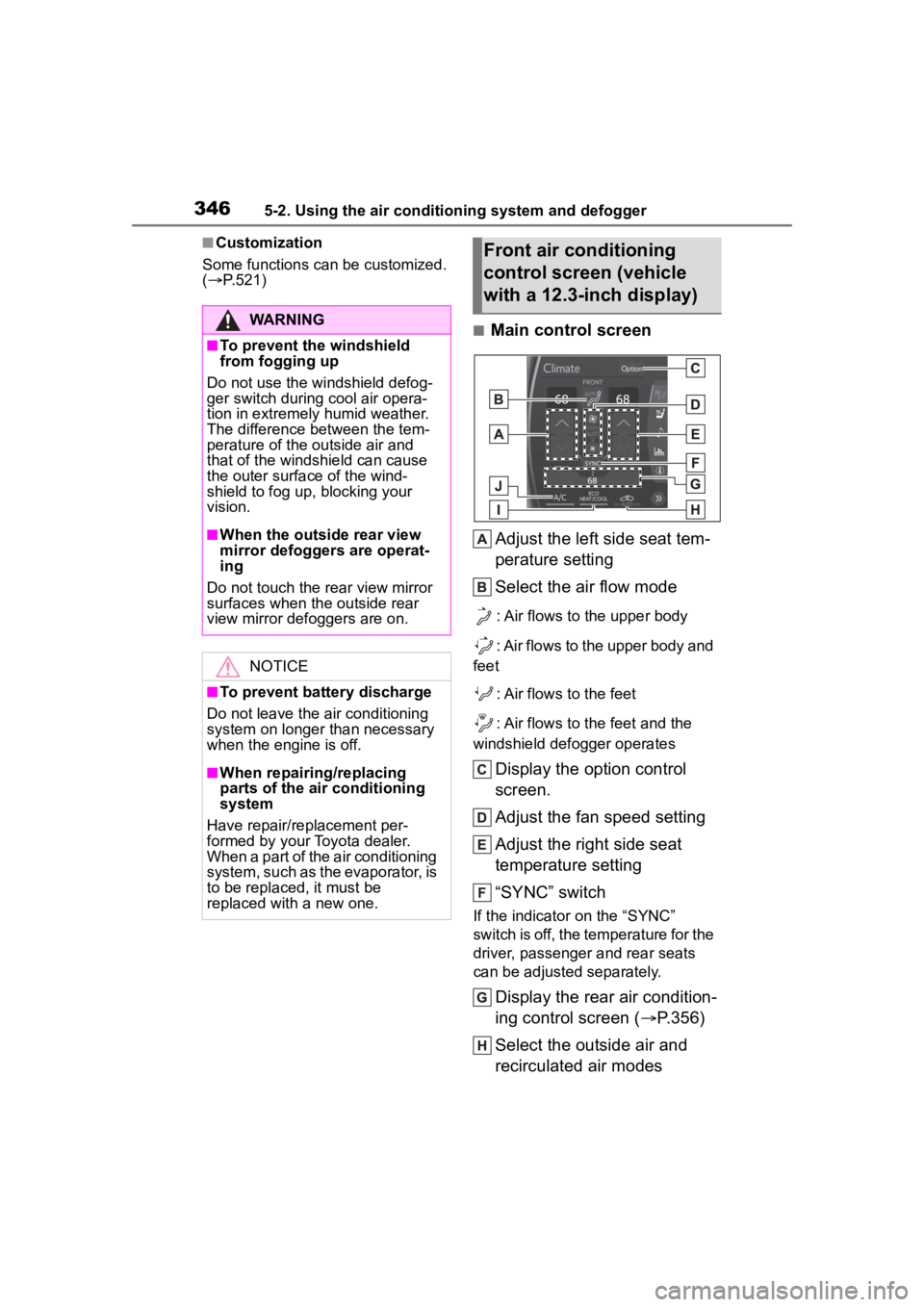
■Main control screen
Adjust the left side seat tem-
perature setting
Select the air flow mode
: Air flows to the upper body
: Air flows to the upper body and
feet
: Air flows to the feet
: Air flows to the feet and the
windshield defogger operates
Display the option control
screen.
Adjust the fan speed setting
Adjust the right side seat
temperature setting
“SYNC” switch
If the indicator on the “SYNC”
switch is off, the temperature for the
driver, passenger and rear seats
can be adjusted separately.
Display the rear air condition-
ing control screen ( P.356)
Select the outside air and
recirculated air modes
WARNING
■To prevent the windshield
from fogging up
Do not use the windshield defog-
ger switch during cool air opera-
tion in extremely humid weather.
The difference between the tem-
perature of the outside air and
that of the windshield can cause
the outer surface of the wind-
shield to fog up, blocking your
vision.
■When the outside rear view
mirror defoggers are operat-
ing
Do not touch the rear view mirror
surfaces when the outside rear
view mirror defoggers are on.
NOTICE
■To prevent battery discharge
Do not leave the air conditioning
system on longer than necessary
when the engine is off.
■When repairing/replacing
parts of the air conditioning
system
Have repair/replacement per-
formed by your Toyota dealer.
When a part of the air conditioning
system, such as the evaporator, is
to be replaced, it must be
replaced with a new one.
Front air conditioning
control screen (vehicle
with a 12.3-inch display)
Page 353 of 568
3535-2. Using the air conditioning system and defogger
5
Interior features
2Upper body and feet
3 Feet
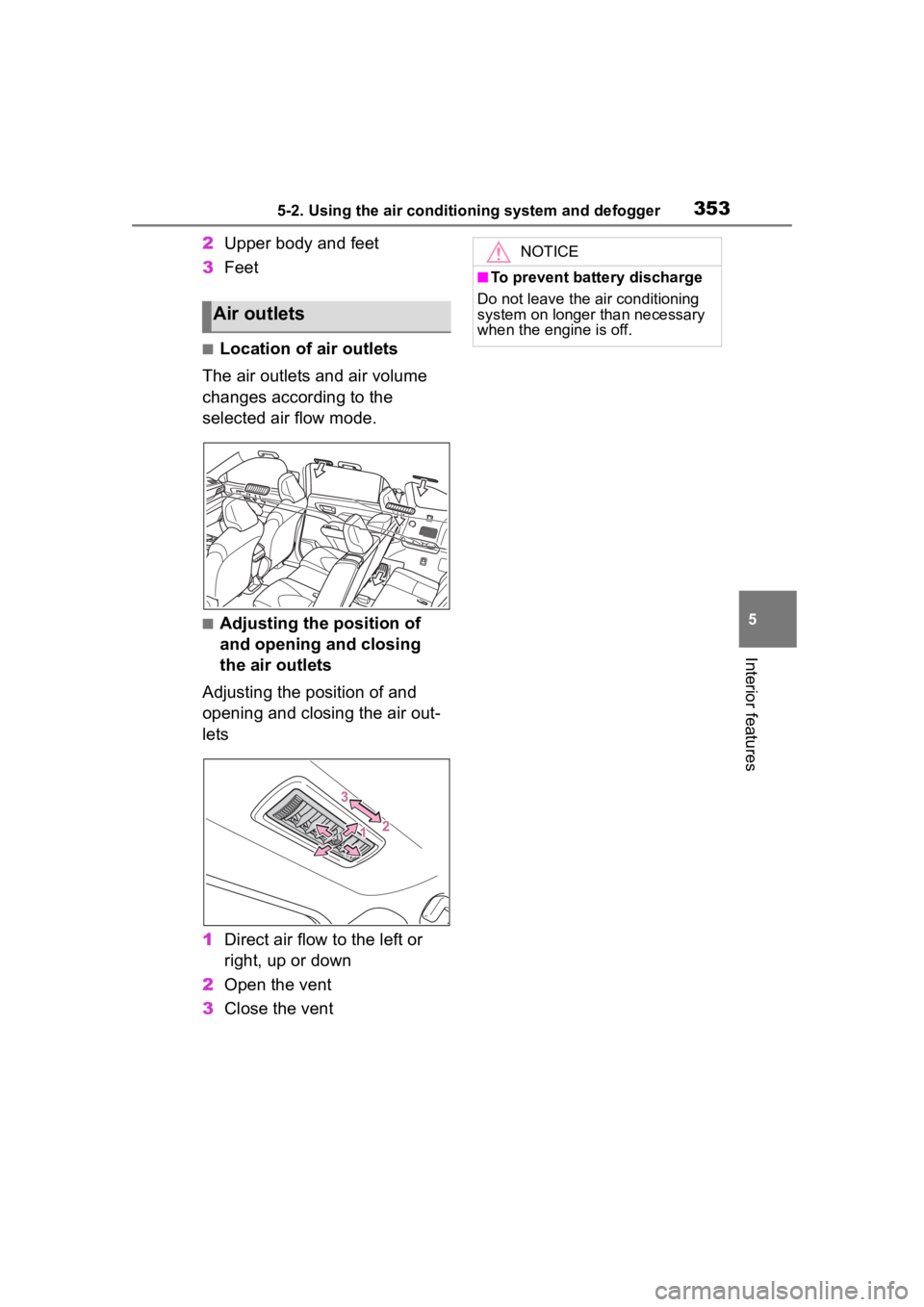
■Location of air outlets
The air outlets and air volume
changes according to the
selected air flow mode.
■Adjusting the position of
and opening and closing
the air outlets
Adjusting the position of and
opening and closing the air out-
lets
1 Direct air flow to the left or
right, up or down
2 Open the vent
3 Close the vent
Air outlets
NOTICE
■To prevent battery discharge
Do not leave the air conditioning
system on longer than necessary
when the engine is off.
Page 357 of 568
3575-2. Using the air conditioning system and defogger
5
Interior features
■Rear air conditioning con-
trol screen (vehicle with a
12.3-inch display)
To change the airflow mode,
select the airflow mode control
switch.
The air outlets used are switched
each time the switch is selected.
: Air flows to the upper body
: Air flows to the upper body and
feet
: Air flows to the feet
1Press the automatic mode
switch.
2 Adjust the temperature set-
ting.
3 To stop the operation, press
the “OFF” switch.
If the fan speed setting or air
flow modes are operated, the
automatic mode indicator goes
off. However, automatic mode
for functions other than that
operated is maintained.
■Using automatic mode
Fan speed is adjusted automati-
cally according to the temperature
setting and the ambient conditions.
Therefore, the fan may stop for a
while until warm or cool air is ready
to flow immediately after the auto-
matic mode switch is pressed.
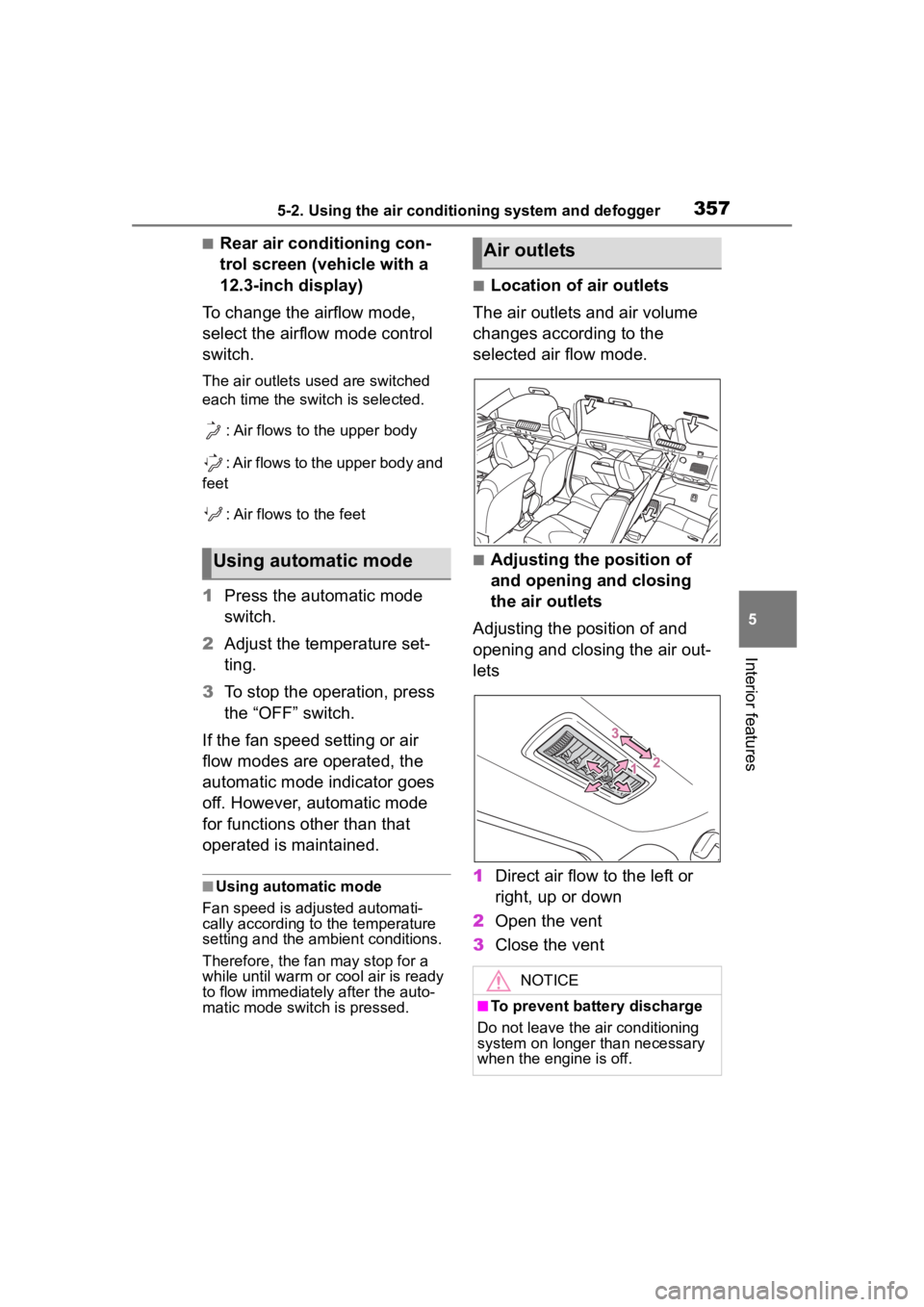
■Location of air outlets
The air outlets and air volume
changes according to the
selected air flow mode.
■Adjusting the position of
and opening and closing
the air outlets
Adjusting the position of and
opening and closing the air out-
lets
1 Direct air flow to the left or
right, up or down
2 Open the vent
3 Close the ventUsing automatic mode
Air outlets
NOTICE
■To prevent battery discharge
Do not leave the air conditioning
system on longer than necessary
when the engine is off.