2022 TOYOTA HIGHLANDER warning
[x] Cancel search: warningPage 302 of 568

3024-5. Using the driving support systems
ment cluster.
To re-enable the system when it
was disabled, select on the
multi-information display, select
and turn it on. If the system is dis-
abled, it will remain off even if the
engine switch is turned to ON after
the engine switch has been turned
off.
If the engine output restriction con-
trol or brake control operates, a
buzzer will sound and a message
will be displayed on the audio sys-
tem screen and mu lti-information
display, to alert the driver.
Depending on the situation, engine
output restriction control will oper-
ate to either limit acceleration or
restrict output as much as possible.
Engine output restriction con-
trol is operating (acceleration
restriction)
Acceleration greater than a certain
amount is restricted by the system.
Audio system screen (Panoramic
view monitor) (if equipped): No
warning displayed
Multi-information display: “Object
Detected Acceleration Reduced”
PKSB OFF indicator: Not illumi-
nated
Buzzer: Does not sound
Engine output restriction con-
trol is operating (output
restricted as much as possi-
ble)
The system has determined that
stronger-than-normal brake opera-
tion is necessary.
Audio system screen (Panoramic
view monitor) (if equipped):
“BRAKE!”
Multi-information display/Head-up
display (if equipped): “BRAKE!”
PKSB OFF indicator: Not illumi-
nated
Buzzer: Short beep
Brake control is operating
The system determined that emer-
gency braking is necessary.
Audio system screen (Panoramic
view monitor) (if equipped):
“BRAKE!”
Multi-information display/Head-up
display (if equipped): “BRAKE!”
PKSB OFF indicator: Not illumi-
nated
Buzzer: Short beep
Vehicle stopped by system
operation
The vehicle has been stopped by
brake control operation.
Audio system screen (Panoramic
view monitor) (if equipped): “Press
Brake Pedal”
Multi-information display/Head-up
display (if equipped): “Switch to
Brake” (If the acce lerator pedal is
not depressed, “Press Brake Pedal”
will be displayed.)
PKSB OFF indicato r: Illuminated
Buzzer: Short beep
Displays and buzzers for
engine output restriction
control and brake control
Page 308 of 568

3084-5. Using the driving support systems
■When the accelerator pedal is depressed excessively
■When the vehicle moves in the unintended direction due to
the wrong shift lever positionFront corner sensors
Front center sensors
Rear corner sensors
Rear center sensors
Types of sensors
WARNING
■To ensure the system can
operate properly
P. 2 8 6
Page 309 of 568

3094-5. Using the driving support systems
4
Driving
■The Parking Support Brake
function (static object) will
operate when
The function will operate when the
PKSB OFF indicator is not illumi-
nated or flashing ( P.77, 78) and all
of the following conditions are met:
●Engine output restriction control
• The Parking Support Brake is
enabled.
• The vehicle speed is approxi- mately 9 mph (15 km/h) or less.
• There is a static object in the trav- eling direction o f the vehicle and
approximately 6 to 13 ft. (2 to 4 m)
away.
• The Parking Support Brake deter- mines that a stronger-than-nor-
mal brake operation is necessary
to avoid a collision.
●Brake control
• Engine output restri ction control is
operating.
• The Parking Support Brake deter- mines that an immediate brake
operation is necessary to avoid a
collision.
■The Parking Support Brake
function (static objects) will
stop operating when
The function will st op operating if
any of the following conditions are
met:
●Engine output restriction control
• The Parking Support Brake is dis- abled.
• The system determines that the collision has become avoidable
with normal brake operation.
• The static object is no longer
approximately 6 to 13 ft. (2 to 4 m)
away from the vehicle or in the
traveling direction of the vehicle.
●Brake control
• The Parking Support Brake is dis-
abled.
• Approximately 2 seconds have elapsed since the vehicle was
stopped by brake control.
• The brake pedal is depressed after the vehicle is stopped by
brake control.
• The static object is no longer approximately 6 to 13 ft. (2 to 4 m)
away from the vehicle or in the
traveling direction of the vehicle.
■Detection range of the Parking
Support Brake function (static
objects)
The detection range of the Parking
Support Brake function (static
objects) differs from the detection
range of the intuitive parking assist.
( P.290) Therefore, even if the intu-
itive parking assist detects an object
and provides a warning, the Parking
Support Brake function (static
objects) may not start operating.
■Situations in which the system
may not operate properly
P.287
■Situations in which the system
may operate even if there is no
possibility of a collision
P.288
WARNING
■If the Parking Support Brake
function (static objects) oper-
ates unnecessarily, such as
at a railroad crossing
P. 3 0 5
■Notes when washing the vehi-
cle
P. 2 8 6
Page 310 of 568

3104-5. Using the driving support systems
*: If equipped
This function will operate in situ-
ation such as the following if a
vehicle is detected in the travel-
ing direction of the vehicle.
■When reversing, a vehicle is
approaching and the brake
pedal is not depressed, or
is depressed late
P.280
■The Parking Support Brake
function (rear-crossing vehi-
cles) will operate when
The function will op erate when the
PKSB OFF indicator is not illumi-
nated or flashing ( P.77, 78) and all
of the following conditions are met:
●Engine output restriction control
• The Parking Support Brake is enabled.
• The vehicle speed is approxi-
mately 9 mph (15 km/h) or less.
• Vehicles which are approaching from the right or left at the rear of
the vehicle at a traveling speed of
approximately 5 mph (8 km/h) or
more.
• The shift lever is in R.
• The Parking Support Brake deter- mines that a stronger than normal
brake operation is necessary to
avoid a collision with an approach-
ing vehicle.
●Brake control
• Engine output restriction control is operating.
• The Parking Support Brake deter- mines that an emergency brake
operation is necessary to avoid a
collision with an approaching vehi-
cle.
Parking Suppor t Brake function (rear-crossing
vehicles)*
If a rear radar sensor detects a vehicle approaching from the
right or left at the rear of the vehicle and the system deter-
mines that the possibility of a collision is high, this function
will perform brake control to reduce the likelihood of an
impact with the approaching vehicle.
Example of function operation
Types of sensors
WARNING
■To ensure the system can
operate properly
P. 2 8 0
Page 312 of 568
3124-5. Using the driving support systems
driving on roads with many curves.
When Sport mode is selected,
Sport mode indicator comes on.
3Eco drive mode
Helps the driver a ccelerate in an
eco-friendly manner and improve
fuel economy through moderate
throttle characteri stics and by con-
trolling the operation of the air con-
ditioning system (heating/cooling).
When Eco drive mode is selected,
Eco drive mode indicator comes
on.
■When changing to a driving
mode other than normal mode
Switches to AWD control suitable for
the selected mode. (for Dynamic
Torque Vectoring AWD vehicles
only)
■Air conditioning system opera-
tion in Eco drive mode
In Eco drive mode, heating/cooling
operations and the fan speed is con-
trolled to improve fuel efficiency.
Perform the following procedures to
increase the air conditioning perfor-
mance.
●Vehicle with a 12.3-inch display:
Turn eco air conditioning mode off
( P.347)
●Adjust the fan speed ( P.334,
340)
●Cancel Eco drive mode
■Canceling a driving mode
●Sport mode is automatically can-
celed and the driving mode
returns to normal mode when the
engine switch is turned off.
●Normal mode and Eco drive mode
are not canceled until another
driving mode is sel ected. (Even if
the engine switch is turned off,
normal mode and Eco drive mode
will not be automatically can-
celed.)
Multi-terrain Select
(AWD models)
Multi-terrain Select is a sys-
tem that improves drivabil-
ity in off-road situations.
When driving over muddy,
sandy or rough road sur-
faces, the system selects a
suitable driving mode to
switch AWD, brake and
drive force control to per-
form control suitable for the
road condition.
WARNING
■Before using Multi-terrain
Select
Make sure to observe the follow-
ing precautions. Failure to
observe these precautions may
result in an unexp ected accident.
●Check that the Mud & Sand and
Rock & Dirt indicators are illumi-
nated before driving. Multi-ter-
rain Select will not operate
when the indicators are off.
●Do not rely solely upon the
Multi-terrain Select. This func-
tion is not inten ded to expand
the limits of the vehicle. If the
system is continuously used for
a long period of time, the load
on related parts increases and
the system may be unable to
operate normally, which may
lead to an accident. Thoroughly
check the road conditions and
driving route before driving, and
drive with caution.
Page 313 of 568
3134-5. Using the driving support systems
4
Driving
Control that is suitable for the
following road conditions can be
performed by switching to either
of the two modes. Select a
mode that is appropriate for the
road condition.
■Mud & Sand mode
Suitable for driving on roads
with increased driving resis-
tance such as sandy roads,
muddy roads, etc.
■Rock & Dirt mode
Suitable for driving in bumpy
road conditions, such as on
unpaved forest roads.
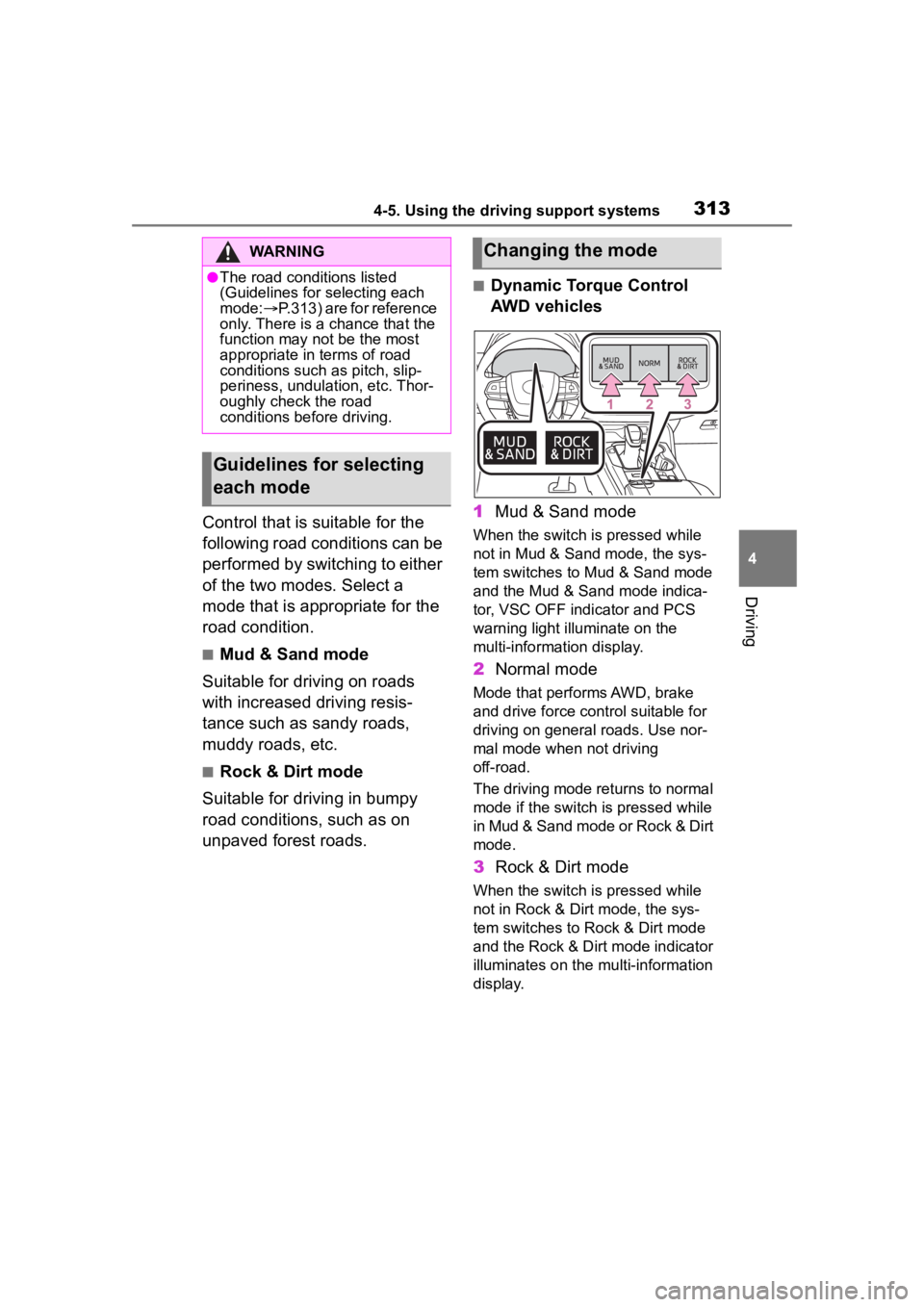
■Dynamic Torque Control
AWD vehicles
1 Mud & Sand mode
When the switch is pressed while
not in Mud & Sand mode, the sys-
tem switches to Mud & Sand mode
and the Mud & Sand mode indica-
tor, VSC OFF indi cator and PCS
warning light illuminate on the
multi-information display.
2 Normal mode
Mode that performs AWD, brake
and drive force cont rol suitable for
driving on general roads. Use nor-
mal mode when not driving
off-road.
The driving mode returns to normal
mode if the switch i s pressed while
in Mud & Sand mode or Rock & Dirt
mode.
3 Rock & Dirt mode
When the switch is pressed while
not in Rock & Dirt mode, the sys-
tem switches to Rock & Dirt mode
and the Rock & Dirt mode indicator
illuminates on the mu lti-information
display.
WARNING
●The road conditions listed
(Guidelines for selecting each
mode: P.313) are for reference
only. There is a chance that the
function may not be the most
appropriate in terms of road
conditions such as pitch, slip-
periness, undulation, etc. Thor-
oughly check the road
conditions before driving.
Guidelines for selecting
each mode
Changing the mode
Page 314 of 568
3144-5. Using the driving support systems
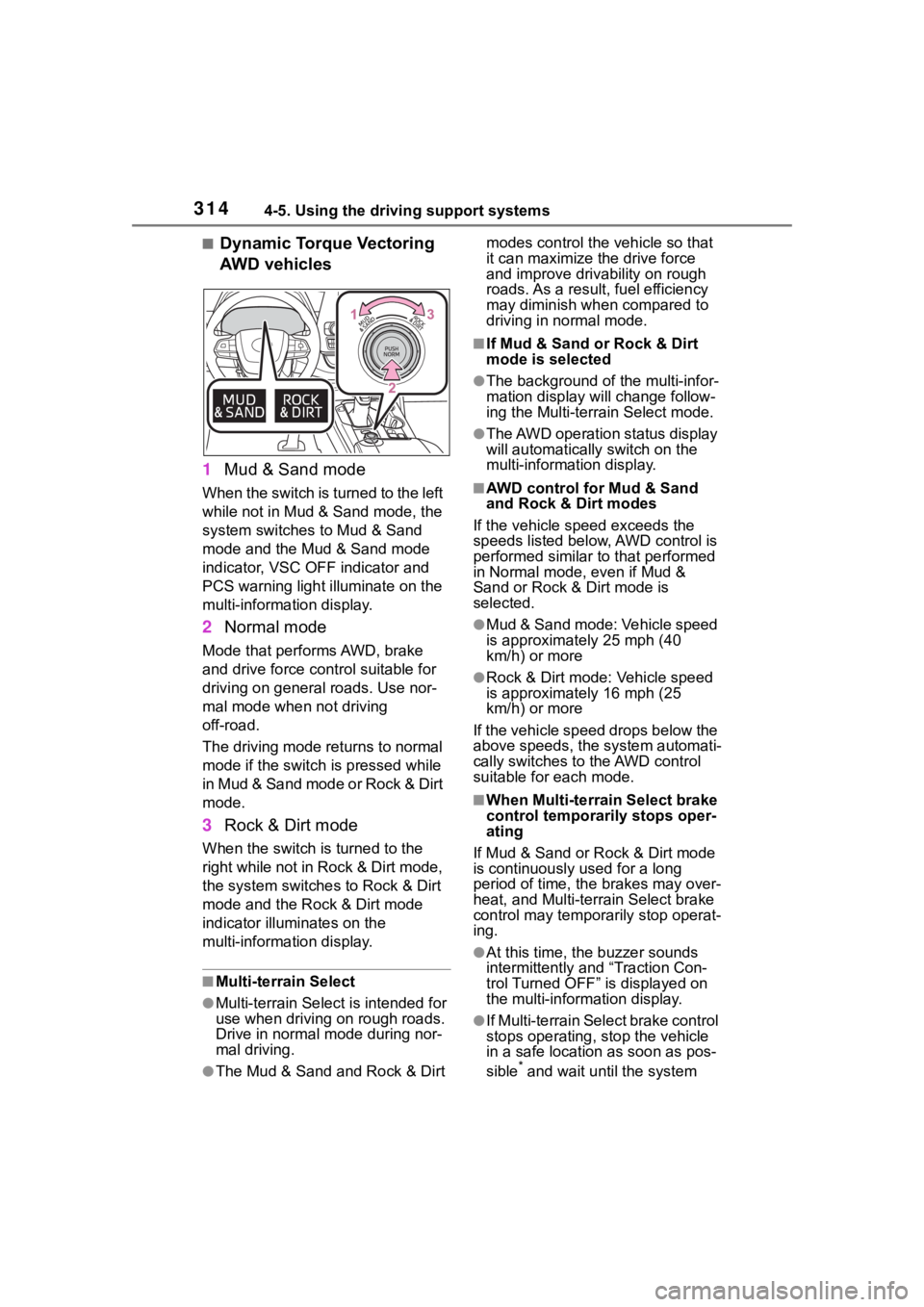
■Dynamic Torque Vectoring
AWD vehicles
1 Mud & Sand mode
When the switch is turned to the left
while not in Mud & Sand mode, the
system switches to Mud & Sand
mode and the Mud & Sand mode
indicator, VSC OFF indicator and
PCS warning light illuminate on the
multi-information display.
2Normal mode
Mode that performs AWD, brake
and drive force control suitable for
driving on general roads. Use nor-
mal mode when not driving
off-road.
The driving mode returns to normal
mode if the switch is pressed while
in Mud & Sand mode or Rock & Dirt
mode.
3Rock & Dirt mode
When the switch is turned to the
right while not in Rock & Dirt mode,
the system switches to Rock & Dirt
mode and the Rock & Dirt mode
indicator illuminates on the
multi-information display.
■Multi-terrain Select
●Multi-terrain Sele ct is intended for
use when driving on rough roads.
Drive in normal mode during nor-
mal driving.
●The Mud & Sand and Rock & Dirt modes control the
vehicle so that
it can maximize the drive force
and improve driv ability on rough
roads. As a result, fuel efficiency
may diminish when compared to
driving in normal mode.
■If Mud & Sand or Rock & Dirt
mode is selected
●The background of the multi-infor-
mation display will change follow-
ing the Multi-terrain Select mode.
●The AWD operation status display
will automatically switch on the
multi-information display.
■AWD control for Mud & Sand
and Rock & Dirt modes
If the vehicle speed exceeds the
speeds listed below, AWD control is
performed similar to that performed
in Normal mode, even if Mud &
Sand or Rock & Dirt mode is
selected.
●Mud & Sand mode: Vehicle speed
is approximately 25 mph (40
km/h) or more
●Rock & Dirt mode: Vehicle speed
is approximately 16 mph (25
km/h) or more
If the vehicle speed drops below the
above speeds, the system automati-
cally switches to the AWD control
suitable for each mode.
■When Multi-terrain Select brake
control temporarily stops oper-
ating
If Mud & Sand or Rock & Dirt mode
is continuously used for a long
period of time, th e brakes may over-
heat, and Multi-terrain Select brake
control may temporarily stop operat-
ing.
●At this time, the buzzer sounds
intermittently and “Traction Con-
trol Turned OFF” is displayed on
the multi-information display.
●If Multi-terrain Sele ct brake control
stops operating, stop the vehicle
in a safe location as soon as pos-
sible
* and wait until the system
Page 316 of 568

3164-5. Using the driving support systems
*: If equipped
Press the downhill assist control
switch.
The downhill assist control system
indicator will comes on and the sys-
tem will operate.
When the system is in operation,
the slip indicator will flash, and the
stop lights/high mounted stop lights
will be lit. A sound may also occur
during the operation. This does not
indicated a malfunction.
Press the downhill assist control
switch while the system is in
operation.
The downhill assist control system
indicator will flash as the system
gradually ceases operation, and will
turn off when the system is fully off.
Press the downhill assist control
switch while the downhill assist
control system indicator is flashing
to start the system again.
■Operating tips
The system will o perate when the
shift lever is in a position other than
P, however to make effective use of
the system it is recommended to
select a lower shift range.
■If the downhill assist control
system indicator flashes
●In the following situ ations, the indi-
cator flashes and the system will
not operate:
• The shift lever is in a position P.
• The vehicle speed exceeds approximately 18 mph (30 km/h).
• The brake system overheats.
●In the following situation, the indi-
cator flashes to alert the driver,
but the system will operate:
• The downhill assist control switch is turned off while the system is
operating.
The system will gradually ceases
Downhill assist con-
trol system*
The downhill assist control
system helps to prevent
excessive speed on steep
downhill slopes.
The system will operate
when the vehicle is traveling
under 18 mph (30 km/h).
WARNING
■When using downhill assist
control system
Do not rely overmuch on the
downhill assist control system.
This function does not extend the
vehicle’s performance limitations.
Always thoroughly check the road
conditions, and drive safely.
System operation
Turning off the system