2022 TOYOTA HIGHLANDER mirror
[x] Cancel search: mirrorPage 80 of 568

802-1. Instrument cluster
Drive mode indicators
*1: 7-inch display only: This light illu-
minates on the multi-information
display.
*2: This light illuminates on the multi-information display.
*3: This light comes on when the system is turned off.
*4: These lights turn on when the engine switch is turned to ON to
indicate that a system check is
being performed. They will turn
off after the engine is started, or
after a few seconds. There may
be a malfunction in a system if a
light does not co me on, or turn
off. Have the vehicle inspected
by your Toyota dealer.
*5: In order to confirm operation, the BSM outside rear view mirror
indicators illumina te in the follow-
ing situations:
When the BSM function is
enabled on of the
multi-information display, the
engine switch is turned to ON.
When the engine switch is in
ON, the BSM function is
enabled on of the
multi-information display. If the system is functioning cor-
rectly, the BSM outside rear
view mirror indicators will turn
off after a few seconds. If the
BSM outside rear view mirror
indicators do not illuminate or do
not turn off, there may be a mal-
function in the system. If this
occurs, have the vehicle
inspected by your Toyota dealer.
*6: This light illuminates on the out-
side rear view mirrors.
*7: When the outside temperature is approximately 37°F (3°C) or
lower, this indicator will flash for
approximately 10 seconds, then
stay on.
*8: This light illuminates on the cen-ter panel.
*9: 4.2-inch display only: These lights turn on when the engine
switch is turned to ON to indicate
that a system che ck is being per-
formed. They will turn off after
the engine is started, or after a
few seconds. There may be a
malfunction in a system if a light
does not come on, or turn off.
Have the vehicle inspected by
your Toyota dealer.
*10:7-inch display only
Eco drive mode indicator
*2
( P.311)
Sport mode indicator
*2
( P.311)
Mud & sand mode indica-
tor
*2 (if equipped)
( P.313)
Rock & dirt mode indica-
tor
*2 (if equipped)
( P.313)
Page 90 of 568

902-1. Instrument cluster
• “Sensitivity”
Select to change the pre-collision
warning timing.
DRCC (Dynamic Radar
Cruise Control with full-speed
range) ( P.257)
Press and hold to change the
settings of the following items:
• “Curve Speed Reduction”
( P.264)
Select to set the curve speed
reduction function strength.
BSM (Blind Spot Monitor)
(if equipped) ( P.278)
Press to enable/disable the
Blind Spot Monitor function.
• BSM (Blind Spot Monitor) on/off
Select to enable/disable the Blind
Spot Monitor function.
Press and hold to change the
settings of the following items:
• “Brightness”
Select to switch the brightness of
the outside rear view mirror indica-
tors. (P.278)
• “Sensitivity”
Select to change the alert timing for
an approaching vehicle.
RCTA (Rear Cross Traffic
Alert) (if equipped) ( P.293)
Press to enable/disable the
Rear Cross Traffic Alert function.
• RCTA (Rear Cross Traffic Alert)
on/off
Select to enable/disable the Rear Cross Traffic Alert function.
Press and hold to change the
settings of the following item:
•“Volume”
Select to change the volume of the
RCTA buzzer.
RSA (Road Sign Assist) (if
equipped) ( P.269)
Press to enable/disable the
Road Sign Assist.
• RSA (Road Sign Assist) on/off
Select to enable/d isable the Road
Sign Assist.
Press and hold to change the
settings of the following items:
• “Notification Method”
Select to change each notification
method used to notify the driver
when the system recognizes
excess speed and no-entry sign.
• “Notification Level”
Select to change each notification
level used to notify the driver when
the system recognizes a speed limit
sign.
■ Vehicle settings
Press and hold to change
the settings of the following
items:
PBD (Power Back Door)
(if equipped) ( P.121)
• “System Settings”
Select to enable/disable the power
back door system.
• “Opening Adjustment”
Page 99 of 568

992-1. Instrument cluster
2
Vehicle status information and indicators
• “Sway Sensitivity”
Select to set the vehicle sway warn-
ing sensitivity.
PCS (Pre-Collision Sys-
tem) ( P.235)
Press to enable/disable the
pre-collision system.
• PCS (Pre-Collision System)
on/off
Select to enable/disable the
pre-collision system.
Press and hold to change the
settings of the following item:
• “Sensitivity”
Select to change t he pre-collision
warning timing.
DRCC (Dynamic Radar
Cruise Control with full-speed
range) ( P.257)
Press and hold to change the
settings of the following items:
• “Curve Speed Reduction”
( P.264)
Select to set the curve speed
reduction function strength.
BSM (Blind Spot Monitor)
( P.278)
Press to enable/disable the
Blind Spot Monitor function.
• BSM (Blind Spot Monitor) on/off
Select to enable/disable the Blind
Spot Monitor function.
Press and hold to change the
settings of the following items:
• “Brightness” Select to switch the brightness of
the outside rear view mirror indica-
tors. (
P.278)
• “Sensitivity”
Select to change the alert timing for
an approaching vehicle.
Intuitive parking assist (if
equipped) ( P.284)
Press to enable/disable the
Intuitive parking assist.
• Intuitive parking assist on/off
Select to enable/d isable the Intui-
tive parking assist.
Press and hold to change the
settings of the following item:
•“Volume”
Select to set the volume of the
buzzer which sounds when the
Intuitive parking assist is operated.
RCTA (Rear Cross Traffic
Alert) ( P.293)
Press to enable/disable the
Rear Cross Traffic Alert function.
• RCTA (Rear Cross Traffic Alert)
on/off
Select to enable/d isable the Rear
Cross Traffic Alert function.
Press and hold to change the
settings of the following item:
•“Volume”
Select to change the volume of the
RCTA buzzer.
PKSB (Parking Support
Brake) (if equipped) ( P.300)
Press to enable/disable the
Page 113 of 568

113
3
3
Before driving
Before driving
.3-1. Key informationKeys ............................ 114
3-2. Opening, closing and locking the doors
Side doors ................... 117
Back door .................... 121
Smart key system ....... 133
3-3. Adjusting the seats Front seats .................. 141
Rear seats................... 142
Driving position memory .................................. 147
Head restraints............ 150
3-4. Adjusting the steering wheel and mirrors
Steering wheel ............ 153
Inside rear view mirror .................................. 154
Digital Rearview Mirror .................................. 155
Outside rear view mirrors .................................. 165
3-5. Opening, closing the win- dows and moon roof
Power windows ........... 167
Moon roof .................... 170
Panoramic moon roof.. 173
Page 147 of 568

1473-3. Adjusting the seats
3
Before driving
From outside
Pull the straps and raise the seat-
backs until they lock.
After using either strap, use the vel-
cro on the strap to attach it to the
seatback.
2 Returning the outer head
restraints.
Remove the secure d seat belts
from the seat belt hangers before
using them.
*: If equipped
1 Check that the shift lever is in
P.
2 Turn the engine switch to
ON.
3 Adjust the driver’s seat, out-
side rear view mirrors and
head-up display (if equipped)
to the desired positions.
4 While pressing the “SET” but-
ton, or within 3 seconds after
the “SET” button is pressed,
press button “1” or “2” until
the buzzer sounds.
If the selected button has already
been preset, the previously
recorded positio n will be overwrit-
Driving position mem-
or y*
This feature automatically
adjusts the driver’s seat,
outside rear view mirrors
and head-up display (if
equipped) to suit your pref-
erences.
Two different driving posi-
tions can be recorded into
memory.
Each electronic key can be
registered to recall your pre-
ferred driving position.
Recording a driving posi-
tion into memory
Page 149 of 568

1493-3. Adjusting the seats
3
Before driving
button “1” or “2” before perform-
ing the following:
Carry only the key you want to
register, and then close the
driver’s door.
If 2 or more keys are in the vehicle,
the driving position cannot be
recorded properly.
1Check that the shift lever is in
P.
2 Turn the engine switch to
ON.
3 Recall the driving position
that you want to record.
4 While pressing the recalled
button, press and hold the
door lock switch (either lock
or unlock) until the buzzer
sounds.
If the button could not be regis-
tered, the buzzer sounds continu-
ously for approximately 3 seconds.
■Cancelation procedure
Carry only the key you want to
cancel and then close the
driver’s door.
If 2 or more keys are in the vehicle,
the driving position cannot be can-
celed properly.
1 Turn the engine switch to
ON.
2 While pressing the “SET” but-
ton, press and hold the door
lock switch (either lock or
unlock) until the buzzer
sounds twice.
If the button could not be canceled,
the buzzer sounds c ontinuously for
approximately 3 seconds.
■Recall procedure
Make sure that the doors are
locked before recalling the driv-
ing position. Carry the electronic
key that has been registered to
the driving position, and then
unlock and open the driver’s
door using the smart key system
or wireless remote control.
The driving position will move to the
recorded position.
If the driving position is in a position
that has already been recorded, the
seat and outside rear view mirrors
will not move.
■Recalling the driving position
using the memory recall func-
tion
●Different driving p ositions can be
registered for each electronic key.
Therefore, the driving position that
is recalled may be different
depending on the key being car-
ried.
●If a door other than the driver’s
door is unlocked with the smart
key system, the driving position
cannot be recalled. In this case,
press the driving position button
which has been set.
■Customization
Some functions can be customized.
Page 153 of 568
1533-4. Adjusting the steering wheel and mirrors
3
Before driving
3-4.Adjusting the steering wheel and mirrors
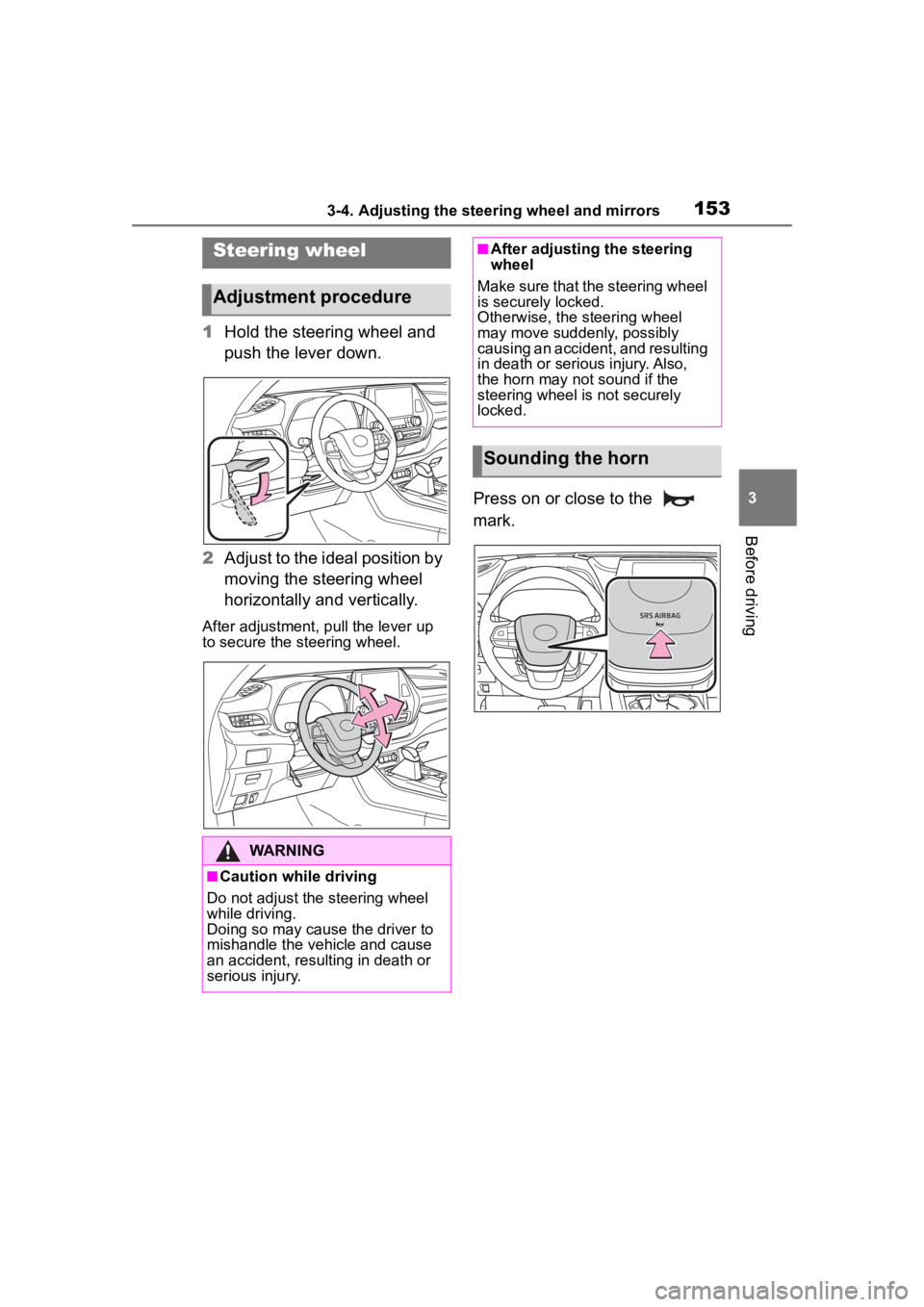
1Hold the steering wheel and
push the lever down.
2 Adjust to the ideal position by
moving the steering wheel
horizontally and vertically.
After adjustment, pull the lever up
to secure the steering wheel.
Press on or close to the
mark.
Steering wheel
Adjustment procedure
WARNING
■Caution while driving
Do not adjust the steering wheel
while driving.
Doing so may cause the driver to
mishandle the vehicle and cause
an accident, resul ting in death or
serious injury.
■After adjusting the steering
wheel
Make sure that the steering wheel
is securely locked.
Otherwise, the steering wheel
may move suddenly, possibly
causing an accident, and resulting
in death or serious injury. Also,
the horn may not sound if the
steering wheel is not securely
locked.
Sounding the horn
Page 154 of 568
1543-4. Adjusting the steering wheel and mirrors
*: If equipped
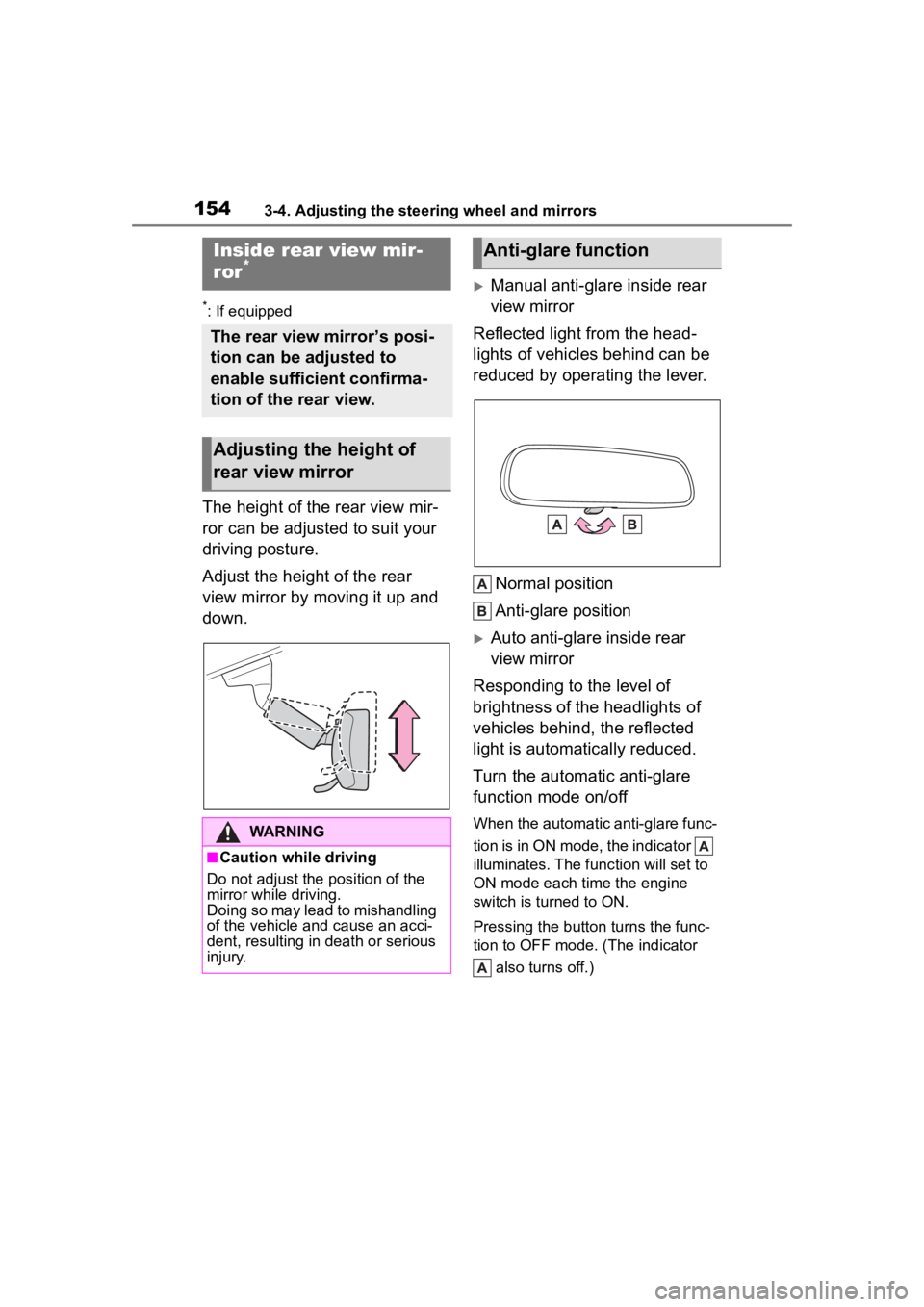
The height of the rear view mir-
ror can be adjusted to suit your
driving posture.
Adjust the height of the rear
view mirror by moving it up and
down.
Manual anti-glare inside rear
view mirror
Reflected light from the head-
lights of vehicles behind can be
reduced by operating the lever.
Normal position
Anti-glare position
Auto anti-glare inside rear
view mirror
Responding to the level of
brightness of the headlights of
vehicles behind, the reflected
light is automatically reduced.
Turn the automatic anti-glare
function mode on/off
When the automatic anti-glare func-
tion is in ON mode, the indicator
illuminates. The func tion will set to
ON mode each time the engine
switch is turned to ON.
Pressing the button turns the func-
tion to OFF mode. (The indicator
also turns off.)
Inside rear view mir-
ror*
The rear view mirror’s posi-
tion can be adjusted to
enable sufficient confirma-
tion of the rear view.
Adjusting the height of
rear view mirror
WARNING
■Caution while driving
Do not adjust the position of the
mirror while driving.
Doing so may lead to mishandling
of the vehicle and cause an acci-
dent, resulting in death or serious
injury.
Anti-glare function