2022 TOYOTA COROLLA buttons
[x] Cancel search: buttonsPage 20 of 678

18Pictorial index
■Interior (left-hand drive vehicles)
SRS airbags ......................................................................................P.35
Floor mats.........................................................................................P.28
Front seats......................................................................................P.126
Head restraints ...............................................................................P.128
Seat belts ..........................................................................................P.31
Console box ...................................................................................P.398
Inside lock buttons ........................................................................ P.116
Cup holders ....................................................................................P.397
Rear seats .......................................................................................P.127
Rear seat heater switches*............................................................P.392
*: If equipped
Page 26 of 678
24Pictorial index
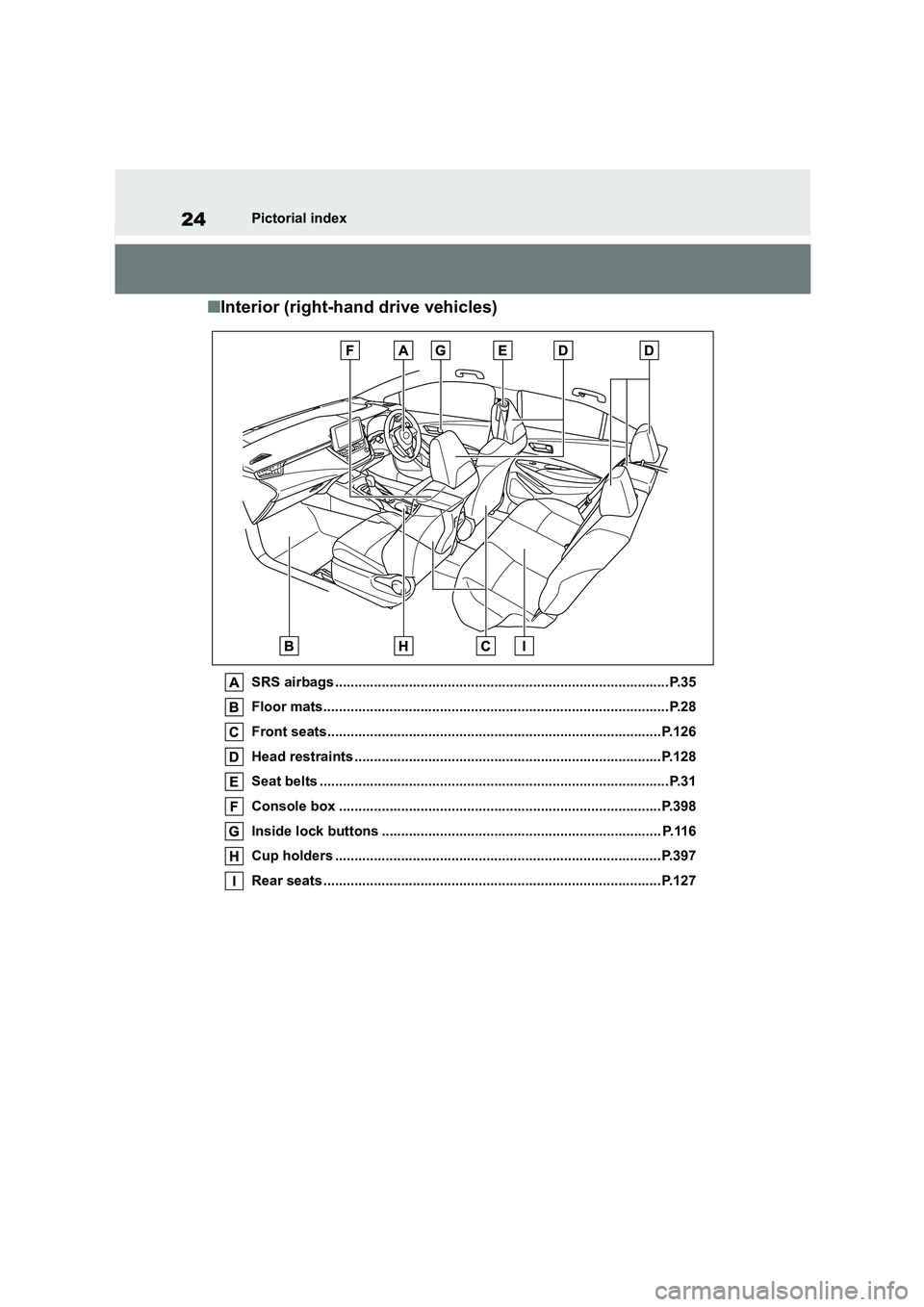
■Interior (right-hand drive vehicles)
SRS airbags ......................................................................................P.35
Floor mats.........................................................................................P.28
Front seats......................................................................................P.126
Head restraints ...............................................................................P.128
Seat belts ..........................................................................................P.31
Console box ...................................................................................P.398
Inside lock buttons ........................................................................ P.116
Cup holders ....................................................................................P.397
Rear seats .......................................................................................P.127
Page 66 of 678

641-3. Emergency assistance
1-3.Emergency assistance
*1: If equipped
*2: Operates within the eCall coverage.
The system name differs depending
on the country.
Microphone
“SOS” button*
Indicator lights
Speaker
*: This button is intended for communi-
cation with the eCall system operator.
Other SOS buttons available in other
systems of a motor vehicle do not
relate to the device and are not
intended for communication with the
eCall system operator.
■Automatic Emergency Calls
If any airbag deploys, the system is
designed to automatically call the
eCall control center.* The answer-
ing operator receives the vehicle’s
location, the time of the incident
and the vehicle VIN, and attempts
to speak with the vehicle occupants
to assess the situation. If the occu-
pants are unable to communicate,
the operator automatically treats
the call as an emergency and con-
tacts the nearest emergency ser-
vices provider (112 system etc.) to
describe the situation and request
that assistance be sent to the loca-
tion.
*: In some cases, th e call cannot be
made. ( P.65)
■Manual Emergency Calls
In the event of an emergency, press
the “SOS” button to call the eCall
control center.* The answering
operator will dete rmine your vehi-
cle’s location, assess the situation,
and dispatch the necessary assis-
eCall*1, 2
eCall is a telematics service
that uses Global Navigation
Satellite System (GNSS) data
and embedded cellular tech-
nology to enable the following
emergency calls to be made:
Automatic emergency calls
(Automatic Collision Notifica-
tion) and manual emergency
calls (by pressing the “SOS”
button). This service is
required by European Union
Regulations.
System components
Emergency Notification Ser-
vices
Page 79 of 678

77
1
1-4. Theft deterrent system
For safety and security
●A person inside the vehicle opens a
door, the trunk or hood, or unlocks the vehicle.
●A person inside the vehicle unlocks the door using the inside lock buttons.
●The battery is recharged or replaced when the vehicle is locked. ( P.516)
■Alarm-operated door lock
In the following cases, depending on the
situation, the door may automatically
lock to prevent improper entry into the vehicle:
●When a person remaining in the vehi-cle unlocks the door and the alarm is
activated.
●While the alarm is activated, a person
remaining in the vehicle unlocks the
door.
●When recharging or replacing the bat-
tery
NOTICE
■To ensure the system operates correctly
Do not modify or remove the system.
If modified or removed, the proper operation of the system cannot be
guaranteed.
Page 110 of 678
1083-1. Key information
3-1.Key information
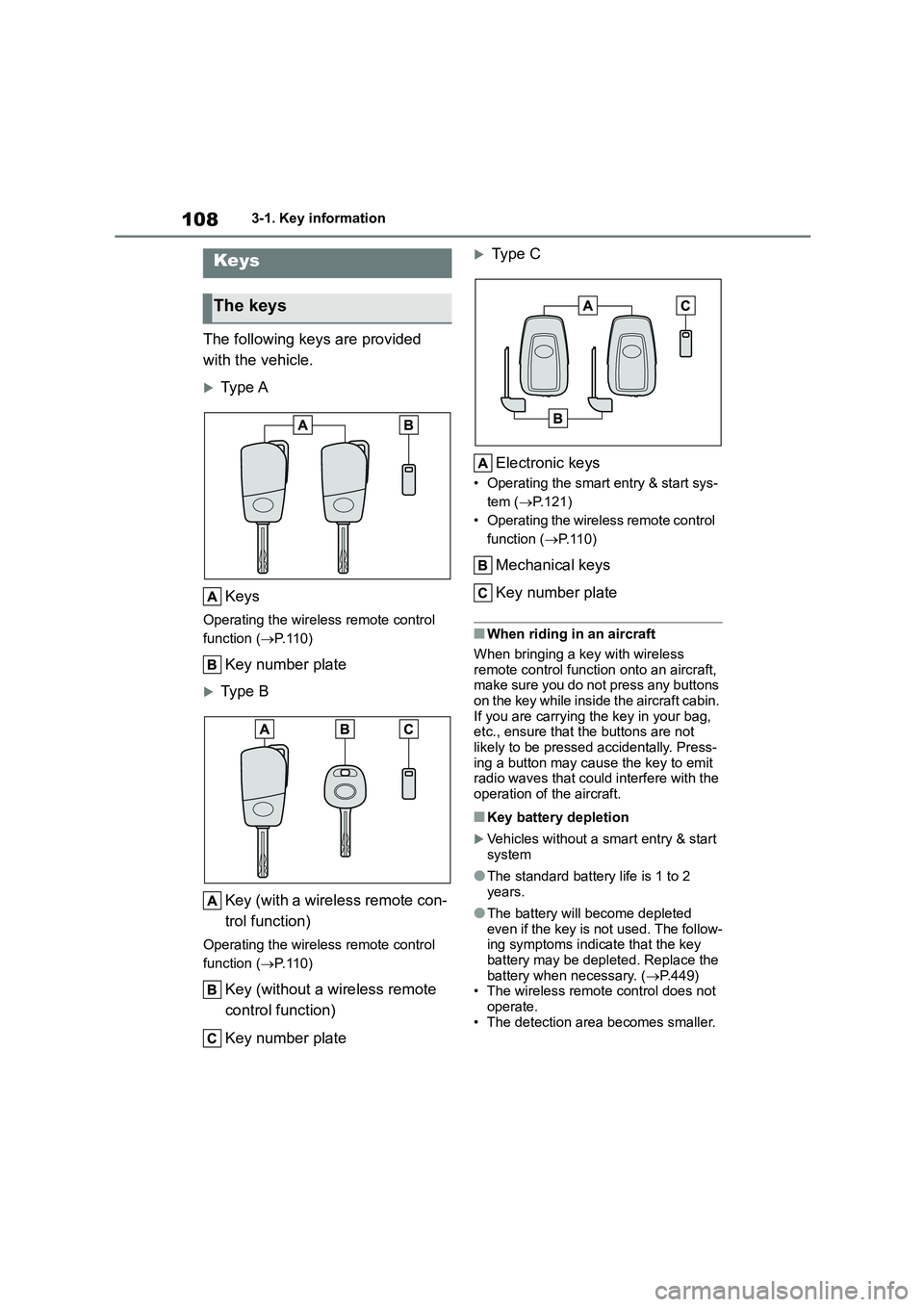
The following keys are provided
with the vehicle.
Type A
Keys
Operating the wireless remote control
function ( P.110)
Key number plate
Type B
Key (with a wireless remote con-
trol function)
Operating the wireless remote control
function ( P.110)
Key (without a wireless remote
control function)
Key number plate
Ty p e C
Electronic keys
• Operating the smart entry & start sys-
tem ( P.121)
• Operating the wire less remote control
function ( P. 1 1 0 )
Mechanical keys
Key number plate
■When riding in an aircraft
When bringing a key with wireless remote control function onto an aircraft,
make sure you do not press any buttons
on the key while inside the aircraft cabin. If you are carrying the key in your bag,
etc., ensure that the buttons are not
likely to be pressed accidentally. Press- ing a button may cause the key to emit
radio waves that could interfere with the
operation of the aircraft.
■Key battery depletion
Vehicles without a smart entry & start
system
●The standard battery life is 1 to 2
years.
●The battery will become depleted
even if the key is not used. The follow- ing symptoms indicate that the key
battery may be depleted. Replace the
battery when necessary. ( P.449)
• The wireless remote control does not operate.
• The detection area becomes smaller.
Keys
The keys
Page 116 of 678
1143-2. Opening, closing and locking the doors
any authorized Toyota retailer or
Toyota authorized repairer, or any
reliable repairer.
*2: If equipped
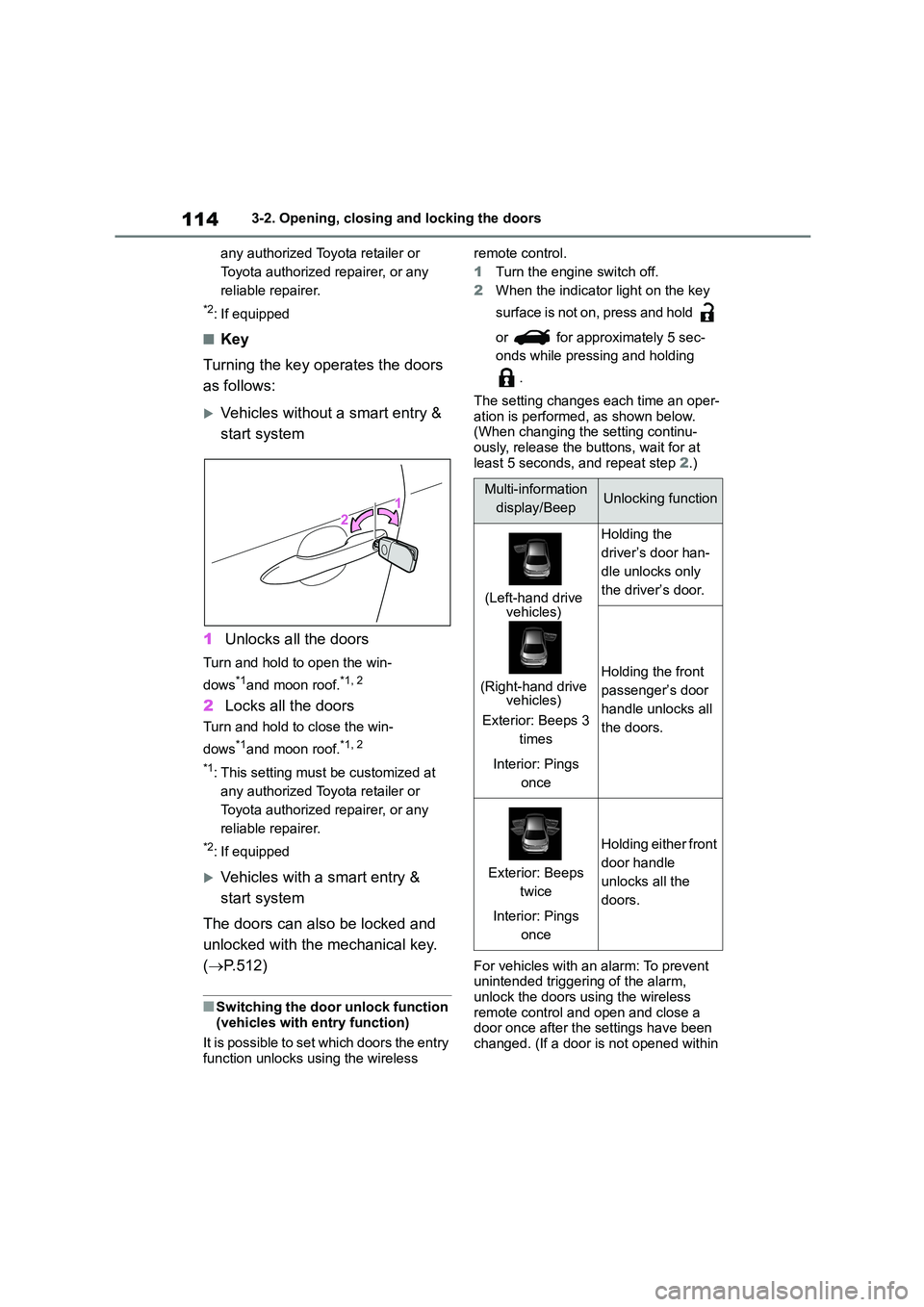
■Key
Turning the key operates the doors
as follows:
Vehicles without a smart entry &
start system
1 Unlocks all the doors
Turn and hold to open the win-
dows*1and moon roof.*1, 2
2 Locks all the doors
Turn and hold to close the win-
dows*1and moon roof.*1, 2
*1: This setting must be customized at
any authorized Toyota retailer or
Toyota authorized repairer, or any
reliable repairer.
*2: If equipped
Vehicles with a smart entry &
start system
The doors can also be locked and
unlocked with the mechanical key.
( P.512)
■Switching the door unlock function
(vehicles with entry function)
It is possible to set which doors the entry function unlocks using the wireless
remote control.
1 Turn the engine switch off.
2 When the indicator light on the key
surface is not on, press and hold
or for approximately 5 sec-
onds while pressing and holding
.
The setting changes each time an oper-
ation is performed, as shown below.
(When changing the setting continu- ously, release the buttons, wait for at
least 5 seconds, and repeat step 2.)
For vehicles with an alarm: To prevent
unintended triggering of the alarm,
unlock the doors using the wireless remote control and open and close a
door once after the settings have been
changed. (If a door is not opened within
Multi-information
display/BeepUnlocking function
(Left-hand drive vehicles)
(Right-hand drive vehicles)
Exterior: Beeps 3
times
Interior: Pings
once
Holding the
driver’s door han-
dle unlocks only
the driver’s door.
Holding the front
passenger’s door
handle unlocks all
the doors.
Exterior: Beeps
twice
Interior: Pings
once
Holding either front
door handle
unlocks all the
doors.
Page 118 of 678
1163-2. Opening, closing and locking the doors
■If the battery is discharged (vehi-
cles with a smart entry & start sys- tem)
The doors cannot be locked and
unlocked using the entry function (if equipped) or wireless remote control.
Lock or unlock the doors using the
mechanical key. ( P.512)
■Customization
Some functions can be customized.
( P.538)
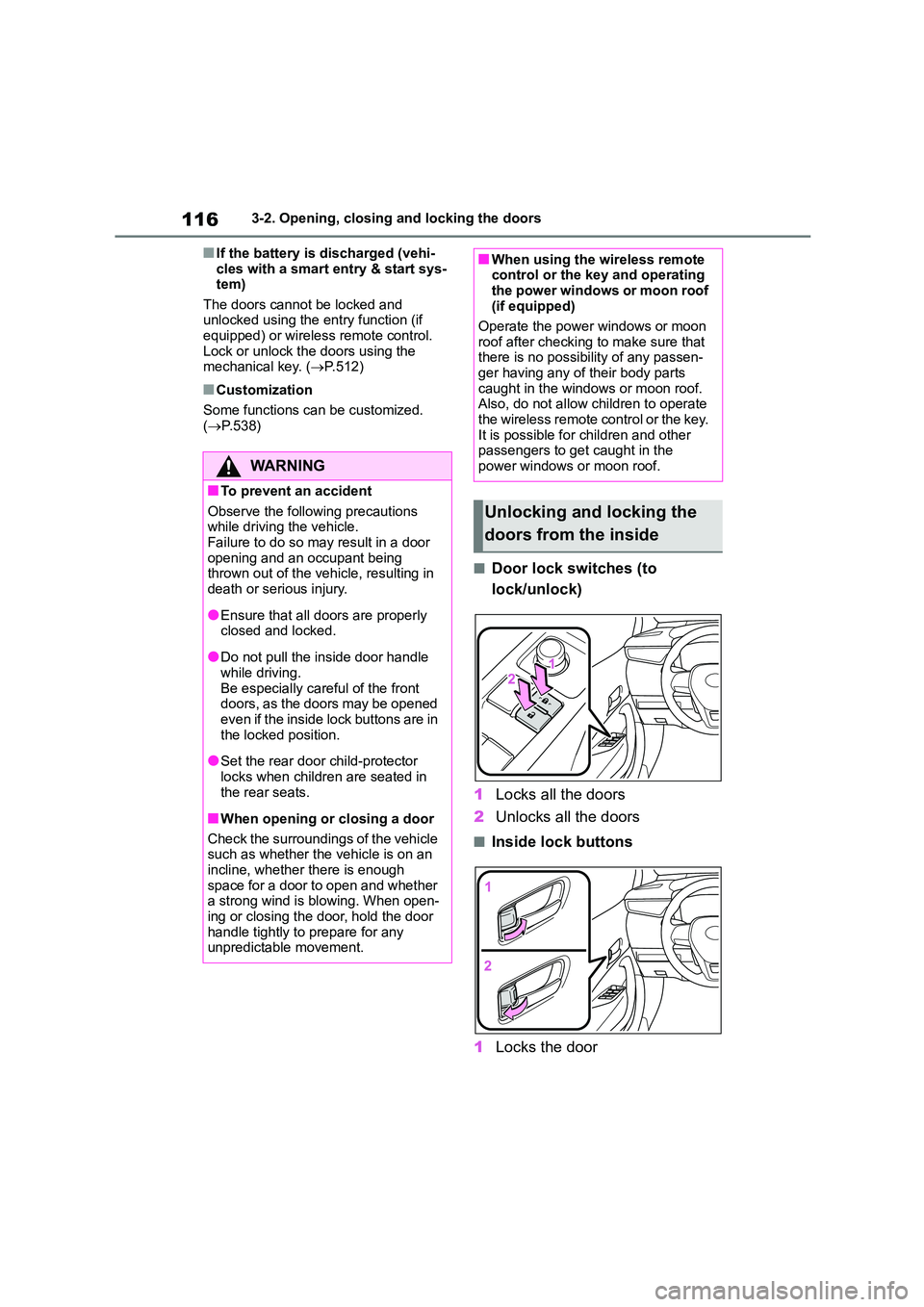
■Door lock switches (to
lock/unlock)
1 Locks all the doors
2 Unlocks all the doors
■Inside lock buttons
1 Locks the door
WA R N I N G
■To prevent an accident
Observe the following precautions while driving the vehicle.
Failure to do so may result in a door
opening and an occupant being thrown out of the vehicle, resulting in
death or serious injury.
●Ensure that all doors are properly
closed and locked.
●Do not pull the inside door handle
while driving.
Be especially careful of the front doors, as the doors may be opened
even if the inside lock buttons are in
the locked position.
●Set the rear door child-protector
locks when children are seated in the rear seats.
■When opening or closing a door
Check the surroundings of the vehicle
such as whether the vehicle is on an
incline, whether there is enough space for a door to open and whether
a strong wind is blowing. When open-
ing or closing the door, hold the door handle tightly to prepare for any
unpredictable movement.
■When using the wireless remote control or the key and operating
the power windows or moon roof
(if equipped)
Operate the power windows or moon
roof after checking to make sure that
there is no possibility of any passen- ger having any of their body parts
caught in the windows or moon roof.
Also, do not allow children to operate the wireless remote control or the key.
It is possible for children and other
passengers to get caught in the power windows or moon roof.
Unlocking and locking the
doors from the inside
Page 119 of 678
117
3
3-2. Opening, closing and locking the doors
Before driving
2 Unlocks the door
The front doors can be opened by pull-
ing the inside handle even if the lock
buttons are in the lock position.
■Locking the front doors from the
outside without a key
1 Move the inside lock button to the
lock position.
2 Close the door while pulling the door handle.
Vehicles without a smart entry & start system
The door cannot be locked if the key is in the engine switch.
Vehicles with a smart entry & start system
The door cannot be locked if the engine switch is in ACC or ON, or the electronic
key is left inside the vehicle.
The key may not be detected correctly
and the door may be locked.
■Open door warning buzzer
If a door or the trunk is not fully closed, a buzzer will sound when the vehicle
speed reaches 5 km/h (3 mph).
The open door(s) or trunk is indicated on the multi-information display.
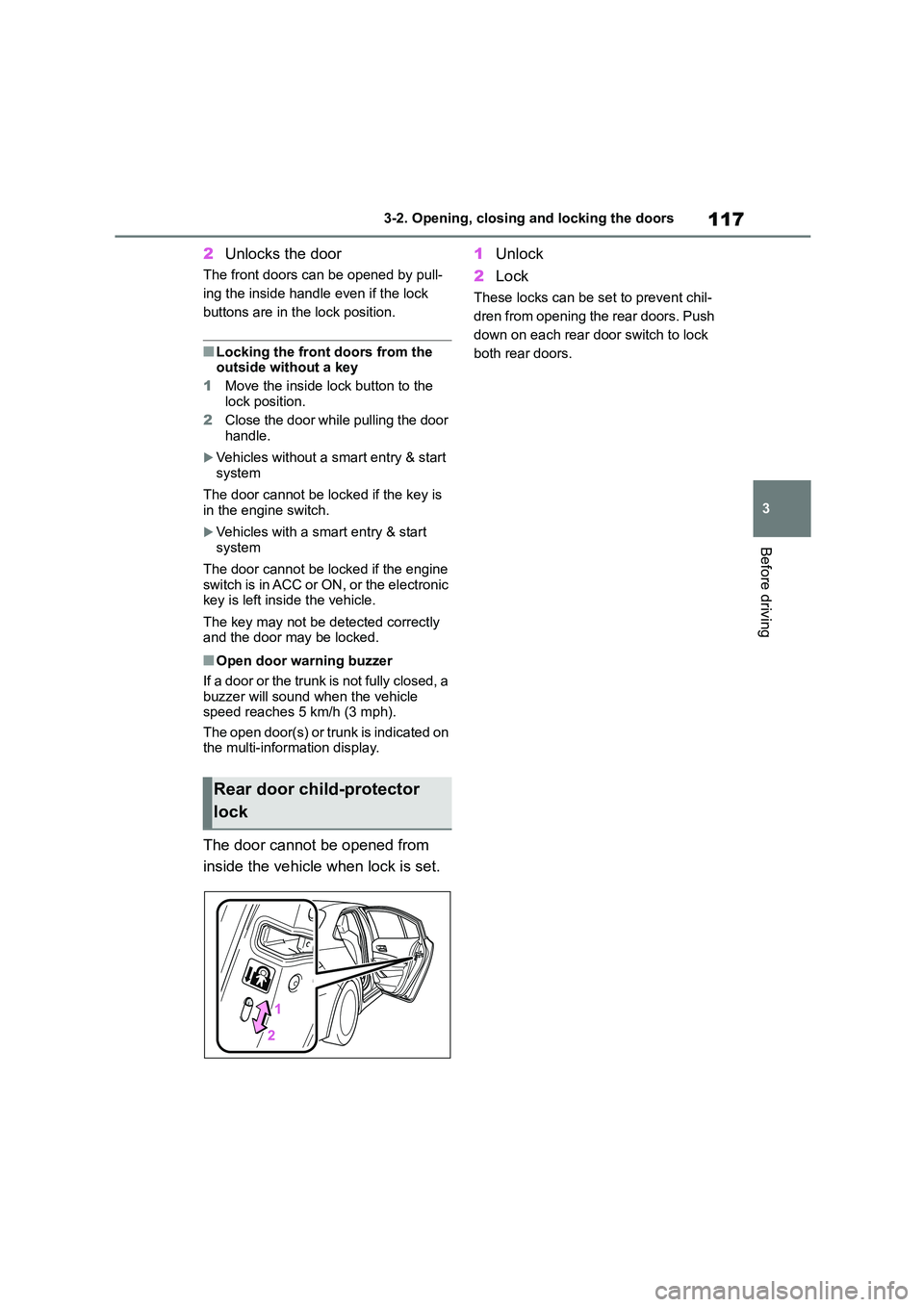
The door cannot be opened from
inside the vehicle when lock is set.
1 Unlock
2 Lock
These locks can be set to prevent chil-
dren from opening the rear doors. Push
down on each rear door switch to lock
both rear doors.
Rear door child-protector
lock