2022 TOYOTA COROLLA CROSS windshield wipers
[x] Cancel search: windshield wipersPage 3 of 612

3TABLE OF CONTENTS
1
2
3
4
5
6
7
8
9
10
Parking brake .....................171
Brake Hold ......................... 174
4-3. Operating the lights and wip- ers
Headlight switch ................. 177
Automatic High Beam ........ 180
Fog light switch .................. 184
Windshield wipers and washer ......................................... 184
Rear windshield wiper and washer ............................. 186
4-4. Refueling Opening the fuel tank cap .. 188
4-5. Using the driving support sys- tems
Toyota Safety Sense 2.0 .... 190
PCS (Pre-Collision System) ......................................... 195
LTA (Lane Tracing Assist)... 203
RSA (Road Sign Assist) ..... 213
Dynamic radar cruise control with full-speed range ........ 216
Stop & Start system ........... 227
BSM (Blind Spot Monitor)... 233
RCTA (Rear Cross Traffic Alert) ......................................... 238
Rear view monitor system .. 243
Intuitive parking assist ........ 251
PKSB (Parking Support Brake) ......................................... 258
Parking Support Brake function (static objects) .................. 264
Parking Support Brake function (rear-crossing vehicles).... 267
Driving assist systems........ 269
4-6. Driving tips Winter driving tips............... 274
Utility vehicle precautions... 2765-1. Basic function
Buttons overview................ 281
Menu screen ...................... 283
Status icon ......................... 284
“Setup” screen ................... 286
5-2. Basic information before oper- ation
Initial screen ....................... 287
Touch screen...................... 288
Home screen...................... 290
Entering letters and num- bers/list screen operation......................................... 291
Screen adjustment ............. 294
Linking multi-information display and the system ................ 295
5-3. Connectivity settings Registering/Connecting a Blue-
tooth
® device ................... 296
Setting Bluetooth
® details .. 300
Wi-Fi
® Hotspot ................... 308
Apple CarPlay/ Android Auto .................... 312
5-4. Other settings General settings ................. 319
Voice settings ..................... 323
Vehicle settings .................. 324
5-5. Using the audio/visual system Quick reference.................. 326
Some basics ...................... 327
5-6. Radio operation
AM radio/FM radio/SiriusXM
®
Satellite Radio(SXM) ....... 331
Internet radio ...................... 336
5-7. Media operation USB memory...................... 337
5Audio
Page 14 of 612

14Pictorial index
Pictorial index
■Exterior
Side doors ......... ................................. ................................ P.104
Locking/unlocking ................................................................ P.104
Opening/closing the side windows ....................................... P.133
Locking/unlocking by using the mechanical key
*1................ P.530
Warning messages .............................................................. P.108
Back door ........................................................................... P.109
Opening from inside the cabin
*2........................................... P.113
Opening from outside............................................................P.111
Warning messages ........................................................ P.505515
Outside rear view mirrors ................................................. P.131
Adjusting the mirror angle .................................................... P.131
Folding the mirrors ............................................................... P.132
Defogging the mirrors .................................................. P.412, 419
Windshield wipers.............................................................. P.184
Precautions for winter season.... .......................................... P.274
To prevent freezing (windshield wiper de-icer)
*2.................. P.422
Page 139 of 612

139
4
4
Driving
Driving
.4-1. Before drivingDriving the vehicle....... 141
Cargo and luggage ..... 147
Vehicle load limits ....... 150
Trailer towing............... 151
Dinghy towing ............. 161
4-2. Driving procedures Engine (ignition) switch (vehicles without a smart
key system) ............... 162
Engine (ignition) switch (vehicles with a smart key
system)...................... 163
Continuously variable trans- mission ...................... 167
Turn signal lever.......... 170
Parking brake .............. 171
Brake Hold .................. 174
4-3. Operating the lights and wipers
Headlight switch .......... 177
Automatic High Beam . 180
Fog light switch ........... 184
Windshield wipers and washer....................... 184
Rear windshield wiper and washer....................... 186
4-4. Refueling Opening the fuel tank cap.................................. 1884-5. Using the driving support
systems
Toyota Safety Sense 2.0 .................................. 190
PCS (Pre-Collision System) .................................. 195
LTA (Lane Tracing Assist) .................................. 203
RSA (Road Sign Assist) .................................. 213
Dynamic radar cruise con- trol with full-speed range
.................................. 216
Stop & Start system .... 227
BSM (Blind Spot Monitor) .................................. 233
RCTA (Rear Cross Traffic Alert) .......................... 238
Rear view monitor system .................................. 243
Intuitive parking assist . 251
PKSB (Parking Support Brake) ........................ 258
Parking Support Brake func- tion (static objects) .... 264
Parking Support Brake func- tion (rear-crossing vehi-
cles) ........................... 267
Driving assist systems .................................. 269
4-6. Driving tips Winter driving tips........ 274
Page 178 of 612

1784-3. Operating the lights and wipers
■Daytime running light system
●Vehicles without a smart key sys-
tem :The daytime running lights
illuminate using the same lights as
the headlights and illuminate
darker than the headlights.
Vehicles with a smart key system
:The daytime running lights illumi-
nate using the same lights as the
parking lights and illuminate darker
than the parking lights.
●To make your vehicle more visible
to other drivers during daytime
driving, the daytime running lights
turn on automatically when all of
the following conditions are met.
(The daytime running lights are
not designed for use at night.)
• The engine is running
• The parking brake is released
• Type A: The headlight switch is in
the or
* position
Type B: The headlight switch is in
the or position
*: When the surroundings are bright
The daytime running lights remain
on after they illuminate, even if the
parking brake is set again.
●Daytime running lights can be
turned off by operating the switch.
●Compared to turning on the head-
lights, the daytime running light
system offers greater durability
and consumes less electricity, so
it can help improve fuel economy.
■Headlight control sensor (if
equipped)
The sensor may not function prop-
erly if an object is placed on the sen- sor, or anything that blocks the
sensor is affixed to the windshield.
Doing so interferes with the sensor
detecting the level of ambient light
and may cause the automatic head-
light system to
malfunction.
■Automatic light off system
●When the headlights are on: The
headlights and tail lights turn off
30 seconds after the driver’s door
is opened and closed if the engine
switch is turned to ACC or OFF.
(The lights turn off immediately if
on the key is pressed after all
the doors are closed.)
●When only the tail lights are on:
The tail lights turn off automati-
cally if the engine switch is turned
to ACC or OFF and the driver’s
door is opened.
To turn the lights on again, turn the
engine switch to ON, or turn the light
switch off once and then back to
or .
■Light reminder buzzer
A buzzer sounds when the engine
switch is turned to OFF or ACC and
the driver’s door is opened while the
lights are turned on.
■Automatic headlight leveling
system (if equipped)
The level of the headlights is auto-
matically adjusted according to the
number of passengers and the load-
ing condition of the vehicle to
ensure that the headlights do not
interfere with other road users.
■Windshield wiper linked head-
light illumination (vehicles with
a headlight control sensor )
When driving during daytime with
the headlight switch turned to , if
the windshield wipers are used, the
headlights will turn on automatically
after several se conds to help
enhance the visibility of your vehi-
cle.
Page 180 of 612

1804-3. Operating the lights and wipers
AFS (Adaptive Front-lighting
System) secures excellent visi-
bility at intersections and on
curves by automatically adjust-
ing the direction of the light axis
of the headlights according to
vehicle speed and the degree of
the tire’s angle as controlled by
steering input.
AFS operates at speeds of approxi-
mately 6 mph (10 km/h) or higher.
■Customization
Some functions can be customized.
( P.563)
1 Press the Automatic High
Beam switch.
AFS (Adaptive Front-light-
ing System) (if equipped)Automatic High Beam
The Automatic High Beam
uses a camera sensor
located behind the upper
portion of the windshield to
assess the brightness of the
lights of vehicles ahead,
streetlights, etc., and auto-
matically turns the high
beams on or off as neces-
s a r y.
WARNING
■Limitations of the Automatic
High Beam
Do not overly rely on the Auto-
matic High Beam. Always drive
safely, taking care to observe your
surroundings and turning the high
beams on or off manually if nec-
essary.
■To prevent incorrect opera-
tion of the Automatic High
Beam system
Do not overload the vehicle.
Activating the Automatic
High Beam
Page 182 of 612
1824-3. Operating the lights and wipers
switch between the high and low
beams.
• When driving in inclement weather
(heavy rain, snow, fog, sand-
storms, etc.)
• When the windshield is obscured
by fog, mist, ice, dirt, etc.
• When the windshield is cracked or damaged
• When the camera sensor is deformed or dirty
• When the temperature of the cam-
era sensor is extremely high
• When the surrounding brightness level is equal to that of headlights,
tail lights or fog lights
• When headlights or tail lights of vehicles ahead are turned off,
dirty, changing color, or not aimed
properly
• When the vehicle is hit by water,
snow, dust, etc. from a preceding
vehicle
• When driving through an area of
intermittently changing brightness
and darkness
• When frequently and repeatedly
driving ascending/descending
roads, or roads with rough, bumpy
or uneven surfaces (such as
stone-paved roads, gravel roads,
etc.)
• When frequently and repeatedly
taking curves or driving on a wind-
ing road
• When there is a highly reflective
object ahead of the vehicle, such
as a sign or mirror
• When the back of a preceding
vehicle is highly reflective, such as
a container on a truck
• When the vehicle’s headlights are
damaged or dirty, or are not aimed
properly
• When the vehicle is listing or titling
due to a flat tire, a trailer being
towed, etc.
• When the headlights are changed between the high beams and low
beams repeatedly in an abnormal
manner
• When the driver believes that the
high beams may be flashing or
dazzling pedestrians or other driv- ers
■Temporarily lowering sensor
sensitivity
The sensitivity of the sensor can be
temporarily lowered.
1 Turn the engine switch off while
the following conditions are met.
●The headlight switch is in or
(if equipped).
●The headlight switch lever is in the
original position.
●Automatic High Beam switch is
on.
2 Turn the engine switch to ON.
3 Within 60 seconds after step 2,
repeat pushing the headlight
switch lever to the high beam
position then pulling it to the orig-
inal position quickly 10 times,
then leave the lever in the origi-
nal position.
4 If the sensitivity is changed, the
Automatic High Beam indicator
is turn on and off 3 times.
■Switching to the high
beams
Push the lever away from you.
The Automatic High Beam indicator
will turn off and the high beam indi-
cator will turn on.
Pull the lever to its original position
to activate the Automatic High
Beam system again.
Turning the high beams
on/off manually
Page 184 of 612
1844-3. Operating the lights and wipers
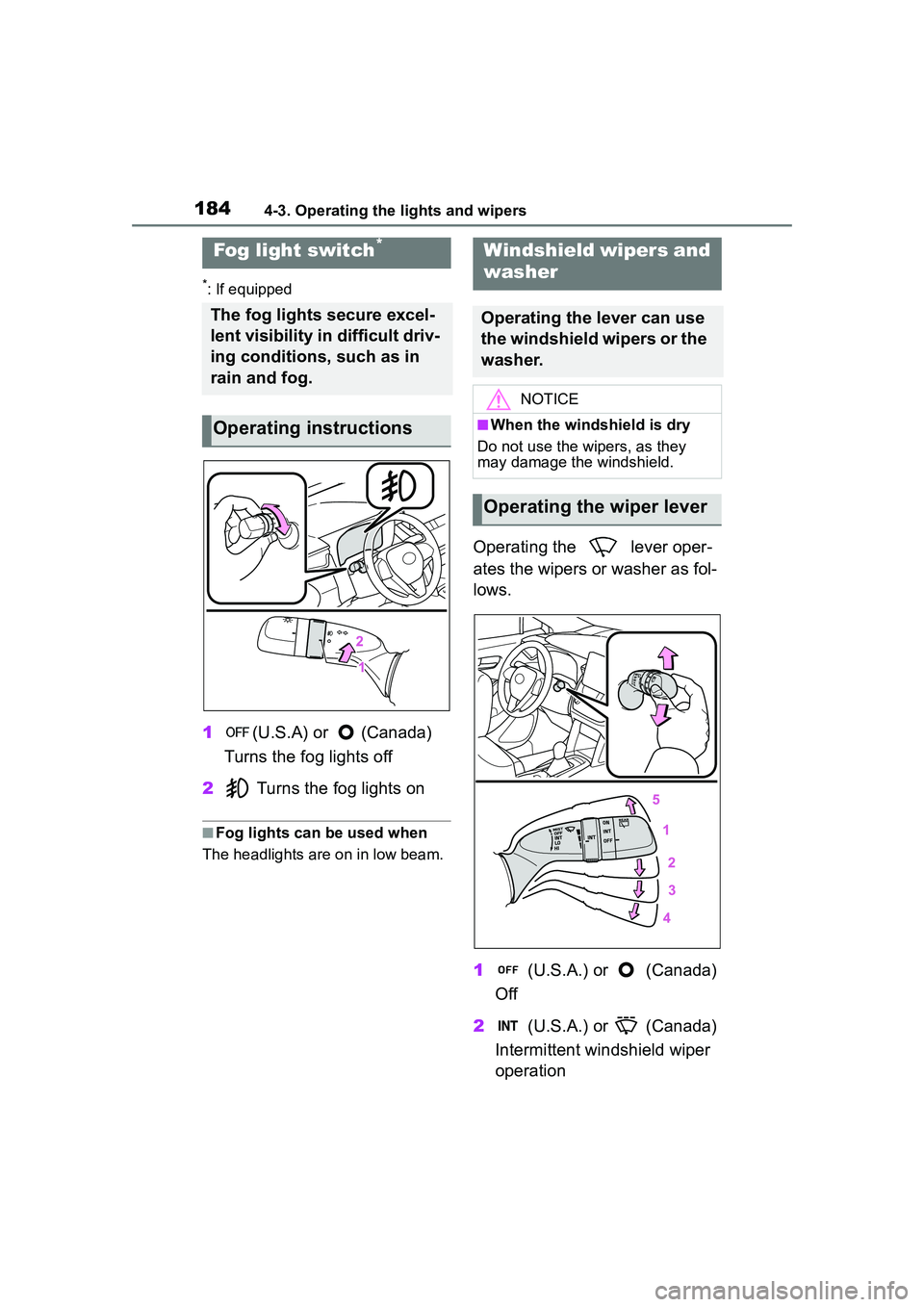
*: If equipped
1(U.S.A) or (Canada)
Turns the fog lights off
2 Turns the fog lights on
■Fog lights can be used when
The headlights are on in low beam.
Operating the lever oper-
ates the wipers or washer as fol-
lows.
1 (U.S.A.) or (Canada)
Off
2 (U.S.A.) or (Canada)
Intermittent windshield wiper
operation
Fog light switch*
The fog lights secure excel-
lent visibility in difficult driv-
ing conditions, such as in
rain and fog.
Operating instructions
Windshield wipers and
washer
Operating the lever can use
the windshield wipers or the
washer.
NOTICE
■When the windshield is dry
Do not use the wipers, as they
may damage the windshield.
Operating the wiper lever
Page 185 of 612

1854-3. Operating the lights and wipers
4
Driving
3 (U.S.A.) or (Canada)
Low speed windshield wiper
operation
4 (U.S.A.) or (Canada)
High speed windshield wiper
operation
5 (U.S.A.) or (Canada)
Temporary operation
Interval adjustment type only:
Wiper intervals can be adjusted
when intermittent operation is
selected.
6 Increases the intermittent
windshield wiper frequency
7 Decreases the intermittent
windshield wiper frequency
8 Washer/wiper dual
operation
Pulling the lever operates the wip-
ers and washer. Wipers will automatically operate a
couple of times after the washer
squirts.
■The windshield wiper and
washer can be operated when
The engine switch is in ON.
■If no windshield washer fluid
sprays
Check that the washer nozzles are
not blocked if there is washer fluid in
the windshield washer fluid reser-
voir.
■When stopping the engine in an
emergency while driving
If the windshield wipers are operat-
ing when the engine is stopped, the
windshield wipers will operate in
high speed operation. After the vehi-
cle is stopped, operation will return
to normal when the engine switch is
turned to ON.
WARNING
■Caution regarding the use of
washer fluid
When it is cold, do not use the
washer fluid until the windshield
becomes warm. The fluid may
freeze on the windshield and
cause low visibility. This may lead
to an accident, resulting in death
or serious injury.
NOTICE
■When there is no washer fluid
spray from the nozzle
Damage to the washer fluid pump
may be caused if the lever is
pulled toward you and held con-
tinually.