2022 TOYOTA COROLLA CROSS air condition
[x] Cancel search: air conditionPage 230 of 612

2304-5. Using the driving support systems
• If the battery charge becomes low.
■When the hood is opened
●If the hood is opened while the
engine is stopped by the Stop &
Start system, the engine will stall
and will not be able to be restarted
by the automatic engine start
function. In this case, restart the
engine using the normal engine
starting procedure. (P.162, 163)
●If the hood is closed after the
engine is started with the hood
open, the Stop & Start system will
not operate. Close the hood, turn
the engine switch off, wait 30 sec-
onds or more, and then start the
engine.
■Air conditioning system opera-
tion while the engine is stopped
by the Stop & Start system
Vehicles with an automatic air con-
ditioning system: When the air con-
ditioning is in automatic mode and
the engine is stopped by the Stop &
Start system, the fan may operate at
a low speed in order to prevent the
temperature in the cabin from
increasing or decreasing or may be
stopped.
To prioritize air conditioning system
performance when the vehicle is
stopped, disable the Stop & Start
system by pressing the Stop & Start
cancel switch.
●If the windshield is fogged up
Turn the windshield defogger on.
( P.410, 416)
If the windshield fogs up frequently,
press the Stop & Start cancel switch
to disable the Stop & Start system.
●If an odor is emitted from the air
conditioning system
• Vehicles with a manual air condi- tioning system
If the idling stop time setting is set to
“Extended” change it to “Standard”.
If an odor is emitted when the idling
stop time setting is set to “Stan- dard”, press the Stop & Start cancel
switch to deactivate the Stop & Start
system.
• Vehicles with an automatic air
conditioning system
Press the Stop & Start cancel switch
to deactivate the Stop & Start sys-
tem.
■Changing the idling stop time
with the air conditioning system
on
The length of time the Stop & Start
system will operate when the air
conditioning system is on can be
changed in of the multi-informa-
tion display ( P.90). (The length of
time the Stop & Start system will
operate when the air conditioning
system is off cannot be changed.)
■Displaying the Stop & Start sys-
tem status
P.82, 87
■Multi-information display mes-
sages
If the following situations, and a
message may be displayed on the
multi-information display.
●When the engine cannot be
stopped by the Stop & Start sys-
tem
“Press Brake More to Activate”
• The brake pedal is not sufficiently depressed.
If the brake pedal is depressed
further, the system will operate.
“Non-Dedicated Battery”
• A battery not designed for use with a Stop & Start system may
have been installed.
Have the vehicle inspected by
your Toyota dealer.
“Battery Charging”
• The battery charge may be low.
Page 231 of 612

2314-5. Using the driving support systems
4
Driving
Stopping of the engine is tempo-
rarily prohibited to prioritize charging
of the battery. After the engine runs
for a certain amount of time, the sys-
tem will be enabled.
• A refresh charge may be occur- ring
After a refresh charge for up to
an hour completes, the system can
be operated.
• If displayed continuously for a long time (more than an hour)
The battery may be deteriorated.
Contact your Toyota dealer for
details.
“Stop & Start Unavailable”
• The Stop & Start system is tempo- rarily disabled.
Allow the engine to run for some
time.
• The engine may have been started with the hood open.
Close the hood, turn the engine
switch off, wait for 30 seconds or
more, and then start the engine.
“In Preparation”
• The vehicle is being driven in a high altitude area.
• The brake booster vacuum is low.
When the brake booster vacuum
reaches a predetermined level, the
system will be enabled.
“For Climate Control”
• The air conditioning system is being used when the ambient
temperature is high or low.
If the difference between the set
temperature and cabin temperature
becomes small, the system will be
enabled.
• The windshield defogger is on.●When the engine automatically
restarts while stopped by the Stop
& Start system
“In Preparation”
• The brake pedal has been depressed further or pumped.
The system will be enabled after
the engine runs and the brake
booster vacuum reaches a predeter-
mined level.
“For Climate Control”
• The air conditioning system has been turned on or is being used.
• The windshield defogger has been turned on.
“Battery Charging”
• The battery charge may be low.
The system will be enabled after
the engine runs to sufficiently
charge the battery.
■When the buzzer sounds
If the driver’s door is opened when
the engine is stopped by the Stop &
Start system and the shift lever is in
D, a buzzer will sound and the Stop
& Start system indicator will flash. To
stop the buzzer, close the driver’s
door.
■The Stop & Start system protec-
tion function
●When the volume of the audio
system is excessively high, sound
output from the audio system may
suddenly be cut off in order to
reduce battery consumption. To
prevent the audio system from
being cut off, keep the volume of
audio system at a moderate level.
If the audio system has been cut
off, turn the engine switch off, wait
for 3 seconds or more and then
turn it to ACC or ON to re-enable
the audio system.
●The audio system may not be acti-
vated if the battery terminals are
Page 243 of 612

2434-5. Using the driving support systems
4
Driving
●When a detected vehicle turns
while approaching the vehicle
●When there are spinning objects
near your vehicle such as the fan
of an air conditioning unit
●When water is splashed or
sprayed toward the rear bumper,
such as from a sprinkler
●Moving objects (flags, exhaust
fumes, large rain droplets or
snowflakes, rain water on the road
surface, etc.)
●When the distance between your
vehicle and a guardrail, wall, etc.,
that enters the detection area is
short
●Gratings and gutters
●When a sensor or the area around
a sensor is extremely hot or cold
●If the suspension has been modi-
fied or tires of a size other than
specified are installed
●If the front of the vehicle is raised
or lowered due to the carried load
*: If equipped
The rear view image is dis-
played when the shift lever is in
R and the engine switch is in
ON.
Rear view monitor sys-
tem
*
Audio
The rear view monitor sys-
tem assists the driver by
displaying an image of the
view behind the vehicle with
fixed guide lines on the
screen while backing up, for
example while parking.
The screen illustrations
used in this text are
intended as examples, and
may differ from the image
that is actually displayed on
the screen.
Audio Plus
Owners of models equipped
with a multimedia system
should refer to the “MULTI-
MEDIA OWNER’S MAN-
UAL”.
System overview
Page 254 of 612

2544-5. Using the driving support systems
determines that it is normal, the sys-
tem will return to normal.
■Sensor detection information
●The sensors may be able to only
detect objects near the front and
rear bumpers.
●The following situations may occur
during use.
• Depending on the shape of the object and other factors, the
detection distance may shorten, or
detection may be impossible.
• Detection may be impossible if static objects draw too close to the
sensor.
• After the static object detection, there will be a short delay before a
graphic is shown on displays, and
warning buzzer sounds. Even at
low speeds, there is a possibility
that the object will come within the
sensor’s detection areas before
the display is shown and the warn-
ing beep sounds.
• It might be difficult to hear the buzzer due to the volume of the
audio system or air flow noise of
the air conditioning system.
• It may be difficult to hear the
buzzer if buzzers for other sys-
tems are sounding.
■Objects which the system may
not be properly detected
The shape of the object may pre-
vent the sensor from detecting it.
Pay particular attention to the follow-
ing objects:
●Wires, fences, ropes, etc.
●Cotton, snow and other materials
that absorb sound waves
●Sharply-angled objects
●Low objects
●Tall objects with upper sections
projecting outwards in the direc-
tion of your vehicle
●People may not be detected if
they are wearing certain types of
clothing.
■Situations in which the system
may not operate properly
Certain vehicle conditions and the
surrounding environment may affect
the ability of a sens or to correctly
detect objects. Pa rticular instances
where this may occur are listed
below.
●There is dirt, snow, water drops or
ice on a sensor. (Cleaning the
sensors will resolv e this problem.)
●A sensor is frozen. (Thawing the
area will resolve this problem.)
In especially cold weather, if a
sensor is frozen the sensor dis-
play may be displayed abnormally,
or objects, such as a wall, may not
be detected.
●When a sensor or the area around
a sensor is extremely hot or cold.
●On an extremely bumpy road, on
an incline, on gravel, or on grass.
●When vehicle horns, vehicle
detectors, motorcycle engines, air
brakes of large vehicles, the clear-
ance sonar of other vehicles or
other devices which produce ultra-
sonic waves are near the vehicle
●A sensor is coated with a sheet of
spray or heavy rain.
●If objects draw too close to the
sensor.
●When a pedestrian is wearing
clothing that does not reflect ultra-
sonic waves (ex. skirts with gath-
ers or frills).
●When objects that are not perpen-
dicular to the ground, not perpen-
dicular to the vehicle traveling
direction, uneven, or waving are in
the detection range.
Page 270 of 612

2704-5. Using the driving support systems
conditions including normal driv-
ing, during cornering, on a
uphill, when starting off, during
acceleration, on a slippery roads
due to snow or rain, thus con-
tributing to stable operability and
driving stability.
■The Secondary Collision
Brake
When the SRS airbag sensor
detects a collision and the sys-
tem operates, the brakes and
brake lights are automatically
controlled to reduce the vehicle
speed and help reduce the pos-
sibility of further damage due to
a secondary collision.
■When the TRAC/VSC systems
are operating
The slip indicator light will flash
while the TRAC/VSC systems are
operating.
■Disabling the TRAC system
If the vehicle gets stuck in mud, dirt
or snow, the TRAC system may
reduce power from the engine to the
wheels. Pressing to turn the
system off may make it easier for
you to rock the vehicle in order to
free it.
To turn the TRAC system off, quickly
press and release .
The “Traction Control Turned OFF” will be shown on the multi-informa-
tion display.
Press again to turn the system
back on.
■Turning off both TRAC and VSC
systems
To turn the TRAC and VSC systems
off, press and hold for more
than 3 seconds while the vehicle is
stopped.
The VSC OFF indicator light will
come on and the “Traction Control
Turned OFF” will be shown on the
multi-information display.
*
Press again to turn the system
back on.
*: PCS will also be disabled (only Pre-Collision warning is avail-
able). The PCS warning light will
come on and a message will be
displayed on the multi-information
display. ( P.202)
■When the message is dis-
played on the mu lti-information
display showing that TRAC has
been disabled even if has
not been pressed
TRAC is temporary deactivated. If
the information continues to show,
contact your Toyota dealer.
■Operating conditions of
hill-start assist control
When the following four conditions
are met, the hill-start assist control
Page 272 of 612

2724-5. Using the driving support systems
■Secondary Collision Brake
operating conditions
The system operates when the SRS
airbag sensor detects a collision
while the vehicle is in motion.
However, the system does not oper-
ate in any of the following situations.
●The vehicle speed is below 6 mph
(10 km/h)
●Components are damaged
■Secondary Collision Brake
automatic cancellation
The system is automatically can-
celed in any of the following situa-
tions.
●The vehicle speed drops below
approximately 6 mph (10 km/h)
●A certain amount of time elapses
during operation
●The accelerator pedal is
depressed a large amount
WARNING
■The ABS does not operate
effectively when
●The limits of tire gripping perfor-
mance have been exceeded
(such as excessively worn tires
on a snow covered road).
●The vehicle hydroplanes while
driving at high speed on wet or
slick roads.
■Stopping distance when the
ABS is operating may exceed
that of normal conditions
The ABS is not designed to
shorten the vehicle’s stopping dis-
tance. Always main tain a safe dis-
tance from the vehicle in front of
you, especially in the following sit-
uations:
●When driving on dirt, gravel or
snow-covered roads
●When driving with tire chains
●When driving over bumps in the
road
●When driving over roads with
potholes or uneven surfaces
■TRAC/VSC may not operate
effectively when
Directional control and power may
not be achievable while driving on
slippery road surfaces, even if the
TRAC/VSC system is operating.
Drive the vehicle carefully in con-
ditions where stability and power
may be lost.
■Active Cornering Assist does
not operate effectively when
●Do not overly rely on Active
Cornering Assist. Active Corner-
ing Assist may not operate
effectively when accelerating
down slopes or driving on slip-
pery road surfaces.
●When Active Cornering Assist
frequently operates, Active Cor-
nering Assist may temporarily
stop operating to ensure proper
operation of the brakes, TRAC
and VSC.
■Hill-start assist control does
not operate effectively when
●Do not overly rely on hill-start
assist control. Hill-start assist
control may not operate effec-
tively on steep inclines and
roads covered with ice.
●Unlike the parking brake,
hill-start assist control is not
intended to hold the vehicle sta-
tionary for an extended period
of time. Do not attempt to use
hill-start assist control to hold
the vehicle on an incline, as
doing so may lead to an acci-
dent.
Page 274 of 612

2744-6. Driving tips
4-6.Driving tips
Use fluids that are appropriate
to the prevailing outside tem-
peratures.
• Engine oil
• Engine coolant
• Washer fluid
Have a service technician
inspect the condition of the
battery.
Have the vehicle fitted with
four snow tires.
Ensure that all tires are the same
size and brand.
Perform the following according
to the driving conditions:
Do not try to forcibly open a
window or move a wiper that
is frozen. Pour warm water
over the frozen area to melt
the ice. Wipe away the water
immediately to prevent it from
freezing.
To ensure proper operation of
the climate control system
fan, remove any snow that
has accumulated on the air
inlet vents in front of the wind-
shield.
Check for and remove any
Winter driving tips
Carry out the necessary
preparations and inspec-
tions before driving the
vehicle in winter. Always
drive the vehicle in a man-
ner appropriate to the pre-
vailing weather conditions.
Pre-winter preparations
WARNING
■Driving with snow tires
Observe the following precautions
to reduce the risk of accidents.
Failure to do so may result in a
loss of vehicle control and cause
death or serious injury.
●Use tires of the size specified.
●Maintain the recommended
level of air pressure.
●Do not drive in excess of 75
mph (120 km/h), regardless of
the type of snow tires being
used.
●Use snow tires on all, not just
some wheels.
NOTICE
■Driving with tire chains
Do not fit tire chains. Tire chains
may damage the vehicle body
and suspension, and adversely
affect driving performance.
■Repairing or replacing snow
tires
Request repairs or replacement of
snow tires from Toyota dealers or
legitimate tire retailers.
This is because the removal and
attachment of snow tires affects
the operation of the tire pressure
warning valves and transmitters.
Before driving the vehicle
Page 358 of 612
3585-11. Voice command system operation
5-11.Voice command system operation
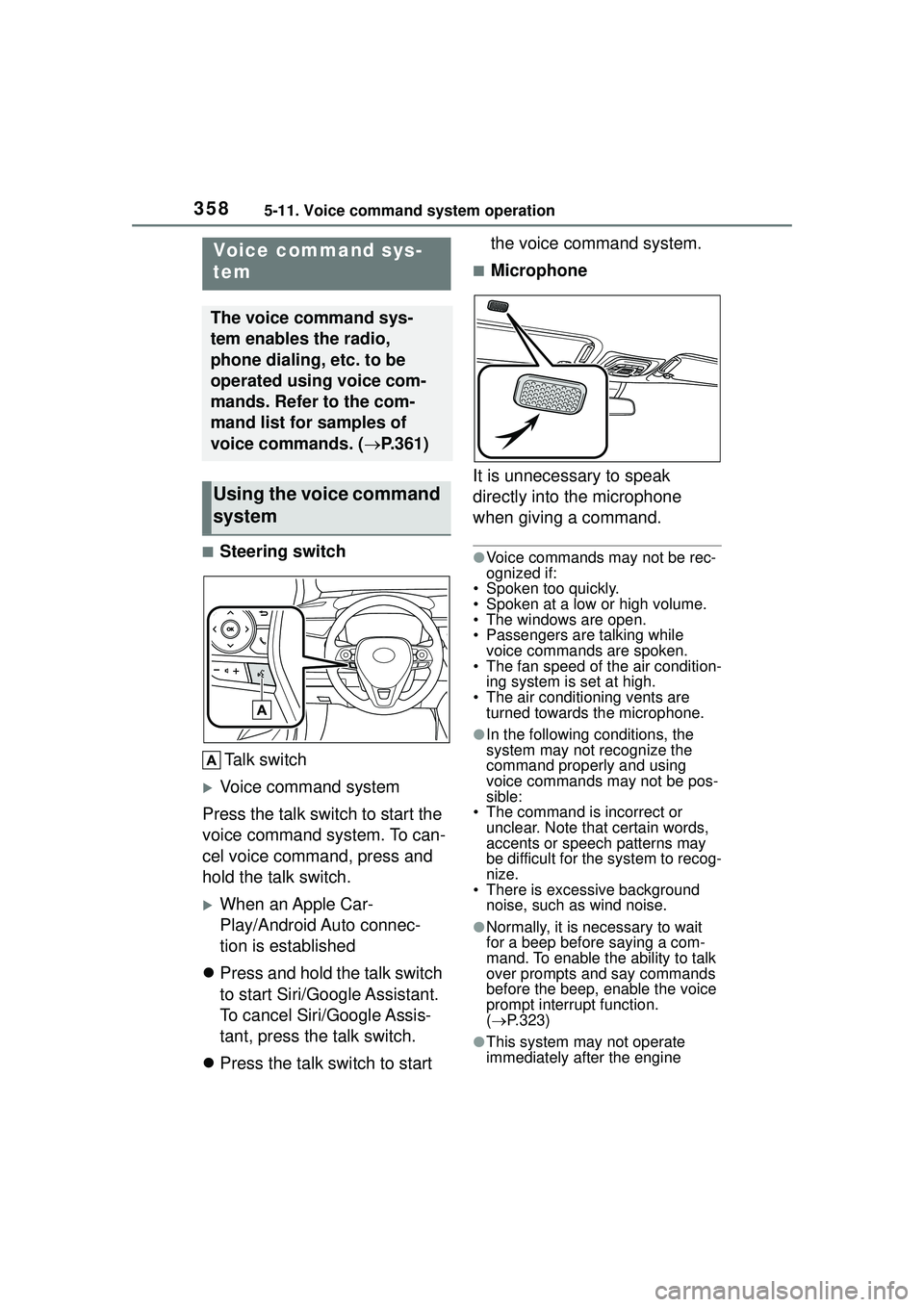
■Steering switchTalk switch
Voice command system
Press the talk switch to start the
voice command system. To can-
cel voice command, press and
hold the talk switch.
When an Apple Car-
Play/Android Auto connec-
tion is established
Press and hold the talk switch
to start Siri/Google Assistant.
To cancel Siri/Google Assis-
tant, press the talk switch.
Press the talk switch to start the voice command system.
■Microphone
It is unnecessary to speak
directly into the microphone
when giving a command.
●Voice commands may not be rec-
ognized if:
• Spoken too quickly.
• Spoken at a low or high volume.
• The windows are open.
• Passengers are talking while voice commands are spoken.
• The fan speed of the air condition-
ing system is set at high.
• The air conditioning vents are turned towards the microphone.
●In the following conditions, the
system may not recognize the
command properly and using
voice commands may not be pos-
sible:
• The command is incorrect or unclear. Note that certain words,
accents or speech patterns may
be difficult for the system to recog-
nize.
• There is excessive background
noise, such as wind noise.
●Normally, it is necessary to wait
for a beep before saying a com-
mand. To enable the ability to talk
over prompts and say commands
before the beep, enable the voice
prompt interrupt function.
( P.323)
●This system may not operate
immediately after the engine
Voice command sys-
tem
The voice command sys-
tem enables the radio,
phone dialing, etc. to be
operated using voice com-
mands. Refer to the com-
mand list for samples of
voice commands. ( P.361)
Using the voice command
system