Page 286 of 612
2865-1. Basic function
Press the “MENU” button, then
select “Setup” to display the
“Setup” screen. The items
shown on the “Setup” screen
can be set.Select to change the selected
language, operation sound
settings, etc. ( P.319)
Select to set Bluetooth
®
device and Bluetooth
® sys-
tem settings. ( P.300)
Select to set audio settings.
( P.349)
Select to set the phone
sound, contacts, message
settings, etc. ( P.382)
Select to set the voice set-
tings. ( P.323) Select to set vehicle informa-
tion. (
P.324)
Select to set Wi-Fi
® connec-
tion settings.
*1, 2 ( P.309)
Select to set Toyota apps set-
tings.
*2 ( P.407)
*1: Vehicles with DCM
*2: This function is not made avail-
able in some countries or areas.
“Setup” screen
“Setup” screen
Page 296 of 612
2965-3. Connectivity settings
5-3.Connectivity settings
●This system is not guaranteed to
operate with all Bluetooth®
devices.
●If your cellular phone does not
support HFP, registering the Blue-
tooth
® phone or using OPP,
PBAP, MAP or SPP profiles indi-
vidually will not be possible.
●If the connected Bluetooth®
device version is older than rec-
ommended or incompatible, the
Bluetooth
® device function may
not work properly.
●Refer to
https://www.toyota.com/
audio-multimedia in the United
States,
https://www.toyota.ca/connected
in Canada, and
http://www.toyotapr.com/
audio-multimedia in Puerto Rico,
to find approved Bluetooth®
phones for this system.
■Registering from the sys-
tem
1 Turn the Bluetooth
® connec-
tion setting of your cellular
phone on.
This function is not available when
Bluetooth® connection setting of
your cellular phone is set to off.
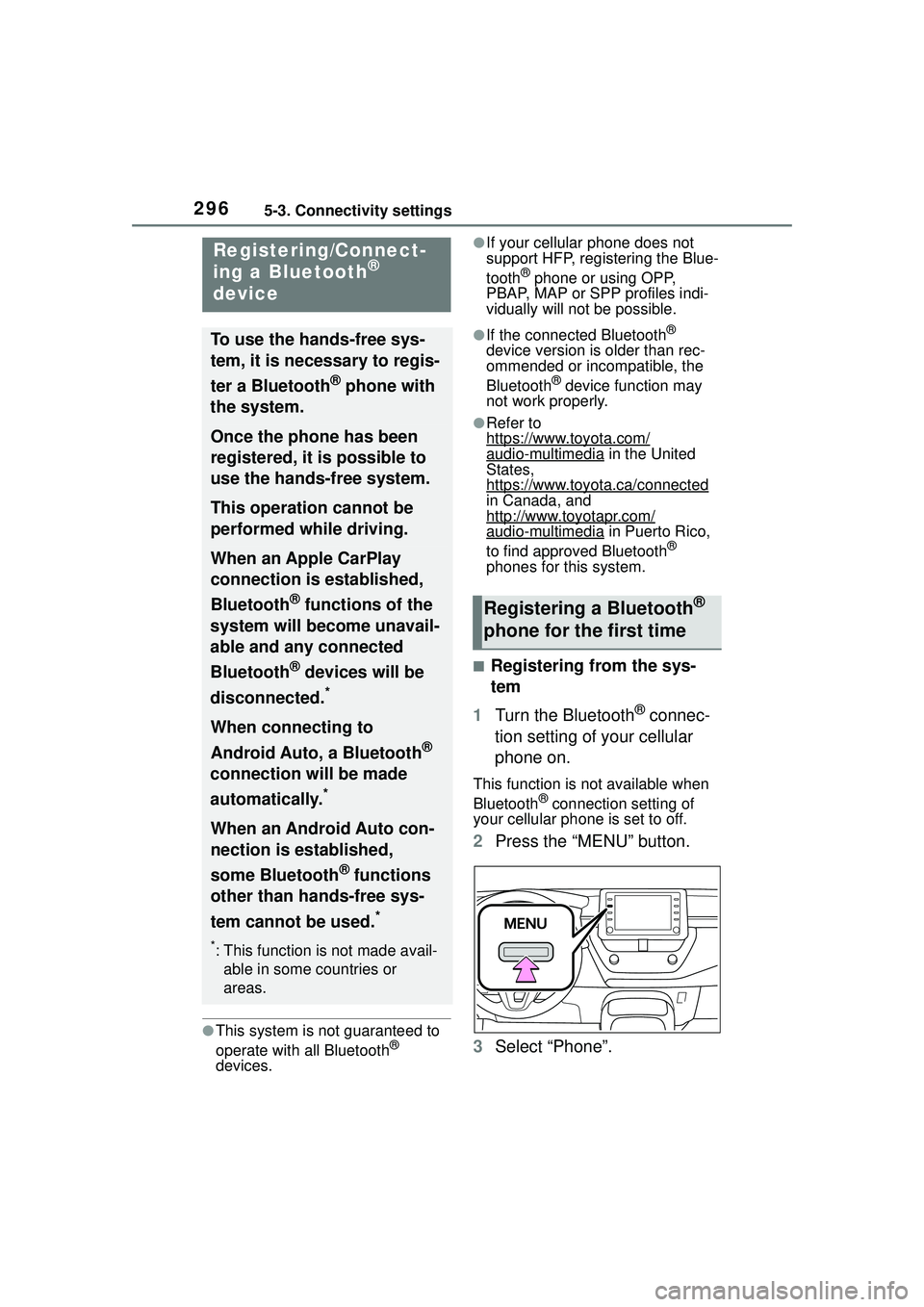
2 Press the “MENU” button.
3 Select “Phone”.
Registering/Connect-
ing a Bluetooth®
device
To use the hands-free sys-
tem, it is necessary to regis-
ter a Bluetooth
® phone with
the system.
Once the phone has been
registered, it is possible to
use the hands-free system.
This operation cannot be
performed while driving.
When an Apple CarPlay
connection is established,
Bluetooth
® functions of the
system will become unavail-
able and any connected
Bluetooth
® devices will be
disconnected.
*
When connecting to
Android Auto, a Bluetooth
®
connection will be made
automatically.
*
When an Android Auto con-
nection is established,
some Bluetooth
® functions
other than hands-free sys-
tem cannot be used.
*
*: This function is not made avail- able in some countries or
areas.
Registering a Bluetooth®
phone for the first time
Page 297 of 612
2975-3. Connectivity settings
5
Audio
Operations up to this point can also
be performed by pressing the
“PHONE” button on the instrument
panel.
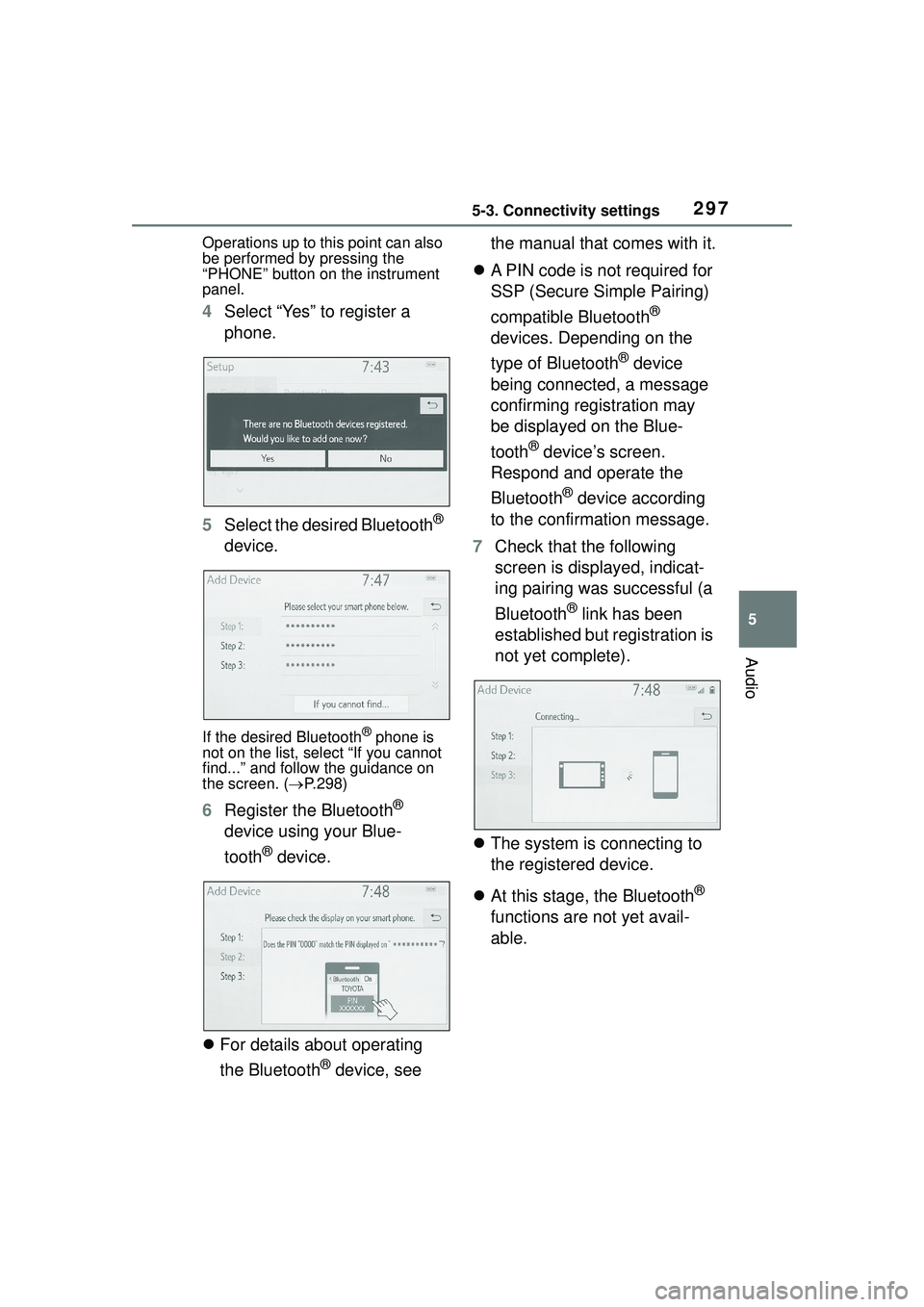
4Select “Yes” to register a
phone.
5 Select the desired Bluetooth
®
device.
If the desired Bluetooth® phone is
not on the list, select “If you cannot
find...” and follow the guidance on
the screen. ( P.298)
6 Register the Bluetooth®
device using your Blue-
tooth
® device.
For details about operating
the Bluetooth
® device, see the manual that comes with it.
A PIN code is not required for
SSP (Secure Simple Pairing)
compatible Bluetooth
®
devices. Depending on the
type of Bluetooth
® device
being connected, a message
confirming registration may
be displayed on the Blue-
tooth
® device’s screen.
Respond and operate the
Bluetooth
® device according
to the confirmation message.
7 Check that the following
screen is displayed, indicat-
ing pairing was successful (a
Bluetooth
® link has been
established but registration is
not yet complete).
The system is connecting to
the registered device.
At this stage, the Bluetooth
®
functions are not yet avail-
able.
Page 298 of 612

2985-3. Connectivity settings
8Check that “Connected” is
displayed and registration is
complete.
If an error message is displayed,
follow the guidance on the screen
to try again.
If a cellular phone does not operate
properly after being connected, turn
the cellular phone off and on and
then connect it again.
■Registering from phone
1 Select “If you cannot find…”.
2 Select “Register from
Phone”.
3 Check that the following
screen is displayed, and reg- ister the Bluetooth
® device
using your Bluetooth
®
device.
For details about operating
the Bluetooth
® device, see
the manual that comes with it.
A PIN code is not required for
SSP (Secure Simple Pairing)
compatible Bluetooth
®
devices. Depending on the
type of Bluetooth
® device
being connected, a message
confirming registration may
be displayed on the Blue-
tooth
® device’s screen.
Respond and operate the
Bluetooth
® device according
to the confirmation message.
4 Follow the steps in “Register-
ing a Bluetooth
® phone for
the first time” from step 7.
( P.296)
To use the Bluetooth
® audio, it is
necessary to register an audio
Registering a Bluetooth®
audio player for the first
time
Page 299 of 612
2995-3. Connectivity settings
5
Audio
player with the system.
Once the player has been regis-
tered, it is possible to use the
Bluetooth
® audio.
This operation cannot be per-
formed while driving.
For details about registering a
Bluetooth
® device: P.296
1 Turn the Bluetooth
® connec-
tion setting of your audio
player on.
This function is not available when
the Bluetooth® connection setting
of your audio player is set to off.
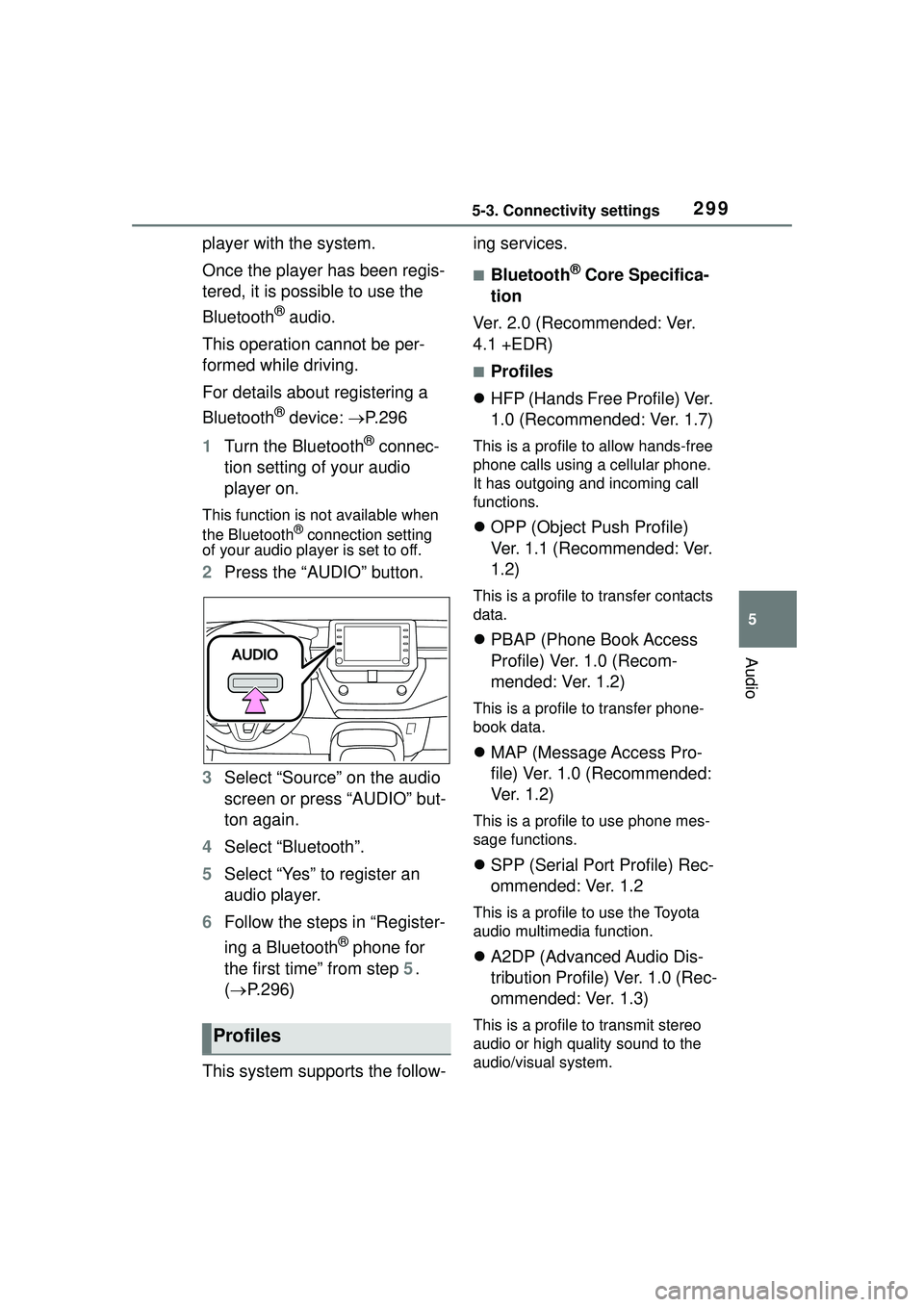
2 Press the “AUDIO” button.
3 Select “Source” on the audio
screen or press “AUDIO” but-
ton again.
4 Select “Bluetooth”.
5 Select “Yes” to register an
audio player.
6 Follow the steps in “Register-
ing a Bluetooth
® phone for
the first time” from step 5.
( P.296)
This system supports the follow- ing services.
■Bluetooth® Core Specifica-
tion
Ver. 2.0 (Recommended: Ver.
4.1 +EDR)
■Profiles
HFP (Hands Free Profile) Ver.
1.0 (Recommended: Ver. 1.7)
This is a profile to allow hands-free
phone calls using a cellular phone.
It has outgoing and incoming call
functions.
OPP (Object Push Profile)
Ver. 1.1 (Recommended: Ver.
1.2)
This is a profile to transfer contacts
data.
PBAP (Phone Book Access
Profile) Ver. 1.0 (Recom-
mended: Ver. 1.2)
This is a profile to transfer phone-
book data.
MAP (Message Access Pro-
file) Ver. 1.0 (Recommended:
Ve r. 1 . 2 )
This is a profile to use phone mes-
sage functions.
SPP (Serial Port Profile) Rec-
ommended: Ver. 1.2
This is a profile to use the Toyota
audio multimedia function.
A2DP (Advanced Audio Dis-
tribution Profile) Ver. 1.0 (Rec-
ommended: Ver. 1.3)
This is a profile to transmit stereo
audio or high quality sound to the
audio/visual system.Profiles
Page 300 of 612
3005-3. Connectivity settings
AVRCP (Audio/Video Remote
Control Profile) Ver. 1.0 (Rec-
ommended: Ver. 1.6)
This is a profile to allow remote
control the A/V equipment.
1 Press the “MENU” button.
2 Select “Setup”.
3 Select “Bluetooth”.
Setting Bluetooth®
details
When an Apple CarPlay
connection is established,
this function will be unavail-
able.
*
When an Android Auto con-
nection is established,
some functions will be
unavailable.
*
*: This function is not made avail-
able in some countries or
areas.
Displaying the Blue-
tooth® setup screen
Page 301 of 612
3015-3. Connectivity settings
5
Audio
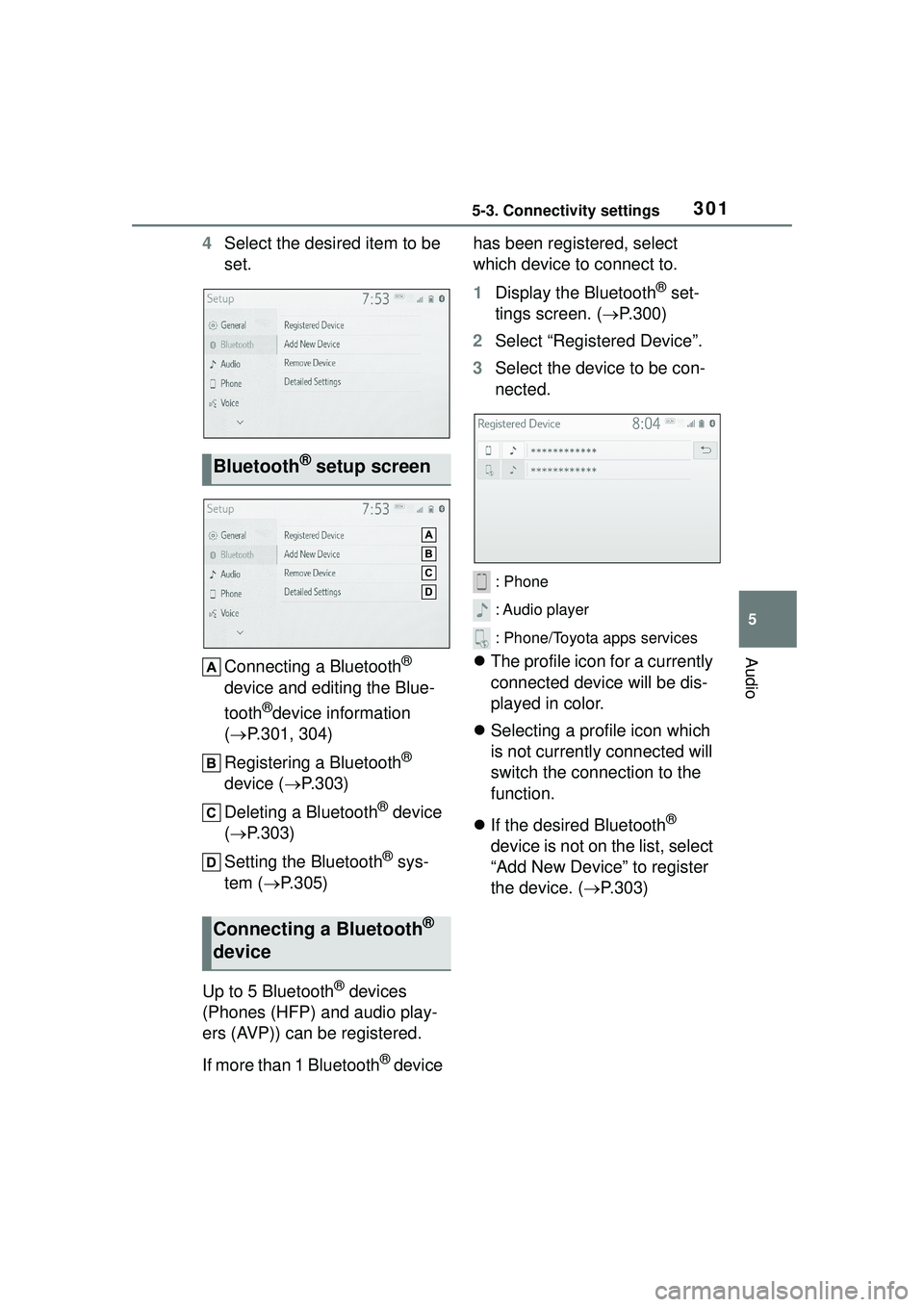
4Select the desired item to be
set.
Connecting a Bluetooth
®
device and editing the Blue-
tooth
®device information
( P.301, 304)
Registering a Bluetooth
®
device ( P.303)
Deleting a Bluetooth
® device
( P.303)
Setting the Bluetooth
® sys-
tem ( P.305)
Up to 5 Bluetooth
® devices
(Phones (HFP) and audio play-
ers (AVP)) can be registered.
If more than 1 Bluetooth
® device has been registered, select
which device to connect to.
1
Display the Bluetooth
® set-
tings screen. ( P.300)
2 Select “Registered Device”.
3 Select the device to be con-
nected.
: Phone
: Audio player
: Phone/Toyota apps services
The profile icon for a currently
connected device will be dis-
played in color.
Selecting a profile icon which
is not currently connected will
switch the connection to the
function.
If the desired Bluetooth
®
device is not on the list, select
“Add New Device” to register
the device. ( P.303)
Bluetooth® setup screen
Connecting a Bluetooth®
device
Page 302 of 612

3025-3. Connectivity settings
4Select the desired connec-
tion.
“Device Info”: Select to confirm and
change the Bluetooth® device infor-
mation. ( P.304)
When another Bluetooth®
device is connected
To disconnect the Bluetooth®
device, select “Yes”.
5 Check that a confirmation
screen is displayed when the
connection is complete.
If an error message is displayed,
follow the guidance on the screen
to try again.
●It may take time if the device con-
nection is carried out during Blue-
tooth
® audio playback.
●Depending on the type of Blue-
tooth® device being connected, it
may be necessary to perform
additional steps on the device.
●When disconnecting a Bluetooth®
device, it is recommended to dis-
connect using the system.
■Connecting a Bluetooth®
device in a different way
(from phone top screen)
P. 3 6 9
■Connecting a Bluetooth®
device in a different way
(from phone setup screen)
P.382
■Connecting a Bluetooth®
device in a different way
(from Bluetooth
® audio
screen)
P.345
■Auto connection mode
To turn auto connection mode
on, set “Bluetooth Power” to on.
( P.305) Leave the Bluetooth
®
device in a location where the
connection can be established.
When the engine switch is in
ACC or ON, the system
searches for a nearby regis-
tered device.
The system will connect with
the registered device that was
last connected, if it is nearby.
When automatic connection
priority is set to on and there
is more than one registered
Bluetooth
® phone available,
the system will automatically
connect to the Bluetooth
®
phone with the highest prior-
ity. ( P.305)
■Connecting manually
When the auto connection has
failed or “Bluetooth Power” is
turned off, it is necessary to con-
nect the Bluetooth
® device man-
ually.

