2022 TOYOTA BZ4X lock
[x] Cancel search: lockPage 147 of 674

145
2
Owners Manual_Europe_M42D76_en
2-2. Charging
Electric Vehicle system
1Connect the charge cable to the
vehicle to start charging.
AC Charging: P.121
DC Charging: P. 1 2 9
2Turn the power switch to ON
while charging.
My Room Mode settings is automati- cally displayed on the multi-information
display.
3 Operate the meter control
switches to select “Yes”, and
then press “OK”.
My Room Mode is started and it is pos- sible to use the air conditioning system, audio system, etc.
Select “No” and press “OK” when My Room Mode is not being used.
To disable My Room Mode, turn the
power switch off.
My Room Mode will automatically be off when DC charging is completed.
When starting My Room Mode, the
electric power balance will be auto-
matically displayed on the multi-
information display, and an approxi-
mation of the electricity balance
(the balance between the amount
of electricity provided and electricity
consumed) during My Room Mode
can be checked.
Discharging (-)
Charging (+)
The size of the arrow symbol changes
depending on the power supply and
electricity consumption amounts.
If the electricity consumption is more
than the power supply, is displayed
more than .
If the power supply and electricity con-
sumption amounts are equal, and
are displayed as the same size.
■When a door is unlocked while using “My Room Mode”
The charging connector unlocks, charging stops and “My Room Mode” stops. In order to use “My Room Mode”
again, reconnect the AC charging cable and start “My Room Mode”.
When using “My Room Mode” with pub-
lic charging station, operation to start charging using the charger may be required again before starting “My Room
Using My Room Mode
When the charging cable is
connected to the vehicle, elec-
trical components such as the
air conditioning system and
audio system can be used by
the power supply from an
external power source.
Starting My Room Mode
Display information for elec-
tric power balance during
My Room Mode
Page 148 of 674

146
Owners Manual_Europe_M42D76_en
2-2. Charging
Mode”.
■Meter display while charging
After turning the power switch to ON while charging, the power switch auto-matically turns off if My Room Mode is
not selected within approximately 100 seconds.
■When using My Room Mode the fol-lowing may occur
●When the remaining charge of the traction battery drops to the lower
limit, the air conditioning system auto- matically stops. In that case, the air conditioning system can not operate
until the remaining charge of the trac- tion battery increases. Turn off the power switch once, then use My
Room Mode after the remaining charge of the traction battery increases.
●If the doors are unlocked while using My Room mode, the AC charging con-
nector will be unlocked and My Room mode will be stopped. To use My Room mode again, perform the opera-
tion to start it. ( P.145) In addition, when using AC charger at the public charging station, it is necessary to
perform the operation to start the charger before using My Room mode.
●The charging time of the traction bat-tery gets longer.
●Noise may be heard from the radio depending on conditions of the radio
wave.
●The surrounding area of the onboard traction battery charger in the motor
compartment may become hot.
●The electric power steering system
warning light (yellow) may turn on, but this is not a malfunction.
■Using My Room Mode during DC charging
When using My Room mode during DC charging, the state of charge completion will be lower than when not using My
Room Mode.
■When “My Room Mode” is used while the traction battery is fully charged
When the power switch is turned on
while the traction battery is fully charged
and the charging connector that sup-
plies power is connected, “Charging
Port Lid is Open” is displayed on the
multi-information display. In this case,
press on the meter control switches
to display the setting screen of “My
Room Mode”, and then select “My
Room Mode”.
When “My Room Mode” is used while
the traction battery is fully charged, the electric power of the traction battery may be consumed. In this case,
charging may be performed again.
■Warning message display
When trying to start My Room Mode or My Room Mode is being used , if a message
is displayed on the multi-information display, refer to the cor responding table and perform the appropriate correction procedures.
MessageCorrection procedure
“Traction Battery is too Low
for “My Room Mode””
There is no remaining charge of the traction battery to
start My Room Mode. Wait until the remaining charge
of the traction battery increases, start My Room Mode.
Page 157 of 674

155
2
Owners Manual_Europe_M42D76_en
2-2. Charging
Electric Vehicle system
■DC charging does not start
When DC charging cannot be performed normally
Likely causeCorrection procedure
The DC charging connector is not prop-
erly connected to the vehicle.
Check the connection status of the DC
charging connector and be sure that it is
locked.
If the DC charging does not start, even
though the DC charging connector is
securely connected, there may be a mal-
function with the DC charger or charging
system.
The DC charging connector is not
securely locked.
• If there is a malfunction with the DC
charger, contact the charging station
manager.
• If there is not a malfunction with the
DC charger, there may be a malfunc-
tion in the system. Contact any autho-
rized Toyota retailer or Toyota
authorized repairer, or any reliable
repairer.
• If there is an error in the connection
status due to the weight of the connec-
tor, disconnect the connector and then
reconnect it. Lift and hold the connec-
tor in place for about 3 seconds after
reinserting it until it locks.
If the connector still does not lock,
check if it can be charged with another
DC charger.
Page 160 of 674

158
Owners Manual_Europe_M42D76_en
2-2. Charging
■EV system does not start after DC charging
Refer to the following tables and carry out the appropriate cor rection proce-
dures.
■Cannot charge at desired time
Likely causeCorrection procedure
System check is not completed properly
after charging.
Do a system check following the proce-
dures on P.131. If the system check can
not be completed properly even after
these procedures are performed, con-
tact any authorized Toyota retailer or
Toyota authorized repairer, or any reli-
able repairer.
The DC charging connector is still con-
nected.
For safety, the EV system can not be
started when the DC charging connector
is connected. ( P.118)
Remove the DC charging connector
immediately after the charging is com-
pleted.
The DC charging system is malfunction-
ing
• Depending on the type of malfunction,
the EV system can be started after
closing the charging port lid.
• If the EV system can not be started,
contact any authorized Toyota retailer
or Toyota authorized repairer, or any
reliable repairer.
When charging schedule function does not operate normally
Likely causeCorrection procedure
The vehicle calendar and clock is not set
correctly.
Check the calendar setting and set it to
the correct date. ( P.178)
Page 163 of 674

161
2
Owners Manual_Europe_M42D76_en
2-2. Charging
Electric Vehicle system
■If “Charging Stopped Due to Pulled Charging Connector” is shown
*: Electricity is consumed when operating battery heater (P.114), the Remote Air
Conditioning System ( P.427).
■If “Charging Complete Limited Charge Due to Battery Temp” is
shown
Likely causeCorrection procedure
AC charging connector is removed while
AC chargingWhen the AC charging connector is
removed while AC charging, charging
stops. If you want to fully charge the trac-
tion battery, reconnect the AC charging
connector.
After the traction battery is fully charged,
the AC charging connector is removed
while the traction battery is being
recharged again because electricity-con-
suming functions* have been used and
the remaining charge is now reduced.
AC charging connector is not securely
connected
Check the connection status of the AC
charging connector.
• When connecting the AC charging
connector, insert the AC charging con-
nector securely.
• After connecting the AC charging con-
nector, check that the charging indica-
tor of the charging port is turned on.
If charging cannot be carried out, even
though the proper procedures were fol-
lowed, have the vehicle inspected by any
authorized Toyota retailer or Toyota
authorized repairer, or any reliable
repairer.
AC charging connector was unlocked
while AC charging
When the AC charging connector is
unlocked while AC charging, charging
stops. To continue charging, reconnect
the AC charging connector.
Likely causeCorrection procedure
Charging was stopped to protect the
traction battery as it continued to remain
hot for a certain period of time.
Allow the traction battery to cool down
and perform charging again if the
charging amount has not reached the
desired amount.
Page 167 of 674

165
2
Owners Manual_Europe_M42D76_en
2-2. Charging
Electric Vehicle system
■If “Charging Stopped Check Charging Source or Vehicle” is shown
Likely causeCorrection procedure
Malfunction occurred in connector lock-
ing system.
Have the vehicle inspected by any autho-
rized Toyota retailer or Toyota authorized
repairer, or any reliable repairer.
Page 174 of 674
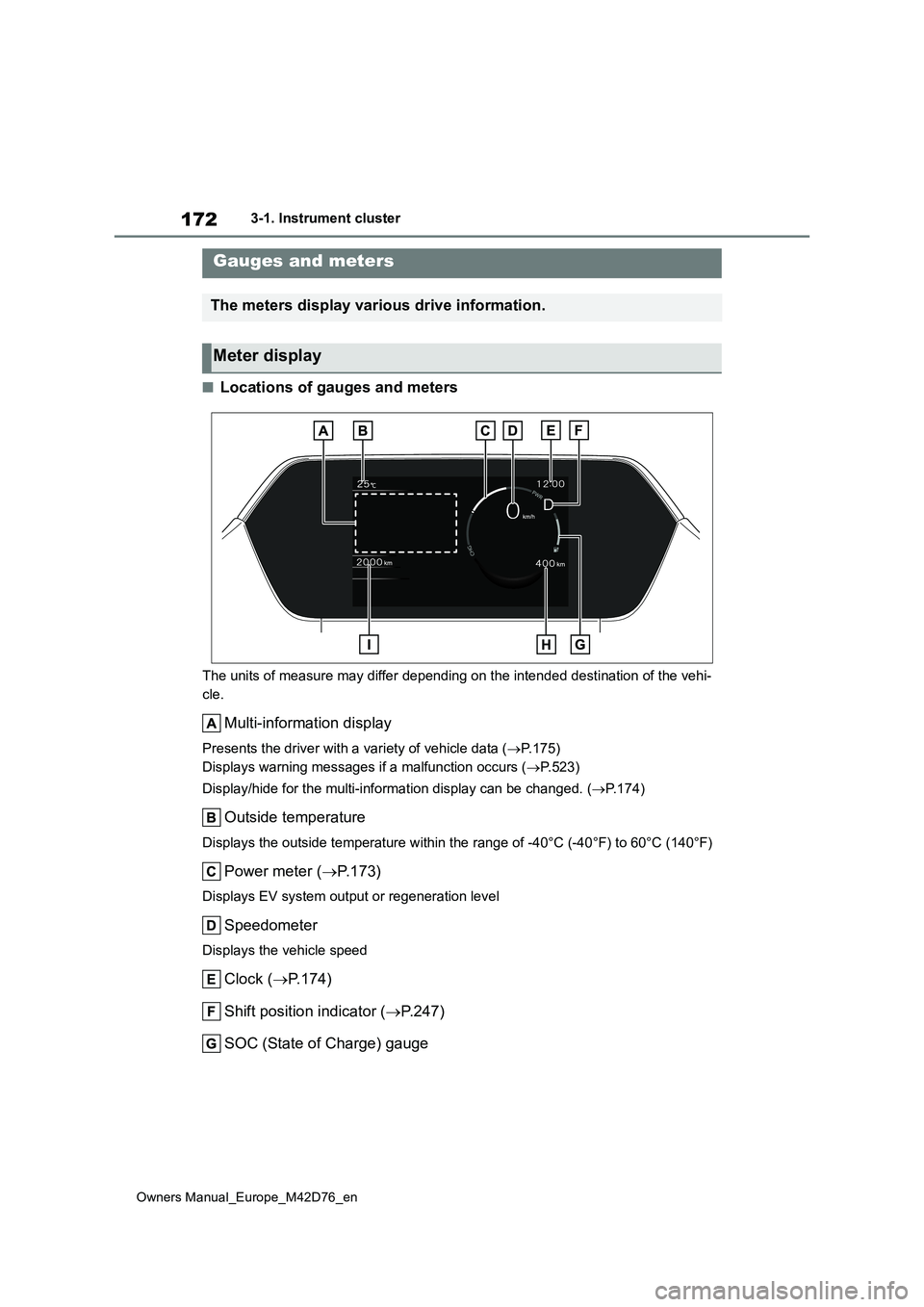
172
Owners Manual_Europe_M42D76_en
3-1. Instrument cluster
■Locations of gauges and meters
The units of measure may differ depending on the intended destination of the vehi-
cle.
Multi-information display
Presents the driver with a variety of vehicle data ( P.175)
Displays warning messages if a malfunction occurs ( P.523)
Display/hide for the multi-information display can be changed. (P.174)
Outside temperature
Displays the outside temperature within the range of -40°C (-40°F) to 60°C (140°F)
Power meter (P. 1 7 3 )
Displays EV system output or regeneration level
Speedometer
Displays the vehicle speed
Clock (P.174)
Shift position indicator ( P.247)
SOC (State of Charge) gauge
Gauges and meters
The meters display various drive information.
Meter display
Page 176 of 674

174
Owners Manual_Europe_M42D76_en
3-1. Instrument cluster
●When “--” is displayed, the system
may be malfunctioning. Take your vehicle to any authorized Toyota retailer or Toyota authorized repairer,
or any reliable repairer.
●When the outside temperature is
approximately 3°C (37°F) or lower, the
indicator will flash for approxi-
mately 10 seconds, then stay on.
■Liquid crystal display
P. 1 7 6
■Customization
The gauges and meters can be custom-
ized in of the multi-information dis-
play. ( P.561)
The Multi-Information display can
be switched between display and
hidden.
■Display items
Odometer
Displays the total distance the vehicle
has been driven.
Trip meter A/Trip meter B
Displays the distance the vehicle has
been driven since the meter was last
reset. Trip meters A and B can be used
to record and display different distances
independently.
■Switching the display
The display switches each time the
switch is pressed. Also, when the
switch is continuously pressed
during the trip meter display, the
driving distance can be changed to
“0”.
The clocks on the following can be
adjusted on the audio system
screen.
Multi-information display
Audio system screen
For details, refer to “Multimedia owner’s
manual”.
WARNING
■The information display at low temperatures
Allow the interior of the vehicle to warm up before using the liquid crys-tal information display. At extremely
low temperatures, the information dis- play monitor may respond slowly, and display changes may be delayed.
Switching the meter display
Odometer and trip meter
display
Adjusting the clock