2022 TOYOTA 4RUNNER battery change
[x] Cancel search: battery changePage 80 of 616

801-3. Theft deterrent system
4RUNNER (U)
The alarm uses light and sound to give an alert when an intrusion is
detected.
The alarm is triggered in the following situations when the ala rm is
set:
● A locked door is unlocked or opened in any way other than using
the entry function, wireless remote control or mechanical key. (The
doors will lock aga in automatically.)
● The hood is opened.
● The battery is reconnected.
Close the doors and hood, and
lock all the doors. The system will
be set automatically after 30 sec-
onds.
The indicator light changes from
being on to flashing when the sys-
tem is set.
Do one of the following to deac tivate or stopping the alarms:
● Unlock the doors.
● Vehicles without a smart key sy stem: Turn the engine switch to
“ACC” or “ON” position, or start the engine. (The alarm will be deac-
tivated or stopped after a few seconds.)
● Vehicles with a smart key syst em: Turn the engine switch is in
ACCESSORY or IGNITION ON mode, or start the engine. (The
alarm will be deactivated or s topped after a few seconds.)
Alar m
: If equipped
The alarm
Setting the alarm system
Deactivating or stopping the alarm
Page 97 of 616
972. Instrument cluster
2
Instrument cluster
4RUNNER (U)
Items displayed can be switched by pressing or up and down.
■Steering angle
Displays the direction of the front tires.
The tire direction is displayed in 3 stages for both left and right, in accor-
dance with the angle of the tire.
If a battery terminal is disconnected and reconnected, the disp lay may
be disabled temporarily. After driving the vehicle for a while, the display
will be enabled.
■
Tire inflation pressure
Displays inflation pressure of each tire.
The inflation pressure of the spare tire will be displayed. (if equipped)
The settings of some features can be changed by using the meter
control switches.
■Setting procedure
On the setting screen, choose the desired item using or ,
and then press .
• For functions that can be enabled or disabled, the function switches between on and off each time is pressed.
• For functions that allow to select operation contents, display con- tents, etc., the setting screen is displayed.
Select the desired setting by operating or , and then
press .
To stop the selection, press to return to the previous screen.
Vehicle information
Settings display
1
2
Page 102 of 616
1022. Instrument cluster
4RUNNER (U)
WARNING
■Caution for use while driving
For safety, avoid operating the meter control switches while dr iving as much
as possible, and do not look continuously at the multi-informat ion display
while driving. Stop the vehicle and operate the meter control switches. Fail-
ure to do so may cause a steering wheel operation error, resulting in an
unexpected accident.
■ Cautions while setting up the display
As the engine needs to be running during setting up the display , ensure that
the vehicle is parked in a place with adequate ventilation. In a closed area
such as a garage, exhaust gases including harmful carbon monoxi de (CO)
may collect and enter the vehicle. This may lead to death or a serious
health hazard.
■ The multi-information display at low temperatures
Allow the interior of the vehicle to warm up before using the multi-informa-
tion display. At extremely low temperatures, the multi-information display
monitor may respond slowly, and display changes may be delayed.
For example, there is a lag between the driver’s shifting and the new gear
number appearing on the display. This lag could cause the drive r to down-
shift again, causing rapid and excessive engine braking and pos sibly an
accident resulting in death or serious injury.
NOTICE
■ While setting up the display
To prevent battery discharge, ensure that the engine is running while setting
up the display features.
Page 125 of 616
1253-2. Opening, closing and locking the doors
3
Operation of each component
4RUNNER (U)■
Note for the unlocking function
●Gripping the door handle when wearing a glove may not unlock th e door.
● A sudden approach to the effective range or door handle may prevent the
doors from being unlocked. In this case, return the door handle to the origi-
nal position and check that the doors unlock before pulling the door handle
again.
● If there is another electronic key in the detection area, it ma y take slightly
longer to unlock the doors after the door handle is gripped.
■ When the vehicle is not driven for extended periods
●To prevent theft of the vehicle, do not leave the electronic ke y within 6 ft. (2
m) of the vehicle.
● The smart key system can be deactivated in advance. Ask your To yota
dealer for details.
● Setting the electronic key to battery- saving mode helps to reduce key bat-
tery depletion. ( P. 122)
■ To operate the system properly
●Make sure to carry the electronic key when operating the system. Do not get
the electronic key too close to the vehicle when operating the system from
the outside of the vehicle.
● Depending on the position and holding condition of the electronic key, the
key may not be detected correctly and the system may not operat e properly.
(The alarm may go off accidentally, or the door lock prevention function may
not operate.)
■ If the smart key system does not operate properly
●Locking and unlocking the doors: Use the mechanical key. ( P. 520)
● Starting the engine: P. 521
■ Customization
Settings (e. g. operation signal) can be changed.
(Customizable features: P. 557)
■ If the smart key system has been d eactivated in a customized setting
● Locking and unlocking the doors: P. 520
● Starting the engine and changing engine switch modes: P. 521
● Stopping the engine: P. 2 1 1
Page 213 of 616
2134-2. Driving procedures
4
Driving
4RUNNER (U)■
If the engine does not start
●The engine immobilizer system may not have been deactivated. ( P. 78)
Contact your Toyota dealer.
● Check that the shift lever is securely set in P. The engine may not start if the
shift lever is displaced out of P.
■ When a message requesting the smart key system be inspected is dis-
played on the multi-information display
The system may be malfunctioning. Have the vehicle inspected by your
Toyota dealer immediately.
■ If the electronic key battery is depleted
P. 455
■ Operation of the engine switch
If the switch is not pressed shortly and firmly, the engine swi tch mode may
not change or the engine may not start.
Page 227 of 616
2274-3. Operating the lights and wipers
4
Driving
4RUNNER (U)■
Automatic light off system (if equipped)
Vehicles without a smart key system
● When the headlights come on: The headlights and tail lights turn off 30 sec-
onds after a door is opened and closed if the engine switch is turned to the
“ACC” or “LOCK” position. (The lights turn off immediately if on the
key is pressed after all the doors are locked.)
● When only the tail lights come on: The tail lights turn off automatically if the
engine switch is turned to the “ACC” or “LOCK” position and the driver’s
door is opened.
To turn the lights on again, turn the engine switch to the “ON” position, or turn
the lights off and then back to or .
Vehicles with a smart key system
● When the headlights come on: The headlights and tail lights turn off 30 sec-
onds after a door is opened and closed if the engine switch is turned to
ACCESSORY mode or turned off. (The lights turn off immediately if
on the key is pressed after all the doors are locked.)
● When only the tail lights come on: The tail lights turn off automatically if the
engine switch is turned off and the driver’s door is opened.
To turn the lights on again, turn the engine switch to IGNITION ON mode, or
turn the light switch off and then back to or .
■ Customization
Settings (e.g. light sensor sensitivity) can be changed.
(Customizable features: P. 557)
NOTICE
■To prevent battery discharge
Do not leave the lights on longer than necessary when the engin e is not
running.
Page 402 of 616
4025-4. Other interior features
4RUNNER (U)
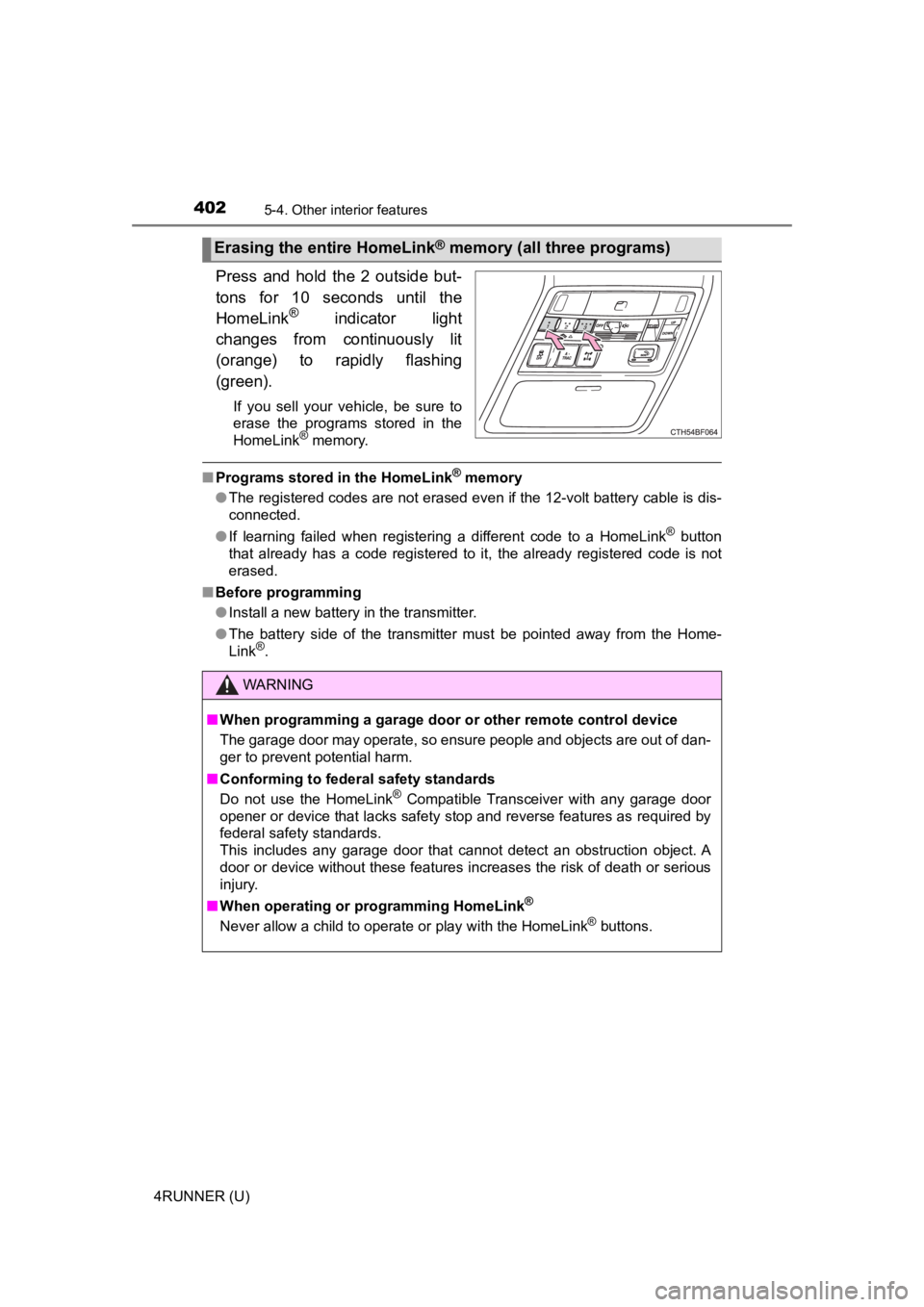
Press and hold the 2 outside but-
tons for 10 seconds until the
HomeLink
® indicator light
changes from continuously lit
(orange) to rapidly flashing
(green).
If you sell your vehicle, be sure to
erase the programs stored in the
HomeLink
® memory.
■ Programs stored in the HomeLink® memory
● The registered codes are not erased even if the 12-volt battery cable is dis-
connected.
● If learning failed when registering a different code to a HomeLink
® button
that already has a code registered to it, the already registere d code is not
erased.
■ Before programming
●Install a new battery in the transmitter.
● The battery side of the transmitter must be pointed away from the Home-
Link
®.
Erasing the entire HomeLink® memory (all three programs)
WARNING
■When programming a garage door or other remote control device
The garage door may operate, so ensure people and objects are out of dan-
ger to prevent potential harm.
■ Conforming to federal safety standards
Do not use the HomeLink
® Compatible Transceiver with any garage door
opener or device that lacks safety stop and reverse features as required by
federal safety standards.
This includes any garage door that cannot detect an obstruction object. A
door or device without these features increases the risk of dea th or serious
injury.
■ When operating or programming HomeLink
®
Never allow a child to operate or play with the HomeLink® buttons.
Page 412 of 616
4126-2. Maintenance
4RUNNER (U)■
Resetting the message indicating maintenance is required (U.S.A. only)
After the required maintenance is performed according to the ma intenance
schedule, please reset the message.
To reset the message, follow the procedures described below:
Turn the engine switch off with the trip meter A reading shown. (P. 91)
Vehicles without a smart key system:
While pressing the display change button ( P. 91), turn the engine switch
to the “ON” position (do not start the engine because reset mode will be
canceled).
Vehicles with a smart key system:
While pressing the display change button ( P. 91), turn the engine switch
to the IGNITION ON mode (do not start the engine because otherw ise the
reset mode will be canceled).
Continue to press and hold the button until the trip meter disp lays “000000”.
■ Allow inspection and repairs to be performed by a Toyota dealer
●Toyota technicians are well-trained specialists and are kept up to date with
the latest service information. They are well informed about the operations
of all systems on your vehicle.
● Keep a copy of the repair order. It proves that the maintenance that has
been performed is under warranty coverage. If any problem shoul d arise
while your vehicle is under warranty, your Toyota dealer will p romptly take
care of it.
WARNING
■ If your vehicle is no t properly maintained
Improper maintenance could result in serious damage to the vehi cle and
possible death or serious injury.
■ Handling of the battery
● Engine exhaust, some of its constituents, and a wide variety of automobile
components contain or emit chemicals known to the State of Cali fornia to
cause cancer and birth defects and other reproductive harm. Work in a
well ventilated area.
● Oils, fuels and fluids contained in vehicles as well as waste produced by
component wear contain or emit chemicals known to the State of Califor-
nia to cause cancer and birth defects or other reproductive har m. Avoid
exposure and wash any affected area immediately.
● Battery posts, terminals and related accessories contain lead and lead
compounds which are known to cause brain damage. Wash your hands
after handling. ( P. 430)
1
2
3