2022 TOYOTA 4RUNNER ECU
[x] Cancel search: ECUPage 232 of 616
2324-3. Operating the lights and wipers
4RUNNER (U)
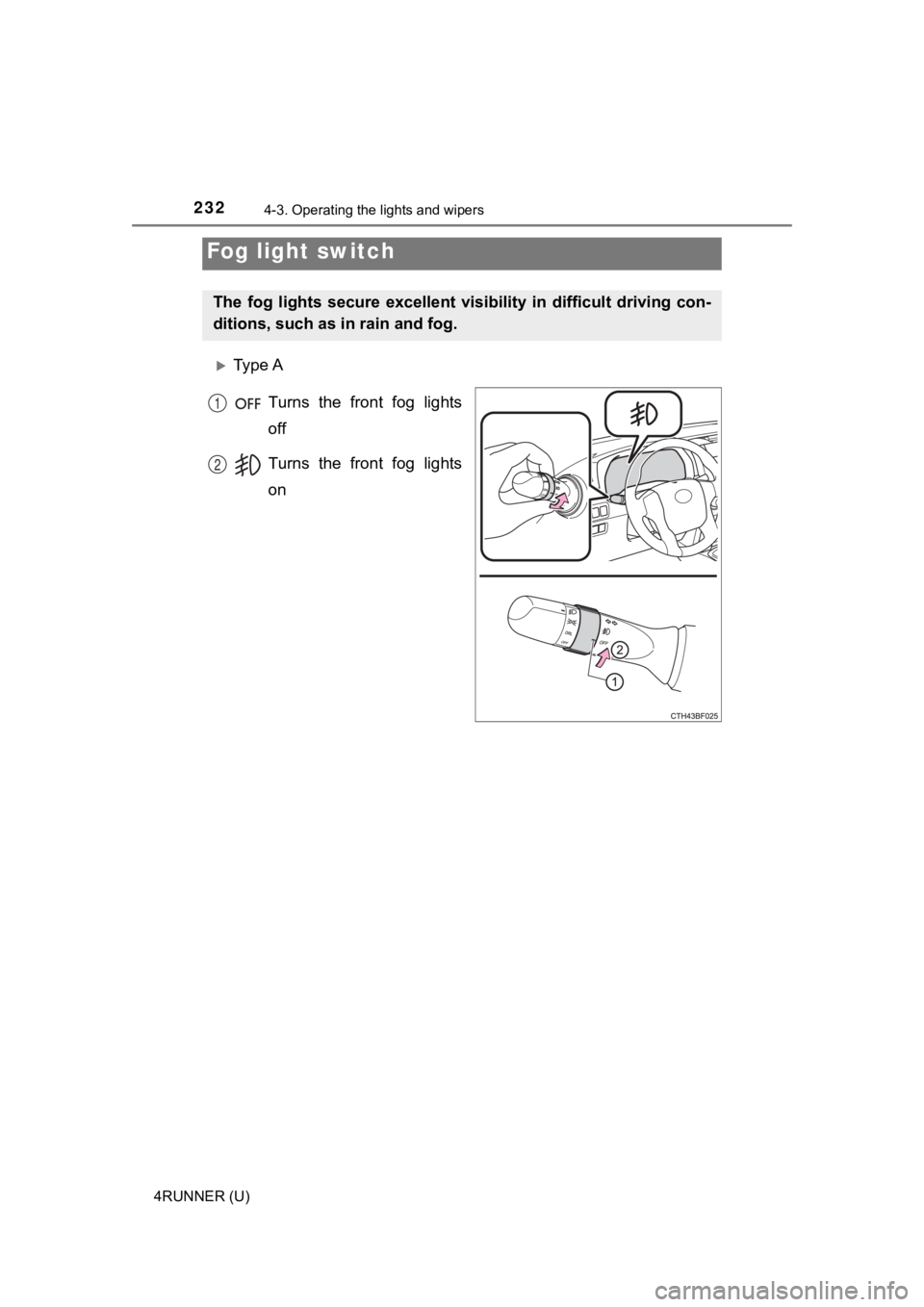
Ty p e ATurns the front fog lights
off
Turns the front fog lights
on
Fog light switch
The fog lights secure excellent visibility in difficult driving con-
ditions, such as in rain and fog.
1
2
Page 241 of 616
2414-4. Refueling
4
Driving
4RUNNER (U)
WARNING
■When refueling the vehicle
Observe the following precautions while refueling the vehicle. Failure to do
so may result in death or serious injury.
● After exiting the vehicle and before opening the fuel door, touch an
unpainted metal surface to discharge any static electricity. It is important to
discharge static electricity before refueling because sparks resulting from
static electricity can cause fuel vapors to ignite while refueling.
● Always hold the grips on the fuel tank cap and turn it slowly t o remove it.
A whooshing sound may be heard when the fuel tank cap is loosened.
Wait until the sound cannot be heard before fully removing the cap. In hot
weather, pressurized fuel may spray out the filler neck and cau se injury.
● Do not allow anyone that has not discharged static electricity from their
body to come close to an open fuel tank.
● Do not inhale vaporized fuel.
Fuel contains substances that are harmful if inhaled.
● Do not smoke while refueling the vehicle.
Doing so may cause the fuel to ignite and cause a fire.
● Do not return to the vehicle or touch any person or object that is statically
charged.
This may cause static electricity to build up, resulting in a p ossible ignition
hazard.
■ When refueling
Observe the following precautions to prevent fuel overflowing from the fuel
tank:
● Securely insert the fuel nozzle into the fuel filler neck.
● Stop filling the tank after the fuel nozzle automatically click s off.
● Do not top off the fuel tank.
NOTICE
■Refueling
Do not spill fuel during refueling.
Doing so may damage the vehicle, such as causing the emission c ontrol
system to operate abnormally or damaging fuel system components or the
vehicle’s painted surface.
Page 287 of 616

2874-5. Using the driving support systems
4
Driving
4RUNNER (U)■
Conditions under which the system may not function correctly
●The Blind Spot Monitor may not detect vehicles correctly in the following sit-
uations:
• When the sensor is misaligned due to a strong impact to the se nsor or its
surrounding area
• When mud, snow, ice, a sticker, etc. is covering the sensor or surround-
ing area on the rear bumper
• When driving on a road surface that is wet with standing water during bad
weather, such as heavy rain, snow, or fog
• When multiple vehicles are approaching with only a small gap b etween
each vehicle
• When the distance between your vehicle and a following vehicle is short
• When there is a significant difference in speed between your v ehicle and
the vehicle that enters the detection area
• When the difference in speed between your vehicle and another vehicle
is changing
• When a vehicle enters a detection area traveling at about the same
speed as your vehicle
• As your vehicle starts from a stop, a vehicle remains in the d etection area
• When driving up and down consecutive steep inclines, such as hills, dips in the road, etc.
• When driving on roads with sharp bends, consecutive curves, or uneven
surfaces
• When vehicle lanes are wide, or when driving on the edge of a lane, and
the vehicle in an adjacent lane is far away from your vehicle
• When an accessory (such as a bicycle carrier) or towing eyelet is
installed to the rear of the vehicle
• When there is a significant difference in height between your vehicle and
the vehicle that enters the detection area
• Immediately after the Blind Spot Monitor is turned on
● Instances of the Blind Spot Monitor unnecessarily detecting a vehicle and/or
object may increase in the following situations:
• When the sensor is misaligned due to a strong impact to the se nsor or its
surrounding area
• When the distance between your vehicle and a guardrail, wall, etc. that
enters the detection area is short
• When driving up and down consecutive steep inclines, such as h ills, dips
in the road, etc.
• When vehicle lanes are narrow, or when driving on the edge of a lane,
and a vehicle traveling in a lane other than the adjacent lanes enters the
detection area
• When driving on roads with sharp bends, consecutive curves, or uneven
surfaces
• When the tires are slipping or spinning
• When the distance between your vehicle and a following vehicle is short
• When an accessory (such as a bicycle carrier) or towing eyelet is
installed to the rear of the vehicle
• When the vehicle throws up water or snow behind.
Page 379 of 616
3795-3. Using the storage features
5
Interior features
4RUNNER (U)■
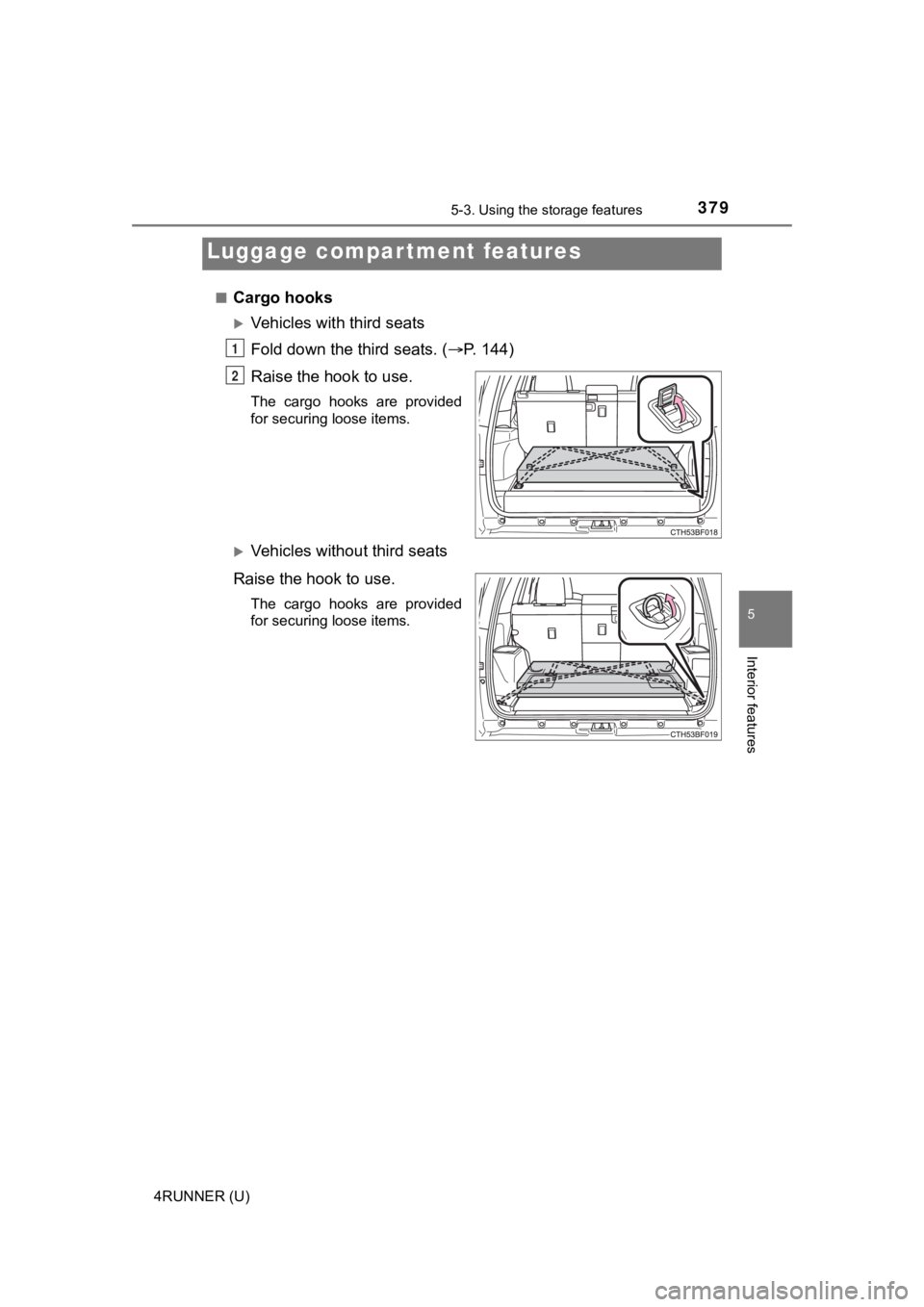
Cargo hooks
Vehicles with third seats
Fold down the third seats. (
P. 144)
Raise the hook to use.
The cargo hooks are provided
for securing loose items.
Vehicles with out third seats
Raise the hook to use.
The cargo hooks are provided
for securing loose items.
Luggage compartment features
1
2
Page 383 of 616
3835-3. Using the storage features
5
Interior features
4RUNNER (U)
WARNING
■When the cargo hooks are not in use
To avoid injury, always return the cargo hooks to their stowed positions.
■ Slide deck operating precaution (if equipped)
● Be careful not to get hands or feet pinched by the slide deck.
● Be careful not to allow the slide deck to hit any persons or lu ggage while
sliding the deck.
● Do not operate the slide deck while someone is on it.
Doing so may cause an accident.
● If operating the slide deck when the vehicle is stopped on an incline, the
slide deck may move faster. Be careful not to allow the slide d eck to hit
you or pinch your fingers etc.
● After sliding the deck, make sure it is securely locked in posi tion.
● Do not close the back door while any person is sitting on the s lide deck or
any person is between the slide deck and back door.
● Do not stow any objects into the space between the slide deck rails.
NOTICE
■To prevent damage to the cargo net hooks
Avoid hanging things other than a cargo net on them.
■ Slide deck weight capacity (if equipped)
Do not load anything heavier than 440 lb. (200 kg) on the slidi ng deck.
■ Grocery bag hook weight capacity
Do not hang any object heavier than 8.8 lb. (4 kg) on the groce ry bag hooks.
■ When using the slide deck (if equipped)
● Do not close the back door while the slide deck is sliding out. Doing so
may cause the back door or slide deck to break.
● If operating the slide deck when the vehicle is stopped on an incline, the
slide deck may move faster. Be careful as luggage may become damaged
or fly out and damage the cabin.
Page 387 of 616
3875-4. Other interior features
5
Interior features
4RUNNER (U)
■The power outlet can be used when
The engine is running.
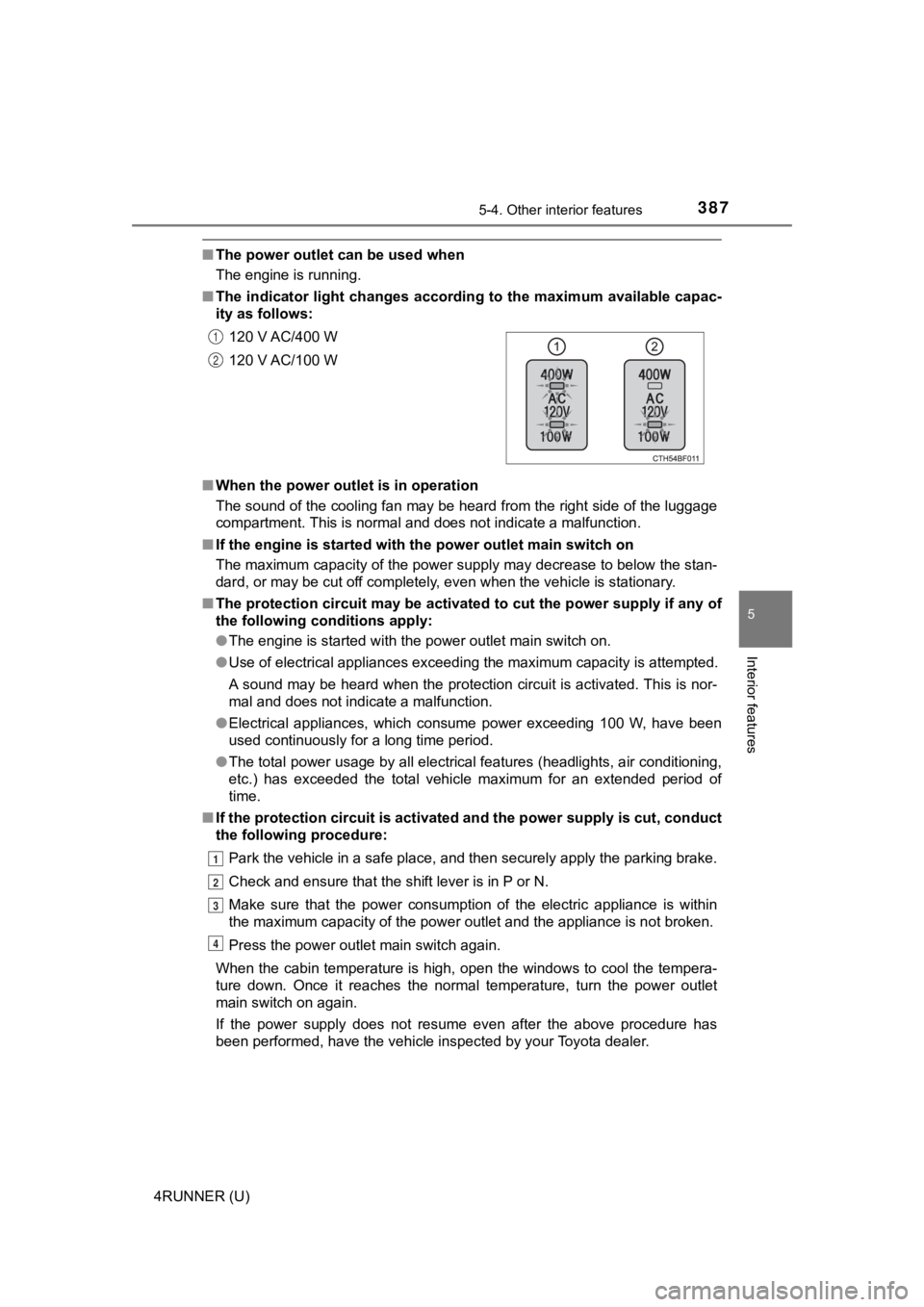
■ The indicator light changes acco rding to the maximum available capac-
ity as follows:
■ When the power outle t is in operation
The sound of the cooling fan may be heard from the right side o f the luggage
compartment. This is normal and does not indicate a malfunction .
■ If the engine is started with th e power outlet main switch on
The maximum capacity of the power supply may decrease to below the stan-
dard, or may be cut off completely, even when the vehicle is st ationary.
■ The protection circuit may be act ivated to cut the power supply if any of
the following conditions apply:
● The engine is started with the power outlet main switch on.
● Use of electrical appliances exceeding the maximum capacity is attempted.
A sound may be heard when the protection circuit is activated. This is nor-
mal and does not indicate a malfunction.
● Electrical appliances, which consume power exceeding 100 W, have been
used continuously for a long time period.
● The total power usage by all electrical features (headlights, a ir conditioning,
etc.) has exceeded the total vehicle maximum for an extended period of
time.
■ If the protection circuit is act ivated and the power supply is cut, conduct
the following procedure:
Park the vehicle in a safe place, and then securely apply the p arking brake.
Check and ensure that the shift lever is in P or N.
Make sure that the power consumption of the electric appliance is within
the maximum capacity of the power outlet and the appliance is n ot broken.
Press the power outlet main switch again.
When the cabin temperature is high, open the windows to cool th e tempera-
ture down. Once it reaches the normal temperature, turn the pow er outlet
main switch on again.
If the power supply does not resume even after the above procedure has
been performed, have the vehicle inspected by your Toyota deale r.
120 V AC/400 W
120 V AC/100 W
1
2
1
2
3
4
Page 388 of 616

3885-4. Other interior features
4RUNNER (U)
WARNING
■Using a power outlet
Observe the following precautions to reduce the risk of injury.
● Use of the power outlet when it is wet with water or snow may r esult in
electrical shocks and is extremely dangerous. The power outlet must be
thoroughly dried before use.
● Do not allow children to use or play with the power outlet.
● Be careful not to get any part of your body caught in the power outlet lid.
● When using electrical appliances, strictly follow any cautions and notices
written on their labels and in the manufacturers' instruction manuals.
● Do not modify, disassemble or repair the power outlet or its in verter in any
way. Doing so may result in unexpected malfunctions or accidents, which
could cause serious damage or injuries. Contact your Toyota dea ler for
any necessary repairs.
■ To prevent injuries and accidents, secure all electric appliances before
use and do not use any appliances that may do any of the follow ing:
● Distract the driver while driving, or hamper safe driving.
● Result in a fire or burn injuries due to the appliance rolling, falling or over-
heating while driving.
● Emit steam while the window s of the cabin are closed.
■ To prevent unexpected accidents, such as electric shocks, do not per-
form any of the following actions:
● Using the power outlet for electric heaters while sleeping.
● Contaminating the power outlet with liquid substances or mud.
● Handling electrical appliance plugs at the power outlet with wet hands or
feet.
● Inserting foreign objects into the power outlet.
● Using malfunctioning electric appliances.
● Inserting inappropriate or badly fitting plugs into the power outlet.
Page 390 of 616
3905-4. Other interior features
4RUNNER (U)
Please use as a power supply for electronic goods that use less than
12 VDC / 10 A (power c onsumption of 120 W).
When using electronic goods, make sure that the power consumpti on
of all the connected power outlets is less than 120 W.
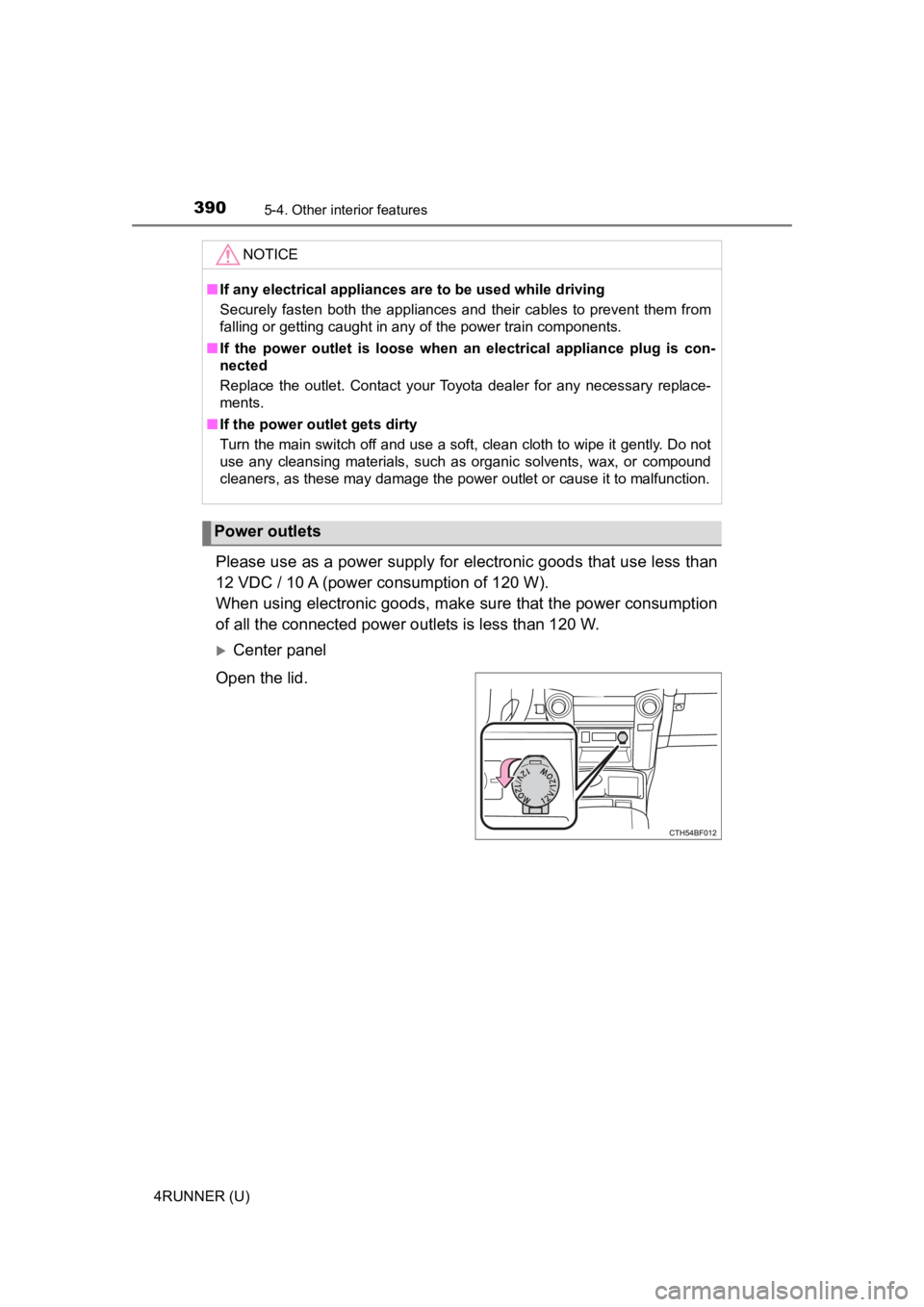
Center panel
Open the lid.
NOTICE
■ If any electrical appliances are to be used while driving
Securely fasten both the appliances and their cables to prevent them from
falling or getting caught in any of the power train components.
■ If the power outlet is loose when an electrical appliance plug is con-
nected
Replace the outlet. Contact your Toyota dealer for any necessar y replace-
ments.
■ If the power outlet gets dirty
Turn the main switch off and use a soft, clean cloth to wipe it gently. Do not
use any cleansing materials, such as organic solvents, wax, or compound
cleaners, as these may damage the power outlet or cause it to m alfunction.
Power outlets