2022 TOYOTA 4RUNNER ECU
[x] Cancel search: ECUPage 81 of 616
811-3. Theft deterrent system
1
For safety and security
4RUNNER (U)
■System maintenance
The vehicle has a maintenance-free type alarm system.
■ Items to check before locking the vehicle
To prevent unexpected triggering of the alarm and vehicle theft, make sure of
the following:
●Nobody is in the vehicle.
● The windows and moon roof are closed before the alarm is set.
● No valuables or other personal items are left in the vehicle.
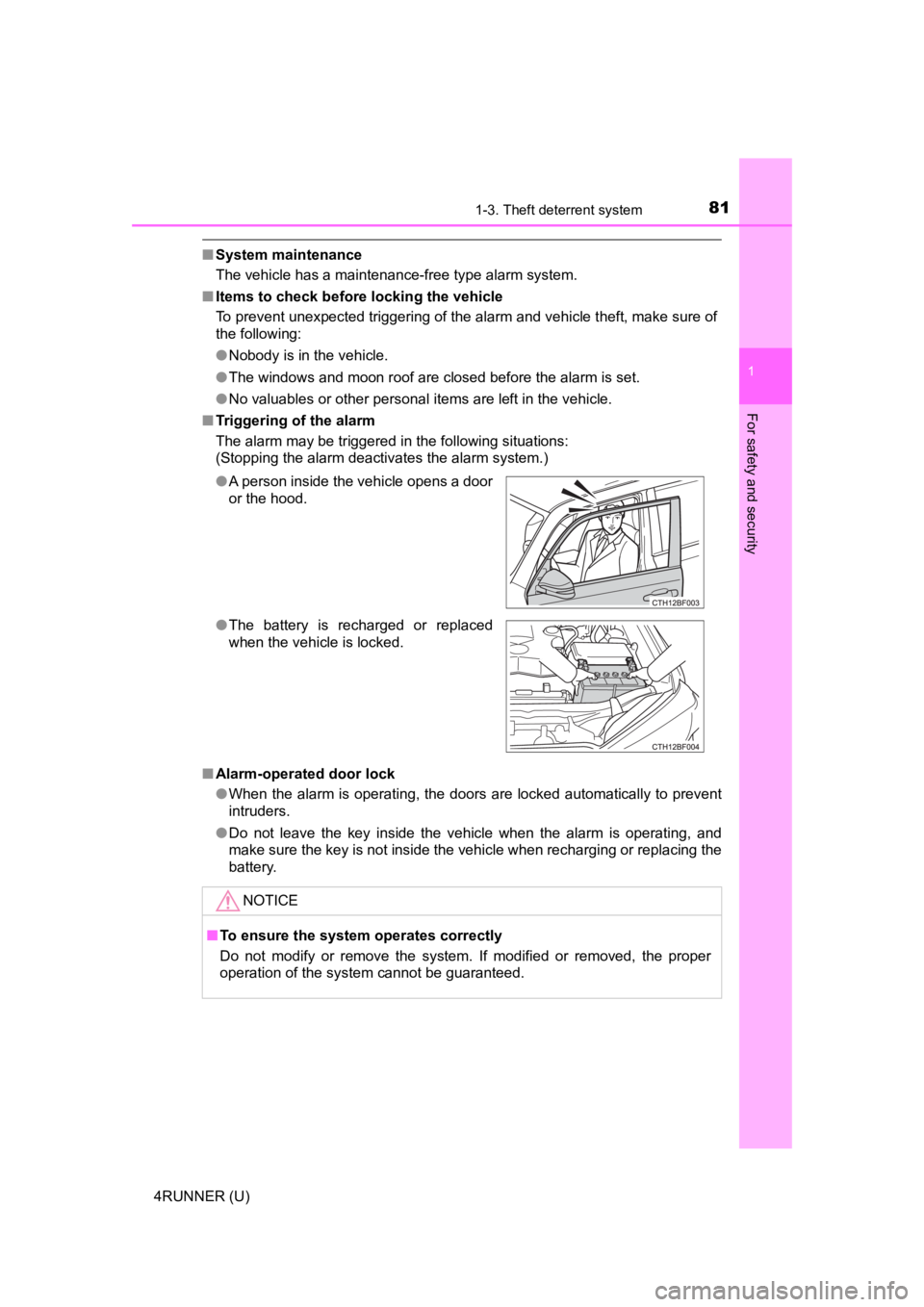
■ Triggering of the alarm
The alarm may be triggered in the following situations:
(Stopping the alarm deactivates the alarm system.)
■ Alarm-operated door lock
●When the alarm is operating, the doors are locked automatically to prevent
intruders.
● Do not leave the key inside the vehicle when the alarm is operating, and
make sure the key is not inside the vehicle when recharging or replacing the
battery.
●
A person inside the vehicle opens a door
or the hood.
● The battery is recharged or replaced
when the vehicle is locked.
NOTICE
■To ensure the system operates correctly
Do not modify or remove the system. If modified or removed, the proper
operation of the system cannot be guaranteed.
Page 87 of 616
872. Instrument cluster
2
Instrument cluster
4RUNNER (U)
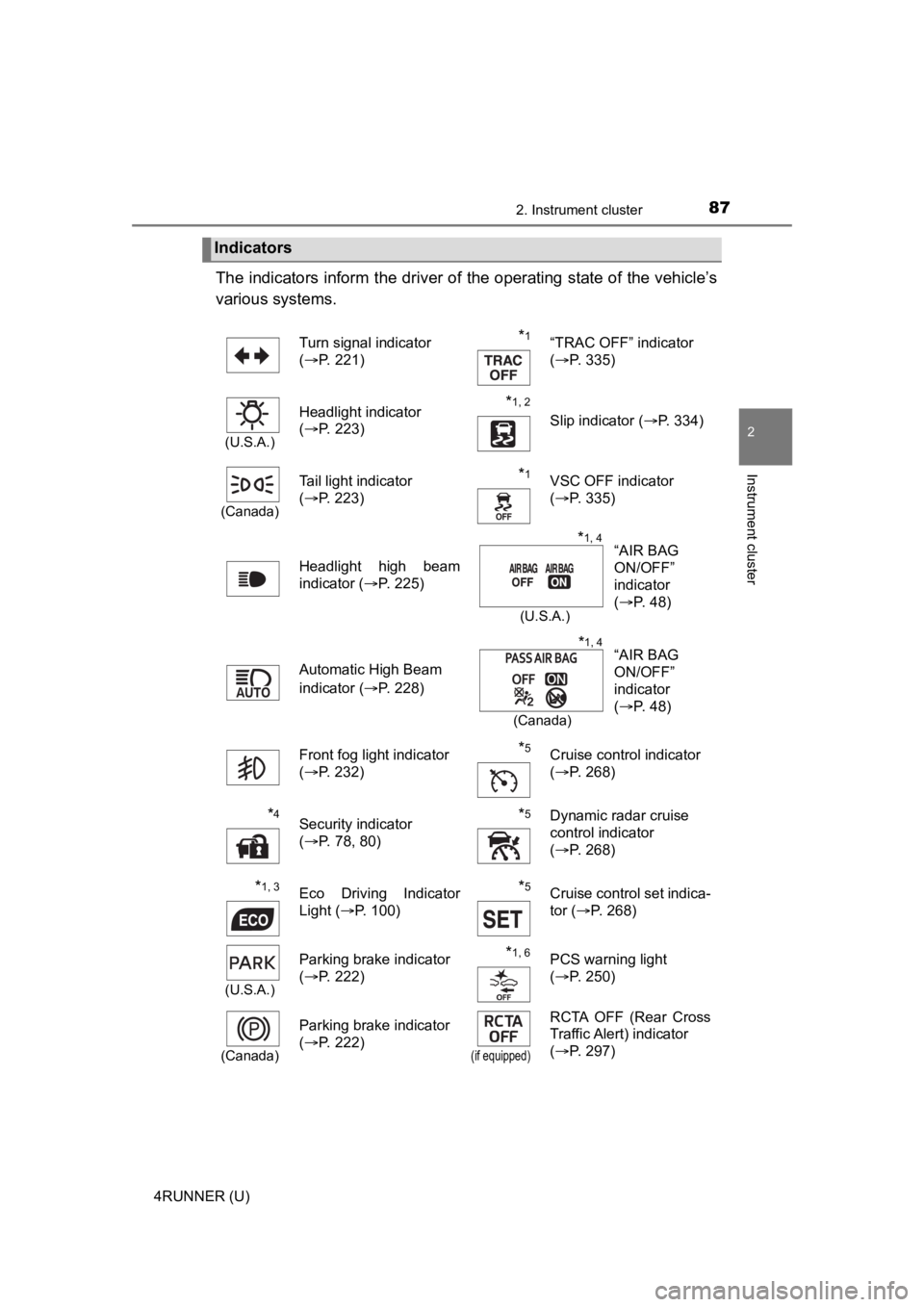
The indicators inform the driver of the operating state of the vehicle’s
various systems.
Indicators
Turn signal indicator
( P. 221)*1“TRAC OFF” indicator
(P. 335)
(U.S.A.)
Headlight indicator
(P. 223)*1, 2 Slip indicator ( P. 334)
(Canada)
Tail light indicator
(P. 223) *1VSC OFF indicator
(P. 335)
Headlight high beam
indicator ( P. 225)
Automatic High Beam
indicator ( P. 228)
Front fog light indicator
( P. 232)
*5Cruise control indicator
(P. 268)
*4Security indicator
(P. 78, 80)*5Dynamic radar cruise
control indicator
(P. 268)
*1, 3Eco Driving Indicator
Light ( P. 100)*5Cruise control set indica-
tor (P. 268)
(U.S.A.)
Parking brake indicator
(P. 222)*1, 6PCS warning light
(P. 250)
(Canada)
Parking brake indicator
(P. 222)
(if equipped)
RCTA OFF (Rear Cross
Traffic Alert) indicator
(P. 297)
“AIR BAG
ON/OFF”
indicator
(P. 48)*1, 4
(U.S.A.)
“AIR BAG
ON/OFF”
indicator
(P. 48)*1, 4
(Canada)
Page 110 of 616
1103-1. Key information
4RUNNER (U)
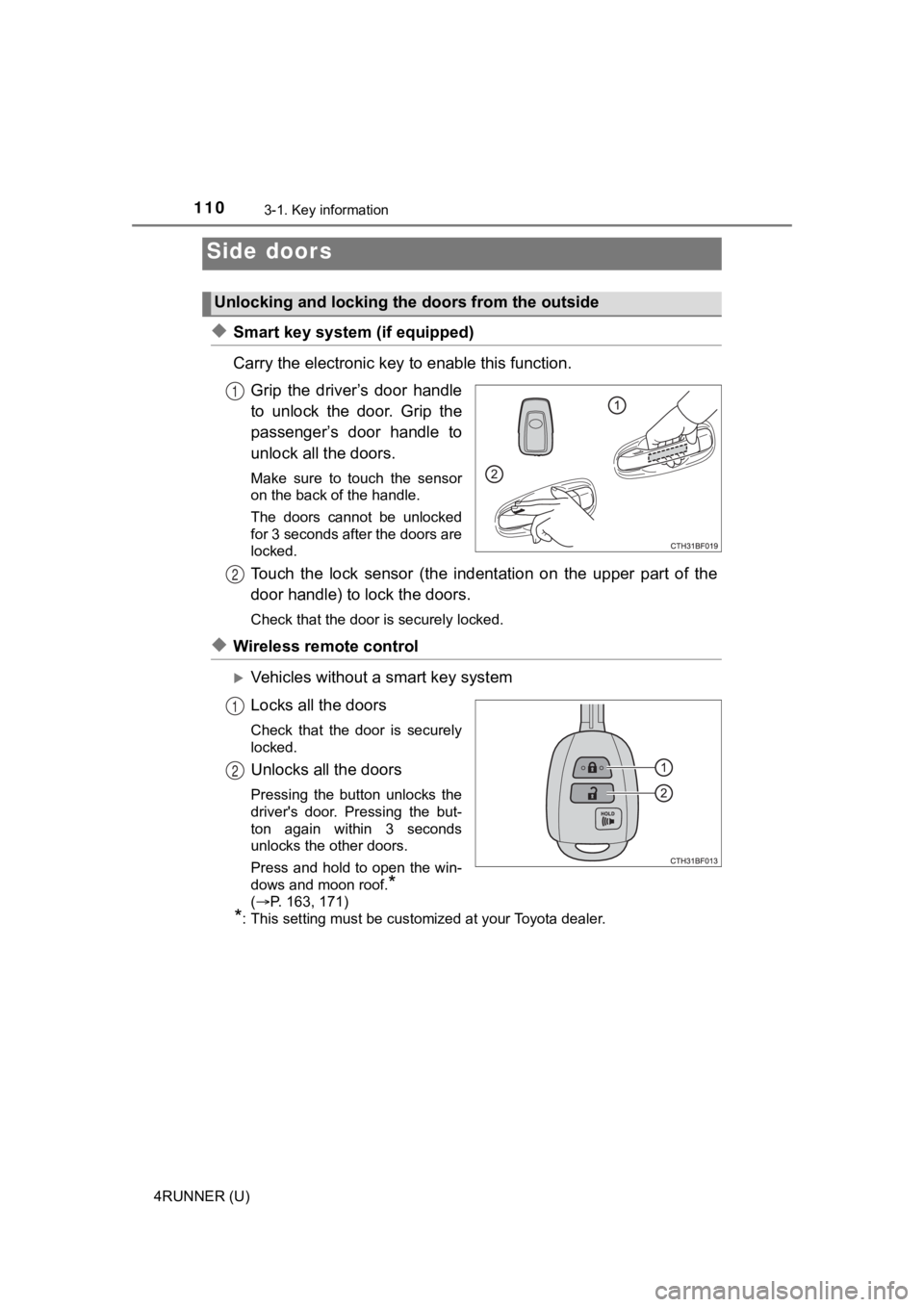
◆Smart key system (if equipped)
Carry the electronic key to enable this function.
Grip the driver’s door handle
to unlock the door. Grip the
passenger’s door handle to
unlock all the doors.
Make sure to touch the sensor
on the back of the handle.
The doors cannot be unlocked
for 3 seconds after the doors are
locked.
Touch the lock sensor (the indent ation on the upper part of the
door handle) to lock the doors.
Check that the door is securely locked.
◆Wireless remote control
Vehicles without a smart key system
Locks all the doors
Check that the door is securely
locked.
Unlocks all the doors
Pressing the button unlocks the
driver's door. Pressing the but-
ton again within 3 seconds
unlocks the other doors.
Press and hold to open the win-
dows and moon roof.
*
( P. 163, 171)
*: This setting must be customized at your Toyota dealer.
Side doors
Unlocking and locking the doors from the outside
1
2
1
2
Page 111 of 616
1113-1. Key information
3
Operation of each component
4RUNNER (U)
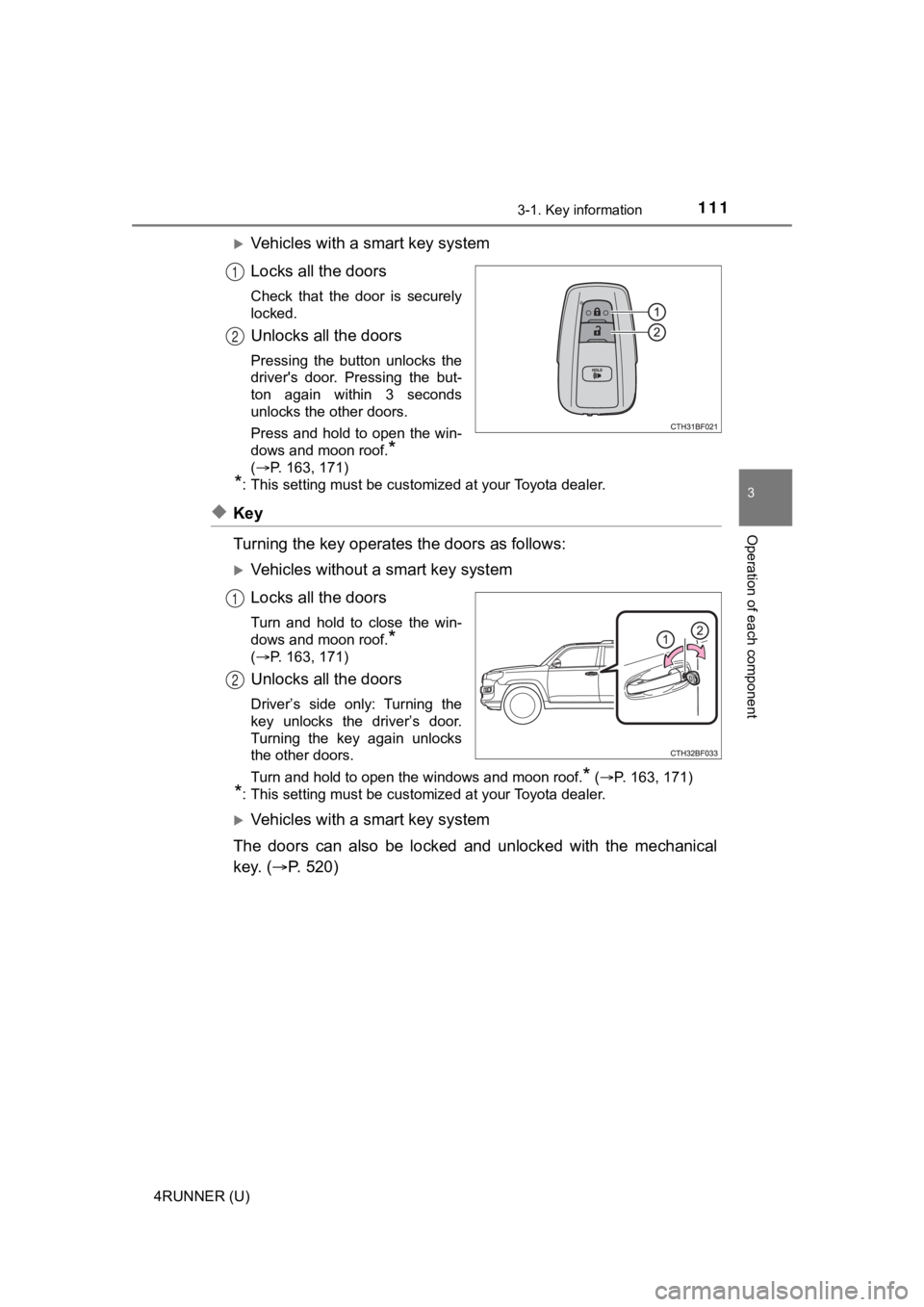
Vehicles with a smart key system
Locks all the doors
Check that the door is securely
locked.
Unlocks all the doors
Pressing the button unlocks the
driver's door. Pressing the but-
ton again within 3 seconds
unlocks the other doors.
Press and hold to open the win-
dows and moon roof.
*
( P. 163, 171)
*: This setting must be customized at your Toyota dealer.
◆Key
Turning the key operates the doors as follows:
Vehicles without a smart key system
Locks all the doors
Turn and hold to close the win-
dows and moon roof.
*
( P. 163, 171)
Unlocks all the doors
Driver’s side only: Turning the
key unlocks the driver’s door.
Turning the key again unlocks
the other doors.
Turn and hold to open the windows and moon roof.
* ( P. 163, 171)
*: This setting must be customized at your Toyota dealer.
Vehicles with a smart key system
The doors can also be locked and unlocked with the mechanical
key. ( P. 5 2 0 )
1
2
1
2
Page 112 of 616
1123-1. Key information
4RUNNER (U)
■Operation signals
Vehicles without a smart key system
The emergency flashers flash to indicate that the doors have been locked/
unlocked. (Locked: once; Unlocked: twice)
Vehicles with a smart key system
A buzzer sounds and the emergency flashers flash to indicate th at the doors
have been locked/unlocked. (Locked: once; Unlocked: twice)
■ Security feature
Vehicles without a smart key system
If a door is not opened within approximately 60 seconds after t he vehicle is
unlocked, the security feature automatically locks the vehicle again.
Vehicles with a smart key system
If a door is not opened within approximately 60 seconds after t he vehicle is
unlocked, the security feature automatically locks the vehicle again. (How-
ever, depending on the location of the electronic key, the key may be
detected as being in the vehicle. In this case, vehicle may be unlocked.)
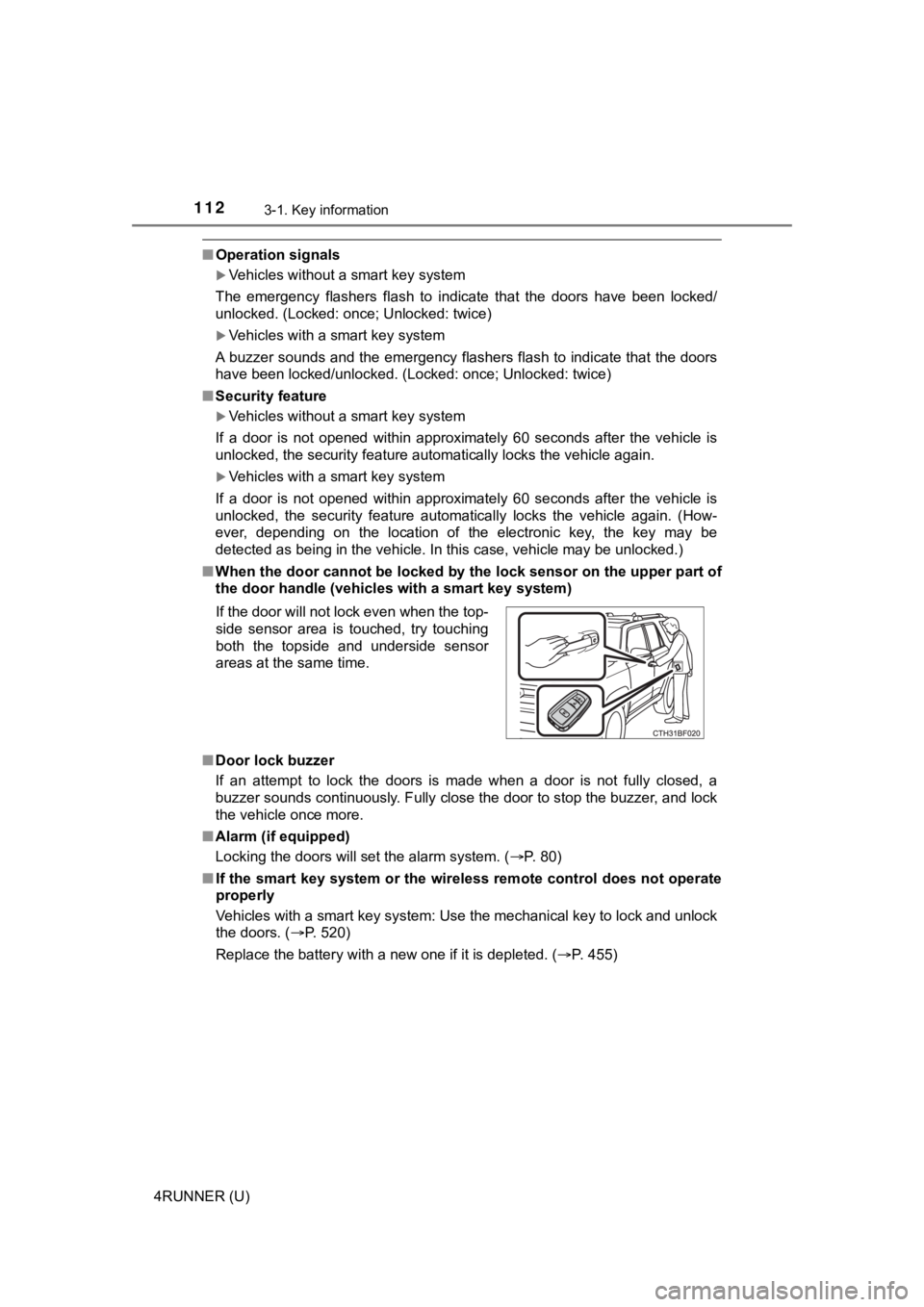
■ When the door cannot be locked by the lock sensor on the upper part of
the door handle (vehicles with a smart key system)
■ Door lock buzzer
If an attempt to lock the doors is made when a door is not full y closed, a
buzzer sounds continuously. Fully close the door to stop the bu zzer, and lock
the vehicle once more.
■ Alarm (if equipped)
Locking the doors will set the alarm system. ( P. 80)
■ If the smart key system or the wireless remote control does not operate
properly
Vehicles with a smart key system: Use the mechanical key to loc k and unlock
the doors. ( P. 520)
Replace the battery with a new one if it is depleted. ( P. 455)
If the door will not lock even when the top-
side sensor area is touched, try touching
both the topside and underside sensor
areas at the same time.
Page 122 of 616
1223-2. Opening, closing and locking the doors
4RUNNER (U)■
Battery-saving function
The battery-saving function will be activated in order to preve nt the electronic
key battery and the vehicle battery from being discharged while the vehicle is
not in operation for a long time.
● In the following situations, the smart key system may take some time to
unlock the doors.
• The electronic key has been left in an area of approximately 6 ft. (2 m) of
the outside of the vehicle for 10 minutes or longer.
• The smart key system has not been used for 5 days or longer.
● If the smart key system has not been used for 14 days or longer , the doors
cannot be unlocked at any doors except the driver’s door. In th is case, take
hold of the driver’s door handle, or use the wireless remote co ntrol or the
mechanical key, to unlock the doors.
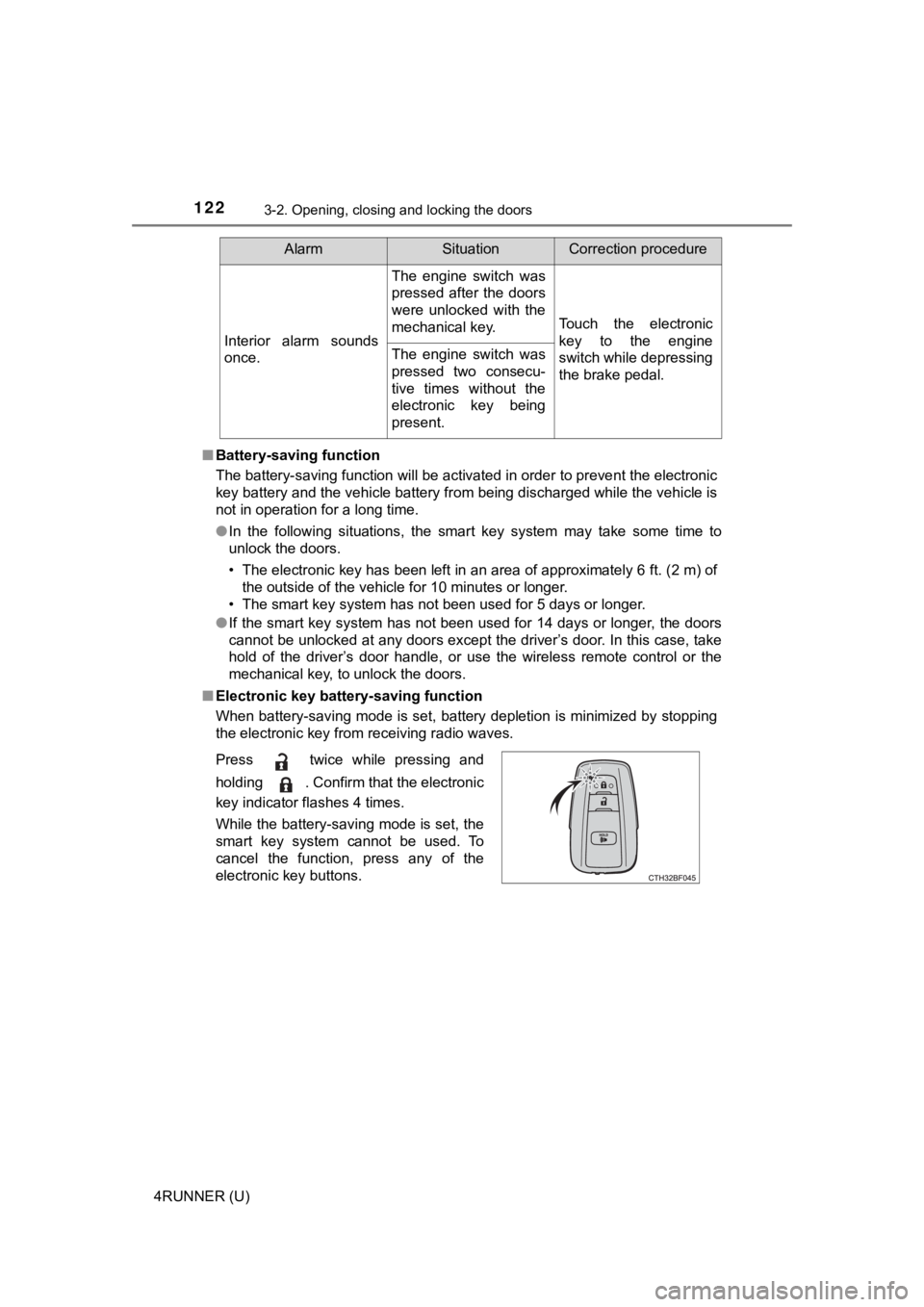
■ Electronic key battery-saving function
When battery-saving mode is set, battery depletion is minimized by stopping
the electronic key from receiving radio waves.
Interior alarm sounds
once.
The engine switch was
pressed after the doors
were unlocked with the
mechanical key.
Touch the electronic
key to the engine
switch while depressing
the brake pedal.
The engine switch was
pressed two consecu-
tive times without the
electronic key being
present.
AlarmSituationCorrection procedure
Press twice while pressing and
holding . Confirm that the electronic
key indicator flashes 4 times.
While the battery-saving mode is set, the
smart key system cannot be used. To
cancel the function, press any of the
electronic key buttons.
Page 124 of 616

1243-2. Opening, closing and locking the doors
4RUNNER (U)■
Note for the entry function
●Even when the electronic key is within the effective range (det ection areas),
the system may not operate properly in the following cases:
• The electronic key is too close to the window or outside door handle, near
the ground, or in a high place when the doors are locked or unl ocked.
• The electronic key is on the instrument panel or floor, in the glove box, or
in the auxiliary box of the instrument panel.
● Do not leave the electronic key on top of the instrument panel or near the
door pockets when exiting the vehicle. Depending on the radio w ave recep-
tion conditions, it may be detected by the antenna outside the cabin and the
door will become lockable from the outside, possibly trapping the electronic
key inside the vehicle.
● As long as the electronic key is within the effective range, th e doors may be
locked or unlocked by anyone. However, only the doors detecting the elec-
tronic key can be used to unlock the vehicle.
● The doors may lock or unlock if the electronic key is within th e effective
range and a large amount of water splashes on the door handle, such as in
the rain or in a car wash. The doors will automatically be lock ed after
approximately 60 seconds if a door is not opened and closed.
● If the wireless remote control is used to lock the doors when t he electronic
key is near the vehicle, there is a possibility that the door m ay not be
unlocked by the entry function. (Use the wireless remote contro l to unlock
the doors.)
● Whether or not the electronic key is inside the vehicle, the engine could be
started if the electronic key is near the window.
■ Note for locking the doors
●Touching the door lock sensor while wearing gloves may delay or prevent
lock operation. Remove the gloves and touch the lock sensor aga in.
● When the lock operation is performed using the lock sensor, rec ognition sig-
nals will be shown up to two consecutive times. After this, no recognition
signals will be given.
● If the door handle becomes wet while the electronic key is with in the effec-
tive range, the door may lock and unlock repeatedly. Place the electronic
key in a location 6 ft. (2 m) or more away from the vehicle while the vehicle
is being washed. (Take care to ensure that the key is not stolen.)
● If the electronic key is inside the vehicle and a door handle b ecomes wet
during a car wash, a buzzer will sound outside the vehicle. To turn off the
alarm, lock all the doors.
● The lock sensor may not work properly if it comes into contact with ice,
snow, mud, etc. Clean the lock sensor and attempt to operate it again, or
use the lock sensor on the lower part of the door handle.
● Fingernails may scrape against the door during operation of the door han-
dle. Be careful not to injure fingernails or damage the surface of the door.
Page 130 of 616
1303-2. Opening, closing and locking the doors
4RUNNER (U)
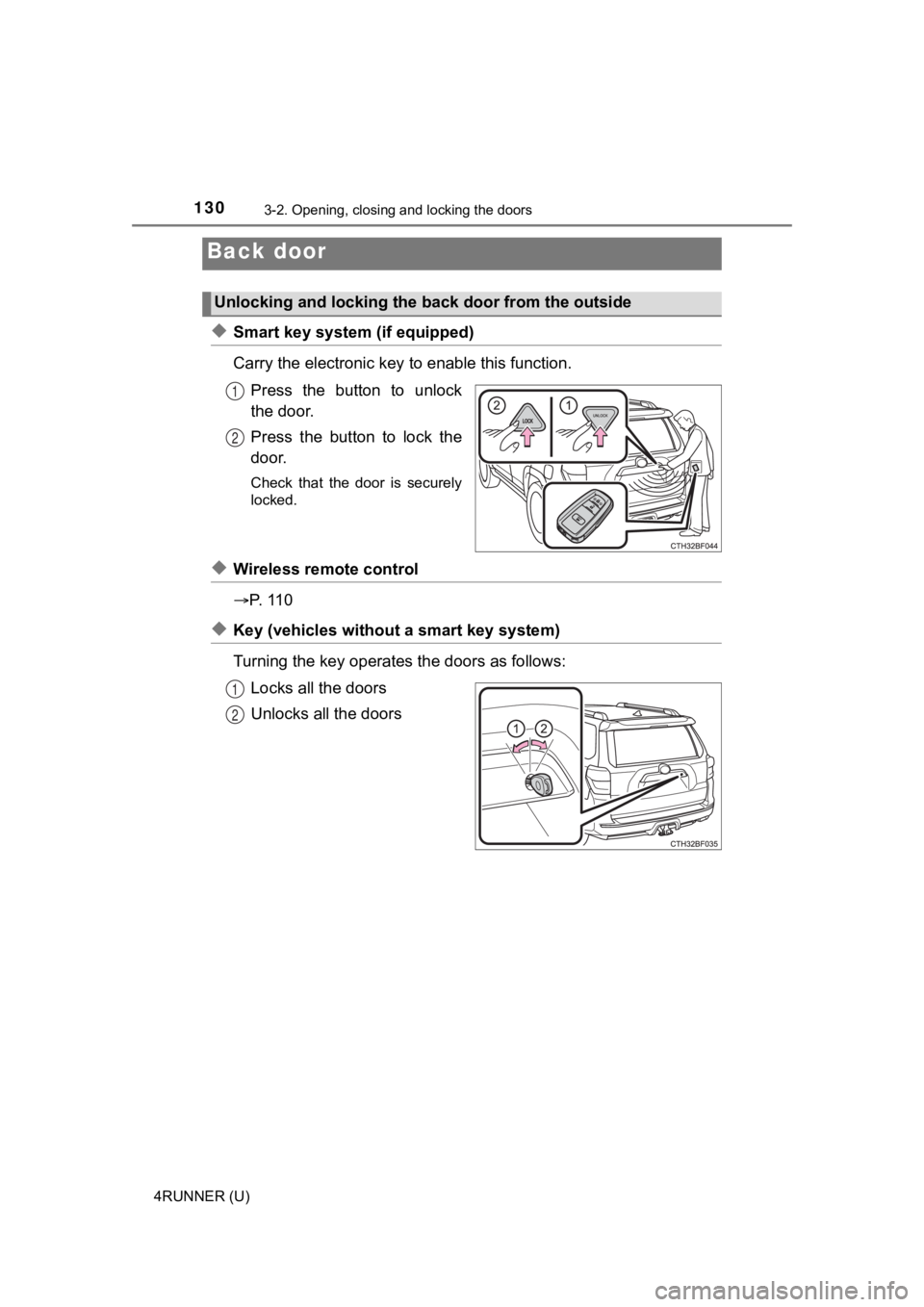
◆Smart key system (if equipped)
Carry the electronic key to enable this function.
Press the button to unlock
the door.
Press the button to lock the
door.
Check that the door is securely
locked.
◆Wireless remote control
P. 1 1 0
◆Key (vehicles without a smart key system)
Turning the key operates the doors as follows: Locks all the doors
Unlocks all the doors
Back door
Unlocking and locking the back door from the outside
1
2
1
2