Page 455 of 616
4556-3. Do-it-yourself maintenance
6
Maintenance and care
4RUNNER (U)
●Flathead screwdriver
● Small flathead screwdriver
● Lithium battery CR2016 (vehicles without a smart key system), o r
CR2032 (vehicles with a smart key system)
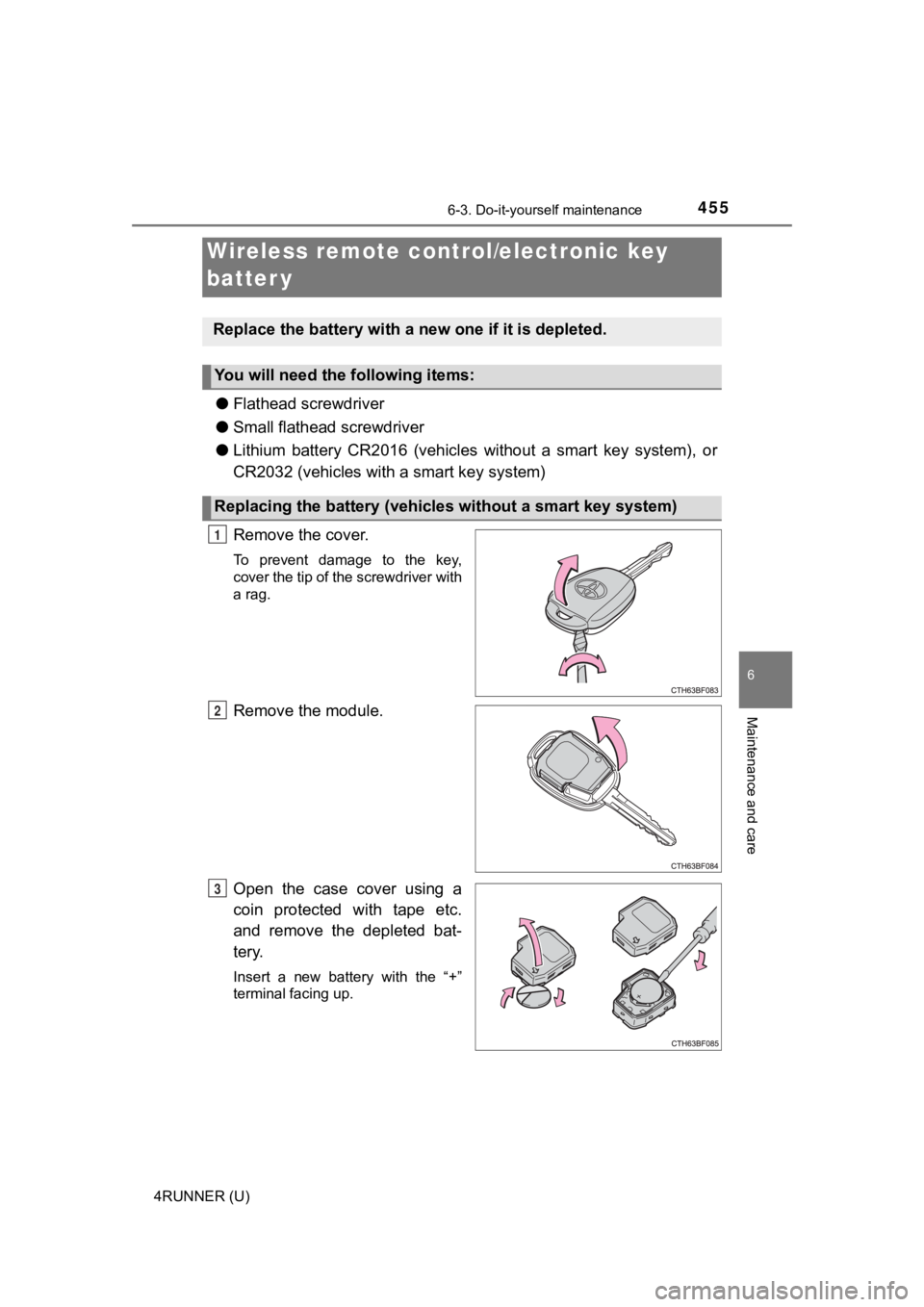
Remove the cover.
To prevent damage to the key,
cover the tip of the screwdriver with
a rag.
Remove the module.
Open the case cover using a
coin protected with tape etc.
and remove the depleted bat-
tery.
Insert a new battery with the “+”
terminal facing up.
Wireless remote control/electronic key
batter y
Replace the battery with a n ew one if it is depleted.
You will need the following items:
Replacing the battery (vehicles without a smart key system)
1
2
3
Page 457 of 616
4576-3. Do-it-yourself maintenance
6
Maintenance and care
4RUNNER (U)
■When replacing the key battery
Be careful not to lose the battery or any other small parts.
■ Use a CR2016 (vehicles without a smart key system) or CR2032 (vehicles
with a smart key system) lithium battery
●Batteries can be purchased at your Toyota dealer, local electrical appliance
shops or camera stores.
● Replace only with the same or equivalent type recommended by the manu-
facturer.
● Dispose of used batteries according to local laws.
■ If the electronic key battery is depleted
The following symptoms may occur:
●The smart key system and wireless remote control will not funct ion properly.
● The operational range will be reduced.
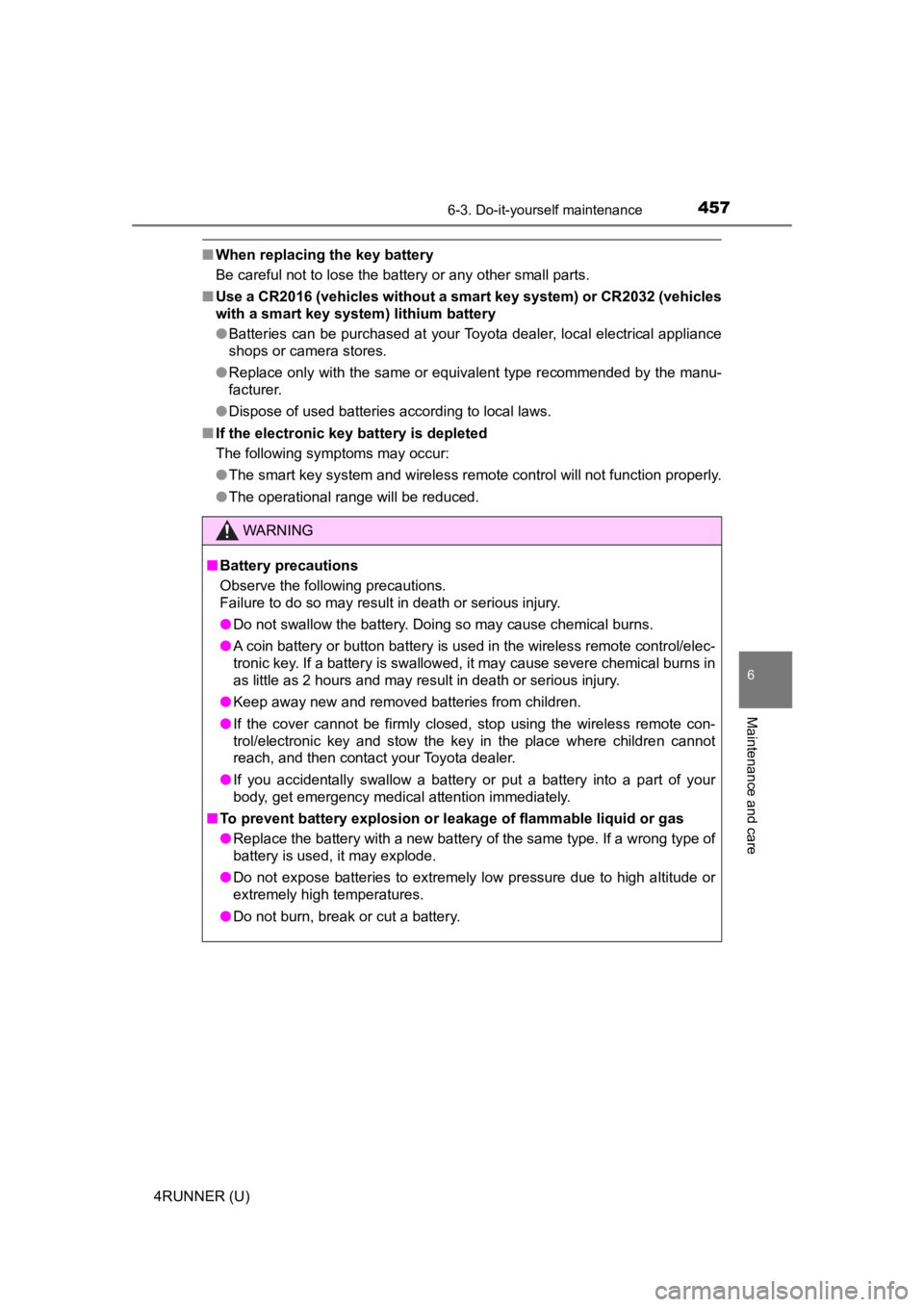
WARNING
■ Battery precautions
Observe the following precautions.
Failure to do so may result in death or serious injury.
● Do not swallow the battery. Doing so may cause chemical burns.
● A coin battery or button battery is used in the wireless remote control/elec-
tronic key. If a battery is swallowed, it may cause severe chem ical burns in
as little as 2 hours and may result in death or serious injury.
● Keep away new and removed batteries from children.
● If the cover cannot be firmly closed, stop using the wireless r emote con-
trol/electronic key and stow the key in the place where childre n cannot
reach, and then contact your Toyota dealer.
● If you accidentally swallow a battery or put a battery into a part of your
body, get emergency medical attention immediately.
■ To prevent battery explosion or leakage of flammable liquid or gas
● Replace the battery with a new battery of the same type. If a w rong type of
battery is used, it may explode.
● Do not expose batteries to extremely low pressure due to high altitude or
extremely high temperatures.
● Do not burn, break or cut a battery.
Page 520 of 616
5207-2. Steps to take in an emergency
4RUNNER (U)
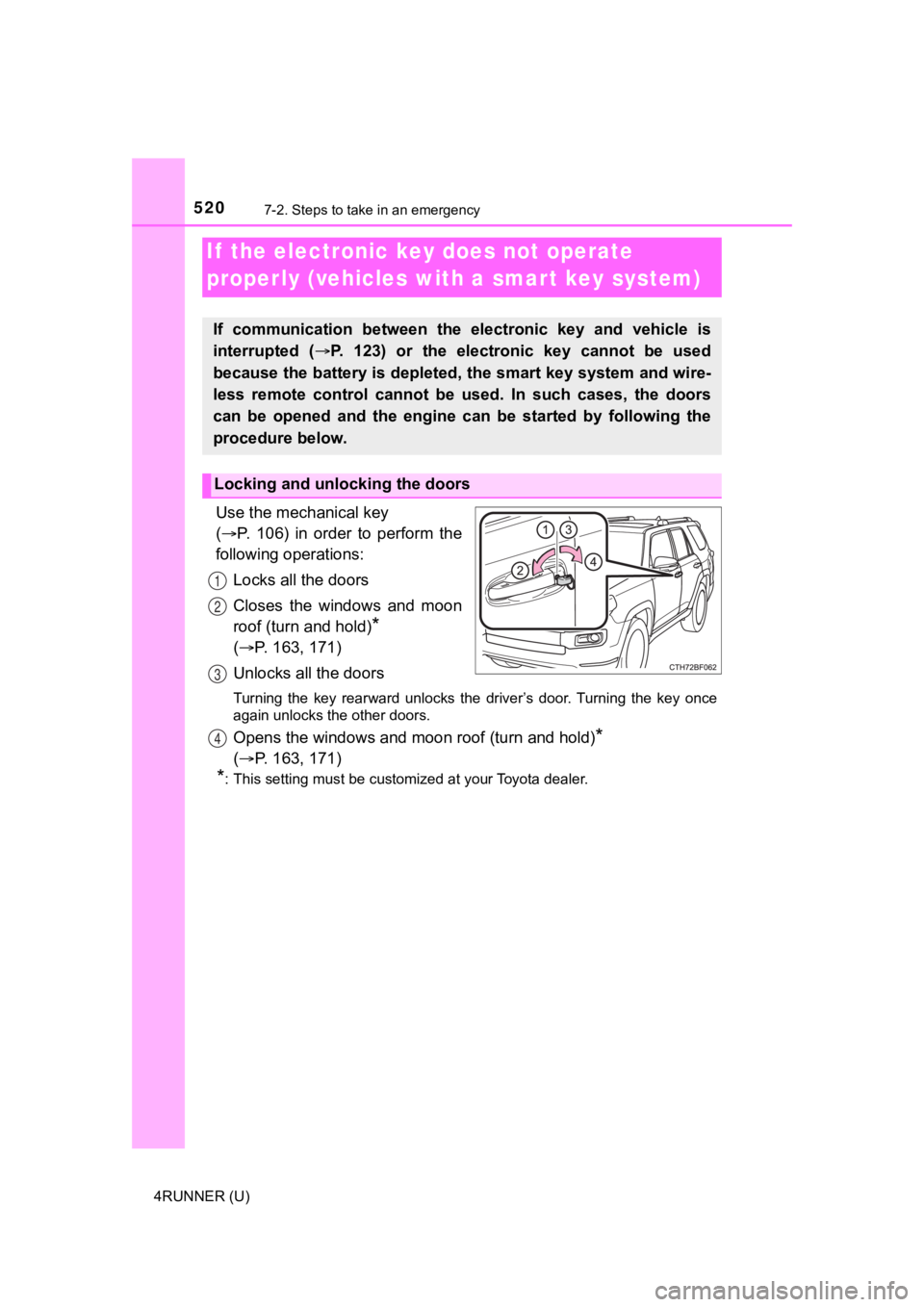
Use the mechanical key
( P. 106) in order to perform the
following operations:
Locks all the doors
Closes the windows and moon
roof (turn and hold)
*
( P. 163, 171)
Unlocks all the doors
Turning the key rearward unlocks the driver’s door. Turning the key once
again unlocks the other doors.
Opens the windows and moon roof (turn and hold)*
( P. 163, 171)
*: This setting must be customized at your Toyota dealer.
If the electronic key does not operate
properly (vehicles with a smar t key system)
If communication between the electronic key and vehicle is
interrupted ( P. 123) or the electronic key cannot be used
because the battery is depleted, the smart key system and wire-
less remote control cannot be used. In such cases, the doors
can be opened and the engine c an be started by following the
procedure below.
Locking and unlocking the doors
1
2
3
4
Page 525 of 616
5257-2. Steps to take in an emergency
7
When trouble arises
4RUNNER (U)
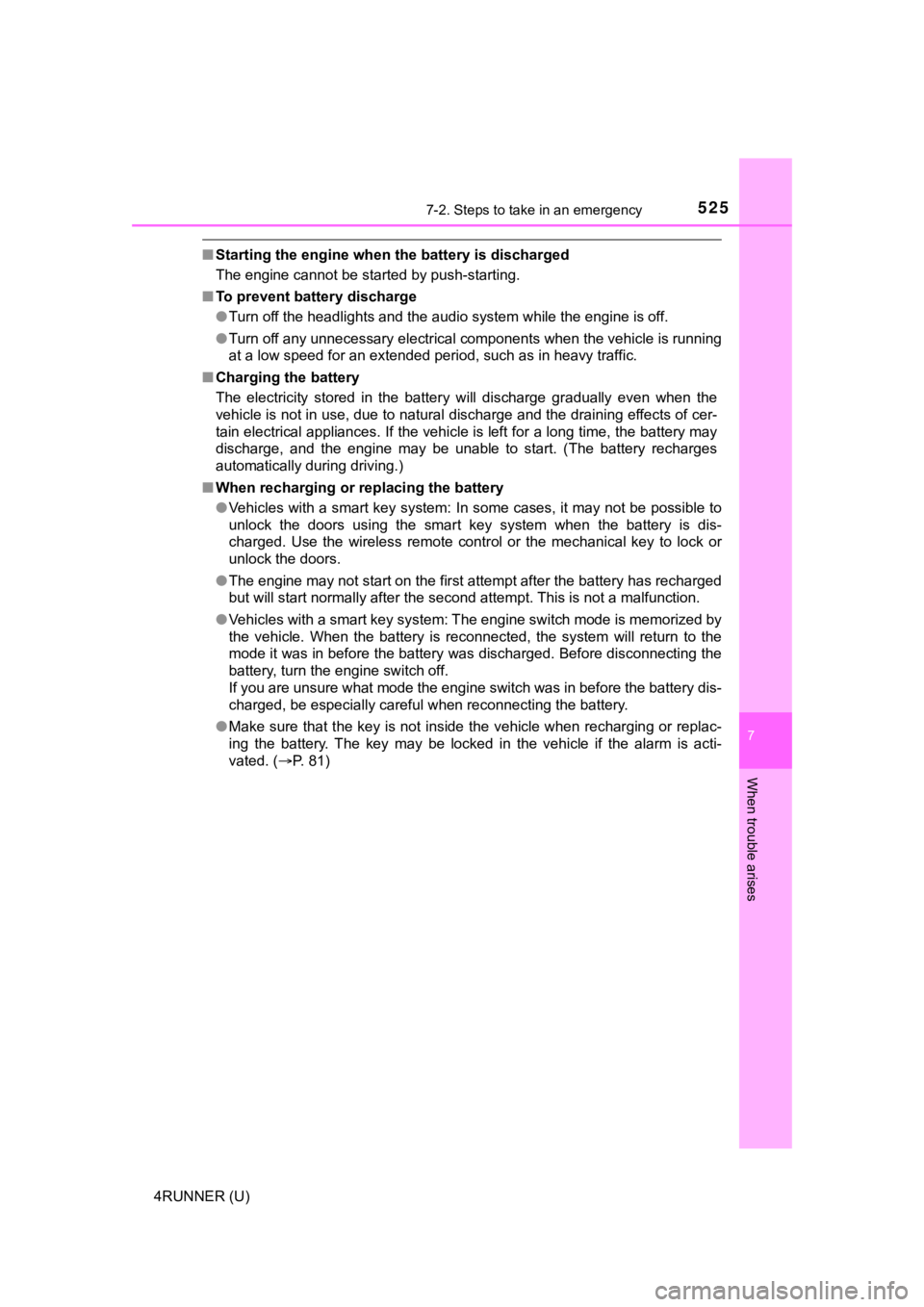
■Starting the engine when t he battery is discharged
The engine cannot be started by push-starting.
■ To prevent battery discharge
●Turn off the headlights and the audio system while the engine is off.
● Turn off any unnecessary electrical components when the vehicle is running
at a low speed for an extended period, such as in heavy traffic .
■ Charging the battery
The electricity stored in the battery will discharge gradually even when the
vehicle is not in use, due to natural discharge and the draining effects of cer-
tain electrical appliances. If the vehicle is left for a long t ime, the battery may
discharge, and the engine may be unable to start. (The battery recharges
automatically during driving.)
■ When recharging or replacing the battery
●Vehicles with a smart key system: In some cases, it may not be possible to
unlock the doors using the smart key system when the battery is dis-
charged. Use the wireless remote control or the mechanical key to lock or
unlock the doors.
● The engine may not start on the first attempt after the battery has recharged
but will start normally after the second attempt. This is not a malfunction.
● Vehicles with a smart key system: The engine switch mode is memorized by
the vehicle. When the battery is reconnected, the system will r eturn to the
mode it was in before the battery was discharged. Before disconnecting the
battery, turn the engine switch off.
If you are unsure what mode the engine switch was in before the battery dis-
charged, be especially careful when reconnecting the battery.
● Make sure that the key is not inside the vehicle when rechargin g or replac-
ing the battery. The key may be locked in the vehicle if the al arm is acti-
vated. ( P. 81)
Page 559 of 616
5598-2. Customization
8
Vehicle specifications
4RUNNER (U)■
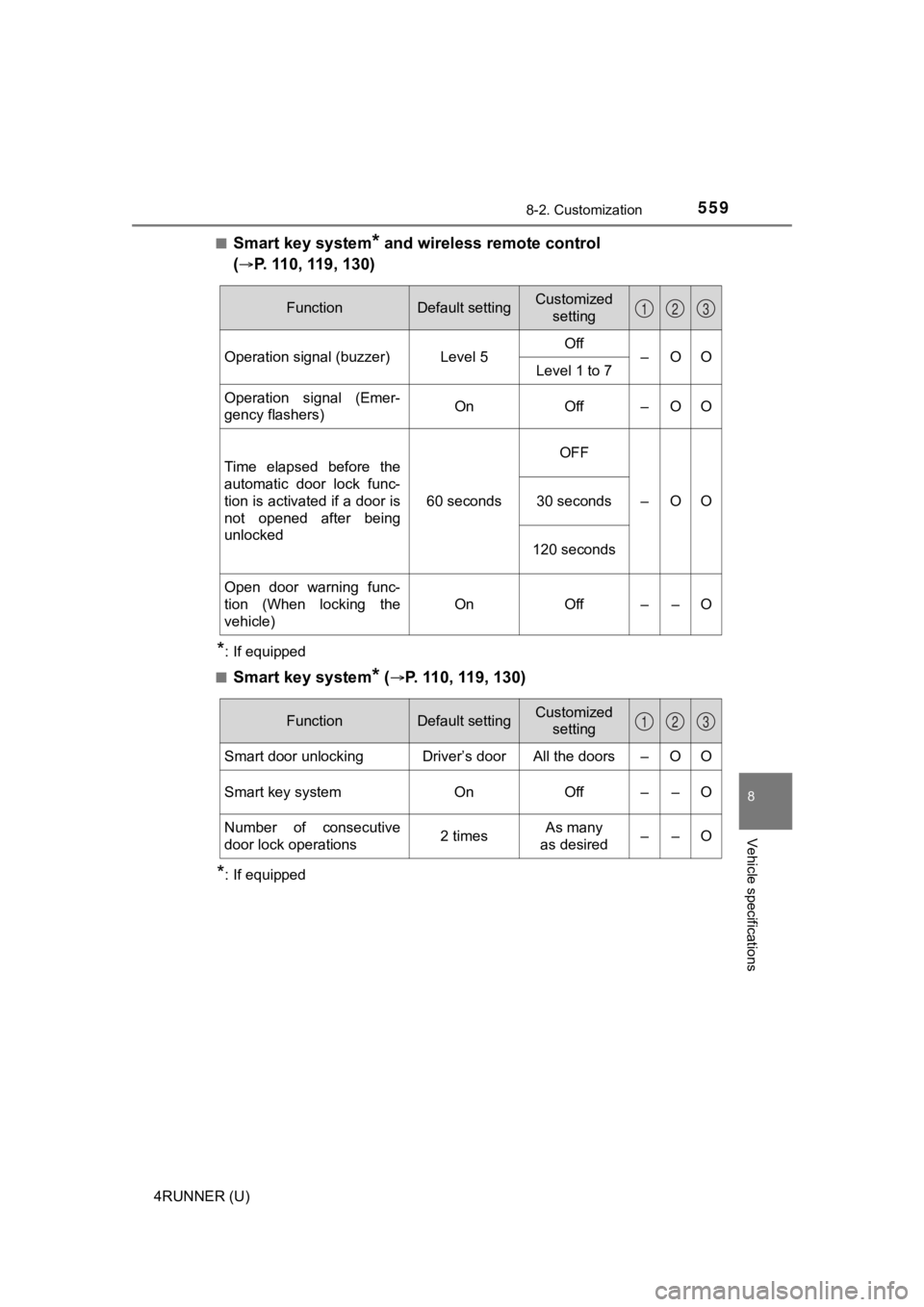
Smart key system* and wireless remote control
(
P. 110, 119, 130)
*: If equipped
■
Smart key system* (P. 110, 119, 130)
*: If equipped
FunctionDefault settingCustomized setting
Operation signal (buzzer) Level 5 Off
–OO
Level 1 to 7
Operation signal (Emer-
gency flashers) On Off – O O
Time elapsed before the
automatic door lock func-
tion is activated if a door is
not opened after being
unlocked 60 secondsOFF
–OO
30 seconds
120 seconds
Open door warning func-
tion (When locking the
vehicle) On Off – – O
123
FunctionDefault settingCustomized
setting
Smart door unlocking Driver’s door All the doors – O O
Smart key system On Off – – O
Number of consecutive
door lock operations 2 timesAs many
as desired ––O
123
Page 560 of 616
5608-2. Customization
4RUNNER (U)■
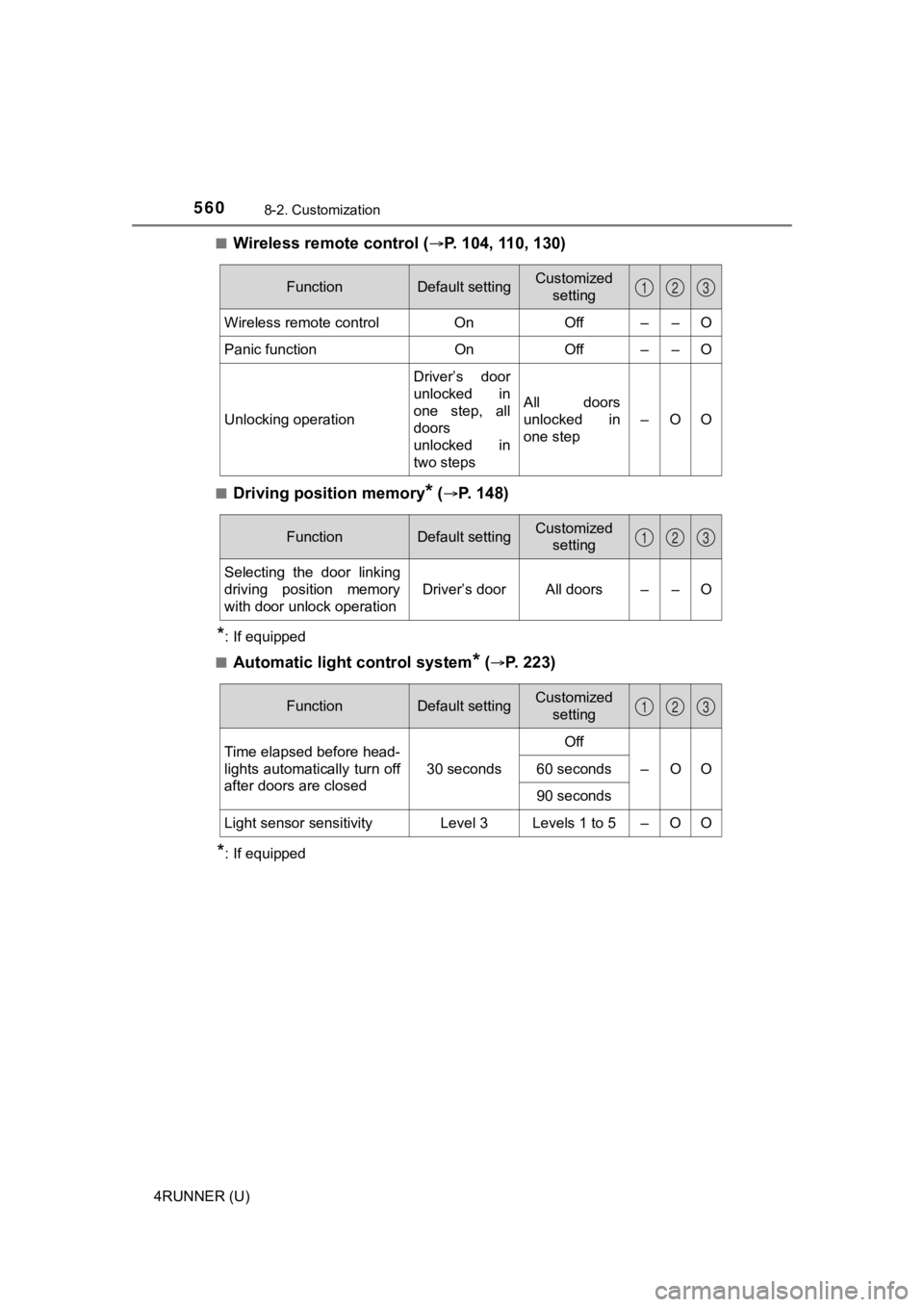
Wireless remote control (P. 104, 110, 130)
■Driving position memory* (P. 148)
*: If equipped
■
Automatic light control system* (P. 223)
*: If equipped
FunctionDefault settingCustomized setting
Wireless remote control OnOff – – O
Panic functionOnOff – – O
Unlocking operation Driver’s door
unlocked in
one step, all
doors
unlocked in
two stepsAll doors
unlocked in
one step
–OO
123
FunctionDefault settingCustomized
setting
Selecting the door linking
driving position memory
with door unlock operation Driver’s door All doors – – O
123
FunctionDefault settingCustomized
setting
Time elapsed before head-
lights automatically turn off
after doors are closed 30 secondsOff
–OO
60 seconds
90 seconds
Light sensor sensitivity Level 3 Levels 1 to 5 – O O
123
Page 561 of 616
5618-2. Customization
8
Vehicle specifications
4RUNNER (U)■
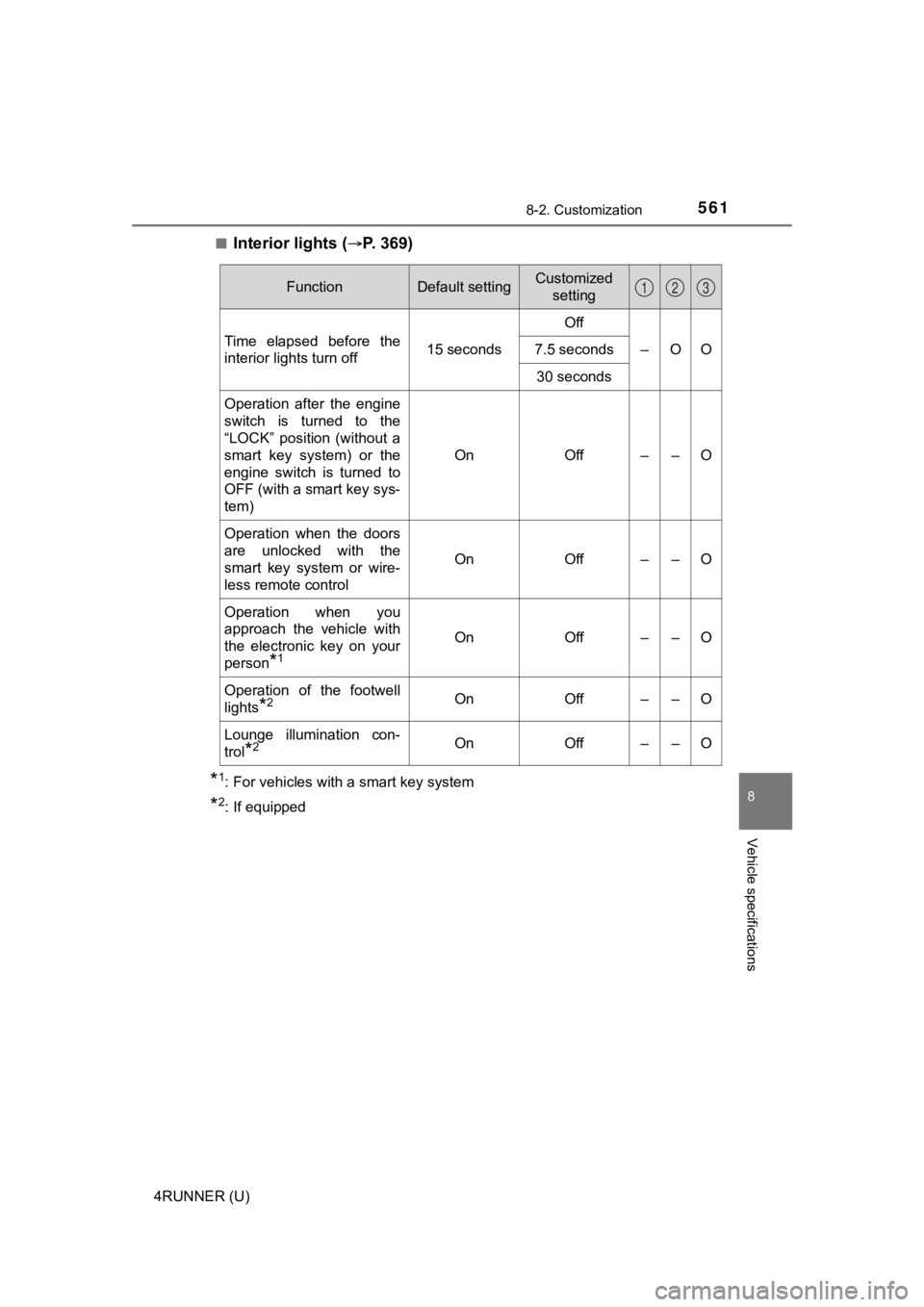
Interior lights (P. 3 6 9 )
*1: For vehicles with a smart key system
*2: If equipped
FunctionDefault settingCustomized
setting
Time elapsed before the
interior lights turn off 15 secondsOff
–OO
7.5 seconds
30 seconds
Operation after the engine
switch is turned to the
“LOCK” position (without a
smart key system) or the
engine switch is turned to
OFF (with a smart key sys-
tem) On Off – – O
Operation when the doors
are unlocked with the
smart key system or wire-
less remote control On Off – – O
Operation when you
approach the vehicle with
the electronic key on your
person
*1
On Off – – O
Operation of the footwell
lights
*2On Off – – O
Lounge illumination con-
trol
*2On Off – – O
123
Page 564 of 616
5648-2. Customization
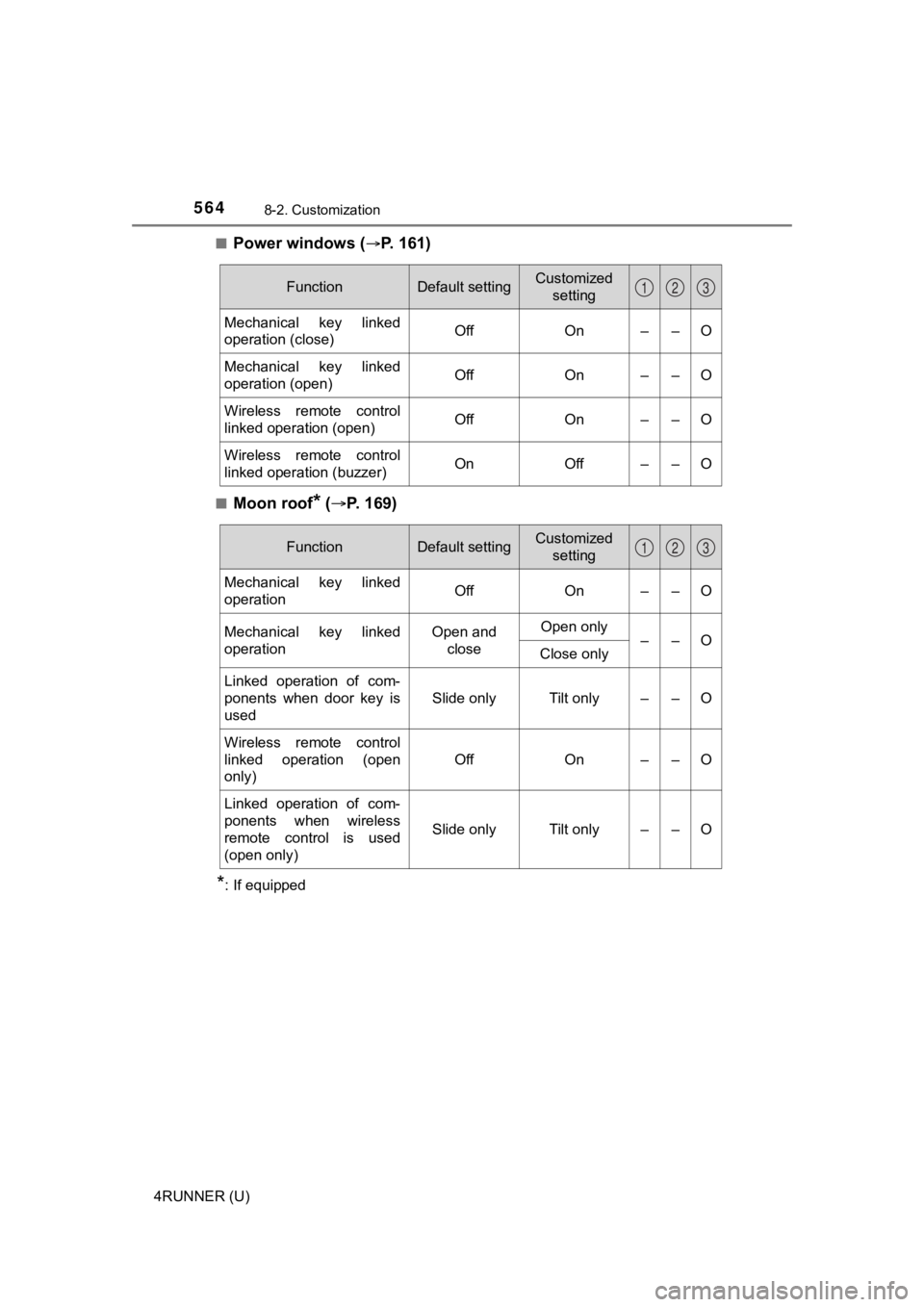
4RUNNER (U)■
Power windows (P. 161)
■Moon roof* (
P. 169)
*: If equipped
FunctionDefault settingCustomized
setting
Mechanical key linked
operation (close) Off On – – O
Mechanical key linked
operation (open) Off On – – O
Wireless remote control
linked operation (open) Off On – – O
Wireless remote control
linked operation (buzzer) On Off – – O
123
FunctionDefault settingCustomized
setting
Mechanical key linked
operationOffOn – – O
Mechanical key linked
operationOpen and closeOpen only ––O
Close only
Linked operation of com-
ponents when door key is
used
Slide onlyTilt only – – O
Wireless remote control
linked operation (open
only)
OffOn – – O
Linked operation of com-
ponents when wireless
remote control is used
(open only)
Slide onlyTilt only – – O
123