2022 TOYOTA 4RUNNER lights
[x] Cancel search: lightsPage 85 of 616
852. Instrument cluster
2
Instrument cluster
4RUNNER (U)
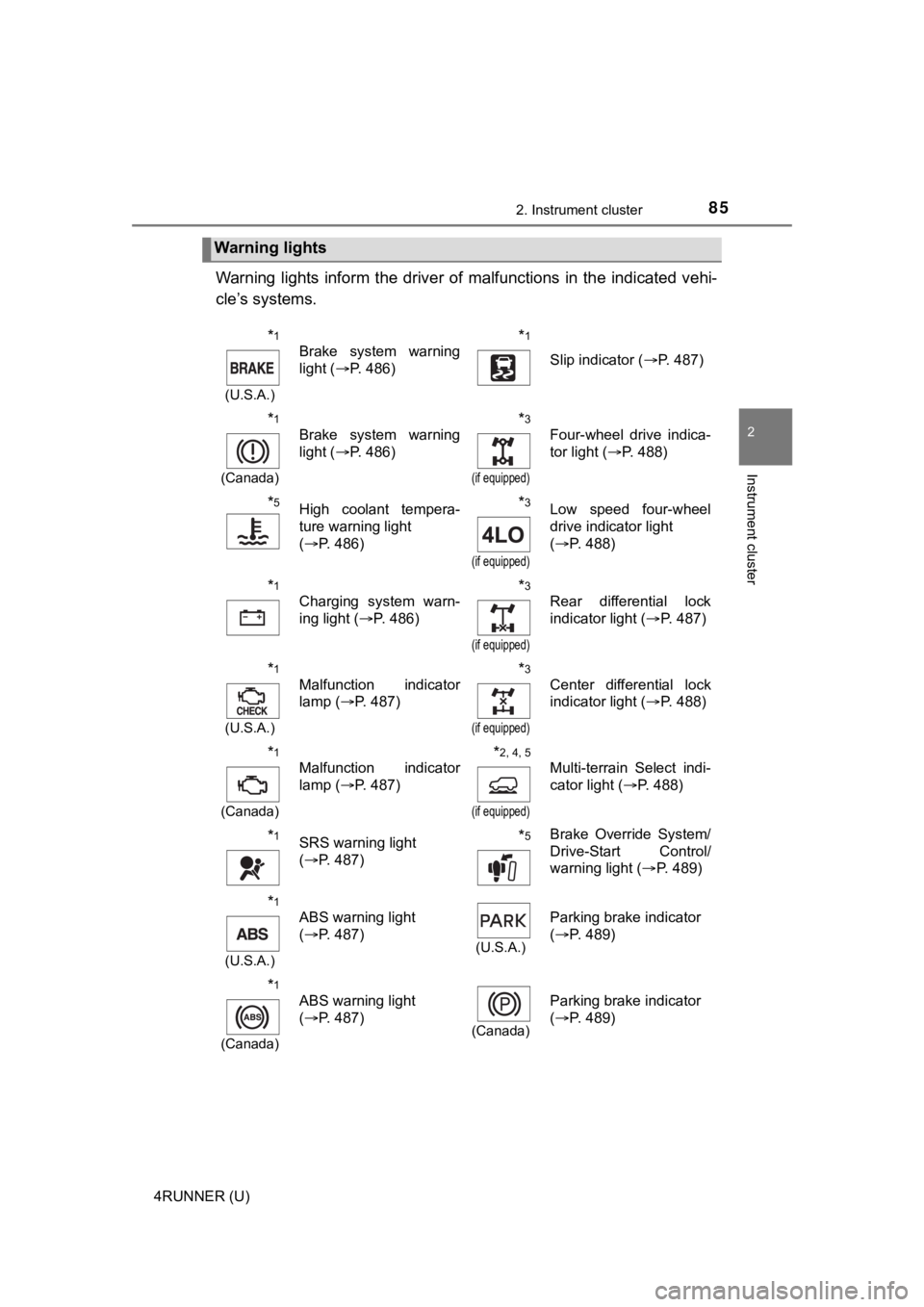
Warning lights inform the driver of malfunctions in the indicated vehi-
cle’s systems.
Warning lights
*1
(U.S.A.)
Brake system warning
light ( P. 486)*1
Slip indicator ( P. 487)
*1
(Canada)
Brake system warning
light (P. 486)*3
(if equipped)
Four-wheel drive indica-
tor light ( P. 488)
*5High coolant tempera-
ture warning light
(P. 486)*3
(if equipped)
Low speed four-wheel
drive indicator light
(P. 488)
*1
Charging system warn-
ing light ( P. 486)*3
(if equipped)
Rear differential lock
indicator light ( P. 487)
*1
(U.S.A.)
Malfunction indicator
lamp ( P. 487)*3
(if equipped)
Center differential lock
indicator light ( P. 488)
*1
(Canada)
Malfunction indicator
lamp ( P. 487)*2, 4, 5
(if equipped)
Multi-terrain Select indi-
cator light ( P. 488)
*1SRS warning light
(P. 487)*5Brake Override System/
Drive-Start Control/
warning light ( P. 489)
*1
(U.S.A.)
ABS warning light
(P. 487)
(U.S.A.)
Parking brake indicator
(P. 489)
*1
(Canada)
ABS warning light
(P. 487)
(Canada)
Parking brake indicator
(P. 489)
Page 86 of 616

862. Instrument cluster
4RUNNER (U)
*1: These lights turn on when the engine switch is turned to IGNITION ON
mode (vehicles with a smart key system) or the engine switch is turned to
the “ON” position (vehicles without a smart key system) to indi cate that a
system check is being performed. They will turn off after the engine is
started, or after a few seconds. There may be a malfunction in a system if
the lights do not come on, or do not turn off. Have the vehicle inspected by
your Toyota dealer.
*2: This light flashes to indicate a malfunction.
*3: This light flashes rapidly to indicate a malfunction.
*4: This light flashes continuously to indicate a malfunction.
*5: This light illuminates on the multi-information display.
*6: This light flashes or illuminates to indicate a malfunction.
*1
(if equipped)
BSM OFF (Blind Spot
Monitor) indicator
( P. 491)*5
Low engine oil pressure
warning light ( P. 486)
*1
(Flashes)
(if equipped)
RCTA OFF (Rear Cross
Traffic Alert) indicator
(P. 491)
*1
Power steering warning
light ( P. 488)
*1, 6PCS warning light
(P. 490)*1Master warning light
(P. 497)
*5
(Amber)
LDA indicator ( P. 490)
*1Tire pressure warning
light (P. 490)
Open door warning light
(P. 488)
(if equipped)
Unengaged “Park” warn-
ing light ( P. 488)
Low fuel level warning
light (P. 489)*1
(if equipped)
KDSS warning light
(P. 488)
Seat belt reminder light
(P. 489)*1, 2
(if equipped)
Automatic running
boards indicator light
(P. 488)
Page 89 of 616

892. Instrument cluster
2
Instrument cluster
4RUNNER (U)
*1: These lights turn on when the engine switch is turned to the “ON” position(vehicles without a smart key system) or the engine switch is turned to
IGNITION ON mode (vehicles with a smart key system) to indicate that a
system check is being performed. They will turn off after the engine is
started, or after a few seconds. There may be a malfunction in a system if
the lights do not come on, or do not turn off. Have the vehicle inspected by
your Toyota dealer.
*2: This light flashes to indicate that the system is operating.
*3: This light does not turn on when the system is disabled.
*4: This light illuminates on the center panel.
*5: This light illuminates on the multi-information display.
*6: This light turns on when the system is off.
*7: In order to confirm operation, the BSM outside rear view mirror indicators illuminate in the following situations:
• When the engine switch is turned to IGNITION ON mode while the sys-
tem is set to on.
• When the system is set to on while the engine switch is in IGN ITION ON
mode.
*8: This light illuminates on the outside rear view mirrors.
WARNING
■ If a safety system warning light does not come on
Should a safety system light such as the ABS and SRS warning li ght not
come on when you start the engine, this could mean that these s ystems are
not available to help protect you in an accident, which could result in death
or serious injury. Have the vehicle inspected by your Toyota dealer immedi-
ately if this occurs.
Page 91 of 616

912. Instrument cluster
2
Instrument cluster
4RUNNER (U)
Switches between odometer and
trip meter displays. When the trip
meter is displayed, pressing and
holding the button will reset the
trip meter.
The brightness of the instrument panel lights can be adjusted.Brighter
Darker
■The meters and display illuminate when
Vehicles without a smart key system
The engine switch is in the “ON” position.
Vehicles with a smart key system
The engine switch is in IGNITION ON mode.
■ The brightness of the instrument panel lights
When the headlight switch is turned to on, the brightness will be reduced
slightly unless the control dial is turned fully upward.
Changing the display
Instrument panel light control
1
2
NOTICE
■ To prevent damage to the engine and its components
● Do not let the indicator needle of the tachometer enter the red zone, which
indicates the maximum engine speed.
● The engine may be overheating if the engine coolant temperature gauge is
in the red zone (H). In this case, immediately stop the vehicle in a safe
place, and check the engine after it has cooled completely. ( P. 527)
Page 106 of 616

1063-1. Key information
4RUNNER (U)
To take out the mechanical key,
push the release button and take
the key out.
The mechanical key can only be
inserted in one direction, as the
key only has grooves on one side.
If the key cannot be inserted in a
lock cylinder, turn it over and re-
attempt to insert it.
After using the mechanical key, store it in the electronic key. Carry the
mechanical key together with the electronic key. If the electro nic key bat-
tery is depleted or the entry function does not operate properl y, you will
need the mechanical key. ( P. 520)
■Panic mode
Vehicles without a smart key system
Vehicles with a smart key system
■ When required to leave the vehicle’s key with a parking attendant
Lock the glove box as circumstances demand. ( P. 373)
Vehicles without a smart key system
Carry the master key for your own use and provide the attendant with the
valet key.
Vehicles with a smart key system
Remove the mechanical key for your own use and provide the attendant with
the electronic key only.
Using the mechanical key (vehic les with a smart key system)
When is pressed for longer than
about one second, an alarm will sound
intermittently and the vehicle lights will
flash to deter any person from trying to
break into or damage your vehicle.
To stop the alarm, press any button on the
wireless remote control.
When is pressed for longer than
about one second, an alarm will sound
intermittently and the vehicle lights will
flash to deter any person from trying to
break into or damage your vehicle.
To stop the alarm, press any button on the
electronic key.
Page 132 of 616
1323-2. Opening, closing and locking the doors
4RUNNER (U)
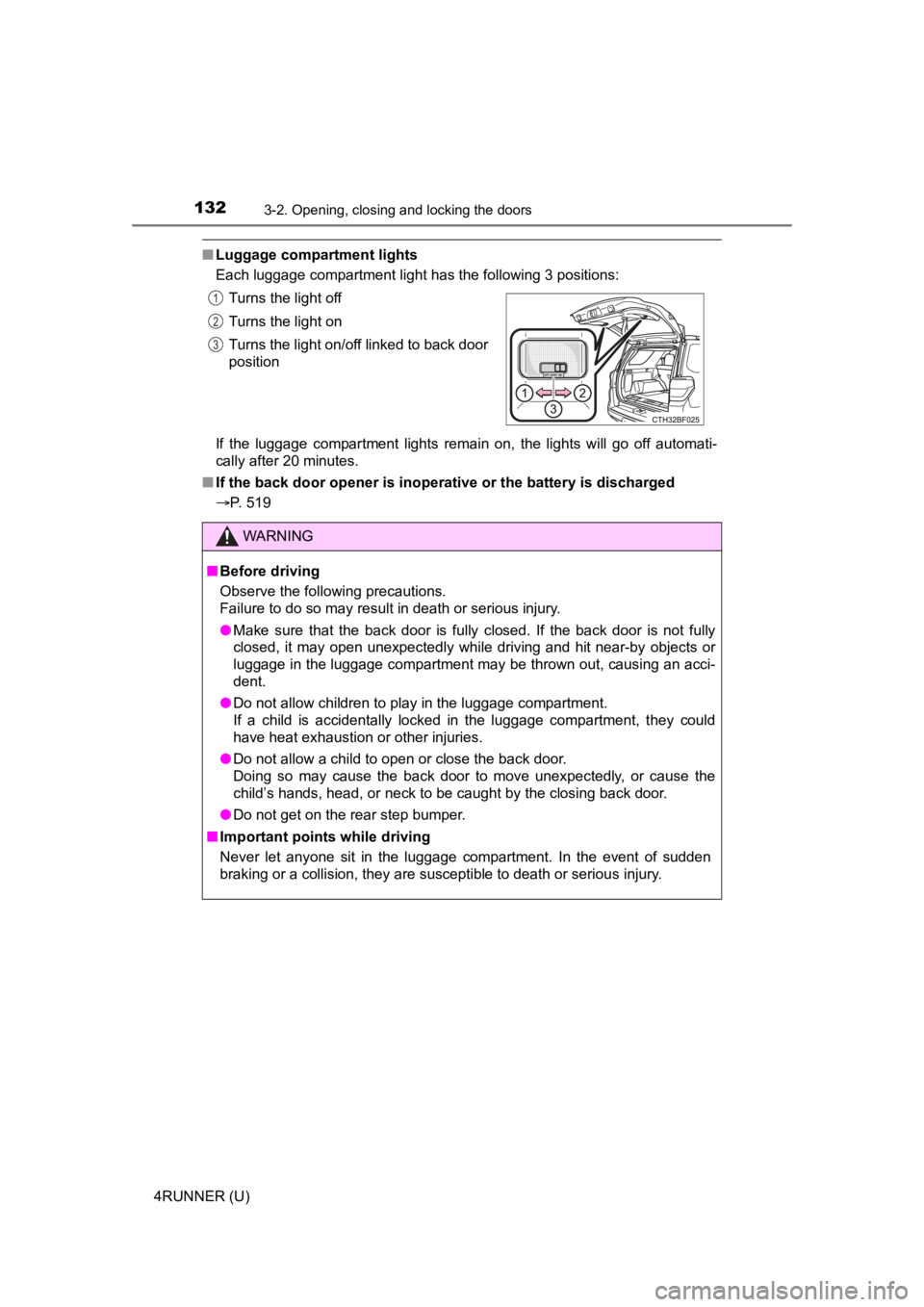
■Luggage compartment lights
Each luggage compartment light has the following 3 positions:
If the luggage compartment lights remain on, the lights will go off automati-
cally after 20 minutes.
■ If the back door opener is inoperative or the battery is discha rged
P. 519 Turns the light off
Turns the light on
Turns the light on/off linked to back door
position
WARNING
■
Before driving
Observe the following precautions.
Failure to do so may result in death or serious injury.
● Make sure that the back door is fully closed. If the back door is not fully
closed, it may open unexpectedly while driving and hit near-by objects or
luggage in the luggage compartment may be thrown out, causing an acci-
dent.
● Do not allow children to play in the luggage compartment.
If a child is accidentally locked in the luggage compartment, they could
have heat exhaustion or other injuries.
● Do not allow a child to open or close the back door.
Doing so may cause the back door to move unexpectedly, or cause the
child’s hands, head, or neck to be caught by the closing back door.
● Do not get on the rear step bumper.
■ Important points while driving
Never let anyone sit in the luggage compartment. In the event of sudden
braking or a collision, they are susceptible to death or seriou s injury.
1
2
3
Page 157 of 616
1573-4. Adjusting the steering wheel and mirrors
3
Operation of each component
4RUNNER (U)
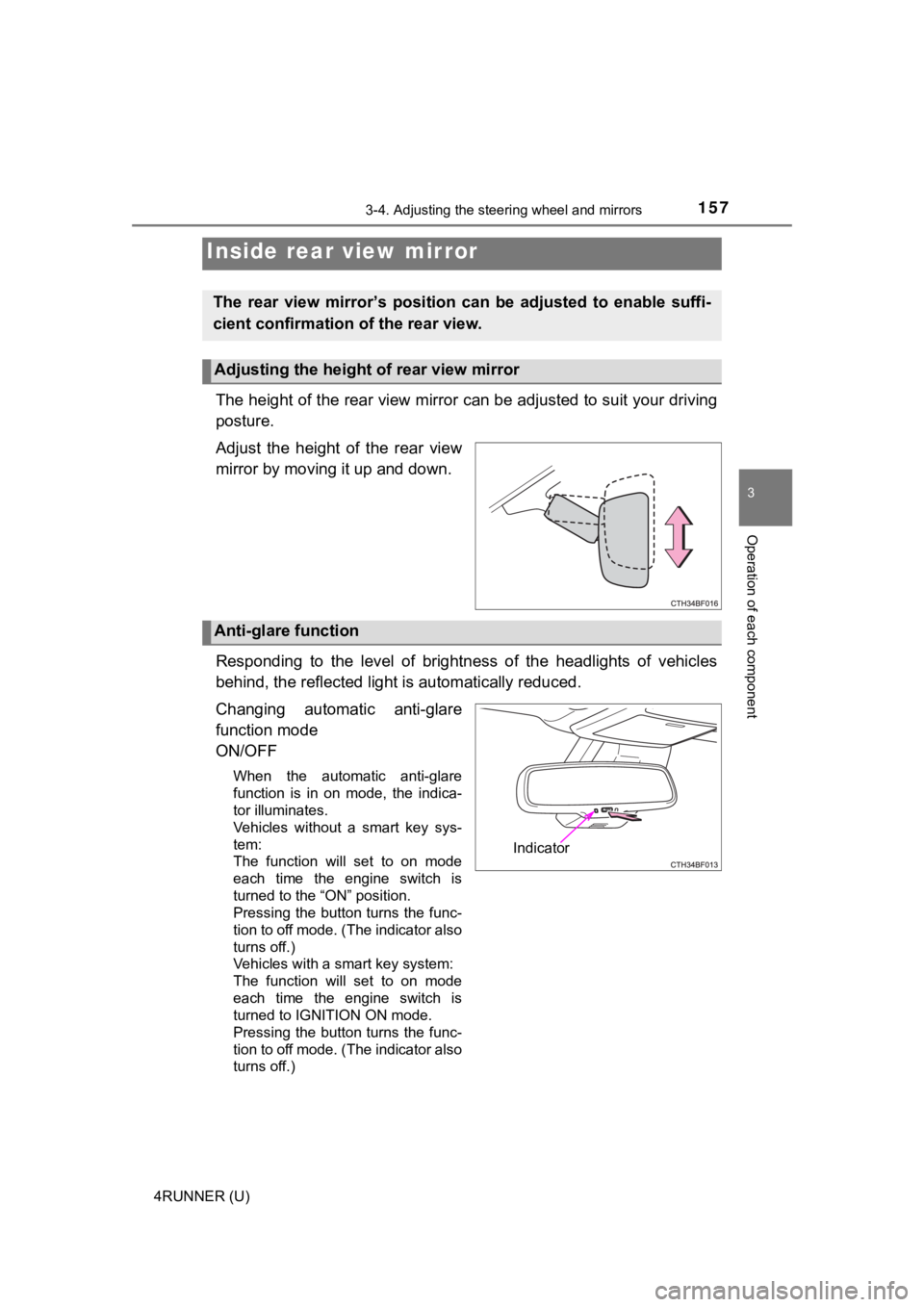
The height of the rear view mirror can be adjusted to suit your driving
posture.
Adjust the height of the rear view
mirror by moving it up and down.
Responding to the level of brightness of the headlights of vehi cles
behind, the reflected light is automatically reduced.
Changing automatic anti-glare
function mode
ON/OFF
When the automatic anti-glare
function is in on mode, the indica-
tor illuminates.
Vehicles without a smart key sys-
tem:
The function will set to on mode
each time the engine switch is
turned to the “ON” position.
Pressing the button turns the func-
tion to off mode. (The indicator also
turns off.)
Vehicles with a smart key system:
The function will set to on mode
each time the engine switch is
turned to IGNITION ON mode.
Pressing the button turns the func-
tion to off mode. (The indicator also
turns off.)
Inside rear view mirror
The rear view mirror’s position ca n be adjusted to enable suffi-
cient confirmation of the rear view.
Adjusting the height of rear view mirror
Anti-glare function
Indicator
Page 173 of 616

173
Driving4
4RUNNER (U)4-1. Before driving
Driving the vehicle ............. 174
Cargo and luggage ........... 184
Vehicle load limits ............. 189
Trailer towing..................... 190
Dinghy towing ................... 206
4-2. Driving procedures Engine (ignition) switch (vehicles without a
smart key system) ........... 207
Engine (ignition) switch (vehicles with a
smart key system) ........... 210
Automatic transmission ..... 216
Turn signal lever................ 221
Parking brake .................... 222
4-3. Operating the lights and wipers
Headlight switch ................ 223
AHB (Automatic High Beam) ............................. 228
Fog light switch ................. 232
Windshield wipers and washer ............................ 234
Rear window wiper and washer ............................ 237
4-4. Refueling Opening the fuel tank cap .................................. 240 4-5. Using the driving
support systems
Toyota Safety Sense P ..... 243
PCS (Pre-Collision System)........................... 250
LDA (Lane Departure Alert) ............................... 260
Dynamic radar cruise control ............................. 268
BSM (Blind Spot Monitor)........................... 281
Intuitive parking assist....... 288
RCTA (Rear Cross Traffic Alert) .................... 297
Four-wheel drive system (part-time 4WD
models) ........................... 305
Four-wheel drive system (full-time 4WD
models) ........................... 309
Active traction control system ............................ 313
AUTO LSD system (2WD models) ................. 315
Rear differential lock system ............................ 317
Downhill assist control system ............................ 320
Crawl Control .................... 323
Multi-terrain Select ............ 326
Driving assist systems ...... 333
4-6. Driving tips Winter driving tips ............. 342
Off-road precautions ......... 346