2022 RAM PROMASTER instrument cluster
[x] Cancel search: instrument clusterPage 69 of 268

GETTING TO KNOW YOUR INSTRUMENT PANEL67
Active Lane Management Indicator Light —
If Equipped
When the Active Lane Management
system is ON, but not armed, the Active
Lane Management indicator light
illuminates solid white. This occurs when
only left, right, or neither lane line has been
detected. If a single lane line is detected, the
system is ready to provide only visual warnings if
an unintentional lane departure occurs on the
detected lane line Ú page 102.
Active Speed Limiter Ready Indicator
Light — If Equipped With A Premium
Instrument Cluster
This light will illuminate when the Active
Speed Limiter has been turned on, but
not set Úpage 79.
Speed Warning Indicator Light —
If Equipped
When Set Speed Warning is turned on,
the speed warning telltale will illuminate
in the instrument cluster with a number
matching the set speed. When the set
speed is exceeded, a single chime will sound along
with pop-up message of speed warning exceeded.
Speed Warning can be turned on and off in the
instrument cluster display Ú page 55.
NOTE:The number “55” is only an example of a speed
that can be set.
ONBOARD DIAGNOSTIC SYSTEM — OBD II
Your vehicle is equipped with a sophisticated Onboard
Diagnostic system called OBD II. This system monitors
the performance of the emissions, engine, and
transmission control systems. When these systems are
operating properly, your vehicle will provide excellent
performance and fuel economy, as well as engine
emissions well within current government regulations.
If any of these systems require service, the OBD II
system will turn on the Malfunction Indicator Light
(MIL). It will also store diagnostic codes and other
information to assist your service technician in
making repairs. Although your vehicle will usually
be drivable and not need towing, see an authorized
dealer for service as soon as possible.
CAUTION!
Prolonged driving with the MIL on could cause
further damage to the emission control
system. It could also affect fuel economy and
driveability. The vehicle must be serviced
before any emissions tests can be performed.
If the MIL is flashing while the vehicle is
running, severe catalytic converter damage
and power loss will soon occur. Immediate
service is required.
3
22_VF_OM_EN_USC_t.book Page 67
Page 73 of 268
STARTING AND OPERATING71
NOTE:A new engine may consume some oil during its first
few thousand miles (kilometers) of operation. This
should be considered a normal part of the break-in
and not interpreted as a problem. Please check
your oil level with the engine oil indicator often
during the break-in period. Add oil as required.
PARKING BRAKE
ELECTRIC PARK BRAKE (EPB)
Your vehicle is equipped with an EPB that offers
simple operation, and some additional features
that make the parking brake more convenient and
useful.
The parking brake is primarily intended to prevent
the vehicle from rolling while parked. Before
leaving the vehicle, make sure that the parking
brake is applied. Also, be certain to leave the
transmission in PARK.
You can engage the parking brake in two ways:
Manually, by applying the parking brake switch.
Automatically, by enabling the Auto Park Brake
feature in the Customer Programmable
Features section of the Uconnect settings.
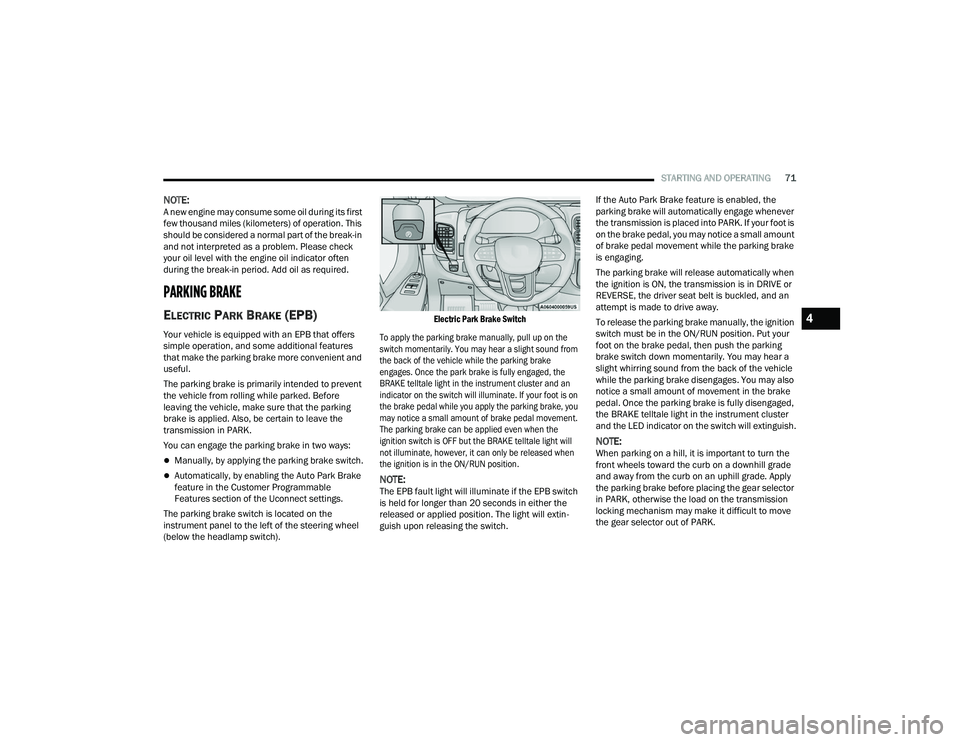
The parking brake switch is located on the
instrument panel to the left of the steering wheel
(below the headlamp switch).
Electric Park Brake Switch
To apply the parking brake manually, pull up on the
switch momentarily. You may hear a slight sound from
the back of the vehicle while the parking brake
engages. Once the park brake is fully engaged, the
BRAKE telltale light in the instrument cluster and an
indicator on the switch will illuminate. If your foot is on
the brake pedal while you apply the parking brake, you
may notice a small amount of brake pedal movement.
The parking brake can be applied even when the
ignition switch is OFF but the BRAKE telltale light will
not illuminate, however, it can only be released when
the ignition is in the ON/RUN position.
NOTE:The EPB fault light will illuminate if the EPB switch
is held for longer than 20 seconds in either the
released or applied position. The light will extin -
guish upon releasing the switch. If the Auto Park Brake feature is enabled, the
parking brake will automatically engage whenever
the transmission is placed into PARK. If your foot is
on the brake pedal, you may notice a small amount
of brake pedal movement while the parking brake
is engaging.
The parking brake will release automatically when
the ignition is ON, the transmission is in DRIVE or
REVERSE, the driver seat belt is buckled, and an
attempt is made to drive away.
To release the parking brake manually, the ignition
switch must be in the ON/RUN position. Put your
foot on the brake pedal, then push the parking
brake switch down momentarily. You may hear a
slight whirring sound from the back of the vehicle
while the parking brake disengages. You may also
notice a small amount of movement in the brake
pedal. Once the parking brake is fully disengaged,
the BRAKE telltale light in the instrument cluster
and the LED indicator on the switch will extinguish.
NOTE:When parking on a hill, it is important to turn the
front wheels toward the curb on a downhill grade
and away from the curb on an uphill grade. Apply
the parking brake before placing the gear selector
in PARK, otherwise the load on the transmission
locking mechanism may make it difficult to move
the gear selector out of PARK.
4
22_VF_OM_EN_USC_t.book Page 71
Page 76 of 268

74STARTING AND OPERATING
IGNITION PARK INTERLOCK
(K
EYLESS VEHICLE)
This vehicle is equipped with an Ignition Park
Interlock, which requires the transmission to be in
PARK before the ignition can be turned to the OFF
position. Also, the transmission is locked in PARK
whenever the ignition is in the OFF position.
BRAKE/TRANSMISSION SHIFT
I
NTERLOCK (BTSI) SYSTEM
This vehicle is equipped with a BTSI that holds the
transmission gear selector in PARK unless the
brakes are applied. To shift the transmission out of
PARK, the ignition must be turned to the ON/RUN
position (engine running or not), and the brake
pedal must be pressed. This vehicle is equipped
with an additional lock system that holds the
transmission gear selector in NEUTRAL (if vehicle
speed is approximately 0 mph (0 km/h). To shift
the transmission into REVERSE or DRIVE the brake
pedal must be pressed.
NOTE:Swivel seats that are unlocked can also prevent
the transmission gear selector from being moved
out of the PARK position. To shift the transmission
out of the PARK position the first time after
cranking is allowed, ensure swivel seats are locked
in the forward facing position.
9-SPEED AUTOMATIC TRANSMISSION
The transmission gear position display (located in
the instrument cluster) indicates the transmission
gear range. You must press the brake pedal to
move the gear selector out of PARK. To drive, move
the gear selector from PARK or NEUTRAL to the
DRIVE position.
The electronically controlled transmission provides a
precise shift schedule. The transmission electronics
are self-calibrating; therefore, the first few shifts on a
new vehicle may be somewhat abrupt. This is a normal
condition, and precision shifts will develop within a few
hundred miles (kilometers).
Gear Selector
Only shift from DRIVE to PARK or REVERSE when
the accelerator pedal is released and the vehicle is
stopped. Be sure to keep your foot on the brake
pedal when shifting between these gears.Never leave children alone in a vehicle, or with
access to an unlocked vehicle. Allowing chil -
dren to be in a vehicle unattended is
dangerous for a number of reasons. A child or
others could be seriously or fatally injured.
Children should be warned not to touch the
parking brake, brake pedal or the transmis -
sion gear selector.
Do not leave the key fob in or near the vehicle
(or in a location accessible to children), and do
not leave the ignition in the ON or RUN posi -
tion. A child could operate power windows,
other controls, or move the vehicle.
CAUTION!
Shift into or out of PARK or REVERSE only after
the vehicle has come to a complete stop.
Do not shift between PARK, REVERSE,
NEUTRAL, or DRIVE when the engine is above
idle speed.
Before shifting into any gear, make sure your
foot is firmly pressing the brake pedal.
WARNING!
22_VF_OM_EN_USC_t.book Page 74
Page 77 of 268

STARTING AND OPERATING75
(Continued)
(Continued)
The transmission gear selector provides PARK,
REVERSE, NEUTRAL, DRIVE, and Electronic Range
Select (ERS) shift positions. Manual downshifts
can be made using the ERS shift control. Moving
the gear selector into the ERS “-”/”+” position
(beside the DRIVE position) activates ERS mode,
displays the current gear in the instrument cluster,
and prevents automatic upshifts beyond this gear.
In ERS mode, toggling the gear selector forward “-”
or rearward “+” will change the highest available
gear Ú
page 77.
NOTE:If the gear selector cannot be moved to the PARK,
REVERSE, or NEUTRAL position (when pushed
forward) it is probably in the ERS “+”/”-” position
(beside the DRIVE position). In ERS mode, the
transmission gear limit (1, 2, 3, etc.) is displayed in
the instrument cluster. Move the gear selector to
the right (into the DRIVE [D] position) for access to
PARK, REVERSE, and NEUTRAL.
Gear Ranges
Do not press the accelerator pedal when shifting
out of PARK or NEUTRAL.
NOTE:After selecting any gear range, wait a moment to
allow the selected gear to engage before acceler -
ating. This is especially important when the engine
is cold.
PARK (P)
This range supplements the parking brake by
locking the transmission. The engine can be
started in this range. Never attempt to use PARK
while the vehicle is in motion. Apply the parking
brake when exiting the vehicle in this range.
When parking on a hill, apply the parking brake
before shifting the transmission to PARK,
otherwise the load on the transmission locking
mechanism may make it difficult to move the gear
selector out of PARK. As an added precaution, turn
the front wheels toward the curb on a downhill
grade, and away from the curb on an uphill grade.
When exiting the vehicle, always:
Apply the parking brake.
Shift the transmission into PARK.
Turn the engine off.
Remove the key fob from the vehicle.
WARNING!
Never use the PARK position as a substitute
for the parking brake. Always apply the
parking brake fully when exiting the vehicle to
guard against vehicle movement and possible
injury or damage.
Your vehicle could move and injure you and
others if it is not in PARK. Check by trying to
move the transmission gear selector out of
PARK with the brake pedal released. Make
sure the transmission is in PARK before
exiting the vehicle.
The transmission may not engage PARK if the
vehicle is moving. Always bring the vehicle to a
complete stop before shifting to PARK, and
verify that the transmission gear position indi -
cator solidly indicates PARK (P) without
blinking. Ensure that the vehicle is completely
stopped, and the PARK position is properly
indicated, before exiting the vehicle.
It is dangerous to shift out of PARK or
NEUTRAL if the engine speed is higher than
idle speed. If your foot is not firmly pressing
the brake pedal, the vehicle could accelerate
quickly forward or in reverse. You could lose
control of the vehicle and hit someone or
something. Only shift into gear when the
engine is idling normally (or stopped) and your
foot is firmly pressing the brake pedal.
WARNING!
4
22_VF_OM_EN_USC_t.book Page 75
Page 79 of 268
STARTING AND OPERATING77
When frequent transmission shifting occurs (such
as when operating the vehicle under heavy loading
conditions, in hilly terrain, traveling into strong
head winds, or while towing a heavy trailer), select
TOW/HAUL mode or use the Electronic Range
Select (ERS) shift control to select a lower gear
range Úpage 77. Under these conditions, using a
lower gear range will improve performance and
extend transmission life by reducing excessive
shifting and heat buildup.
During cold temperatures, transmission operation
may be modified depending on engine and
transmission temperature as well as vehicle
speed. This feature improves warm-up time of the
engine and transmission to achieve maximum
efficiency. During extremely cold temperatures
(-16°F [-27°C] or below), operation may briefly be
limited to THIRD gear only. Normal operation will
resume once the transmission temperature has
risen to a suitable level.
Transmission Limp Home Mode
Transmission function is monitored electronically
for abnormal conditions. If a condition is detected
that could result in transmission damage,
Transmission Limp Home Mode is activated. In this
mode, the transmission remains in THIRD gear
regardless of which forward gear is selected.
PARK, REVERSE, and NEUTRAL will continue to operate. The Malfunction Indicator Light (MIL) may
be illuminated. Transmission Limp Home Mode
allows the vehicle to be driven to an authorized
dealer for service without damaging the
transmission.
In the event of a momentary problem, the
transmission can be reset to regain all forward
gears by performing the following steps:
1. Stop the vehicle.
2. Shift the transmission into PARK.
3. Turn the ignition OFF.
4. Wait approximately 10 seconds.
5. Restart the engine.
6. Shift into the desired gear range. If the
problem is no longer detected, the
transmission will return to normal operation.
NOTE:Even if the transmission can be reset, we
recommend that you visit an authorized dealer at
your earliest possible convenience. An authorized
dealer has diagnostic equipment to assess the
condition of your transmission. If the transmission
cannot be reset, authorized dealer service is
required.
Electronic Range Select (ERS) Operation
The ERS shift control allows the driver to
select the max gear limit. For example, if you
set the transmission gear limit to FOURTH gear, the
transmission will not shift above FOURTH gear, but
will shift through the lower gears normally.
You can switch between DRIVE and ERS mode at
any vehicle speed. When the gear selector is in the
DRIVE position, the transmission will operate
automatically, shifting between all available gears.
Moving the gear selector to the ERS position
(beside DRIVE) will activate ERS mode, display the
current gear in the instrument cluster, and set that
gear as the max gear limit. Once in ERS mode,
moving the gear selector forward “-” or rearward
“+” will change the max gear limit.
NOTE:The transmission will still continue to use the
optimal highest gear, for the current driving condi -
tions, within the selected gear range limit.
To exit ERS mode, simply return the gear selector
to the DRIVE position.
WARNING!
Do not downshift for additional engine braking
on a slippery surface. The drive wheels could
lose their grip and the vehicle could skid,
causing a collision or personal injury.
4
22_VF_OM_EN_USC_t.book Page 77
Page 80 of 268
78STARTING AND OPERATING
NOTE:To select the proper gear position for maximum
deceleration (engine braking), move the gear
selector into the ERS position, then tap it forward
“-” repeatedly as the vehicle slows. The trans -
mission will shift to the range from which the
vehicle can best be slowed down.
When To Use TOW/HAUL Mode
When driving in hilly areas, towing a trailer, carrying a
heavy load, etc., and frequent transmission shifting
occurs, push the TOW/HAUL switch to activate
TOW/HAUL mode. This will improve performance and
reduce the potential for transmission overheating or
failure due to excessive shifting. When operating in
TOW/HAUL mode, transmission upshifts are delayed,
and the transmission will automatically downshift (for
engine braking) during steady braking maneuvers.
The “TOW/HAUL Indicator Light” will illuminate in
the instrument cluster to indicate that TOW/HAUL
mode has been activated. Pushing the switch a
second time restores normal operation. Normal
operation is always the default at engine start-up. If TOW/HAUL mode is desired, the switch must be
pushed each time the engine is started.
POWER STEERING
The electric power steering system will provide
increased vehicle response and ease of
maneuverability. The power steering system
adapts to different driving conditions.
If the steering icon is flashing, it indicates that the
vehicle needs to be taken to the dealer for service.
It is likely the vehicle has lost power steering
assistance.
If the steering icon is displayed and the “POWER
STEERING SYSTEM OVER TEMP” message is
displayed on the instrument cluster screen, this
indicates an over temperature condition in the
power steering system. Once driving conditions are
safe, pull over and let the vehicle idle for a few
moments until the icon and message turn off
Ú
page 55. If the steering icon is displayed and the “SERVICE
POWER STEERING – ASSIST OFF” message is
displayed on the instrument cluster screen, this
indicates the vehicle needs to be taken to the
dealer for service Ú
page 55.NOTE:
Even if the power steering system is no longer
operational, it is still possible to steer the vehicle.
Under these conditions there will be a substantial
increase in steering effort, especially at low
speeds and during parking maneuvers.
If the condition persists, see an authorized
dealer for service.
Instrument
Cluster
Display 1
23456789D
Actual
Gear(s)
Allowed 1 1–2 1–3 1–4 1–5 1–6 1–7 1–8 1–9 1–9
22_VF_OM_EN_USC_t.book Page 78
Page 81 of 268
STARTING AND OPERATING79
ACTIVE SPEED LIMITER — IF EQUIPPED
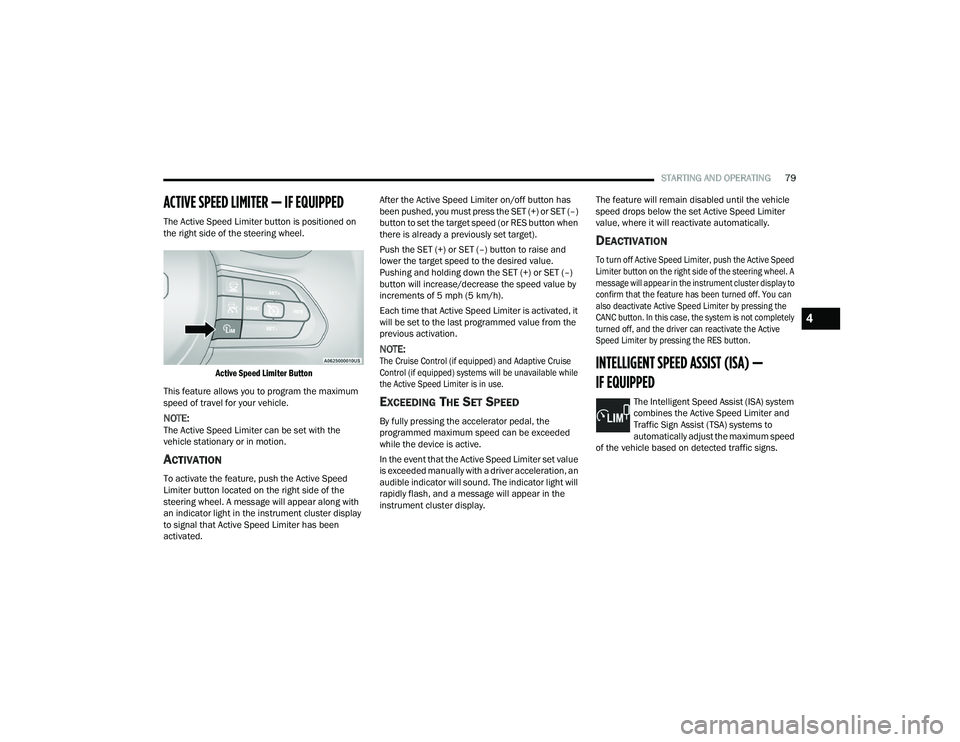
The Active Speed Limiter button is positioned on
the right side of the steering wheel.
Active Speed Limiter Button
This feature allows you to program the maximum
speed of travel for your vehicle.
NOTE:The Active Speed Limiter can be set with the
vehicle stationary or in motion.
ACTIVATION
To activate the feature, push the Active Speed
Limiter button located on the right side of the
steering wheel. A message will appear along with
an indicator light in the instrument cluster display
to signal that Active Speed Limiter has been
activated. After the Active Speed Limiter on/off button has
been pushed, you must press the SET (+) or SET (–)
button to set the target speed (or RES button when
there is already a previously set target).
Push the SET (+) or SET (–) button to raise and
lower the target speed to the desired value.
Pushing and holding down the SET (+) or SET (–)
button will increase/decrease the speed value by
increments of 5 mph (5 km/h).
Each time that Active Speed Limiter is activated, it
will be set to the last programmed value from the
previous activation.
NOTE:
The Cruise Control (if equipped) and Adaptive Cruise
Control (if equipped) systems will be unavailable while
the Active Speed Limiter is in use.
EXCEEDING THE SET SPEED
By fully pressing the accelerator pedal, the
programmed maximum speed can be exceeded
while the device is active.
In the event that the Active Speed Limiter set value
is exceeded manually with a driver acceleration, an
audible indicator will sound. The indicator light will
rapidly flash, and a message will appear in the
instrument cluster display. The feature will remain disabled until the vehicle
speed drops below the set Active Speed Limiter
value, where it will reactivate automatically.
DEACTIVATION
To turn off Active Speed Limiter, push the Active Speed
Limiter button on the right side of the steering wheel. A
message will appear in the instrument cluster display to
confirm that the feature has been turned off. You can
also deactivate Active Speed Limiter by pressing the
CANC button. In this case, the system is not completely
turned off, and the driver can reactivate the Active
Speed Limiter by pressing the RES button.
INTELLIGENT SPEED ASSIST (ISA) —
IF EQUIPPED
The Intelligent Speed Assist (ISA) system
combines the Active Speed Limiter and
Traffic Sign Assist (TSA) systems to
automatically adjust the maximum speed
of the vehicle based on detected traffic signs.
4
22_VF_OM_EN_USC_t.book Page 79
Page 82 of 268

80STARTING AND OPERATING
ACTIVATION
To activate the feature, make sure the Traffic Sign
Assist (TSA) system is enabled within Uconnect
Settings Úpage 120, then push the Active Speed
Limiter button located on the right side of the
steering wheel. The message “Ready” will appear
along with a white indicator light in the instrument
cluster display to signal that the system has been
activated.
While the system is in the “Ready” state, the driver
must press the SET (+), SET (–), or RES button to
engage the system. When the system is fully
engaged and detects the current speed limit using
the TSA system, the message in the instrument
cluster display will indicate the new detected
speed limit by suggesting the driver to press "RES"
to accept it.
If the detected speed sign is greater then the
current set speed, an up arrow will be displayed
too. If the detected speed sign is lower then the
current set speed, a down arrow will be displayed
instead. If the driver accepts the new suggested
speed sign, the indicator light will change to green.
Pushing the SET (+) or SET (–) button on the right
of the steering wheel will raise and lower the set
speed to a desired value above or below the set ISA
speed. Pushing and holding down the SET (+) or
SET (–) button will increase/decrease the speed
value by increments of 5 mph (5 km/h).
NOTE:The Cruise Control (if equipped) and Adaptive
Cruise Control (if equipped) systems will be
unavailable while the ISA system is in use.
EXCEEDING THE SET SPEED
By fully pressing the accelerator pedal, the
maximum set speed can be exceeded while the
system is active.
When the maximum set speed is exceeded, the
green indicator light will blink and the instrument
cluster display will show an override message for
five seconds, or until the accelerator pedal is
released.
DEACTIVATION
To turn off the Intelligent Speed Assist system,
push the Active Speed Limiter button on the right
side of the steering wheel. A message will appear
in the instrument cluster display to confirm that the
feature has been turned off. The Intelligent Speed
Assist system can also be deactivated by pressing
the CANC button. In this case, the ISA system is
not completely turned off, and the driver can
reactivate the system by pressing the RES button.
CRUISE CONTROL SYSTEMS — IF EQUIPPED
Your vehicle may be equipped with the Cruise
Control system, or the Adaptive Cruise Control
(ACC) system:
Cruise Control will keep your vehicle at a
constant preset speed.
Adaptive Cruise Control (ACC) will adjust the
vehicle speed up to the preset speed to main -
tain a distance with the vehicle ahead.
NOTE:
In vehicles equipped with ACC, if ACC is not
enabled, Fixed Speed Cruise Control will not
detect vehicles directly ahead of you. Always be
aware of the feature selected.
Only one Cruise Control feature can operate at a
time. For example, if Fixed Speed Cruise Control
is enabled, Adaptive Cruise Control will be
unavailable, and vice versa.
CRUISE CONTROL
When engaged, the Cruise Control takes over
accelerator operations at speeds greater than
25 mph (40 km/h) up to the maximum speed of
100 mph (160 km/h).
The Cruise Control buttons are located on the right
side of the steering wheel.
22_VF_OM_EN_USC_t.book Page 80