2022 RAM PROMASTER CITY USB
[x] Cancel search: USBPage 130 of 260
128MULTIMEDIA
Copyright Notices
© 2021 TomTom®. All rights reserved. TomTom®
and the "two hands" logo are registered
trademarks of TomTom® N.V. or one of its
subsidiaries. Please see
www.tomtom.com/
en_us/legal/ for warranties and end user license
agreements applying to this product.
© 2021 TomTom®. All rights reserved. This
material is proprietary and the subject of copyright
protection and/or database rights protection and/
or other intellectual property rights owned by
TomTom® or its suppliers. The use of this material
is subject to the terms of a license agreement. Any
unauthorized copying or disclosure of this material
will lead to criminal and civil liabilities.
Data Source © 2021 TomTom® All rights reserved.
The software included in this product contains
copyrighted software that is licensed under the
GPL. A copy of that license can be viewed in the
License section. You can obtain the complete
corresponding source code from us for a period of
three years after our last shipment of this product.
For more information, visit
https://
www.tomtom.com/en_gb/opensource or
contact your local TomTom® customer support
team via
us.support.tomtom.com/app/
answers/list. Upon request, we will send you a CD
with the corresponding source code. Linotype, Frutiger and Univers are trademarks of
Linotype GmbH registered in the US Patent and
Trademark Office and may be registered in certain
other jurisdictions. MHei is a trademark of The
Monotype Corporation and may be registered in
certain jurisdictions.
STEERING WHEEL AUDIO CONTROLS —
IF EQUIPPED
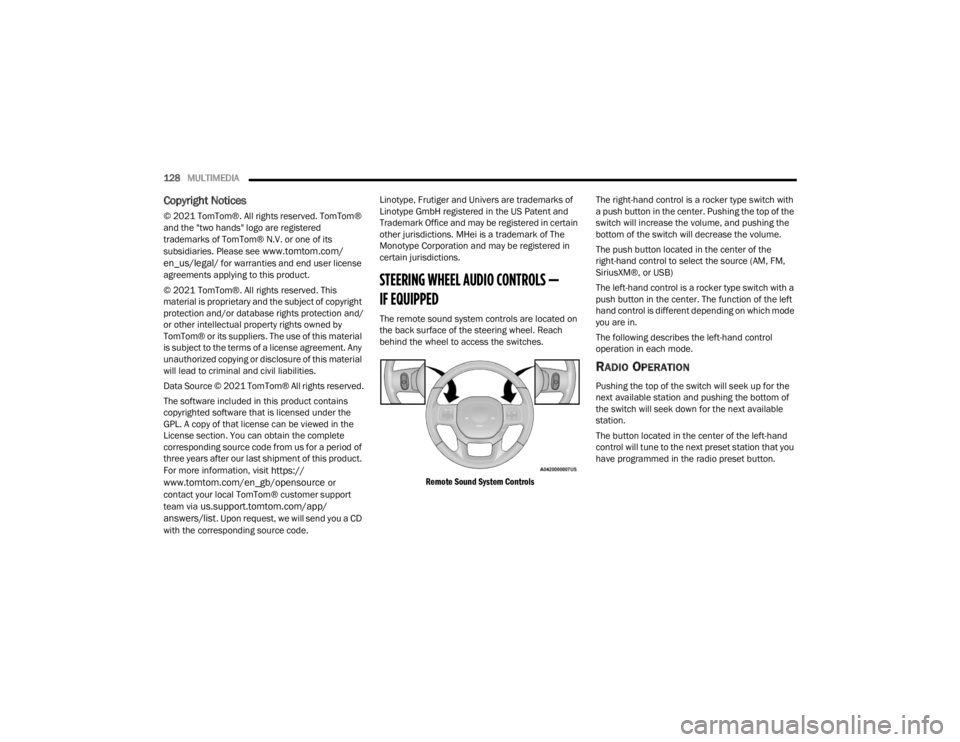
The remote sound system controls are located on
the back surface of the steering wheel. Reach
behind the wheel to access the switches.
Remote Sound System Controls
The right-hand control is a rocker type switch with
a push button in the center. Pushing the top of the
switch will increase the volume, and pushing the
bottom of the switch will decrease the volume.
The push button located in the center of the
right-hand control to select the source (AM, FM,
SiriusXM®, or USB)
The left-hand control is a rocker type switch with a
push button in the center. The function of the left
hand control is different depending on which mode
you are in.
The following describes the left-hand control
operation in each mode.
RADIO OPERATION
Pushing the top of the switch will seek up for the
next available station and pushing the bottom of
the switch will seek down for the next available
station.
The button located in the center of the left-hand
control will tune to the next preset station that you
have programmed in the radio preset button.
22_VM_OM_EN_USC_t.book Page 128
Page 131 of 260
MULTIMEDIA129
MEDIA MODE
Pushing the top of the switch once goes to the next
track on the selected media (USB/Bluetooth®).
Pushing the bottom of the switch once goes to the
beginning of the current track, or to the beginning
of the previous track if it is within eight seconds
after the current track begins to play.
RAM TELEMATICS - IF EQUIPPED
Ram Telematics is designed to help improve
safety, efficiency, and productivity. It gives you
complete visibility of your fleet options, whether
from behind a desk or on a mobile device while you
are on the go. You can log-in to view near real-time
and historical activity, including location, vehicle
health, and driver performance. Activating Ram Telematics In Your Vehicles
Before you get started you will need:
The Vehicle Identification Number (VIN) of each
vehicle you want to activate.
Your main user’s username and password; new
customers will be asked to register.
If you are a new customer, you will need
company credit card information or invoice
number as further proof of customer identifica
-
tion. Don’t worry, you will not be charged.
Go to activate.verizonconnect.com/ram/
#login. If you are an existing Verizon Connect
customer, enter your company’s log in creden -
tials. New customers will need to register to
create a new account.
Manually enter the VIN or upload a CSV file with
your VIN. A vehicle name is optional and can be
added later. Follow online instructions to
complete your vehicle entry.
Create a password and enter billing information.
An email will be sent to you to complete the final
step. After that, you will be ready to log-in and
access Verizon Connect Fleet!
You are good to go! You will receive an email
confirming your vehicles are now online.
For more information, or to learn more, visit
www.verizonconnect.com/ram/.
RAM TELEMATICS GENERAL
I
NFORMATION
Modification Statement
Marelli has not approved any changes or
modifications to this device by the user. Any
changes or modifications could void the user’s
authority to operate the equipment.
Marelli n'approuve aucune modification apportée
à l'appareil par l'utilisateur, quelle qu'en soit la
nature. Tout changement ou modification peuvent
annuler le droit d'utilisation de l'appareil par
l'utilisateur.5
22_VM_OM_EN_USC_t.book Page 129
Page 213 of 260

SERVICING AND MAINTENANCE211
Cavity Mini Fuse Description
F535 Amp BeigeKL 30 (+30) - IPC, FTM
F38 20 Amp YellowCentral Doors Locking
F36 15 Amp Blue
KL 30 (+30) - TPMS, EOBD, HVAC, Radio, USB, SGW
F43 15 Amp BlueBi-Directional Washer Pump
F48 20 Amp YellowPassenger Power Windows
F13 7.5 Amp BrownSupply for left low beam bulb or discharge lamp
F50 7.5 Amp BrownKL 15 (+15) - Air-Bag
F51 7.5 Amp BrownKL 15 (+15) - External Mirror Adjustment
Command, HVAC, RVC, HWB Coils
F37 5 Amp BeigeKL 15 (+15) - Brake Pedal Switch (N.O.), IPC, Brake
Pedal Switch (N.C.)
F49 5 Amp BeigeKL 15 (+15) - PAM, CSS Lighting, TTM, SGW,
Heaters Light, ECM Backlighting
F31 5 Amp BeigeKL 15a (INT A) - HWB, MCO
F47 20 Amp YellowDriver Power Windows
8
22_VM_OM_EN_USC_t.book Page 211
Page 251 of 260

249
H
Hazard Driving Through Flowing, Rising, Or Shallow Standing Water
....................................... 76Hazard Warning Flashers.............................. 171Head Restraints............................................... 19HeadlightsCleaning.................................................... 234Passing........................................................ 24Switch......................................................... 24Heated Mirrors................................................ 23Heated Seats................................................... 18Heater, Engine Block....................................... 53Hill Start Assist.............................................. 134HitchesTrailer Towing.............................................. 70Hood Prop........................................................ 36Hood Release.................................................. 36
I
Ignition............................................................ 12Key....................................................... 10, 12Switch......................................................... 12Ignition Key Removal....................................... 12Immobilizer (Sentry Key).................................. 12Inside Rearview Mirror..................................... 22
Instrument Cluster.................................... 39, 40Descriptions................................................ 49Display......................................................... 40Display Controls........................................... 40Engine Oil Reset.......................................... 41Menu Items................................................. 42Instrument Panel............................................. 39Instrument Panel Lens Cleaning................... 235Interior And Instrument Lights......................... 25Interior Appearance Care.............................. 235Interior Lights................................................... 25iPod Control..................................................... 32iPod/USB/MP3 Control.................................... 32Bluetooth Streaming Audio.......................... 32
J
Jack Location................................................ 171Jack Operation.............................................. 171Jacking And Tire Changing............................ 171Jump Starting............................................... 181
K
Key FobProgramming Additional Key Fobs
............... 11Key Fob Battery Service
(Remote Keyless Entry).................................... 10
Key Fob Programming (Remote Keyless Entry)..11
Keys.................................................................10Replacement...............................................11Sentry (Immobilizer).....................................12
L
Lane Change Assist..........................................25Lap/Shoulder Belts....................................... 139Latches......................................................... 170Hood............................................................36Leaks, Fluid................................................... 170Life Of Tires................................................... 227Light Bulbs........................................... 170, 213Lights............................................................ 170Air Bag............................................... 44, 168Brake Assist Warning................................ 133Brake Warning.............................................45Bulb Replacement.................................... 213Cruise..........................................................50Daytime Running.........................................24Engine Temperature Warning......................46Exterior.............................................. 24, 170Hazard Warning Flasher........................... 171Headlights...................................................24Interior.........................................................25Malfunction Indicator (Check Engine)..........48
11
22_VM_OM_EN_USC_t.book Page 249