2022 PEUGEOT 301 steering wheel
[x] Cancel search: steering wheelPage 111 of 148
109
PEUGEOT Connect Radio
11
In the "Settings" menu, it is possible to
create a profile for an individual or for a
group of people with shared interests, and
configure a wide range of settings (radio
presets, audio settings, ambiences, etc.).
Settings are applied automatically.
In very hot conditions, the volume may
be limited to protect the system. It may
enter standby mode (with the screen and
sound off) for 5 minutes or more.
The system will resume normal operation
when the temperature in the passenger
compartment has dropped.
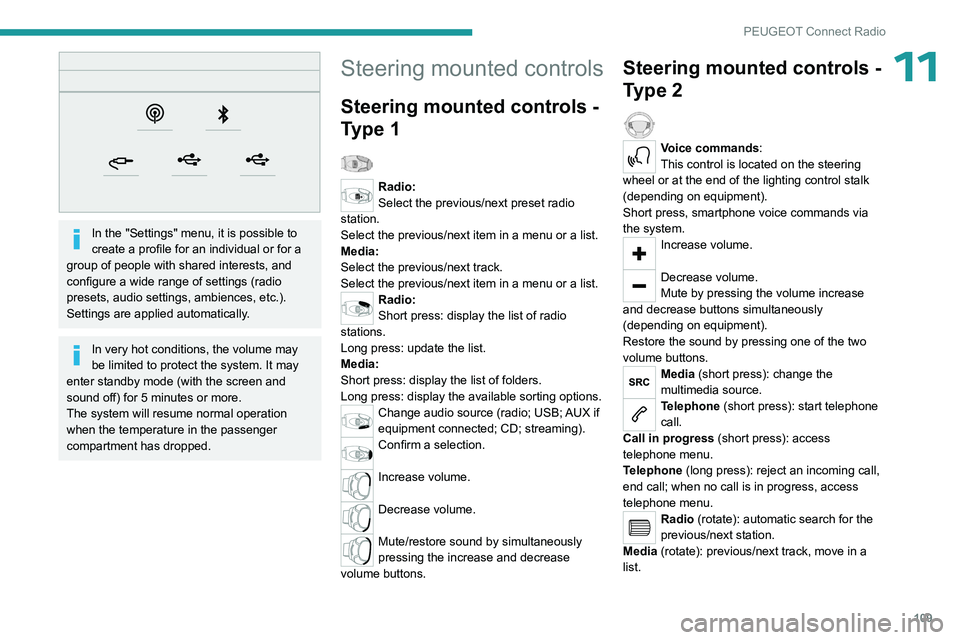
Steering mounted controls
Steering mounted controls -
Type 1
Radio:
Select the previous/next preset radio
station.
Select the previous/next item in a menu or a list.
Media:
Select the previous/next track.
Select the previous/next item in a menu or a list.
Radio:
Short press: display the list of radio
stations.
Long press: update the list.
Media:
Short press: display the list of folders.
Long press: display the available sorting options.
Change audio source (radio; USB; AUX if
equipment connected; CD; streaming).
Confirm a selection.
Increase volume.
Decrease volume.
Mute/restore sound by simultaneously
pressing the increase and decrease
volume buttons.
Steering mounted controls -
Type 2
Voice commands:
This control is located on the steering
wheel or at the end of the lighting control stalk
(depending on equipment).
Short press, smartphone voice commands via
the system.
Increase volume.
Decrease volume.
Mute by pressing the volume increase
and decrease buttons simultaneously
(depending on equipment).
Restore the sound by pressing one of the two
volume buttons.
Media (short press): change the
multimedia source.
Telephone (short press): start telephone
call.
Call in progress (short press): access
telephone menu.
Telephone (long press): reject an incoming call,
end call; when no call is in progress, access
telephone menu.
Radio (rotate): automatic search for the
previous/next station.
Media (rotate): previous/next track, move in a
list.
Page 124 of 148
122
Vehicle data recording and privacy
Comfort and infotainment
functions
Comfort settings and personalised settings
may be saved in the vehicle and modified or
reinitialised at any time.
Depending on the vehicle's equipment level,
this
may
include:
–
Seat and steering wheel position settings.
–
Chassis and air conditioning settings.
–
Personalised settings such as the interior
lighting.
Y
ou can enter your own data into the functions
of your vehicle's audio and telematic system, as
part of the selected functionalities.
Depending on the vehicle's equipment level,
this
may
include:
–
Multimedia data such as music, videos or
photos to be read by an integrated multimedia
system.
–
Address book data to be used with an
integrated hands-free system or with an
integrated navigation system.
–
Entered destinations.
–
Data regarding the use of online services.
This data for the comfort and infotainment
functions may be stored locally in the vehicle
or saved to a device that you have connected
to the vehicle (e.g.
smartphone, USB memory
stick or MP3 player). Data that you have entered
yourself may be deleted at any time.
This data may also be transmitted outside the
vehicle at your request, particularly when using online services in line with the settings that you
have selected. Smartphone integration
(e.g.
Android
Auto
® or
Apple
®CarPlay®)
If your vehicle is equipped accordingly, you can
connect your smartphone or another mobile
device to the vehicle in order to operate it using
the vehicle's integrated controls. Images and
sounds from the smartphone can be transmitted
through the audio and telematics system.
Specific information is simultaneously sent
to your smartphone. Depending on the type
of
integration, this includes data such as location,
day/night mode and other general information
about the vehicle. For more information, please
refer to the user instructions for the vehicle or the
audio and telematics system.
Integrating a smartphone allows you to use
its applications, such as a navigation app or
music player. No other
integration between
the smartphone and the vehicle is possible, in
particular active access to vehicle data. How the
data is processed subsequently is determined
by the supplier of the application being used.
The ability the change settings depends on the
application in question and on the operating
system installed on your smartphone.
Online services
If your vehicle is connected to a wireless
network, data can be exchanged between
your vehicle and other systems. Connection
to a wireless network is made possible
via a
transmitter located in your vehicle or a mobile
device that you have provided (e.g.
smartphone).
The online services can be used via this wireless
connection.
These include online services and
applications (apps) provided to you by the
Manufacturer or other suppliers.
Exclusive services
As regards the Manufacturer's online services,
the corresponding functions are described by
the Manufacturer in an appropriate medium
(e.g.
handbook, Manufacturer's website) and the
information about data protection is provided.
Personal data may be used for online services.
The exchange of data for this purpose takes
place over a secure connection, using for
example the Manufacturer's dedicated computer
systems. The collection, processing and use of
personal data for the development of services
are carried out solely on the basis of a legal
authorisation, for example in the case of a
legal emergency call system or a contractual
agreement or else under a consent agreement.
You can activate or deactivate the services and
functions (some may be chargeable) and, in
some cases, the vehicle's entire connection to
the wireless network. This does not include the
Page 126 of 148
124
Alphabetical index
A
ABS 36
Accessories
35
Additive, Diesel
74–75
Adjusting headlamps
33
Adjusting head restraints
21
Adjusting seat
21–22
Adjusting the date
12, 119
Adjusting the headlamp beam height
33
Adjusting the height and reach of the
steering wheel
23
Adjusting the time
12, 118
Advice on care and maintenance
76
Advice on driving
6, 49–50
Airbags
39–41, 43
Airbags, curtain
40
Airbags, front
40–41, 43
Airbags, lateral
40–41
Air conditioning
24
Air conditioning, electronic (with
display screen)
26–27
Air conditioning, manual (without
display screen)
25
Air vents
24
Alarm
19–20
Anti-lock braking system (ABS)
36
Antitheft / Immobiliser
16
Armrest, front
28–29
Ashtray, portable
28
Assistance, emergency braking
36
Audio streaming (Bluetooth)
102–103, 114
B
Battery 88
Battery, 12 V
69, 74–75, 88–90
Battery, charging
88–89
Battery, remote control
17
Blanking screen (snow shield)
70
Bluetooth (hands-free)
102, 116
Bluetooth (telephone)
116–117
Bodywork
77
Bonnet
71–72
Boot
18–19
Boot (opening)
15
Brake discs
75
Brake lamps
86
Brakes
75
Braking assistance system
36
Brightness
11 8
Bulbs (changing)
83–84, 86
C
Capacity, fuel tank 67
Care of the bodywork
77
CD
100
CD, MP3
100
Central locking
16
Changing a bulb
83–84, 86
Changing a fuse
87
Changing a wheel
80
Changing a wiper blade
33–34
Changing the remote control battery 17
Changing to free-wheeling
76
Checking the levels
73–74
Checks
72, 74–75
Checks, routine
74–75
Child lock
44, 47–48
Children
38, 44–47
Children (safety)
48
Child seats
38, 41–44
Child seats, conventional
43
Child seats, ISOFIX
45–47
Cigar lighter
29
Cleaning (advice)
76–78
Clock
12
Closing the boot
18–19
Closing the doors
18
Connection, Apple CarPlay
11 5
Connection, Bluetooth
116–117
Connection, MirrorLink
11 5
Control, emergency boot release
19
Control, emergency door
17
Control stalk, lighting
31
Control stalk, wipers
33
Courtesy lamps
30
Cruise control
62–64
D
DAB (Digital Audio Broadcasting) -
Digital radio
11 3
Date (setting)
12, 119
Page 129 of 148

127
Alphabetical index
R
Radio 99, 111–112
Radio, digital (Digital Audio
Broadcasting - DAB)
11 3
RDS
11 2
Reading lamps
30
Rear bench seat
22
Rear screen (demisting)
27–28
Recharging the battery
88–89
Recorder, trip distance
11
Reduction of electrical load (mode)
69
Regeneration of the particle filter
75
Reinitialising the remote control
18
Reinitialising the under-inflation detection
system
59
Reminder, key in ignition
52
Reminder, lighting on
32
Remote control
15–17, 50
Removing a wheel
81–82
Replacing bulbs
83–84, 86
Replacing fuses
87
Replacing the air filter
75
Replacing the oil filter
75
Replacing the passenger compartment
filter
75
Reservoir, screenwash
74
Resetting the trip recorder
11
Reversing camera
60, 65
Reversing lamps
86
Roof bars
70–71
Running out of fuel (Diesel)
79
S
Safety, children 40–43, 45–46
Saturation of the particle filter (Diesel)
75
Screen, cold climate
70
Screen menu map
11 5
Screen, multifunction (with audio system)
99
Screens, very cold conditions
70
Screenwash
33
Screenwash, front
33
Seat belts
37–38, 43
Seat belts, rear
38
Seats, front
21
Seats, rear
22, 42
Sensors (warnings)
60
Serial number, vehicle
96
Servicing
10, 74
Settings, system
11 8
Shield, snow
70
Sidelamps
32, 84–86
Side repeater (turn signal)
86
Snow chains
59, 68–69
Snow screen
70
Socket, 12 V accessory
29
Socket, auxiliary
101, 114
Socket, Jack
29, 101
Sockets, audio
29, 101
Speed limiter
61–62
Speedometer
61
Stability control (ESC)
36
Starting a Diesel engine
67
Starting the vehicle
51–52, 55
Starting using another battery 89
Station, radio
99, 111–112
Stay, engine bonnet
72
Steering mounted controls, audio
98, 109
Steering wheel (adjustment)
23
Stickers, customising
77
Stopping the vehicle
51–52, 55
Stop & Start
14, 25, 27, 56–58, 67, 71, 75, 91
Storage
28–29
Sunshine sensor
24
Sun visor
28
Switch, ignition
51–52
Synchronising the remote control
18
T
Tables of engines 94–95
Tank, fuel
67–68
Technical data
94–95
Telephone
103, 116–117
Third brake lamp
87
Time (setting)
12, 118
Tools
79, 80
Top Tether (fixing)
45
Total distance recorder
11
Towbar
69
Towed loads
93
Towing
91–92
Towing another vehicle
92
Towing the vehicle
91–92
Traction control (ASR)
36–37