2022 NISSAN TITAN window
[x] Cancel search: windowPage 275 of 635

Operating tips
• Keep the windows closed while the airconditioner is in operation.
• Af ter parking in the sun, drive for 2 or 3 minutes with the windows open to vent
hot air from the passenger compart-
ment. Then, close the windows. This al-
lows the air conditioner to cool the inte-
rior more quickly.
• The air conditioning system should be
operated for approximately 10 minutes
at least once a month. This helps pre-
vent damage to the system due to lack
of lubrication.
• A visible mist may be seen coming from the ventilators in hot, humid conditions
as the air is cooled rapidly. This does not
indicate a malfunction.
• If the engine coolant temperature
gauge indicates engine coolant tem-
perature over the normal range, turn
the air conditioner off. For additional
information, see “If your vehicle over-
heats” (P. 6-12).
AIR FLOW CHARTS
The following charts show the button and
dial positions for MAXIMUM AND QUICK
heating, cooling or defrosting. For addi-
tional information on heating and cooling,
see “Heater and air conditioner (manual)”
(P. 4-28). The air recirculation (
) but-
ton should always be in the OFF position
for heating and defrosting.
Monitor, climate, audio, phone and voice recognition systems4-33
Page 279 of 635
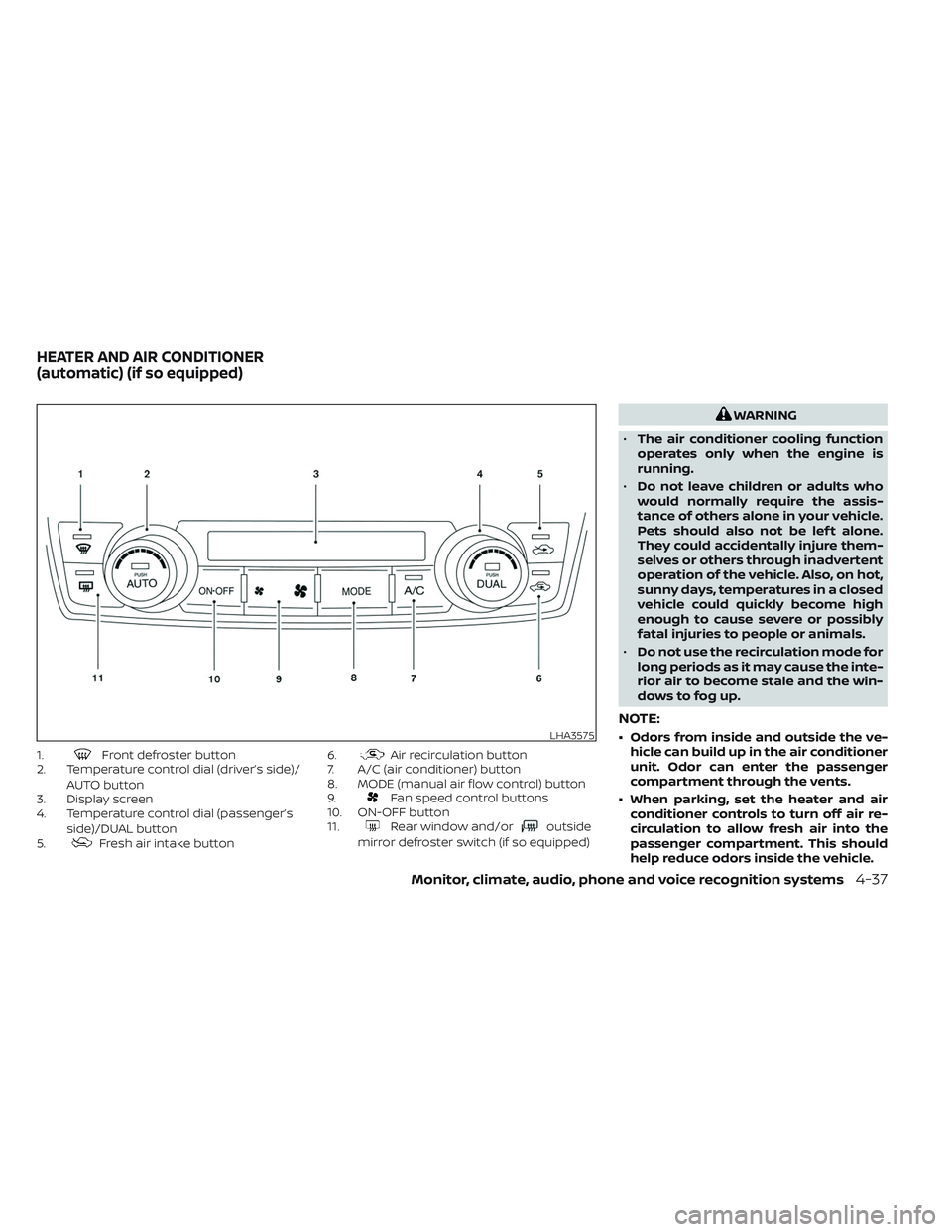
1.Front defroster button
2. Temperature control dial (driver’s side)/
AUTO button
3. Display screen
4. Temperature control dial (passenger’s
side)/DUAL button
5.
Fresh air intake button 6.
Air recirculation button
7. A/C (air conditioner) button
8. MODE (manual air flow control) button
9.
Fan speed control buttons
10. ON-OFF button
11.
Rear window and/oroutside
mirror defroster switch (if so equipped)
WARNING
• The air conditioner cooling function
operates only when the engine is
running.
• Do not leave children or adults who
would normally require the assis-
tance of others alone in your vehicle.
Pets should also not be lef t alone.
They could accidentally injure them-
selves or others through inadvertent
operation of the vehicle. Also, on hot,
sunny days, temperatures in a closed
vehicle could quickly become high
enough to cause severe or possibly
fatal injuries to people or animals.
• Do not use the recirculation mode for
long periods as it may cause the inte-
rior air to become stale and the win-
dows to fog up.
NOTE:
• Odors from inside and outside the ve- hicle can build up in the air conditioner
unit. Odor can enter the passenger
compartment through the vents.
• When parking, set the heater and air conditioner controls to turn off air re-
circulation to allow fresh air into the
passenger compartment. This should
help reduce odors inside the vehicle.LHA3575
HEATER AND AIR CONDITIONER
(automatic) (if so equipped)
Monitor, climate, audio, phone and voice recognition systems4-37
Page 280 of 635
AUTOMATIC OPERATION
Cooling or heating (auto)
This mode may be normally used all year
round as the system automatically works
to keep a constant temperature. Air flow
distribution and fan speed are also con-
trolled automatically.
1. Press the AUTO button on.
2. Turn the temperature dial to the lef t orright to set the desired temperature.
Driver and passenger temperatures can
be set independently. Press the DUAL
button to activate dual climate control
functions. Turn the passenger's side
temperature control dial to the lef t or
right to set the desired passenger's
temperature.
• Adjust the temperature dial to about 75°F (24°C) for normal operation. • The temperature of the passenger com-
partment will be maintained automati-
cally. Air flow distribution, fan speed and
A/C on/off are also controlled automati-
cally. The A/C button indicator will remain
in the last user setting. Under this condi-
tion, the indicator light on the A/C button
indicator will not turn on if the user had
not selected the A/C button off. Turning
off the air conditioning via the A/C button
is not allowed in this mode. If the A/C
button indicator was on when entering
this mode, and the A/C button is selected
in this mode, the A/C button indicator will
turn off, but the A/C compressor will still
be automatically enabled. For additional
information, see “Air flow control” (P. 4-40).
To turn off the compressor, turn off auto
mode, then turn the A/C on then off until
the A/C button indicator is not lit.
• A visible mist may be seen coming from the vents in hot, humid conditions as the
air is cooled rapidly. This does not indicate
a malfunction.
Heating
When you need to heat only, use this mode.
1. Press the AUTO button. 2. Turn the temperature control dial to the
lef t or the right to set the desired tem-
perature. Driver and passenger tem-
peratures can be set independently.
Press the DUAL button to activate dual
climate control functions. Turn the pas-
senger’s side temperature control dial
to the lef t or right to set the desired
passenger’s temperature.
• The temperature of the passenger com- partment will be maintained automati-
cally. Air flow distribution and fan speed
are also controlled automatically.
• Do not set the temperature lower than the outside air temperature. Otherwise,
the system may not work properly.
• Not recommended if windows fog up.
Dehumidified defrosting or
defogging
1. Press thedefroster control button
to turn the system on. The indicator light
in the button will illuminate.
2. The fan will automatically change to blower speed 5. Blower speed can be
changed by pressing the
fan speed
control button. Increase the fan to 6 or 7
for more aggressive defogging
performance.
4-38Monitor, climate, audio, phone and voice recognition systems
Page 281 of 635
3. Turn the temperature dial to the lef t orright to set the desired temperature.
• To quickly remove ice from the outside of the windows, press the
fan speed
control button to the maximum position.
• As soon as possible af ter the windshield is clean, press the AUTO button to return
to the auto mode.
• When the
control is activated, the air
conditioner will automatically be turned
on at outside temperatures approxi-
mately at or below freezing. This dehu-
midifies the air which helps defog the
windshield. Under this condition, the indi-
cator light on the A/C button indicator will
not turn on if the user had selected A/C
off prior to entering this mode. Turning off
the air condition via the A/C button is not
allowed in this mode. If the A/C button
indicator was on when entering this
mode, and the A/C button is selected in
this mode, the A/C compressor will still be
automatically enabled. The air recircula-
tion mode automatically turns off, allow-
ing outside air to be drawn into the pas-
senger compartment to further improve
the defogging performance.
Remote Engine Start with
Intelligent Climate Control (if so
equipped)
Vehicles equipped with automatic climate
controls and Remote Engine Start function
may go into automatic heating or cooling
mode when Remote Engine Start is acti-
vated depending on outside and cabin
temperatures. During this period, the cli-
mate control display and buttons will be
inoperable until the ignition switch is
turned on. In Remote Engine Start defrost-
ing mode, the rear window defroster (if so
equipped), heated seats (if so equipped)
and heated steering wheel (if so equipped)
may be activated automatically.
Voice Recognition logic (if so
equipped)
When the climate control system is on, the
front and rear (if so equipped) fan speeds
may be automatically lowered so that
commands are more easily recognized.
Fan speed can be adjusted using the fan
speed
decrease andincrease
buttons, if desired.
MANUAL OPERATION
Fan speed control
Press thefan speed control buttons
to manually control the fan speed.
Press the AUTO button to return to auto-
matic control of the fan speed.
When adjusting the manual fan from auto
mode, the outlet direction (floor, floor/
defrost, vent, bi-level) will still automatically
change. To fix the outlet to a manual mode,
select the desired air flow location using
the MODE button.
Temperature control dial
The temperature control dial allows you to
adjust the temperature of the outlet air. To
lower the temperature, turn the dial to the
lef t. To increase the temperature, turn the
dial to the right. Temperature can be ad-
justed on the driver’s and passenger’s side.
Air recirculation
Press theair recirculation button to
recirculate interior air inside the vehicle
when:
• driving on a dusty road
• to prevent traffic fumes from entering passenger compartment.
Monitor, climate, audio, phone and voice recognition systems4-39
Page 283 of 635

To turn system off
Press the ON-OFF button.
Rear window and/or outside
mirror defroster switch (if so
equipped)
For additional information, see “Rear win-
dow and/or outside mirror defroster
switch” (P. 2-44).
OPERATING TIPS
The sunload sensor (if so equipped)O1, lo-
cated on the top center of the instrument
panel, helps the system maintain a con-
stant temperature. Do not put anything on
or around this sensor. • When the climate system is in automatic
operation and the engine coolant tem-
perature and outside air temperature are
low, the air flow outlet may default to de-
froster mode for approximately 2 min-
utes 30 seconds. This is not a malfunc-
tion. Af ter the engine coolant
temperature warms up, the air flow outlet
will return to foot mode and operation will
continue normally.
• When the outside and interior cabin tem- peratures are moderate to high, the in-
take setting may default to turn off air
recirculation to allow fresh air into the
passenger compartment. You may no-
tice air flow from the foot mode, bi-level
mode, or side demist vent outlets for a
maximum of 15 seconds. This may occur
when previous climate setting was sys-
tem off. This is not a malfunction. Af ter
the initial warm air is expelled, the intake
will return to automatic control, air flow
outlet will return to previous settings, and
operation will continue normally. To exit,
press any climate control button.
• Keep the windows closed while the air conditioner is in operation.
• If you feel that the air flow mode you have selected and the outlets the air is coming
out do not match, select the
mode.
LHA4126
Monitor, climate, audio, phone and voice recognition systems4-41
Page 316 of 635
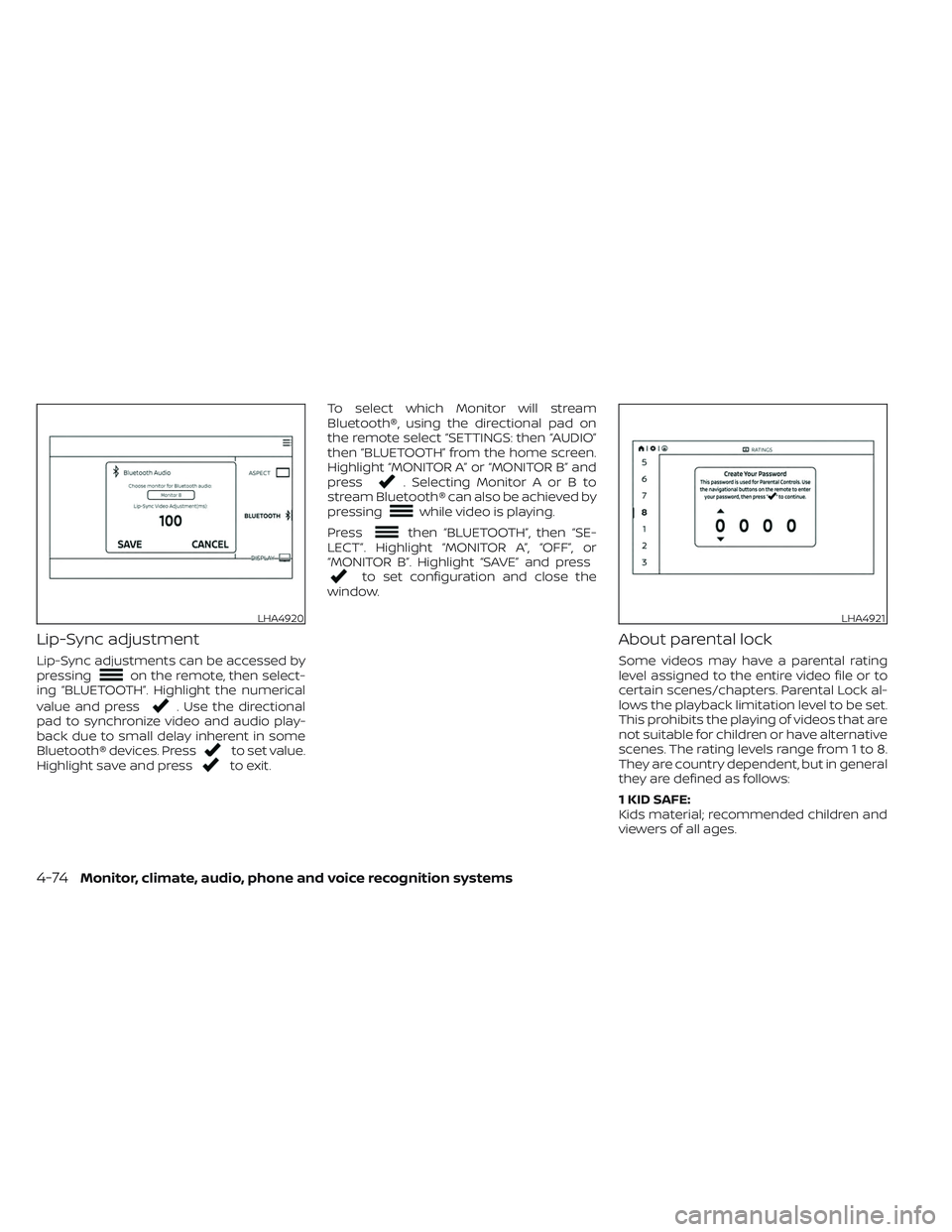
Lip-Sync adjustment
Lip-Sync adjustments can be accessed by
pressingon the remote, then select-
ing “BLUETOOTH”. Highlight the numerical
value and press
. Use the directional
pad to synchronize video and audio play-
back due to small delay inherent in some
Bluetooth® devices. Press
to set value.
Highlight save and pressto exit. To select which Monitor will stream
Bluetooth®, using the directional pad on
the remote select “SETTINGS: then “AUDIO”
then “BLUETOOTH” from the home screen.
Highlight “MONITOR A” or “MONITOR B” and
press
. Selecting Monitor A or B to
stream Bluetooth® can also be achieved by
pressing
while video is playing.
Press
then “BLUETOOTH”, then “SE-
LECT”. Highlight “MONITOR A”, “OFF”, or
“MONITOR B”. Highlight “SAVE” and press
to set configuration and close the
window.
About parental lock
Some videos may have a parental rating
level assigned to the entire video file or to
certain scenes/chapters. Parental Lock al-
lows the playback limitation level to be set.
This prohibits the playing of videos that are
not suitable for children or have alternative
scenes. The rating levels range from 1 to 8.
They are country dependent, but in general
they are defined as follows:
1 KID SAFE:
Kids material; recommended children and
viewers of all ages.
LHA4920LHA4921
4-74Monitor, climate, audio, phone and voice recognition systems
Page 322 of 635
AAC
AAC is short for Advanced Audio Coding
and refers to an audio compression tech-
nology standard used with MPEG-2 and
MPEG-4. Several applications can be used
to encode AAC files, but file formats and
extensions differ depending on the appli-
cation which is used to encode.
FLAC
Copyright © 2000-2009 Josh Coalson
Copyright © 2011-2013 Xiph.Org Foundation
Redistribution and use in source and bi-
nary forms, with or without modification,
are permitted provided that the following
conditions are met:
Redistributions of source code must retain
the above copyright notice, this list of con-
ditions and the following disclaimer.
Redistributions in binary form must repro-
duce the above copyright notice, this list of
conditions and the following disclaimer in
the documentation and/or other materi-
als provided with the distribution.
Neither the name of the Xiph.org Founda-
tion nor the names of its contributors may
be used to endorse or promote products
derived from this sof tware without specific
prior written permission.THIS SOFTWARE IS PROVIDED BY THE COPY-
RIGHT HOLDERS AND CONTRIBUTORS “AS
IS” AND ANY EXPRESS OR IMPLIED WARRAN-
TIES, INCLUDING, BUT NOT LIMITED TO, THE
IMPLIED WARRANTIES OF MERCHANTABIL-
ITY AND FITNESS FOR A PARTICULAR PUR-
POSE ARE DISCLAIMED. IN NO EVENT SHALL
THE FOUNDATION OR CONTRIBUTORS BE
LIABLE FOR ANY DIRECT, INDIRECT, INCIDEN-
TAL, SPECIAL, EXEMPLARY, OR CONSEQUEN-
TIAL DAMAGES (INCLUDING, BUT NOT LIM-
ITED TO, PROCUREMENT OF SUBSTITUTE
GOODS OR SERVICES; LOSS OF USE, DATA,
OR PROFITS; OR BUSINESS INTERRUPTION)
HOWEVER CAUSED AND ON ANY THEORY
OF LIABILITY, WHETHER IN CONTRACT,
STRICT LIABILITY, OR TORT (INCLUDING
NEGLIGENCE OR OTHERWISE) ARISING IN
ANY WAY OUT OF THE USE OF THIS SOFT-
WARE, EVEN IF ADVISED OF THE POSSIBILITY
OF SUCH DAMAGE.
MP3
Supply of this product only conveys a li-
cense for private, non-commercial use and
does not convey a license nor imply any
right to use this product in any commercial
(i.e. revenue generating) real time broad-
casting (terrestrial, satellite, cable and/or
any other media), broadcasting/streaming
via internet, intranets and/or other net-works or in other electronic content distri-
bution systems, such as pay-audio or
audio-on-demand applications. An inde-
pendent license for such use is required.
For details, please visit
http://www.mp3licensing.com.
WMA/WMV
Windows Media is either a registered trade-
mark or trademark of Microsof t
Corporation in the United States and/or
other countries. This product includes
technology owned by Microsof t
Corporation and cannot be used or distrib-
uted without a license from Microsof t Li-
censing, Inc.
SD/SDHC/SDXC
SD, SDHC and SDXC Logos are trademarks
or registered trademarks of SD-3C LLC in
the United States, other countries or both.
4-80Monitor, climate, audio, phone and voice recognition systems
Page 330 of 635
WARNING
• Do not leave children or adults who
would normally require the assis-
tance of others alone in your vehicle.
Pets should also not be lef t alone.
They could accidentally injure them-
selves or others through inadvertent
operation of the vehicle. Also, on hot,
sunny days, temperatures in a closed
vehicle could quickly become high
enough to cause severe or possibly
fatal injuries to people or animals.
• Properly secure all cargo with ropes
or straps to help prevent it from slid-
ing or shif ting. Do not place cargo
higher than the seatbacks. In a sud-
den stop or collision, unsecured
cargo could cause personal injury.
EXHAUST GAS (carbon monoxide)
WARNING
• Do not breathe exhaust gases; they
contain colorless and odorless car-
bon monoxide. Carbon monoxide is
dangerous. It can cause uncon-
sciousness or death. •
If you suspect that exhaust fumes
are entering the vehicle, drive with all
windows fully open, and have the ve-
hicle inspected immediately.
• Do not run the engine in closed
spaces such as a garage.
• Do not park the vehicle with the en-
gine running for any extended length
of time.
• Keep the rear vent windows, lif t-
gates, doors and trunk lids (if so
equipped) closed while driving, oth-
erwise exhaust gases could be
drawn into the passenger compart-
ment. If you must drive with one of
these open, follow these precau-
tions:
1. Open all the windows.
2. Set the
air recirculation but-
ton to off and the fan control dial
to high to circulate the air.
• If electrical wiring or other cable con-
nections must pass to a trailer
through the seal on the lif tgate or the
body, follow the manufacturer's rec-
ommendation to prevent carbon
monoxide entry into the vehicle. •
The exhaust system and body should
be inspected by a qualified mechanic
whenever:
a. The vehicle is raised for service.
b. You suspect that exhaust fumes are entering into the passenger
compartment.
c. You notice a change in the sound of the exhaust system.
d. You have had an accident involv- ing damage to the exhaust sys-
tem, underbody, or rear of the
vehicle.
NOTE:
If the vehicle engine experiences exces-
sive fuel consumption or produces ex-
cessive smoke it is recommended that
you visit a NISSAN dealer for service.
THREE-WAY CATALYST (if so
equipped)
The three-way catalyst is an emission con-
trol device installed in the exhaust system.
Exhaust gases in the three-way catalyst
are burned at high temperatures to help
reduce pollutants.
PRECAUTIONS WHEN STARTING AND
DRIVING
5-4Starting and driving